install.packages("arbor",
                 repos = c("https://r-lidar.r-universe.dev",
"https://cloud.r-project.org"))15 Lidar for Forestry (arbor)
15.1 Topics Covered
- Prepare a mobile laser scanning (MLS) point cloud for processing
- Segment ground, wood, and foliage points
- Detect trees and segment points to individual trees
- Generate quantitative structure models (QSMs) for individual trees
- Calculate per-tree metrics: diameter at breast height (DBH), canopy height, and canopy base height
- Represent the point cloud as a voxel grid
15.2 Introduction
In the prior chapter, we explored the lidR package for processing lidar data in R. lidR is a general-purpose toolkit that was originally designed with airborne laser scanning (ALS) data in mind. In this chapter, we explore arbor, a newer package from the same group of developers (r-lidar) that is designed specifically for processing close-range forest point clouds collected with mobile laser scanning (MLS) or terrestrial laser scanning (TLS). This chapter is meant to serve as just a brief introduction to this topic. For a full treatment on this package, we recommend the text Arbor: The Complete R Tutorial Book, which is freely available. Since this chapter is just a brief introduction, we do not provide any questions or exercises at the end of the chapter.
Close-range point clouds are very different from ALS data. Instead of capturing the forest from above at tens of points per square meter, MLS and TLS systems scan the forest from below and from the side at thousands of points per square meter.
arbor is built on a C++ library with an R interface. It implements a complete workflow from a raw point cloud to individual tree models. Key steps include:
- Decimation: homogenizing point spacing to reduce data volume
- Ground segmentation: classifying ground points and calculating height above ground
- Semantic segmentation: separating wood (stems and branches) from foliage
- Instance segmentation: detecting individual trees and assigning each point to a tree
- Quantitative structure modeling: reconstructing each tree as a set of connected cylinders, from which DBH, height, and volume can be estimated
The algorithms are rule-based as opposed to relying on machine learning. As a result, no training data are needed and, according to the package authors, the default parameters should work for most high-quality MLS and TLS datasets. Detailed documentation is available in the arbor book.
arbor is currently available from r-universe as opposed to CRAN. It can be installed using the code below. On Windows, if a pre-compiled binary is not available for your version of R, the package will be compiled from source, which requires Rtools. The developers recommend a machine with at least 32 GB of RAM and 6 cores. The example in this chapter uses a small plot and a decimated point cloud, so it can be run on a machine with 16 GB of RAM.
We use lidR to read, manipulate, and visualize point clouds; arbor for the tree-level processing; tidyverse for data manipulation; ggplot2 and sf for 2D graphs and maps; and terra for raster data. Three-dimensional graphics are generated with rgl, which lidR and arbor use internally. When you run the code in this chapter, each 3D plot opens in an interactive rgl window that you can rotate, zoom, and pan. In the rendered chapter, the 3D graphics are static snapshots of these windows.
rgl scenes can also be embedded in a Quarto document as interactive WebGL widgets using rglwidget(). However, each widget stores all of the points or mesh triangles in the scene, so widgets of dense point clouds and, especially, QSMs quickly become very large (more than 100 MB for the QSMs in this chapter). For this reason, we use static snapshots here.
15.3 Read and Prepare the Data
The example dataset is an MLS point cloud collected in a forest in West Virginia, USA. The point cloud covers an area of approximately 42 m by 32 m and contains roughly 5 million points. The data are in a local coordinate system with units of meters.
The point cloud is read using readTLS() from lidR, which flags the data as terrestrial as opposed to airborne. We only load the X,Y,Z coordinates since arbor does not require any other attributes. We also use a LASlib filter to randomly retain 50% of the points at read time, which reduces memory use. The authors of arbor note that tree measurements often remain reliable even with heavily decimated point clouds.
Next, hybrid_homogeneization() is used to further decimate the data. Close-range point clouds have very uneven point density: surfaces close to the scanner are sampled much more densely than surfaces farther away, such as the upper canopy. This function homogenizes point spacing using voxel-based decimation (with a default 2 cm resolution) while re-injecting some of the removed points so that local density variation is not fully lost. Most of the redundant points near the ground and along the scan path are removed while the sparsely sampled upper canopy is mostly retained.
fldPth <- "gslrData/chpt15/data/"

las <- readTLS(str_glue("{fldPth}wvForestTest.laz"),
               select = "xyz",
               filter = "-keep_random_fraction 0.5")
las <- hybrid_homogeneization(las)
arbor and lidR print detailed progress information to the console as each step runs. In this chapter, we hide this output in the rendered document using the results: hide chunk option and print the results in separate code chunks.
lasclass : LAS (v1.4 format 6)
memory : 43.3 Mb
extent : -18.18854, 23.99006, -15.23706, 17.17154 (xmin, xmax, ymin, ymax)
coord. ref. :
area : 1341 m²
points : 1.89 million points
type : terrestrial
density : 1409.54 points/m²We also define the processing parameters. arbor_parameters_default is a nested list holding all of the internal parameters used by the arbor algorithms. The developers intentionally discourage changing most of these parameters. Here, we only change cut_above_ground, which sets the height above ground below which points are ignored by most of the subsequent processing steps. This removes most low vegetation and debris, which reduces complexity and processing time.
params <- arbor_parameters_default
params$global$cut_above_ground <- 0.25
Even after decimation, the point cloud contains close to 2 million points. Embedding all of these points in a web page would result in a very large file. So, for visualization purposes only, we create a lighter version of each point cloud using decimate_points() with the random() algorithm, which retains a specified number of points per square meter. We wrap this in a small helper function, which we use throughout the chapter. All of the processing is performed on the full point cloud.
thin <- function(x, density = 100) {
  set.seed(42)
  decimate_points(x, random(density))
}
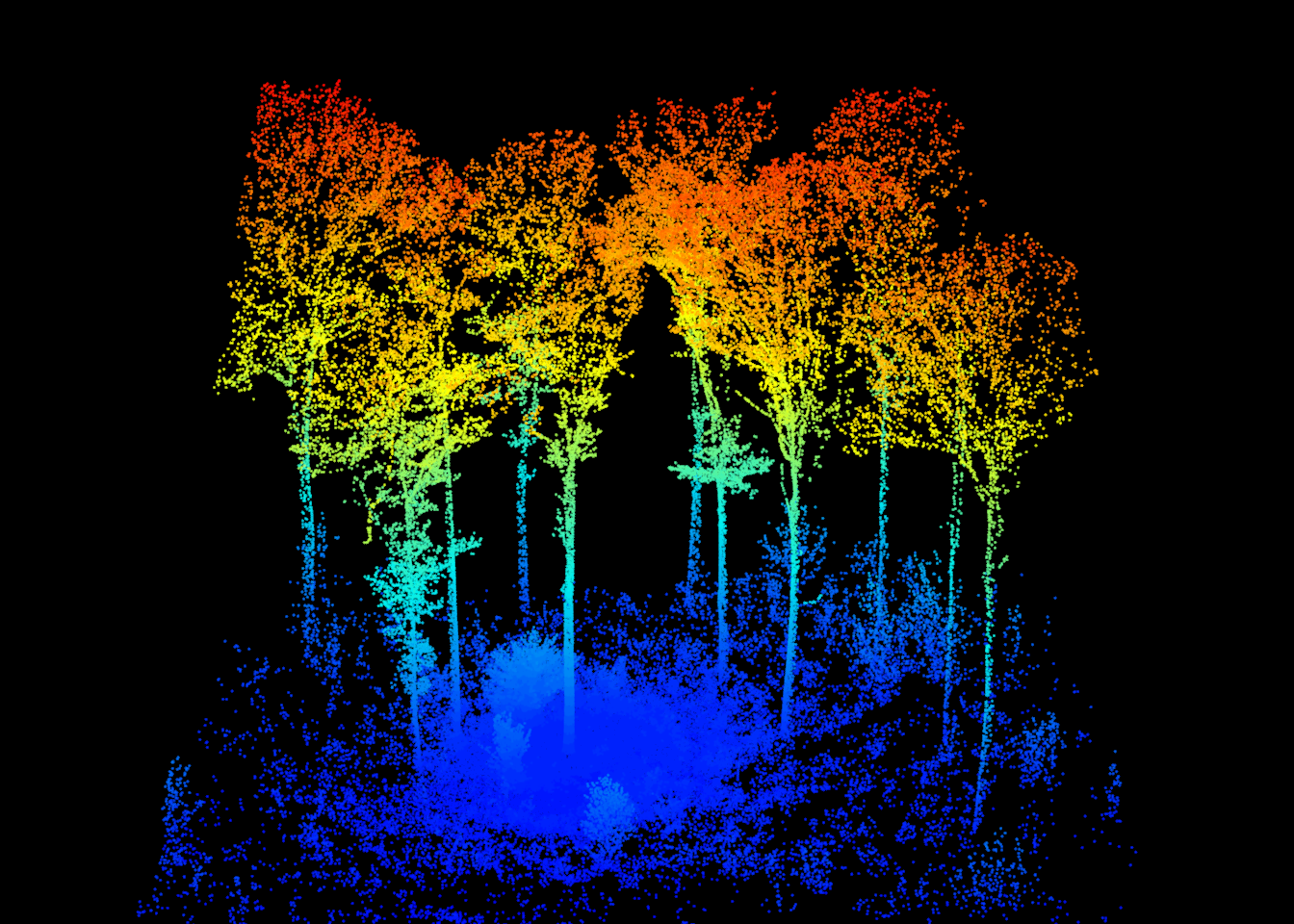
The point cloud is displayed below with points colored by elevation.
15.4 Ground Segmentation
The first processing step is to classify ground points using segment_ground(). This function assigns a value of 2 to ground points in the “Classification” attribute and adds a new “hag” (height above ground) attribute. Unlike with ALS data, we do not normalize the point cloud. Since the original Z coordinates are needed to accurately reconstruct the tree geometry, height above ground is stored as a separate attribute instead.
las <- segment_ground(las, params)table(las$Classification)
      1       2
1855905   34285
Ground points make up only a small proportion of the point cloud since the forest floor is largely obscured by low vegetation. Below, we use filter_ground() from lidR to extract and plot only the ground points, colored by elevation.
plot(filter_ground(las), color = "Z", size = 2)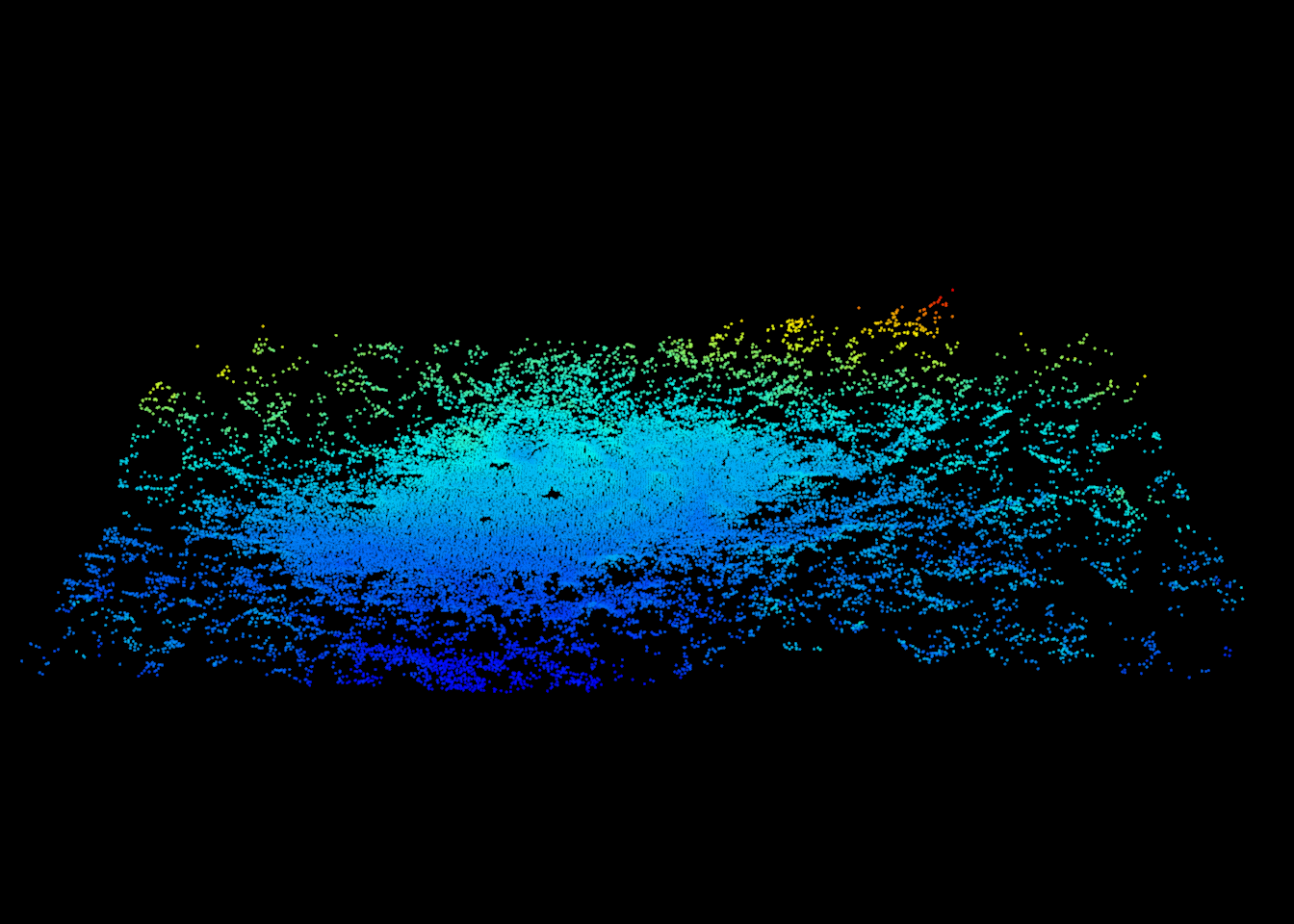
Since ground points have been classified, we can use rasterize_terrain() from lidR to generate a digital terrain model (DTM) using triangulation (tin()) and a 0.25 m cell size. The DTM is displayed below using terra.
dtm <- rasterize_terrain(las, res = 0.25, algorithm = tin())
plot(dtm, col = gray.colors(50), main = "DTM (m)")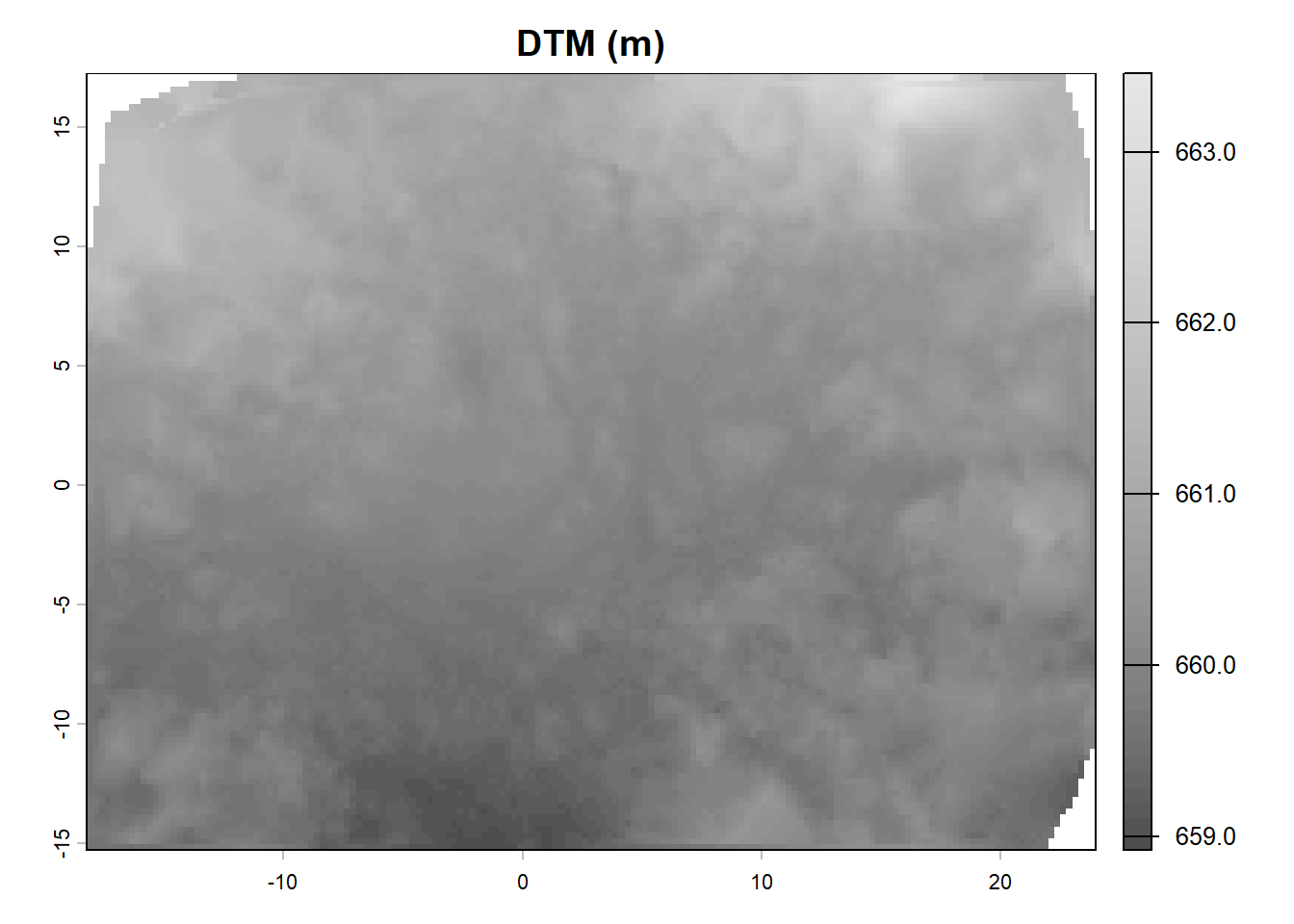
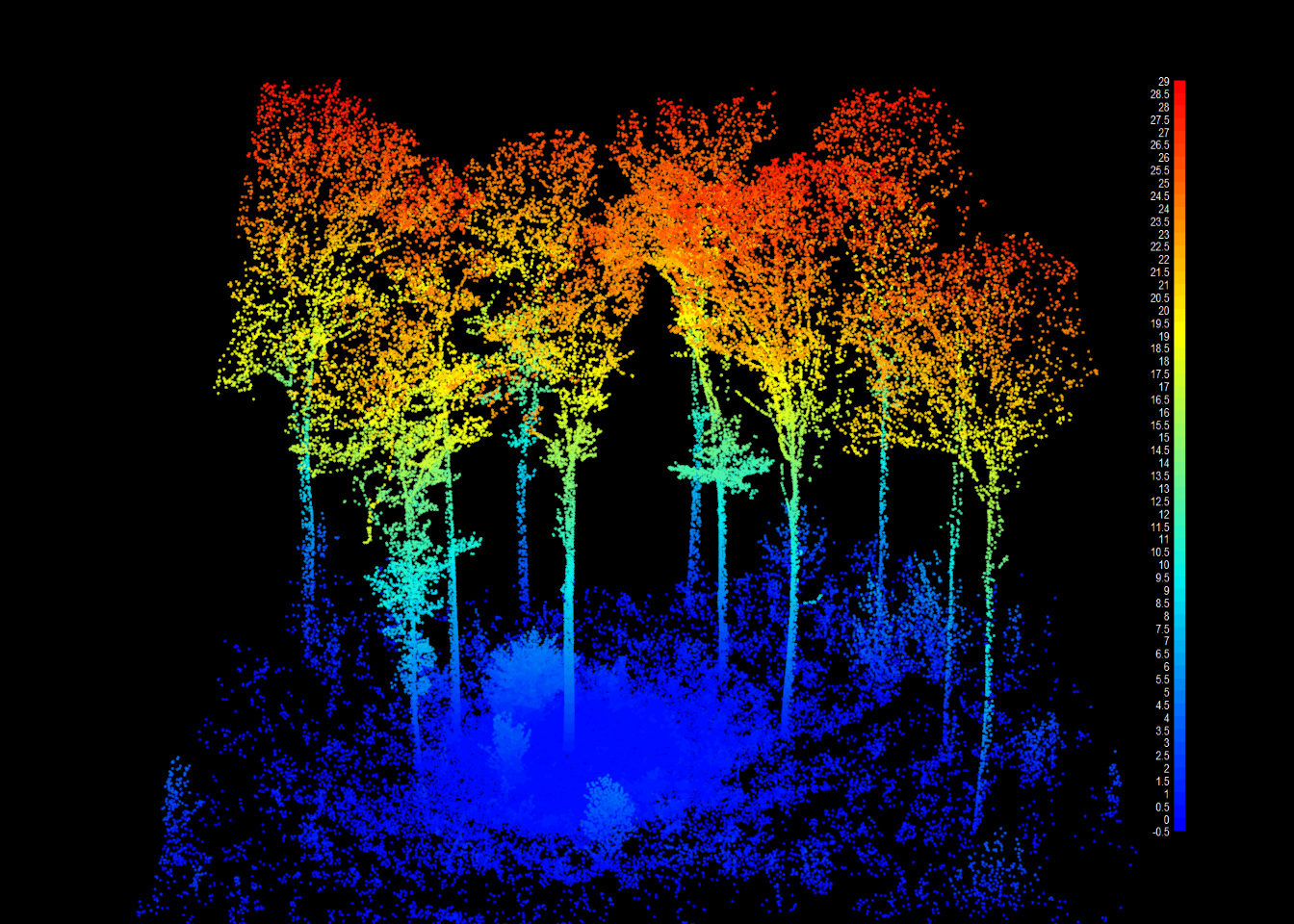
We can also visualize the height above ground of each point. Note that the trees in this plot are tall, close to 30 m in height.
15.5 Semantic Segmentation: Wood vs. Foliage
The next step is to separate wood points (stems and branches) from foliage points. This is completed in two steps.
First, wood_likelihood() estimates the likelihood that each point belongs to a woody structure. For each point, the function analyzes the shape of the local neighborhood of points using singular value decomposition (SVD). Stems and branches create locally elongated or planar (anisotropic) patterns of points while foliage creates more scattered, noisy (isotropic) patterns. The result is written to a new “pwood” attribute that ranges from 0 to 1.
las <- wood_likelihood(las, params)summary(las$pwood) Min. 1st Qu. Median Mean 3rd Qu. Max.
0.0356 0.6734 0.8208 0.7849 0.9333 0.9998 plot_likelihood() displays the result. Points with a high wood likelihood are shown in red while those with a low likelihood are shown in blue. Stems are already apparent. However, the likelihood alone is noisy: some foliage clusters have high likelihood values, and some small branches have low values.
plot_likelihood(thin(las))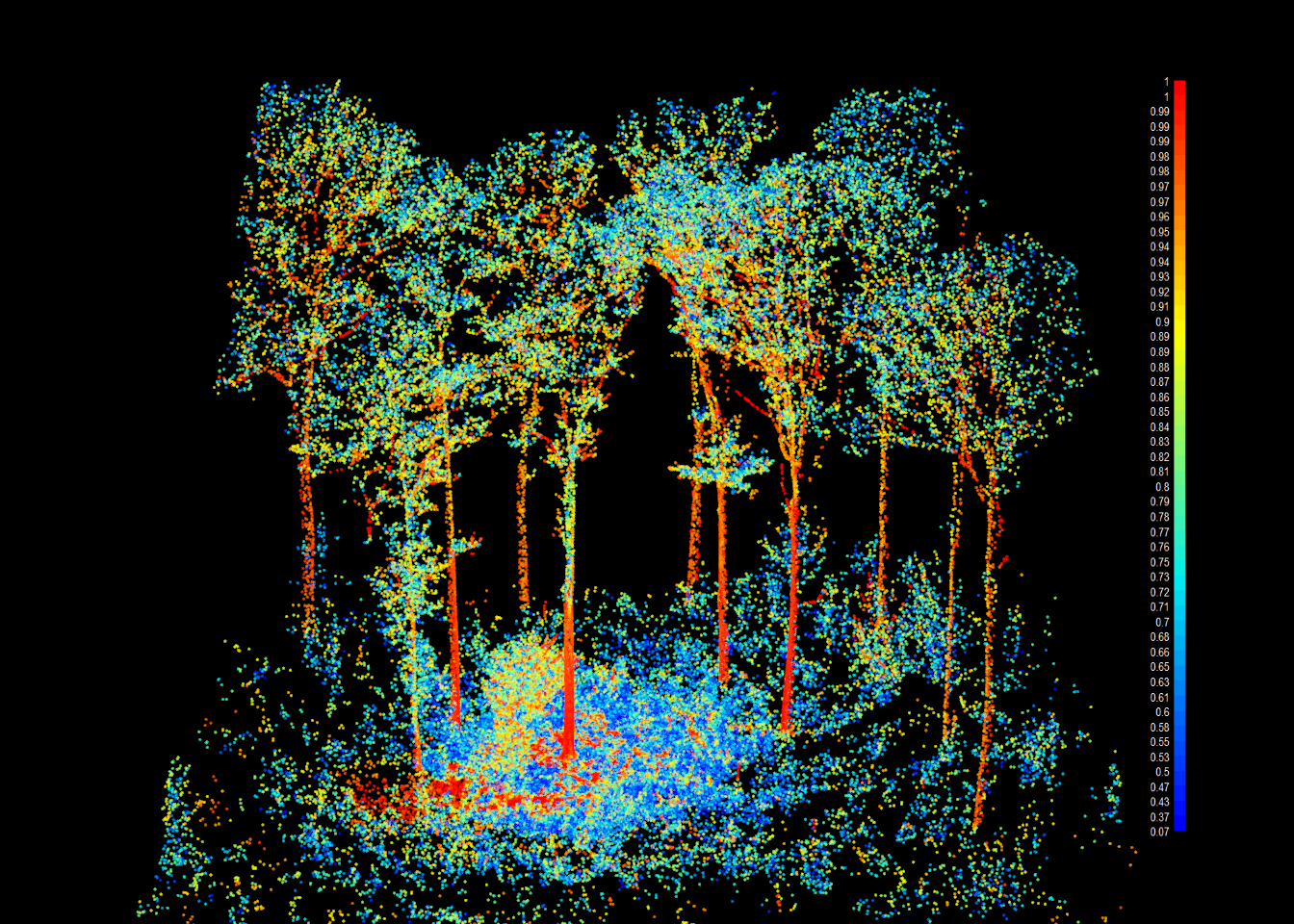
Second, segment_semantic() produces the final wood/foliage classification. This function relies on a “pathfinder” algorithm: the point cloud is converted to a graph, and the least-cost path from each point to the ground is calculated. The cost of moving between points increases with distance and penalizes non-vertical movement. Since trees transport water from the roots to the leaves, the paths from points in the canopy tend to converge along the branches and the stem. Points near frequently used paths are therefore likely to be wood. The path information is combined with the wood likelihood and several cleaning steps to produce the final classification.
The function adds a “foliage” attribute where 0 indicates wood and values of 1 or 2 indicate foliage (or, more generally, non-wood points, including small twigs and understory vegetation). It also adds a “passage” attribute that stores the number of paths that passed through each point.
las <- segment_semantic(las, params)table(las$foliage)
      0       1       2
 627019 1190959   72212
The passage counts can be visualized using plot_passage(). Notice how the paths are concentrated along the stems and main branches.
plot_passage(thin(las))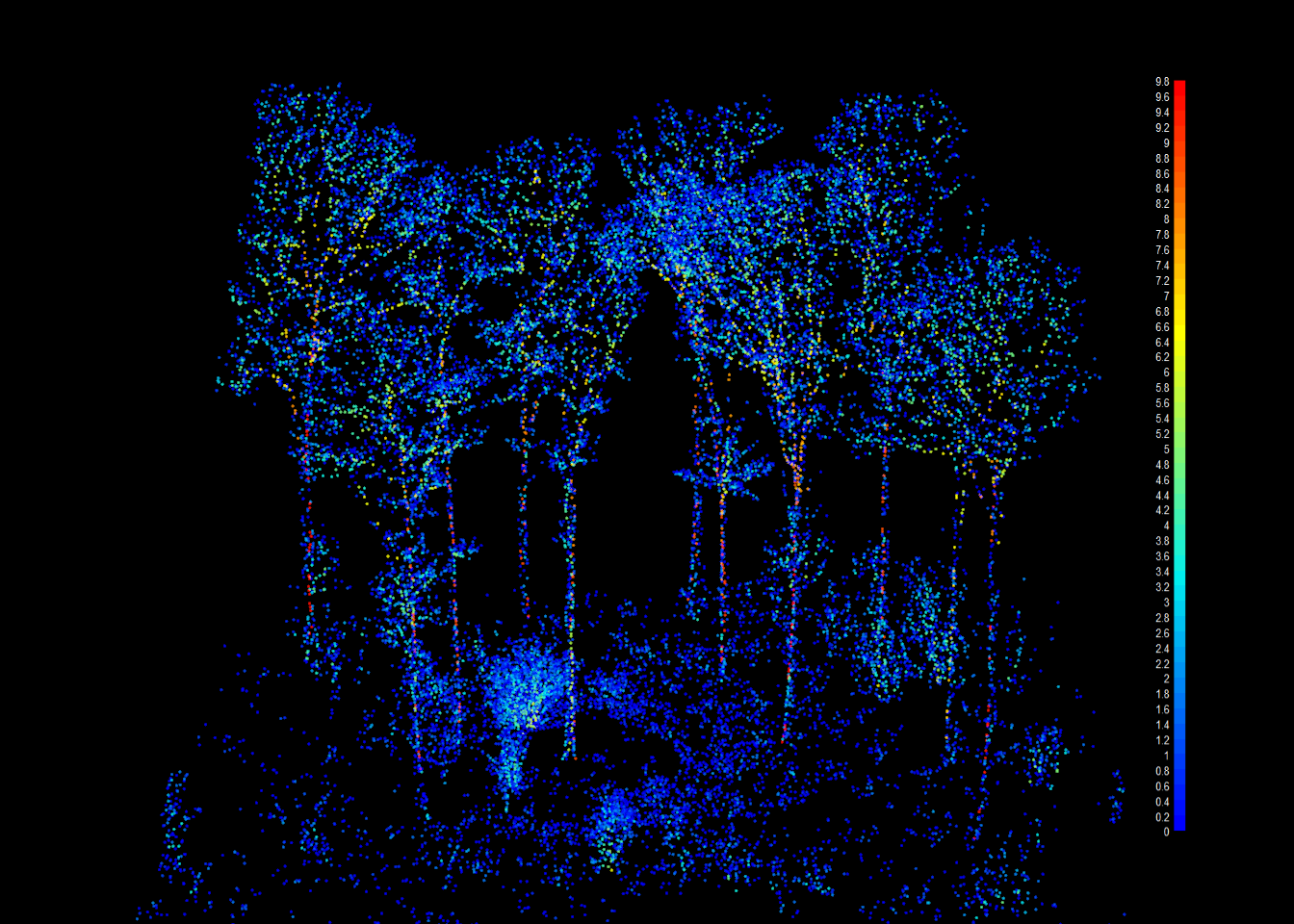
The final wood/foliage classification is displayed using plot_semantic().
plot_semantic(thin(las))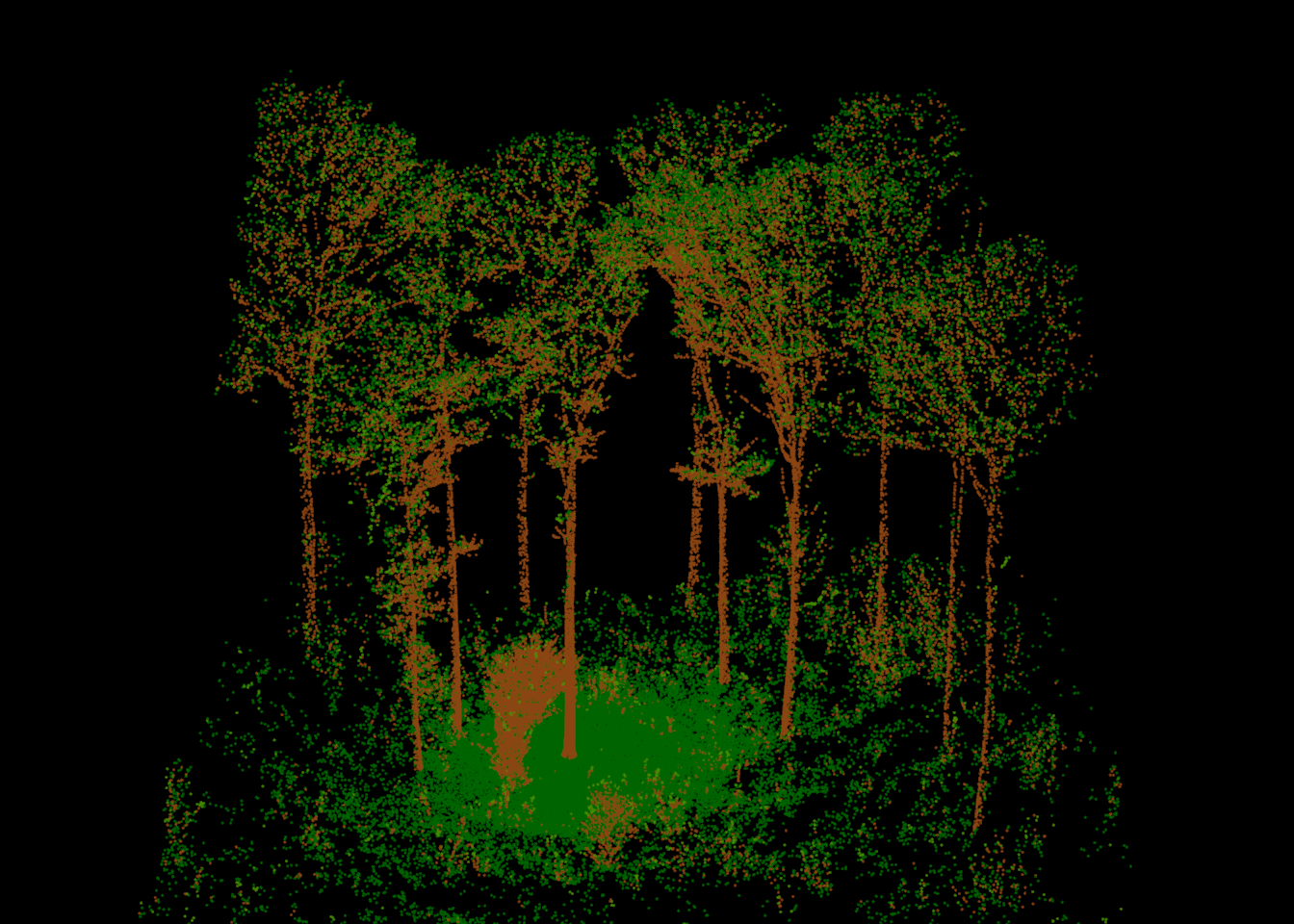
The authors of arbor note that perfect point-wise classification is not the goal of this step. Instead, the goal is to provide information that allows for accurate tree segmentation and structure models. The later processing steps are designed to be robust to some misclassification.
15.6 Find Trees
Before points can be assigned to individual trees, the trees must be located. find_seeds() uses the passages generated during the semantic segmentation to detect candidate trees near the base of their stems. Passages that belong to the same tree are merged using a connected component analysis of the wood points. The result is a small point cloud of seed points. Each candidate tree is represented by a cluster of seed points that share the same “treeID”.
seeds <- find_seeds(las, params)seedsclass : LAS (v1.4 format 6)
memory : 350.6 Kb
extent : -18.08644, 23.77096, -15.08756, 17.00124 (xmin, xmax, ymin, ymax)
coord. ref. :
area : 420 m²
points : 6.9 thousand points
type : airborne
density : 16.42 points/m²[1] 1119Thousands of candidate trees are detected since every sapling and shrub is located, not only the overstory trees. Most of these will be flagged as understory in a later step. To simplify the visualization, we summarize the seeds to a single location per candidate tree: the mean X and Y coordinates and the minimum Z coordinate of its seed points.
Below, the seed locations are shown as red points on top of the point cloud. The plot functions from lidR and arbor return the offset used to shift the coordinates for display. We use this offset to add the seed locations to the same scene using points3d() from rgl.
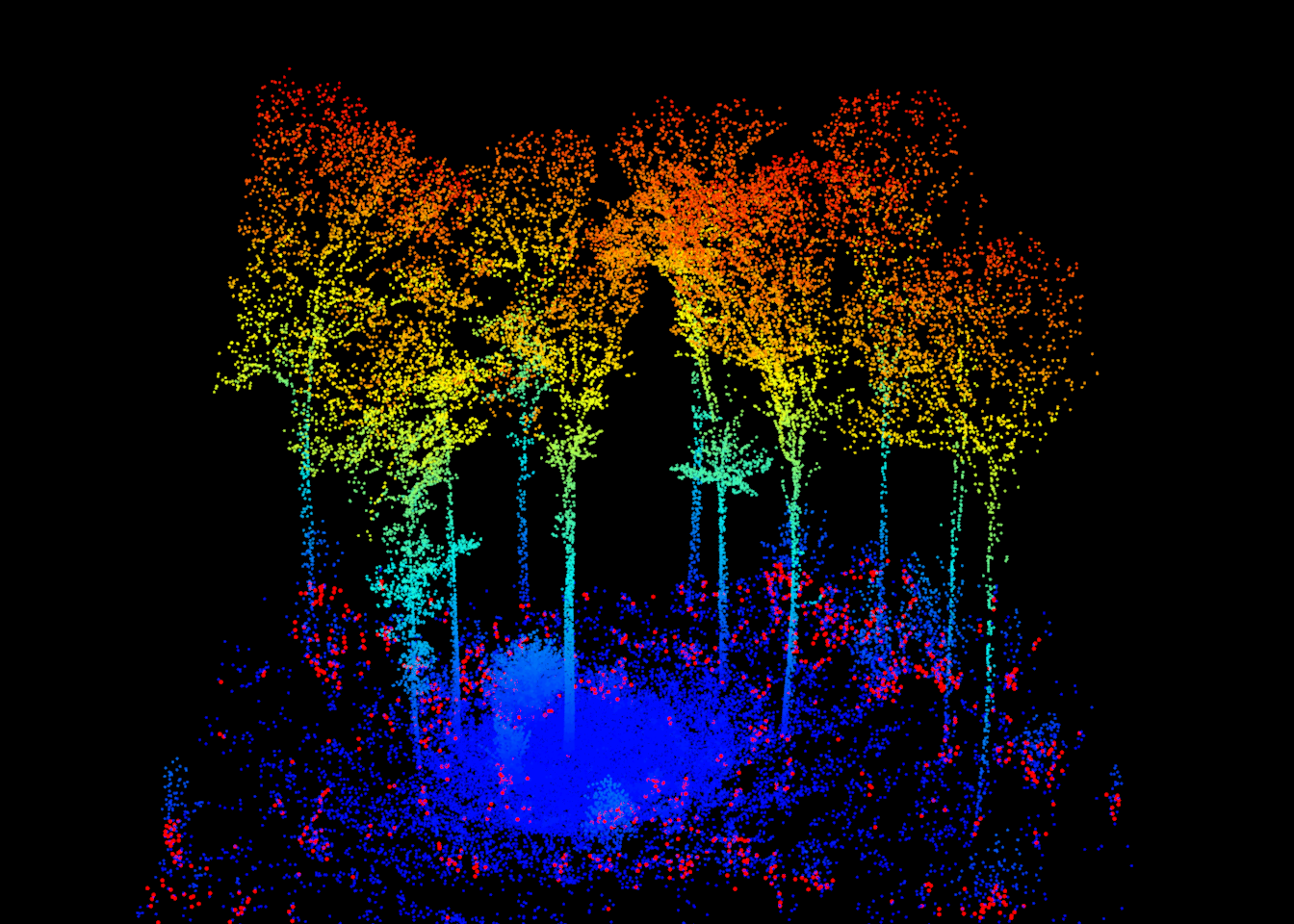
We can also map the seed locations in 2D on top of the DTM.
plot(dtm, col = gray.colors(50), main = "Tree seeds")
points(seed_loc$X, seed_loc$Y, pch = 20, col = "red", cex = 0.5)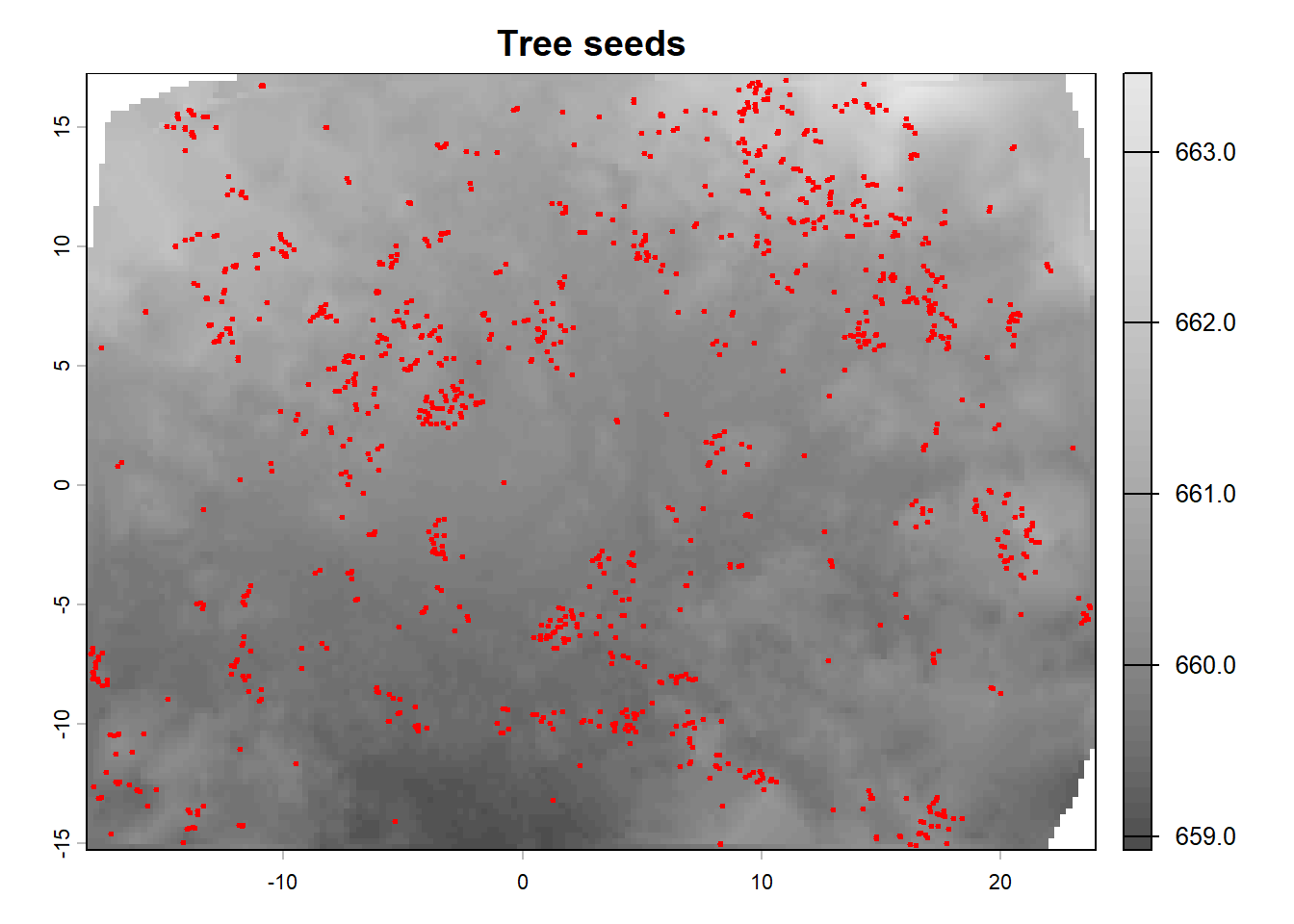
15.7 Segment Points to Trees
segment_instance() assigns each point to a tree, a process known as instance segmentation. Similar to the semantic segmentation, the least-cost path is calculated from each point to the seeds, and the point is assigned to the seed it reaches. A strong penalty is added for paths that move from wood to foliage, which prevents paths from “jumping” between the crowns of neighboring trees. The result is stored in the “treeID” attribute. Points with a “treeID” of 0 were not assigned to a tree.
arbor also automatically detects and merges over-segmented trees: a single tree that has been split into multiple instances. This commonly occurs with trees that have buttressed or forked bases.
las <- segment_instance(las, seeds, params)Next, two cleaning steps are applied. Instead of removing points, both functions flag points using the “UserData” attribute, which makes the process reversible.
-
flag_small_trees()flags trees shorter thanmax_height, here 2 m. These are generally shrubs and saplings. They receive a value ofARBORUNDERSTORY(2). -
flag_buffer()flags trees at the edge of the dataset. Since the point cloud ends abruptly at the plot boundary, trees near the boundary are incomplete. Also, the branches of trees whose stems fall outside the plot cannot be connected to their stem, so they may be incorrectly assigned to a neighboring tree. The negative buffer (-2 m) defines a zone inside of the plot boundary, and trees whose seeds fall in this zone receive a value ofARBORBUFFER(3). For larger plots, the developers suggest a buffer equal to the largest expected crown radius. Here, we use a small buffer because the example plot is small.
Valid tree points are assigned ARBORTREE (0), while points near the ground that were excluded from processing are assigned ARBORLOW (1).
las <- flag_small_trees(las, max_height = 2)
las <- flag_buffer(las, seeds, -2)

c(ARBORTREE = ARBORTREE, ARBORLOW = ARBORLOW,
  ARBORUNDERSTORY = ARBORUNDERSTORY, ARBORBUFFER = ARBORBUFFER)
ARBORTREE ARBORLOW ARBORUNDERSTORY ARBORBUFFER
0 1 2 3 table(las$UserData)
     0      1      2      3
907169 677976 278298  26747
The flags are visualized below: valid trees are shown in green, low points in grey, understory trees in orange, and buffer trees in purple.
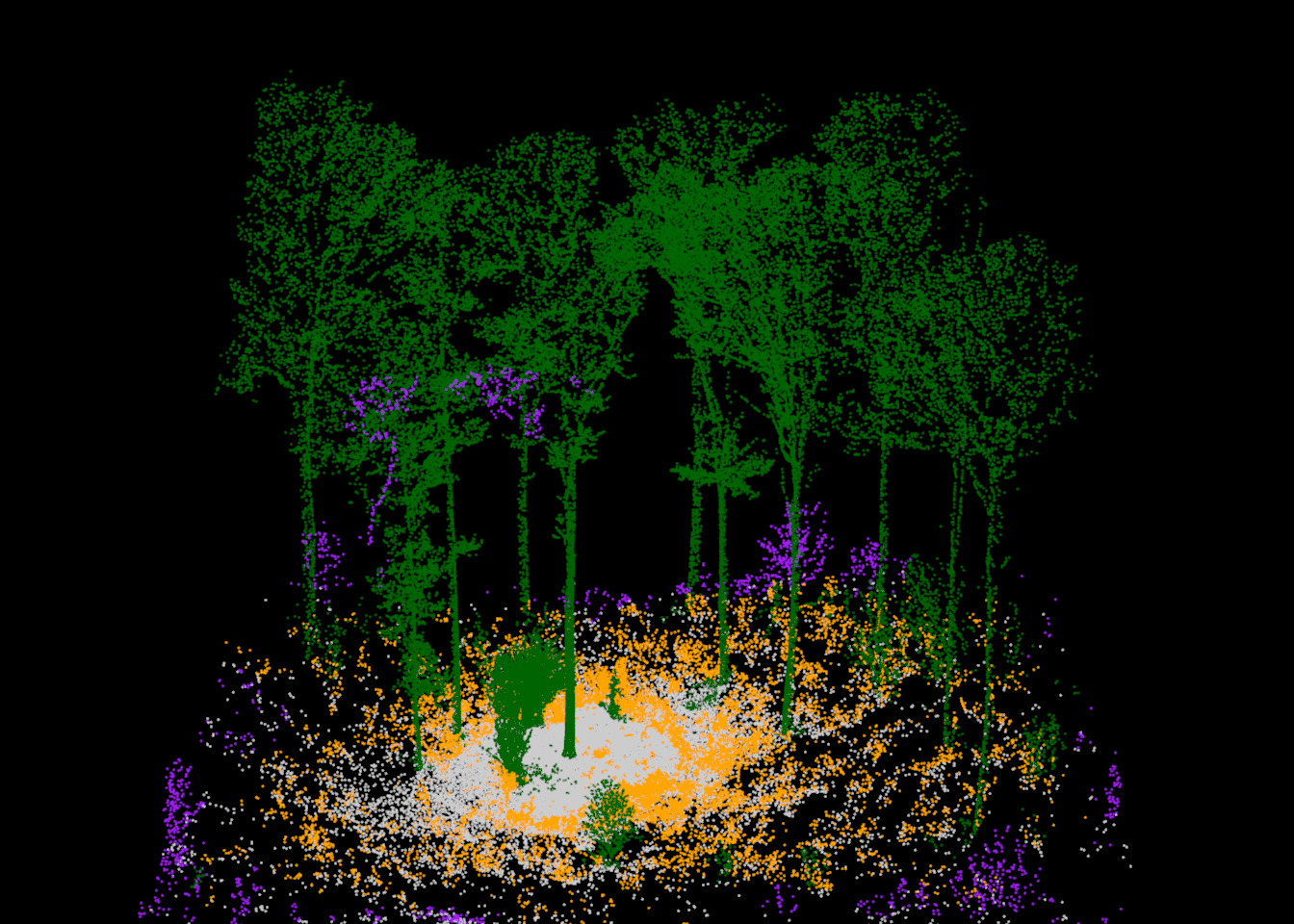
The instance segmentation is displayed with plot_instance(), which uses a different color for each tree. We can also combine the instance and semantic segmentation results in a single view using colorize_trees(). This function adds red, green, and blue (RGB) attributes to the point cloud, with a unique color for each tree, and darkens the foliage points so that the wood of each tree stands out. The point cloud is then plotted using the RGB attributes. Adding RGB colors is also useful when exporting segmented point clouds for viewing in other software, such as CloudCompare.
plot_instance(thin(las))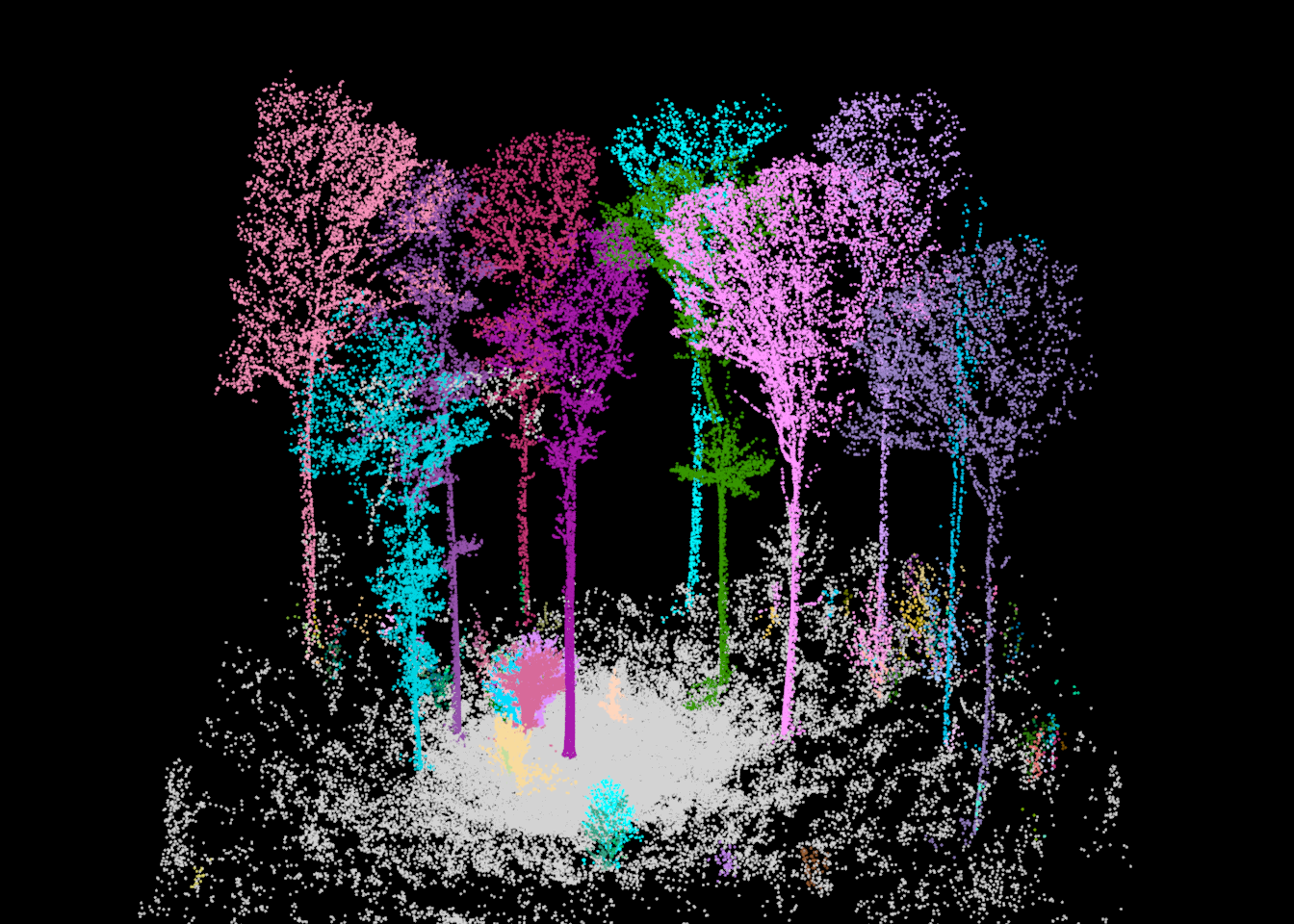
thin(las) |>
  colorize_trees(darken_foliage = TRUE) |>
  plot(color = "RGB")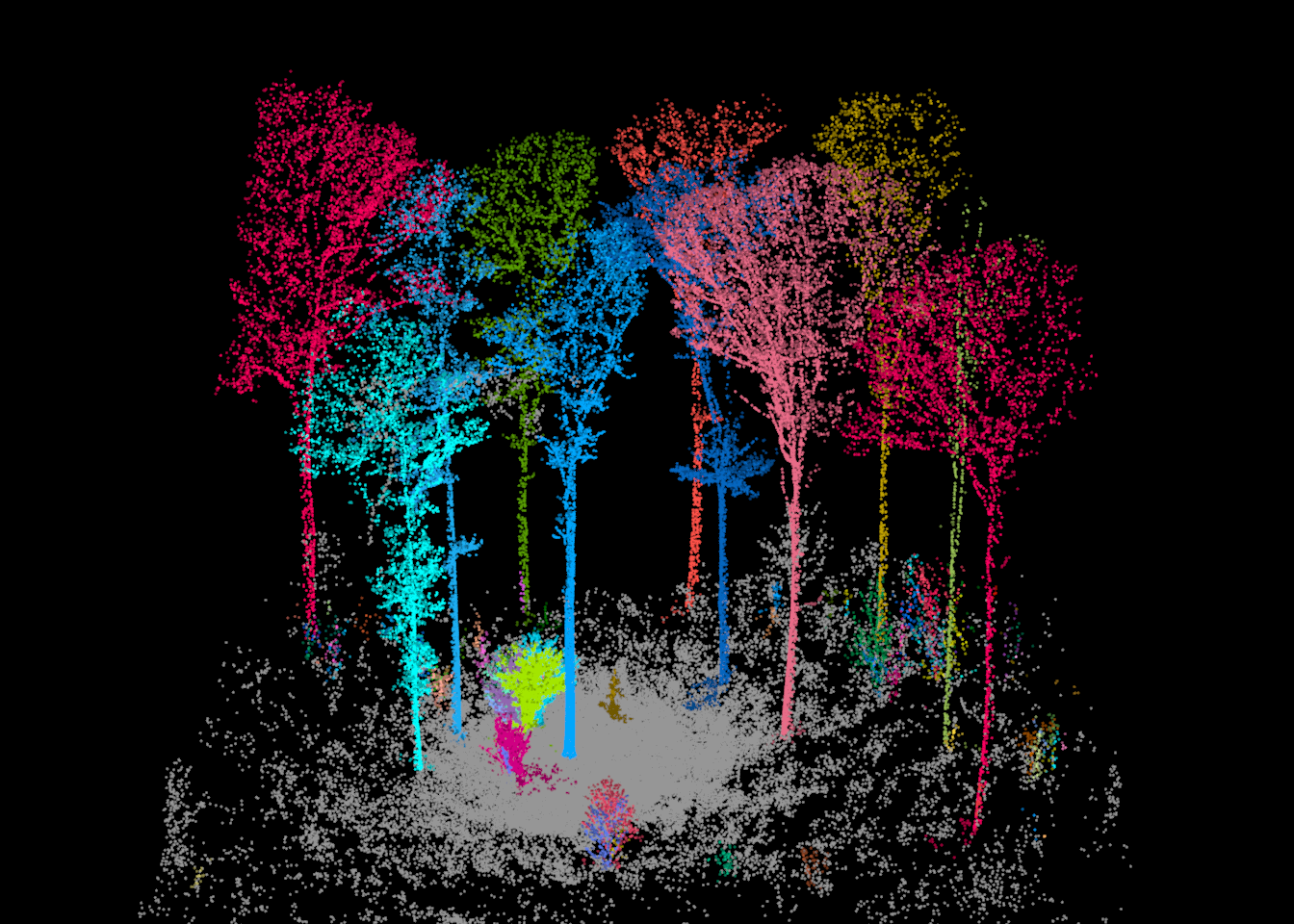
Individual trees can be extracted using filter_poi() from lidR. In the rest of the chapter, we use the largest tree in the plot as an example. Its stem is located near X = 9.5 m and Y = 1.6 m. Since tree IDs can change slightly each time the workflow is run (the points are randomly decimated when they are read), we find the ID of this tree using its location instead of hard coding it. Specifically, we select the points located within 0.5 m of this location and between 1 and 2 m above the ground, and we use the most common tree ID among these points.
[1] 2We then extract the points for this tree and plot its semantic segmentation. Since we are only plotting a single tree, we do not need to decimate the data for visualization.
tree <- filter_poi(las, treeID == focal_id)
tree
class : LAS (v1.4 format 6)
memory : 7.9 Mb
extent : 3.122659, 16.12116, -8.50766, 6.61184 (xmin, xmax, ymin, ymax)
coord. ref. :
area : 139.1 m²
points : 137.8 thousand points
type : terrestrial
density : 990.86 points/m²plot_semantic(tree)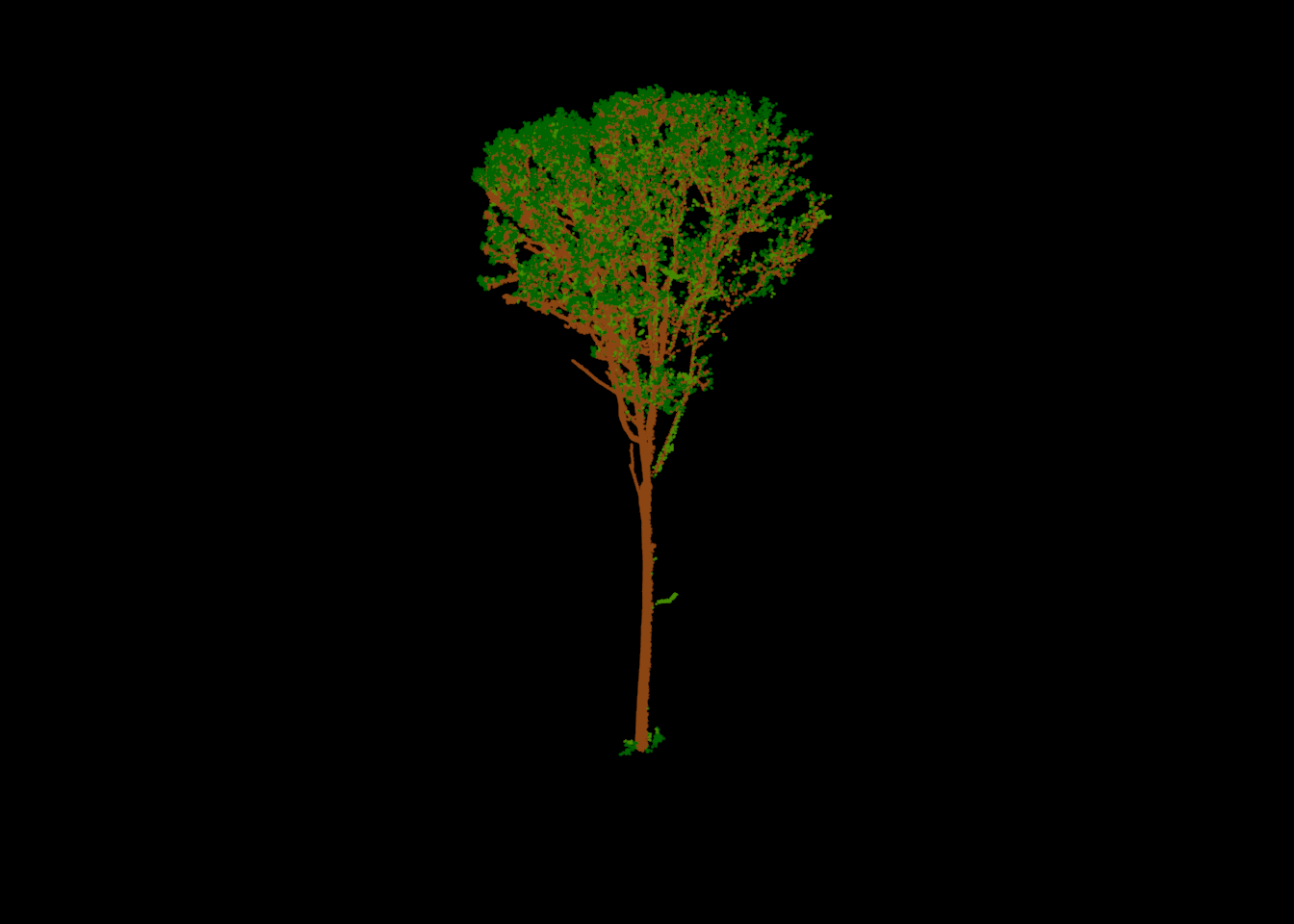
15.8 Quantitative Structure Models (QSMs)
A quantitative structure model (QSM) represents a tree as a set of connected cylinders that follow the stem and branches. Each cylinder has a start point, end point, and radius, and it is linked to its parent cylinder, which results in a hierarchical branching structure. From a QSM, we can derive the stem diameter at any height, total tree height, wood volume, branch lengths, branching angles, and many other metrics.
15.8.1 Single Tree
qsm() generates a QSM from a single tree point cloud. Printing the result provides a summary.
qsm_tree <- qsm(tree)qsm_treeClass : QSM
Cylinders : 10495
Diameter : 58.0 cm
Height : 28.1 m
Volume : 4.05 m³
Coord. ref. : A QSM is a data table where each row is a cylinder. The columns include the start and end coordinates, the cylinder and parent identifiers, the branch order (1 = stem, 2 = branch attached to the stem, and so on), and the radius. The “quality” column indicates how each cylinder was obtained, ranging from cylinders that were measured directly from the points to those that were interpolated or extrapolated where data were missing.
as.data.frame(qsm_tree) |> head() startX startY startZ endX endY endZ cyl_ID parent_ID
1 9.264787 1.502245 660.8438 9.346330 1.546957 660.9446 2 1
2 9.346330 1.546957 660.9446 9.399984 1.576552 661.0449 3 2
3 9.399984 1.576552 661.0449 9.441567 1.598684 661.1460 4 3
4 9.441567 1.598684 661.1460 9.468120 1.611464 661.2476 5 4
5 9.468120 1.611464 661.2476 9.486711 1.618301 661.3497 6 5
6 9.486711 1.618301 661.3497 9.498200 1.619906 661.4520 7 6
axis_ID branch_order dist_to_root subtree_length radius quality
1 1 1 0.5973229 29.10079 0.2628143 3
2 1 1 0.7344286 28.98529 0.2684253 3
3 1 1 0.8519863 28.87564 0.2696684 3
4 1 1 0.9635564 28.77177 0.2785349 3
5 1 1 1.0693306 28.66808 0.2907106 4
6 1 1 1.1733681 28.56521 0.2929275 4plot_qsm() displays the model. By default, the cylinders are colored by branch order.
plot_qsm(qsm_tree)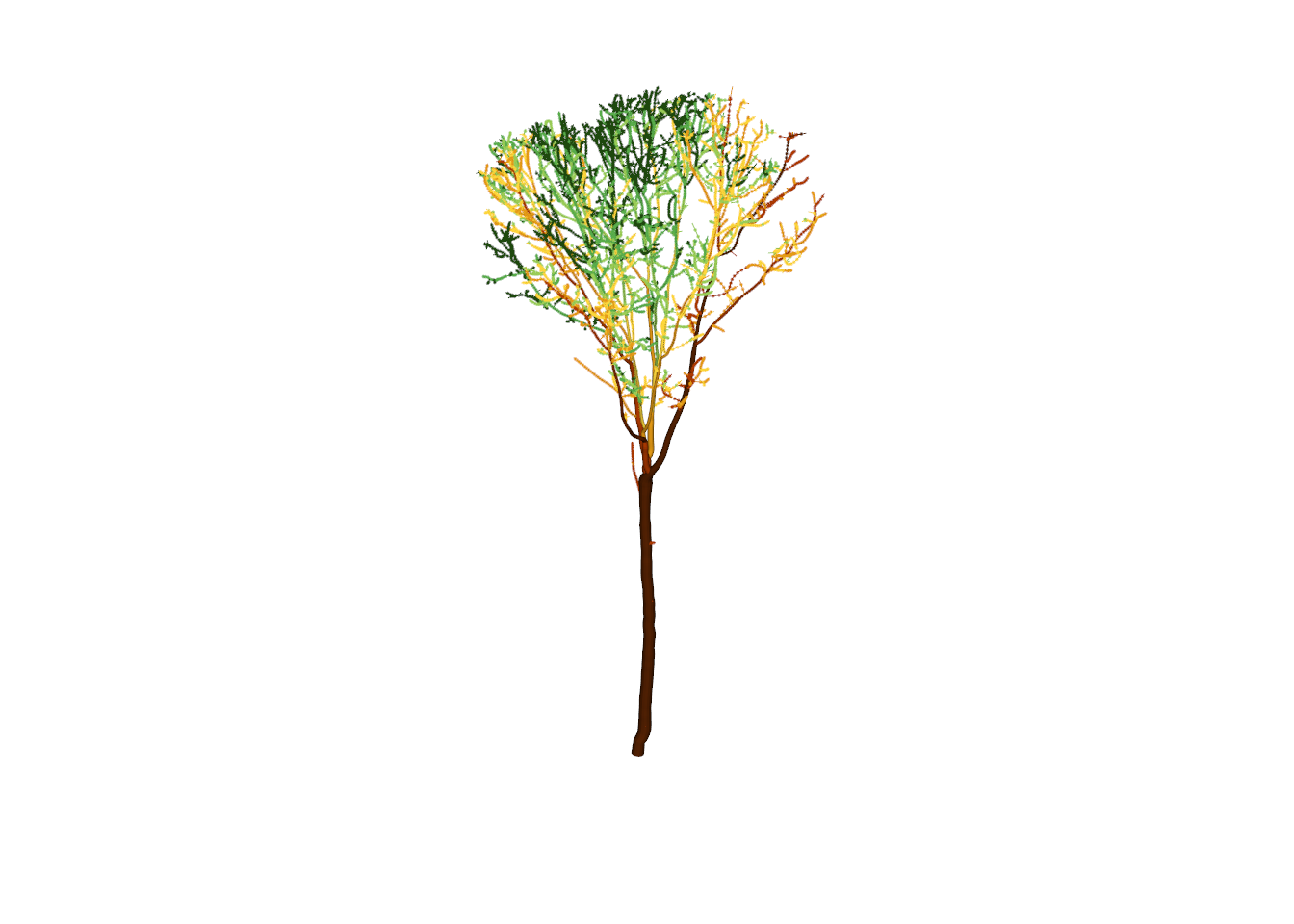
We can overlay the QSM on top of the semantic segmentation by passing the offset returned by plot_semantic() to the add argument. This is a useful way to check whether the model is consistent with the points.
x <- plot_semantic(tree)
plot_qsm(qsm_tree, add = x)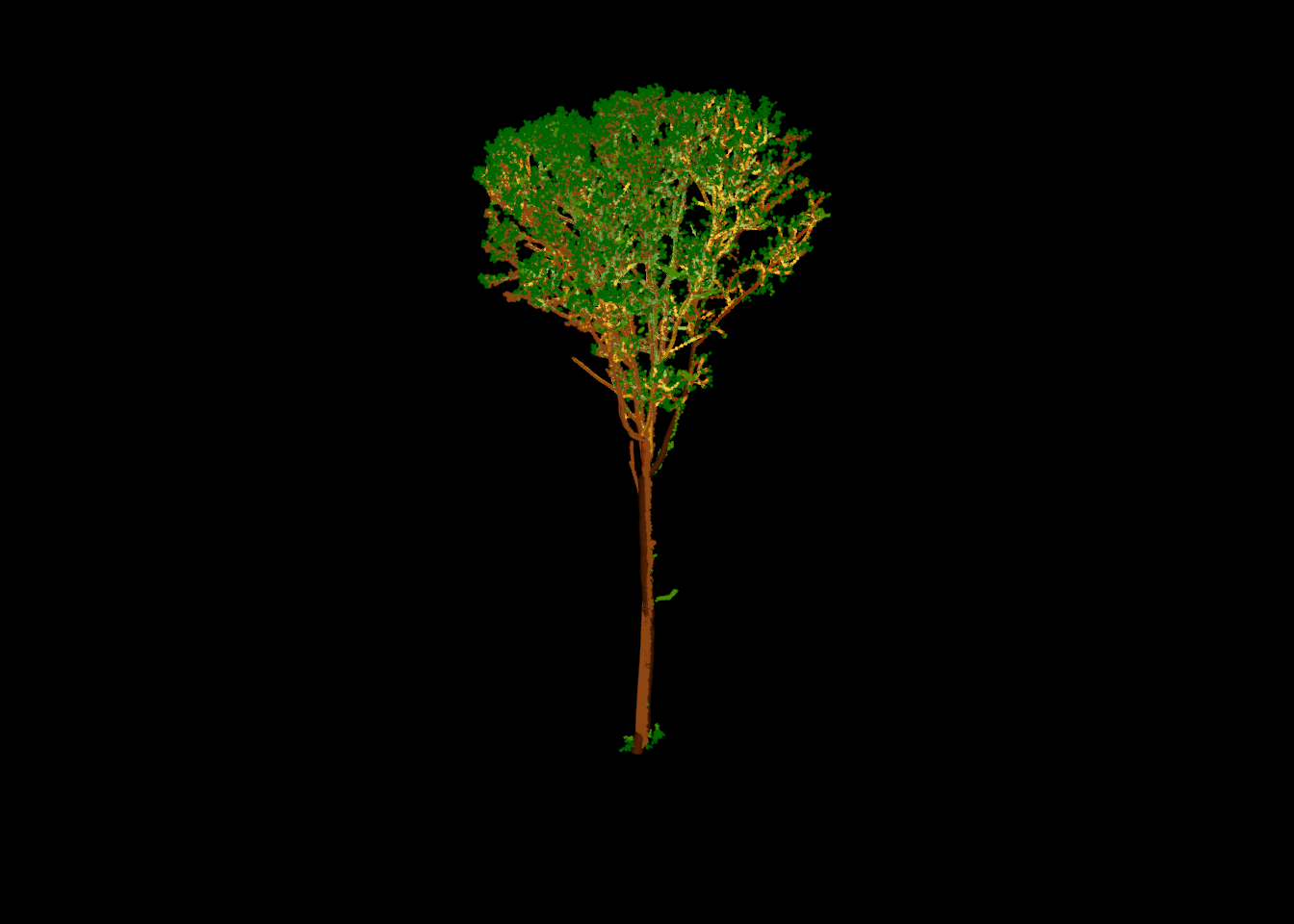
Coloring the cylinders by “quality” shows how each part of the model was obtained. Orange and red cylinders were fit directly to the points, and yellow cylinders were interpolated between measurements. Green cylinders were reconstructed: most branches in the crown are too small, or too sparsely sampled, to be measured, so their radii are estimated from the branching structure. Blue cylinders were extended (prolonged) to reach the ground where the base of the stem was not captured. For this tree, the stem was measured from near the ground up to the base of the crown.
plot(qsm_tree, color = "quality")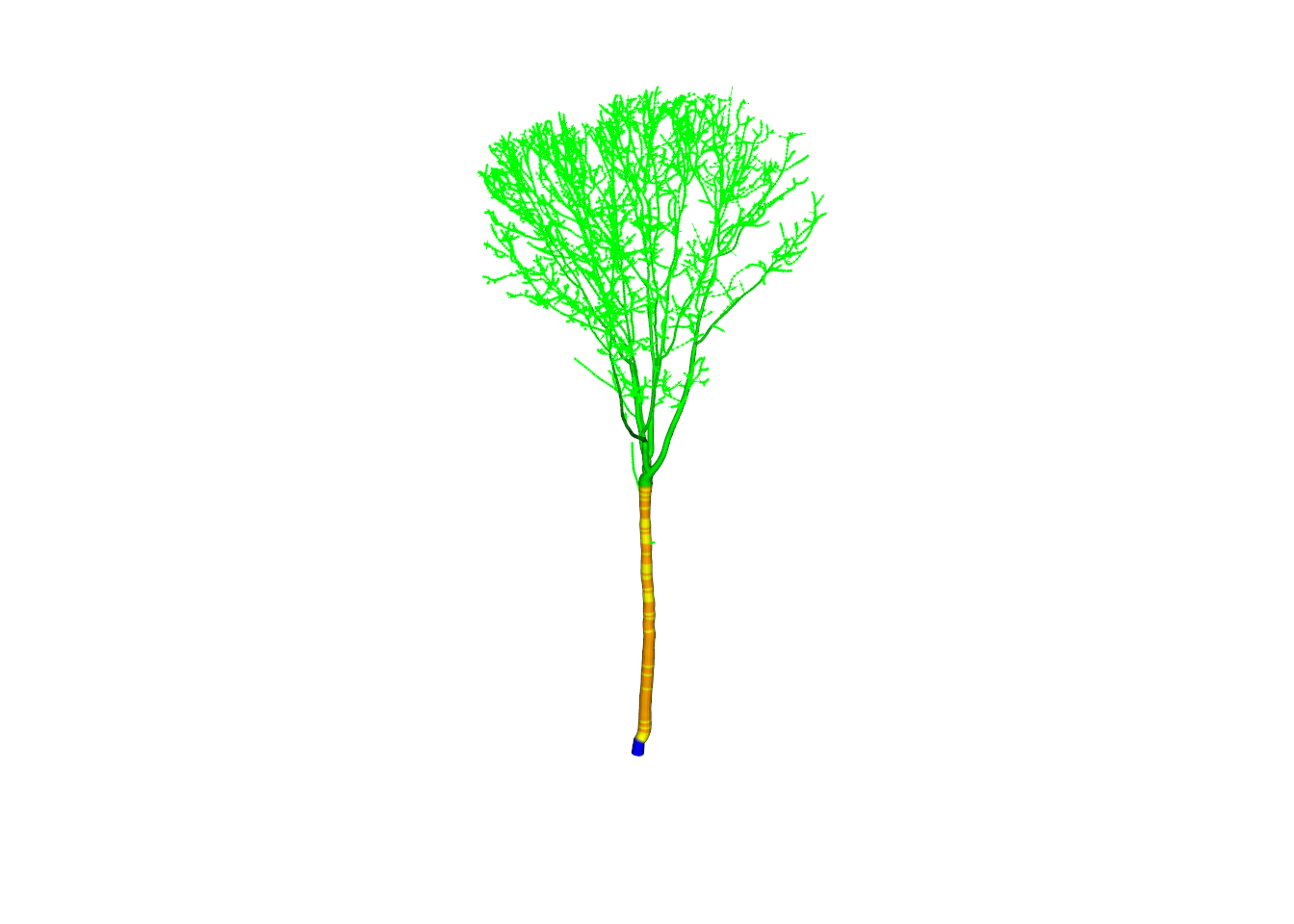
15.8.2 All Trees: Quantitative Structure Forest (QSF)
Generating QSMs one tree at a time is inefficient. qsf() builds QSMs for all trees in the scene in parallel and stores them in a quantitative structure forest (QSF) object. Trees flagged as understory or buffer trees are skipped, and the min_height argument (default of 2 m) sets the minimum tree height to model.
forest <- qsf(las)forestQSF
Trees : 103
Cylinders : 54412
Basal area : 1.35 m²
Volume : 18.74 m³
Coord. ref. : qsf_log() summarizes any warnings or messages generated during the reconstruction. Here, most of the warnings are associated with small trees, for which arbor uses an allometric model as opposed to direct measurement. A few trees have no valid DBH measurement, which can occur when the stem is partially occluded.
qsf_log(forest)[W3] warning Small tree allometry n = 91 trees
[W2] warning No valid measure n = 5 treesFor the remainder of the chapter, we focus on the overstory trees. qsf_filter() is used to retain trees with a DBH of at least 10 cm (0.1 m).
forest_ot <- qsf_filter(forest, dbh = c(0.1, Inf))
forest_ot
QSF
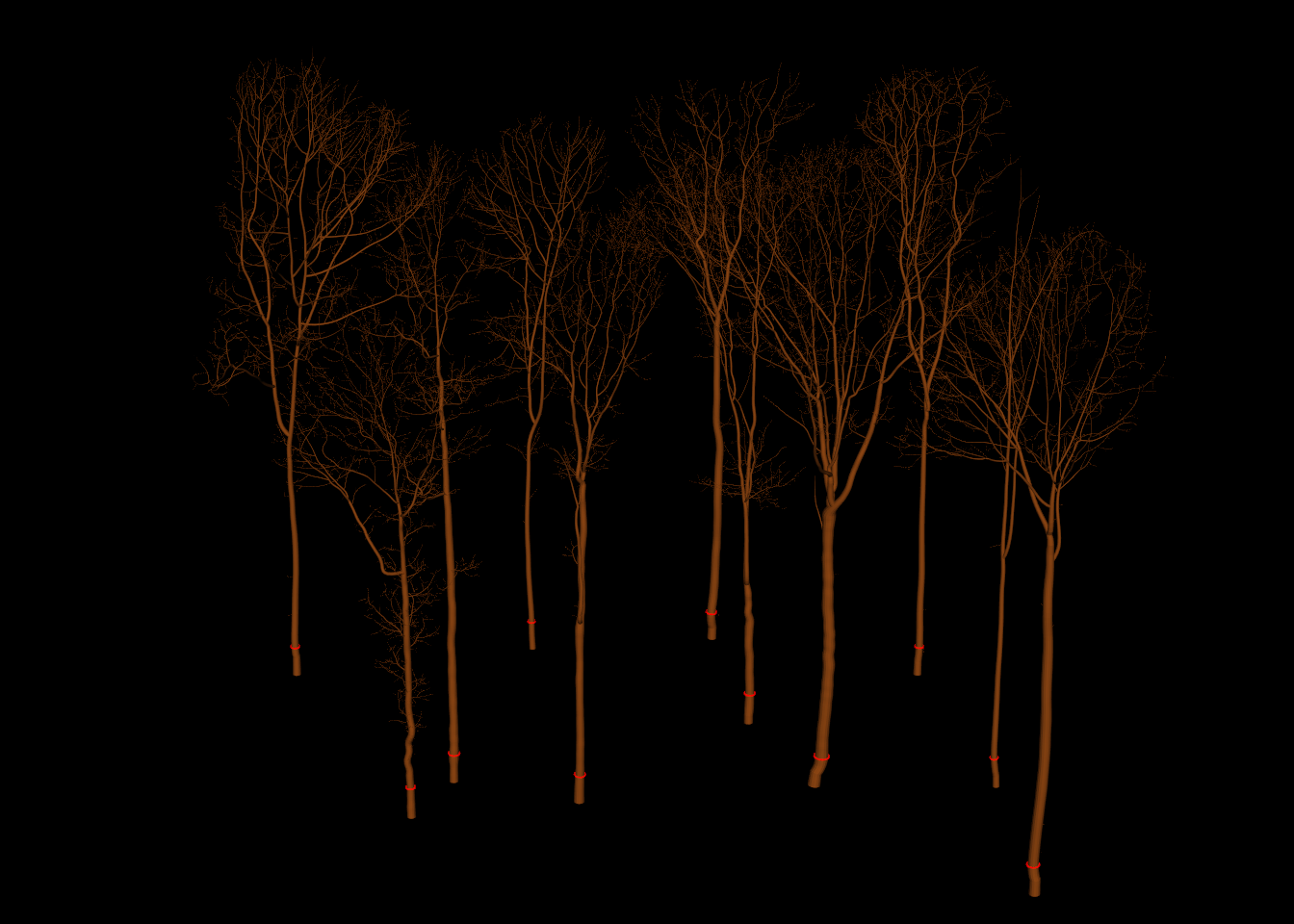
Trees : 11
Cylinders : 47095
Basal area : 1.33 m²
Volume : 18.62 m³
Coord. ref. : The QSF is plotted below. We also use add_dbh3d() to draw a red ring at breast height (1.3 m) on each stem, sized to the measured DBH.
Lastly, the models are shown together with the point cloud, colored by tree.
x <- plot_instance(thin(las, 50))
plot(forest_ot, pal = "chocolate4", add = x)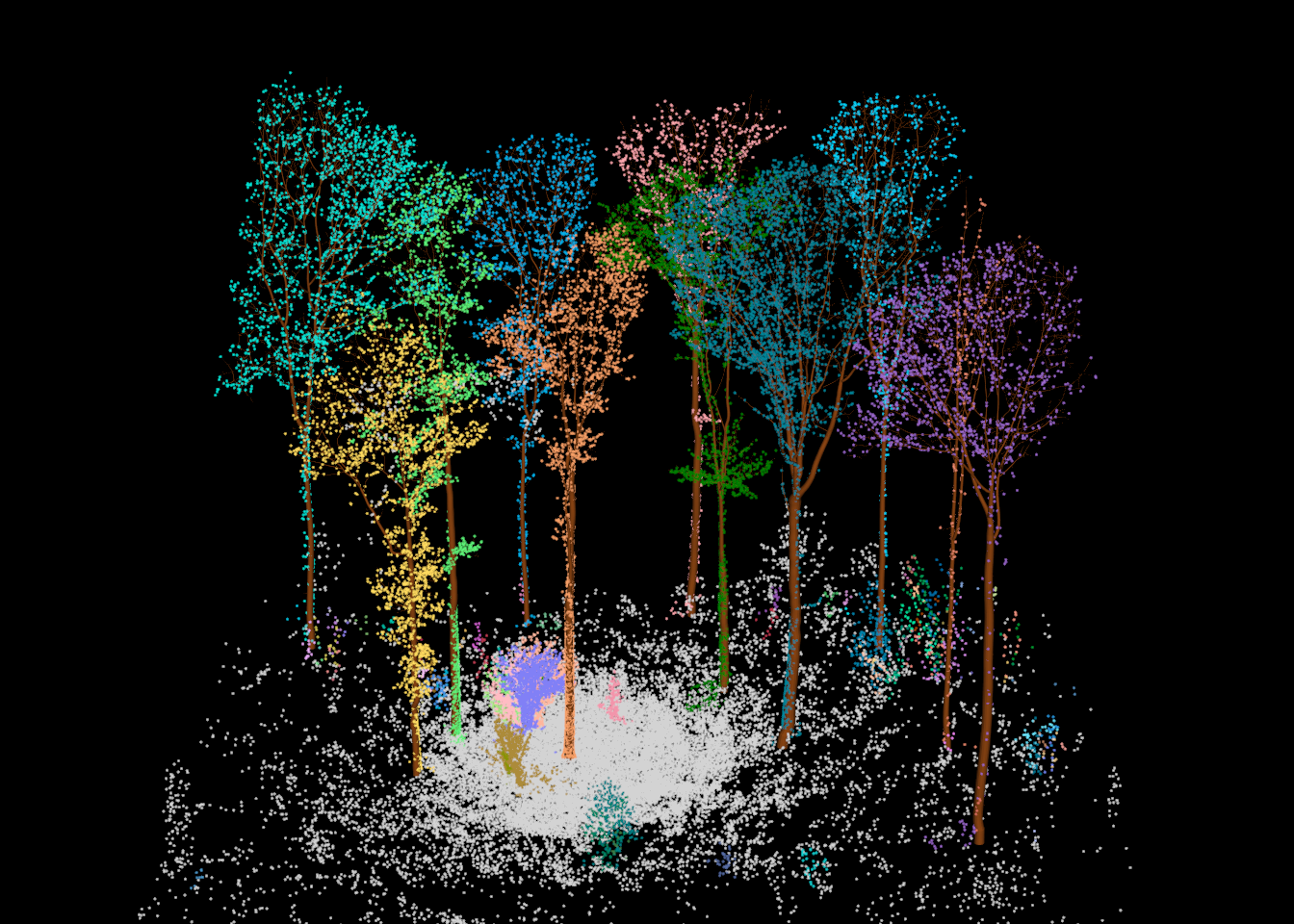
15.9 Per-Tree Metrics
We now generate a table of metrics for each overstory tree: DBH, canopy (total tree) height, and canopy base height.
15.9.1 DBH
qsm_dbh() returns the diameter of the stem at breast height. By default, breast height is 1.3 m above the base of the tree, and it is measured along the stem as opposed to vertically, which matters for leaning trees. The output includes the tree ID, the DBH in meters, the coordinates of the measurement, and the direction of the stem at breast height (“nx”, “ny”, “nz”).
dbh <- qsm_dbh(forest_ot)
dbh
treeID dbh x y z nx ny
<char> <num> <num> <num> <num> <num> <num>
1: 1 0.3961641 -0.7189126 0.1826477 661.4122 0.054231739 -0.091303792
2: 2 0.5797767 9.5048239 1.6177738 661.5540 0.047091574 -0.036366341
3: 3 0.4182747 -6.0845719 1.5696606 661.7098 0.051675489 -0.010248013
4: 4 0.3241908 -7.6865025 -1.3024493 661.5679 -0.035097264 0.023618534
5: 7 0.4081880 6.6598849 7.3099927 661.8261 0.001879926 -0.003155589
6: 65 0.4369417 17.3102052 -7.0987169 661.1300 -0.033287230 -0.051143831
7: 108 0.3395638 -13.8569088 10.3301762 662.7523 -0.003559124 0.017729435
8: 116 0.2756164 -3.2991247 14.1760604 662.3310 -0.004790802 -0.008103327
9: 180 0.4134507 5.1208698 14.8095590 662.5363 0.066220698 -0.045175838
10: 191 0.3426474 14.5238915 11.0048172 662.4704 0.016244328 0.021895092
11: 271 0.2826841 16.8111980 1.5194520 661.5179 -0.069188560 -0.008237890
nz
<num>
1: 0.9943453
2: 0.9982284
3: 0.9986113
4: 0.9991048
5: 0.9999933
6: 0.9981364
7: 0.9998365
8: 0.9999557
9: 0.9967818
10: 0.9996283
11: 0.997569615.9.2 Canopy Height
Canopy height can be obtained from the QSM using qsm_height(). Alternatively, it can be calculated from the points as the maximum height above ground of the points assigned to each tree. We calculate both. The QSM height may be slightly lower since the model may not extend all the way to the uppermost leaves.
ids <- as.integer(qsm_treeid(forest_ot))

tree_pts <- las@data |>
  filter(treeID %in% ids, UserData == ARBORTREE)

height_qsm <- data.frame(treeID = ids,
                         height_qsm = qsm_height(forest_ot))

height_pts <- tree_pts |>
  group_by(treeID) |>
  summarize(height_pts = max(hag))
15.9.3 Canopy Base Height
arbor does not provide a function for canopy base height (CBH), the height of the bottom of the live crown. However, we can estimate it from the outputs of the prior steps. We demonstrate two methods.
The first method uses the point cloud. The vertical distribution of each tree’s foliage points describes where the crown is located. A simple, robust estimate of the bottom of the crown is a low percentile of this distribution. Here, we use the 5th percentile. Points less than 2 m above the ground are excluded since understory vegetation near the base of a tree is often assigned to that tree. Using a percentile as opposed to the minimum makes the estimate less sensitive to a few stray points.
The second method uses the QSM. We define CBH as the height of the lowest first-order branch (branch_order == 2) with a radius of at least 2.5 cm (5 cm diameter), which approximates the height to the first major branch. Smaller branches are ignored since they are often dead branches or epicormic sprouts. Height is measured relative to the base of the stem.
first_branch <- function(q, min_radius = 0.025) {
  d <- as.data.frame(q)
  b <- filter(d, branch_order == 2, radius >= min_radius)
  if (nrow(b) == 0) return(NA)
  min(b$startZ) - min(d$startZ)
}

cbh_qsm <- data.frame(treeID = ids,
                      cbh_qsm = sapply(seq_along(forest_ot),
                                       function(i) first_branch(forest_ot[[i]])))
To illustrate the point-based method, the graph below shows the vertical distribution of foliage points for the focal tree, along with the two CBH estimates. The dashed line shows the point-based estimate and the dotted line shows the QSM-based estimate.
tree_pts |>
  filter(treeID == focal_id, foliage > 0, hag > 2) |>
  ggplot(aes(x = hag)) +
  geom_histogram(binwidth = 0.5, fill = "darkgreen", color = "white") +
  geom_vline(xintercept = cbh_pts$cbh_pts[cbh_pts$treeID == focal_id],
             linetype = "dashed", linewidth = 1) +
  geom_vline(xintercept = cbh_qsm$cbh_qsm[cbh_qsm$treeID == focal_id],
             linetype = "dotted", linewidth = 1) +
  coord_flip() +
  labs(x = "Height Above Ground (m)", y = "Number of Foliage Points") +
  theme_bw()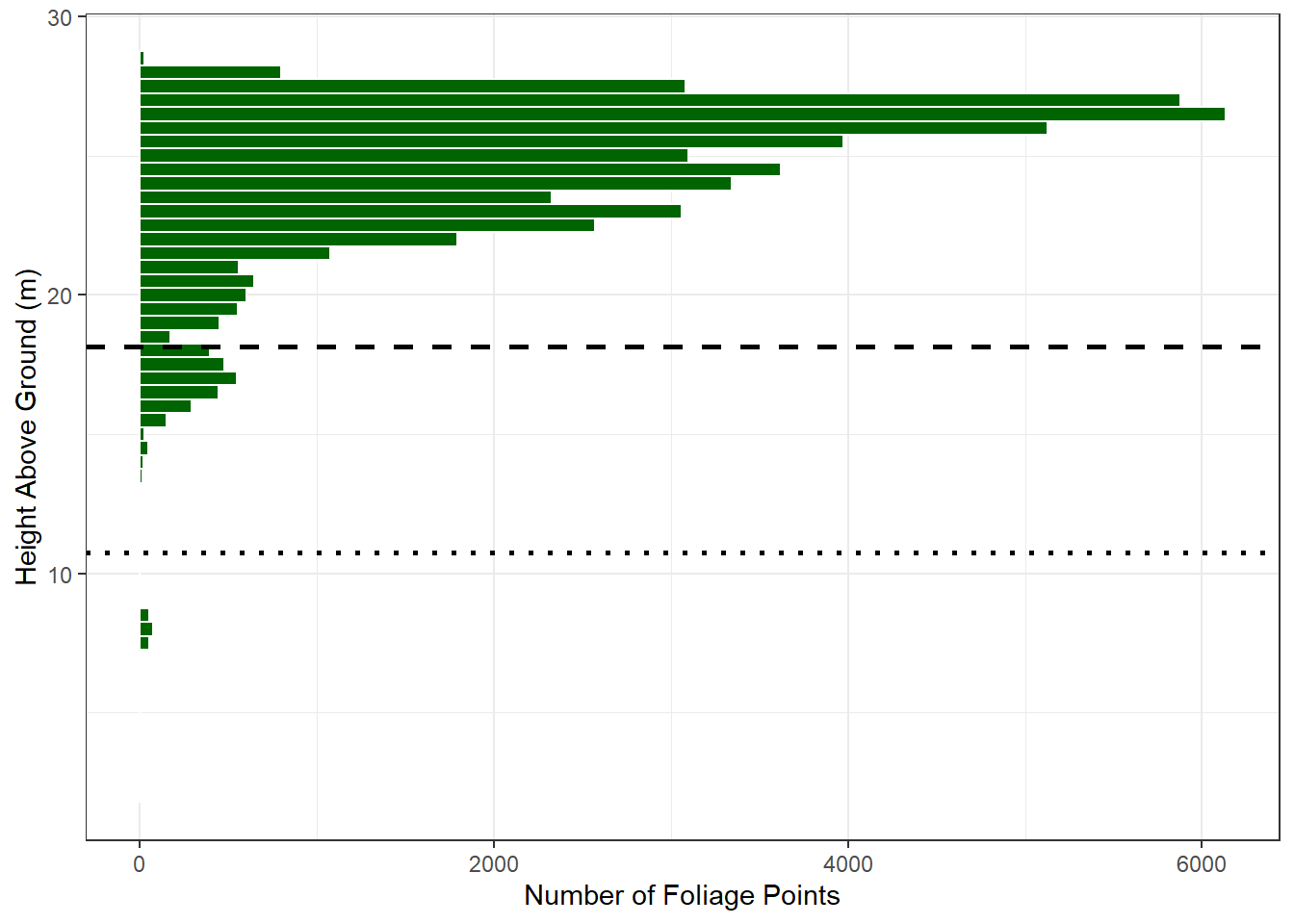
15.9.4 Combine Metrics
The metrics are combined into a single table. We convert DBH to centimeters and also add the wood volume calculated from each QSM using qsm_volume().
tree_metrics <- dbh |>
  transmute(treeID = as.integer(treeID), x, y, dbh_cm = dbh * 100) |>
  left_join(height_qsm, by = "treeID") |>
  left_join(height_pts, by = "treeID") |>
  left_join(cbh_pts, by = "treeID") |>
  left_join(cbh_qsm, by = "treeID") |>
  mutate(volume_m3 = qsm_volume(forest_ot))

tree_metrics |>
  mutate(across(where(is.numeric) & !treeID, \(v) round(v, 2)))
treeID x y dbh_cm height_qsm height_pts cbh_pts cbh_qsm volume_m3
<int> <num> <num> <num> <num> <num> <num> <num> <num>
1: 1 -0.72 0.18 39.62 26.05 26.14 15.07 8.33 1.67
2: 2 9.50 1.62 57.98 28.14 28.45 18.16 10.75 4.05
3: 3 -6.08 1.57 41.83 27.91 27.98 14.32 13.14 1.57
4: 4 -7.69 -1.30 32.42 23.85 24.35 5.60 7.99 0.97
5: 7 6.66 7.31 40.82 26.92 26.88 11.78 6.64 1.33
6: 65 17.31 -7.10 43.69 27.91 27.57 18.70 14.47 2.46
7: 108 -13.86 10.33 33.96 28.91 29.10 18.18 11.68 1.70
8: 116 -3.30 14.18 27.56 26.22 26.48 13.13 11.26 0.81
9: 180 5.12 14.81 41.35 27.73 28.03 14.45 15.98 2.02
10: 191 14.52 11.00 34.26 28.06 28.56 14.47 12.77 1.32
11: 271 16.81 1.52 28.27 26.96 26.94 11.65 10.52 0.72The two CBH estimates differ since they measure different things. The QSM-based method finds the lowest large branch, which may be a single low branch below the bulk of the crown. The point-based method describes where the foliage begins in substantial amounts. Both estimates depend on the parameters chosen (the percentile, minimum height, and minimum branch radius), which should be selected based on the definition of CBH needed for the application. For example, fire behavior models often define CBH based on a minimum canopy bulk density.
Lastly, we map the stem locations of the overstory trees as circles scaled by DBH and colored by canopy height. The “x” and “y” coordinates are the location of the DBH measurement.
tree_metrics |>
  st_as_sf(coords = c("x", "y")) |>
  ggplot() +
  geom_sf(aes(size = dbh_cm, fill = height_pts),
          shape = 21, color = "black") +
  geom_sf_text(aes(label = treeID), nudge_y = 1.2, size = 3) +
  scale_fill_viridis_c(name = "Height (m)") +
  scale_size_continuous(name = "DBH (cm)", range = c(3, 10)) +
  labs(x = "X (m)", y = "Y (m)") +
  theme_bw()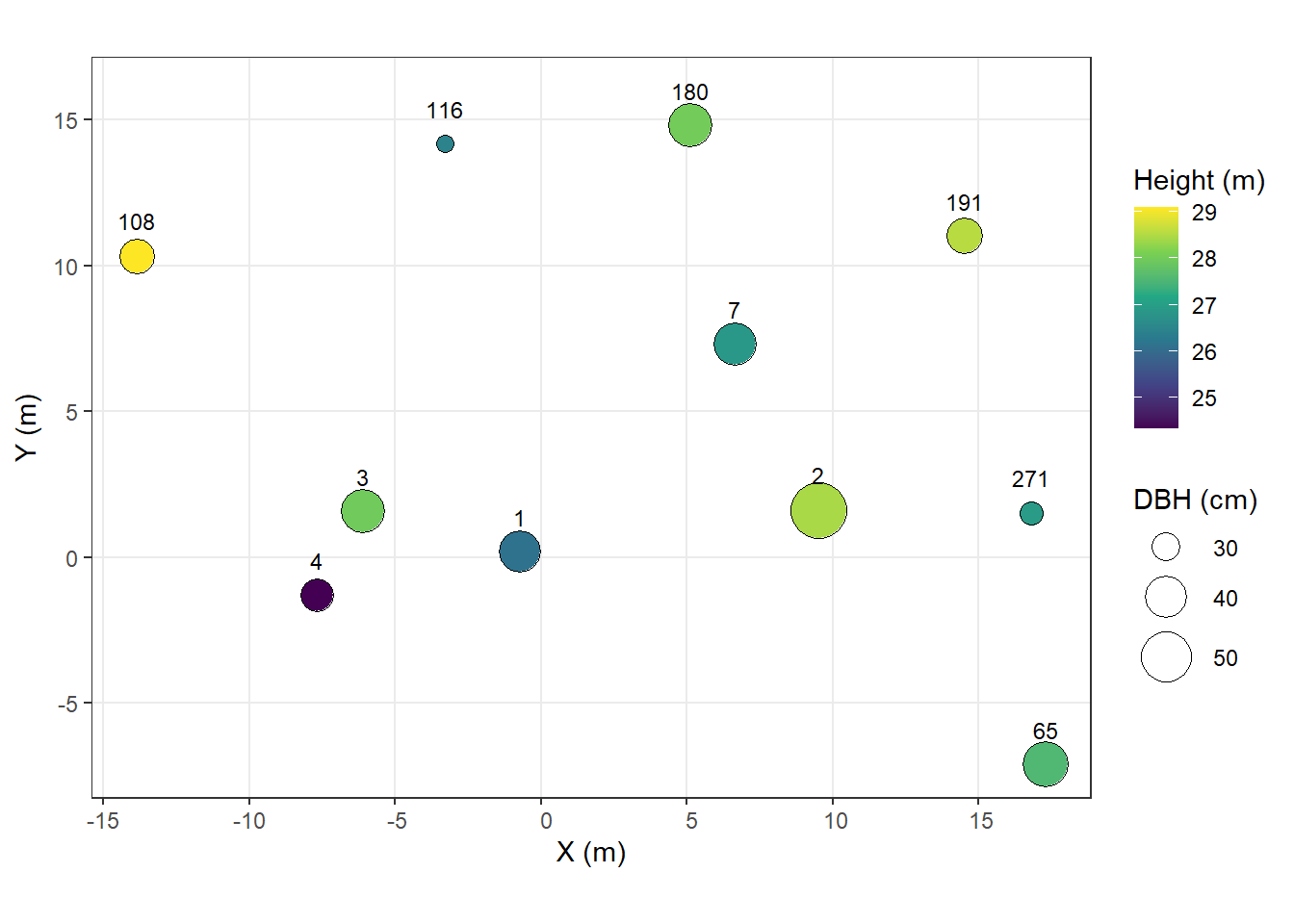
15.10 Voxel Representation
The last step is to represent the point cloud as a voxel grid. A voxel is a three-dimensional pixel, here a cube with 0.2 m sides. Voxelization converts an irregular point cloud into a regular 3D grid, which standardizes the data, reduces its volume, and allows for summarizing the vertical and horizontal distribution of material in the forest. Voxel grids are commonly used for estimating leaf area density and canopy fuels and as input to 3D deep learning models.
voxel_metrics() from lidR summarizes the points that fall in each voxel using a user-defined set of metrics. Here, for each voxel, we calculate:
- “n”: the number of points
- “hag”: the mean height above ground
- “pwood”: the proportion of points classified as wood
- “treeID”: the most common tree ID (the mode)
Empty voxels are not returned.
[1] 167746head(vox) X Y Z n hag pwood treeID
<num> <num> <num> <int> <num> <num> <int>
1: -11.9 9.7 690.2 2 28.93683 0 108
2: -11.9 10.1 690.2 1 28.86007 0 108
3: -11.7 9.9 690.2 2 28.90252 0 108
4: -12.1 9.7 690.2 1 28.88065 0 108
5: -11.1 8.7 690.2 2 29.07177 0 108
6: -13.7 11.9 690.0 2 28.59771 0 108The voxel table is converted back to a LAS object using LAS() so that it can be visualized with lidR. Each point in this object is the center of a voxel.
class        : LAS (v1.2 format 0)
memory       : 7.7 Mb
extent       : -18.1, 23.9, -15.3, 17.1 (xmin, xmax, ymin, ymax)
coord. ref.  :
area         : 1341 m²
points       : 167.7 thousand points
type         : terrestrial
density      : 125.09 points/m²
Even with more than a hundred thousand voxels, the voxel grid is much smaller than the original point cloud. Below, the voxel centers are colored by the proportion of wood points. Stems and major branches are clearly visible.
plot(vox_las, color = "pwood", size = 2,
     pal = colorRampPalette(c("darkgreen", "yellow", "chocolate4"))(50))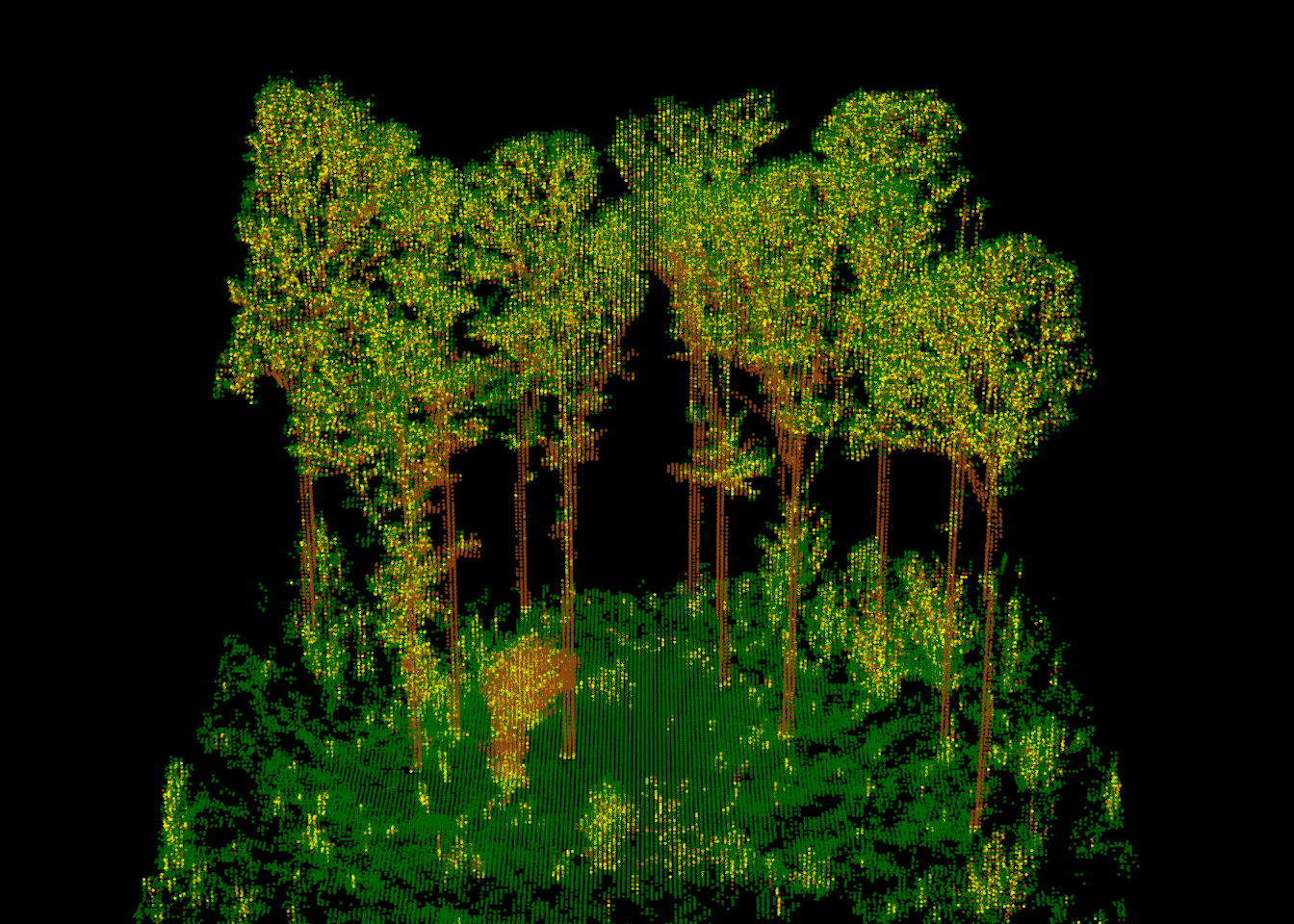
To see the voxels as cubes, we set voxel = TRUE. Since drawing more than a hundred thousand cubes is slow and results in a large file, we only render the voxels for a single tree, the focal tree, colored by the number of points per voxel. The voxels along the lower stem contain the most points since the stem is a solid surface located close to the scanner, while the crown voxels contain relatively few points.
vox_tree <- filter_poi(vox_las, treeID == focal_id)
plot(vox_tree, color = "n", voxel = TRUE)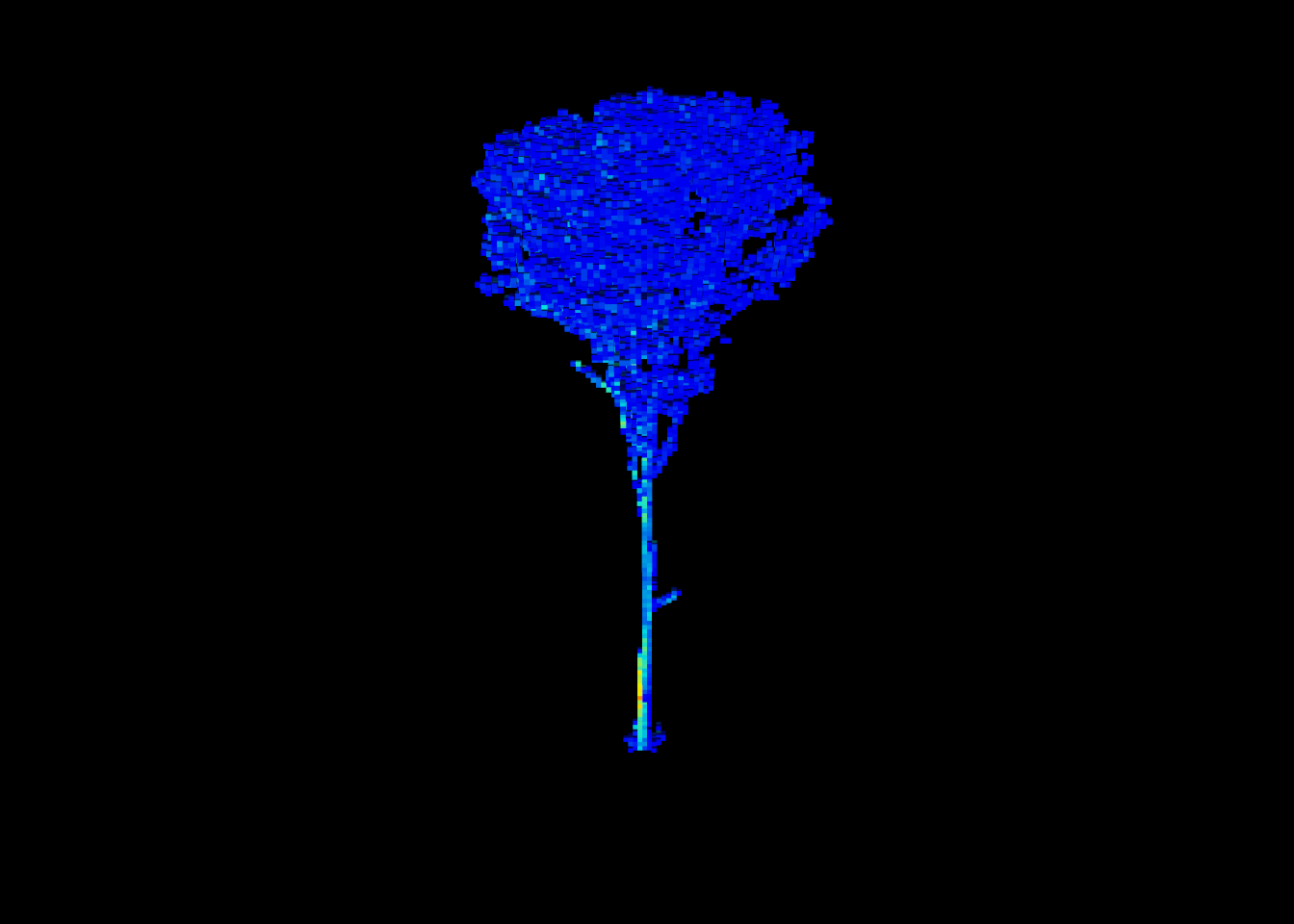
Voxels also provide a convenient way to describe the vertical structure of the forest. Since each voxel has the same volume, the number of occupied voxels in each height layer approximates the volume of space occupied by vegetation at that height. Below, we count the occupied voxels in 1 m layers, separated into wood and foliage voxels using a 50% threshold, and we exclude ground voxels. The result is a vertical profile of the forest structure: a dense understory layer within a few meters of the ground, a sparse layer made up mostly of stems between roughly 5 and 12 m, and the overstory canopy above, which is densest between roughly 22 and 26 m.
vox |>
  filter(hag > 0.25) |>
  mutate(layer = floor(hag),
         type = ifelse(pwood >= 0.5, "Wood", "Foliage")) |>
  count(layer, type) |>
  ggplot(aes(x = layer + 0.5, y = n, fill = type)) +
  geom_col() +
  scale_fill_manual(values = c(Foliage = "darkgreen", Wood = "chocolate4")) +
  coord_flip() +
  labs(x = "Height Above Ground (m)", y = "Number of Occupied 0.2 m Voxels",
       fill = NULL) +
  theme_bw()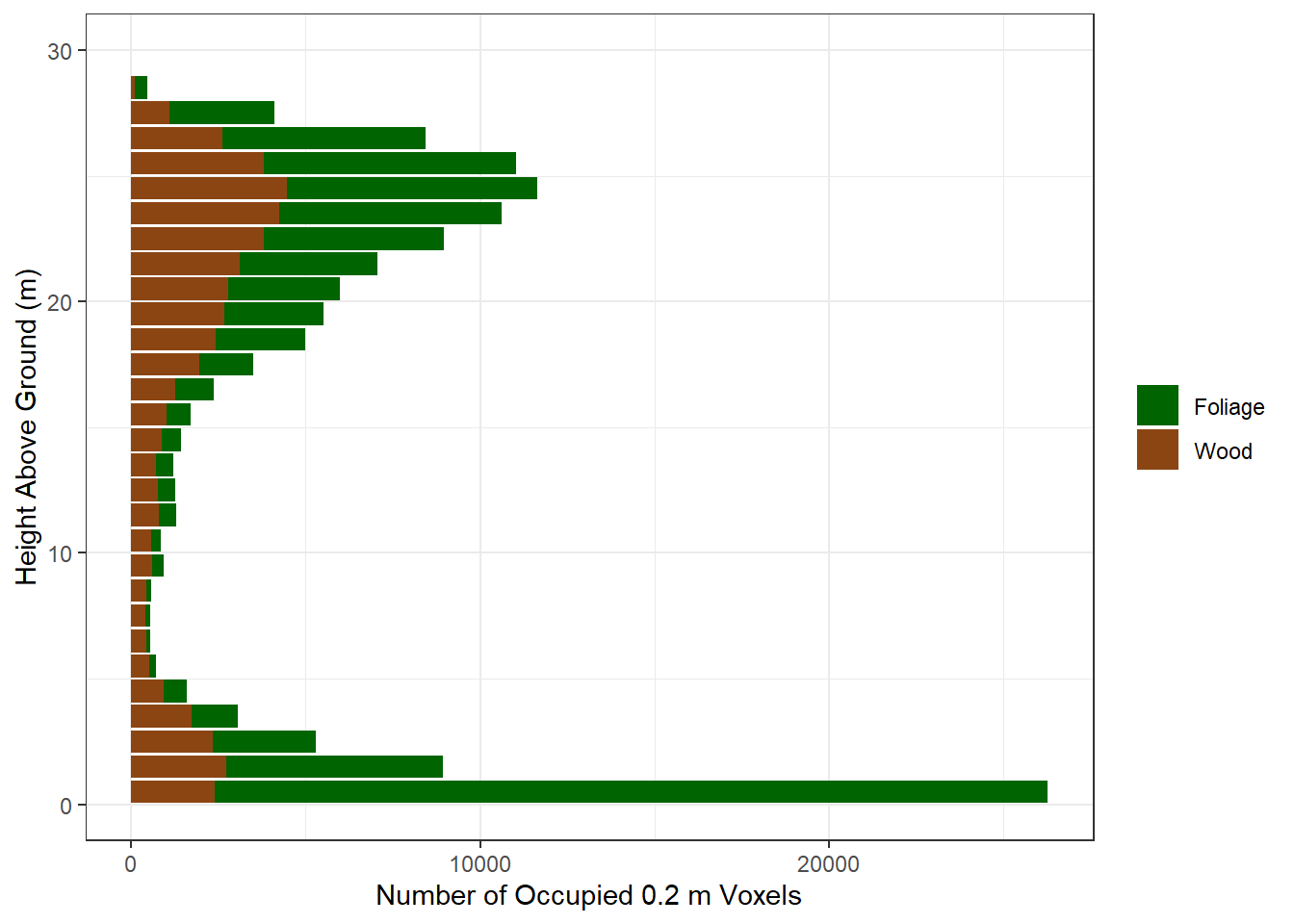
15.11 Concluding Remarks
In this chapter, we used the arbor package to process an MLS point cloud from raw points to individual tree models. We segmented ground, wood, and foliage points; detected trees; assigned points to individual trees; generated QSMs; and calculated DBH, canopy height, and canopy base height for each overstory tree. Lastly, we represented the point cloud as a 0.2 m voxel grid. Although close-range lidar processing is computationally demanding, arbor makes it possible to complete this entire workflow within R in a few minutes on a laptop. The resulting per-tree metrics and structure models could then be used to estimate volume and biomass, assess forest structure, or provide training and validation data for analyses of coarser-resolution data, such as ALS or satellite imagery.