4 Working with Dates and Times
4.1 Topics Covered
- How R stores dates and times:
Date,POSIXct, andPOSIXlt - Creating, formatting, and extracting components of dates in base R
- Date arithmetic and sequences of dates
- Parsing and manipulating dates with lubridate
- Durations, periods, intervals, and time zones
- Working with time series data using
tsobjects and data frames
4.2 Introduction
Dates and times data are common; unfortunately, they are also one of the most error-prone kinds of data to work with. Months have different lengths, years can be leap years, clocks jump forward and back for daylight saving time, and the same moment in time has a different “clock time” depending on where you are in the world.
In this chapter, we discuss how R represents dates and times, how to convert text into proper date-time objects, how to perform arithmetic with them, and how to summarize and plot data that are ordered in time. We cover two toolkits:
- Base R: has everything you need built in and is worth understanding because every other package builds on it
- lubridate: a tidyverse package that makes the most common tasks shorter, more readable, and harder to get wrong
Before starting, we load in lubridate. We also load ggplot2 for graphing, which is discussed in more detail in Chapter 5 and Chapter 6.
4.3 How R Stores Dates and Times
R has three main classes for temporal data, which are described in Table 4.1.
| Class | Stores | Underlying Value |
|---|---|---|
| Date | Calendar date, no time of day | Days since 1970-01-01 |
| POSIXct | Date and time (an instant) | Seconds since 1970-01-01 00:00:00 UTC |
| POSIXlt | Date and time, broken into parts | List of components (year, month, hour, etc.) |
The key idea is that, under the hood, dates and date-times are just numbers with a class attached. This is what makes it possible to sort them, subtract them, and plot them on a continuous axis.
d <- as.Date("2024-03-15")
d
[1] "2024-03-15"class(d)[1] "Date"unclass(d) # days since 1970-01-01[1] 19797For most work, you will use Date when you only care about the day and POSIXct when the time of day matters. POSIXlt is mostly useful as an intermediate step for pulling out components.
4.4 Dates and Times in Base R
4.4.1 Creating Dates from Text
as.Date() converts character strings into Date objects. If your strings are already in the international standard YYYY-MM-DD format (ISO 8601), no extra arguments are needed.
For any other layout, you must describe the format using format codes.
as.Date("15/03/2024", format = "%d/%m/%Y")[1] "2024-03-15"as.Date("March 15, 2024", format = "%B %d, %Y")[1] "2024-03-15"as.Date("15-Mar-24", format = "%d-%b-%y")[1] "2024-03-15"The most common format codes are listed in Table 4.2. See ?strptime for the complete list.
| Code | Meaning | Example |
|---|---|---|
| %Y | 4-digit year | 2024 |
| %y | 2-digit year | 24 |
| %m | Month as number | 03 |
| %B / %b | Full / abbreviated month name | March / Mar |
| %d | Day of month | 15 |
| %A / %a | Full / abbreviated weekday | Friday / Fri |
| %H | Hour (00–23) | 14 |
| %I | Hour (01–12) | 02 |
| %p | AM/PM indicator | PM |
| %M | Minute | 30 |
| %S | Second | 05 |
| %j | Day of year | 075 |
Month and weekday names (%B, %b, %A, %a) depend on your computer’s language settings, or locale. Code that parses "March" may fail on a machine set to French or German.
4.4.2 Creating Date-Times
as.POSIXct() works the same way but also handles the time of day. You should always supply a time zone using the tz argument. If you leave it out, R uses your computer’s local time zone, and your results may differ on someone else’s machine.
t1 <- as.POSIXct("2024-03-15 14:30:00", tz = "UTC")
t1
[1] "2024-03-15 14:30:00 UTC"as.POSIXct("15/03/2024 2:30 PM", format = "%d/%m/%Y %I:%M %p", tz = "UTC")[1] "2024-03-15 14:30:00 UTC"4.4.3 Formatting Dates as Text
format() goes the other way, turning a date into a string. It uses the same format codes.
4.4.4 Extracting Components
The helper functions weekdays() and months() cover the most common cases. For anything else, you can convert to POSIXlt and pull out the needed parts.
weekdays(d)[1] "Friday"months(d)[1] "March"lt <- as.POSIXlt(t1)
lt$hour[1] 14lt$year + 1900 # years are stored as years since 1900[1] 2024lt$mon + 1 # months are stored 0–11[1] 3The odd offsets on year and mon are a historical quirk inherited from the C language and a common source of bugs. This is one of the places where lubridate helps a great deal.
4.4.5 Date Arithmetic
Because dates are numbers, you can add and subtract days directly.
Subtracting two dates returns a difftime object. You can choose the units with difftime() and convert to a plain number with as.numeric().
For POSIXct objects, adding a number adds seconds.
t1 + 3600 # one hour later[1] "2024-03-15 15:30:00 UTC"4.4.6 Sequences of Dates
seq() understands dates and accepts readable step sizes.
4.5 Making Life Easier with lubridate
lubridate does not replace base R’s date classes. Instead, it produces ordinary Date and POSIXct objects. What it adds is a set of functions with consistent names that remove most of the friction discussed above.
4.5.1 Parsing without Format Codes
Instead of writing format strings, you name the order of the components using the letters y, m, d, h, m, and s. lubridate works out the separators and month names for you.
ymd("2024-03-15")[1] "2024-03-15"dmy("15/03/2024")[1] "2024-03-15"mdy("March 15, 2024")[1] "2024-03-15"ymd_hms("2024-03-15 14:30:00")[1] "2024-03-15 14:30:00 UTC"dmy_hm("15.03.2024 14:30", tz = "America/New_York")[1] "2024-03-15 14:30:00 EDT"These functions are also forgiving of messy input as long as the order is consistent.
[1] "2024-03-15" "2024-03-16" "2024-03-17" "2024-03-18"Note that the date-time parsers (ymd_hms() and related functions) default to UTC, which makes results reproducible across computers.
If you have the parts in separate columns, you can use make_date() or make_datetime().
make_date(year = 2024, month = 3, day = 15)[1] "2024-03-15"make_datetime(2024, 3, 15, 14, 30, tz = "UTC")[1] "2024-03-15 14:30:00 UTC"4.5.2 Getting and Setting Components
lubridate provides one function per component, so there are no offsets to remember.
[1] 2024month(x)[1] 3month(x, label = TRUE)[1] Mar
12 Levels: Jan < Feb < Mar < Apr < May < Jun < Jul < Aug < Sep < ... < Decday(x)[1] 15wday(x, label = TRUE)[1] Fri
Levels: Sun < Mon < Tue < Wed < Thu < Fri < Satyday(x)[1] 75hour(x)[1] 14quarter(x)[1] 1The same functions can be used to change a component.
month(x) <- 7
x
[1] "2024-07-15 14:30:05 UTC"4.5.3 Rounding Dates
Rounding is very useful for grouping observations into periods, for example to sum sales by week or month.
x <- ymd_hms("2024-03-15 14:30:05")
floor_date(x, "month")
[1] "2024-03-01 UTC"floor_date(x, "week", week_start = 1) # weeks starting Monday[1] "2024-03-11 UTC"round_date(x, "hour")[1] "2024-03-15 15:00:00 UTC"ceiling_date(x, "day")[1] "2024-03-16 UTC"4.5.4 Durations, Periods, and Intervals
lubridate distinguishes between three kinds of time span. The difference matters whenever the calendar is irregular.
- Duration: an exact number of seconds; used for physical elapsed time
- Period: a span in human calendar units, such as “1 month” or “1 day”; its length in seconds depends on when it starts
- Interval: a span with a specific start and end point
The difference is easiest to see around a daylight saving change. In New York, clocks jumped from 2:00 to 3:00 AM on 10 March 2024.
[1] "2024-03-10 13:00:00 EDT"before + days(1) # period: same clock time, next day[1] "2024-03-10 12:00:00 EDT"The duration lands at 1 PM because that day was only 23 hours long. The period keeps the clock time the same, which is usually what people mean by “one day later.”
Periods also handle months of different lengths. If adding a month would produce an invalid date, %m+% rolls back to the last valid day instead of returning NA.
[1] NA[1] "2024-02-29"Intervals allow you to ask how many whole units fit between two points and whether a date falls inside a range.
4.5.5 Time Zones
A POSIXct value is a single instant; the time zone only controls how it is displayed. lubridate provides two functions that look similar but do very different things:
-
with_tz(): keeps the instant the same and changes the display time zone -
force_tz(): keeps the clock time the same and changes the instant
[1] "2024-03-15 13:00:00 GMT"force_tz(meeting, "Europe/London") # 9 AM in London instead[1] "2024-03-15 09:00:00 GMT"Use with_tz() when you want to know “what time is that over there?” Use force_tz() to fix data that were recorded with the wrong time zone label. OlsonNames() lists all valid time zone names.
4.6 Working with Time Series Data
A time series is a set of observations recorded in time order. In R, there are two common ways to store one:
- A built-in
tsobject, suited to regularly spaced data such as monthly or quarterly values - A data frame with a date or date-time column, which is more flexible and is the approach you will use most often
4.6.1 The ts Class
ts() stores a numeric vector together with its start time and frequency, or the number of observations per unit time (12 for monthly data and 4 for quarterly data). R ships with several examples, including AirPassengers, which contains monthly airline passenger totals from 1949 to 1960.
class(AirPassengers)[1] "ts"start(AirPassengers)[1] 1949 1frequency(AirPassengers)[1] 12 Jan Feb Mar Apr May Jun
1960 417 391 419 461 472 535Plotting a ts object using R’s built-in plot() function automatically places time on the x-axis. It is also possible to plot the data using ggplot2 after converting it to a data frame or tibble.
plot(AirPassengers, ylab = "Passengers (thousands)", xlab = "Year")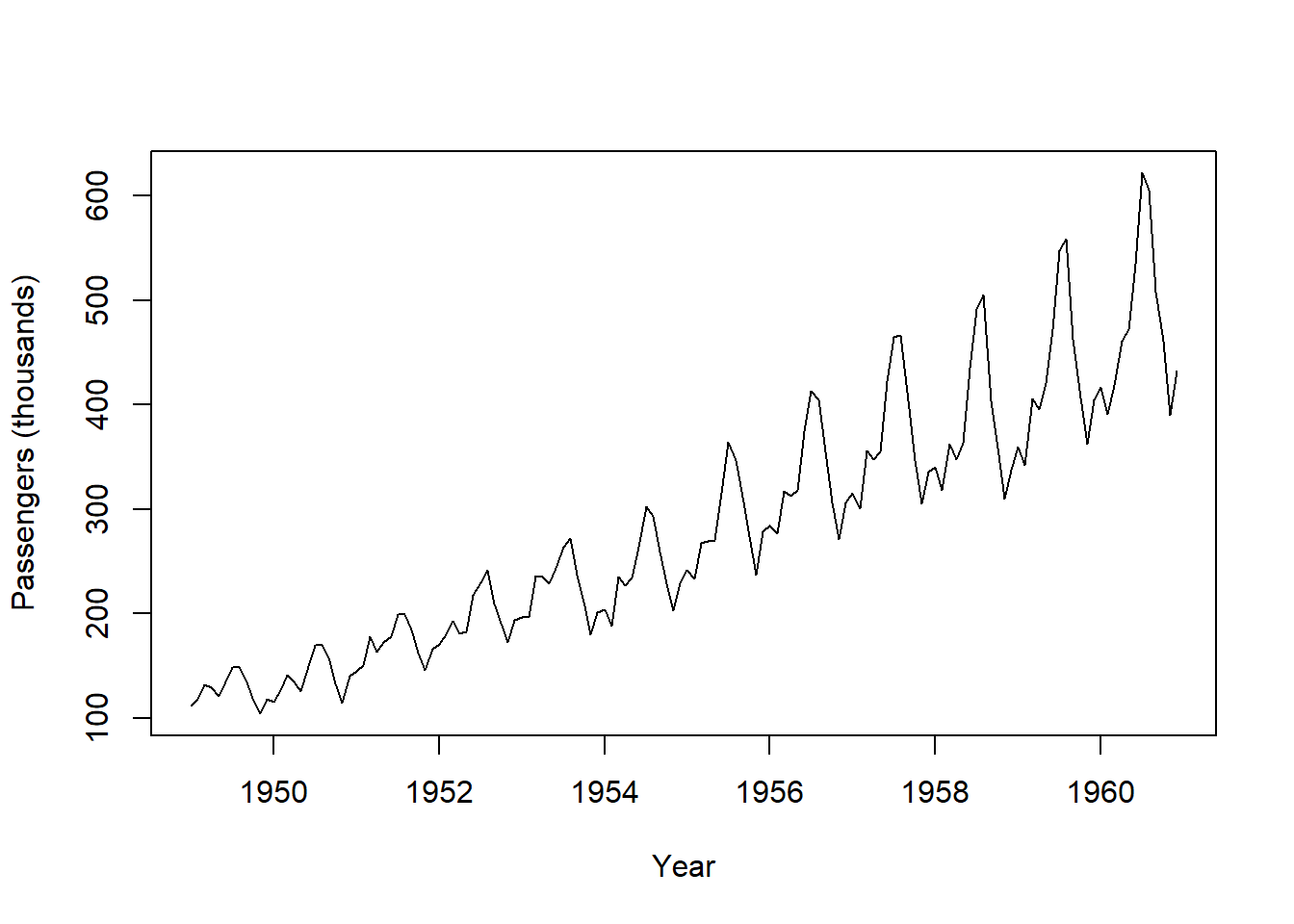
y <- AirPassengers
df <- data.frame(time = as.numeric(time(y)),
                 value = as.numeric(y))

ggplot(df, aes(time, value)) + geom_line()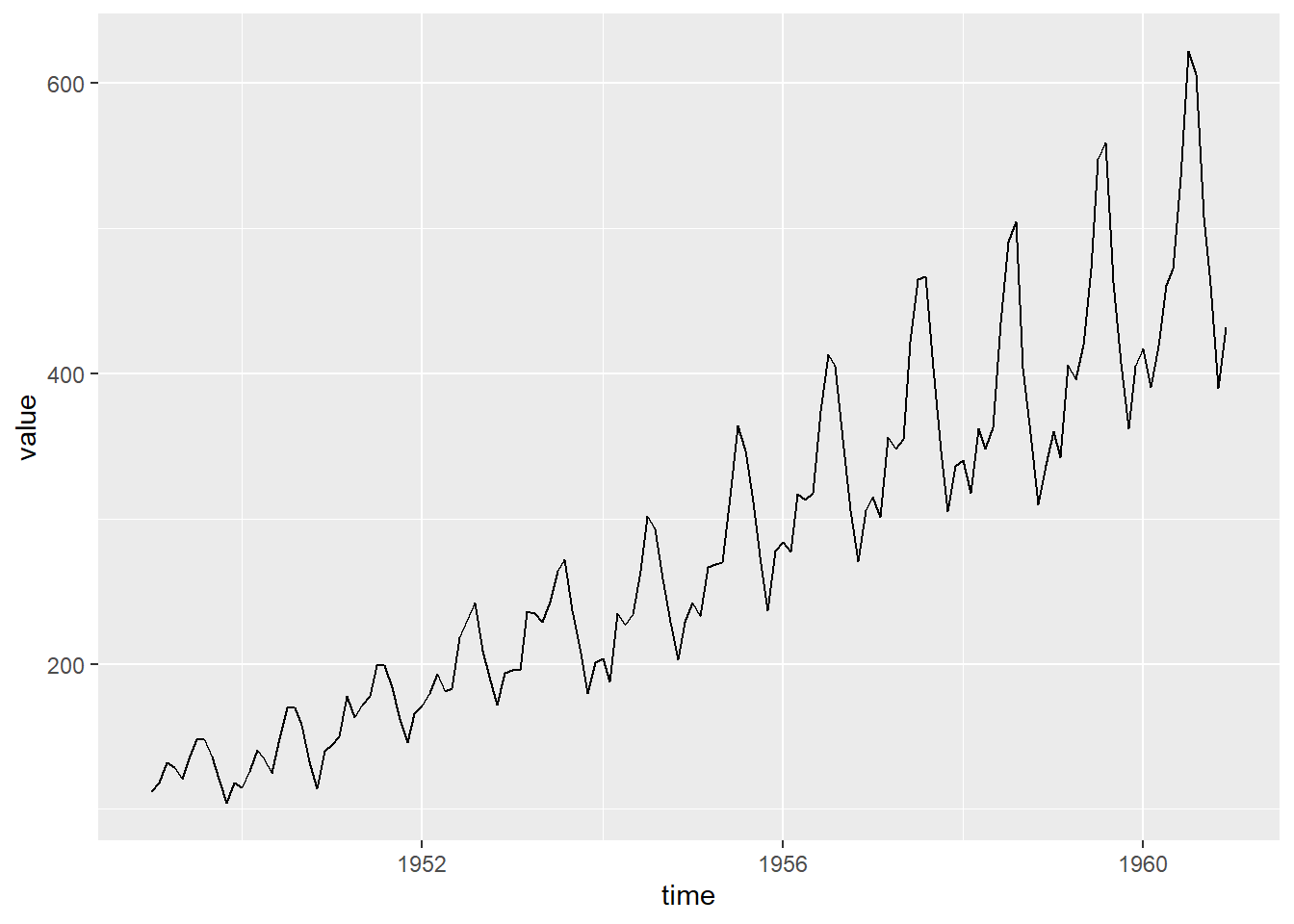
You can create your own ts object from a vector.
     Qtr1 Qtr2 Qtr3 Qtr4
2023  120  135  150  142
2024  160  171  180  176
The ts class works well with R’s classical forecasting tools, but it can only represent evenly spaced observations and has no room for extra columns. For most data analysis, a data frame is more practical.
4.6.2 Time Series in a Data Frame
In the next code block, we simulate a year of daily temperature readings with a seasonal pattern.
        date      temp
1 2024-01-01 6.1143489
2 2024-01-02 0.3117991
3 2024-01-03 3.1026443
4 2024-01-04 3.9221555
5 2024-01-05 3.2496213
6 2024-01-06 1.7346277
Because date is a true Date column, plotting provides a properly labeled time axis.
plot(weather$date, weather$temp, type = "l",
     xlab = "Date", ylab = "Temperature (°C)")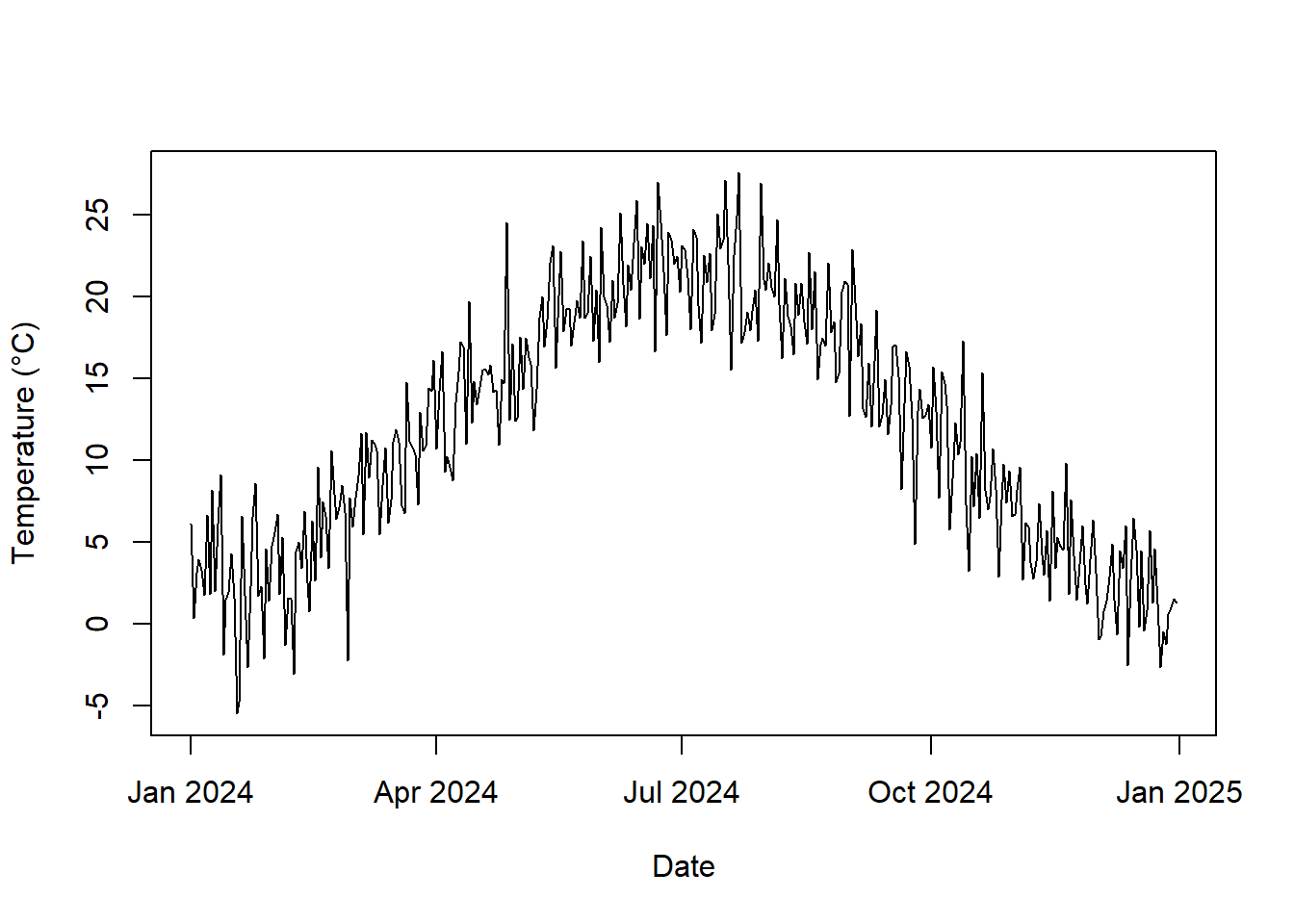
4.6.3 Aggregating to a Coarser Time Scale
A common task is summarizing daily data by week, month, or year. With lubridate, this is a two-step process: round each date down to the start of its period, then summarize by group.
weather$month <- floor_date(weather$date, "month")

monthly <- aggregate(temp ~ month, data = weather, FUN = mean)
head(monthly)
month temp
1 2024-01-01 2.731130
2 2024-02-01 4.606292
3 2024-03-01 10.089835
4 2024-04-01 14.173596
5 2024-05-01 18.186860
6 2024-06-01 21.607406If you use dplyr, the same pattern reads naturally.
4.6.4 Filtering by Date
Dates can be compared using the standard comparison operators, so filtering a range is straightforward.
[1] "2024-06-01" "2024-08-31"Component functions make other filters easy to write too, for example selecting only weekends.
4.6.5 Lags, Differences, and Rolling Means
Time series analysis often compares each observation with earlier ones. Base R provides diff() for changes between consecutive values and stats::filter() for moving averages.
        date      temp     change  temp_7d
1 2024-01-01 6.1143489         NA       NA
2 2024-01-02 0.3117991 -5.8025497       NA
3 2024-01-03 3.1026443  2.7908452       NA
4 2024-01-04 3.9221555  0.8195112 3.577411
5 2024-01-05 3.2496213 -0.6725342 2.962531
6 2024-01-06 1.7346277 -1.5149936 4.085758
7 2024-01-07 6.6066835  4.8720558 3.922359
8 2024-01-08 1.8101825 -4.7965010 4.232391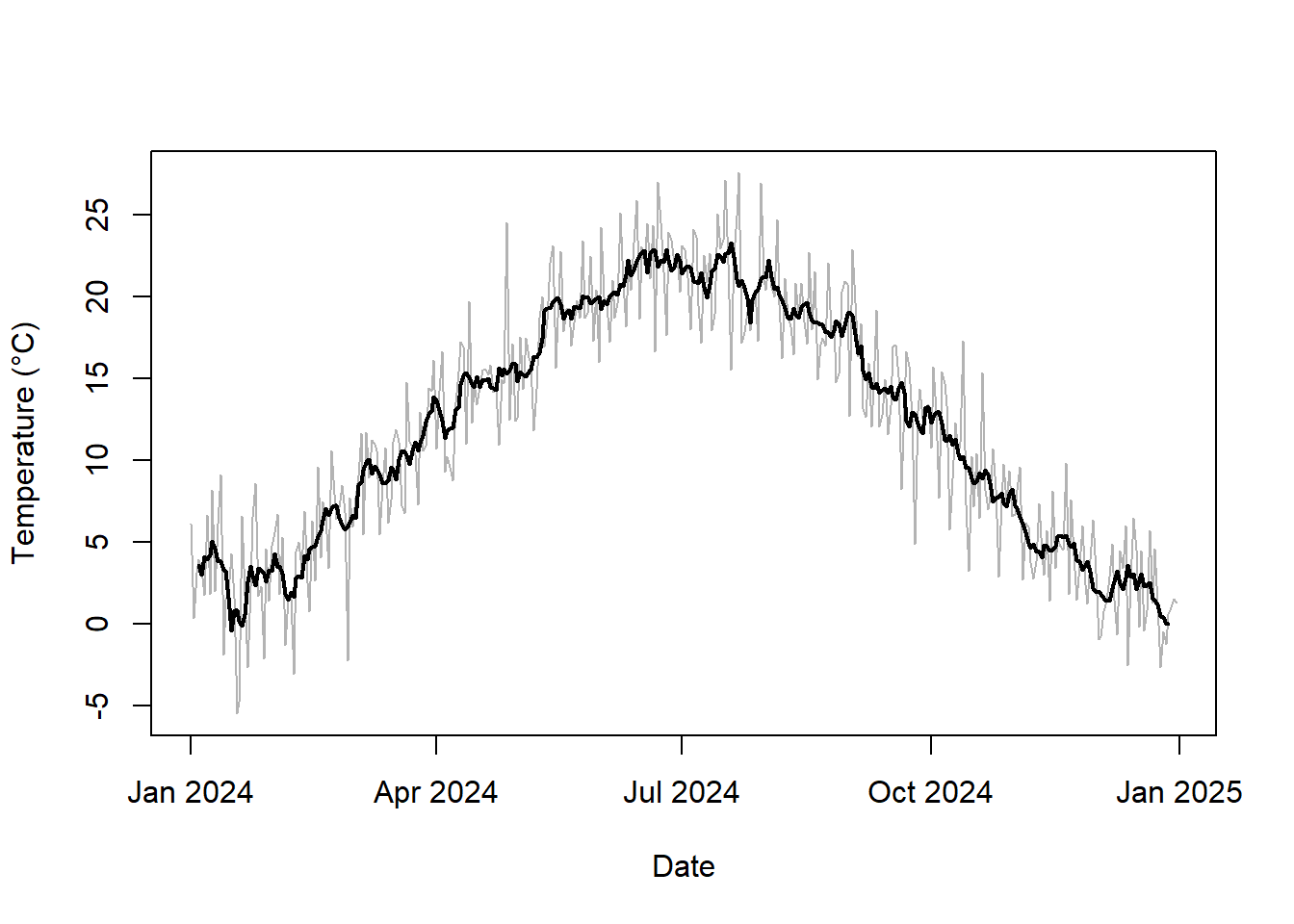
4.7 Concluding Remarks
Dates and times are stored as numbers in R: Date objects as days and POSIXct objects as seconds since 1 January 1970. This is why sorting, arithmetic, and plotting all work. Base R provides everything you need to convert between text and dates, but format codes and component offsets can be error-prone. lubridate simplifies parsing, extracting components, and rounding, and it makes the distinction between durations and periods explicit. Whichever toolkit you use, always be explicit about time zones. For time series, ts objects work well for regularly spaced data and classical forecasting, while a data frame with a date column is more flexible for general data analysis.
4.8 Questions
- Explain how R stores
DateandPOSIXctobjects internally. - Explain the difference between the
Date,POSIXct, andPOSIXltclasses. - What happens when a string does not match the format provided to
as.Date()? - Why should you always specify a time zone when creating a
POSIXctobject? - Explain the difference between a duration and a period in lubridate.
- Explain the difference between the
with_tz()andforce_tz()functions. - What is the purpose of the
floor_date()function? - Explain the difference between storing a time series as a
tsobject and as a data frame with a date column.
4.9 Exercises
Parsing and Manipulating Dates
Task 1
Parse the following strings into Date objects twice, once with base R and once with lubridate: "07/04/1776" (month first), "1 January 2000", and "2024.12.25".
Task 2
Determine what day of the week you were born on. How many days old are you today?
Task 3
Starting from ymd("2024-01-31"), create a sequence of the last day of each month in 2024. Hint: try ceiling_date() or %m+%.
Task 4
A flight leaves Sydney at 10:00 PM local time on 1 March 2024 and lands in Los Angeles 13.5 hours later. What is the local arrival time in Los Angeles? The time zones are "Australia/Sydney" and "America/Los_Angeles".
Working with Time Series Data
Task 1
Using the weather data from this chapter, find the week (starting on Monday) with the highest average temperature.
Task 2
Convert AirPassengers into a data frame with a Date column and a passengers column, then calculate the total number of passengers per year. Hint: time(AirPassengers) returns decimal years; lubridate’s date_decimal() can convert them.