import itertools
import numpy as np
import pandas as pd
import matplotlib.pyplot as plt
import seaborn as sns
from scipy import stats
import statsmodels.api as sm
from statsmodels.formula.api import ols
from statsmodels.stats.oneway import anova_oneway
from statsmodels.stats.multicomp import pairwise_tukeyhsd
from statsmodels.stats.multitest import multipletests
from statsmodels.stats.power import TTestIndPower
from statsmodels.stats.proportion import proportions_ztest, confint_proportions_2indep
from libpysal.weights import KNN
from esda.moran import Moran

rng = np.random.default_rng(42)6 Statistical Inference
6.1 Topics Covered
- Distinguish a population from a sample, and a parameter from a statistic
- Explain what a sampling distribution is and why it is the foundation of inference
- Build and interpret confidence intervals using both theory (the t distribution) and simulation (the bootstrap)
- Carry out hypothesis tests using two complementary approaches: theory-based (distribution) tests and simulation-based (permutation) tests
- Choose, execute, and interpret a t-test, ANOVA, and chi-square test, along with their nonparametric alternatives
- Perform pairwise comparisons and explain why multiple testing requires an adjustment
- Reason about statistical power, effect size, and the difference between statistical and practical significance
- Recognize how spatial autocorrelation violates the independence assumption behind most of these tests, and what to do about it
6.2 Why Inference?
In earlier chapters you learned to import, clean, summarize, and visualize data. Those skills describe data. Statistical inference is about using the data you have to say something about data you don’t have, with an associated estimate of uncertainty. Every inferential question in this chapter has the same shape:
I observed some pattern in a sample. How confident can I be that the pattern also exists in the population the sample came from, or could it plausibly be the product of random chance?
6.3 Libraries and Data
In this chapter, we use Pandas and NumPy for general data wrangling and summarization and matplotlib and Seaborn for graphing. Statistical tests are performed using the stats module of SciPy and Statsmodels. SciPy also provides bootstrap() and permutation_test() functions, which we use for simulation-based inference. Lastly, we use libpysal and esda, which are part of the PySAL family of spatial analysis libraries, to assess spatial autocorrelation.
For our example data, we use an inventory of trees collected by Portland Parks & Recreation’s Urban Forestry volunteers, which is made available in the pdxTrees R package. We have exported the parks inventory to a CSV file, pdx_trees_parks.csv. It records tens of thousands of trees across Portland’s public parks, including size, condition, species, origin, and location.
We also create a random number generator using np.random.default_rng(). All random sampling in the chapter uses this generator. Setting the seed (42) means that the same “random” samples are obtained each time the code is run, which makes the results reproducible. If you change or remove the seed, your results will differ somewhat from those discussed in the text.
We first simplify and clean the dataset to better suit our needs. Column names are converted to lowercase, and only the columns that we need are retained. The “native” column is recoded to “Native” and “Non-native”, and the functional type codes are replaced with descriptive names using the map() method and a dictionary. The “condition” and “mature_size” columns are converted to ordered categorical data types so that their categories are listed in a meaningful order as opposed to alphabetically. Lastly, records with missing values in the columns of interest are removed using dropna(), and trees with a diameter or height of zero are removed.
parks_raw = pd.read_csv("datasets/pdx_trees_parks.csv")

trees = parks_raw.rename(columns=str.lower)[[
    "park", "latitude", "longitude", "genus", "common_name",
    "dbh",                  # diameter at breast height (in)
    "tree_height",          # ft
    "carbon_storage_lb", "native", "condition", "functional_type", "mature_size"]].copy()

trees["native"] = trees["native"].map({"Yes": "Native", "No": "Non-native"})
trees["condition"] = pd.Categorical(trees["condition"],
                                    categories=["Good", "Fair", "Poor", "Dead"], ordered=True)
trees["functional_type"] = trees["functional_type"].map({
    "BD": "Broadleaf deciduous", "BE": "Broadleaf evergreen",
    "CD": "Conifer deciduous", "CE": "Conifer evergreen"})
trees["mature_size"] = pd.Categorical(trees["mature_size"],
                                      categories=["S", "M", "L"], ordered=True)

trees = trees.dropna(subset=["dbh", "tree_height", "native", "condition", "functional_type"])
trees = trees[(trees["dbh"] > 0) & (trees["tree_height"] > 0)]

trees.info()
<class 'pandas.DataFrame'>
Index: 25118 entries, 0 to 25533
Data columns (total 12 columns):
# Column Non-Null Count Dtype
--- ------ -------------- -----
0 park 25118 non-null str
1 latitude 25118 non-null float64
2 longitude 25118 non-null float64
3 genus 25118 non-null str
4 common_name 25118 non-null str
5 dbh 25118 non-null float64
6 tree_height 25118 non-null float64
7 carbon_storage_lb 25085 non-null float64
8 native 25118 non-null str
9 condition 25118 non-null category
10 functional_type 25118 non-null str
11 mature_size 25118 non-null category
dtypes: category(2), float64(5), str(5)
memory usage: 3.7 MBBefore running any test, it is good practice to look at the categories you plan to compare. Category labels (e.g., “Yes”/“No” for “native”) occasionally change between data versions, so confirm these counts look sensible.
print(trees["native"].value_counts())native
Non-native 14196
Native 10922
Name: count, dtype: int64print(trees["condition"].value_counts())condition
Fair 22150
Good 1641
Poor 1327
Dead 0
Name: count, dtype: int64print(trees["functional_type"].value_counts())functional_type
Broadleaf deciduous 13975
Conifer evergreen 10709
Broadleaf evergreen 242
Conifer deciduous 192
Name: count, dtype: int646.4 A Field Guide to Common Statistical Tests
Before diving into details, Table 6.1 gives a map of the tests used in this chapter (and a few related tests). Use it as a reference: the right test depends on the question you are asking and the type of variables involved. Unless otherwise noted, the functions are from the stats module of SciPy.
| Test | Typical question | Variables | Key assumptions | Theory-based function | Nonparametric / simulation alternative | How to interpret a small p-value |
|---|---|---|---|---|---|---|
| One-sample t-test | Is the mean equal to some reference value? | 1 numeric | Independent obs.; roughly normal or large n | ttest_1samp(x, popmean) |
Wilcoxon signed-rank (wilcoxon(x - mu)); bootstrap CI (bootstrap()) |
The population mean likely differs from the reference value |
| Two-sample t-test (Welch) | Do two groups have different means? | Numeric ~ 2-level categorical | Independent obs. within & between groups; roughly normal or large n | ttest_ind(a, b, equal_var=False) |
Wilcoxon rank-sum / Mann–Whitney (mannwhitneyu(a, b)); permutation test (permutation_test()) |
The two population means likely differ |
| Paired t-test | Did values change within the same units? | 2 numeric measures on the same units | Differences are independent and roughly normal | ttest_rel(x, y) |
Wilcoxon signed-rank (wilcoxon(x, y)); permutation of signs |
The mean within-unit difference is likely not zero |
| One-way ANOVA | Do 3+ groups have different means? | Numeric ~ categorical (3+ levels) | Independence; normal residuals; equal variances (or use Welch’s ANOVA) |
f_oneway(); Statsmodels anova_lm() and anova_oneway()
|
Kruskal–Wallis (kruskal()); permutation F test |
At least one group mean differs; follow up with pairwise comparisons |
| Pairwise comparisons | Which groups differ? | Numeric ~ categorical | Same as ANOVA; adjust for multiple tests |
Statsmodels pairwise_tukeyhsd(); pairwise ttest_ind() + multipletests()
|
Pairwise mannwhitneyu() + multipletests()
|
The specific pair differs, after controlling for the number of comparisons |
| Chi-square test of independence | Are two categorical variables associated? | Categorical × categorical | Independent obs.; expected counts ≥ 5 in (nearly) all cells | chi2_contingency(table) |
Fisher’s exact test (fisher_exact(), 2 × 2 tables); permutation chi-square |
The distribution of one variable differs across levels of the other |
| Chi-square goodness of fit | Do observed category frequencies match expected ones? | 1 categorical | Independent obs.; expected counts ≥ 5 | chisquare(f_obs, f_exp) |
Monte Carlo test (monte_carlo_test()) |
Observed frequencies depart from the hypothesized proportions |
| Test of proportions | Do two groups have different proportions? | Binary ~ categorical | Independence; enough successes/failures |
Statsmodels proportions_ztest()
|
Permutation or bootstrap of the difference in proportions | The population proportions likely differ |
| Correlation | Are two numeric variables linearly (or monotonically) related? | Numeric × numeric | Independence; linearity (Pearson) | pearsonr() |
Spearman / Kendall (spearmanr(), kendalltau()); permutation |
A nonzero association likely exists in the population |
| Moran’s I | Are nearby observations more similar than distant ones? | Numeric + locations | A sensible definition of “neighbor” |
esda Moran() (analytical p-value) |
esda Moran() (permutation p-value) |
Values are spatially clustered: observations are not independent |
A p-value is not:
- the probability that the null hypothesis is true,
- the probability that your result was “due to chance,”
- a measure of how large or important an effect is.
A p-value is the probability of observing a statistic at least as extreme as yours, if the null hypothesis were true.
6.5 Populations, Samples, and Sampling Distributions
6.5.1 Parameters and Statistics
- A population is the entire set of units you want to learn about (e.g., all trees in all public parks in Portland).
- A parameter is a numeric summary of the population (e.g., the true mean diameter at breast height (DBH) for all trees in public parks in Portland, \(\mu\)).
- A sample is the subset of units you actually observe (e.g., a subset of trees occurring in public parks in Portland).
- A statistic is a numeric summary of the sample (e.g., the sample mean, \(\bar{x}\)), used to estimate the parameter (the mean DBH of a subset of trees occurring in public parks in Portland).
In real research we almost never see the whole population. For teaching purposes in this chapter, we will pretend the park inventory is the entire population of Portland park trees. That lets us do something impossible in practice: compare our sample estimates to the true answer.
population = trees

pop_mean_dbh = population["dbh"].mean()
print(pop_mean_dbh)20.7676717891551876.5.2 Demo: One Sample is Not the Truth
Let’s draw a single random sample of 30 trees multiple times using the sample() method. By selecting a random sample of 30 trees from the entire population multiple times, you can see that we do not obtain the same mean each time. This sampling variability is the central problem inference solves.
for i in range(5):
    sample_30 = population.sample(n=30, random_state=rng)
    print(sample_30["dbh"].mean())
25.079999999999995
22.679999999999996
20.53666666666667
18.619999999999997
21.6999999999999966.5.3 Demo: The Sampling Distribution
If we drew many samples and computed the mean of each, the distribution of those means is called the sampling distribution. Below, we draw 1,000 samples for each of three sample sizes (10, 30, and 100 trees). Since we only need the DBH values, we extract them as a NumPy array and use the choice() method of the random number generator to sample without replacement, which is faster than sampling the full DataFrame. The results are stored in a DataFrame and graphed as a histogram for each sample size.
dbh_pop = population["dbh"].to_numpy()

sample_means = pd.DataFrame([
    {"n": n, "xbar": rng.choice(dbh_pop, size=n, replace=False).mean()}
    for n in [10, 30, 100] for rep in range(1000)])

fig, axs = plt.subplots(3, 1, figsize=(8, 7), sharex=True)
for ax, (n, grp) in zip(axs, sample_means.groupby("n")):
    ax.hist(grp["xbar"], bins=40, color="forestgreen", edgecolor="white")
    ax.axvline(pop_mean_dbh, color="black", linewidth=1, linestyle="--")
    ax.set_title(f"n = {n}")
    ax.set_ylabel("Count")
axs[-1].set_xlabel("Sample mean DBH (in)")
fig.suptitle("Sampling distributions of the mean DBH (dashed line = population mean)")
plt.tight_layout()
plt.show()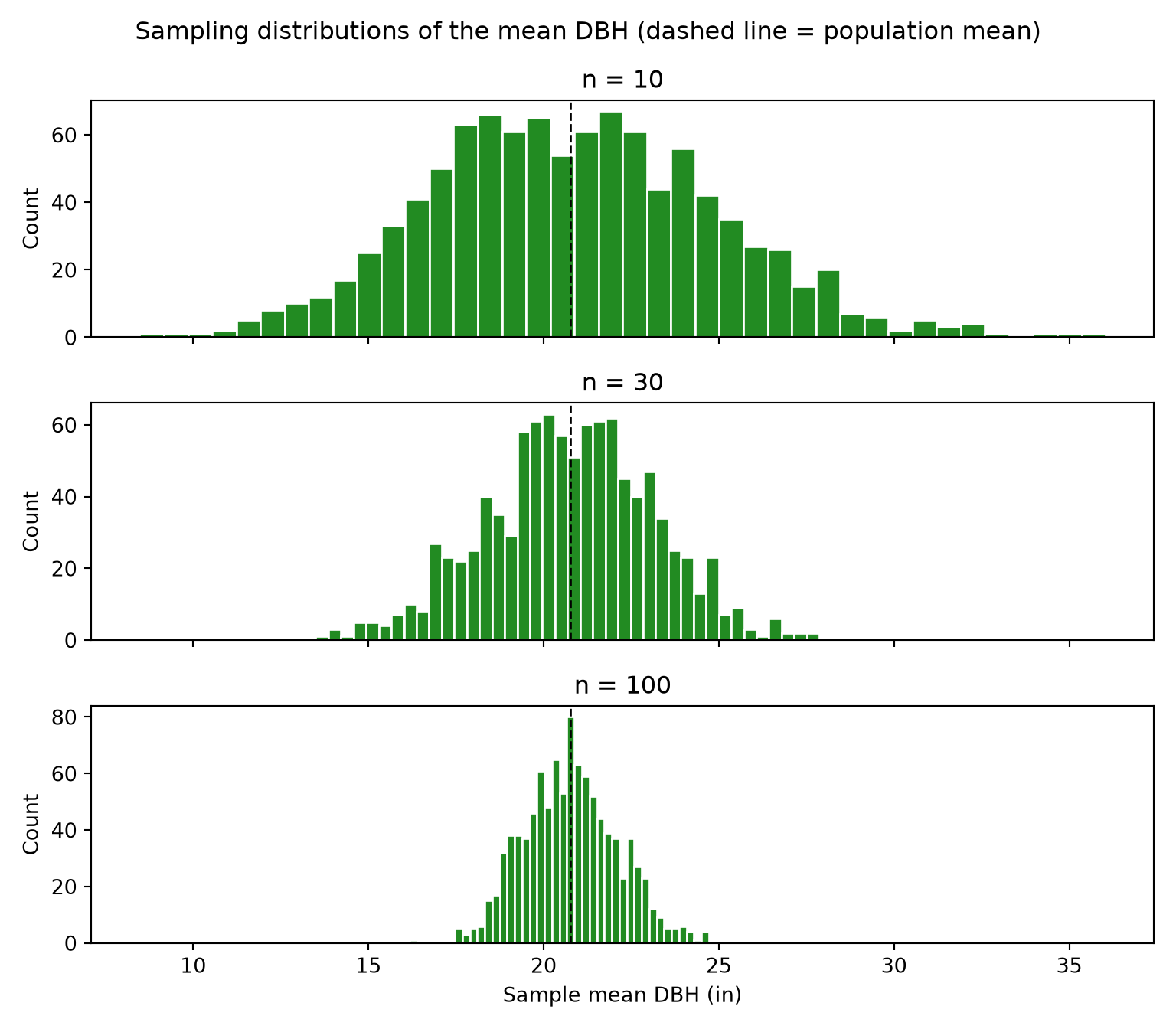
Notice three things:
- Centered on the truth: sample means are centered on the population mean: the sample mean is an unbiased estimator.
- Gets narrower as n grows: the spread of the sampling distribution, the standard error, shrinks in proportion to \(1/\sqrt{n}\).
- Becomes bell-shaped: even though DBH itself is strongly right-skewed (check with a histogram), the distribution of sample means becomes approximately normal. This is the Central Limit Theorem, and it is why t-tests work reasonably well on non-normal data when samples are large.
The standard deviation of the simulated sample means closely matches the theoretical standard error, \(\sigma / \sqrt{n}\).
se_table = sample_means.groupby("n")["xbar"].std().to_frame("simulated_se")
se_table["theoretical_se"] = dbh_pop.std(ddof=1) / np.sqrt(se_table.index)
print(se_table)
simulated_se theoretical_se
n
10 4.115728 4.236630
30 2.393869 2.446019
100 1.328621 1.339740Every inference procedure needs an approximation of the sampling distribution. There are two ways to get one:
-
Theory (distribution-based): mathematics tells us the sampling distribution follows a known shape (normal, t, F, \(\chi^2\)) under certain assumptions. This is what
ttest_ind(),f_oneway(), andchi2_contingency()do. -
Simulation (resampling-based): we use the computer to build the sampling distribution by resampling the data (bootstrapping for confidence intervals, permuting for hypothesis tests). This is what SciPy’s
bootstrap()andpermutation_test()functions do.
When assumptions hold, the two approaches agree closely. When they disagree, that is a signal to look harder at your data.
6.6 Confidence Intervals
A confidence interval (CI) gives a range of plausible values for a parameter. Its width communicates our uncertainty.
6.6.1 Theory-Based CI
The ttest_1samp() function performs a one-sample t-test. The returned result object has a confidence_interval() method that returns a CI for the mean based on the t distribution.
print(stats.ttest_1samp(sample_30["dbh"], popmean=0).confidence_interval())ConfidenceInterval(low=np.float64(15.95794616122054), high=np.float64(27.44205383877945))6.6.2 Bootstrap CI
The bootstrap idea: treat the sample as a stand-in for the population, and resample from the sample, with replacement, to see how much the statistic varies. Table 6.2 describes the SciPy functions that we use for simulation-based inference in this chapter.
| Function | Purpose |
|---|---|
bootstrap() |
Resample the data with replacement to estimate a confidence interval for a statistic |
permutation_test() |
Shuffle group labels (or pairings) to build a null distribution and obtain a p-value |
monte_carlo_test() |
Compare a statistic to values computed from data simulated under a null distribution |
The bootstrap() function requires the data as a sequence of samples (here, a tuple containing a single array) and a function that calculates the statistic of interest. We generate 2,000 bootstrap samples and use the percentile method, in which the CI is defined by the 2.5th and 97.5th percentiles of the bootstrap distribution. The result object stores the CI and the bootstrap distribution, which we graph as a histogram.
boot = stats.bootstrap((sample_30["dbh"].to_numpy(),), np.mean, n_resamples=2000,
                       confidence_level=0.95, method="percentile", random_state=rng)
print(boot.confidence_interval)
ConfidenceInterval(low=np.float64(16.503333333333334), high=np.float64(27.17675))fig, ax = plt.subplots(figsize=(8, 4))
ax.hist(boot.bootstrap_distribution, bins=30, color="grey", edgecolor="white")
for endpoint in boot.confidence_interval:
ax.axvline(endpoint, color="forestgreen", linewidth=2)
ax.set_xlabel("Bootstrap mean DBH (in)")
ax.set_ylabel("Count")
plt.show()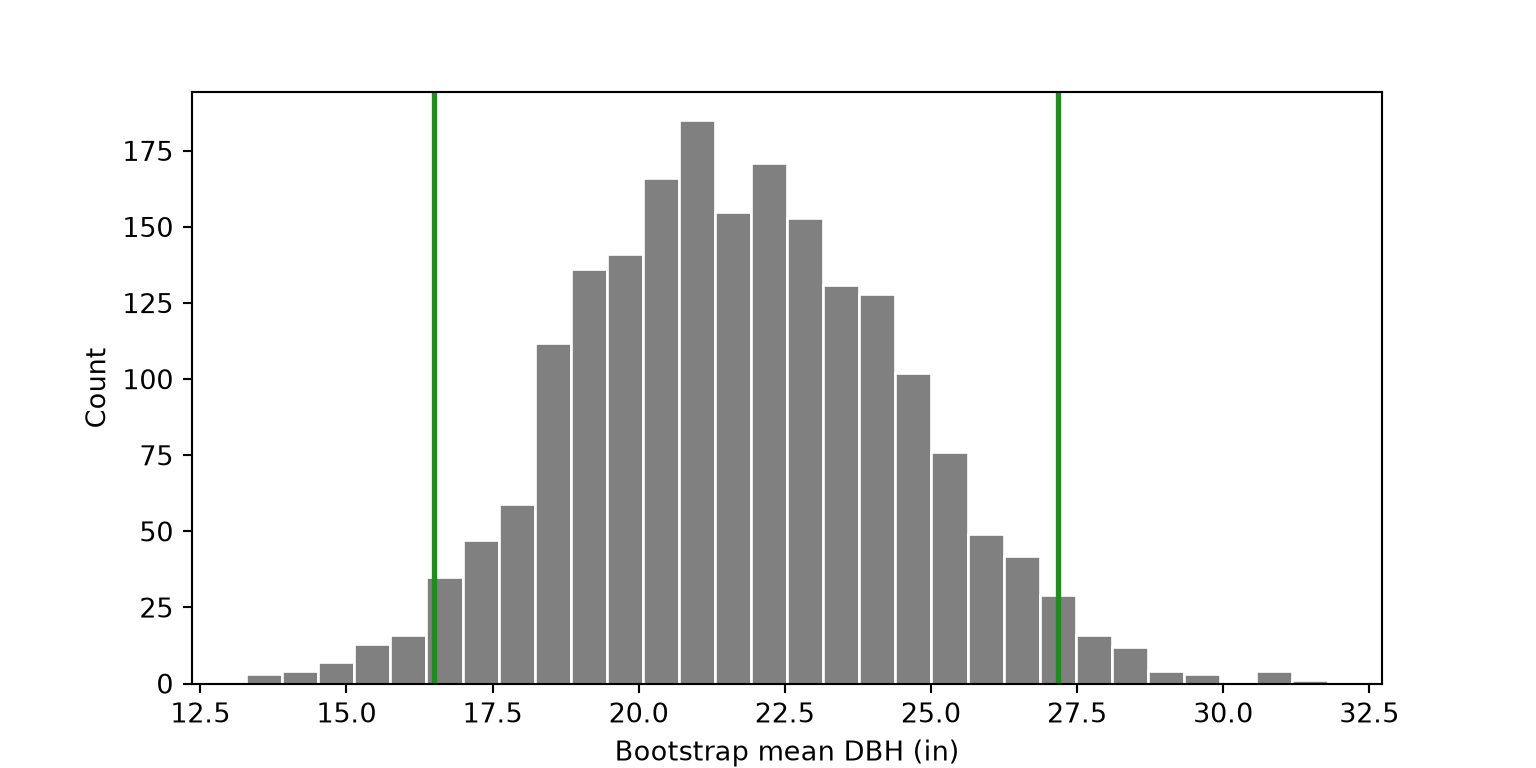
6.6.3 Demo: What “95% Confidence” Actually Means
“95% confident” does not mean there is a 95% probability the true mean is inside this particular interval. It means that the method produces intervals that capture the true parameter about 95% of the time across repeated samples. Because we have the “population,” we can check this directly. Below, we draw 100 samples of 30 trees, calculate a 95% CI for each, and record whether each interval captures the population mean.
ci_rows = []
for rep in range(100):
    s = rng.choice(dbh_pop, size=30, replace=False)
    ci = stats.ttest_1samp(s, popmean=0).confidence_interval()
    ci_rows.append({"replicate": rep, "conf_low": ci.low, "conf_high": ci.high})
ci_sim = pd.DataFrame(ci_rows)
ci_sim["captures"] = (ci_sim["conf_low"] <= pop_mean_dbh) & (ci_sim["conf_high"] >= pop_mean_dbh)

print(ci_sim["captures"].mean())0.96fig, ax = plt.subplots(figsize=(8, 7))
colors = np.where(ci_sim["captures"], "grey", "firebrick")
ax.hlines(ci_sim["replicate"], ci_sim["conf_low"], ci_sim["conf_high"], colors=colors)
ax.axvline(pop_mean_dbh, color="black", linestyle="--")
ax.set_xlabel("95% CI for mean DBH (in)")
ax.set_ylabel("Sample")
ax.set_title("100 confidence intervals from 100 random samples (red = misses true mean)")
plt.show()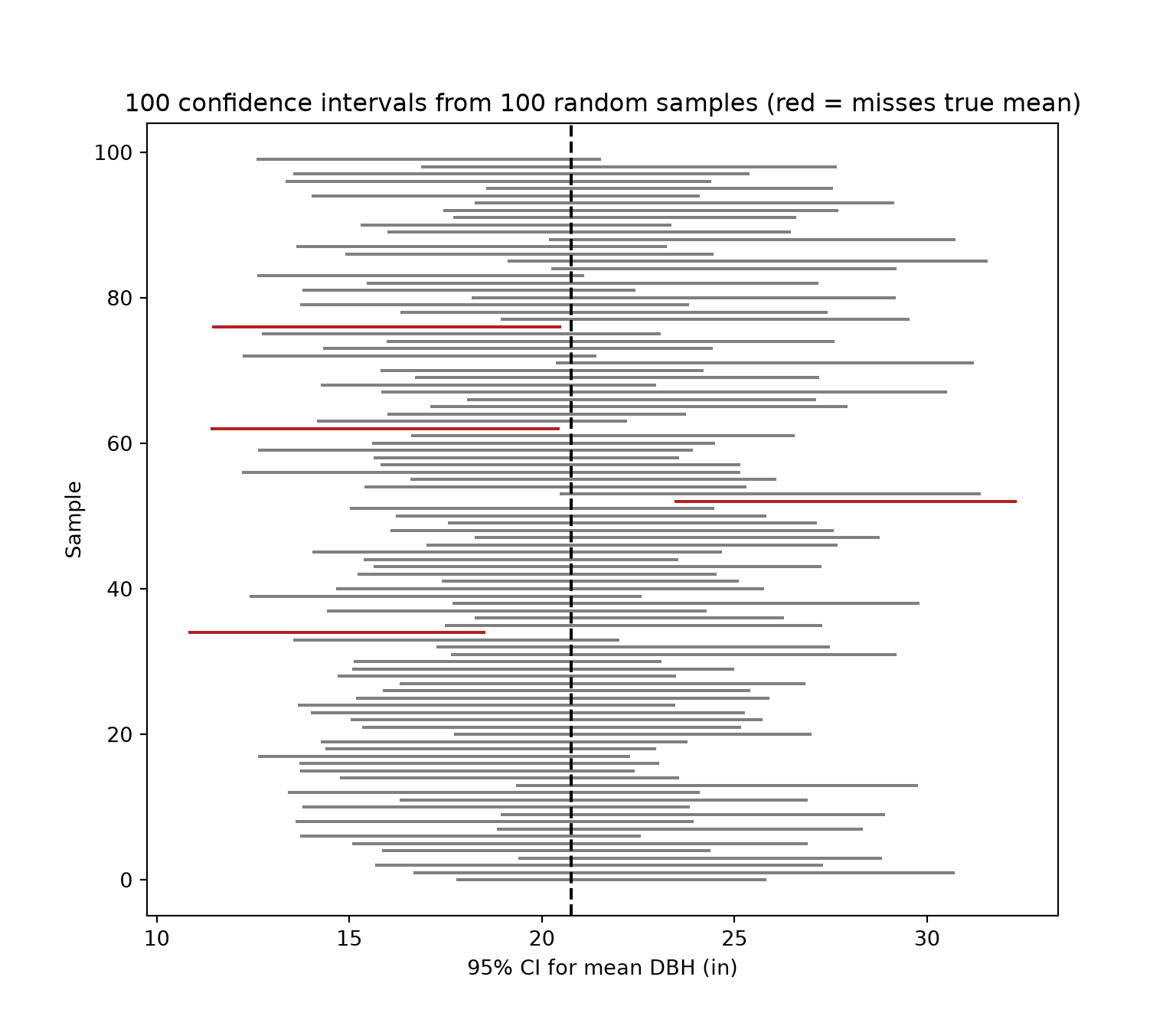
Change size=30 to size=100. What happens to the widths of the intervals? What happens to the capture rate? Then change the confidence level with confidence_interval(confidence_level=0.80).
6.7 The Logic of Hypothesis Testing
Every hypothesis test follows the same recipe:
- State a null hypothesis (\(H_0\), “nothing interesting is going on”) and an alternative hypothesis (\(H_A\)).
- Choose a test statistic that measures the departure from \(H_0\).
- Find the null distribution: how the statistic would vary if \(H_0\) were true.
- Compare the observed statistic to the null distribution to get a p-value.
- Make a decision at a pre-chosen significance level \(\alpha\) (commonly 0.05) and, more importantly, interpret in context.
| \(H_0\) is true | \(H_0\) is false | |
|---|---|---|
| Reject \(H_0\) | Type I error (rate = \(\alpha\)) | Correct (rate = power) |
| Fail to reject | Correct | Type II error (rate = \(\beta\)) |
The permutation test makes step 3 intuitive: if group labels truly don’t matter (\(H_0\)), then shuffling them shouldn’t change anything. So we shuffle the labels many times, recompute the statistic each time, and see where our real statistic falls.
6.8 Comparing Two Groups: The t-test
Question: Do native and non-native park trees differ in mean trunk diameter (diameter at breast height or DBH)?
6.8.1 Explore First
We can use summary statistics and grouped box plots to compare the central tendency and distribution of DBH for native and non-native trees for the entire population. The results suggest that the native trees have a larger DBH on average.
print(trees.groupby("native")["dbh"].agg(["count", "mean", "median", "std"])) count mean median std
native
Native 10922 24.915805 25.8 12.843110
Non-native 14196 17.576216 14.8 12.933192fig, ax = plt.subplots(figsize=(6, 4))
sns.boxplot(data=trees, x="native", y="dbh", color="darkseagreen",
flierprops={"alpha": 0.2}, ax=ax)
ax.set_yscale("log")
ax.set_xlabel("")
ax.set_ylabel("DBH (in, log scale)")
plt.show()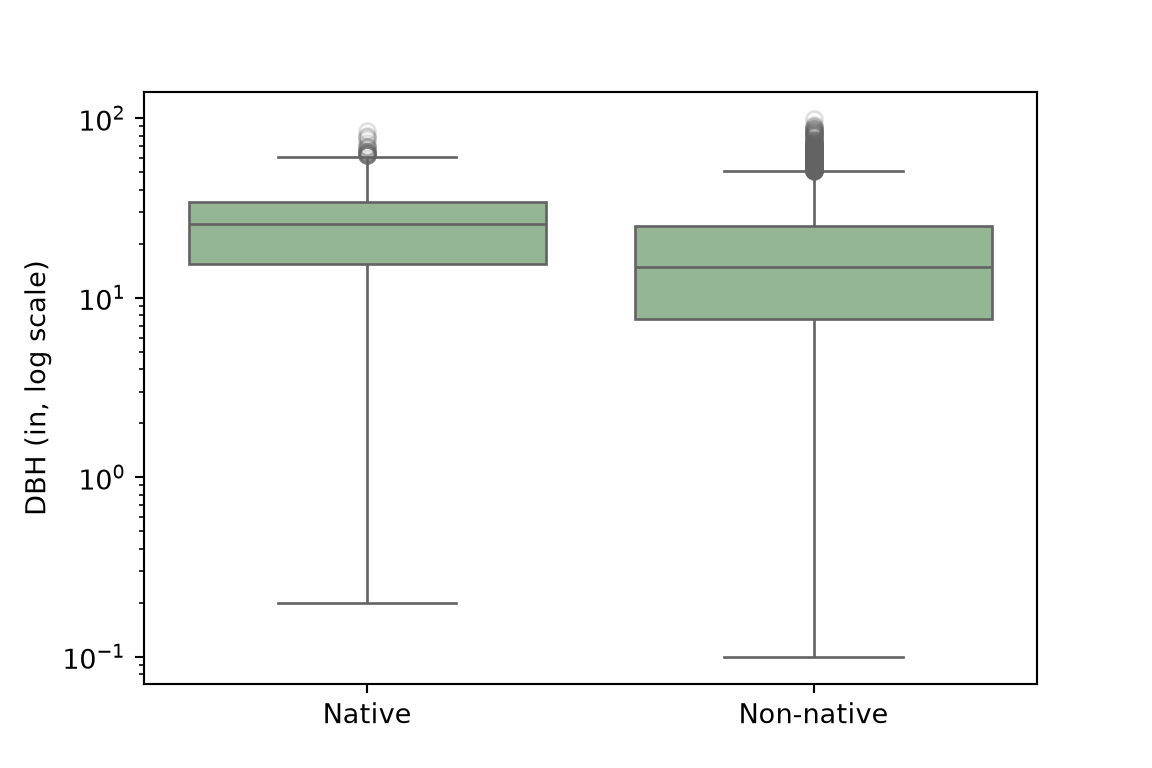
6.8.2 Working with a Sample
Testing on the full inventory of tens of thousands of trees would make nearly any difference “significant.” To mimic a realistic field study, we’ll take a random sample of 60 trees per group. Applying sample() to a grouped DataFrame samples separately from each group. For convenience, we also extract the DBH values for each group as NumPy arrays.
tree_sample = trees.groupby("native").sample(n=60, random_state=rng)

dbh_nat = tree_sample.loc[tree_sample["native"] == "Native", "dbh"].to_numpy()
dbh_non = tree_sample.loc[tree_sample["native"] == "Non-native", "dbh"].to_numpy()
6.8.3 Theory-Based: Welch’s t-test
The ttest_ind() function performs a two-sample t-test. Setting equal_var=False results in Welch’s t-test, which does not assume equal variances. This is almost always the better choice; only assume equal variances with good reason. The confidence_interval() method of the result returns a CI for the difference in means (native minus non-native).
t_res = stats.ttest_ind(dbh_nat, dbh_non, equal_var=False)
print(t_res)
TtestResult(statistic=np.float64(3.3842484300481335), pvalue=np.float64(0.0010003080969895601), df=np.float64(106.38065635583209))print(t_res.confidence_interval())ConfidenceInterval(low=np.float64(3.297461991263007), high=np.float64(12.624871342070328))The test suggests that the two groups have different mean DBHs since the obtained p-value is lower than the pre-defined threshold (0.05), and the confidence interval for the difference in means does not include zero.
6.8.4 Simulation-Based: Permutation Test
We now implement a permutation test using permutation_test(). The null hypothesis is that the mean DBH is not different between the two groups (or, mean DBH is independent of group). We first define a function that calculates the statistic of interest, the difference in means. The axis parameter allows SciPy to calculate the statistic for many permutations at once, which is much faster than using a loop. The group labels are permuted 2,000 times (permutation_type="independent") to estimate the null distribution, and the observed difference in means is compared to this distribution. This test also suggests a statistical difference since the obtained p-value is lower than our predefined threshold (0.05).
def diff_in_means(x, y, axis=0):
    return np.mean(x, axis=axis) - np.mean(y, axis=axis)

perm_res = stats.permutation_test((dbh_nat, dbh_non), diff_in_means,
                                  permutation_type="independent", n_resamples=2000,
                                  alternative="two-sided", random_state=rng)
print(perm_res.statistic, perm_res.pvalue)
7.961166666666667 0.0009995002498750624fig, ax = plt.subplots(figsize=(8, 4))
ax.hist(perm_res.null_distribution, bins=30, color="grey", edgecolor="white")
for value in [perm_res.statistic, -perm_res.statistic]:
ax.axvline(value, color="firebrick", linewidth=2)
ax.set_xlabel("Difference in mean DBH under the null hypothesis (in)")
ax.set_ylabel("Count")
plt.show()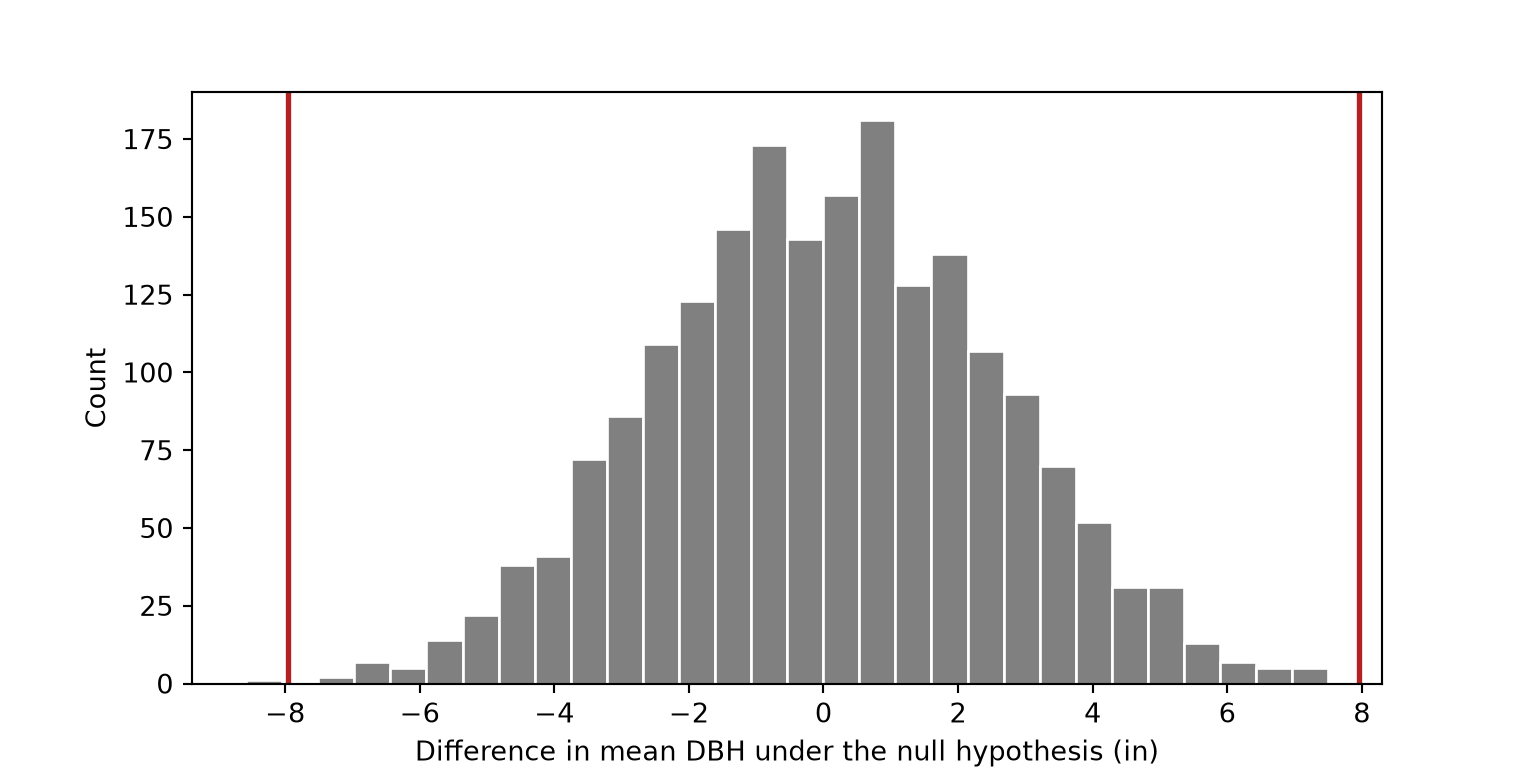
We next obtain a bootstrap confidence interval for the difference in means. Note that the range does not include zero. The range is also similar to the result obtained using the t-test.
boot_diff = stats.bootstrap((dbh_nat, dbh_non), diff_in_means, n_resamples=2000,
                            method="percentile", random_state=rng)
print(boot_diff.confidence_interval)
ConfidenceInterval(low=np.float64(3.3094583333333296), high=np.float64(12.626650000000007))The permutation test does not rely on the t distribution. If you would like to compare the two approaches visually, overlay the theoretical t distribution, stats.t.pdf(), scaled by the standard error of the difference in means, on the histogram of the permutation null distribution.
6.8.5 Effect Size
A p-value tells you whether a difference is detectable; an effect size tells you whether it is meaningful. Cohen’s d expresses the mean difference in standard deviation units (rough guide: 0.2 small, 0.5 medium, 0.8 large). It is calculated by dividing the difference in means by the pooled standard deviation.
n1, n2 = len(dbh_nat), len(dbh_non)
s1, s2 = dbh_nat.std(ddof=1), dbh_non.std(ddof=1)
pooled_sd = np.sqrt(((n1 - 1) * s1**2 + (n2 - 1) * s2**2) / (n1 + n2 - 2))
cohens_d = (dbh_nat.mean() - dbh_non.mean()) / pooled_sd
print(cohens_d)0.61787640177960256.8.6 Checking Assumptions and a Nonparametric Alternative
DBH is right-skewed. With 60 per group, the Central Limit Theorem gives us some protection, but it’s worth checking. The kernel density plots and QQ-plots generated below suggest non-normality or a right-skewed distribution, especially for the non-native trees. The probplot() function from SciPy generates the QQ-plots by comparing the ordered data to the quantiles of a normal distribution.
g = sns.displot(data=tree_sample, x="dbh", col="native", kind="kde", height=3.5, aspect=1.2)
plt.show()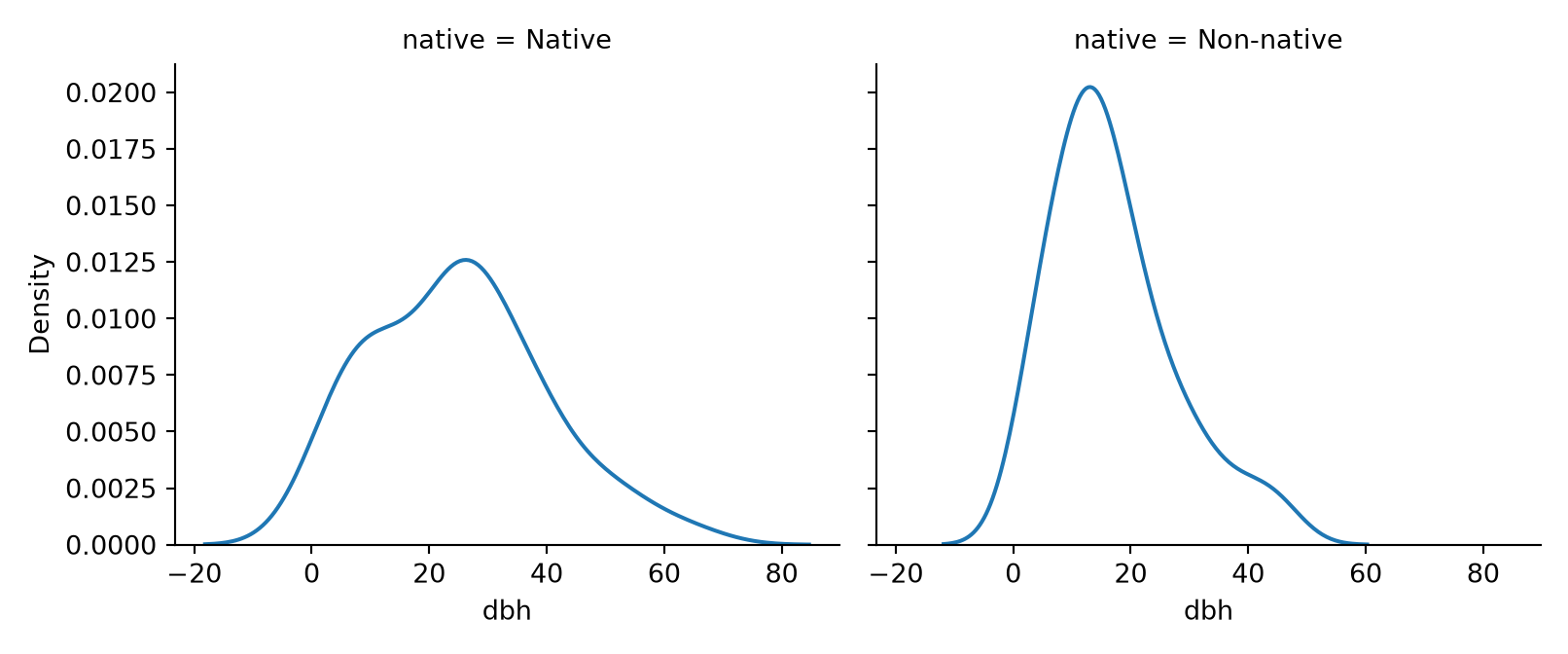
fig, axs = plt.subplots(1, 2, figsize=(9, 3.5))
for ax, (name, values) in zip(axs, [("Native", dbh_nat), ("Non-native", dbh_non)]):
    stats.probplot(values, dist="norm", plot=ax)
    ax.set_title(name)
plt.tight_layout()
plt.show()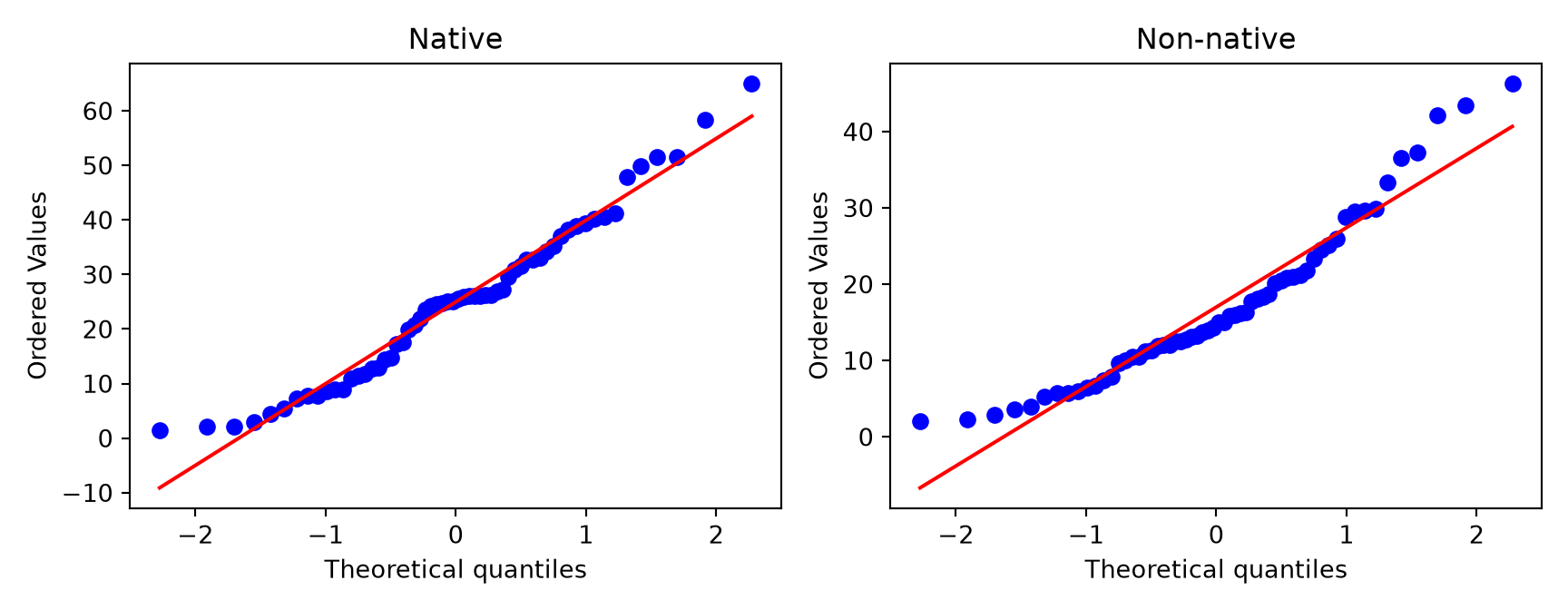
When data are skewed or contain outliers, the Wilcoxon rank-sum test (also called Mann–Whitney U) compares groups using ranks rather than raw values. It asks whether values in one group tend to be larger than in the other group. The test is performed using mannwhitneyu(). As with the parametric tests above, this test suggests statistical significance since the obtained p-value is lower than our pre-defined threshold (0.05).
print(stats.mannwhitneyu(dbh_nat, dbh_non, alternative="two-sided"))MannwhitneyuResult(statistic=np.float64(2377.0), pvalue=np.float64(0.002478657097292717))Nonparametric tests trade a little power (when parametric assumptions hold) for robustness (when they don’t). Note also that they often test a slightly different hypothesis (e.g., Wilcoxon is about the location shift / stochastic ordering, not the mean).
6.9 Comparing Three or More Groups: ANOVA
Question: Does mean tree height differ among functional types (broadleaf/conifer, deciduous/evergreen)?
Why not just run a t-test on every pair? Because each test carries a chance of a false positive, and those chances add up. ANOVA asks one omnibus question first: is there any difference among the group means at all? Looking at the grouped box plots below, it would appear that at least some of the groups are different. For example, conifer evergreen trees tend to be taller than the other groups. As a result, this is worth exploring statistically.
height_sample = trees.groupby("functional_type").sample(n=40, random_state=rng)

print(height_sample.groupby("functional_type")["tree_height"].agg(["count", "mean", "std"]))
count mean std
functional_type
Broadleaf deciduous 40 41.500 22.189163
Broadleaf evergreen 40 30.700 15.916771
Conifer deciduous 40 41.450 28.498268
Conifer evergreen 40 91.375 41.020750fig, ax = plt.subplots(figsize=(9, 4))
sns.boxplot(data=height_sample, x="functional_type", y="tree_height",
color="darkseagreen", ax=ax)
ax.set_xlabel("")
ax.set_ylabel("Tree height (ft)")
plt.show()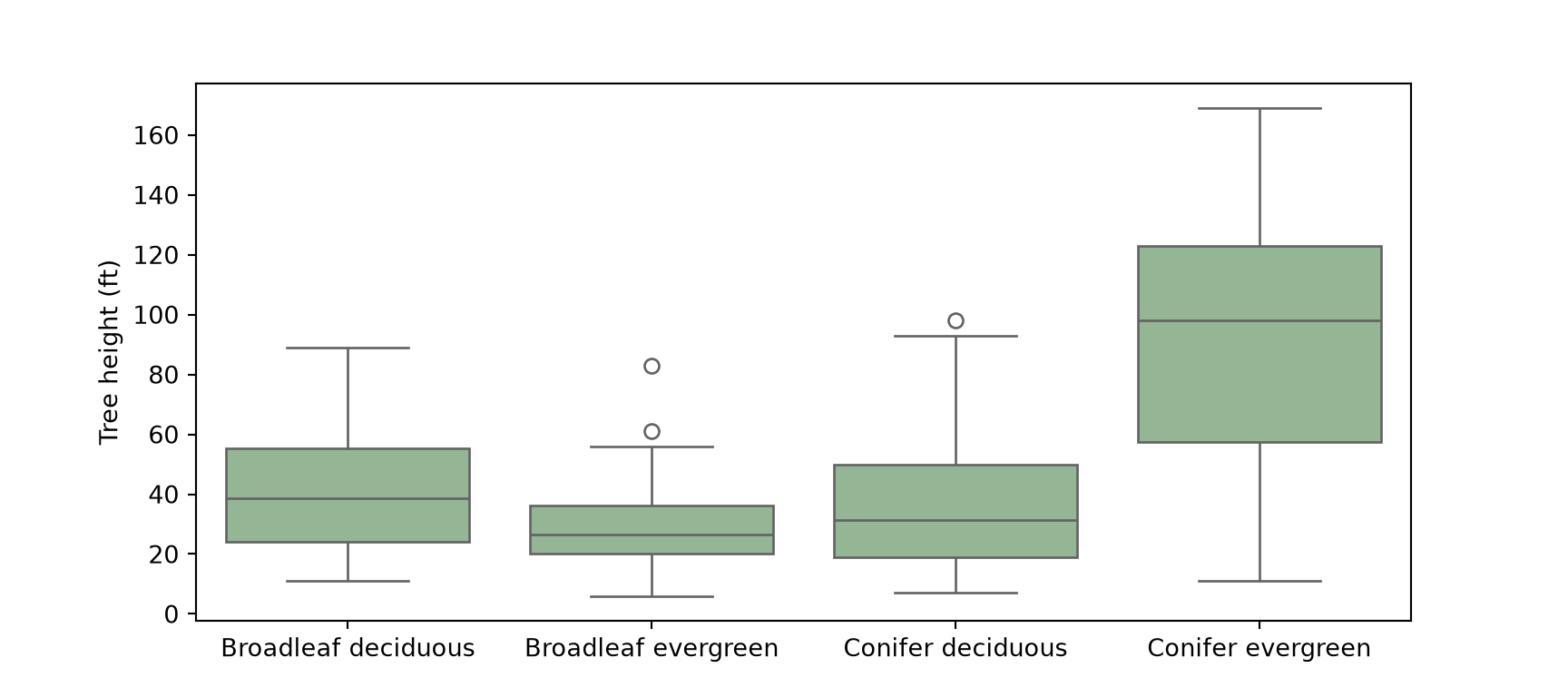
When applied to grouped data, sample() returns an error if a group has fewer rows than the requested sample size. All four functional types include more than 200 trees, so this is not an issue here. If it were, you could sample each group separately using min() to limit the sample size to the number of available rows.
6.9.1 Theory-Based: ANOVA and Welch’s ANOVA
The F statistic compares variation between group means to variation within groups. Large F = group means are farther apart than within-group noise would suggest. The quickest way to perform a one-way ANOVA is f_oneway(), which accepts the values for each group as separate arrays. Here, we generate a list containing an array for each group and unpack it using *.
ANOVA can also be performed by fitting a linear model with the ols() function from Statsmodels and a formula, where C() indicates that the predictor is categorical, and then using anova_lm() to produce an ANOVA table. Lastly, anova_oneway() with use_var="unequal" performs Welch’s ANOVA, which does not assume equal variances. The results of all three tests suggest statistical significance (very low p-values). Note that these tests do not offer any information about which pairs of groups are different.
groups = [grp["tree_height"].to_numpy() for _, grp in height_sample.groupby("functional_type")]
print(stats.f_oneway(*groups))
F_onewayResult(statistic=np.float64(36.59323691508282), pvalue=np.float64(5.8003330587722875e-18))anova_fit = ols("tree_height ~ C(functional_type)", data=height_sample).fit()
print(sm.stats.anova_lm(anova_fit, typ=2)) sum_sq df F PR(>F)
C(functional_type) 88936.81875 3.0 36.593237 5.800333e-18
Residual 126381.67500 156.0 NaN NaN# Welch's ANOVA does not assume equal variances
welch = anova_oneway(height_sample["tree_height"], height_sample["functional_type"],
use_var="unequal")
print(welch.statistic, welch.pvalue)25.15327742682214 1.150903993234727e-11Since the ANOVA test has assumptions, it is necessary to explore any issues that may invalidate the results. This includes homoscedasticity (the residuals, or errors, do not vary with the predicted values) and normality of the residuals. Plotting the fitted values against the residuals should show no trend, and a QQ-plot should show limited divergence from the 1:1 line. The fitted values and residuals are available as properties of the fitted model. In the graphs below, the QQ-plot suggests that the residuals are approximately normal. However, the residuals for the conifer evergreen group, which has the largest fitted value, are much more spread out than those of the other groups. This indicates unequal variances, which is why it is valuable to also run Welch’s ANOVA, which does not assume equal variances. Both versions of the test suggest a strong difference between groups.
fig, axs = plt.subplots(1, 2, figsize=(10, 4))
axs[0].scatter(anova_fit.fittedvalues, anova_fit.resid, alpha=0.5)
axs[0].axhline(0, color="grey", linestyle="--")
axs[0].set_xlabel("Fitted values")
axs[0].set_ylabel("Residuals")
axs[0].set_title("Residuals vs Fitted")
sm.qqplot(anova_fit.resid, line="s", ax=axs[1])
axs[1].set_title("Normal Q-Q")
plt.tight_layout()
plt.show()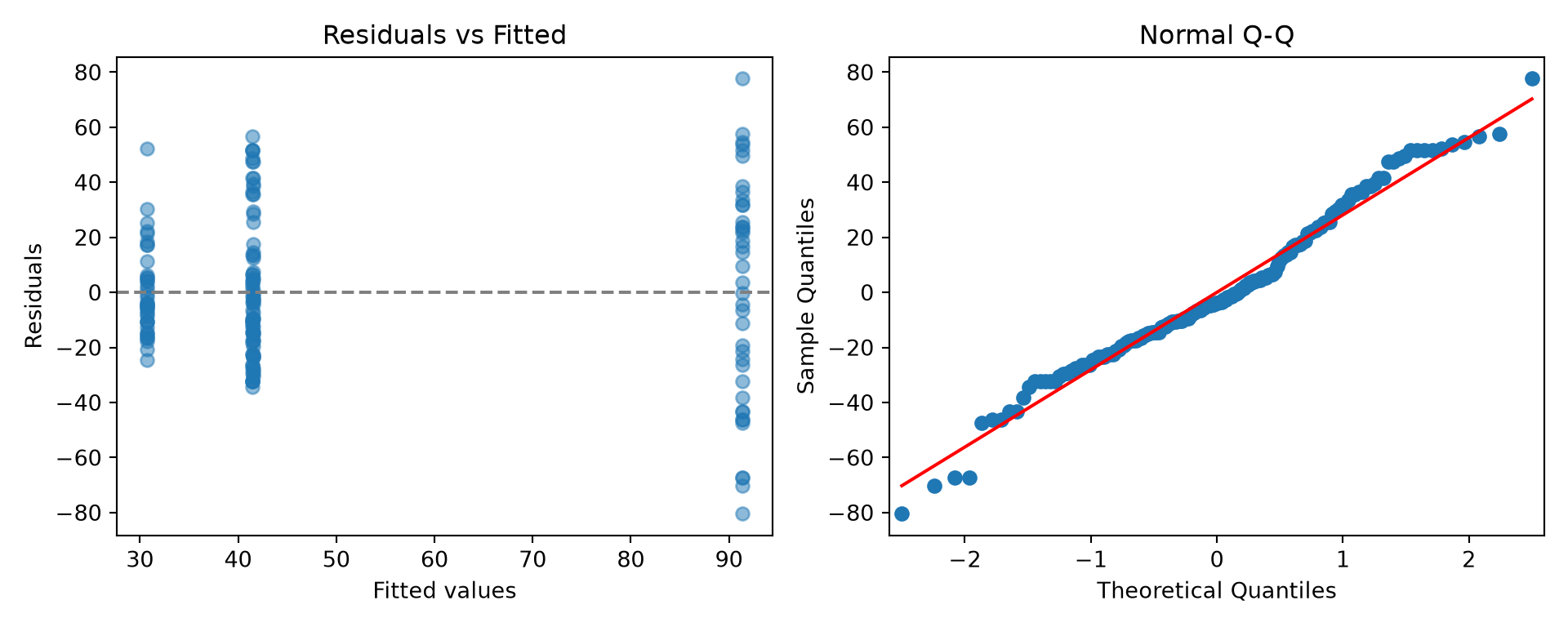
6.9.2 Simulation-Based: Permutation F Test
We now execute the test using a permutation-based method. The statistic is the F statistic returned by f_oneway(), which also accepts an axis parameter. The results also suggest a statistical difference based on the obtained p-value. We overlay the theoretical F distribution, with \(k-1\) and \(N-k\) degrees of freedom for \(k\) groups and \(N\) observations, on the permutation distribution: a nice visual check of whether the two approaches agree.
def f_stat(*samples, axis=0):
    return stats.f_oneway(*samples, axis=axis).statistic

perm_F = stats.permutation_test(groups, f_stat, permutation_type="independent",
                                n_resamples=2000, alternative="greater", random_state=rng)
print(perm_F.statistic, perm_F.pvalue)
36.59323691508282 0.0004997501249375312k, N = len(groups), sum(len(g) for g in groups)
x = np.linspace(0, max(perm_F.null_distribution.max(), perm_F.statistic) * 1.05, 300)
fig, ax = plt.subplots(figsize=(8, 4))
ax.hist(perm_F.null_distribution, bins=40, density=True, color="grey", edgecolor="white")
ax.plot(x, stats.f.pdf(x, k - 1, N - k), color="steelblue", linewidth=2)
ax.axvline(perm_F.statistic, color="firebrick", linewidth=2)
ax.set_xlabel("F statistic")
ax.set_ylabel("Density")
plt.show()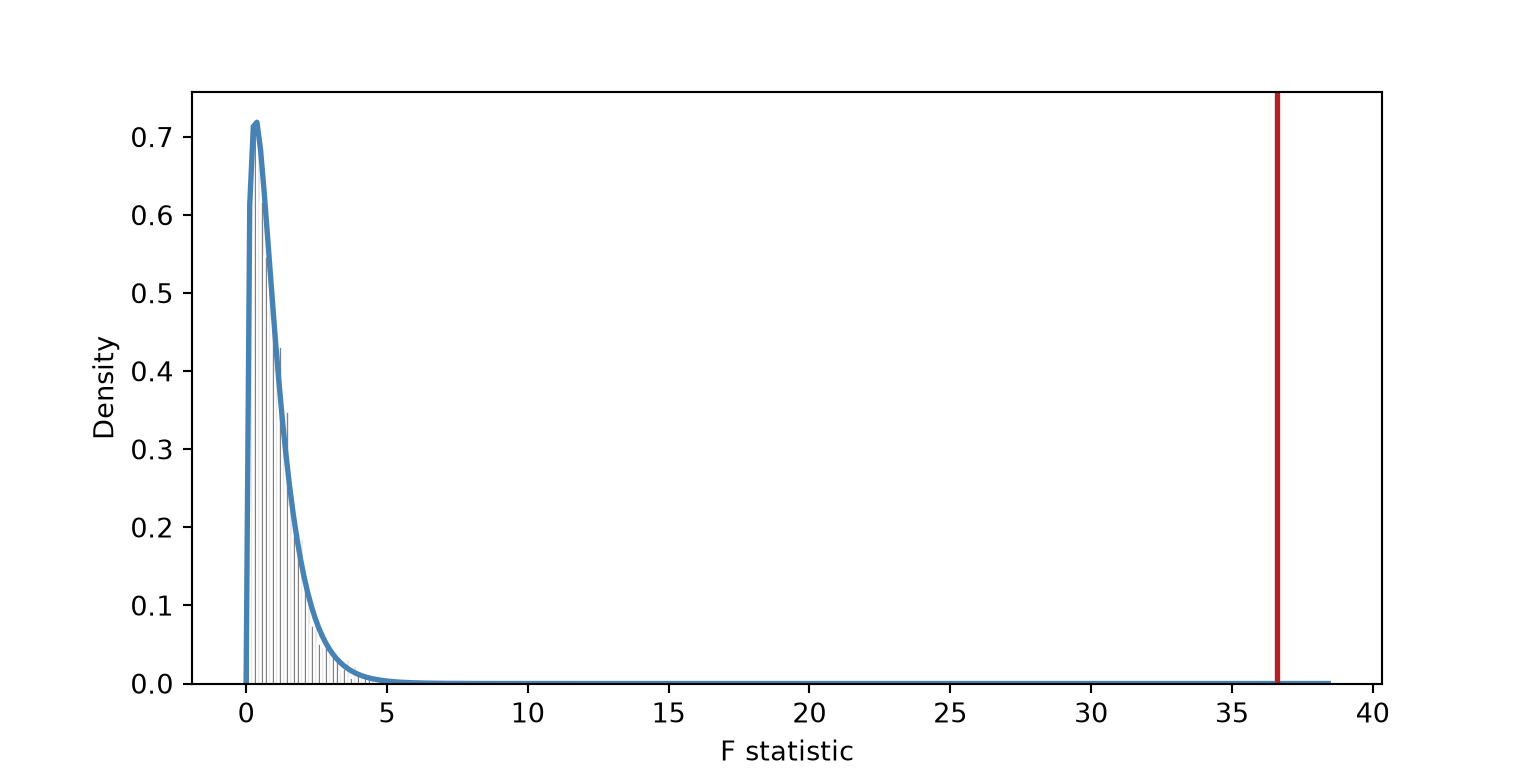
6.9.3 Nonparametric Alternative: Kruskal-Wallis
Here, we demonstrate the Kruskal-Wallis test, a nonparametric alternative to ANOVA that is based on ranks. The null hypothesis of this test is that all groups come from the same distribution. Similar to the ANOVA implementations demonstrated above, this test suggests a statistical difference between at least two of the groups.
print(stats.kruskal(*groups))KruskalResult(statistic=np.float64(49.00303060720581), pvalue=np.float64(1.302520683134727e-10))6.9.4 Pairwise Comparisons
A significant ANOVA tells you some means differ, but not which pair(s) of means differ. Pairwise comparisons answer that follow-up question.
Tukey’s Honest Significant Differences gives adjusted p-values and simultaneous confidence intervals for every pair. Intervals that do not cross zero indicate pairs that differ. Tukey’s test is performed using pairwise_tukeyhsd() from Statsmodels. We convert the summary table to a DataFrame so that the differences and confidence intervals can be graphed.
tukey = pairwise_tukeyhsd(height_sample["tree_height"], height_sample["functional_type"])
print(tukey)
Multiple Comparison of Means - Tukey HSD, FWER=0.05
===============================================================================
group1 group2 meandiff p-adj lower upper reject
-------------------------------------------------------------------------------
Broadleaf deciduous Broadleaf evergreen -10.8 0.3288 -27.3282 5.7282 False
Broadleaf deciduous Conifer deciduous -0.05 1.0 -16.5782 16.4782 False
Broadleaf deciduous Conifer evergreen 49.875 0.0 33.3468 66.4032 True
Broadleaf evergreen Conifer deciduous 10.75 0.3329 -5.7782 27.2782 False
Broadleaf evergreen Conifer evergreen 60.675 0.0 44.1468 77.2032 True
Conifer deciduous Conifer evergreen 49.925 0.0 33.3968 66.4532 True
-------------------------------------------------------------------------------summary = tukey.summary().data
tukey_df = pd.DataFrame(summary[1:], columns=summary[0])
tukey_df["contrast"] = tukey_df["group2"] + " - " + tukey_df["group1"]
fig, ax = plt.subplots(figsize=(8, 4))
ax.errorbar(tukey_df["meandiff"], tukey_df["contrast"],
xerr=[tukey_df["meandiff"] - tukey_df["lower"], tukey_df["upper"] - tukey_df["meandiff"]],
fmt="o", color="black", capsize=3)
ax.axvline(0, linestyle="--", color="grey")
ax.set_xlabel("Difference in mean height (ft), 95% family-wise CI")
plt.tight_layout()
plt.show()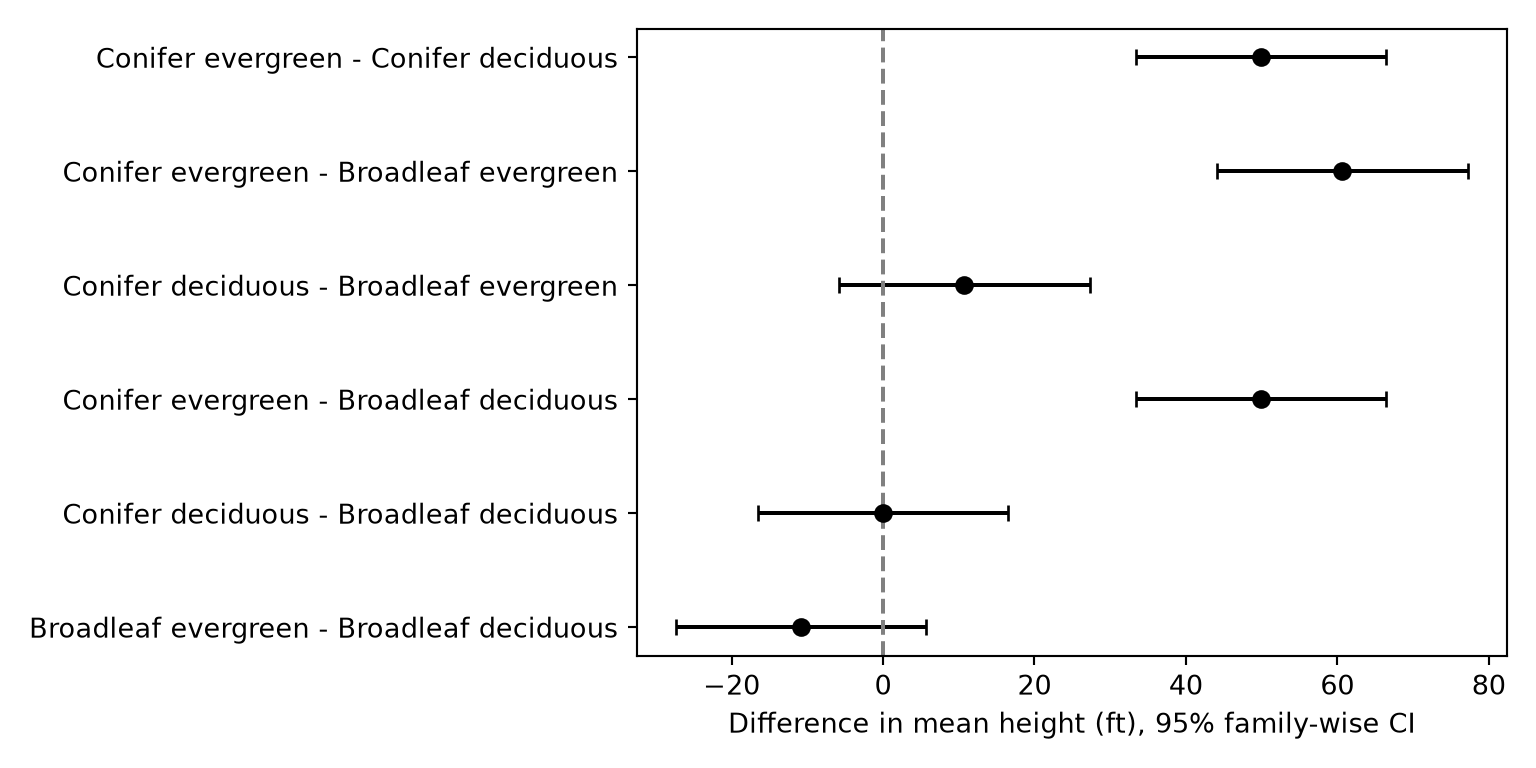
In this example, the conifer evergreen group is suggested to be different from the other three groups. This confirms what we saw visually in the grouped box plot above.
There are other options available, including pairwise Welch t-tests with a Holm adjustment and pairwise Wilcoxon rank-sum tests, which are often performed after a statistically significant result from the Kruskal-Wallis test. SciPy does not provide a single function for these, so we write a function that performs a test for every pair of groups, which are obtained using combinations() from the itertools module, and then adjusts the p-values using multipletests() from Statsmodels.
def pairwise_tests(df, value, group, test, method="holm"):
    """Run a two-sample test for every pair of groups and adjust the p-values."""
    rows = []
    for g1, g2 in itertools.combinations(sorted(df[group].unique()), 2):
        p = test(df.loc[df[group] == g1, value], df.loc[df[group] == g2, value]).pvalue
        rows.append({"group1": g1, "group2": g2, "p_raw": p})
    out = pd.DataFrame(rows)
    out["p_adj"] = multipletests(out["p_raw"], method=method)[1]
    return out

# Pairwise Welch t-tests with Holm adjustment (no equal-variance assumption)
print(pairwise_tests(height_sample, "tree_height", "functional_type",
                     lambda a, b: stats.ttest_ind(a, b, equal_var=False)))
group1 group2 p_raw p_adj
0 Broadleaf deciduous Broadleaf evergreen 1.468965e-02 4.406894e-02
1 Broadleaf deciduous Conifer deciduous 9.930380e-01 9.930380e-01
2 Broadleaf deciduous Conifer evergreen 6.311749e-09 3.155874e-08
3 Broadleaf evergreen Conifer deciduous 4.145030e-02 8.290061e-02
4 Broadleaf evergreen Conifer evergreen 1.201117e-11 7.206703e-11
5 Conifer deciduous Conifer evergreen 2.147924e-08 8.591694e-08# Nonparametric pairwise comparisons following Kruskal-Wallis
print(pairwise_tests(height_sample, "tree_height", "functional_type", stats.mannwhitneyu)) group1 group2 p_raw p_adj
0 Broadleaf deciduous Broadleaf evergreen 3.221276e-02 9.663829e-02
1 Broadleaf deciduous Conifer deciduous 6.824713e-01 6.824713e-01
2 Broadleaf deciduous Conifer evergreen 1.645921e-07 8.229605e-07
3 Broadleaf evergreen Conifer deciduous 2.125401e-01 4.250802e-01
4 Broadleaf evergreen Conifer evergreen 1.048725e-09 6.292352e-09
5 Conifer deciduous Conifer evergreen 2.240585e-07 8.962340e-076.9.5 Demo: Why We Adjust for Multiple Comparisons
If each test has a 5% false-positive rate, the chance of at least one false positive across \(m\) independent tests is \(1 - 0.95^m\).
m = np.arange(1, 21)
fig, ax = plt.subplots(figsize=(7, 4))
ax.plot(m, 1 - 0.95**m, marker="o")
ax.axhline(0.05, linestyle="--", color="grey")
ax.set_xlabel("Number of tests")
ax.set_ylabel("P(at least one false positive)")
plt.show()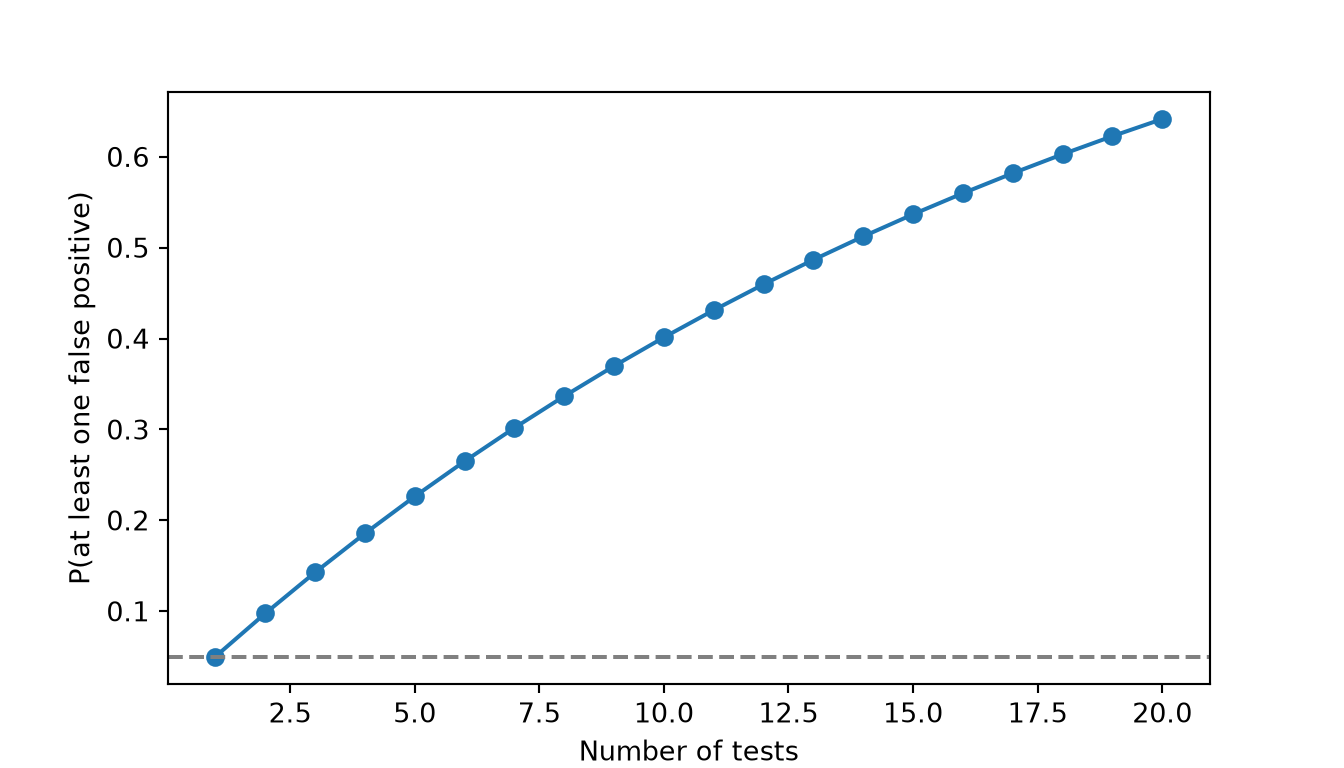
Let’s verify by simulation. We’ll create six fake groups of 20 trees by randomly sampling 120 trees and splitting them into groups (so we know for certain that \(H_0\) is true) and count how often any of the 15 pairwise comparisons comes out “significant.” For speed, the random sample is reshaped into a 6-by-20 array in which each row is a group. Without adjustment, we’d “discover” a difference between random groups far more than 5% of the time.
def any_sig(adjust):
    groups6 = rng.choice(dbh_pop, size=120, replace=False).reshape(6, 20)
    p = [stats.ttest_ind(groups6[i], groups6[j], equal_var=False).pvalue
         for i, j in itertools.combinations(range(6), 2)]
    if adjust == "holm":
        p = multipletests(p, method="holm")[1]
    return (np.array(p) < 0.05).any()

print(pd.DataFrame({"adjustment": ["none", "holm"],
                    "familywise_error": [np.mean([any_sig(a) for _ in range(500)])
                                         for a in ["none", "holm"]]}))
adjustment familywise_error
0 none 0.352
1 holm 0.0326.10 Associations Between Categorical Variables: Chi-Square
Question: Is tree condition associated with whether a tree is native?
In contrast to the methods discussed above, the chi-square test allows you to explore the association between two categorical variables. In our example, we specifically explore whether the proportions of tree conditions vary between native and non-native trees. A contingency table, or table of counts, is generated using pd.crosstab(). Setting normalize="index" converts the counts to proportions within each row. Since “condition” is a categorical data type, any category that is absent from the sample is removed using remove_unused_categories().
cond_sample = trees.sample(n=600, random_state=rng)
cond_sample["condition"] = cond_sample["condition"].cat.remove_unused_categories()

cond_tab = pd.crosstab(cond_sample["native"], cond_sample["condition"])
print(cond_tab)
condition Good Fair Poor
native
Native 13 248 15
Non-native 29 280 15print(pd.crosstab(cond_sample["native"], cond_sample["condition"], normalize="index").round(3))condition Good Fair Poor
native
Native 0.047 0.899 0.054
Non-native 0.090 0.864 0.046props = pd.crosstab(cond_sample["native"], cond_sample["condition"], normalize="index")
ax = props.plot(kind="bar", stacked=True, colormap="RdYlGn_r", figsize=(6, 4))
ax.set_xlabel("")
ax.set_ylabel("Proportion")
ax.legend(title="Condition", bbox_to_anchor=(1, 1), loc="upper left")
plt.xticks(rotation=0)
plt.show()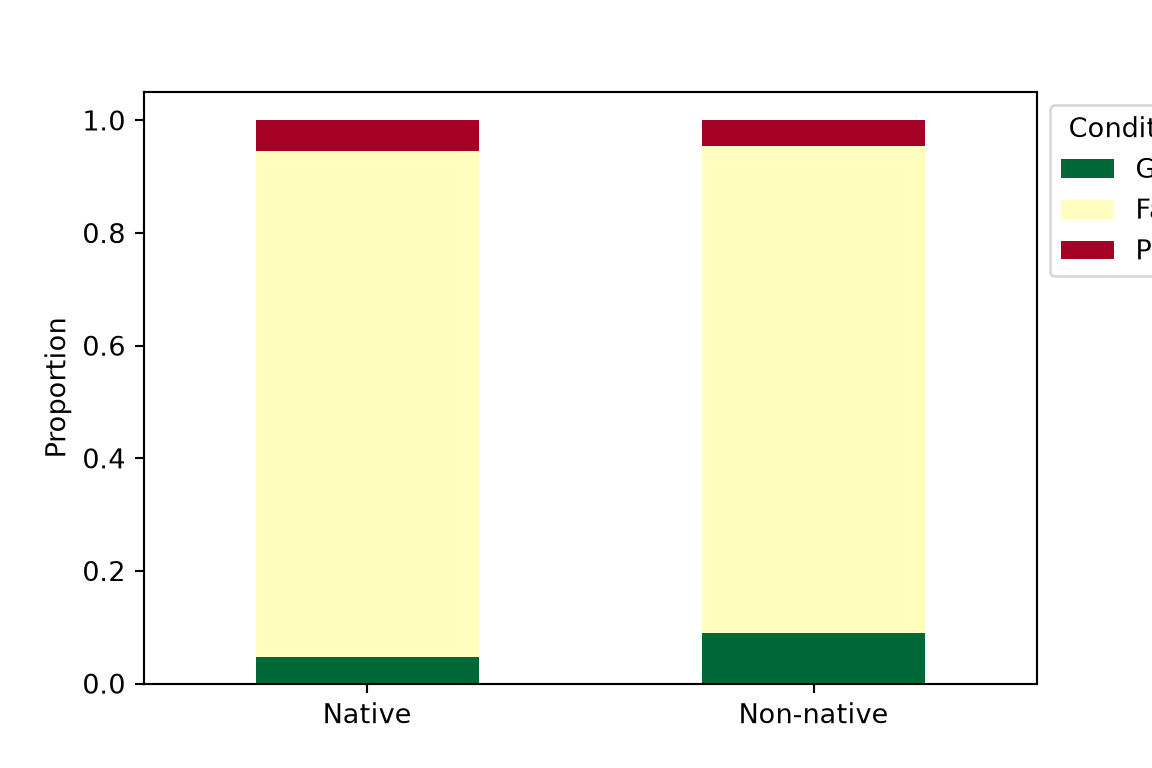
The chi-square statistic compares observed counts to the counts we’d expect if the two variables were independent. Below, we perform this analysis using the theory-based approach, as implemented with chi2_contingency(), followed by a permutation-based approach. The result object stores the expected counts. Adjusted standardized residuals show which cells drive the result; values with an absolute value greater than 2 are notable. SciPy does not calculate these directly, so we calculate them from the observed and expected counts and the row and column proportions.
chi_res = stats.chi2_contingency(cond_tab)
print(chi_res.statistic, chi_res.pvalue, chi_res.dof)
4.221650598462193 0.12113795011027867 2# Always check expected counts (rule of thumb: >= 5)
expected = pd.DataFrame(chi_res.expected_freq, index=cond_tab.index, columns=cond_tab.columns)
print(expected.round(1))condition Good Fair Poor
native
Native 19.3 242.9 13.8
Non-native 22.7 285.1 16.2# Adjusted standardized residuals show which cells drive the result (|r| > 2 is notable)
n_total = cond_tab.to_numpy().sum()
row_p = cond_tab.sum(axis=1).to_numpy()[:, None] / n_total
col_p = cond_tab.sum(axis=0).to_numpy()[None, :] / n_total
std_res = (cond_tab - expected) / np.sqrt(expected * (1 - row_p) * (1 - col_p))
print(std_res.round(2))condition Good Fair Poor
native
Native -2.03 1.29 0.45
Non-native 2.03 -1.29 -0.45Rare categories can result in expected counts below 5. When that happens, the \(\chi^2\) approximation is unreliable. In these data, the “Dead” trees are removed during cleaning since they have no functional type, and the smallest expected count in our sample is above 5. If expected counts are too small, options include combining sparse categories (e.g., “Poor” + “Dead”), using a permutation test, or, for 2 × 2 tables, using fisher_exact().
For the permutation test, we repeatedly shuffle the “native” labels relative to the “condition” labels, rebuild the contingency table, and recalculate the chi-square statistic. Since permutation_test() is designed for numeric samples, we write the loop ourselves. The categories are first converted to integer codes so that each contingency table can be built quickly using np.bincount().
nat_codes = pd.factorize(cond_sample["native"])[0]
cond_codes = cond_sample["condition"].cat.codes.to_numpy()
n_cond = len(cond_sample["condition"].cat.categories)

def chisq_stat(a, b):
    table = np.bincount(a * n_cond + b, minlength=2 * n_cond).reshape(2, n_cond)
    return stats.chi2_contingency(table, correction=False).statistic

obs_chisq = chisq_stat(nat_codes, cond_codes)
null_chisq = np.array([chisq_stat(rng.permutation(nat_codes), cond_codes) for _ in range(2000)])
print(obs_chisq, np.mean(null_chisq >= obs_chisq))
4.221650598462194 0.12x = np.linspace(0.01, null_chisq.max(), 300)
fig, ax = plt.subplots(figsize=(8, 4))
ax.hist(null_chisq, bins=40, density=True, color="grey", edgecolor="white")
ax.plot(x, stats.chi2.pdf(x, chi_res.dof), color="steelblue", linewidth=2)
ax.axvline(obs_chisq, color="firebrick", linewidth=2)
ax.set_xlabel("Chi-square statistic")
ax.set_ylabel("Density")
plt.show()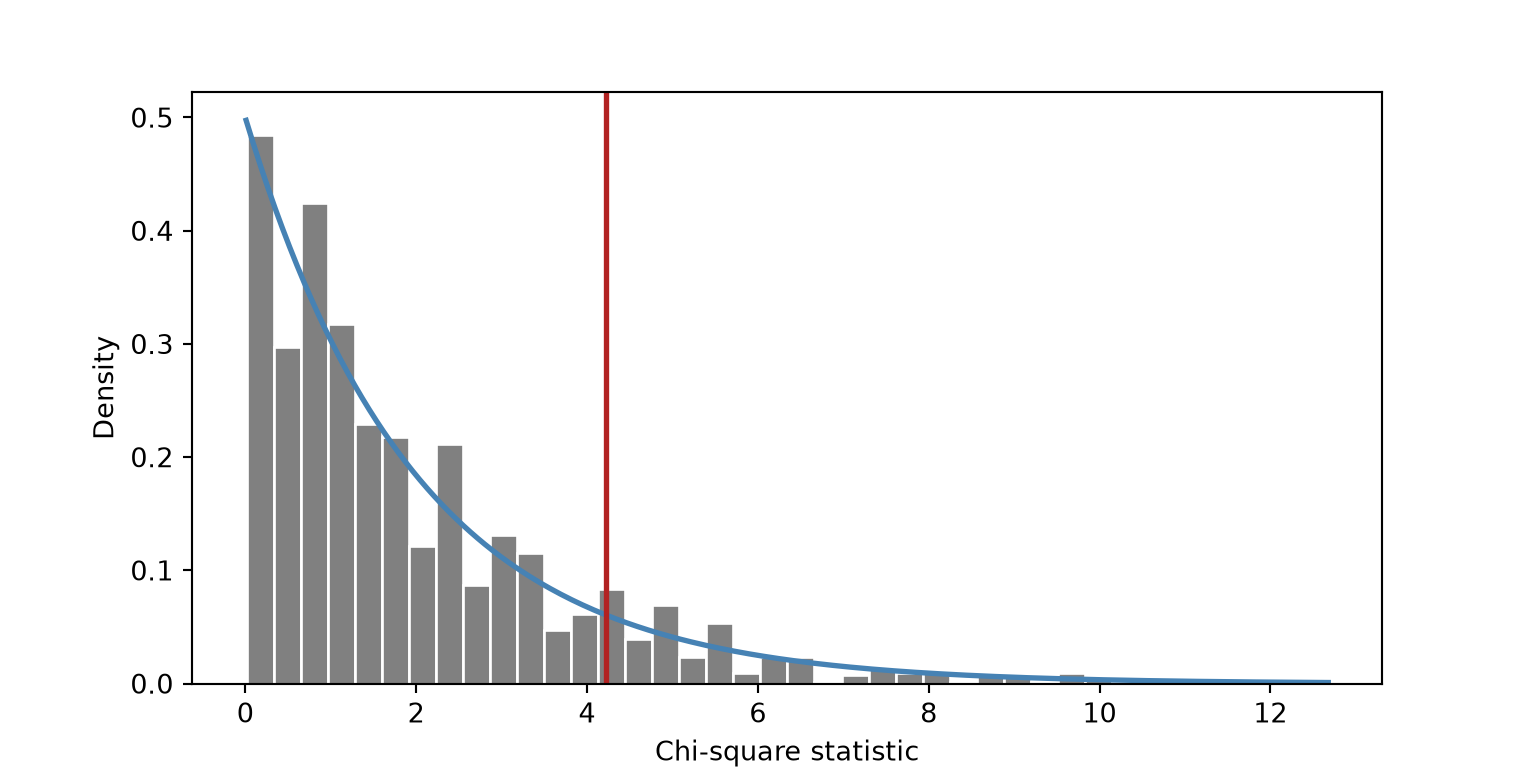
Both methods generally suggest that the proportions of condition classes do not differ between native and non-native trees (i.e., the p-values are above the 0.05 threshold). This supports the graph above, where the proportions are not drastically different between the two groups.
6.10.1 Exact Alternative: Fisher’s Test
Fisher’s exact test should be considered as an alternative to chi-square when the sample size for some of the classes is small. The usual rule of thumb is that all expected counts should be at least 5, or at least 80% of them should be at least 5 with none below 1. SciPy’s fisher_exact() function is designed for 2 × 2 tables. So, we simplify the condition to “Good” vs. “Not good” before performing the test.
cond_sample["good"] = np.where(cond_sample["condition"] == "Good", "Good", "Not good")
good_tab = pd.crosstab(cond_sample["native"], cond_sample["good"])
print(good_tab)
good Good Not good
native
Native 13 263
Non-native 29 295print(stats.fisher_exact(good_tab))SignificanceResult(statistic=np.float64(0.5028189327389537), pvalue=np.float64(0.05329591383004619))6.10.2 Pairwise Comparisons and CIs for Proportions
We now explore pairwise comparisons and confidence intervals when working with proportions. The proportions_ztest() function from Statsmodels tests for a difference in proportions given the number of successes and the number of observations in each group, and confint_proportions_2indep() returns a CI for the difference. A bootstrap CI for the difference in proportions can be obtained using the same diff_in_means() function defined above: if “Good” is coded as 1 and “Not good” as 0, the mean of each group is its proportion of “Good” trees.
good_counts = good_tab["Good"].to_numpy()
group_n = good_tab.sum(axis=1).to_numpy()

# Theory-based
print(proportions_ztest(good_counts, group_n))
(np.float64(-2.028967838681866), np.float64(0.042461566189376646))print(confint_proportions_2indep(good_counts[0], group_n[0], good_counts[1], group_n[1]))(np.float64(-0.08335936020500796), np.float64(-0.0010293014521811014))# Bootstrap CI for the difference in proportions
is_good = (cond_sample["good"] == "Good").astype(int)
boot_prop = stats.bootstrap((is_good[cond_sample["native"] == "Native"].to_numpy(),
is_good[cond_sample["native"] == "Non-native"].to_numpy()),
diff_in_means, n_resamples=2000, method="percentile",
random_state=rng)
print(boot_prop.confidence_interval)ConfidenceInterval(low=np.float64(-0.08065955448201823), high=np.float64(-0.0012077294685990322))When comparing proportions across more than two groups (e.g., proportion in good condition by functional type), we can perform pairwise tests and adjust the p-values, as we did for the means above.
good_sample = trees.sample(n=1000, random_state=rng)
good_by_type = good_sample.groupby("functional_type")["condition"].agg(
    good=lambda c: (c == "Good").sum(), n="count")
print(good_by_type)
good n
functional_type
Broadleaf deciduous 36 555
Broadleaf evergreen 1 9
Conifer deciduous 0 3
Conifer evergreen 25 433rows = []
for g1, g2 in itertools.combinations(good_by_type.index, 2):
sub = good_by_type.loc[[g1, g2]]
rows.append({"group1": g1, "group2": g2,
"p_raw": proportions_ztest(sub["good"], sub["n"])[1]})
pair_props = pd.DataFrame(rows)
pair_props["p_adj"] = multipletests(pair_props["p_raw"], method="holm")[1]
print(pair_props) group1 group2 p_raw p_adj
0 Broadleaf deciduous Broadleaf evergreen 0.578296 1.0
1 Broadleaf deciduous Conifer deciduous 0.648328 1.0
2 Broadleaf deciduous Conifer evergreen 0.644159 1.0
3 Broadleaf evergreen Conifer deciduous 0.546494 1.0
4 Broadleaf evergreen Conifer evergreen 0.500591 1.0
5 Conifer deciduous Conifer evergreen 0.668174 1.06.11 Statistical Power and Sample Size
Power is the probability that a test detects an effect that actually exists (\(1 - \beta\)). Power depends on:
- Effect size: bigger effects are easier to detect
- Sample size: more data reduces the standard error
- Variability: noisier data hides effects
- Significance level \(\alpha\): stricter thresholds lower power
6.11.1 Demo: Type I Error when the Null is True
First, a sanity check. If we shuffle the native labels in the population, there is no true difference. A test at \(\alpha = 0.05\) should reject about 5% of the time. To speed up the simulation, we extract the DBH values for each group as NumPy arrays and write a function that samples a set number of trees from each group and returns the t-test p-value.
def ttest_p(a, b, n):
    return stats.ttest_ind(rng.choice(a, n, replace=False), rng.choice(b, n, replace=False),
                           equal_var=False).pvalue

shuffled = rng.permutation(population["native"].to_numpy())
null_a = dbh_pop[shuffled == "Native"]
null_b = dbh_pop[shuffled == "Non-native"]

type1 = [ttest_p(null_a, null_b, 30) < 0.05 for _ in range(1000)]
print(np.mean(type1))0.0556.11.2 Demo: Power Curve from Simulation
Now we use the real labels, where a true population difference exists. How often do we detect it at different sample sizes? This analysis can be used to determine the minimum sample size required to obtain a desired power.
pop_summ = population.groupby("native")["dbh"].agg(mu="mean", sigma="std")
print(pop_summ)
mu sigma
native
Native 24.915805 12.843110
Non-native 17.576216 12.933192pop_nat = dbh_pop[population["native"].to_numpy() == "Native"]
pop_non = dbh_pop[population["native"].to_numpy() == "Non-native"]
power_sim = pd.DataFrame({"n_per_group": [10, 20, 40, 80, 160, 320]})
power_sim["power"] = [np.mean([ttest_p(pop_nat, pop_non, n) < 0.05 for _ in range(500)])
for n in power_sim["n_per_group"]]
fig, ax = plt.subplots(figsize=(7, 4))
ax.plot(power_sim["n_per_group"], power_sim["power"], marker="o")
ax.axhline(0.8, linestyle="--", color="grey")
ax.set_xscale("log")
ax.set_xlabel("Sample size per group (log scale)")
ax.set_ylabel("Power")
ax.set_title("Simulated power to detect the native vs. non-native DBH difference\n(dashed line = conventional 80% power target)")
plt.show()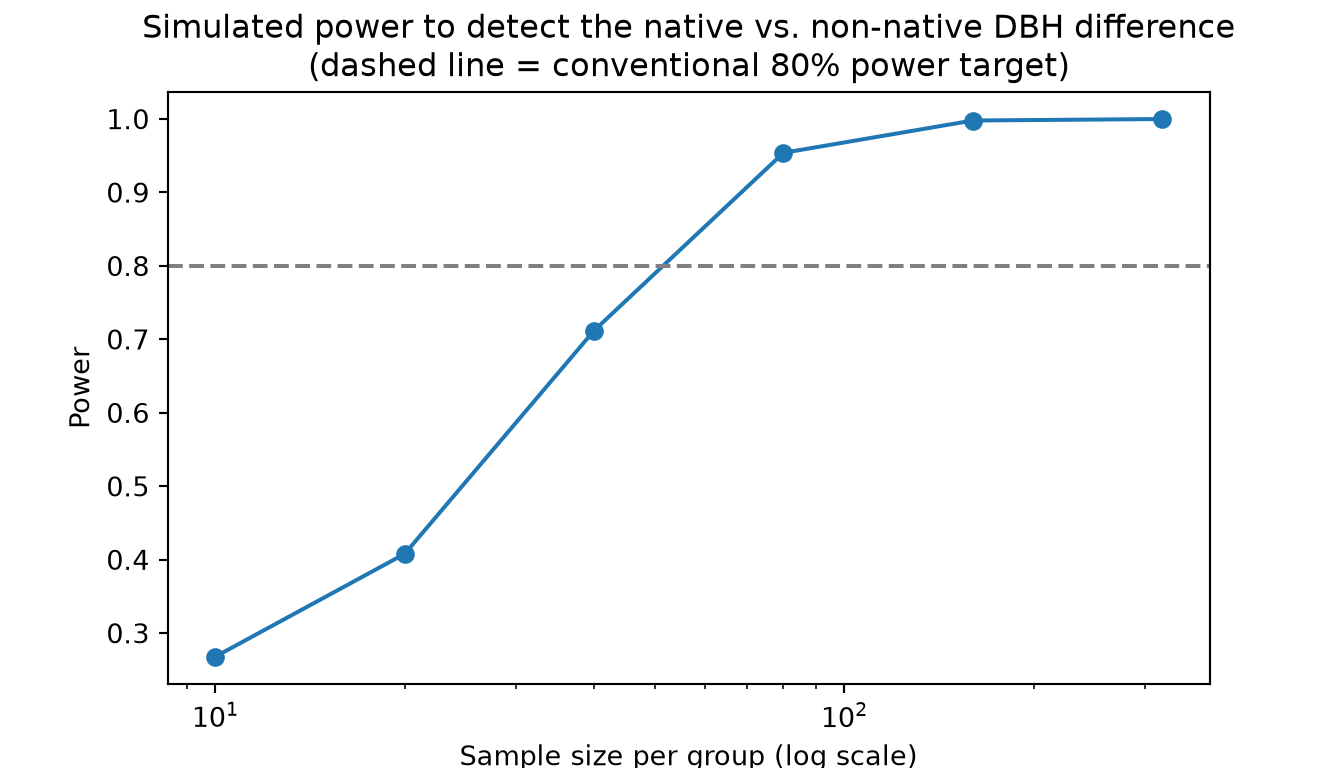
6.11.3 Analytical Power with Statsmodels
For planning studies, the TTestIndPower class from Statsmodels can solve for any one of the sample size, effect size, \(\alpha\), or power given the others. The effect size is expressed as Cohen’s d, here calculated as the difference in population means divided by the average of the two standard deviations. The result is the required number of trees per group.
effect = abs(pop_summ["mu"].diff().iloc[-1]) / pop_summ["sigma"].mean()

print(TTestIndPower().solve_power(effect_size=effect, alpha=0.05, power=0.80))49.382205402812076With a large enough sample, trivially small differences become “statistically significant.” Run stats.ttest_ind(pop_nat, pop_non, equal_var=False) on the full inventory and look at the p-value, then look at the confidence interval and ask whether the difference matters to an urban forester. Always report and interpret the effect size and its CI, not just the p-value.
6.12 When Observations Aren’t Independent: Spatial Autocorrelation
Every test in Table 6.1 assumes independent observations. Trees are not scattered at random: trees in the same park were often planted at the same time, of the same species, in the same soil, and are maintained by the same crew. Tobler’s First Law of Geography puts it simply: near things are more related than distant things. This is spatial autocorrelation.
6.12.1 Why it Matters
If neighboring trees are similar, 500 trees from 10 parks contain much less independent information than 500 trees from 500 parks. Standard tests treat each tree as a fresh, independent piece of evidence, so they underestimate standard errors, produce CIs that are too narrow, and produce p-values that are too small. This is sometimes called pseudoreplication.
6.12.2 Demo: See it on a Map
Since these data contain latitude and longitude, we can plot the data in map space and observe a variable across this space. In the example below, we plot DBH using a natural log transformation. Since a degree of longitude is shorter than a degree of latitude away from the equator, we set the aspect ratio of the graph using the cosine of the mean latitude so that the map is not stretched. A simple visual inspection suggests that spatial autocorrelation may be an issue: nearer trees may have more similar DBH.
map_sample = trees.sample(n=5000, random_state=rng)

fig, ax = plt.subplots(figsize=(8, 6))
sc = ax.scatter(map_sample["longitude"], map_sample["latitude"], c=np.log(map_sample["dbh"]),
                s=2, alpha=0.7, cmap="viridis")
fig.colorbar(sc, ax=ax, label="log DBH")
ax.set_aspect(1 / np.cos(np.radians(map_sample["latitude"].mean())))
ax.set_xlabel("Longitude")
ax.set_ylabel("Latitude")
ax.set_title("Park trees in Portland, colored by log(DBH)")
plt.show()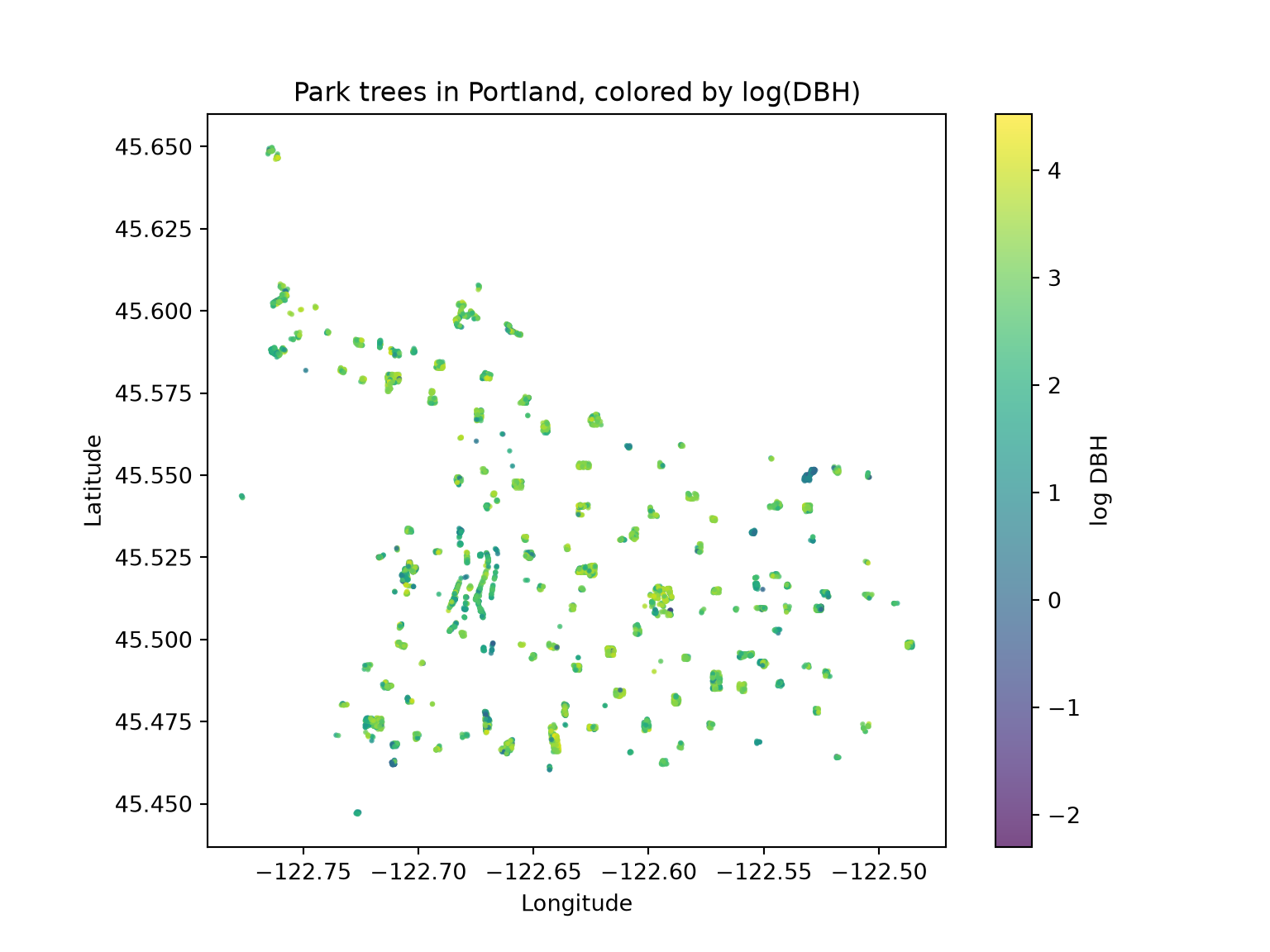
6.12.3 Demo: Measuring it with Moran’s I
Moran’s I measures whether values at nearby locations are more similar (positive I) or more different (negative I) than expected under spatial randomness. We first define who counts as a “neighbor”: here, each tree’s 8 nearest trees. The KNN class from libpysal creates the spatial weights. Setting radius to the radius of the Earth in kilometers indicates that the coordinates are longitude and latitude, so great-circle distances are used. Setting the transform property to “r” row-standardizes the weights so that the weights for each tree sum to 1.
The Moran class from esda then calculates Moran’s I. It provides both a theory-based result (z_rand and p_rand) and a permutation-based result (p_sim). Notice that the permutation test shuffles DBH values across locations to see what Moran’s I looks like when space doesn’t matter: exactly the logic we used for the permutation tests above. The results suggest statistical significance: trees that are closer together tend to have more similar DBH values. In other words, DBH is spatially clustered. Spatial weights and Moran’s I are discussed in more detail in Chapter 13.
spatial_sample = (trees.sample(n=2000, random_state=rng)
                  .drop_duplicates(subset=["longitude", "latitude"]))

coords = spatial_sample[["longitude", "latitude"]].to_numpy()
w = KNN.from_array(coords, k=8, radius=6371.0)
w.transform = "r"

np.random.seed(42)  # esda uses NumPy's global random state for the permutations
moran = Moran(np.log(spatial_sample["dbh"].to_numpy()), w, permutations=999)
print(f"Moran's I = {moran.I:.3f}, expected I = {moran.EI:.4f}")
Moran's I = 0.289, expected I = -0.0005print(f"Theory-based: z = {moran.z_rand:.2f}, p = {moran.p_rand:.3g}")Theory-based: z = 27.61, p = 8.04e-168print(f"Permutation-based: p = {moran.p_sim:.3f}")Permutation-based: p = 0.001fig, ax = plt.subplots(figsize=(8, 4))
ax.hist(moran.sim, bins=40, color="grey", edgecolor="white")
ax.axvline(moran.I, color="firebrick", linewidth=2)
ax.set_xlabel("Moran's I under random spatial arrangement")
ax.set_ylabel("Count")
ax.set_title("Permutation null distribution of Moran's I (red line = observed)")
plt.show()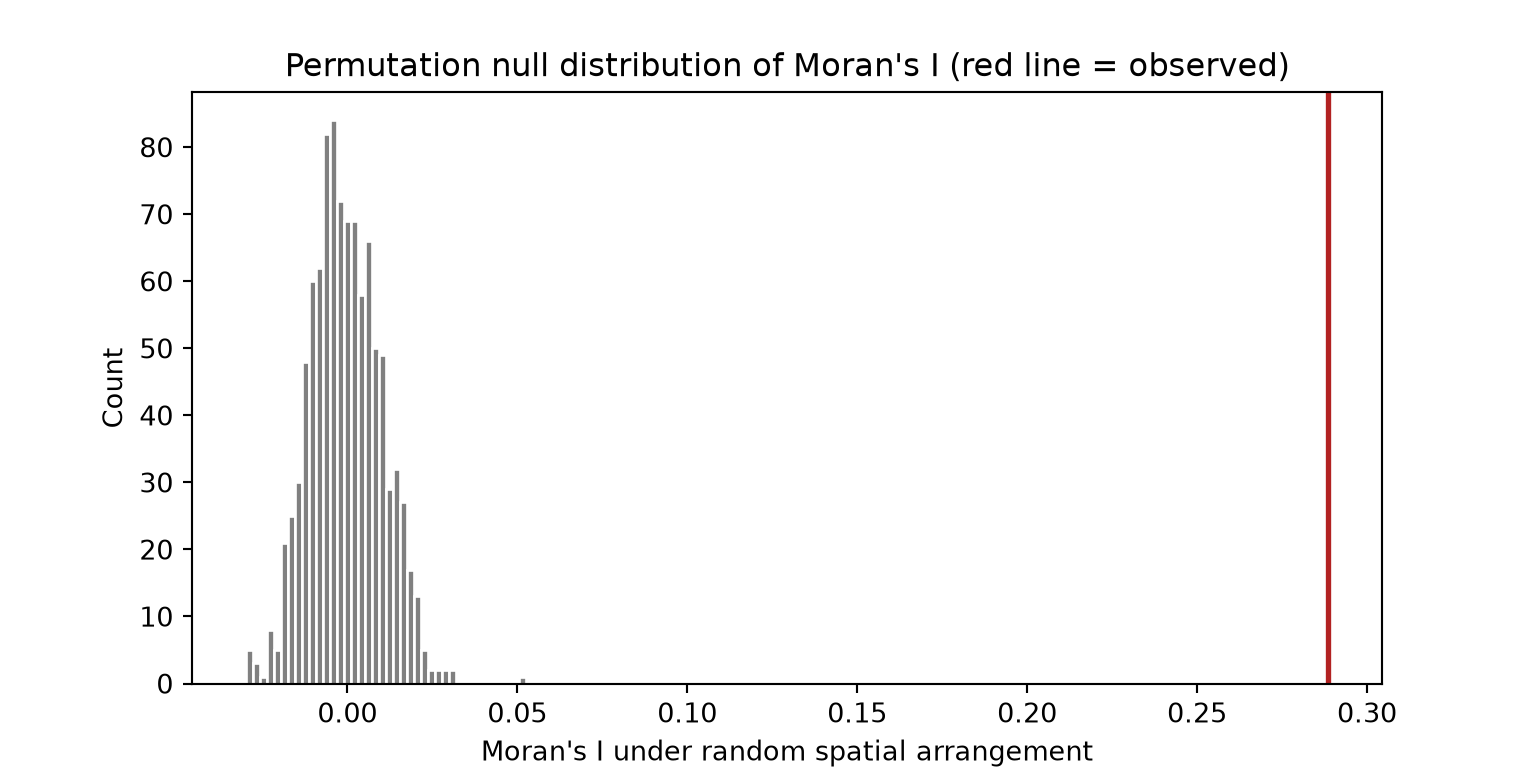
6.12.4 Demo: Clustered Sampling Inflates Uncertainty
Let’s compare two ways to sample 300 trees:
- Simple random sample: 300 trees from anywhere
- Cluster sample: pick 10 parks at random, then 30 trees within each
Both designs use 300 trees, but the cluster sample’s estimates are far more variable. The “naive” standard error, \(s / \sqrt{n}\), which every test in this chapter uses, matches the simple random sample but badly understates the uncertainty of the cluster sample. The ratio of the variances is called the design effect. A design effect of, say, 4 means our 300 clustered trees carry roughly the information of only 75 independent ones: the effective sample size.
park_counts = trees["park"].value_counts()
eligible_parks = park_counts[park_counts >= 30].index.to_numpy()
trees_elig = trees[trees["park"].isin(eligible_parks)]
dbh_elig = trees_elig["dbh"].to_numpy()
park_dbh = {park: grp["dbh"].to_numpy() for park, grp in trees_elig.groupby("park")}

srs_means = np.array([rng.choice(dbh_elig, 300, replace=False).mean() for _ in range(1000)])

cluster_means = np.array([
    np.concatenate([rng.choice(park_dbh[p], 30, replace=False)
                    for p in rng.choice(eligible_parks, 10, replace=False)]).mean()
    for _ in range(1000)])

sim_compare = pd.DataFrame({
    "design": ["Simple random sample"] * 1000 + ["Cluster sample (10 parks x 30)"] * 1000,
    "xbar": np.concatenate([srs_means, cluster_means])})

se_compare = sim_compare.groupby("design")["xbar"].std().to_frame("true_se")
se_compare["naive_se"] = dbh_elig.std(ddof=1) / np.sqrt(300)
print(se_compare)
true_se naive_se
design
Cluster sample (10 parks x 30) 2.136974 0.773279
Simple random sample 0.770128 0.773279fig, ax = plt.subplots(figsize=(8, 4))
sns.kdeplot(data=sim_compare, x="xbar", hue="design", fill=True, alpha=0.5, ax=ax)
ax.set_xlabel("Sample mean DBH (in)")
ax.set_title("Same sample size, very different uncertainty")
plt.show()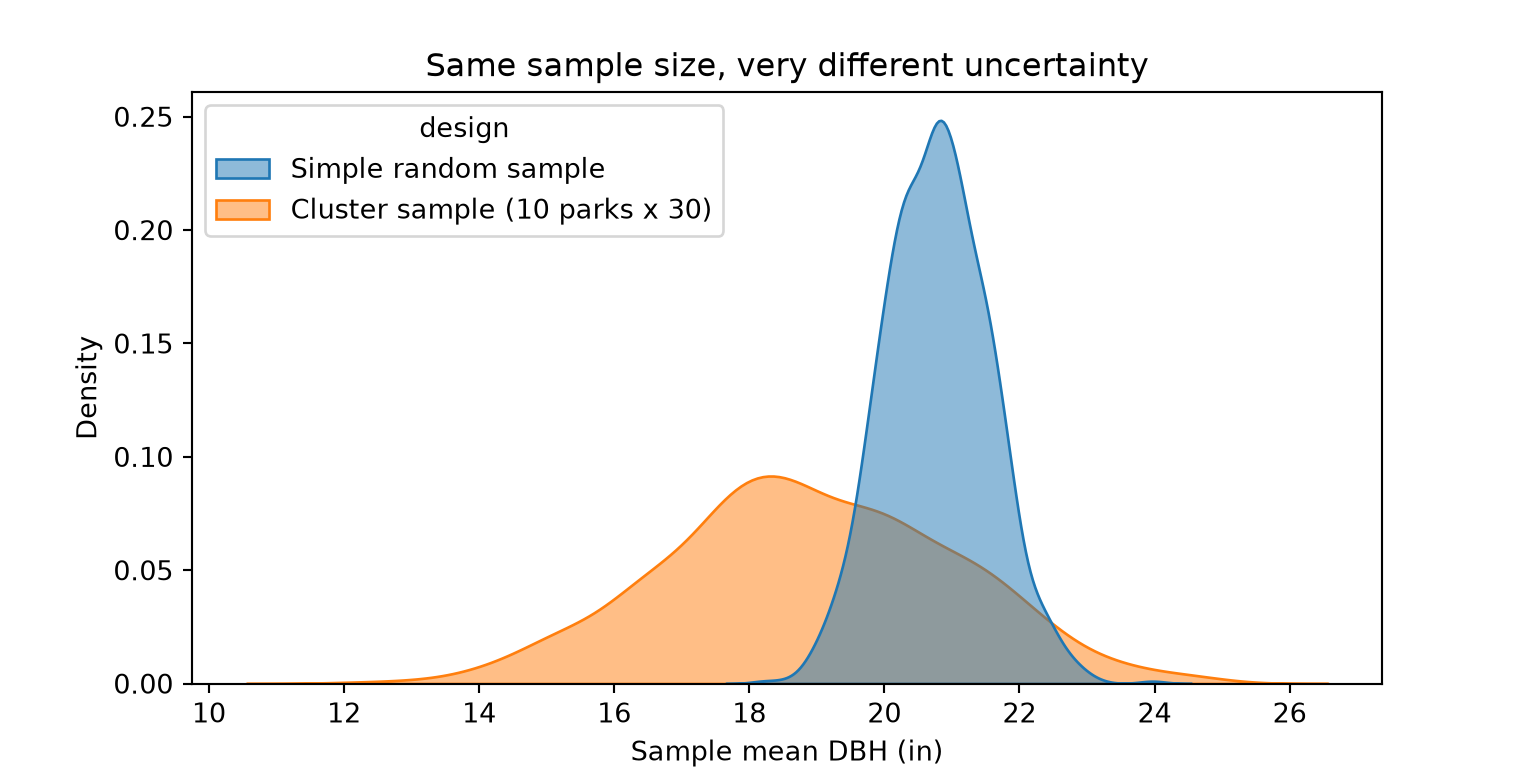
print((cluster_means.std(ddof=1) / srs_means.std(ddof=1))**2)7.699678393572558Table 6.4 provides some options for dealing with spatial autocorrelation when conducting statistical tests, using the Portland trees dataset as an example.
| Strategy | Idea | Tools in Python |
|---|---|---|
| Design | Sample randomly across space; space out sampling units |
GeoPandas sample_points() (Chapter 9) |
| Aggregate | Use the cluster (park) as the unit of analysis |
groupby("park") and summarize, then test |
| Model the structure | Include random effects for clusters |
Statsmodels mixedlm("dbh ~ native", data, groups="park")
|
| Spatial models | Model spatial dependence explicitly | spreg (PySAL) spatial regression; generalized additive models with a smooth of location |
| Restricted resampling | Permute or bootstrap within blocks, or resample whole blocks | Custom groupby() resampling; scikit-learn GroupKFold
|
| Diagnose | Test model residuals for leftover autocorrelation |
esda Moran() applied to the model residuals |
As a quick illustration of the aggregation strategy, compare a tree-level test with a park-level test of the same question. In the park-level test, each park contributes one mean DBH for each group.
def welch_summary(df, level):
    a = df.loc[df["native"] == "Native", "dbh"]
    b = df.loc[df["native"] == "Non-native", "dbh"]
    res = stats.ttest_ind(a, b, equal_var=False)
    ci = res.confidence_interval()
    return {"level": level, "estimate": a.mean() - b.mean(),
            "conf_low": ci.low, "conf_high": ci.high, "p_value": res.pvalue}

# Tree-level: treats every tree as independent
tree_level = welch_summary(trees_elig, "Trees as units")

# Park-level: each park contributes one mean per group
park_means = trees_elig.groupby(["park", "native"], as_index=False)["dbh"].mean()
park_level = welch_summary(park_means, "Parks as units")

print(pd.DataFrame([tree_level, park_level]))
level estimate conf_low conf_high p_value
0 Trees as units 7.29596 6.971594 7.620326 0.00000
1 Parks as units 4.50713 2.539849 6.474410 0.00001The park-level interval is wider: a more honest reflection of how much independent information we actually have. Note that the two analyses also answer slightly different questions; the mixed model in Table 6.4 reconciles them.
6.13 Concluding Remarks
Here is a summary of the key content discussed in this chapter.
- Inference uses sample statistics to learn about population parameters, and the sampling distribution quantifies how much a statistic varies from sample-to-sample.
- Confidence intervals give a range of plausible values; the “95%” describes the long-run success rate of the method.
- Hypothesis tests compare an observed statistic to a null distribution, which can come from theory (e.g.,
ttest_ind(),f_oneway(), andchi2_contingency()from SciPy) or simulation (e.g.,permutation_test()andbootstrap()from SciPy). - Nonparametric tests (Wilcoxon, Kruskal–Wallis, Fisher) relax distributional assumptions.
- After an omnibus test, use pairwise comparisons with a multiple-comparison adjustment.
- Power grows with effect size and sample size; with huge samples, focus on effect sizes and CIs, not p-values.
- Spatial autocorrelation violates independence, making naive tests overconfident. Design, aggregate, or model the dependence.
6.14 Questions
- Explain why it does not make sense to use an ANOVA to compare groups when you have data for the entire population.
- Explain the concept of heteroscedasticity.
- Explain the appropriate uses and differences between a one-sample t-test, a two-sample t-test, and a paired t-test. Which SciPy function implements each?
- Explain the difference between Type I and Type II error using an example.
- Explain the concept of statistical power. How is it affected by effect size, sample size, variability, and the chosen significance level?
- Nonparametric statistical tests have no assumptions. Is this statement true or false? Explain your answer.
- What is one pro and one con of using a permutation-based test as opposed to a theory-based test?
- Why is it important to consider effect size even if a statistical test suggests significance?
- Explain why spatial autocorrelation can result in confidence intervals that are too narrow and p-values that are too small.
6.15 Exercises
Exercise 6.1: Manual t-Test
74 Points scaled to 20 Points
Introduction
In this assignment, you will create a function that performs a T-Test and returns the resulting T-Value, p-value, degrees of freedom, Group 1 mean, and Group 2 mean. You will then use your function to assess for differences in mean annual temperature averaged over a county (“tempmn”) within two different subregions of the United States (“SUB_REGION”): Mid-Atlantic and New England. You will make use of the us_county_ttest.csv dataset, which is provided in the datasets/us_data_gen folder of the book download. This is a subset of the us_county_data.csv data in which 40 random counties were sampled within the two subregions of interest. Make sure to read the associated description of the data (datasets/us_data_gen/us_county_data_description.docx) prior to undertaking the assignment. Note that not all of the assumptions of a T-Test may be met. For example, there is likely some spatial autocorrelation in the data, which may invalidate the assumption of independent samples. However, we will not worry about testing assumptions and assume that the results are valid.
Objectives
Conduct a two-tailed, 2-Sample T-Test and interpret the results
Create a function that performs a set of calculations and returns results
Deliverables
- Quarto document or Jupyter Notebook with all code and answers to the questions embedded. Files can be rendered to HTML webpages if your instructor requires this. Questions should be stated and answered within Markdown cells.
Background Questions
Question 1. State the T-Test null hypothesis for this specific research question. (4 Points)
Question 2. State the T-Test alternative hypothesis for this specific research question. (4 Points)
Question 3. Explain how the degrees of freedom are determined for a 2-Sample T-Test? (4 Points)
Question 4. What is the difference between a 2-Sample T-Test and a Paired T-Test? (8 Points)
Question 5. Explain the difference in calculating the T-Value when the two groups are assumed to have the same variance in comparison to when they are assumed to have a different variance. (8 Points)
T-Test Function and Questions
This assignment can be conducted using either Python or R, whichever you prefer or whichever your instructor requires. Generate code to perform the following tasks and answer the associated questions.
Task 1. Read in the data table. (4 Points)
Task 2. Create a grouped boxplot that shows the distribution of mean annual temperature within the two groups. (6 Points)
Task 3. Generate a function that calculates and returns the T-Value, p-value, degrees of freedom, Group 1 mean, and Group 2 mean. The calculations should assume that the groups do not have equal variance and that the test is two-sided. You cannot use a function that performs a T-Test directly (e.g., t.test() in R). Instead, you must perform the required calculations in code. You can use a function that calculates a p-value if provided the T-Value and the degrees of freedom. This is too difficult to code on your own. (20 Points)
Question 6. Based on the grouped boxplot, what do you expect to be the results of the T-Test? Explain your reasoning. (8 Points)
Question 7. State the findings of the T-Test using standard statistical language. (8 Points)
Exercise 6.2: ANOVA and Sample Size
110 Points scaled to 20 Points
Introduction
In this assignment, you will conduct an experiment to explore how the size of the sample drawn from a population impacts the results of an ANOVA test. Specifically, you will assess for differences in the percent of households in a county that do not have internet access (“per_no_internet”) within different subregions of the country (“SUB_REGION”). You will make use of the us_county_data.csv dataset, which is provided in the datasets folder of the book download. Make sure to read the associated description of the data (datasets/us_data_gen/us_county_data_description.docx) prior to undertaking the assignment. Note that not all of the assumptions of ANOVA may be met. For example, there is likely some spatial autocorrelation in the data, which may invalidate the assumption of independent samples. However, we will not worry about testing assumptions and assume that the results are valid.
Objectives
Conduct an Analysis of Variance (ANOVA) test and interpret the results
Create stratified random samples and use loops to perform multiple iterations of a test using different random subsets of a population
Explain the impact of sample size on the central tendency and variability of statistical results
Deliverables
- Quarto document or Jupyter Notebook with all code and answers to the questions embedded. Files can be rendered to HTML webpages if your instructor requires this. Questions should be stated and be answered within Markdown cells.
Background Questions
Question 1. State the null hypothesis for the ANOVA test for this specific research question. (4 Points)
Question 2. State the alternative hypothesis for the ANOVA test for this specific research question. (4 Points)
Question 3. Why do we need to use an ANOVA test to investigate this research question as opposed to a T-Test? (4 Points)
Question 4. Explain how the F-Value associated with an ANOVA test is calculated. What defines the numerator and denominator? What defines the degrees of freedom? (8 Points)
Question 5. List and explain the assumptions of ANOVA. (8 Points)
Experiment and Questions
This experiment can be conducted using either Python or R, whichever you prefer or whichever your instructor requires. Generate code to perform the following tasks and answer the associated questions.
Task 1. Read in the data table. (4 Points)
Task 2. Create a grouped boxplot that shows the distribution of percent of households without internet access grouped by subregion. (6 Points)
Task 3. Perform 50 iterations of an ANOVA test using different random subset of the available counties. Perform 50 replicate tests for each of the following sample sizes: 5, 10, 20, 30, 40, 50. (20 Points)
Task 4. Extract the obtained p-value for each test and save them to a table. (10 Points)
Task 5. Calculate the mean and standard deviation of the obtained p-values for each sample size. (10 Points)
Question 6: Based on the grouped boxplot, what do you expect to be the results of the ANOVA test? Explain your reasoning. (8 Points)
Question 7: Compare the mean p-values obtained relative to the different sample sizes. Does sample size impact the p-value obtained when using different samples from the same population? (8 Points)
Question 8: Compare the standard deviation of the p-values relative to the different sample sizes. Does sample size impact the variability of the p-value obtained when using different samples from the same population? (8 Points)
Question 9: Summarize how the size of the sample drawn from the population may impact the results of an ANOVA test and how this may impact your interpretation and use of the results. (8 Points)
Exercise 6.3: Statistical Inference with Portland Park Trees
Introduction
In this exercise, you will further explore the Portland park tree inventory (datasets/pdx_trees_parks.csv) used in Chapter 6. Begin by reading and cleaning the data as demonstrated in the chapter so that you are working with the same trees DataFrame.
Deliverables
- Jupyter Notebook or Quarto document with all code and graphs embedded. Files can be rendered to HTML webpages if your instructor requires this. Answers to questions should be provided in Markdown cells or text.
Questions and Tasks
Task 1. Repeat the sampling distribution demonstration for the median DBH instead of the mean. Is the median’s sampling distribution as well-behaved? How does its standard error compare to that of the mean?
Task 2. Build a bootstrap 90% confidence interval for the mean “carbon_storage_lb” from a sample of 50 trees using bootstrap() from SciPy. Then build a theory-based confidence interval using ttest_1samp(). Which is wider, and why might they differ for this variable?
Task 3. Use a t-test to test whether mean tree height differs between trees in “Good” condition and all others. Report the test result, an effect size (Cohen’s d), and a 95% confidence interval. Run both a Welch t-test and a permutation test.
Task 4. Use ANOVA to investigate the following question: do trees with different “mature_size” values (S, M, L) differ in DBH? Fit an ANOVA, check its assumptions, run a Kruskal–Wallis test, and perform pairwise comparisons. Write a two-sentence interpretation for a non-statistician.
Task 5. Using a chi-square test, explore whether “functional_type” is associated with “condition”. Inspect the expected counts and the adjusted standardized residuals. Which cells contribute most?
Task 6. Compute Moran’s I for “tree_height” using esda. Then fit a linear model of log(dbh) predicted by “native” using ols() from Statsmodels (e.g., ols("np.log(dbh) ~ native", data=spatial_sample)) and test its residuals for spatial autocorrelation. What does this imply about the p-value from that model?