import numpy as np
import pandas as pd
import matplotlib.pyplot as plt
import seaborn as sns
from scipy import stats
import statsmodels.api as sm
from statsmodels.formula.api import ols
from statsmodels.stats.diagnostic import linear_reset, het_breuschpagan
from statsmodels.stats.outliers_influence import variance_inflation_factor
from statsmodels.stats.stattools import durbin_watson
from sklearn.metrics import mean_squared_error
from sklearn.linear_model import LassoCV
from sklearn.preprocessing import StandardScaler
import rasterio
from rasterio.enums import Resampling
from rasterio.warp import reproject
from rasterio.plot import plotting_extent
from matplotlib.colors import BoundaryNorm15 Linear Regression
15.1 Topics Covered
- Fit a linear model
- Include higher order terms (polynomial regression)
- Fit a multiple linear regression model
- Incorporate interactions
- Interpret linear regression coefficients and summary information
- Diagnostics for regression assumptions
- L1 and L2 regularization
- Apply a linear model to raster data
15.2 Introduction
A great place to begin studying supervised learning algorithms is linear regression since the process used to implement it is very similar to more advanced algorithms. Labeled samples are still necessary to train the model, and models are built using one (i.e., single or simple linear regression) or multiple (i.e., multiple linear regression) predictor variables. Outside of generating models for making predictions to new data, which is the focus of this part of the text, linear regression is also a key component of statistical analysis. Many inferential methods, for example analysis of variance (ANOVA), which we explored in Chapter 6, make use of linear models. However, to trust the results of statistical tests that rely on linear regression, certain assumptions must be met, which are discussed and tested later in this chapter.
The linear regression model takes the following form:
\[\begin{aligned} y &= \beta_0 + \beta_1 x + \varepsilon \\ \text{where:} \\ y &\text{ = dependent variable} \\ x &\text{ = predictor variable } \\ \beta_0 &\text{ = } \mathit{y} \text{-intercept term} \\ \beta_1 &\text{ = slope or coefficient for variable } \mathit{x} \\ \varepsilon &\text{ = error term (residual)} \end{aligned}\]
The goal of training or fitting a linear regression model is to estimate the trainable parameters, or beta terms, that minimize some measure. When fitting a model using ordinary least squares (OLS), the goal is to minimize the sum of the squared residuals. A residual is the difference between the actual value and the predicted value for a sample.
In this chapter, we fit linear models using the ols() function from the formula interface of Statsmodels, which uses a formula syntax similar to that used in R and provides detailed model summaries. Statsmodels also provides the diagnostic tests used to assess the model assumptions. We use scikit-learn to calculate assessment metrics and to implement regularized regression, Pandas and NumPy for data wrangling, and matplotlib and Seaborn for graphs. Linear models can also be used to make predictions to spatial data. To work with raster data in this chapter, we use Rasterio (Chapter 10).
We specifically explore the prediction of the composite burn index (CBI) using the differenced normalized burn ratio (dNBR). CBI is a ground-based, visual assessment of burn severity while NBR is based on multispectral satellite surface reflectance and is calculated using a near infrared (NIR) and shortwave infrared (SWIR) band as follows, where smaller values indicate higher burn severity:
\[\begin{aligned} \text{NBR} &= \frac{\text{NIR} - \text{SWIR}}{\text{NIR} + \text{SWIR}} \\ \end{aligned}\]
Post-fire NBR can be subtracted from pre-fire NBR to obtain dNBR. Larger values of dNBR suggest higher burn severity.
\[\begin{aligned} \text{dNBR} &= \text{NBR}_{\text{pre-fire}} - \text{NBR}_{\text{post-fire}} \end{aligned}\]
Burned areas tend to have a spectral signature similar to bare soil with high SWIR reflectance and lower NIR reflectance. In contrast, green, healthy, and photosynthetically active vegetation tends to have the opposite pattern: higher NIR reflectance and lower SWIR reflectance. In other words, this band ratio can help differentiate burned areas from unburned forests.
The data we use here are from the WorldView-3 sensor, which has multiple NIR and SWIR bands. Thus, it is not clear which combination provides the strongest correlation with, or ability to predict, CBI. So, we will generate linear models using different band combinations and compare the resulting predictions in order to make a recommendation for the optimal NIR/SWIR band combination. These data are from the following paper:
Warner, T.A., Skowronski, N.S. and Gallagher, M.R., 2017. “High spatial resolution burn severity mapping of the New Jersey Pine Barrens with WorldView-3 near-infrared and shortwave infrared imagery.” International Journal of Remote Sensing, 38(2), pp.598-616.
We read in the tabulated data below using Pandas. Each sample represents a field plot where ground-based CBI measurements were collected. Pre- and post-fire spectral values were extracted at these locations from WorldView-3 imagery.
fld = "datasets/gisData/regression/"

burn = pd.read_csv(fld + "burn_wv3.csv")
print(burn.shape)
(156, 32)print(burn.columns.tolist())['Total', 'DcB2', 'DcB3', 'DcB4', 'DcB5', 'DcB6', 'DcB7', 'DcB8', 'DcB9', 'DcB10', 'DcB11', 'DcB12', 'DcB13', 'DcB14', 'DcB15', 'DcB16', 'ApB1', 'ApB2', 'ApB3', 'ApB4', 'ApB5', 'ApB6', 'ApB7', 'ApB8', 'ApB9', 'ApB10', 'ApB11', 'ApB12', 'ApB13', 'ApB14', 'ApB15', 'ApB16']The table includes pre- and post-fire spectral measurements. However, we would like to use dNBR measures as predictor variables. As a result, we first calculate the dNBRs. These calculations, along with CBI (“Total”), are written to a new DataFrame named burn_r. The December data (prefixed with “Dc”) represent pre-fire conditions while the April data (prefixed with “Ap”) represent post-fire conditions. Bands 9 through 16 are the SWIR bands (SWIR1-8) while Bands 7 and 8 are the NIR bands (NIR1-2). Note that we do not use the first SWIR band here.
Since we need a dNBR for every combination of the two NIR bands and seven SWIR bands, we write a function that calculates dNBR from a NIR and SWIR band number and use a loop to create a column for each combination. The new columns are named using the band numbers (e.g., “dnbr7_10”). We also add a small value to the denominators to avoid dividing by zero.
def dnbr(df, nir, swir):
    """dNBR from pre-fire (Dc) and post-fire (Ap) NIR and SWIR band columns."""
    pre = (df[f"DcB{nir}"] - df[f"DcB{swir}"]) / (df[f"DcB{nir}"] + df[f"DcB{swir}"] + 0.0001)
    post = (df[f"ApB{nir}"] - df[f"ApB{swir}"]) / (df[f"ApB{nir}"] + df[f"ApB{swir}"] + 0.0001)
    return pre - post

burn_r = burn[["Total"]].copy()
for nir in [7, 8]:
    for swir in range(10, 17):
        burn_r[f"dnbr{nir}_{swir}"] = dnbr(burn, nir, swir)

print(burn_r.head())
Total dnbr7_10 dnbr7_11 ... dnbr8_14 dnbr8_15 dnbr8_16
0 1.425000 0.493417 0.452209 ... 0.511216 0.476002 0.451303
1 1.450000 0.608907 0.514854 ... 0.593587 0.546880 0.532774
2 1.200000 0.410904 0.335383 ... 0.387098 0.369203 0.340864
3 1.852941 0.534054 0.457983 ... 0.590735 0.624962 0.584362
4 2.157895 0.811425 0.698986 ... 0.951089 0.938858 0.976895
[5 rows x 15 columns]15.3 Using a Single Predictor Variable
15.3.1 Single Linear Regression
We first build models to predict CBI, the “Total” column, using each dNBR measure separately. A linear model is defined using the ols() function and a formula that is formatted as follows: "dependent variable ~ predictor variable". For example, the formula "Total ~ dnbr7_10" can be read as “CBI is predicted by dNBR calculated with NIR Band 7 and SWIR Band 10”. We also must specify the data being used via the data parameter. The model is trained using the fit() method. Since we need a model for each of the 14 dNBR measures, we fit them in a loop and store them in a dictionary.
We are not splitting the data into separate training and test sets for this example.
dnbr_cols = [c for c in burn_r.columns if c.startswith("dnbr")]

models = {col: ols(f"Total ~ {col}", data=burn_r).fit() for col in dnbr_cols}
Once the models are fit, we can compare them using metrics. We specifically use root mean square error (RMSE) and R-squared, which were discussed in Chapter 14. RMSE is calculated as the square root of the average squared residuals. We use the mean_squared_error() function from scikit-learn and take the square root. R-squared is stored in the rsquared property of a fitted model, and the predictions for the training data are stored in the fittedvalues property. We generate a DataFrame that holds the name of each model, as differentiated using the input NIR and SWIR band numbers, the calculated RMSE, and the R-squared.
When using multiple predictor variables (i.e., multiple linear regression), you should use adjusted R-squared (the rsquared_adj property) as opposed to R-squared. When calculating R-squared using a withheld test dataset, regardless of the number of predictor variables, it is not required to use adjusted R-squared. R-squared calculated using a withheld dataset is generally termed predicted R-squared.
results_df = pd.DataFrame({
    "case": [f"B{c[4]} & B{c.split('_')[1]}" for c in dnbr_cols],
    "rsq": [models[c].rsquared for c in dnbr_cols],
    "rmse": [np.sqrt(mean_squared_error(burn_r["Total"], models[c].fittedvalues))
             for c in dnbr_cols]})
print(results_df.round(3))
case rsq rmse
0 B7 & B10 0.761 0.378
1 B7 & B11 0.715 0.412
2 B7 & B12 0.771 0.370
3 B7 & B13 0.761 0.378
4 B7 & B14 0.775 0.366
5 B7 & B15 0.756 0.381
6 B7 & B16 0.758 0.380
7 B8 & B10 0.777 0.365
8 B8 & B11 0.734 0.398
9 B8 & B12 0.784 0.359
10 B8 & B13 0.760 0.378
11 B8 & B14 0.775 0.366
12 B8 & B15 0.755 0.382
13 B8 & B16 0.755 0.383Next, we plot the resulting R-squared and RMSE measures. Several band combinations perform similarly well; the differences in R-squared between the strongest combinations are small (roughly 0.77 to 0.78). NIR band 7 (NIR1) and SWIR band 14 (SWIR6) is among the strongest combinations (i.e., low RMSE and high R-squared), so we use it for the remainder of the chapter. The resulting model and data points are plotted as a scatter plot using regplot() from Seaborn, which draws a linear model fitted using OLS and is equivalent to the linear model produced using ols(). The shaded band represents a 95% confidence interval for the regression line.
fig, axs = plt.subplots(1, 2, figsize=(11, 5), sharey=True)
for ax, metric, label in zip(axs, ["rsq", "rmse"], ["R-Squared", "RMSE"]):
    ax.scatter(results_df[metric], results_df["case"], color="red", s=40)
    ax.set_xlabel(label)
axs[0].set_ylabel("Bands Used")
plt.tight_layout()
plt.show()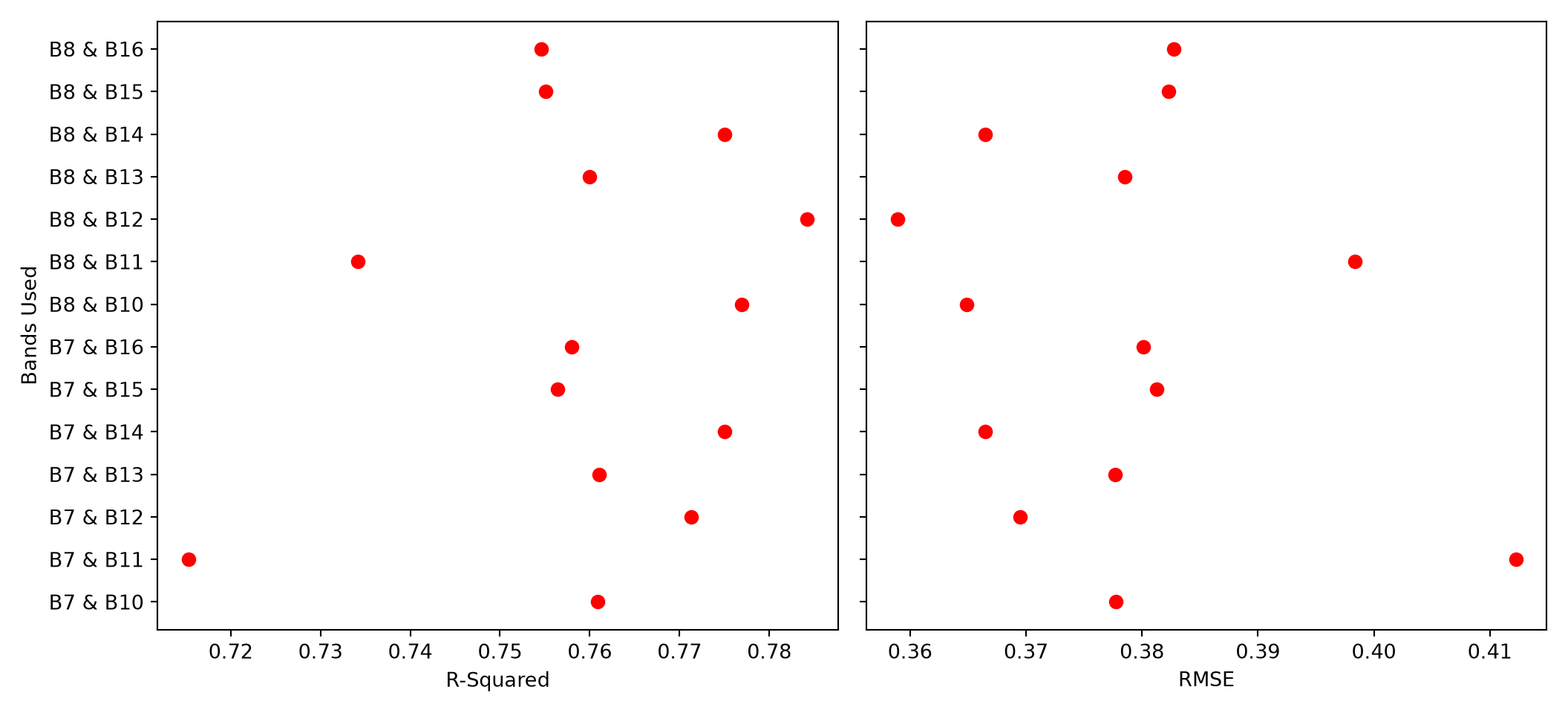
fig, ax = plt.subplots(figsize=(8, 5))
sns.regplot(data=burn_r, x="dnbr7_14", y="Total", ax=ax,
            scatter_kws={"color": "red", "s": 20}, line_kws={"color": "steelblue"})
ax.set_xlabel("dNBR (NIR1 and SWIR6)")
ax.set_ylabel("CBI")
plt.show()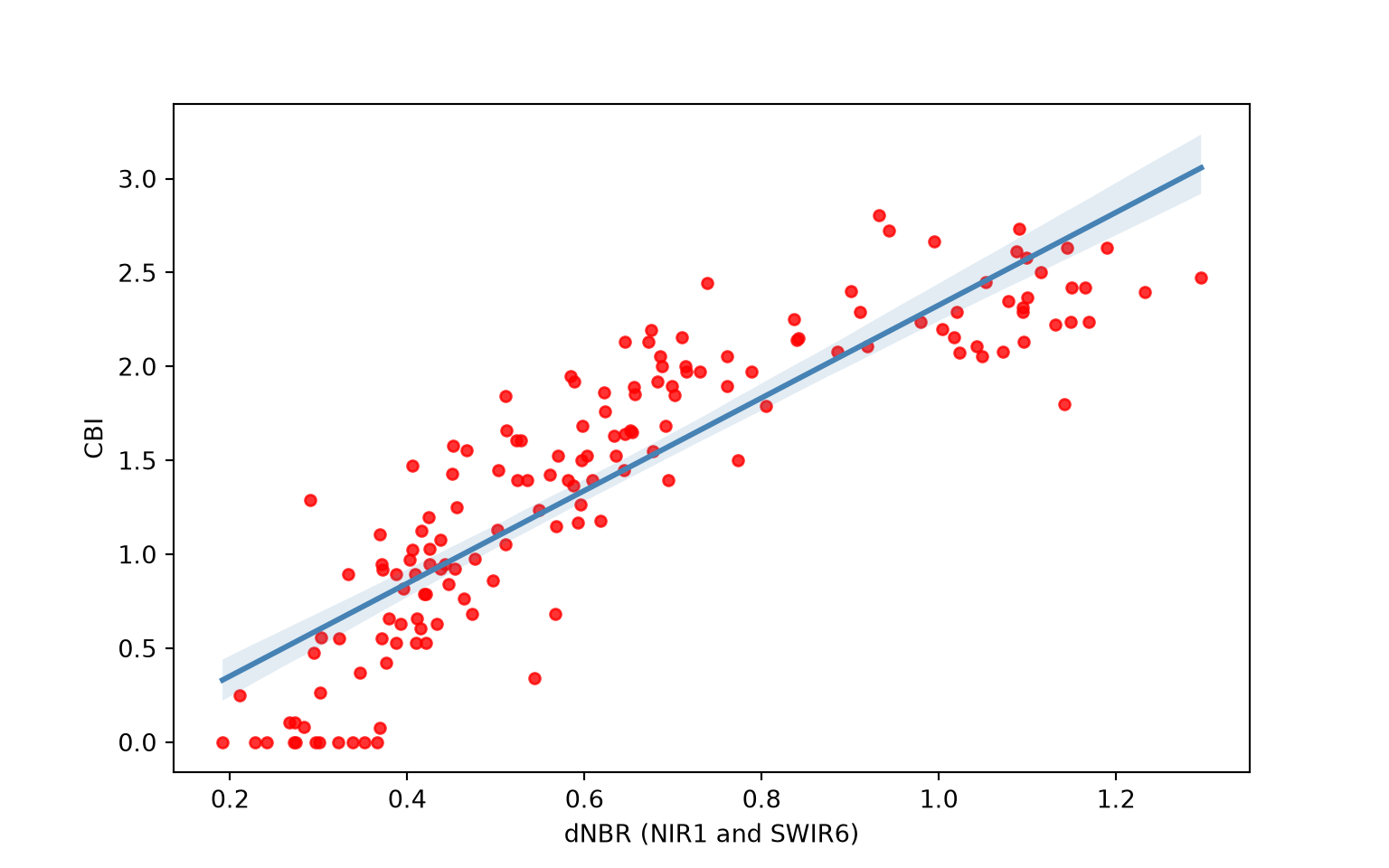
15.3.2 Step-Wise Regression
Now that we have implemented single linear regression, we will explore some augmentations. You may have noticed in the scatter plot generated above when using SWIR Band 14 and NIR Band 7 that the relationship, though generally strong, is not linear. Thus, using a linear model, which is represented as a line, is likely not optimal.
Step-wise regression consists of building a linear model as a series of horizontal line segments with break points between the segments. This type of regression can be implemented by first binning the predictor variable using pd.cut() and then treating the bins as a categorical predictor variable using C() within the model formula. We specifically use break points every 0.2 units between 0 and 1.4. We then predict to a new sequence of dNBR values using the predict() method; these values must be binned in the same way. The resulting model is visualized and, as the name implies, consists of a series of horizontal line segments or steps.
breaks = np.arange(0, 1.5, 0.2)
burn_r["step_bin"] = pd.cut(burn_r["dnbr7_14"], bins=breaks)
step_mod = ols("Total ~ C(step_bin)", data=burn_r).fit()

test_values = np.arange(0.2, 1.3, 0.005)
test_df = pd.DataFrame({"step_bin": pd.cut(test_values, bins=breaks)})
test_pred = step_mod.predict(test_df)
fig, ax = plt.subplots(figsize=(8, 5))
ax.scatter(burn_r["dnbr7_14"], burn_r["Total"], color="red", s=20)
ax.plot(test_values, test_pred, color="black", linewidth=2)
ax.set_xlabel("dNBR")
ax.set_ylabel("Composite Burn Index")
plt.show()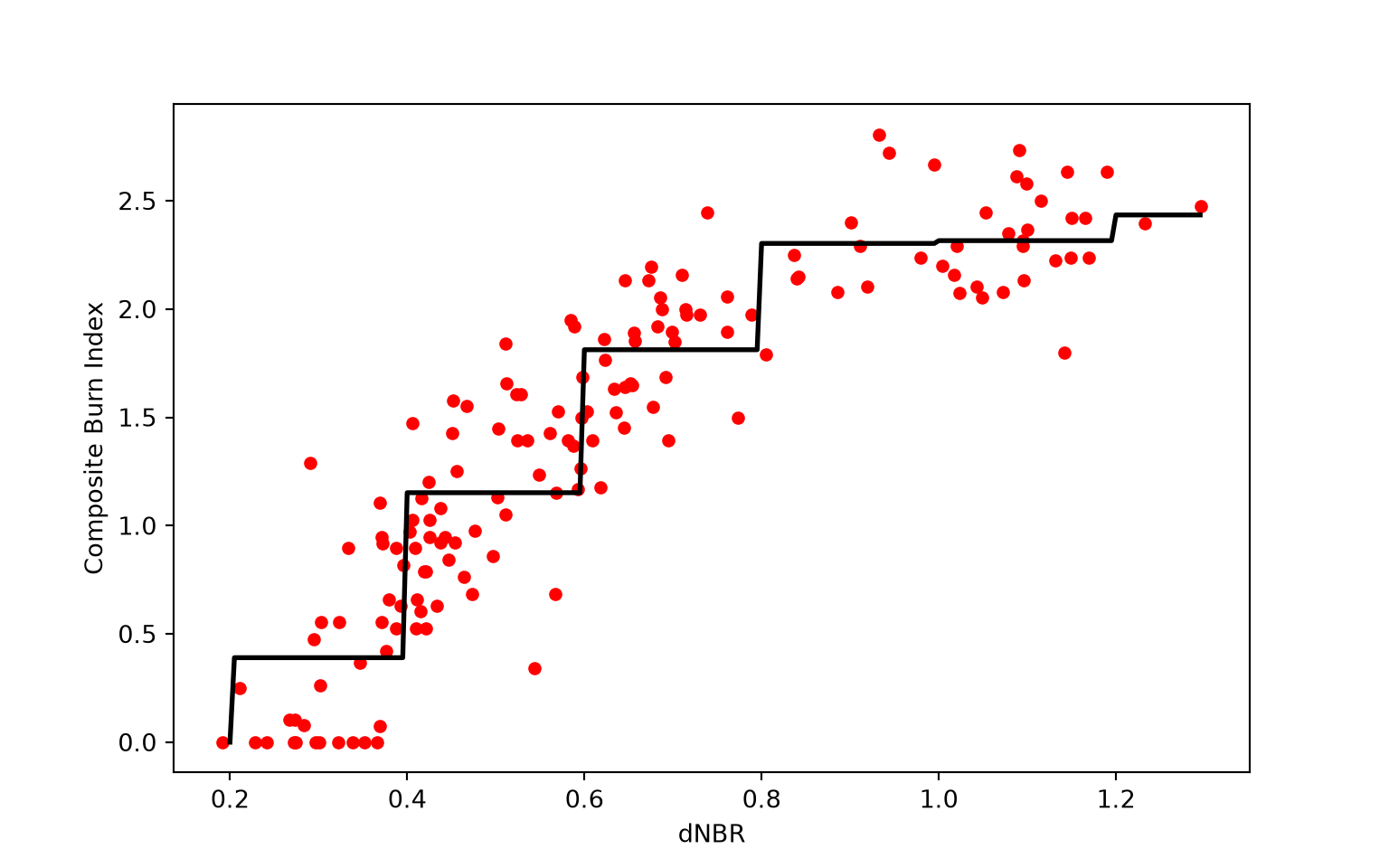
15.3.3 Polynomial Regression
Polynomial regression incorporates the predictor variable raised to a power, commonly either two or three. There is still only one predictor variable; we are simply representing it as two components. The relationship is modeled as follows:
\[\begin{aligned} y &= \beta_0 + \beta_1 x + \beta_2 x^{2} + \varepsilon \\[1em] \text{where}\\ y &\text{ = dependent variable}\\ x &\text{ = predictor variable}\\ \beta_0 &\text{ = } \mathit{y} \text{-intercept term} \\ \beta_1 &\text{ = 1st order coefficient for variable } x\\ \beta_2 &\text{ = 2nd order coefficient for variable } x\\ \varepsilon &\text{ = error term (residual)} \end{aligned}\]
Within a formula, I() allows a calculation to be performed on a variable. So, I(dnbr7_14**2) adds the square of the dNBR as a second term. The important point here is that incorporating a square term allows us to model a non-linear relationship with a linear equation. This is still considered a linear model since the relationship is linear in regard to the trainable parameters: the coefficients and the single y-intercept term.
The summary() method prints a summary of the fitted model, including the coefficients and their standard errors, t-values, and p-values, along with R-squared, adjusted R-squared, and other information. After fitting the model, we apply it to the data using predict() and then plot the results. The polynomial model is able to better capture the non-linear relationship between CBI and dNBR, as suggested by the scatter plot. The R-squared for this model is also higher than that of the model that did not incorporate a square term.
lm7_14 = models["dnbr7_14"]
lm7_14p = ols("Total ~ dnbr7_14 + I(dnbr7_14**2)", data=burn_r).fit()
print(lm7_14p.summary())
OLS Regression Results
==============================================================================
Dep. Variable: Total R-squared: 0.856
Model: OLS Adj. R-squared: 0.854
Method: Least Squares F-statistic: 454.9
Date: Sat, 24 Oct 2026 Prob (F-statistic): 4.05e-65
Time: 18:01:55 Log-Likelihood: -29.930
No. Observations: 156 AIC: 65.86
Df Residuals: 153 BIC: 75.01
Df Model: 2
Covariance Type: nonrobust
====================================================================================
coef std err t P>|t| [0.025 0.975]
------------------------------------------------------------------------------------
Intercept -1.4561 0.154 -9.484 0.000 -1.759 -1.153
dnbr7_14 6.8367 0.479 14.287 0.000 5.891 7.782
I(dnbr7_14 ** 2) -3.0441 0.328 -9.278 0.000 -3.692 -2.396
==============================================================================
Omnibus: 4.217 Durbin-Watson: 1.430
Prob(Omnibus): 0.121 Jarque-Bera (JB): 5.430
Skew: -0.024 Prob(JB): 0.0662
Kurtosis: 3.913 Cond. No. 33.0
==============================================================================
Notes:
[1] Standard Errors assume that the covariance matrix of the errors is correctly specified.burn_r["poly_pred"] = lm7_14p.predict(burn_r)
order = burn_r["dnbr7_14"].argsort()
fig, ax = plt.subplots(figsize=(8, 5))
ax.scatter(burn_r["dnbr7_14"], burn_r["Total"], color="red", s=20)
ax.plot(burn_r["dnbr7_14"].iloc[order], burn_r["poly_pred"].iloc[order], color="black",
linewidth=2)
ax.set_xlabel("dNBR")
ax.set_ylabel("Composite Burn Index")
plt.show()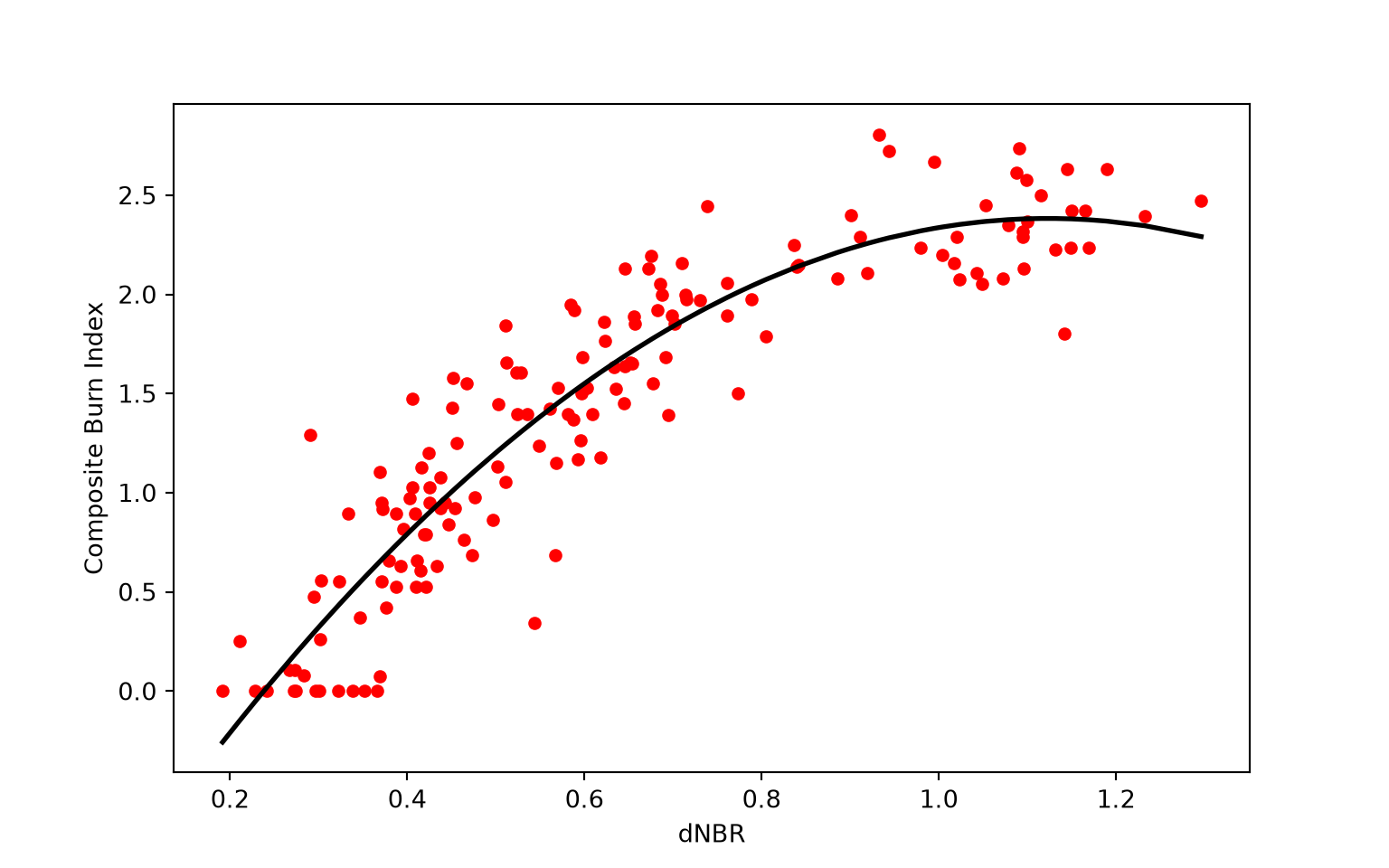
print(lm7_14.rsquared, lm7_14p.rsquared)0.7750249664623172 0.856032652408589715.4 Using Multiple Predictor Variables
15.4.1 Multiple Linear Regression
In contrast to single or simple linear regression, multiple linear regression incorporates more than one predictor variable. It is also possible to incorporate polynomial terms for all or some of the input predictor variables or some linear combination of them. It is also possible to incorporate interactions, which are discussed below.
\[\begin{aligned} y &= \beta_0 + \beta_1 x_1 + \beta_2 x_2 + \cdots + \beta_p x_p + \varepsilon \\ \text{where:} \\ y &\text{ = dependent variable} \\ x_p &\text{ = predictor variable } \mathit{p} \\ \beta_0 &\text{ = } \mathit{y} \text{-intercept term} \\ \beta_p &\text{ = slope or coefficient for variable } \mathit{p} \\ \varepsilon &\text{ = error term (residual)} \end{aligned}\]
Our example data are more appropriate for single regression; however, we will re-frame the problem for the purposes of this demonstration by attempting to predict CBI using the change in image band values between the post- and pre-fire values as opposed to dNBR. This requires calculating all band differences and creating a new DataFrame (burn_diff) that includes only the CBI (“Total”) data and all differenced bands. A dictionary maps each new column name to its band number.
band_names = {"blue": 2, "green": 3, "yellow": 4, "red": 5, "redEdge": 6, "nir1": 7, "nir2": 8,
              "swir1": 9, "swir2": 10, "swir3": 11, "swir4": 12, "swir5": 13, "swir6": 14,
              "swir7": 15, "swir8": 16}

burn_diff = burn[["Total"]].copy()
for name, band in band_names.items():
    burn_diff[name] = burn[f"ApB{band}"] - burn[f"DcB{band}"]
We first fit a model using the NIR and SWIR bands that provided the best result above: NIR1 and SWIR6. To incorporate multiple predictor variables, we use an addition sign in the formula: "Total ~ nir1 + swir6".
model_mlr = ols("Total ~ nir1 + swir6", data=burn_diff).fit()We need to visualize the model output differently now that we have two predictor variables. We display the model as a continuous color gradient within the two-dimensional feature space. To accomplish this, we map the NIR1 data to the x-axis position and the SWIR6 data to the y-axis position. The predicted values are shown using the color gradient. This requires making predictions across the range of NIR1 and SWIR6 values. We accomplish this by generating all pairs of NIR1 and SWIR6 values using np.meshgrid() followed by making predictions using these value combinations with predict(). The result is displayed using pcolormesh() from matplotlib. As the visualization suggests, higher burn severity is associated with higher values of SWIR and lower values of NIR reflectance.
nir_seq = np.arange(-1500, 501, 10)
swir_seq = np.arange(250, 1501, 10)
nir_grid, swir_grid = np.meshgrid(nir_seq, swir_seq)
test_set = pd.DataFrame({"nir1": nir_grid.ravel(), "swir6": swir_grid.ravel()})
pred_grid = model_mlr.predict(test_set).to_numpy().reshape(nir_grid.shape)

fig, ax = plt.subplots(figsize=(8, 6))
mesh = ax.pcolormesh(nir_grid, swir_grid, pred_grid, cmap="Reds", shading="auto")
fig.colorbar(mesh, ax=ax, label="CBI")
ax.set_xlabel("Change in NIR 1")
ax.set_ylabel("Change in SWIR 6")
plt.show()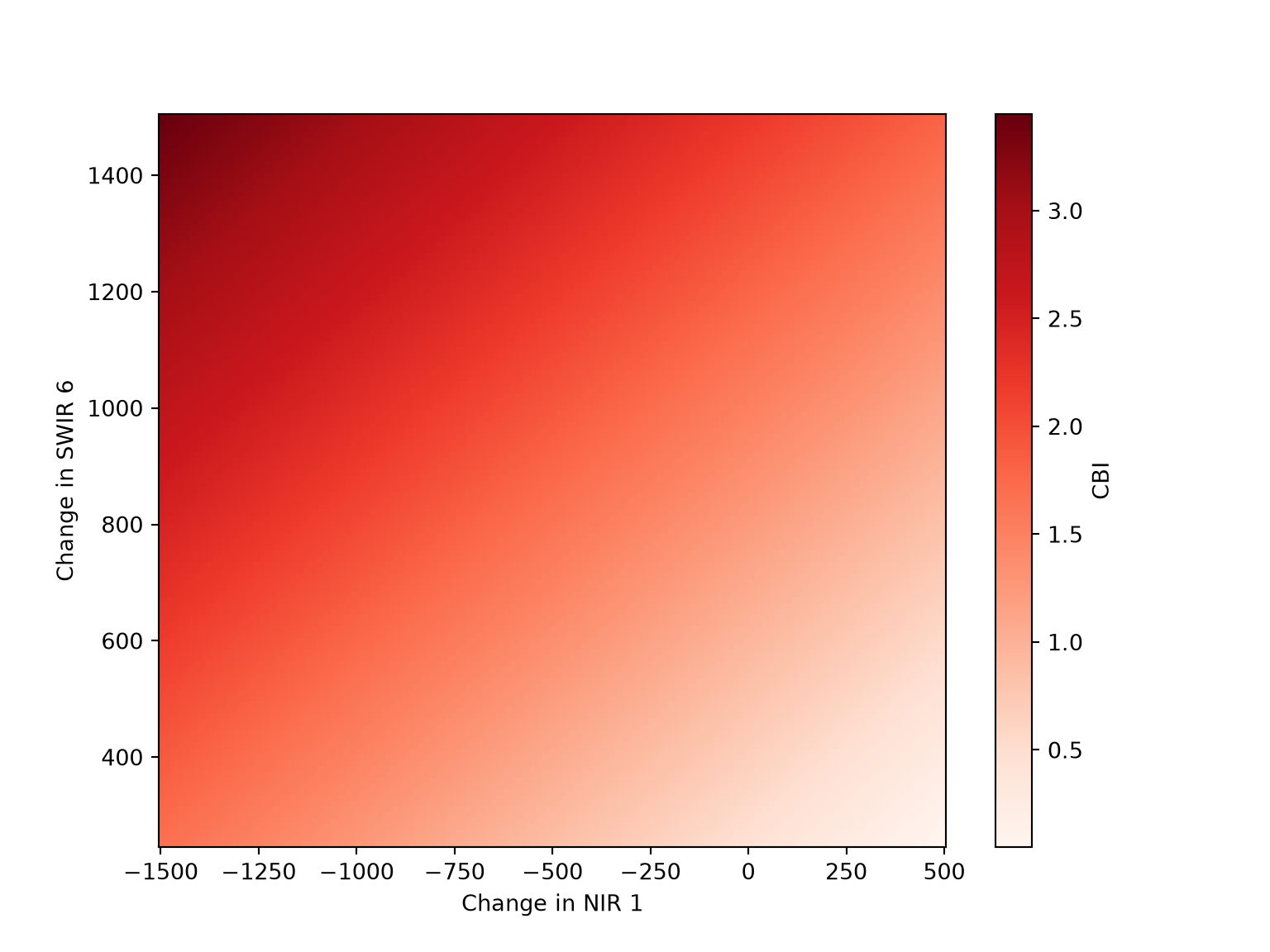
We next produce a model using all channel differences. Before doing so, we plot the relationship between CBI and each band difference. The melt() method reshapes the data to a long format with one row per sample and band, which allows the scatter plots to be generated as facets using relplot() from Seaborn.
burn_long = burn_diff.melt(id_vars="Total", var_name="band", value_name="value")
g = sns.relplot(data=burn_long, x="value", y="Total", col="band", col_wrap=5, color="red",
                s=15, height=2.6, facet_kws={"sharex": False})
g.set_axis_labels("Pixel value", "Composite burn index")
g.set_titles("{col_name}")
plt.show()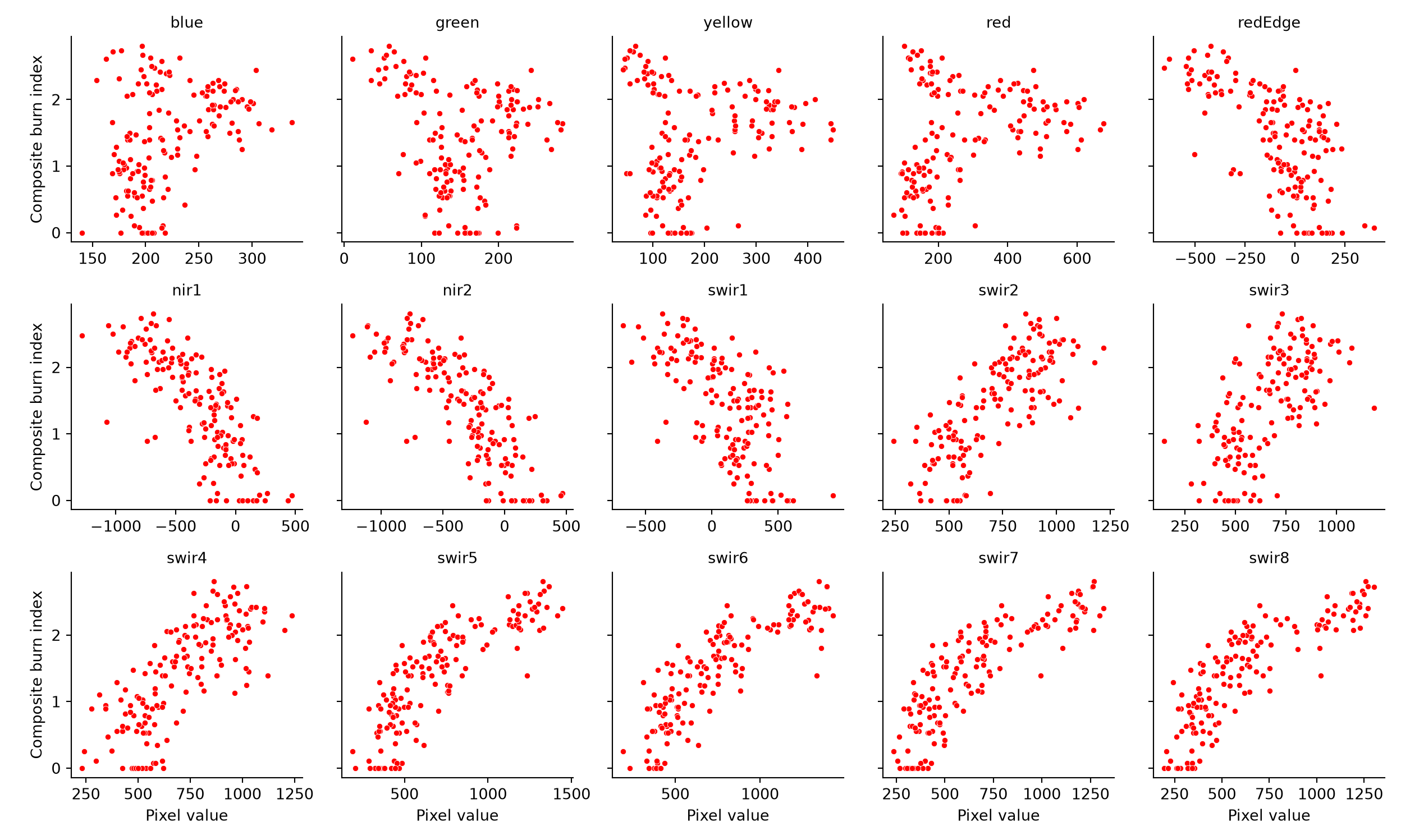
The model using all band differences is defined by joining the column names with + to create the formula. Printing the model summary, we can see that coefficients have been estimated for each differenced band. If model assumptions are met, these coefficients are generally interpreted as the change in the dependent variable, in this case CBI, for a unit change in the predictor variable associated with the coefficient when holding all other predictor variables constant. The associated t-value is used to assess whether the coefficient is statistically significant. In this model, many of the coefficients are not statistically significant. When incorporating polynomial terms and/or interactions, it is important to consider all predictors that include a variable of interest when interpreting coefficients or assessing the relationship between the dependent variable and the predictor variable of interest.
predictors = list(band_names)
model_mlr = ols("Total ~ " + " + ".join(predictors), data=burn_diff).fit()
print(model_mlr.summary())
OLS Regression Results
==============================================================================
Dep. Variable: Total R-squared: 0.870
Model: OLS Adj. R-squared: 0.856
Method: Least Squares F-statistic: 62.57
Date: Sat, 24 Oct 2026 Prob (F-statistic): 2.58e-54
Time: 18:01:57 Log-Likelihood: -21.854
No. Observations: 156 AIC: 75.71
Df Residuals: 140 BIC: 124.5
Df Model: 15
Covariance Type: nonrobust
==============================================================================
coef std err t P>|t| [0.025 0.975]
------------------------------------------------------------------------------
Intercept 0.0539 0.240 0.224 0.823 -0.421 0.529
blue 0.0021 0.002 0.948 0.345 -0.002 0.007
green -0.0034 0.002 -1.409 0.161 -0.008 0.001
yellow -0.0005 0.002 -0.293 0.770 -0.004 0.003
red 0.0020 0.001 2.248 0.026 0.000 0.004
redEdge 0.0013 0.001 1.734 0.085 -0.000 0.003
nir1 -0.0002 0.000 -0.541 0.590 -0.001 0.001
nir2 -0.0010 0.000 -2.432 0.016 -0.002 -0.000
swir1 -0.0001 0.000 -0.544 0.588 -0.001 0.000
swir2 -0.0009 0.001 -1.581 0.116 -0.002 0.000
swir3 -0.0004 0.000 -0.929 0.355 -0.001 0.000
swir4 0.0010 0.000 2.074 0.040 4.83e-05 0.002
swir5 0.0007 0.001 1.049 0.296 -0.001 0.002
swir6 7.263e-05 0.001 0.125 0.900 -0.001 0.001
swir7 -0.0002 0.001 -0.254 0.800 -0.001 0.001
swir8 0.0007 0.001 0.959 0.339 -0.001 0.002
==============================================================================
Omnibus: 2.116 Durbin-Watson: 1.437
Prob(Omnibus): 0.347 Jarque-Bera (JB): 1.595
Skew: 0.009 Prob(JB): 0.450
Kurtosis: 2.505 Cond. No. 2.12e+04
==============================================================================
Notes:
[1] Standard Errors assume that the covariance matrix of the errors is correctly specified.
[2] The condition number is large, 2.12e+04. This might indicate that there are
strong multicollinearity or other numerical problems.15.4.2 Incorporating Interactions
Interaction terms can be useful when the response of the dependent variable to predictor variable A changes with values of predictor variable B and vice versa. Interaction terms are not meant to model correlation between the two predictor variables, which is a common misconception.
Interaction terms are incorporated using :. In the example below, we are attempting to predict CBI using the NIR1 and SWIR6 bands along with their interaction. It is also possible to incorporate polynomial terms and interactions, as demonstrated in the second example.
When performing feature selection, if the coefficient for the interaction term between two predictor variables is statistically significant but one or both coefficients for the predictor variables are not statistically significant, it is common practice to still include the single predictor variables. In other words, if an interaction term is included in a model, the individual variables used within it should also be included. The formula "Total ~ nir1 * swir6" is shorthand for including both variables and their interaction.
model_i = ols("Total ~ nir1 + swir6 + nir1:swir6", data=burn_diff).fit()
print(model_i.summary())
OLS Regression Results
==============================================================================
Dep. Variable: Total R-squared: 0.823
Model: OLS Adj. R-squared: 0.819
Method: Least Squares F-statistic: 235.5
Date: Sat, 24 Oct 2026 Prob (F-statistic): 6.48e-57
Time: 18:01:58 Log-Likelihood: -46.071
No. Observations: 156 AIC: 100.1
Df Residuals: 152 BIC: 112.3
Df Model: 3
Covariance Type: nonrobust
==============================================================================
coef std err t P>|t| [0.025 0.975]
------------------------------------------------------------------------------
Intercept -0.3585 0.104 -3.450 0.001 -0.564 -0.153
nir1 -0.0021 0.000 -8.779 0.000 -0.003 -0.002
swir6 0.0022 0.000 12.567 0.000 0.002 0.003
nir1:swir6 1.681e-06 2.8e-07 5.998 0.000 1.13e-06 2.23e-06
==============================================================================
Omnibus: 10.800 Durbin-Watson: 1.307
Prob(Omnibus): 0.005 Jarque-Bera (JB): 12.498
Skew: -0.491 Prob(JB): 0.00193
Kurtosis: 3.979 Cond. No. 1.98e+06
==============================================================================
Notes:
[1] Standard Errors assume that the covariance matrix of the errors is correctly specified.
[2] The condition number is large, 1.98e+06. This might indicate that there are
strong multicollinearity or other numerical problems.model_poly_i = ols("Total ~ nir2 + I(nir2**2) + swir6 + I(swir6**2) + nir2:swir6",
data=burn_diff).fit()
print(model_poly_i.summary()) OLS Regression Results
==============================================================================
Dep. Variable: Total R-squared: 0.855
Model: OLS Adj. R-squared: 0.850
Method: Least Squares F-statistic: 177.2
Date: Sat, 24 Oct 2026 Prob (F-statistic): 4.56e-61
Time: 18:01:58 Log-Likelihood: -30.385
No. Observations: 156 AIC: 72.77
Df Residuals: 150 BIC: 91.07
Df Model: 5
Covariance Type: nonrobust
=================================================================================
coef std err t P>|t| [0.025 0.975]
---------------------------------------------------------------------------------
Intercept -0.8354 0.161 -5.189 0.000 -1.154 -0.517
nir2 -0.0012 0.000 -5.178 0.000 -0.002 -0.001
I(nir2 ** 2) -7.083e-07 2.36e-07 -3.007 0.003 -1.17e-06 -2.43e-07
swir6 0.0041 0.000 9.080 0.000 0.003 0.005
I(swir6 ** 2) -1.668e-06 3.22e-07 -5.180 0.000 -2.3e-06 -1.03e-06
nir2:swir6 -1.432e-07 4.29e-07 -0.334 0.739 -9.9e-07 7.04e-07
==============================================================================
Omnibus: 5.820 Durbin-Watson: 1.601
Prob(Omnibus): 0.054 Jarque-Bera (JB): 6.417
Skew: -0.282 Prob(JB): 0.0404
Kurtosis: 3.819 Cond. No. 7.13e+06
==============================================================================
Notes:
[1] Standard Errors assume that the covariance matrix of the errors is correctly specified.
[2] The condition number is large, 7.13e+06. This might indicate that there are
strong multicollinearity or other numerical problems.15.5 Regression Diagnostics
Linear regression has several assumptions. The key assumptions are as follows:
- The model errors or residuals are normally distributed
- The relationship between the dependent variable and each predictor variable is linear
- The residuals do not vary with predicted dependent variable values (homoscedasticity)
- All samples are independent (i.e., no autocorrelation)
- For multiple linear regression, it is also generally assumed that pairs of predictor variables are not highly correlated
When a linear model will be used to make predictions, as is our primary focus here, as opposed to being used for statistical inference or to understand the correlation or relationship between the dependent variable and each predictor variable, invalid model assumptions are generally less of a concern. Instead, we are more concerned with the accuracy of predictions made for new data (i.e., how well the model generalizes to new data). This is assessed using assessment metrics, such as RMSE, calculated for withheld test samples.
If the relationships between the predictor variables and the dependent variable are not linear and cannot be easily made more linear, such as by including polynomial terms or transforming variables using data transformations, then linear regression may simply not be a good option for the specific predictive modeling task. In such cases, other predictive modeling methods should be considered, such as generalized linear models (GLMs), generalized additive models (GAMs), or machine learning (ML) algorithms.
Even though assessing linear regression model assumptions is less important for predictive modeling tasks, we discuss model assumption assessment here since this is an important component of linear regression in general. For example, if your goal is to quantify whether there is a statistically significant correlation between the dependent variable and a specific predictor variable, you can make use of the t-test results obtained for that specific predictor variable’s coefficient. However, this test is only valid if model assumptions are met. The direction and magnitude of the coefficient for a specific predictor variable is meant to quantify the change in the dependent variable with a one unit change in the predictor variable of interest when holding all other predictor variables constant. If there is multicollinearity between predictor variables, “holding all other predictor variables constant” is really not meaningful since one predictor variable is likely to change when the other variables change.
15.5.1 Normality of Residuals
In our examples, we make use of our polynomial regression model that used the dNBR calculated from the NIR1 and SWIR6 bands. The residuals are stored in the resid property of the fitted model.
The normality of the residuals can be visually assessed by plotting their distribution. In our example, we use a histogram. This could also be accomplished with a kernel density plot.
burn_r["pred"] = lm7_14p.fittedvalues
burn_r["res"] = lm7_14p.resid

fig, ax = plt.subplots(figsize=(7, 4))
ax.hist(burn_r["res"], bins=np.arange(-1.5, 1.55, 0.05), color="grey", edgecolor="white")
ax.set_xlabel("Residual")
ax.set_ylabel("Count")
plt.show()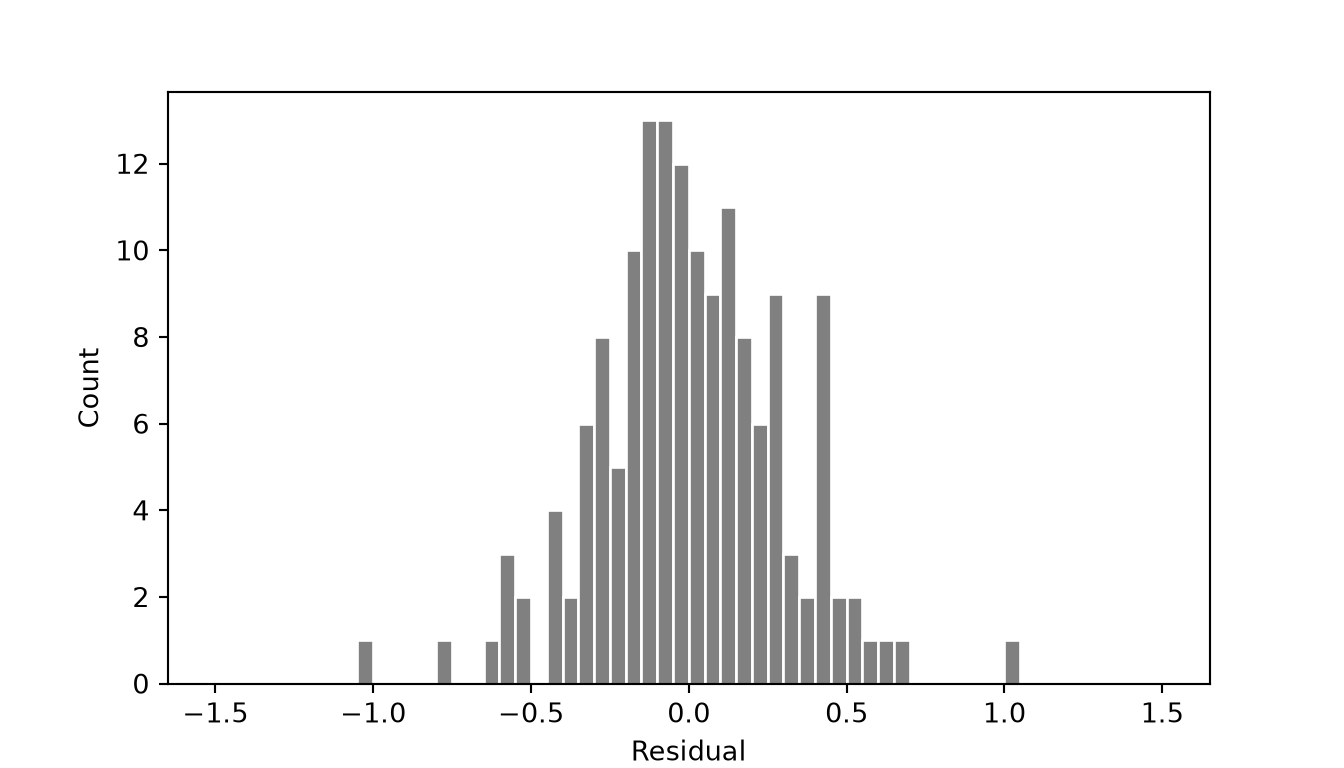
Another option is a quantile-quantile plot (QQ plot). This is a scatter plot where the quantiles of the actual or standardized residuals are plotted to one axis while theoretical quantiles that represent the distribution of the residuals or standardized residuals if they were normally distributed are plotted to the other axis. If the actual and theoretical quantiles are similar, then the data points, which represent individual samples, should generally fall along the one-to-one line. Divergence from this line suggests issues of skewness (i.e., a left or right tail), kurtosis (i.e., wider or narrower than a normal distribution), or some other non-normal distribution characteristic. The standardized residuals are obtained using the get_influence() method, and the QQ plot is generated using qqplot() from Statsmodels.
std_res = lm7_14p.get_influence().resid_studentized_internal

fig, ax = plt.subplots(figsize=(5, 5))
sm.qqplot(std_res, line="45", ax=ax)
plt.show()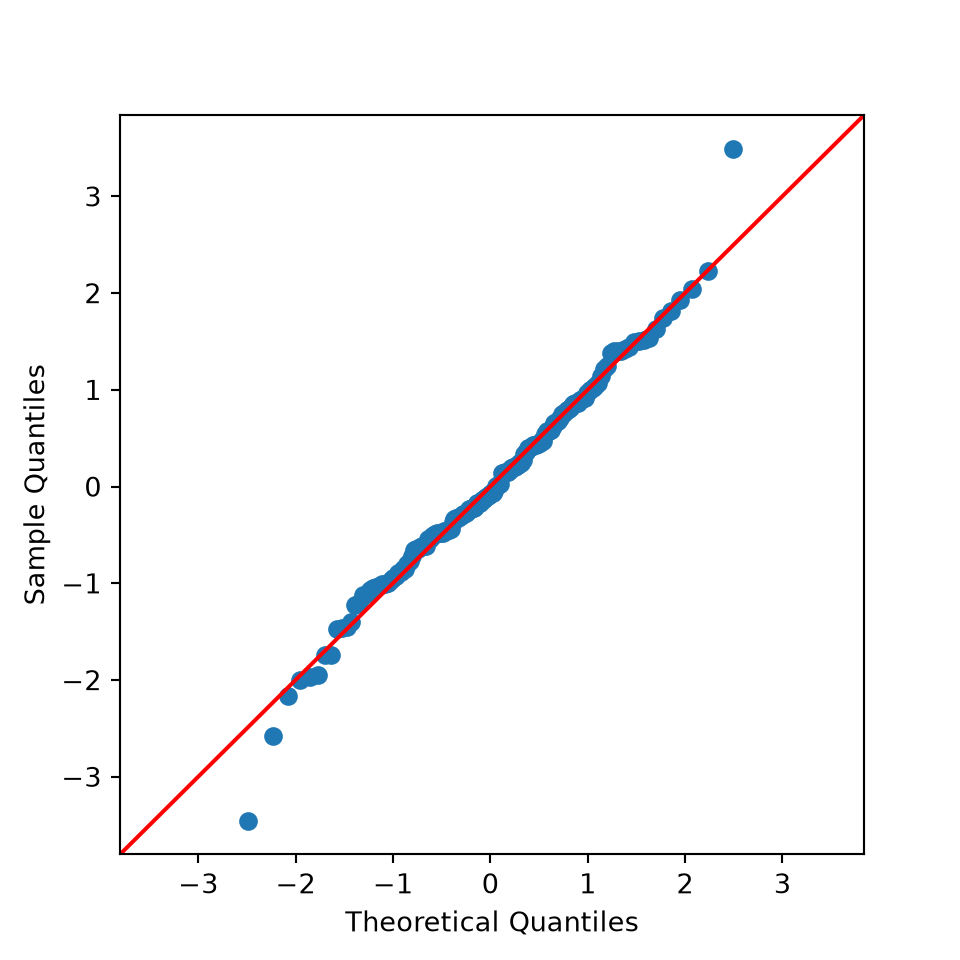
The Shapiro-Wilk Normality Test is a statistical test of normality, which is implemented using shapiro() from SciPy. The results generally suggest that the residuals are normally distributed or that this assumption is not violated.
print(stats.shapiro(std_res))ShapiroResult(statistic=np.float64(0.9905357849992728), pvalue=np.float64(0.3838199079331107))15.5.2 Linear Relationships
Linear relationships can be assessed using the Ramsey Regression Equation Specification Error Test (RESET) and visualized by plotting the model residuals against the predictor variable values, which should show no trend if the relationship between the dependent variable and the predictor variable of interest has been adequately captured.
If there is not a linear relationship, you may consider applying a data transformation, such as Box-Cox, Yeo-Johnson, square root, or logarithmic. Adding polynomial terms may also be useful. If these changes fail to improve the linearity of the relationship, linear regression may not be a good modeling choice for the problem.
The RESET test is performed using linear_reset() from Statsmodels. Setting power=3 adds the squared and cubed fitted values to the model, and the test assesses whether they improve the fit. The test is applied to both the polynomial model and the model that only included the first-order term. Compare the two p-values: a statistically significant result suggests that the linearity assumption is violated. In the residual plot, a LOWESS (locally weighted) smoothed line, obtained using lowess() from Statsmodels, highlights any trend.
print(linear_reset(lm7_14p, power=3, use_f=True))<F test: F=1.146429034253445, p=0.3205194933792524, df_denom=151, df_num=2>print(linear_reset(lm7_14, power=3, use_f=True))<F test: F=42.82237316078851, p=1.776511982049857e-15, df_denom=152, df_num=2>smooth = sm.nonparametric.lowess(burn_r["res"], burn_r["dnbr7_14"])
fig, ax = plt.subplots(figsize=(7, 4))
ax.scatter(burn_r["dnbr7_14"], burn_r["res"], color="black", s=15)
ax.plot(smooth[:, 0], smooth[:, 1], color="steelblue", linewidth=2)
ax.axhline(0, color="red")
ax.set_xlabel("dNBR (NIR1 and SWIR6)")
ax.set_ylabel("Residual")
plt.show()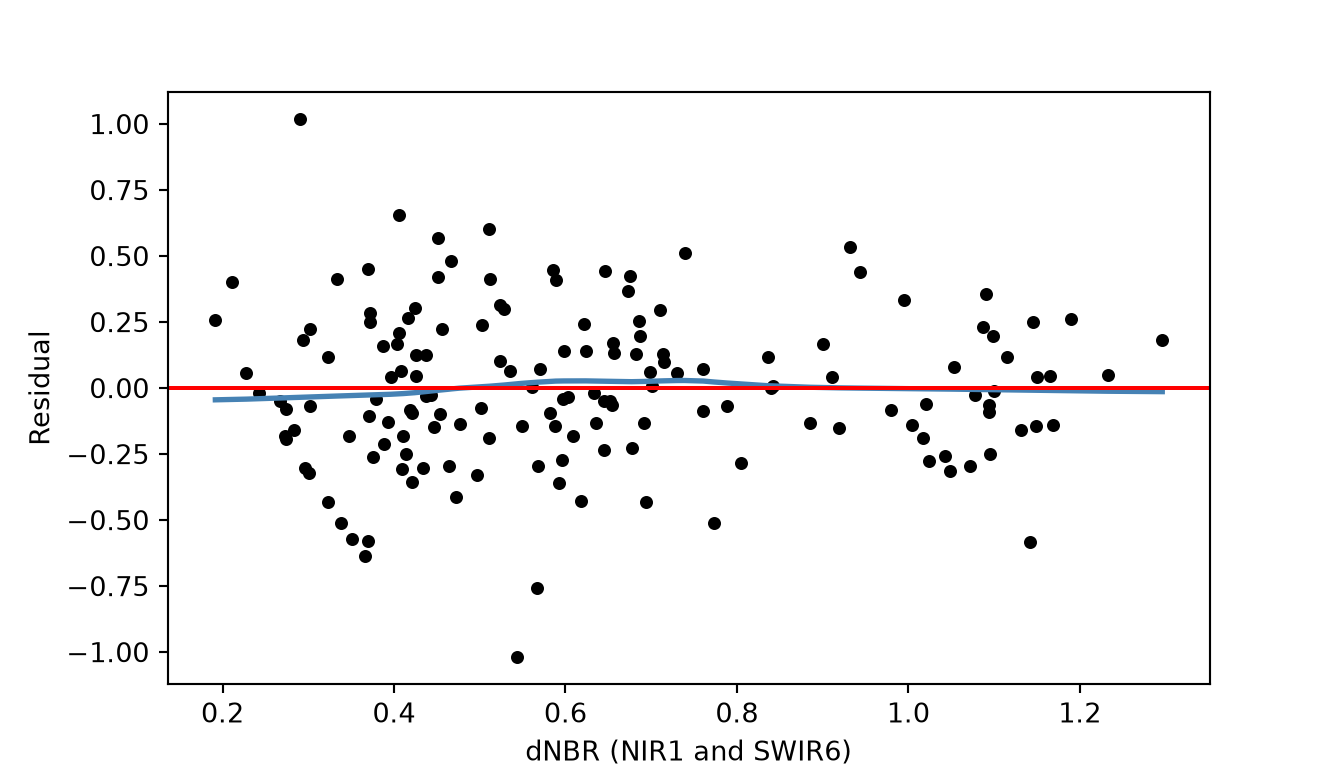
15.5.3 Homoscedasticity
Homoscedasticity suggests that the variability or magnitude of the errors or residuals does not change with the predicted values of the dependent variable. In other words, the model should do an equally good or bad job predicting the dependent variable regardless of its values. This can be visually assessed using a scatter plot where the predicted dependent variable values are plotted to the x-axis and the residuals are plotted to the y-axis.
Homoscedasticity is suggested when the pattern is random or there is no change in residual magnitude with predicted values of the dependent variable. If there are patterns, this suggests heteroscedasticity. For example, a greater magnitude of model errors when predicted dependent variable values are larger suggests that the model is doing a poorer job predicting larger values of the dependent variable in comparison to smaller values. These plots can also be helpful for assessing for model bias. For example, if residuals are negative at lower values of the predicted dependent variable but positive at larger predicted dependent variable values, this indicates that the model is over-predicting low values and under-predicting high values.
The Breusch-Pagan Test can be used to assess for heteroscedasticity. It is implemented using het_breuschpagan() from Statsmodels, which accepts the residuals and the predictor variables used in the model (the design matrix, stored in model.exog). It returns the test statistic and p-value, followed by an F-test version of the test. A statistically significant result suggests that this assumption is violated.
fig, ax = plt.subplots(figsize=(7, 4))
ax.scatter(burn_r["pred"], burn_r["res"], color="red", s=20)
ax.axhline(0, linewidth=1.5, linestyle="--", color="black")
ax.set_xlabel("Predicted CBI")
ax.set_ylabel("Residual")
plt.show()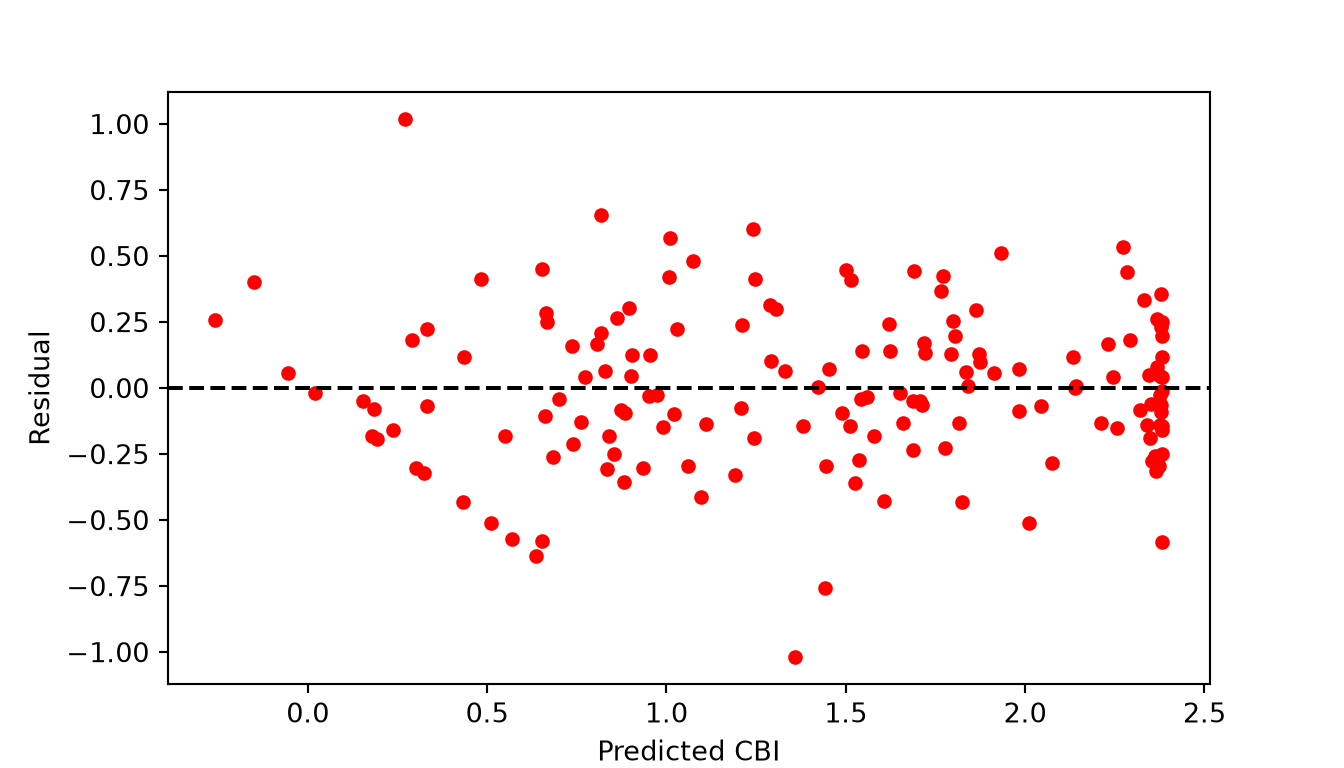
bp_stat, bp_p, f_stat, f_p = het_breuschpagan(lm7_14p.resid, lm7_14p.model.exog)
print(bp_stat, bp_p)
3.759757828500072 0.15260858336294128For our polynomial model, the residuals appear to be somewhat less variable for the largest predicted values, but the pattern is not strong. The Breusch-Pagan test is not statistically significant, so it does not provide strong evidence that the homoscedasticity assumption is violated.
15.5.4 Multicollinearity
Multicollinearity, or correlation between predictor variables, can be visualized using individual scatter plots for pairs of predictor variables, a scatter plot matrix, or a correlation matrix. A correlation matrix is calculated using the corr() method and can be displayed as a heat map using heatmap() from Seaborn. Another option is the variance inflation factor (VIF) metric. A commonly used threshold that suggests multicollinearity is a square root of the VIF larger than two.
The VIF for each predictor variable is calculated using variance_inflation_factor() from Statsmodels, which accepts the design matrix of the model, including the intercept column, and the index of the column of interest. We skip the first column, which is the intercept.
If issues of multicollinearity are discovered, this generally suggests that the coefficients and associated statistical tests may be misleading or flawed. If this is not a major concern, such as for predictive modeling, multicollinearity is generally less of a concern.
For our model that incorporated all band differences (model_mlr), the results below suggest issues of multicollinearity. The correlation matrix suggests strong correlation between predictor variables, and some VIF values are very high.
corr = burn_diff[predictors].corr()

fig, ax = plt.subplots(figsize=(9, 7))
sns.heatmap(corr, mask=np.triu(np.ones_like(corr, dtype=bool), k=1), cmap="PuOr",
            vmin=-1, vmax=1, annot=True, fmt=".1f", annot_kws={"size": 7}, ax=ax)
plt.show()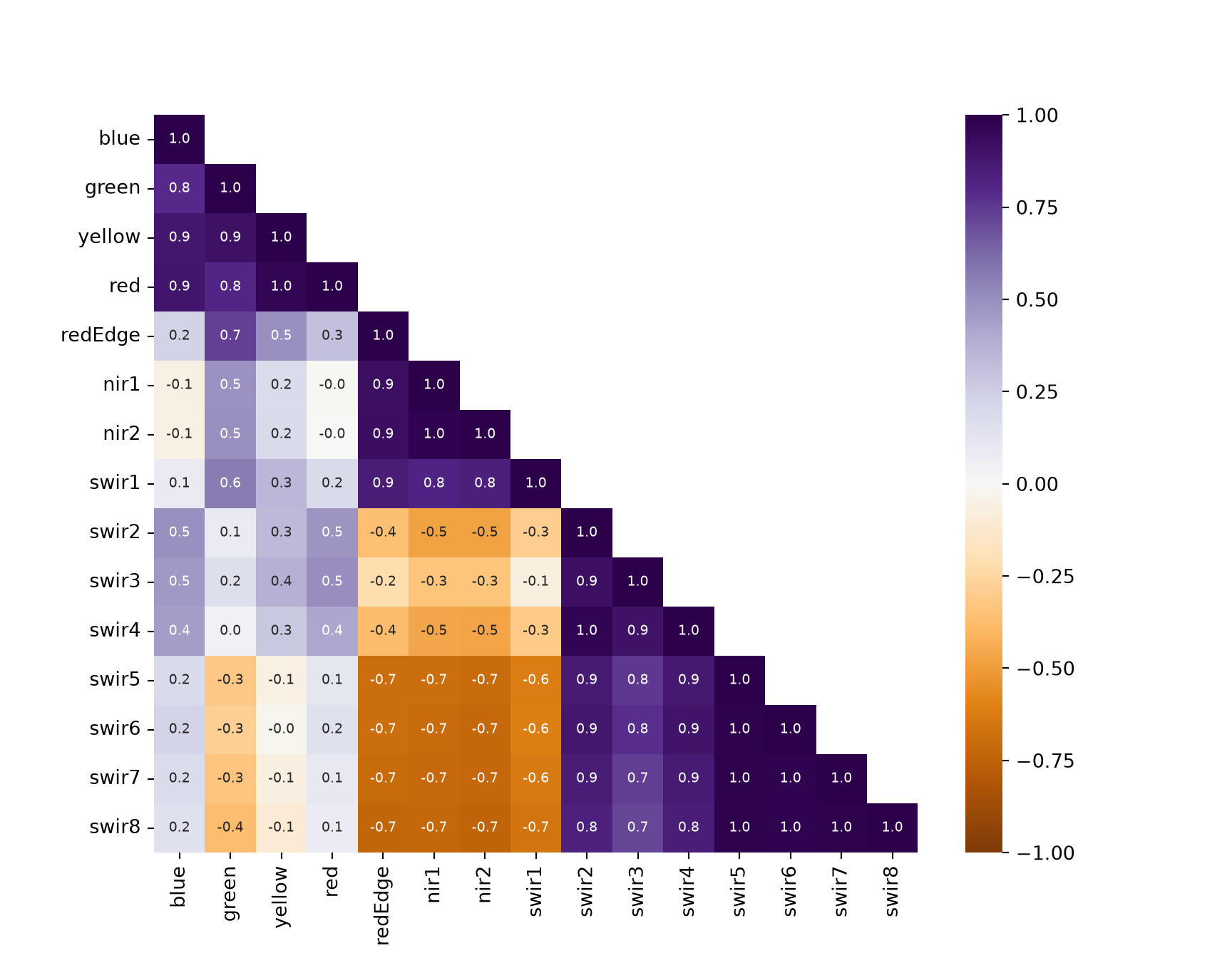
exog = model_mlr.model.exog
vif = pd.Series([variance_inflation_factor(exog, i) for i in range(1, exog.shape[1])],
                index=model_mlr.model.exog_names[1:])
print(pd.DataFrame({"vif": vif.round(1), "sqrt_vif_gt_2": np.sqrt(vif) > 2}))
vif sqrt_vif_gt_2
blue 14.6 True
green 35.6 True
yellow 59.3 True
red 33.9 True
redEdge 49.4 True
nir1 35.1 True
nir2 39.2 True
swir1 8.6 True
swir2 26.7 True
swir3 14.1 True
swir4 21.9 True
swir5 86.5 True
swir6 65.1 True
swir7 69.3 True
swir8 100.1 True15.5.5 Other Concerns
In regard to autocorrelation, for spatial data we are generally most concerned with spatial autocorrelation. This is commonly assessed using the Moran’s I statistic. We generally consider spatial autocorrelation of the dependent variable values or the model residuals. This metric can be calculated using the esda library, as discussed in Chapter 13.
Correlation through time, or for nearer records in a data table, can be assessed with the Durbin-Watson statistic, which is implemented using durbin_watson() from Statsmodels. Values near 2 indicate no autocorrelation. The statistic is also reported in the model summary.
print(durbin_watson(lm7_14p.resid))1.4303626857523513The value is somewhat less than 2, which suggests positive autocorrelation between the residuals of neighboring records in the table. This may reflect the order in which the field plots are listed, for example if nearby plots are listed next to each other.
15.6 Regularization
In order to reduce overfitting or improve model generalization, regularization can be implemented. Common methods include ridge regression, which uses L2 regularization, and lasso regression, which uses L1 regularization. Both methods penalize a model for having larger model coefficients. L2 regularization penalizes based on the squared coefficients, so the coefficients shrink toward, but do not reach, zero. In contrast, L1 regularization penalizes based on the absolute value of the coefficients; as a result, it is possible for predictor variables to drop out of the model when using lasso regression but not ridge regression since their associated coefficients can be reduced to zero. As a result, lasso regression is sometimes used as a feature selection method.
The code below demonstrates how to implement lasso regression in Python using scikit-learn. This involves (1) separating the predictor variables and dependent variable into separate objects, (2) standardizing the predictor variables, (3) selecting the degree of penalization via a cross validation process, and (4) fitting the model with the selected value. The degree of penalization is a hyperparameter, which is called lambda in many texts and alpha in scikit-learn. Since the optimal degree of penalization is not known beforehand, it is generally recommended that it be tuned.
Since the penalty is applied to the coefficients, the predictor variables should be on the same scale, otherwise variables measured using larger numbers would be penalized less. So, we standardize each predictor variable to a mean of 0 and a standard deviation of 1 using StandardScaler(). LassoCV() then fits the model using a sequence of penalty values and selects the value with the lowest mean squared error estimated using 10-fold cross validation (cv=10). The cross validation results are graphed to show how the error changes with the degree of penalization.
x_vars = burn_diff[predictors]
y_var = burn_diff["Total"]

scaler = StandardScaler().fit(x_vars)
x_std = scaler.transform(x_vars)

cv_lasso = LassoCV(cv=10, random_state=42, max_iter=50000).fit(x_std, y_var)

mse_mean = cv_lasso.mse_path_.mean(axis=1)
mse_se = cv_lasso.mse_path_.std(axis=1) / np.sqrt(cv_lasso.mse_path_.shape[1])

fig, ax = plt.subplots(figsize=(7, 4))
ax.errorbar(np.log(cv_lasso.alphas_), mse_mean, yerr=mse_se, fmt="o", color="red",
            ecolor="grey", markersize=3)
ax.axvline(np.log(cv_lasso.alpha_), linestyle="--", color="black")
ax.set_xlabel("Log(alpha)")
ax.set_ylabel("Mean-Squared Error")
plt.show()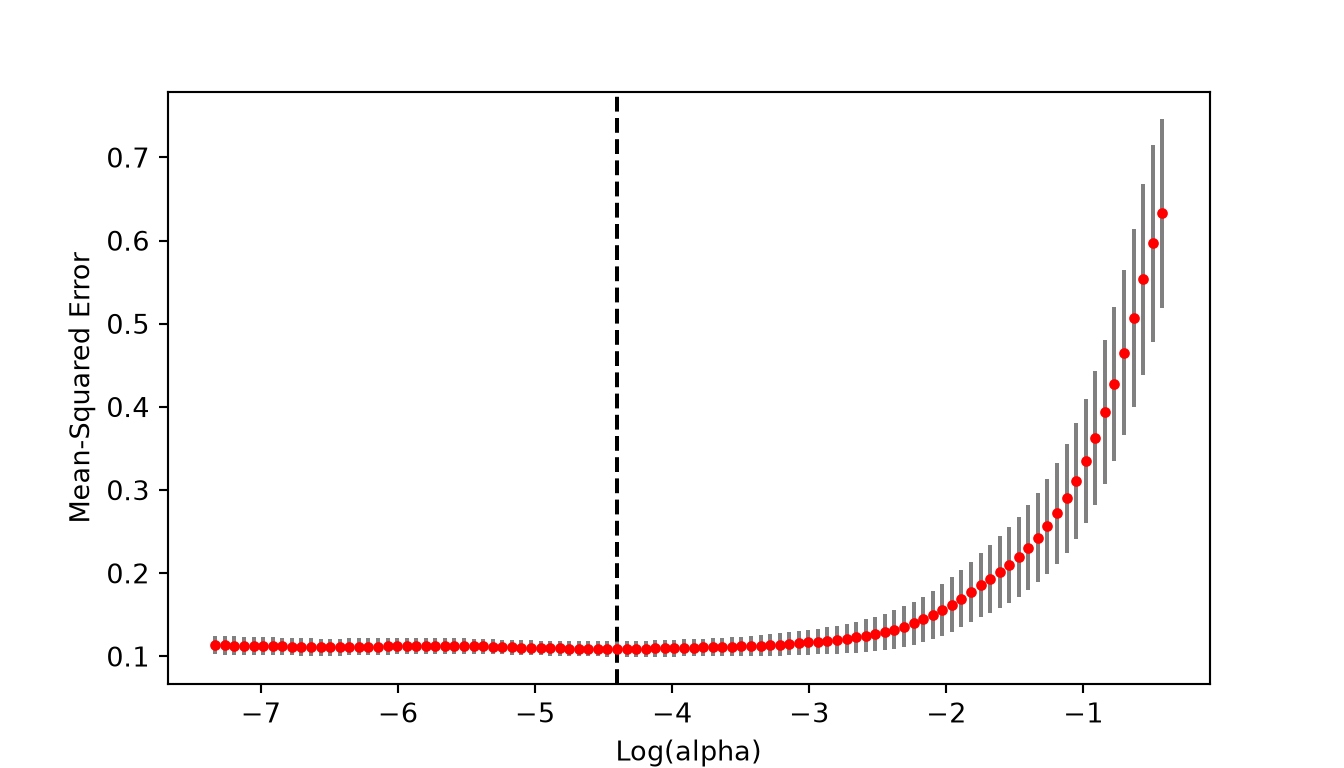
print(cv_lasso.alpha_)0.012265887635899022The fitted model uses the selected penalty. The coefficients are stored in the coef_ property and are relative to the standardized predictor variables. Notice that several coefficients have been reduced to exactly zero, which means that those predictor variables have been dropped from the model.
print(pd.Series(cv_lasso.coef_, index=predictors).round(4))blue 0.0000
green -0.0000
yellow 0.0000
red 0.2064
redEdge -0.0000
nir1 -0.0186
nir2 -0.2547
swir1 -0.0700
swir2 0.0000
swir3 0.0000
swir4 0.0772
swir5 0.0037
swir6 0.0000
swir7 0.0000
swir8 0.3058
dtype: float64print(cv_lasso.intercept_)1.41929124437820515.7 Predict to Raster Data
Lastly, we want to demonstrate how a linear regression model can be used to make spatial predictions on a cell-by-cell basis. We first read in the pre- and post-fire images. The values from the table used throughout this chapter are from these images. Each image has 16 bands, and band n in the image corresponds to “Bn” in the table. The images are then displayed as false color composites using the SWIR6 (band 14), NIR1 (band 7), and green (band 3) channels using a function that applies a linear stretch to each band, as discussed in Chapter 10. In the second image, the extent of the fire is obvious using this band composite, which highlights the value of SWIR and NIR data for mapping fire extents and fire severity.
pre_src = rasterio.open(fld + "decPre.tif")
post_src = rasterio.open(fld + "aprilPost.tif")
pre_img = pre_src.read().astype("float32")
post_img = post_src.read().astype("float32")

def stretch(band, low=2, high=98):
    p_low, p_high = np.nanpercentile(band, [low, high])
    return np.clip((band - p_low) / (p_high - p_low), 0, 1)

def plot_rgb(img, r, g, b, extent, title):
    """Display three bands (1-based band numbers) as a color composite."""
    fig, ax = plt.subplots(figsize=(7, 8))
    ax.imshow(np.dstack([stretch(img[i - 1]) for i in (r, g, b)]), extent=extent)
    ax.set_title(title)
    ax.set_axis_off()
    plt.show()

pre_ext = plotting_extent(pre_src)
plot_rgb(pre_img, 14, 7, 3, pre_ext, "Pre-fire (SWIR6, NIR1, Green)")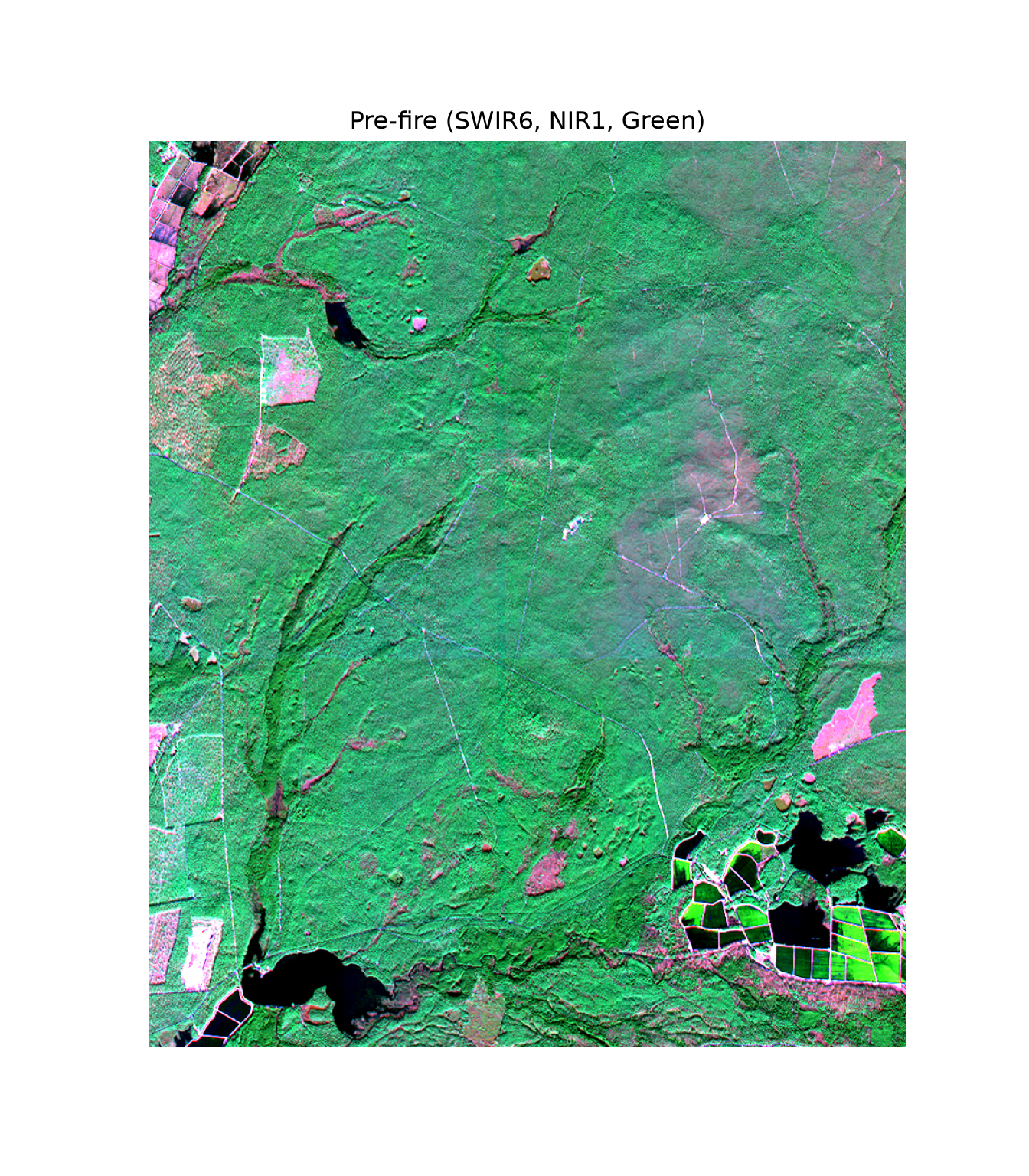
plot_rgb(post_img, 14, 7, 3, plotting_extent(post_src), "Post-fire (SWIR6, NIR1, Green)")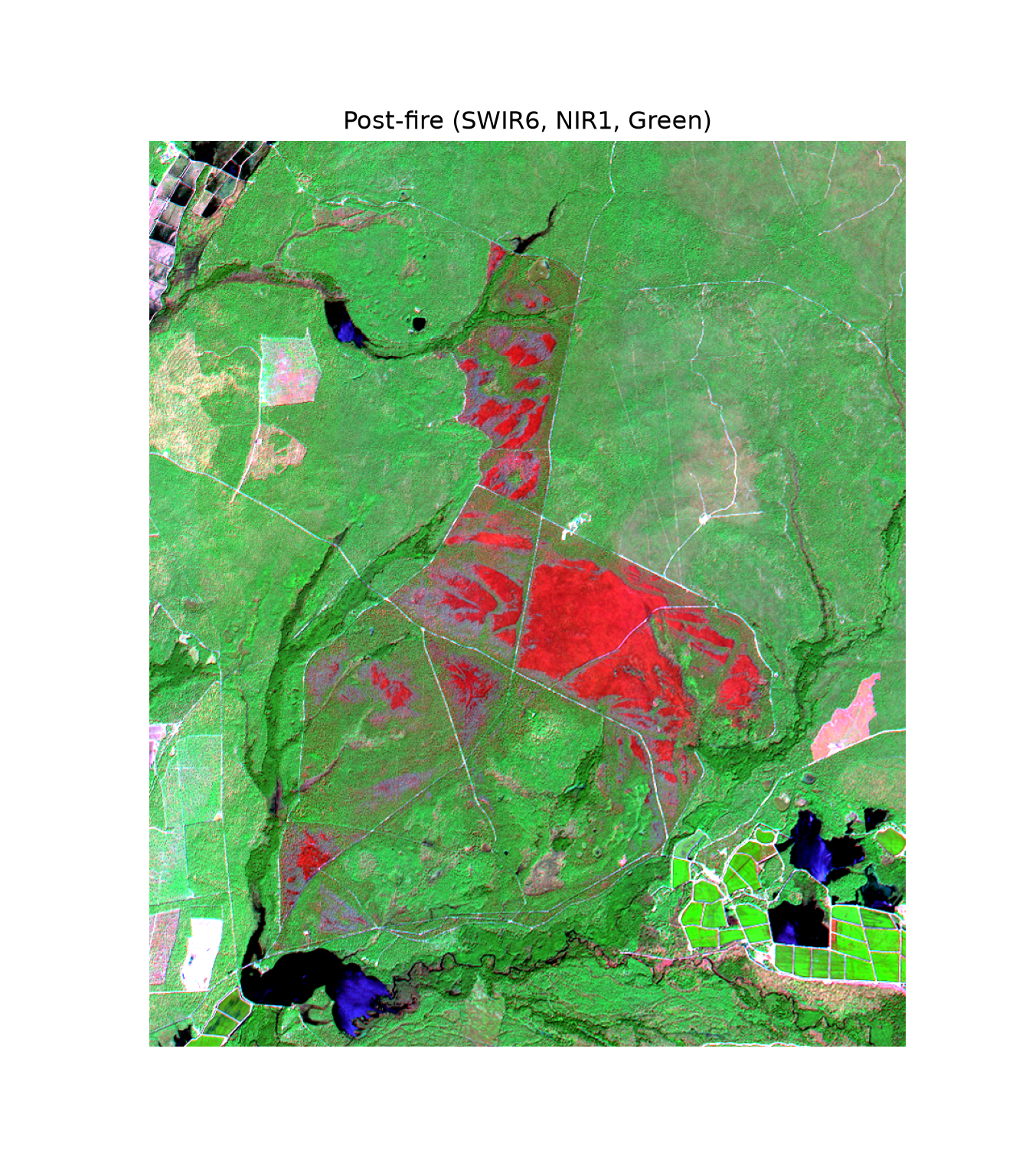
Next, we generate the dNBR that was selected as optimal above (i.e., NIR1 and SWIR6). We calculate NBR for each image and then use the results to calculate dNBR on a pixel-by-pixel basis. The two images do not have exactly the same grid: the post-fire image has one fewer column, and the cell boundaries are slightly offset. So, the post-fire NBR is resampled to the grid of the pre-fire image using reproject() and bilinear interpolation, as discussed in Chapter 10. Lastly, the dNBR values are limited to a range of -2 to 2 using np.clip(). We now have the single predictor variable used in our linear model as a raster grid.
Any preprocessing applied to the tabulated data must also be applied to the image data so that the cell values match those used in the modeling. No preprocessing was applied here, so we do not need to worry about this.
def nbr(img, nir=7, swir=14):
    return (img[nir - 1] - img[swir - 1]) / (img[nir - 1] + img[swir - 1])

nbr_pre = nbr(pre_img)
nbr_post_src = nbr(post_img)

nbr_post = np.full(nbr_pre.shape, np.nan, dtype="float32")
reproject(nbr_post_src, nbr_post, src_transform=post_src.transform, src_crs=post_src.crs,
          dst_transform=pre_src.transform, dst_crs=pre_src.crs, src_nodata=np.nan,
          dst_nodata=np.nan, resampling=Resampling.bilinear)

dnbr_r = np.clip(nbr_pre - nbr_post, -2, 2)
def quantile_map(arr, extent, cmap, label, k=7):
"""Display an array using k quantile classes."""
breaks = np.unique(np.nanquantile(arr, np.linspace(0, 1, k + 1)))
fig, ax = plt.subplots(figsize=(7, 8))
im = ax.imshow(arr, extent=extent, cmap=cmap, norm=BoundaryNorm(breaks, plt.get_cmap(cmap).N))
fig.colorbar(im, ax=ax, shrink=0.6, label=label)
ax.set_axis_off()
plt.show()
quantile_map(dnbr_r, pre_ext, "Reds", "dNBR")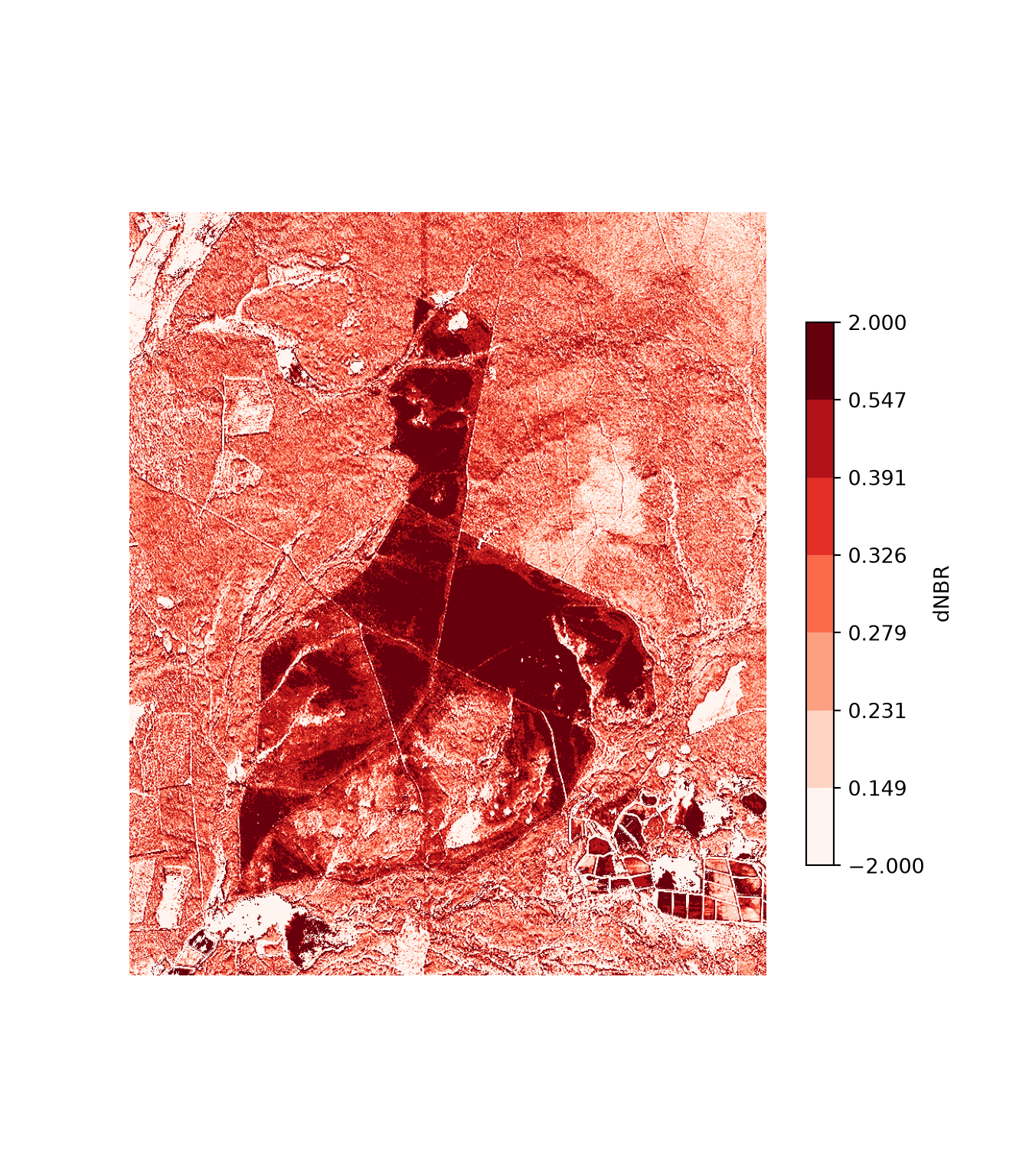
Since our model consists of learned coefficients, we can apply it using simple raster math. We are specifically creating a prediction using the polynomial single regression equation. The coefficients are stored in the params property of the fitted model and can be accessed by name. The learned coefficient for the dNBR variable is multiplied by each cell value. We add to this the square term coefficient multiplied by the square of the dNBR at each pixel. Lastly, we add the y-intercept.
This model could also be applied using the predict() method, which requires a DataFrame with a column for each predictor variable. To accomplish this, we flatten the dNBR array to a single column using ravel(), predict, and reshape the predictions back into the shape of the grid. In later chapters, we will generally use this approach for applying our models to raster grid cells since the models will be too complex to apply using simple raster math. As the printed result confirms, both approaches return the same values.
print(lm7_14p.params)Intercept -1.456081
dnbr7_14 6.836679
I(dnbr7_14 ** 2) -3.044099
dtype: float64b = lm7_14p.params
cbi_r = b["Intercept"] + b["dnbr7_14"] * dnbr_r + b["I(dnbr7_14 ** 2)"] * dnbr_r**2
cbi_r2 = lm7_14p.predict(pd.DataFrame({"dnbr7_14": dnbr_r.ravel()})).to_numpy().reshape(dnbr_r.shape)
print(np.nanmax(np.abs(cbi_r - cbi_r2)))3.552713678800501e-15Before displaying the result, note that the model was trained using dNBR values between roughly 0.2 and 1.3, while the image includes cells with much smaller and larger dNBR values, such as water and unburned areas. Predictions for these cells are extrapolations, and since the polynomial curves downward at both ends, they can result in values well outside the range of possible CBI values, as the minimum and maximum predictions printed below demonstrate. CBI is measured on a scale of 0 to 3, so we limit the predictions to this range using np.clip(). More generally, it is important to keep in mind that a model is only reliable within the range of conditions represented by its training data.
print(np.nanmin(cbi_r), np.nanmax(cbi_r))-27.305836968814056 2.382507974700317cbi_r = np.clip(cbi_r, 0, 3)The resulting prediction is displayed below. If desired, this prediction can be saved to disk as a single-band raster grid using Rasterio, as demonstrated in the second code block.
quantile_map(cbi_r, pre_ext, "Reds", "CBI")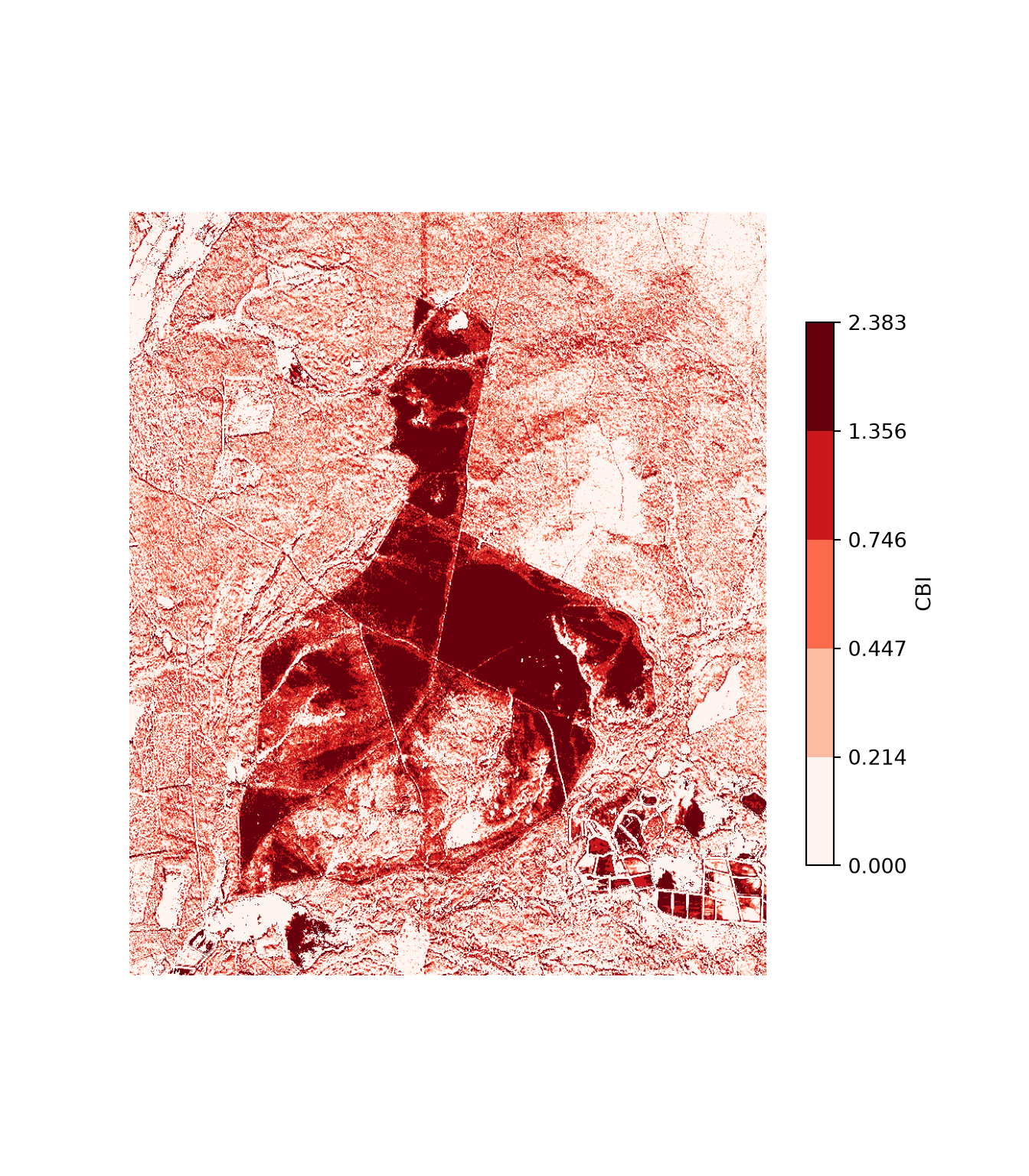
profile = pre_src.profile.copy()
profile.update(count=1, dtype="float32", nodata=np.nan, compress="lzw")
with rasterio.open("output/cbi_prediction.tif", "w", **profile) as dst:
    dst.write(cbi_r.astype("float32"), 1)

pre_src.close()
post_src.close()
15.8 Concluding Remarks
This chapter focused on conducting linear regression in Python, predominantly using Statsmodels. We explored how to build both single and multiple regression models and incorporate higher order terms and interactions. Models were assessed and compared using RMSE and R-squared values. We also discussed how to perform some linear regression assumption diagnostics using graphs/visualizations and also statistical tests. We explored how to implement lasso regression, which makes use of L1 regularization and can aid in reducing overfitting and/or performing variable selection. Lastly, we applied our polynomial regression model to a grid of dNBR values derived from pre- and post-fire WorldView-3 images on a cell-by-cell basis to obtain a spatial prediction.
Now we are ready to investigate additional supervised learning methods, which generally have a similar workflow to linear regression. In the next chapter, we explore spatial probabilistic mapping using the random forest algorithm.
15.9 Questions
- Why is polynomial regression still considered a linear model when the modeled relationship can have curvature?
- Explain the concept of homoscedasticity.
- How is the variance inflation factor (VIF) calculated?
- Explain the difference between a linear model, a generalized linear model, and a generalized additive model.
- Explain the difference between ridge regression, lasso regression, and elastic net.
- Why should predictor variables be standardized before fitting a lasso or ridge regression model?
- What is the purpose of the Moran’s I statistic when assessing a regression model?
- Assuming model assumptions are met, explain how to interpret the coefficient or slope term associated with a single predictor variable in multiple linear regression.
- Explain the use and interpretation of the Shapiro-Wilk Test.
- Why should predictions made for raster cells with predictor variable values outside of the range of the training data be interpreted with caution?
15.10 Exercises
Exercise 15.1: Single Linear Regression
62 Points scaled to 20 Points
Introduction
This assignment explores single linear regression to predict the heating load for buildings based on characteristics of the buildings. Specifically, you will explore regression models in which building heat load is predicted using building relative compactness, wall area, and roof area. These data (energy_efficienty_data.csv) were obtained from Kaggle: https://www.kaggle.com/datasets/ujjwalchowdhury/energy-efficiency-data-set. The dataset has been provided in the datasets folder of the book download (the link above may no longer be active).
Objectives
Prepare data for analysis and prediction using single linear regression
Explore correlation between continuous variables
Create and compare linear regression models
Interpret regression coefficients and R-squared and RMSE metrics
Deliverables
- Jupyter Notebook (Python) or R Markdown file (R) with all code and results embedded. Files can be rendered to HTML webpages if your instructor requires this. Questions should be stated and answered within Markdown cells.
Background Questions
Question 1: Provide a general single linear regression equation and explain all the terms. (5 Points)
Question 2. Explain how the best fitting line is determined using the ordinary least squares method. (5 Points)
Question 2. What is a residual? How are residuals calculated? (5 Points)
Question 3. Explain how R-squared is calculated. (5 Points)
Question 4. What are the units of R-squared? (5 Points)
Question 5. Explain how Root Mean Square Error (RMSE) is calculated. What are the units of measurement for RMSE? (5 Points)
Tasks and Questions
This assignment can be conducted using either Python or R, whichever you prefer or whichever your instructor requires. Generate code to perform the following analyses and answer the stated questions.
Task 1: Extract out only the “Heating_Load”, “Relative_Compactness”, “Wall_Area”, and “Roof_Area” attributes. (2 Points)
Task 2: Create scatterplots to compare the dependent variable (“Heat_Load”) with each of the three independent variables separately. (5 Points)
Task 3. Obtain Pearson correlation coefficients for “Heat_Load” and each of the three independent variables of interest. (5 Points)
Question 6. Discuss the relationships between the dependent variable and each independent variable based on the scatterplots and correlation coefficients obtained. Does each independent variable appear to be correlated with “Heat_Load”? If so, is the correlation positive or negative? Is the correlation linear? (5 Points)
Task 3. Create three separate single linear regression models in which “Heat_Load” is predicted using one of the available predictor variables. (5 Points)
Task 4. Calculate or obtain the R-squared and RMSE metrics for each of the three models. Note that you do not need to separate the data into separate training and testing sets in this assignment. So, you can just predict back to the data used to create the models. (5 Points)
Question 7. Compare the model fit using R-squared and RMSE. Do the model results agree with the results obtained using the scatterplots and Pearson correlation coefficients? In other words, did the variable with the highest linear correlation yield the best performing model? (5 Points)
Exercise 15.2: Multiple Linear Regression
100 Points scaled to 20 Points
Introduction
This assignment explores multiple linear regression to predict the weight of a fish using multiple measures of length and measures of height and width. The species of fish will be represented as dummy variables. These data (Fish.csv) are provided on Kaggle: https://www.kaggle.com/datasets/aungpyaeap/fish-market. The dataset has been provided in the datasets folder of the book download (the link above may no longer be active).
Objectives
Prepare data for analysis and prediction using multiple linear regression
Explore correlation between continuous variables and the difference in distribution of a continuous variable amongst different categories
Create and assess multiple linear regression models
Assess and investigate multiple linear regression assumptions
Deliverables
- Jupyter Notebook (Python) or R Markdown file (R) with all code and results embedded. Files can be rendered to HTML webpages if your instructor requires this. Questions should be stated and answered within Markdown cells.
Background Questions
Question 1: Provide a general multiple linear regression equation and explain all the terms. (5 Points)
Question 2: Explain the concept of a dummy variable and how such variables are calculated. Why is it necessary to convert nominal variables to dummy variables when performing linear regression? (5 Points)
Question 3. State all the assumptions of multiple linear regression. (10 Points)
Question 4. Explain the concept of homoscedasticity as it relates to multiple linear regression. (5 Points)
Question 5. Explain the purpose and interpretation of a QQ-Plot. What is a QQ-Plot used for when assessing assumptions of multiple linear regression? (5 Points)
Question 6. Explain the difference between R-Squared and Adjusted R-Squared. Why is Adjusted R-squared required when assessing multiple linear regression models? (5 Points)
Tasks and Questions
This assignment can be conducted using either Python or R, whichever you prefer or whichever your instructor requires. Generate code to perform the following analyses and answer the stated questions.
Task 1: Create separate scatterplots to compare the fish weight (“Weight”) to each of the continuous independent variables: “Length1”, “Length2”, “Length3”, “Height”, and “Width”. (5 Points)
Task 2: Create a grouped box plot to compare the distribution of weight amongst the seven different species included in the dataset. (5 Points)
Task 3: Recreate the scatterplots from Task 1. However, this time differentiate the different species using the color of each data point. (5 Points)
Question 7. Discuss the relationships between the dependent variable and each independent variable based on the scatterplots and grouped boxplot obtained. Does each independent variable appear to be correlated with fish weight? If so, is the correlation positive or negative? Is the correlation linear? Does the distribution of weight seem to vary by species? Does the relationship between weight and each continuous variable appear to be different between species? (10 Points)
Task 4. Create dummy variables for the species variable (“Species”). (5 Points)
Task 5. Fit a multiple linear regression model that predicts “Weight” using the available continuous variables (“Length1”, “Length2”, “Length3”, “Height”, and “Weight”) and the dummy variables representing the species (“Species”). (5 Points)
Task 6. Calculate or obtain the Adjusted R-Squared and RMSE metrics for the model. (5 Points)
Question 8. Describe the model performance using the obtained Adjusted R-Squared and RMSE values. Also, discuss the coefficients obtained. What variable coefficients were found to be statistically significant in the model? (10 Points)
Task 7. Calculate a QQ-Plot to assess the model assumptions. (5 Points)
Task 8. Create a plot with the “Weight” values mapped to the x-axis and the residuals mapped to the y-axis to assess homoscedasticity. (5 Points)
Question 9. Discuss the graphs obtained in Task 7 and 8. Do these graphs suggest issues of normality of the residuals and/or homoscedasticity in the model? (5 Points)
Exercise 15.3: Comparing Linear, Polynomial, and Generalized Additive Models
Introduction
You will now further explore the composite burn index (CBI) prediction problem presented in Chapter 15 by fitting a generalized additive model (GAM) and comparing it to the linear and polynomial models. Use SWIR6 (Band 14) and NIR1 (Band 7) for this analysis. The data are provided in datasets/gisData/regression/burn_wv3.csv.
Deliverables
- Jupyter Notebook or Quarto document with all code and graphs embedded. Answers to questions should be provided in Markdown cells or text.
Questions and Tasks
- Randomly split the data so that 100 samples are used for training and the remaining samples are withheld for testing. This can be accomplished using the
sample()method of a DataFrame ortrain_test_split()from scikit-learn. - Calculate the dNBR using SWIR6 (Band 14) and NIR1 (Band 7).
- Fit the linear model (
"Total ~ dnbr") and polynomial model ("Total ~ dnbr + I(dnbr**2)") using the training subset andols()from Statsmodels. - Fit a GAM to predict CBI using the dNBR and the training subset. This can be accomplished using the
GLMGamclass with aBSplinessmoother from statsmodels.gam.api (use the default Gaussian family) or using theLinearGAMclass from the pyGAM library. - Use all three models to predict the withheld test data.
- Use the predictions and the CBI measures for the test data to calculate the RMSE and predicted R-squared for each model.
- Write a paragraph describing your results. Which model generalized the best to the withheld test data? Did the GAM overfit in comparison to the other two models?