import numpy as np
import pandas as pd
import matplotlib.pyplot as plt
import rasterio
from rasterio.plot import plotting_extent
from matplotlib.colors import ListedColormap
from sklearn.ensemble import RandomForestClassifier
from sklearn.linear_model import LogisticRegression
from sklearn.preprocessing import MinMaxScaler
from sklearn.metrics import (accuracy_score, confusion_matrix, roc_auc_score, roc_curve,
                             ConfusionMatrixDisplay)
from sklearn.inspection import PartialDependenceDisplay16 Random Forest
16.1 Topics Covered
- Prepare data as input to a random forest model
- Train a random forest model
- Assess model predictions
- Compare different input feature spaces
- Use a random forest model to predict to raster data
- Compare random forest and logistic regression models
- Create and interpret partial dependence plots
- Tune hyperparameters using 10-fold cross validation and compare random forest to a support vector machine (SVM)
16.2 Introduction
We now investigate the random forest algorithm, which is implemented in the scikit-learn library. scikit-learn provides a consistent interface for many machine learning algorithms, data preprocessing methods, and assessment metrics: models are created as objects, trained using the fit() method, and used to make predictions using the predict() and predict_proba() methods. We will specifically implement a workflow to generate a probabilistic model of wetland occurrence based on topographic characteristics represented using land surface parameters (LSPs). This problem is framed as a binary classification task: “wetland” vs. “upland”. However, instead of making use of the “hard” predictions, we primarily make use of the probabilistic estimates.
A random forest is an ensemble of decision trees. Each tree is trained using a bootstrap sample of the training data (a random sample of the same size drawn with replacement), and only a random subset of the predictor variables is considered at each decision node. For a classification task, the final prediction is obtained by combining the predictions of all trees in the ensemble. The samples that were not included in the bootstrap sample for a tree are called its out-of-bag (OOB) samples, and they can be used to estimate how well the model generalizes to new data.
We implement the random forest algorithm with the RandomForestClassifier class from scikit-learn. scikit-learn is also used for data preprocessing and accuracy assessment. Pandas is used for general data wrangling, Rasterio (Chapter 10) is used for handling raster geospatial data, and matplotlib is used to visualize the results.
16.3 Data Preparation
We step through the process of creating a spatial prediction to map the likelihood or probability of palustrine forested/palustrine scrub/shrub (PFO/PSS) wetland occurrence using a variety of LSPs. The provided training.csv table contains 1,000 examples of PFO/PSS wetlands and 1,000 not PFO/PSS examples. The validation.csv file contains a separate, non-overlapping 2,000 examples equally split between PFO/PSS wetlands and not PFO/PSS wetlands. The columns in the provided tables are summarized in Table 16.1. We have also provided a raster stack (predictors.tif) of all the predictor variables so that a spatial prediction can be produced. Since PFO/PSS wetlands should only occur in woody or forested extents, we have also provided a binary raster mask (for_mask.tif) to subset the final result to only areas with woody or forested land cover. For this example, we use only a subset of the available predictor variables. Several of the variables were calculated using different moving window sizes. We only use the averaged versions here.
| Variable | Description |
|---|---|
| class | PFO/PSS (“wet”) or not (“not”) |
| cost | Distance from water bodies weighted by slope |
| crv_arc | Topographic curvature |
| crv_plane | Plan curvature |
| crv_pro | Profile curvature |
| ctmi | Compound topographic moisture index (CTMI) |
| diss_5 | Terrain dissection (11 x 11 window) |
| diss_10 | Terrain dissection (21 x 21 window) |
| diss_20 | Terrain dissection (41 x 41 window) |
| diss_25 | Terrain dissection (51 x 51 window) |
| diss_a | Terrain dissection average |
| rough_5 | Terrain roughness (11 x 11 window) |
| rough_10 | Terrain roughness (21 x 21 window) |
| rough_20 | Terrain roughness (41 x 41 window) |
| rough_25 | Terrain roughness (51 x 51 window) |
| rough_a | Terrain roughness average |
| slp_d | Topographic slope in degrees |
| sp_5 | Slope position (11 x 11 window) |
| sp_10 | Slope position (21 x 21 window) |
| sp_20 | Slope position (41 x 41 window) |
| sp_25 | Slope position (51 x 51 window) |
| sp_a | Slope position average |
The training and test sets are read in using read_csv() from Pandas, and the dependent variable (“class”) and the subset of predictor variables are extracted. We recode the class names using a dictionary and the map() method. Lastly, we re-scale all the predictor variables to a zero to one range using MinMaxScaler() from scikit-learn. The scaler is fit using only the training set, which defines the minimum and maximum of each variable, to avoid a data leak. The same transformation is then applied to both the training and test sets using the transform() method. Note that this normalization is not strictly necessary for random forest since it is not sensitive to different measurement scales. However, it is required by many other algorithms, and it demonstrates a preprocessing step that must also be applied to the raster data.
preds_to_use = ["cost", "ctmi", "crv_plane", "crv_pro", "diss_a", "rough_a", "slp_d", "sp_a"]
class_names = {"wet": "Wetland", "not": "Upland"}

train = pd.read_csv("datasets/training.csv")[["class"] + preds_to_use]
test = pd.read_csv("datasets/validation.csv")[["class"] + preds_to_use]
train["class"] = train["class"].map(class_names)
test["class"] = test["class"].map(class_names)

scaler = MinMaxScaler().fit(train[preds_to_use])

train_p = pd.DataFrame(scaler.transform(train[preds_to_use]), columns=preds_to_use)
test_p = pd.DataFrame(scaler.transform(test[preds_to_use]), columns=preds_to_use)
y_train, y_test = train["class"], test["class"]

print(train_p.describe().round(2))
cost ctmi crv_plane crv_pro diss_a rough_a slp_d sp_a
count 2000.00 2000.00 2000.00 2000.00 2000.00 2000.00 2000.00 2000.00
mean 0.07 0.20 0.53 0.41 0.36 0.41 0.22 0.46
std 0.12 0.14 0.06 0.07 0.23 0.23 0.22 0.10
min 0.00 0.00 0.00 0.00 0.00 0.00 0.00 0.00
25% 0.00 0.11 0.51 0.39 0.16 0.21 0.03 0.41
50% 0.01 0.16 0.52 0.40 0.37 0.40 0.11 0.46
75% 0.10 0.23 0.54 0.42 0.53 0.59 0.38 0.49
max 1.00 1.00 1.00 1.00 1.00 1.00 1.00 1.00print(y_train.value_counts())class
Upland 1000
Wetland 1000
Name: count, dtype: int64We next prepare the raster data. The stack of predictor variables is opened using Rasterio. We define a list of band names that match the predictor variable names in the tabulated data and read only the bands for the subset of predictor variables used. Since Rasterio band numbers start at 1, we add 1 to the position of each variable in the list. NoData cells are converted to NaN.
Since the tabulated data were re-scaled, it is also necessary to apply this same preprocessing step to the raster data for consistency. scikit-learn expects a table in which each row is a sample and each column is a variable. So, we reshape the (bands, rows, columns) array into a (cells, bands) table, apply the fitted scaler, and reshape the result back into the shape of the raster grid.
We also read in the forest mask. Areas outside of forested extents are coded as NoData while forested areas are coded to 1. Lastly, we visualize one predictor variable, topographic slope (“slp_d”), and the forest mask. The slope values have been rescaled so that most cells fall between 0 and 1. Some cells have values greater than 1 since they are steeper than any of the training samples; the scaler uses the minimum and maximum of the training data, not of the raster grid.
stk_names = ["cost", "crv_arc", "crv_plane", "crv_pro", "ctmi", "diss_5", "diss_10", "diss_20",
             "diss_25", "diss_a", "rough_5", "rough_10", "rough_20", "rough_25", "rough_a",
             "slp_d", "sp_5", "sp_10", "sp_20", "sp_25", "sp_a"]

with rasterio.open("datasets/gisData/spatial_ml/predictors.tif") as src:
    pred_stk = src.read([stk_names.index(p) + 1 for p in preds_to_use], masked=True)
    pred_stk = pred_stk.filled(np.nan).astype("float32")
    stk_profile = src.profile
    stk_ext = plotting_extent(src)

n_bands, n_rows, n_cols = pred_stk.shape
cells = pd.DataFrame(pred_stk.reshape(n_bands, -1).T, columns=preds_to_use)
pred_stk = scaler.transform(cells).T.reshape(n_bands, n_rows, n_cols)

with rasterio.open("datasets/gisData/spatial_ml/for_mask.tif") as src:
    for_msk = src.read(1, masked=True)
fig, ax = plt.subplots(figsize=(8, 8))
im = ax.imshow(pred_stk[preds_to_use.index("slp_d")], extent=stk_ext, cmap="copper_r")
fig.colorbar(im, ax=ax, shrink=0.6, label="Slope")
ax.set_axis_off()
plt.show()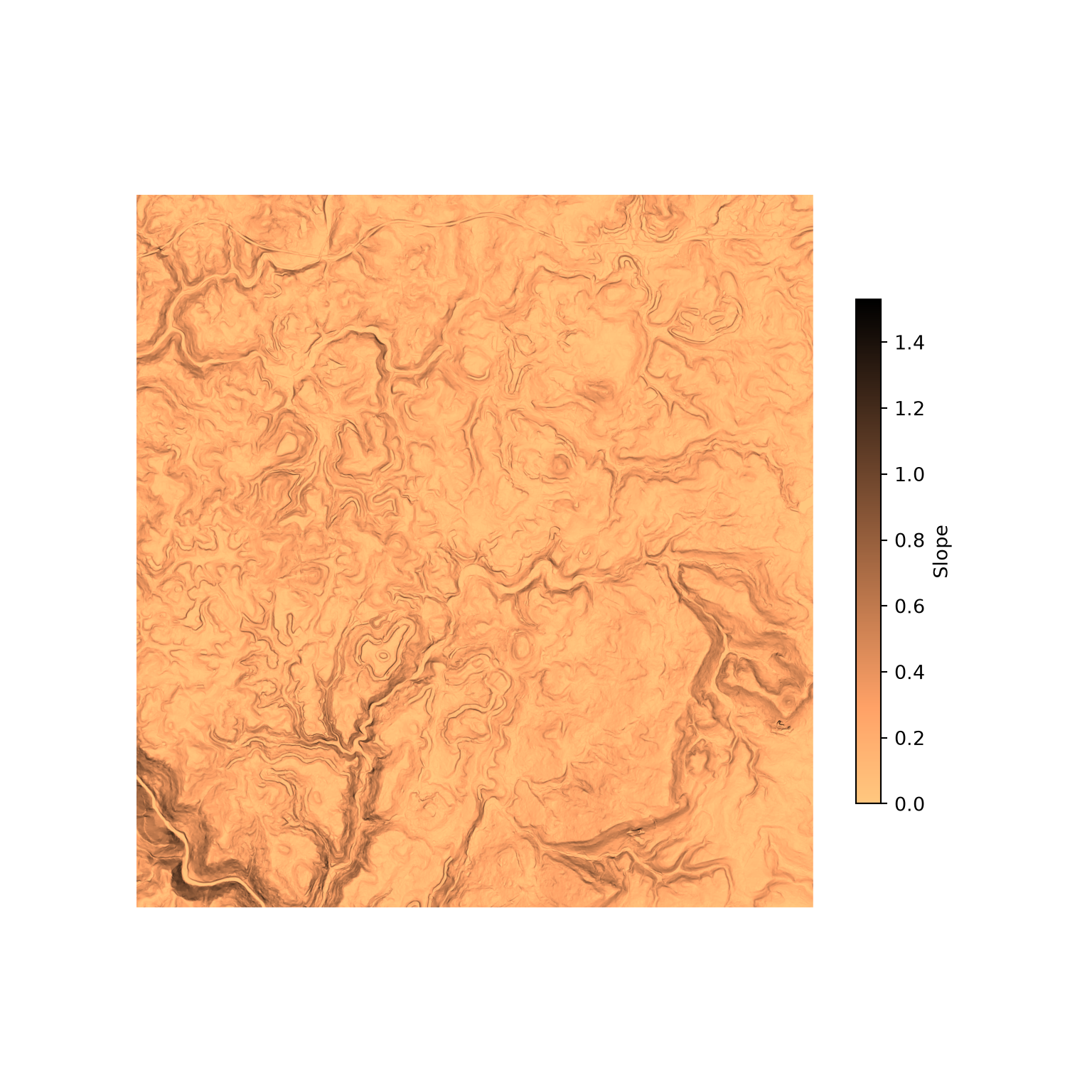
fig, ax = plt.subplots(figsize=(8, 8))
ax.imshow(for_msk, extent=stk_ext, cmap=ListedColormap(["forestgreen"]))
ax.set_title("Forest")
ax.set_axis_off()
plt.show()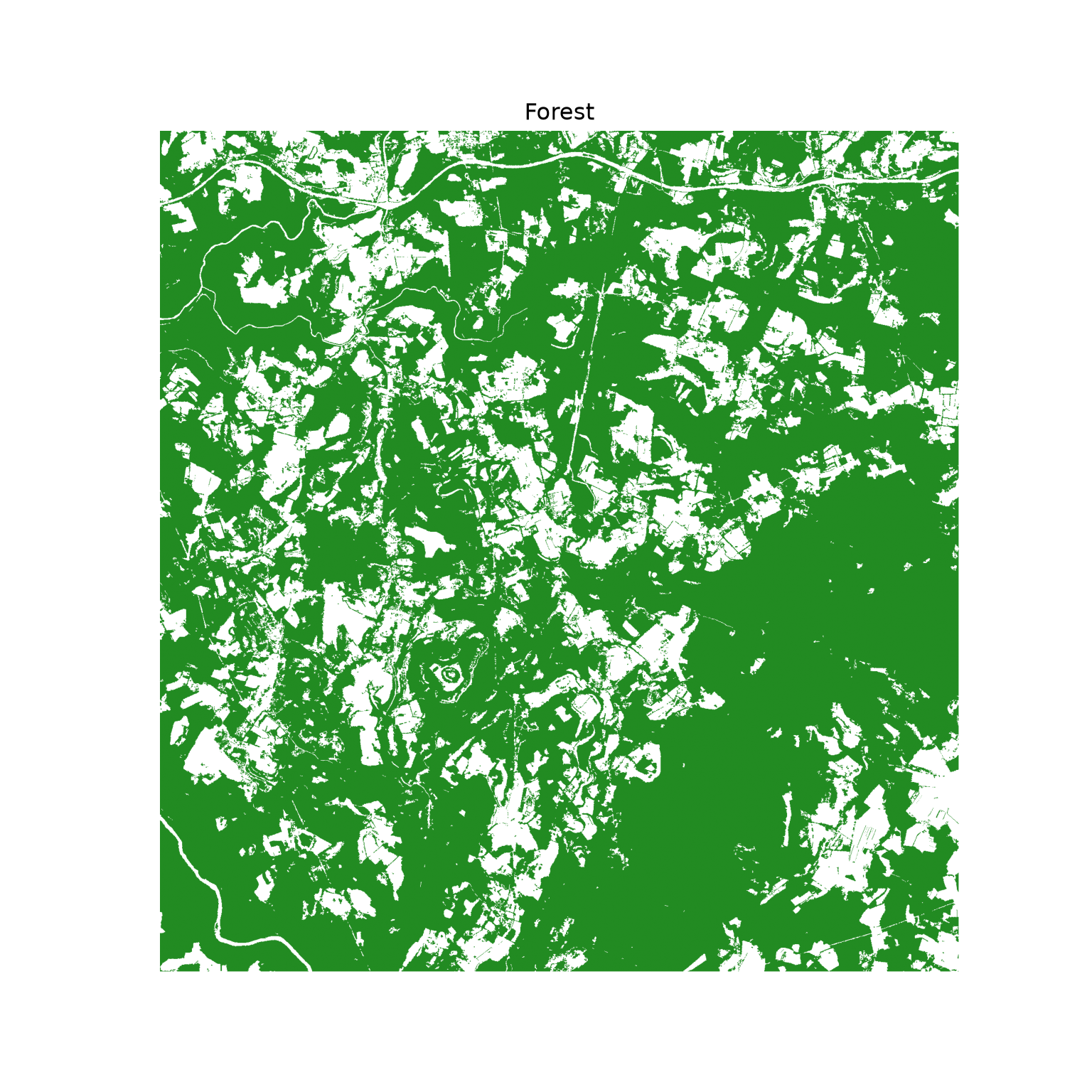
16.4 Base Model
16.4.1 Train Model
We first train a base model that uses all of the extracted predictor variables. A RandomForestClassifier object is created with the desired settings and then trained using the fit() method, which accepts the predictor variables and the dependent variable. We generate 501 trees in the ensemble (n_estimators=501) and estimate the model performance using the OOB data for each tree (oob_score=True). Setting random_state makes the result reproducible, and setting n_jobs=-1 uses all available processor cores to train the trees in parallel.
Since there are only two classes, “Wetland” and “Upland”, we use an odd number of trees in the ensemble to avoid a tie. When more than two categories are differentiated, using an odd number of trees does not guarantee no ties, so we generally only recommend this for binary problems.
The number of predictor variables randomly selected as candidates at each decision node is defined by the max_features hyperparameter. Since we did not set this hyperparameter, the default was used. For a classification task, this is the square root of the total number of predictor variables. It is generally recommended to tune this hyperparameter. This can be accomplished using GridSearchCV() from scikit-learn, which trains and assesses models for every combination of the provided hyperparameter values using cross validation.
The OOB accuracy is stored in the oob_score_ property, so the OOB error rate is 1 minus this value. This offers an estimate of model generalization since the OOB samples for each tree were not used to build that specific tree in the ensemble. The oob_decision_function_ property stores the OOB predicted probabilities for each training sample, which we use to generate an OOB confusion matrix.
OOB error estimates are only unbiased if the training data are randomized and unbiased. There may also be some inflation if there is autocorrelation between the samples. Due to these issues, we recommend further assessing the model using a withheld set of samples from a different geographic extent.
m_all = RandomForestClassifier(n_estimators=501, oob_score=True, random_state=42, n_jobs=-1)
m_all.fit(train_p, y_train)

print(m_all)
RandomForestClassifier(n_estimators=501, n_jobs=-1, oob_score=True,
random_state=42)print(f"OOB error rate: {1 - m_all.oob_score_:.4f}")OOB error rate: 0.0415oob_class = m_all.classes_[m_all.oob_decision_function_.argmax(axis=1)]
print(pd.crosstab(y_train, oob_class, rownames=["Reference"], colnames=["OOB Prediction"]))OOB Prediction Upland Wetland
Reference
Upland 950 50
Wetland 33 96716.4.2 Explore Model
Partial dependence plots characterize how the response varies with the values of a specific predictor variable. To calculate a partial dependence plot, the predictor variable of interest is set to each of a series of values for all samples while the other predictor variables keep their original values, and the predictions are averaged at each value. Relative to the class of interest, larger values, as shown on the y-axis in the partial dependence plots below, indicate a higher likelihood of being predicted to the class of interest, while the x-axis maps the predictor variable values.
Partial dependence plots are generated using the from_estimator() method of PartialDependenceDisplay from scikit-learn. The user must provide the trained model, the predictor variables, the variables of interest, and the class of interest (target). The classes are stored in the classes_ property of the model in alphabetical order, so “Wetland” is the second class.
The two partial dependence plots generated are for the distance from water bodies weighted by slope (“cost”) and topographic slope (“slp_d”) variables. The plots generally suggest that wetlands are more likely to occur in flatter areas near streams, which makes sense.
As with variable importance estimates, partial dependence plots can be misleading or biased if variables are highly correlated. Regardless, we do find them informative, especially when considering more general trends as opposed to local noise.
print(m_all.classes_)['Upland' 'Wetland']fig, axs = plt.subplots(1, 2, figsize=(10, 4))
PartialDependenceDisplay.from_estimator(m_all, train_p, features=["cost", "slp_d"],
target="Wetland", ax=axs)
plt.tight_layout()
plt.show()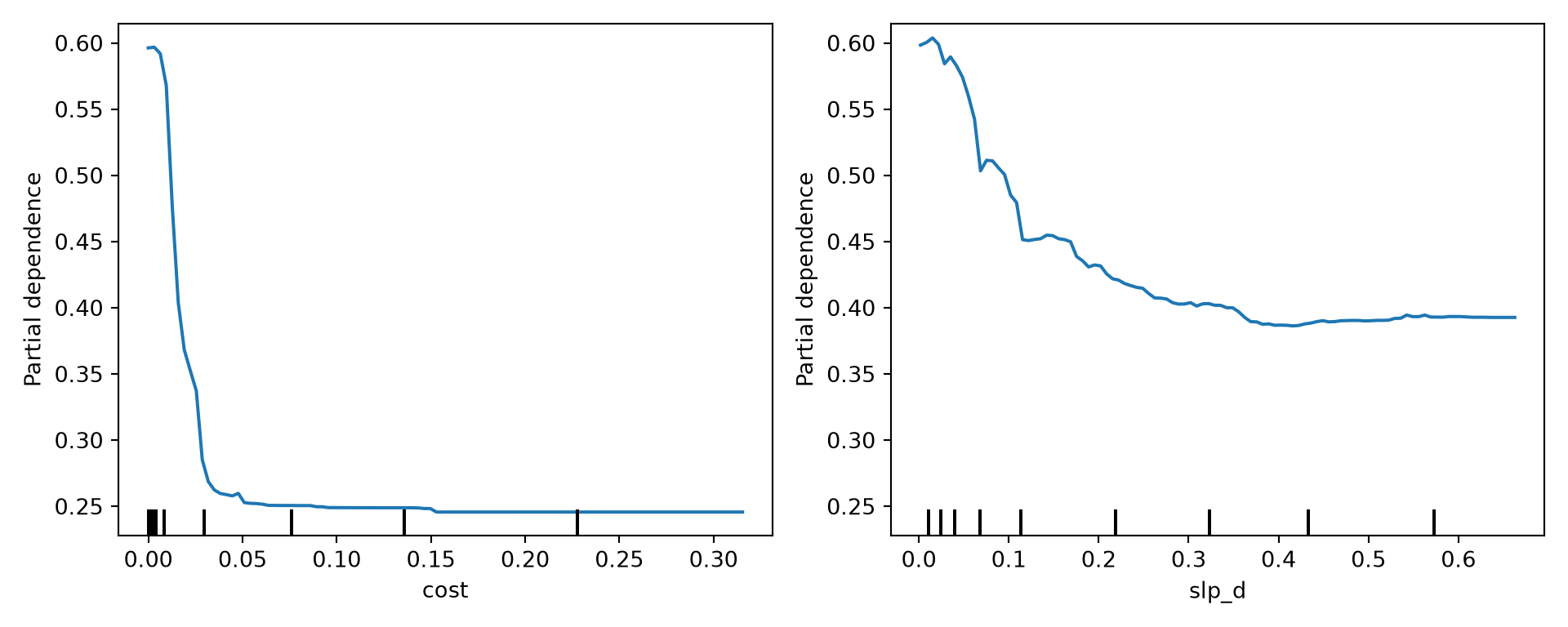
16.5 Compare Feature Spaces
We will now compare models using different features:
- All predictor variables
- Just topographic slope
- Just distance from water bodies weighted by slope
We do not need to train the model that used all predictor variables again since it was already created above. The two new models are trained in the following code block. Since scikit-learn expects a two-dimensional table of predictor variables, even when there is only one, we select the single column using a list (train_p[["slp_d"]]).
m_slp = RandomForestClassifier(n_estimators=501, random_state=42, n_jobs=-1)
m_slp.fit(train_p[["slp_d"]], y_train)

m_cost = RandomForestClassifier(n_estimators=501, random_state=42, n_jobs=-1)
m_cost.fit(train_p[["cost"]], y_train)
RandomForestClassifier(n_estimators=501, n_jobs=-1, random_state=42)In a Jupyter environment, please rerun this cell to show the HTML representation or trust the notebook.
On GitHub, the HTML representation is unable to render, please try loading this page with nbviewer.org.
Parameters
Fitted attributes
We now compare the models based on their predictions to the withheld test data. This requires first obtaining predictions for all test samples using the different models. To compare the models based on the area under the receiver operating characteristic curve (AUCROC), we need to obtain the probabilistic or “soft” predictions as opposed to the predicted class labels or “hard” predictions. This is accomplished using predict_proba(), which returns a column of probabilities for each class. We keep the probabilities for the “Wetland” class, which is the second column. To calculate overall accuracy, we need to obtain the “hard” predictions, which is accomplished using predict().
m_all_p = m_all.predict_proba(test_p)[:, 1]
m_slp_p = m_slp.predict_proba(test_p[["slp_d"]])[:, 1]
m_cost_p = m_cost.predict_proba(test_p[["cost"]])[:, 1]

m_all_c = m_all.predict(test_p)
m_slp_c = m_slp.predict(test_p[["slp_d"]])
m_cost_c = m_cost.predict(test_p[["cost"]])
Next, we use roc_auc_score() from scikit-learn to calculate AUCROC for each model and accuracy_score() to calculate overall accuracy. These metrics were discussed in Chapter 14. For AUCROC, the reference labels are converted to a binary variable where the “Wetland” class, which is considered the positive case, is coded as True. We write the results into a DataFrame along with the name of each model. The results generally suggest that the model that used all the predictor variables provided the best performance followed by the model that used only the distance from water bodies weighted by slope variable. The model using only topographic slope provided the poorest performance.
y_test_bin = y_test == "Wetland"

auc_results = pd.DataFrame({
    "case": ["All", "Slope", "Stream Cost Distance"],
    "auc": [roc_auc_score(y_test_bin, p) for p in (m_all_p, m_slp_p, m_cost_p)],
    "oa": [accuracy_score(y_test, c) for c in (m_all_c, m_slp_c, m_cost_c)]})
print(auc_results.round(4))
case auc oa
0 All 0.9872 0.954
1 Slope 0.9307 0.862
2 Stream Cost Distance 0.9508 0.893fig, axs = plt.subplots(1, 2, figsize=(10, 3.5), sharey=True)
for ax, metric, label in zip(axs, ["auc", "oa"], ["AUCROC", "Overall Accuracy"]):
ax.scatter(auc_results[metric], auc_results["case"], color="red", s=40)
ax.set_xlabel(label)
plt.tight_layout()
plt.show()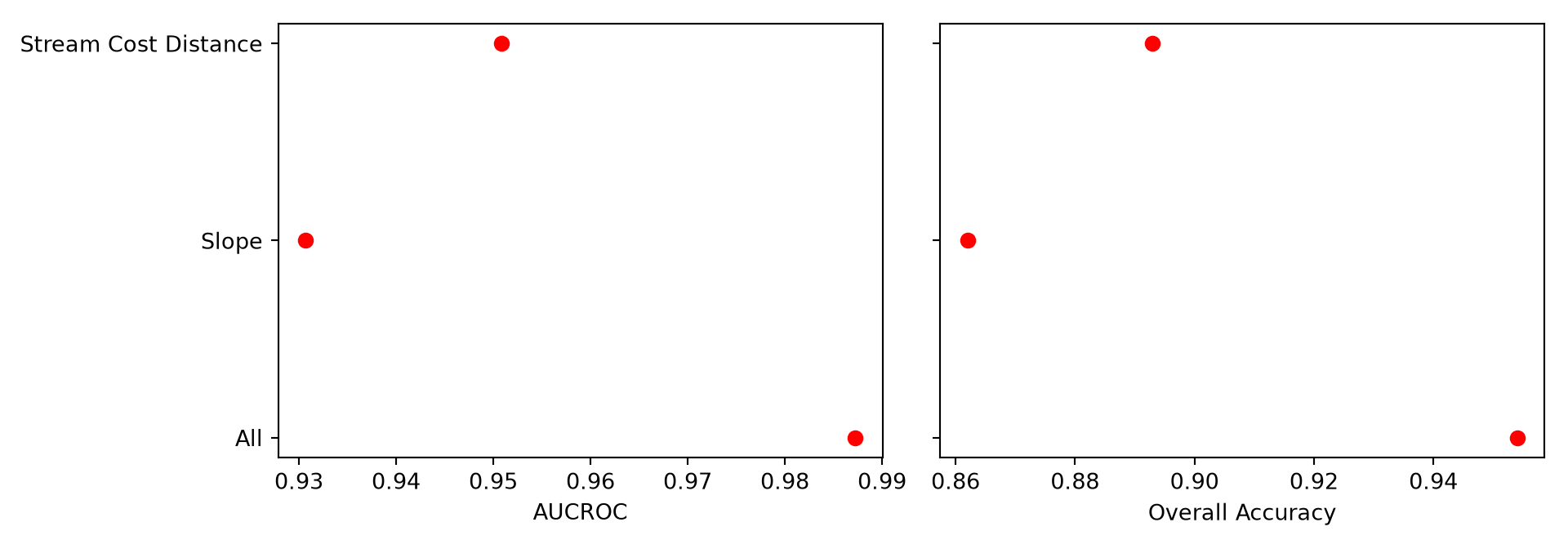
We can also plot the receiver operating characteristic (ROC) curves for all three models in the same graph space. The roc_curve() function returns the false positive rate and true positive rate at a series of decision thresholds. We plot sensitivity (the true positive rate) against specificity (1 minus the false positive rate) and add a one-to-one line that represents random model performance. The curves further highlight the strong performance of the model that used all predictor variables. We also display the confusion matrix for the model using all predictor variables using ConfusionMatrixDisplay.
def plot_roc(curves, title="Model Comparison"):
    """Plot ROC curves (sensitivity vs. specificity) for a dictionary of probabilities."""
    fig, ax = plt.subplots(figsize=(6, 6))
    for (name, prob), color in zip(curves.items(), ["#efd09e", "#d2d8b3", "#90a9b7"]):
        fpr, tpr, _ = roc_curve(y_test_bin, prob)
        ax.plot(1 - fpr, tpr, linewidth=2, color=color, label=name)
    ax.plot([1, 0], [0, 1], color="red", linestyle="--", linewidth=1.2)
    ax.set_xlim(1.02, -0.02)
    ax.set_xlabel("Specificity")
    ax.set_ylabel("Sensitivity")
    ax.set_title(title, fontweight="bold")
    ax.legend()
    plt.show()

plot_roc({"All": m_all_p, "Slope": m_slp_p, "Stream Cost Distance": m_cost_p})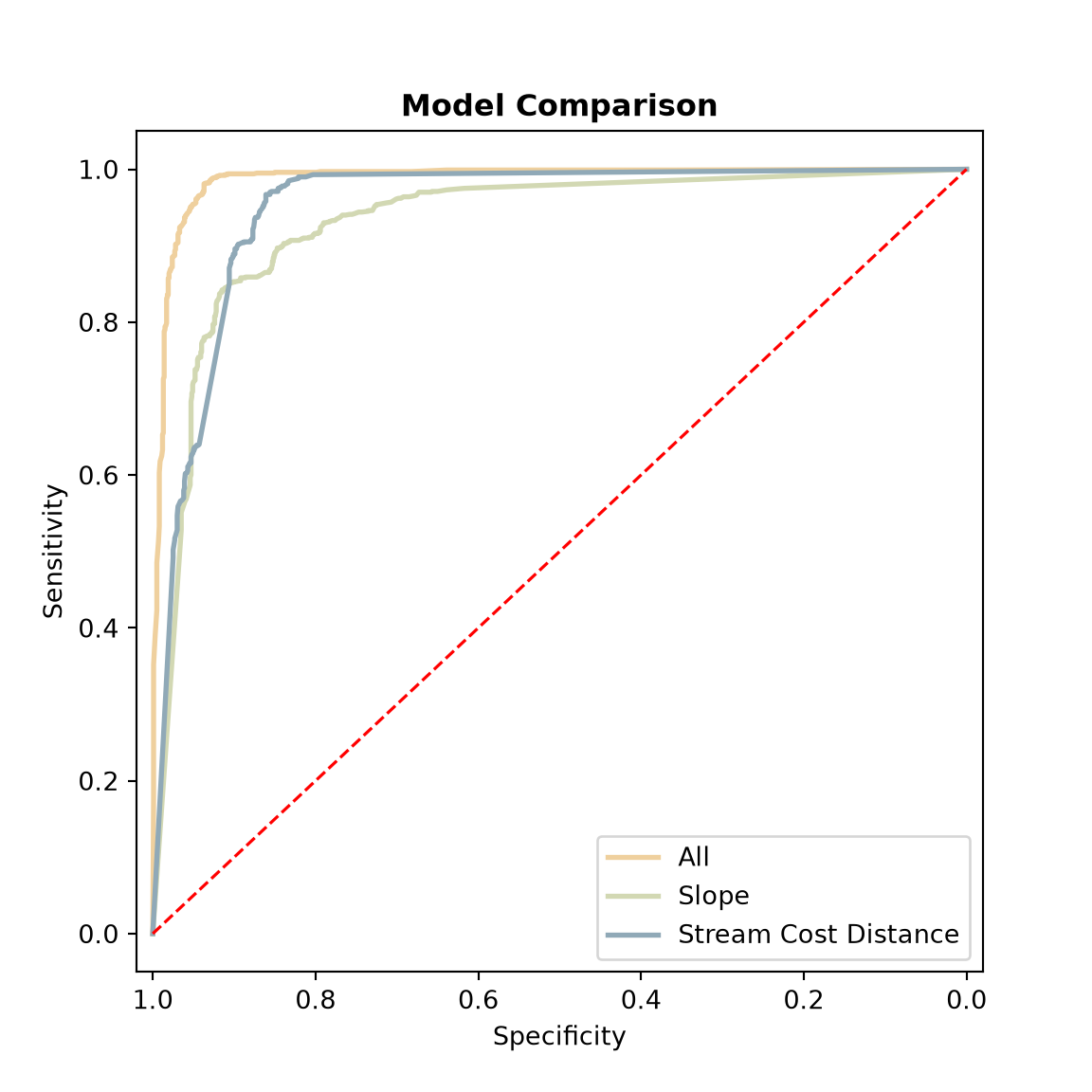
ConfusionMatrixDisplay(confusion_matrix(y_test, m_all_c, labels=m_all.classes_),
                       display_labels=m_all.classes_).plot(cmap="Greys")
plt.show()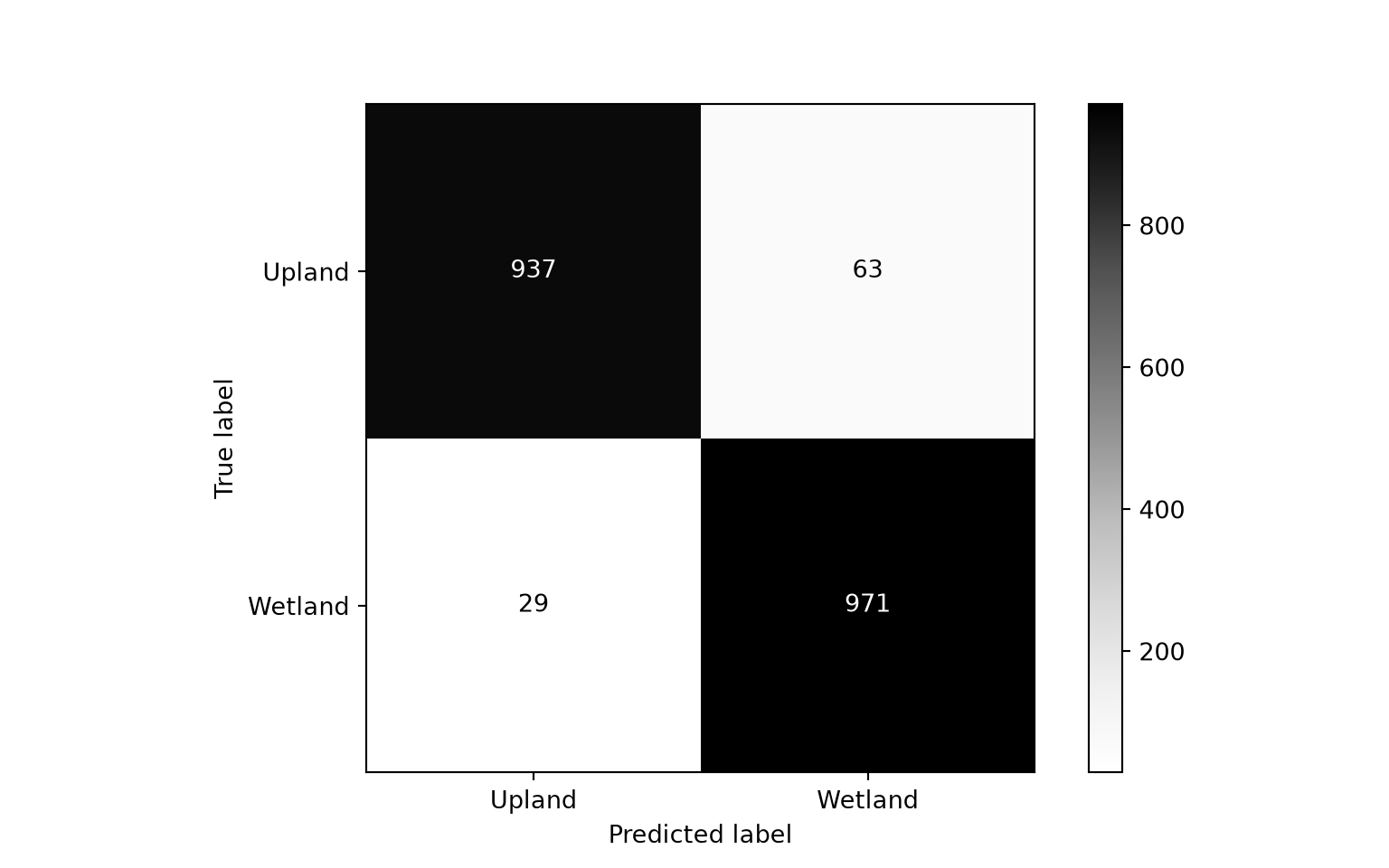
16.6 Predict to Raster Data
Once a model is trained, it can be used to generate map output by using it to make predictions to all raster grid cells within a spatial extent. Since the raster data have already been prepared above, we simply need to reshape the grid into a table of cells and use the predict_proba() method. Cells with NoData values for any predictor variable cannot be predicted, so we only predict the cells that have valid values for all variables and fill the remaining cells with NaN. We obtain the probabilistic output for the wetland class, which is the second column. The result is reshaped back into the shape of the grid, and all cells outside of forested extents are set to NaN, so that only predictions within forested extents are maintained.
It is important that the columns of the table of raster cells are in the same order as the columns of the table used to train the model, and that they have the same names, since each column must be aligned with the correct predictor variable. When we read the raster bands above, we used the list of predictor variable names to select and order the bands, which ensures that this is the case.
The final result is displayed with the masked out areas shown in gray and the predicted woody or forested areas shown using a purple colormap. Areas with a high predicted likelihood of wetland occurrence tend to occur closer to streams or water bodies and in flatter areas, as expected. The prediction is also saved to disk using Rasterio.
cells = pd.DataFrame(pred_stk.reshape(n_bands, -1).T, columns=preds_to_use)
valid = cells.notna().all(axis=1).to_numpy()

prob = np.full(len(cells), np.nan, dtype="float32")
prob[valid] = m_all.predict_proba(cells[valid])[:, 1]

r_pred = prob.reshape(n_rows, n_cols)
r_pred[np.ma.getmaskarray(for_msk)] = np.nan
fig, ax = plt.subplots(figsize=(8, 8))
ax.set_facecolor("lightgray")
im = ax.imshow(r_pred, extent=stk_ext, cmap="Purples", vmin=0, vmax=1)
fig.colorbar(im, ax=ax, shrink=0.6, label="PFO/PSS Wetland Probability")
ax.set_xticks([])
ax.set_yticks([])
plt.show()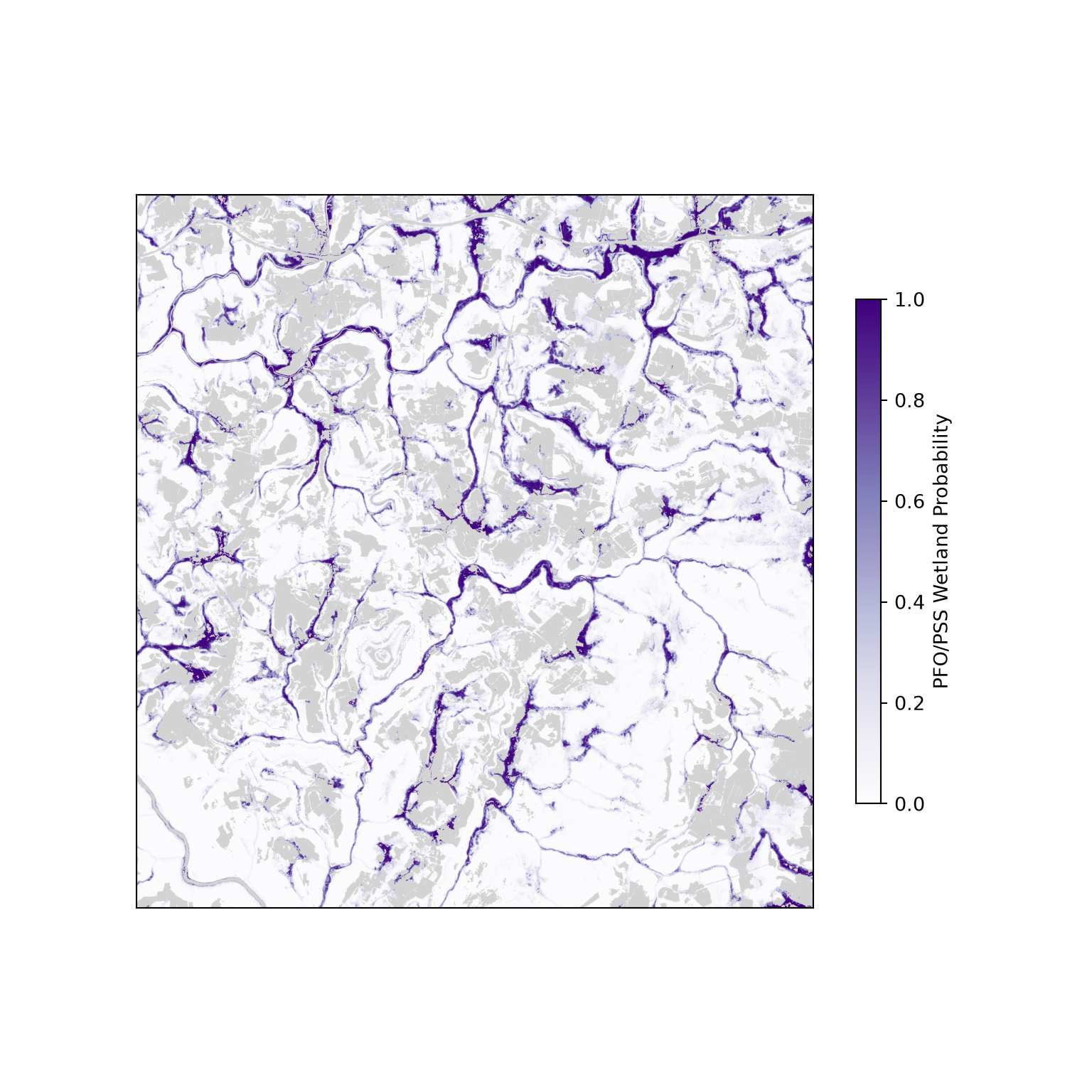
out_profile = stk_profile.copy()
out_profile.update(count=1, dtype="float32", nodata=np.nan, compress="lzw")
with rasterio.open("output/wetland_probability.tif", "w", **out_profile) as dst:
    dst.write(r_pred, 1)
16.7 Compare to Logistic Regression
Other than comparing different feature spaces, an analyst may also want to compare different algorithms or modeling methods. In this section, we compare our random forest model to a logistic regression model. Specifically, we are interested in quantifying whether the more complex random forest model outperforms a simpler and more interpretable model.
Logistic regression is a type of generalized linear model (GLM) that uses the logit link function to model the probability of the positive case. It can be fit using the LogisticRegression class from scikit-learn. By default, scikit-learn applies a small amount of L2 regularization (Chapter 15); setting penalty=None fits a standard, unregularized logistic regression model. The logit() function from Statsmodels can also be used if you would like a summary table with coefficients and associated statistical tests, similar to the linear models in Chapter 15.
The following code block trains a logistic regression model, uses it to make predictions for the withheld test data, and calculates accuracy assessment metrics. The predict() method assigns each sample to the class with the higher probability, which is equivalent to using a decision threshold of 0.5. However, this may not be optimal. A different decision threshold could be selected based on false positive and false negative rates and applied to the probabilities returned by predict_proba(). However, 0.5 is adequate for our example.
Our results generally suggest that the random forest model outperformed logistic regression. However, the differences were not dramatic. Comparing the results obtained here to those obtained above using different feature spaces, for this specific task the feature space generally had a larger impact on model performance than the algorithm used. This is further highlighted by comparing the ROC curves.
m_lr = LogisticRegression(penalty=None, max_iter=1000).fit(train_p, y_train)

m_lr_p = m_lr.predict_proba(test_p)[:, 1]
m_lr_c = m_lr.predict(test_p)

auc_results = pd.DataFrame({
    "case": ["Random Forest", "Logistic Regression"],
    "auc": [roc_auc_score(y_test_bin, m_all_p), roc_auc_score(y_test_bin, m_lr_p)],
    "oa": [accuracy_score(y_test, m_all_c), accuracy_score(y_test, m_lr_c)]})
print(auc_results.round(4))
case auc oa
0 Random Forest 0.9872 0.954
1 Logistic Regression 0.9864 0.949fig, axs = plt.subplots(1, 2, figsize=(10, 3), sharey=True)
for ax, metric, label in zip(axs, ["auc", "oa"], ["AUCROC", "Overall Accuracy"]):
ax.scatter(auc_results[metric], auc_results["case"], color="red", s=40)
ax.set_xlabel(label)
plt.tight_layout()
plt.show()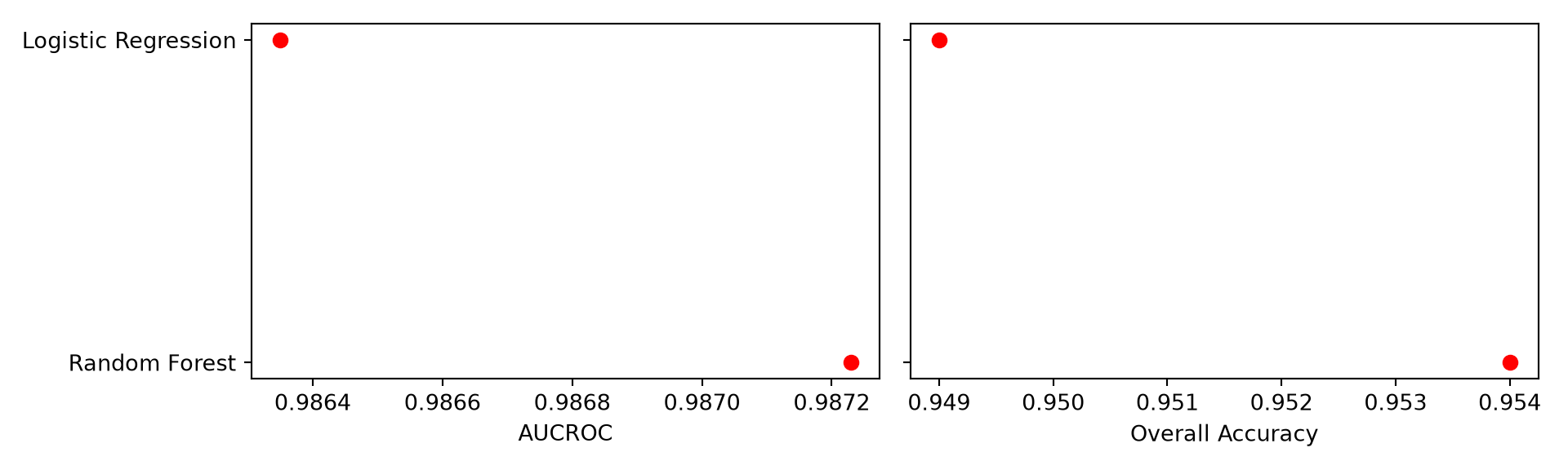
plot_roc({"Random Forest": m_all_p, "Logistic Regression": m_lr_p})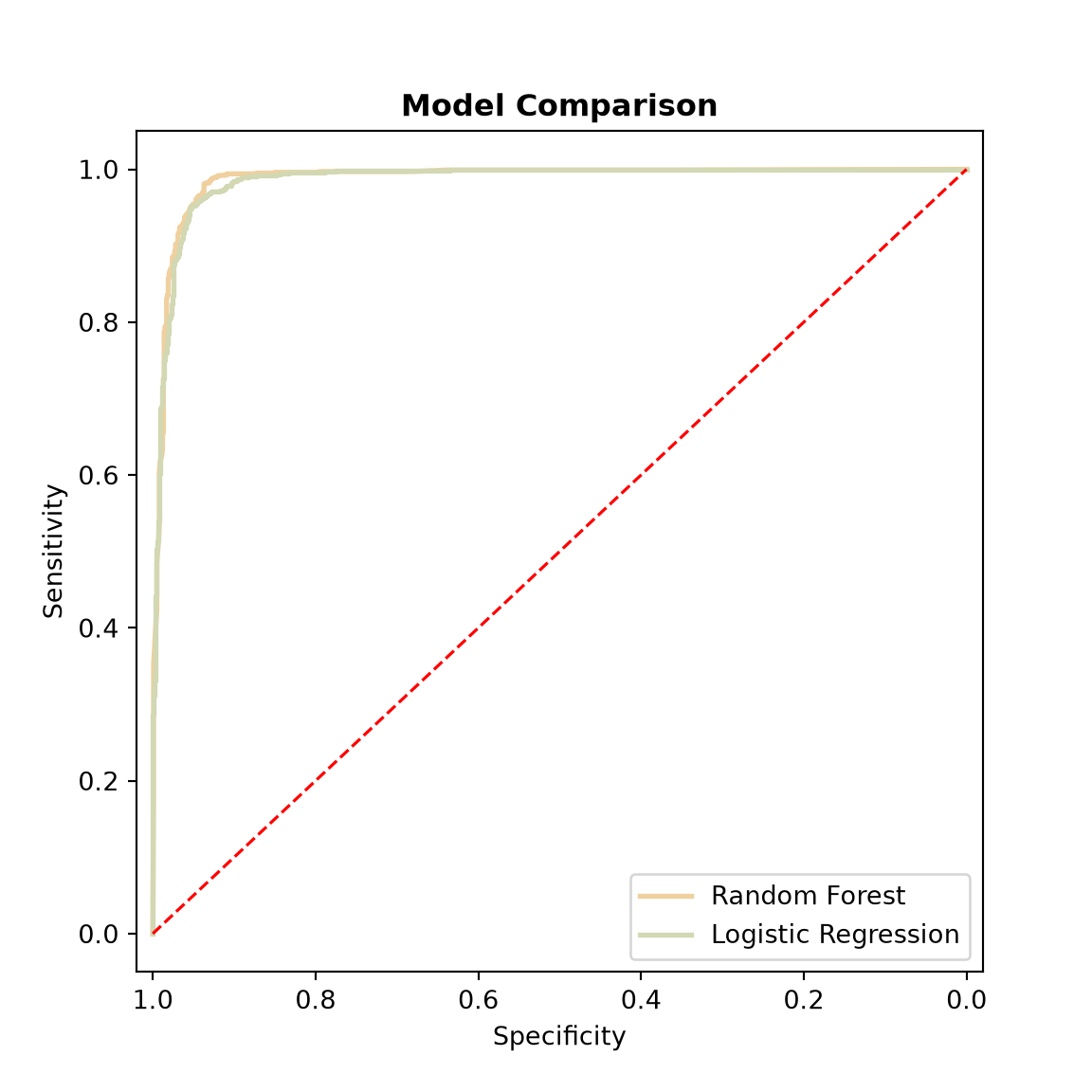
16.8 Compare to Support Vector Machine with Hyperparameter Tuning
16.8.1 Support Vector Machines
As a final comparison, we compare random forest to a support vector machine (SVM). For a binary classification, an SVM attempts to find the boundary, or hyperplane, that separates the two classes in the feature space with the largest possible margin, or distance to the nearest training samples of each class. These nearest samples are called the support vectors, since they alone define the boundary. Since classes are rarely perfectly separable, a soft margin allows some training samples to fall on the wrong side of the boundary, with a penalty for each.
A linear boundary is often inadequate. Using the kernel trick, an SVM can fit a non-linear boundary by implicitly mapping the predictor variables into a higher-dimensional space in which the classes are more easily separated. The radial basis function (RBF) kernel is a common choice. It measures the similarity between two samples based on their distance in the feature space, so that the decision boundary can bend to follow the distribution of the training data.
An RBF SVM has two key hyperparameters:
-
C: the penalty applied to training samples on the wrong side of the margin. Small values result in a wider, “softer” margin and a smoother decision boundary, which may underfit; large values penalize errors heavily, resulting in a more complex boundary that may overfit the training data. -
gamma: how far the influence of a single training sample reaches. Small values result in a smooth boundary influenced by many samples; large values result in a highly local boundary that can wrap tightly around individual samples, which may also overfit.
In contrast to random forest, SVMs are sensitive to the scale of the predictor variables, since they rely on distances in the feature space. Variables measured using larger numbers would dominate the distance calculations. Our predictor variables were already re-scaled to a range of 0 to 1 above, so no additional preprocessing is needed.
16.8.2 Why Tune Hyperparameters?
It is important to distinguish between parameters and hyperparameters. Parameters, such as the coefficients of a linear model or the splitting rules in a decision tree, are learned from the training data when the model is fit. Hyperparameters, such as C and gamma for an SVM or max_features for a random forest, are set by the analyst before training and control how the model learns. Default values are provided, but they are general-purpose settings that are not necessarily appropriate for a specific dataset. The performance of some algorithms, including SVMs, can change dramatically with different hyperparameter values, since they control the trade-off between underfitting and overfitting. As a result, it is generally recommended that hyperparameters be tuned, or optimized, for a specific problem. It is also necessary to tune the hyperparameters of all models being compared; otherwise, a comparison between a tuned model and an untuned model would be unfair.
Hyperparameters must not be selected based on the test data, since the test data would then no longer provide an unbiased estimate of how well the model generalizes to new data. Instead, they are selected using only the training data and cross validation. In k-fold cross validation, the training data are split into k groups, or folds, of approximately equal size. For each set of candidate hyperparameter values, a model is trained using k - 1 folds and assessed using the remaining fold, and this is repeated so that each fold is used for assessment once. The k assessment results are then averaged. The set of hyperparameter values with the best average performance is selected, a final model is trained with these values using all of the training data, and the final model is assessed using the withheld test data. Using 10 folds, as we do here, is a common choice.
16.8.3 Tuning with scikit-learn
In scikit-learn, tuning is implemented using the GridSearchCV class from the model_selection module. It requires the following components:
- An estimator: the model object to tune, such as
SVC(). - A parameter grid: a dictionary that maps each hyperparameter name to a list of candidate values. Every combination of values is evaluated, so the number of models trained is the number of combinations multiplied by the number of folds.
- A cross validation strategy: here,
StratifiedKFoldwith 10 folds. Stratification ensures that each fold has approximately the same proportion of each class as the full training set, and settingshuffle=Truerandomizes the samples before they are split into folds. - A scoring metric: the metric used to compare the candidate models, such as
"roc_auc"or"accuracy".
GridSearchCV is used like any other model: calling fit() performs the search. By default, once the best hyperparameter values are found, a final model is refit using all of the training data (refit=True). The best values are stored in the best_params_ property, the mean cross validation score of the best model is stored in best_score_, the refit model is stored in best_estimator_, and the results for every combination are stored in cv_results_, which can be converted to a DataFrame. Setting n_jobs=-1 trains the models in parallel.
When the number of hyperparameter combinations is large, RandomizedSearchCV can be used to evaluate a random subset of the combinations. If preprocessing, such as re-scaling, is part of the workflow, combining the preprocessing and model into a single Pipeline and tuning the pipeline ensures that the preprocessing is fit separately within each fold. In our example, the scaler was fit using all of the training data, so a small amount of information from each assessment fold was used when re-scaling the data. For simple min-max scaling the impact is minor, but using a Pipeline is the more rigorous approach.
The candidate values for C and gamma are generally spaced on a logarithmic scale since their effects change by orders of magnitude. Below, we evaluate seven values of C and five values of gamma, for a total of 35 combinations and 350 SVM models. We use the AUCROC as the scoring metric. The SVC class does not calculate class probabilities by default; for AUCROC, scikit-learn instead uses the signed distance of each sample from the decision boundary returned by the decision_function() method, which ranks samples in the same way.
from sklearn.model_selection import GridSearchCV, StratifiedKFold
from sklearn.svm import SVC

cv = StratifiedKFold(n_splits=10, shuffle=True, random_state=42)

svm_grid = {"C": [0.1, 1, 10, 100, 1000, 10000, 100000], "gamma": [0.01, 0.1, 1, 10, 100]}
svm_search = GridSearchCV(SVC(kernel="rbf"), svm_grid, cv=cv, scoring="roc_auc", n_jobs=-1)
svm_search.fit(train_p, y_train)

print(svm_search.best_params_)
{'C': 1000, 'gamma': 0.1}print(round(svm_search.best_score_, 4))0.9904The mean cross validation AUCROC for every combination of C and gamma can be displayed as a heat map by reshaping the results using pivot(). This makes it easy to see how sensitive the model is to the hyperparameters. Poor performance in parts of the grid and strong performance elsewhere highlights why tuning is important. For example, large values of gamma perform poorly, since the decision boundary becomes too local. Also notice that the best combinations fall along a diagonal: a larger C can be paired with a smaller gamma, since both control the complexity of the decision boundary. If the best values were at the edge of the grid, it would be advisable to expand the grid in that direction. The grid used here was chosen so that the best value of C is not at the edge.
cv_res = pd.DataFrame(svm_search.cv_results_)
heat = cv_res.pivot(index="param_C", columns="param_gamma", values="mean_test_score")

fig, ax = plt.subplots(figsize=(6, 5))
im = ax.imshow(heat, cmap="viridis")
ax.set_xticks(range(len(heat.columns)), labels=heat.columns)
ax.set_yticks(range(len(heat.index)), labels=heat.index)
for i in range(heat.shape[0]):
    for j in range(heat.shape[1]):
        value = heat.iloc[i, j]
        text_color = "black" if value > heat.to_numpy().mean() else "white"   # readable on light cells
        ax.text(j, i, f"{value:.3f}", ha="center", va="center", color=text_color, fontsize=8)
ax.set_xlabel("gamma")
ax.set_ylabel("C")
fig.colorbar(im, ax=ax, label="Mean 10-fold CV AUCROC")
plt.show()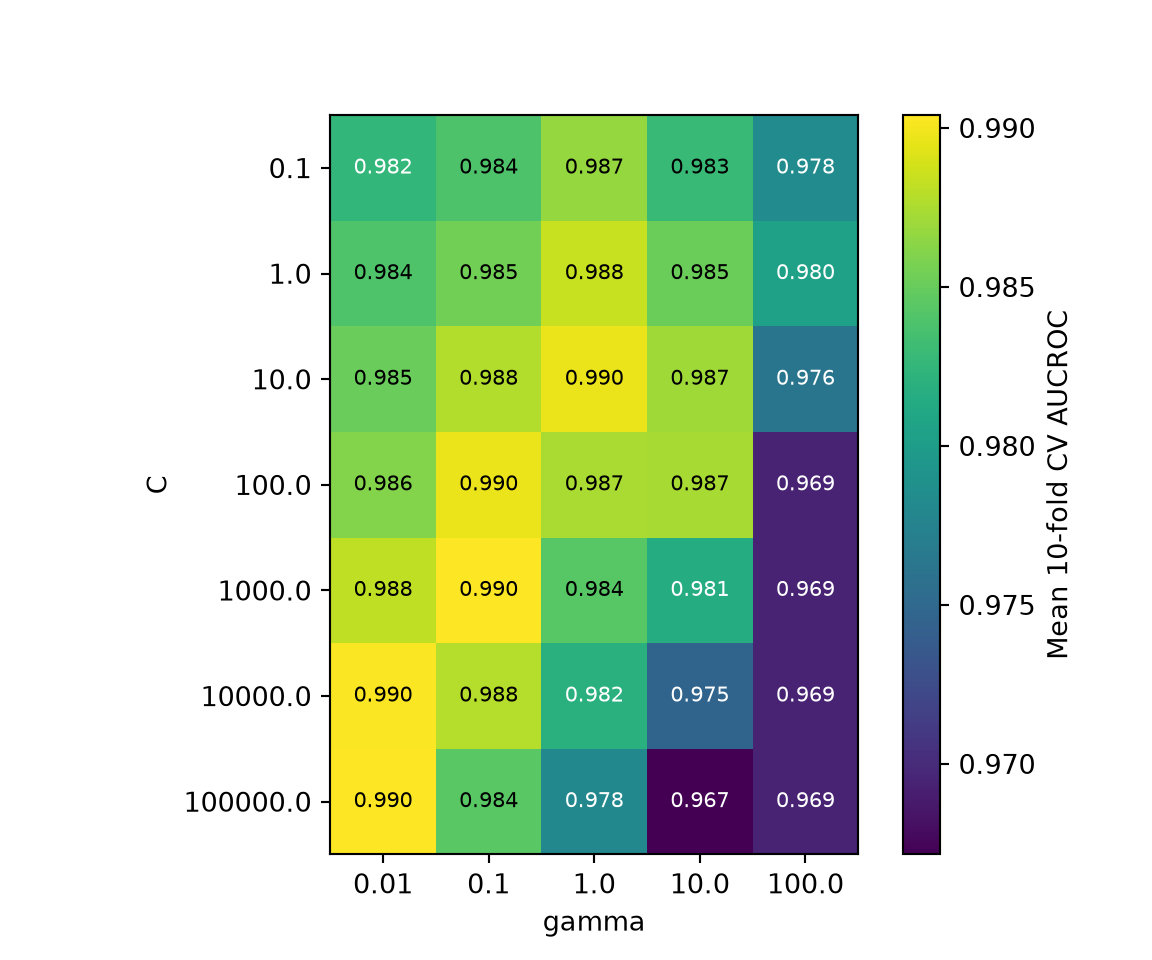
For a fair comparison, we also tune the random forest model. The most important hyperparameter for random forest is generally max_features, the number of predictor variables randomly selected as candidates at each decision node. We evaluate every value from 1 to 8, the total number of predictor variables, using the same 10 folds and scoring metric. Random forest is generally less sensitive to its hyperparameters than SVM, so we expect a smaller range of cross validation scores.
rf_search = GridSearchCV(RandomForestClassifier(n_estimators=501, random_state=42),
                         {"max_features": list(range(1, 9))}, cv=cv, scoring="roc_auc", n_jobs=-1)
rf_search.fit(train_p, y_train)

print(rf_search.best_params_)
{'max_features': 1}print(round(rf_search.best_score_, 4))0.9893print(pd.DataFrame(rf_search.cv_results_)[["param_max_features", "mean_test_score",
"std_test_score"]].round(4)) param_max_features mean_test_score std_test_score
0 1 0.9893 0.0074
1 2 0.9893 0.0078
2 3 0.9891 0.0075
3 4 0.9893 0.0081
4 5 0.9885 0.0080
5 6 0.9890 0.0078
6 7 0.9888 0.0078
7 8 0.9878 0.009116.8.4 Compare the Tuned Models
The refit models are stored in the best_estimator_ property of each search and are used to predict the withheld test data. For the SVM, we use decision_function() to obtain the scores used to calculate AUCROC and the ROC curve. If class probabilities are needed, for example to create a probabilistic map, an SVC can be created with probability=True, which estimates probabilities from the decision function using an internal cross validation; this increases the training time. Lastly, we compare the tuned models to the untuned random forest and logistic regression models from above.
rf_best = rf_search.best_estimator_
svm_best = svm_search.best_estimator_

rf_tuned_p = rf_best.predict_proba(test_p)[:, 1]
svm_p = svm_best.decision_function(test_p)

auc_results = pd.DataFrame({
    "case": ["Random Forest (default)", "Random Forest (tuned)", "SVM (tuned)", "Logistic Regression"],
    "auc": [roc_auc_score(y_test_bin, s) for s in (m_all_p, rf_tuned_p, svm_p, m_lr_p)],
    "oa": [accuracy_score(y_test, c) for c in (m_all_c, rf_best.predict(test_p),
                                                svm_best.predict(test_p), m_lr_c)]})
print(auc_results.round(4))
case auc oa
0 Random Forest (default) 0.9872 0.954
1 Random Forest (tuned) 0.9869 0.954
2 SVM (tuned) 0.9886 0.955
3 Logistic Regression 0.9864 0.949fig, axs = plt.subplots(1, 2, figsize=(10, 3.5), sharey=True)
for ax, metric, label in zip(axs, ["auc", "oa"], ["AUCROC", "Overall Accuracy"]):
ax.scatter(auc_results[metric], auc_results["case"], color="red", s=40)
ax.set_xlabel(label)
plt.tight_layout()
plt.show()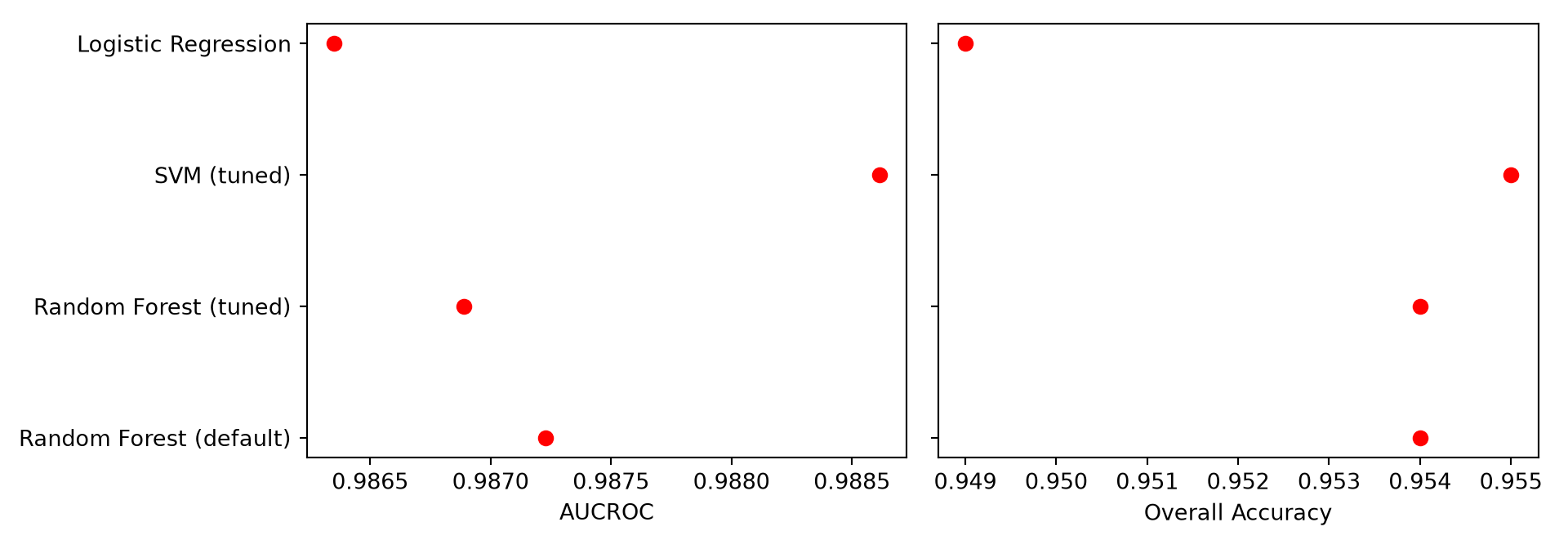
plot_roc({"Random Forest (tuned)": rf_tuned_p, "SVM (tuned)": svm_p})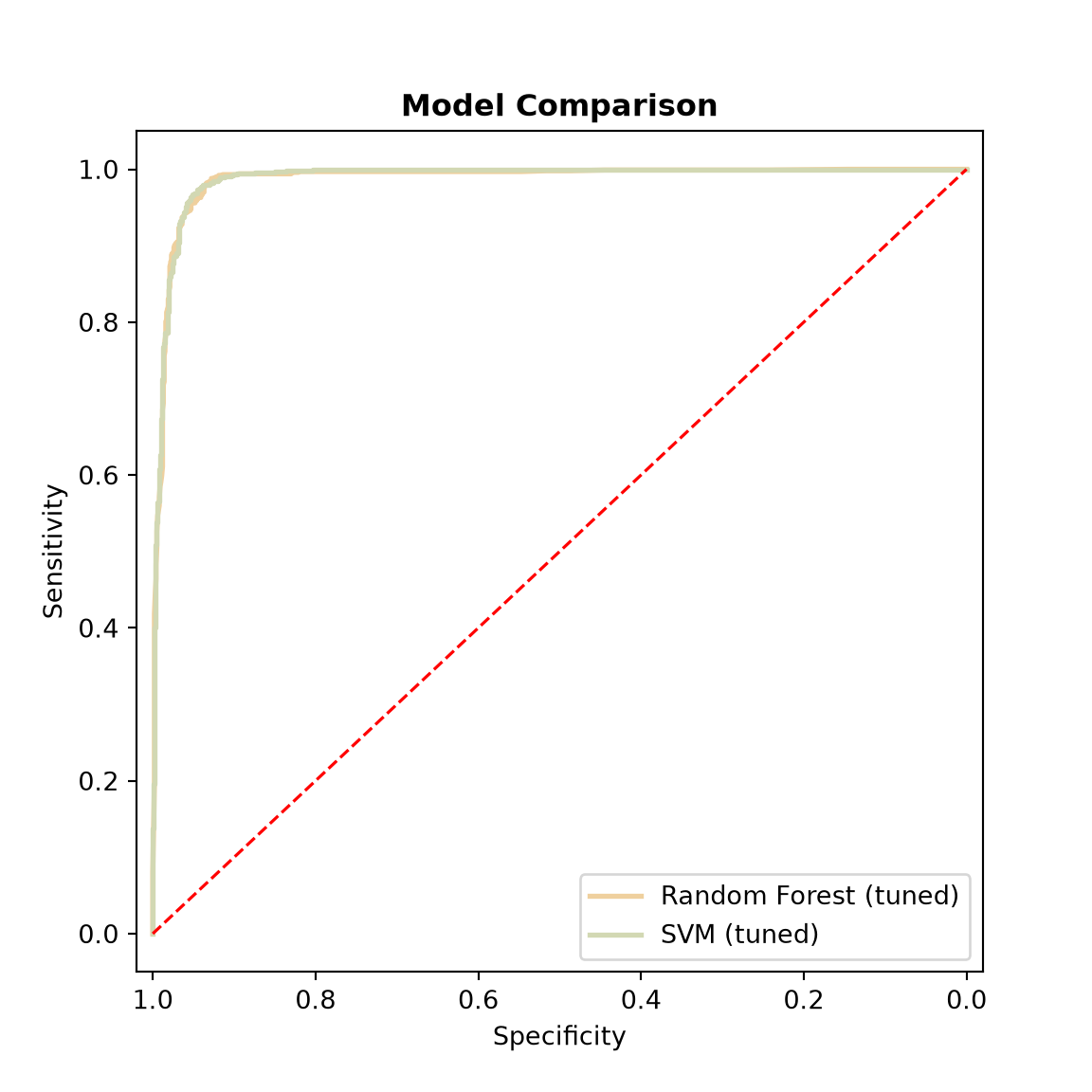
For this task, the tuned random forest and SVM models perform very similarly on the withheld test data, and tuning did not substantially change the performance of the random forest model. This is consistent with the comparison to logistic regression above: for this problem, the choice of predictor variables had a larger impact than the choice of algorithm. This will not always be the case. Some algorithms, such as SVMs and neural networks, can perform poorly with inappropriate hyperparameter values, so tuning is an important component of any machine learning workflow, and the comparison of algorithms is only meaningful if each algorithm has been given a fair opportunity to perform well.
16.9 Concluding Remarks
In this chapter, we stepped through the full supervised learning workflow using the random forest algorithm: preparing and preprocessing training and test data, training a model, exploring the model with partial dependence plots, assessing and comparing models using withheld test data, comparing feature spaces and algorithms, tuning hyperparameters using cross validation, and applying the model to a raster stack of predictor variables to obtain a spatial prediction. The same general workflow applies to the other algorithms available in scikit-learn. In the next chapter, we explore an interpretable machine learning method: the explainable boosting machine.
16.10 Questions
- Explain the difference between bagged decision trees, boosted decision trees, and random forest.
- For a classification task, how is the final classification obtained from the ensemble of single decision tree results?
- For a regression task, how is the final value obtained from the ensemble of single decision tree results?
- Explain the Gini impurity index and how it is used within random forest to determine an optimal splitting rule.
- Is it necessary to re-scale all numeric predictor variables to be on the same scale when using random forest? If the training data are re-scaled, why must the same transformation be applied to the raster data?
- What are out-of-bag (OOB) samples, and how are they used to estimate model performance? What is one limitation of this estimate?
- Explain how a partial dependence plot for a single predictor variable is calculated.
- Explain the difference between the
predict()andpredict_proba()methods. Why are probabilities needed to calculate the area under the ROC curve? - What is a data leak, and why is the scaler fit using only the training data?
- Why might a decision threshold of 0.5 not be optimal when converting predicted probabilities to classes?
- Explain the difference between a model parameter and a hyperparameter. Why is it important to tune hyperparameters?
- Explain how k-fold cross validation is used to select hyperparameter values. Why must the test data not be used for this purpose?
- Explain the roles of the
Candgammahyperparameters of a support vector machine with a radial basis function (RBF) kernel. - Why must predictor variables be re-scaled before training a support vector machine?
16.11 Exercises
Exercise 16.1: Random Forest
75 Points scaled to 20 Points
Introduction
In this assignment, you will use the Random Forest machine learning algorithm to perform a binary classification of airline passenger satisfaction using the airline_passenger_satisfaction.csv dataset. These data were obtained from Kaggle (https://www.kaggle.com/datasets/teejmahal20/airline-passenger-satisfaction). The dataset has been provided in the datasets folder of the book download (the link above may no longer be active).
Objectives
Prepare data as input for machine learning model training
Partition data into separate training and testing datasets
Visually assess variable correlation
Train a Random Forest model
Assess model performance using withheld validation or test data
Deliverables
- Quarto document or Jupyter Notebook with all code and graphs embedded. Files can be rendered to HTML webpages if your instructor requires this. Graph prompts should be stated and answered within Markdown cells.
Background Questions
Question 1. Explain the hyperparameters required for the Random Forest algorithm. (5 Points)
Question 2. How is Random Forest different from a single decision tree? (5 Points)
Question 3. Why is it important to assess machine learning models using withheld validation data as opposed to the data points used to train the model? (5 Points)
Questions and Tasks
This assignment can be conducted using either Python or R, whichever you prefer or whichever your instructor requires. Generate code to perform the following tasks and answer the associated questions.
Task 1. Prepare the data by (1) filtering to create a data table that includes only the dependent variable (“Satisfaction”) and the independent variables used to predict it: “Gender”, “Age”, “Customer.Type”, “Type.of.Travel”, “Class”, “Flight.Distance”, “Departure.Delay”, and “Arrival.Delay”. “Gender”, “Age”, “Customer.Type”, “Type.of.Travel”, and “Class” should be treated as nominal data. “Flight.Distance”, “Departure.Delay”, and “Arrival.Delay” should be treated as continuous data. “Satisfaction” has two levels: “Neutral or Dissatisfied” and “Satisfied”. Remove any rows with missing data in any column. (10 Points)
Task 2. Create grouped bar plots to compare “Satisfaction” to each of the nominal predictor variables. Describe the results. Which variables seem to be predictive of flight satisfaction. (10 Points)
Task 3. Create grouped boxplots to compare “Satisfaction” to each of the continuous predictor variables. Describe the results. Which variables seem to be predictive of flight satisfaction. (10 Points)
Task 4. Split the data into separate, non-overlapping training and testing sets. 75% of the data should be used to train the model while 25% should be maintained for validation. Stratify the partition using the “Satisfaction” variable. (5 Points)
Task 5. Train a Random Forest model. Use 500 trees and 3 variables to select from for splitting at each decision node. You do not need to optimize the hyperparameters for this assignment. (5 Points)
Task 6. Use the trained model to predict to the withheld test data. From the results, calculate the Area Under the Receiver Operating Characteristic (ROC) Curve and Overall Accuracy metrics. Also, create a Confusion Matrix. Discuss thee results of the assessment. (10 Points)
Task 7. Use the variable importance estimates made available by Random Forest to discuss the contribution of each predictor variable in the model. (10 Points)
Exercise 16.2: Comparing Machine Learning Algorithms
55 Points scaled to 20 Points
Introduction
In this assignment you will compare three different machine learning algorithms (Random Forest, Support Vector Machines, and k-Nearest Neighbor) for differentiating between three species of penguins found in Antarctica. The predictor variables include bill length, bill depth, flipper length, body mass, and sex. These data (penguins.csv) were obtained from Kaggle (https://www.kaggle.com/datasets/larsen0966/penguins). The dataset has been provided in the datasets folder of the book download (the link above may no longer be active).
Objectives
Prepare data as input to machine learning algorithms
Visualize relationships between variables
Train and assess multiple machine learning algorithms
Deliverables
- Quarto document or Jupyter Notebook with all code and output embedded. Files can be rendered to HTML webpages if your instructor requires this. Questions should be stated and answered within Markdown cells.
Questions
This assignment can be conducted using either Python or R, whichever you prefer or whichever your instructor requires. Generate code to perform the following task and answer the associated questions.
Task 1: Subset out the following columns from the dataset: “species”, “bill_length_mm”, “bill_depth_mm”, “flipper_length_mm”, “body_mass_g”, and “sex”. In the models, “species” is the dependent variable and should be treated as nominal data. All predictor variables are continuous other than “sex”, which should be treated as a nominal variable. Remove any rows that have missing data in any column. (5 Points)
Task 2: Generate grouped box plots to show the distribution of each continuous predictor variable within each species. Also, differentiate the data by sex within each species. Based on these visualizations, do the penguin species appear to have different characteristics? Do characteristics vary by sex, indicating that sex should be included as a predictor variable? What variables seem most predictive? Generally, do you anticipate being able to separate the species with high accuracy? (10 Points)
Task 3. Split the data into separate training and testing sets stratified by the species type. (5 Points)
Task 4. Center and scale all the continuous predictor variables. This is required for using the Support Vector Machine and k-Nearest Neighbor algorithms. Also, create dummy variables from the “sex” variable. (5 Points)
Task 5. Use the training partition to train Random Forest, Support Vector Machine, and k-Nearest Neighbor models. For Random Forest, use 100 trees and set the number of predictor variables available for splitting at each node hyperparameter to 3. Support Vector Machines can use the default hyperparameters. For k-Nearest Neighbor, set the number of neighbors to 11. Note that it would be best to tune the hyperparameters to offer a fairer comparison of the algorithms. However, we are not asking you to do so here to save time. (10 Points)
Task 6. Use the train models to predict to the withheld validation data. Use the results to create Confusion Matrices and the Overall Accuracy metrics. Discuss your results. How do the algorithms compare for this specific problem? Were the species generally separated with high or low accuracy? (10 Points)
Task 7. Repeat the algorithm comparison. However, this time only use the “body_mass_g” as a predictor variable. How do the three algorithms compare if only one predictor variable is provided? How does the performance using only one predictor variable compare to that obtained when using the entire set of predictors? (10 Points)
Exercise 16.3: Machine Learning Feature Space
35 Points scaled to 20 Points
Introduction
In this assignment you will compare different predictor variable combinations for predicting the occurrence of hear disease. The data for this exercise (heart.csv) were obtained from Kaggle (https://www.kaggle.com/datasets/fedesoriano/heart-failure-prediction). Please visit the page to learn more about the data and the provided variables. The dataset has been provided in the datasets folder of the book download (the link above may no longer be active).
Objectives
Prepare data as input to machine learning algorithms
Visualize relationships between variables
Train and assess models using different feature spaces
Deliverables
- Quarto document or Jupyter Notebook with all code and output embedded. Files can be rendered to HTML webpages if your instructor requires this. Questions should be stated and answered within Markdown cells.
Questions
This assignment can be conducted using either Python or R, whichever you prefer or whichever your instructor requires. Generate code to perform the following task and answer the associated questions.
Task 1. The “HeartDisease” column is the dependent variable. It is currently coded such that 0 = No Heart Disease and 1 = Heart Disease. Make sure this variable is treated as a nominal variable in the model. The following predictor variables should be treated as continuous: “Age”, “RestingBP”, “Cholesterol”, “MaxHR”, and “Oldpeak”. The following predictor variable should be treated as nominal data: “Sex”, “ChestPainType”, “RestingECG”, “FastingBS”, “ExerciseAngina”, and “ST_Slope”. Make sure all variables are treated appropriately in the model. You do not need to convert the nominal predictor variables to dummy variable since this is not required to use Random Forest. (5 Points)
Task 2. Subset the variables to create models using (1) all the available predictor variables, (2) just “Cholesterol” and “MaxHR”, and (3) “Age”, “RestingBP”, and “MaxHR”. (5 Points)
Task 3. Split the data into separate and non-overlapping training and testing sets using the “HeartDisease” variable for stratification. (5 Points)
Task 4. Train three Random Forest models using the three different feature spaces. You can use the default hyperparameter settings. (10 Points)
Task 5. Assess the models using the withheld testing data. Calculate Confusion Matrices and Overall Accuracy metrics. Using the precited probabilities, calculate the Area Under the Receiver Operating Characteristic (ROC) Curve (AUC ROC). Use the results to discuss and compare the different feature spaces. (10 Points)
Exercise 16.4: Landslide Susceptibility with Random Forest
Introduction
The goal of this exercise is to generate a model to predict the likelihood of landslide occurrence for raster cells within the Valley and Ridge physiographic province of West Virginia using topographic predictor variables and the random forest workflow demonstrated in Chapter 16. You have been provided with the following files in the datasets/gisData/spatial_ml/exercise folder.
- landslides.gpkg/lsPnts: point locations representing landslide locations and pseudo-absence locations where predictor variables have been extracted
- stk.tif: raster stack of predictor variables
The following digital terrain model (DTM) derived land surface parameter (LSP) predictor variables have been provided. Other than elevation, the LSPs were calculated at three different window sizes.
- “elev”: elevation in meters
- “slp1”/“slp2”/“slp3”: topographic slope in degrees
- “sar1”/“sar2”/“sar3”: surface area ratio (SAR)
- “tri1”/“tri2”/“tri3”: topographic roughness index (TRI)
- “tpi1”/“tpi2”/“tpi3”: topographic position index (TPI)
- “diss1”/“diss2”/“diss3”: topographic dissection index
The “class” column differentiates landslides (“slpF”) from pseudo-absence samples (“not”).
Deliverables
- Jupyter Notebook or Quarto document with all code, graphs, and maps embedded. Answers to questions should be provided in Markdown cells or text.
Questions and Tasks
Perform the following operations to train, validate, and use the model.
Preparation
- Read in the vector point layer and drop the geometry information. Drop the “elev” column (you will not use this as a predictor variable).
- Open the raster grid. The bands of the raster stack are in the same order as the predictor variable columns in the table, including “elev” as the first band. Store the band names in a list.
- Extract 1,000 examples each for the landslide and pseudo-absence classes using random sampling with replacement to serve as a training set. This can be accomplished using
groupby()andsample(). - Extract all remaining samples as a test set (i.e., samples that were not selected for the training set).
Train Model
- Train a random forest model using
RandomForestClassifierfrom scikit-learn. The “class” column should be the dependent variable while all other columns should be predictor variables. Use 501 trees and estimate the OOB accuracy (oob_score=True).
Explore Model
- What was your out-of-bag error rate? Create an OOB confusion matrix and discuss omission and commission error rates.
- Generate partial dependence plots for the “slp1” and “diss1” variables using
PartialDependenceDisplay. - Discuss your results. What values of slope and dissection are most associated with landslide occurrence?
Use Model
- Use your trained model to make predictions for each cell in the provided raster stack. Specifically, obtain the estimated probabilities for the landslide class. Make sure the columns of the table of raster cells match the predictor variables used to train the model, and only predict cells with valid values.
- Map the prediction.
Compare Models
- Train another model that uses only the “slp1” predictor variable. Use the same settings as the model with all predictor variables.
- Use both models to predict the test data to obtain both probabilistic and “hard” predictions.
- Using the predictions and provided labels, calculate overall accuracy, the area under the precision-recall curve (AUCPR;
average_precision_score()), and the area under the receiver operating characteristic curve (AUCROC;roc_auc_score()). - Plot the ROC curves for each model in the same graph space.
- Use the results to compare the models. Did the model using all predictor variables outperform the slope-only model?