import numpy as np
import pandas as pd
import matplotlib.pyplot as plt
from scipy import stats
from sklearn.metrics import (mean_squared_error, root_mean_squared_error, mean_absolute_error,
                             r2_score, confusion_matrix, ConfusionMatrixDisplay, accuracy_score,
                             recall_score, precision_score, f1_score, classification_report,
                             roc_curve, roc_auc_score, precision_recall_curve,
average_precision_score, auc)14 Accuracy Assessment
14.1 Topics Covered
- Calculating accuracy assessment metrics using the metrics module of scikit-learn
- Regression metrics (mean square error, root mean square error, mean absolute error, and R-squared)
- Multiclass classification metrics (confusion matrix, overall accuracy, producer’s accuracy/recall, user’s accuracy/precision, F1-score, and macro-averaging)
- Single-threshold binary assessment metrics (confusion matrix, precision, recall, F1-score, negative predictive value, and specificity)
- Multi-threshold binary assessment metrics (receiver operating characteristic curve, precision-recall curve, and area under the curve)
14.2 Introduction
In order to validate models, it is important to assess their performance on a new dataset. A model that performs well on the training set may be overfit and fail to generalize to new data. In this chapter, we explore assessment metrics for both classification and regression with a focus on the metrics module of scikit-learn, which we use throughout the remaining chapters.
14.3 Regression
To experiment with regression metrics, we make use of a hypothetical dataset that includes a known measurement, “truth”, and predictions from three models: “m1”, “m2”, and “m3”. There are a total of 156 samples included.
fld = "datasets/gisData/accuracy/"

reg_in = pd.read_csv(fld + "regression_data.csv")
print(reg_in.head())
truth m1 m2 m3
0 1.425000 1.276554 1.166438 1.173226
1 1.450000 1.716117 1.354679 1.371919
2 1.200000 1.003642 0.897605 0.903885
3 1.852941 1.401898 1.512243 1.497734
4 2.157895 2.326138 2.435581 2.455052There are a variety of metrics used to assess regression models. Here, we focus on the most often used measures: mean square error (MSE), root mean square error (RMSE), and mean absolute error (MAE). MSE is simply the mean of the square of the residuals. A residual is the difference between the reference value and predicted value. Since a square is being used, the units of MSE are the square of the units of the variable being predicted. For example, if you are estimating mass in kilograms, the units of MSE would be kg2. RMSE is simply the square root of MSE; as a result, the associated units are the same as the units for the variable being predicted. Lastly, MAE is the mean of the absolute value of the residuals. As with RMSE, the units are the same as those for the dependent variable.
\[\text{MSE} = \frac{1}{n} \sum_{i=1}^{n} \left( y_i - \hat{y}_i \right)^2\]
\[\text{RMSE} = \sqrt{\frac{1}{n} \sum_{i=1}^{n} \left( y_i - \hat{y}_i \right)^2}\]
\[\text{MAE} = \frac{1}{n} \sum_{i=1}^{n} \left| y_i - \hat{y}_i \right|\]
The code block below shows how to calculate MSE, RMSE, and MAE using scikit-learn. Each function requires the reference values first (y_true) and the predicted values second (y_pred), and each returns a single value.
print(round(mean_squared_error(reg_in["truth"], reg_in["m1"]), 3))0.137print(round(root_mean_squared_error(reg_in["truth"], reg_in["m1"]), 3))0.37print(round(mean_absolute_error(reg_in["truth"], reg_in["m1"]), 3))0.296It is also common to calculate the R-squared measure, which quantifies the proportion of the total variance in the dependent variable explained by the model. The total variance is defined as the sum of the squared differences between each value and the mean value while the total unexplained variance is the sum of squares of the residuals, or differences between the actual and predicted values. Subtracting the residual sum of squares from the total sum of squares provides an estimate of the explained variance. Dividing this result by the total variance yields a value that is at most one, where zero indicates that no variance is explained and one indicates that all the variance is explained.
\[R^2 = 1 - \frac{\sum_{i=1}^{n} \left( y_i - \hat{y}_i \right)^2}{\sum_{i=1}^{n} \left( y_i - \bar{y} \right)^2}, \quad \text{where} \quad \bar{y} = \frac{1}{n} \sum_{i=1}^{n} y_i.\]
The code block below demonstrates how to calculate R-squared using r2_score(). For the first model, the metric suggests that roughly three quarters of the variance in the dependent variable is being explained by the model.
The r2_score() function implements the equation above. Some software, such as the R yardstick package, instead calculates R-squared as the square of the Pearson correlation coefficient between the reference and predicted values. The two versions are equal for the predictions of an ordinary least squares model to its own training data but can differ otherwise. In particular, the version above can be negative when a model performs worse than simply predicting the mean, while the squared correlation cannot. Both are calculated below.
print(round(r2_score(reg_in["truth"], reg_in["m1"]), 3))0.771print(round(stats.pearsonr(reg_in["truth"], reg_in["m1"]).statistic ** 2, 3))0.771To compare the three models, we now calculate RMSE and R-squared for each and combine the results into a single DataFrame. Generally, the results suggest that the first model is providing the strongest performance.
reg_df = pd.DataFrame({
    "Model": ["M1", "M2", "M3"],
    "RMSE": [root_mean_squared_error(reg_in["truth"], reg_in[m]) for m in ["m1", "m2", "m3"]],
    "RSquared": [r2_score(reg_in["truth"], reg_in[m]) for m in ["m1", "m2", "m3"]]})
print(reg_df.round(3))
Model RMSE RSquared
0 M1 0.370 0.771
1 M2 0.380 0.758
2 M3 0.383 0.755scikit-learn supports the calculation of a range of other regression metrics, including the mean absolute percentage error (mean_absolute_percentage_error()), median absolute error (median_absolute_error()), and explained variance (explained_variance_score()).
14.4 Multiclass Classification
To experiment with classification accuracy assessment metrics, we will use two example classification results for the EuroSat dataset. We begin by reading in the data. For both results, the predictions are stored in the “pred” column while the reference labels are stored in the “ref” column. Both results use the same set of reference samples. The tables also include the predicted probability for each class, which we will not use here.
Numeric codes are used as opposed to class names. To make our results easier to interpret, we recode the numeric codes to more meaningful text labels using a dictionary and the map() method. Although this is not strictly necessary, we generally find it easier to use class names that are more meaningful and interpretable.
class_codes = {0: "AnnCrp", 1: "Frst", 2: "HrbVg", 3: "Highwy", 4: "Indst",
               5: "Pstr", 6: "PrmCrp", 7: "Resid", 8: "Rvr", 9: "SL"}
class_names = list(class_codes.values())

result1 = pd.read_csv(fld + "assessmentR1.csv")
result2 = pd.read_csv(fld + "assessmentR2.csv")

for df in (result1, result2):
    df["ref"] = df["ref"].map(class_codes)
    df["pred"] = df["pred"].map(class_codes)

print(result1[["ref", "pred"]].head())
ref pred
0 HrbVg HrbVg
1 HrbVg HrbVg
2 Resid Resid
3 Rvr Rvr
4 SL SLprint(len(result1), len(result2))2759 275914.4.1 Confusion Matrix
We begin our analysis by creating confusion matrices for each prediction. In remote sensing, confusion matrices are generally formatted such that the columns represent the reference labels and the rows represent the predictions. A confusion matrix in this format can be created using pd.crosstab() by providing the predictions first (rows) and the reference labels second (columns).
Values populating the main diagonal represent correct classifications while those off the diagonal represent incorrect predictions. Off-diagonal counts in a specific column represent omission errors relative to the class associated with that column. For example, Annual Crop samples that were incorrectly predicted as Forest represent omission error relative to the Annual Crop class. Counts in off-diagonal cells within a row represent commission errors relative to the class associated with the row. In other words, they represent samples that were incorrectly included in the class associated with the row. For example, Permanent Crop samples that were incorrectly predicted as Annual Crop represent commission error relative to the Annual Crop class.
One of the key benefits of the confusion matrix is the ability to quantify not just the overall error rate but the sources of error, or which classes are most commonly confused.
In remote sensing, we generally configure a confusion matrix such that the columns represent the reference labels and the rows represent the predictions. This is not the case for all software. For example, the confusion_matrix() function from scikit-learn returns a matrix in which the rows represent the reference labels and the columns represent the predictions, which is the transpose of the remote sensing convention. Using a table in the wrong orientation results in user’s and producer’s accuracies being swapped, so it is important to make sure the table is formatted as expected.
cm1 = pd.crosstab(result1["pred"], result1["ref"], rownames=["Predicted"], colnames=["Reference"])
cm2 = pd.crosstab(result2["pred"], result2["ref"], rownames=["Predicted"], colnames=["Reference"])
print(cm1)
Reference AnnCrp Frst Highwy HrbVg Indst PrmCrp Pstr Resid Rvr SL
Predicted
AnnCrp 254 0 1 3 0 4 0 0 0 0
Frst 6 300 0 12 0 0 4 0 0 0
Highwy 7 0 242 3 10 1 1 7 1 0
HrbVg 4 0 0 236 1 10 2 1 0 0
Indst 0 0 2 1 227 0 0 11 0 0
PrmCrp 22 0 2 16 1 226 1 5 0 0
Pstr 6 0 0 22 0 6 192 0 2 0
Resid 0 0 1 3 10 1 0 276 0 0
Rvr 0 0 2 3 1 2 0 0 247 3
SL 1 0 0 1 0 0 0 0 0 356print(cm2)Reference AnnCrp Frst Highwy HrbVg Indst PrmCrp Pstr Resid Rvr SL
Predicted
AnnCrp 274 0 2 2 0 4 1 0 0 0
Frst 1 289 0 3 0 0 1 0 0 0
Highwy 2 0 231 0 5 6 0 3 2 0
HrbVg 5 1 2 282 1 16 7 1 1 0
Indst 0 0 3 1 236 1 0 1 1 0
PrmCrp 14 0 1 4 0 219 3 1 0 0
Pstr 3 10 1 2 0 2 188 0 1 0
Resid 1 0 7 2 8 1 0 294 0 0
Rvr 0 0 3 4 0 1 0 0 243 1
SL 0 0 0 0 0 0 0 0 2 358The confusion_matrix() function and ConfusionMatrixDisplay from scikit-learn can be used to plot a confusion matrix. Below, we transpose the matrix (.T) so that it follows the remote sensing convention, and we label the axes accordingly.
cm = confusion_matrix(result1["ref"], result1["pred"], labels=class_names).T

fig, ax = plt.subplots(figsize=(8, 7))
ConfusionMatrixDisplay(cm, display_labels=class_names).plot(ax=ax, cmap="Greys", colorbar=False)
ax.set_xlabel("Reference")
ax.set_ylabel("Predicted")
plt.show()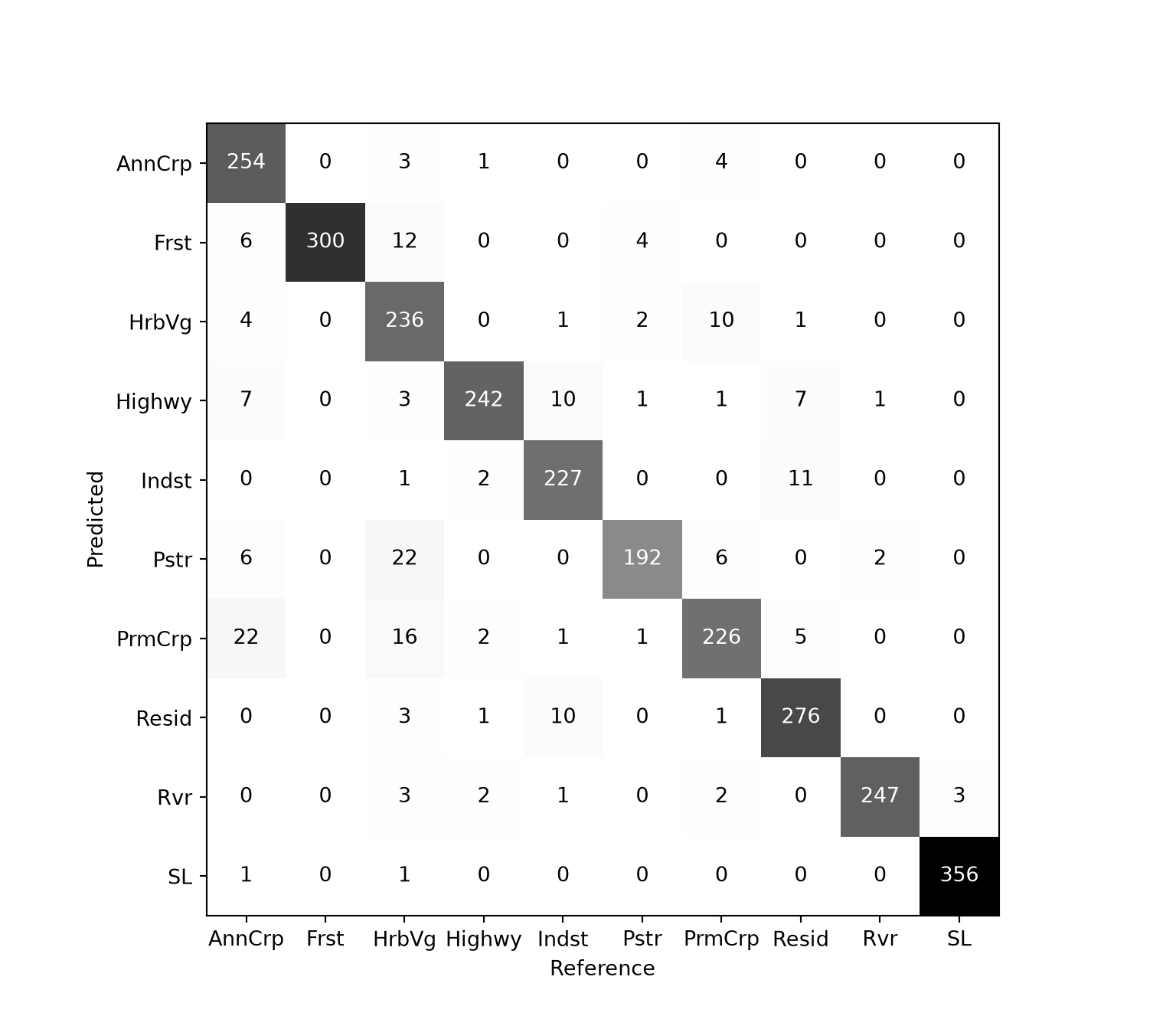
It is important to distinguish between a sample confusion matrix and an estimated population confusion matrix. The population confusion matrix is the confusion matrix for the entire map, and generally is the statistical information of interest. However, it is usually impractical to identify the correct value of every pixel in the population, and thus most confusion matrices are based on a sample, from which the population confusion matrix is estimated. The sample confusion matrix itself is only a direct estimate of the population confusion matrix if the sampling from the map was based on simple random sampling. Note that if stratified sampling is used, with sampling probabilities that vary by class (e.g., to produce a “balanced” dataset), then this information needs to be incorporated in the analysis for estimating the population confusion matrix. One way of understanding the difference between the sample and estimated population confusion matrix is to consider that only in the estimated population confusion matrix is the sum of the values in the table for a particular reference class (i.e., a column total) an estimate of the proportion of that class within the landscape being mapped.
14.4.2 Multiclass Assessment Metrics
A variety of assessment metrics can be generated from the confusion matrix. For each class, it is possible to calculate measures associated with omission and commission errors. Producer’s accuracy or recall for a class is calculated by dividing the correct count by the column total while user’s accuracy or precision is calculated by dividing the correct count by the row total. Note that it is common to report these metrics as proportions instead of percentages.
\[\text{Recall}_i = \frac{C_{ii}}{\sum_{j=1}^{k} C_{ji}}\]
\[\text{Precision}_i = \frac{C_{ii}}{\sum_{j=1}^{k} C_{ij}}\]
where \(C_{ij}\) is the count in row \(i\) (prediction) and column \(j\) (reference). To summarize:
- Producer’s Accuracy = Recall = 1 - Omission Error
- User’s Accuracy = Precision = 1 - Commission Error
The overall accuracy is simply the count correct divided by the sum of the entire table. It is sometimes reported as a proportion and sometimes as a percentage.
\[\text{Accuracy} = \frac{\sum_{i=1}^{k} C_{ii}}{\sum_{i=1}^{k} \sum_{j=1}^{k} C_{ij}}\]
It is possible to aggregate class-level producer’s accuracy/recall or class-level user’s accuracy/precision to a single metric using micro- or macro-averaging. Micro-averaging is actually equivalent to overall accuracy, so it is not necessary to calculate and report additional metrics calculated using this method. Macro-averaging is conducted by calculating the metrics separately for each class and then taking the average such that each class has equal weight in the aggregated metric regardless of the relative abundances of the classes in the dataset or landscape of interest. If desired, it is also possible to incorporate class weights such that each class is not equally weighted.
\[\text{Macro-Averaged Class Aggregated Precision} = \frac{1}{k} \sum_{i=1}^{k} \text{Precision}_i\]
\[\text{Macro-Averaged Class Aggregated Recall} = \frac{1}{k} \sum_{i=1}^{k} \text{Recall}_i\]
Lastly, the F1-score is the harmonic mean of the precision and recall for a class. For macro-averaging, the metric is calculated separately for each class and then averaged. Note that this metric is perfectly correlated with the intersection-over-union (IoU) metric, so it is not necessary to calculate both metrics.
\[\text{Macro-Averaged Class Aggregated F1-Score} = \frac{1}{k} \sum_{i=1}^{k} \left( 2 \times \frac{\text{Precision}_i \times \text{Recall}_i}{\text{Precision}_i + \text{Recall}_i} \right)\]
The code below demonstrates how to calculate these metrics using scikit-learn. Each function accepts the reference labels first and the predictions second. Setting average="macro" calculates the macro-averaged metric, while average=None returns the class-level metrics. The results are combined into a single DataFrame, which suggests that the second model, “Result 2”, is generally outperforming the other model for this task.
Since micro-averaged, class aggregated precision, recall, and F1-score are equivalent to each other and also to overall accuracy, there is no need to report these when overall accuracy is reported.
def multiclass_metrics(df, name):
    return {"Model": name,
            "Accuracy": accuracy_score(df["ref"], df["pred"]),
            "F1Score": f1_score(df["ref"], df["pred"], average="macro"),
            "Precision": precision_score(df["ref"], df["pred"], average="macro"),
            "Recall": recall_score(df["ref"], df["pred"], average="macro")}

metrics_df = pd.DataFrame([multiclass_metrics(result1, "Result 1"),
                           multiclass_metrics(result2, "Result 2")])
print(metrics_df.round(3))
Model Accuracy F1Score Precision Recall
0 Result 1 0.926 0.923 0.923 0.927
1 Result 2 0.947 0.945 0.945 0.945The class-level metrics can also be obtained. The classification_report() function prints the precision, recall, and F1-score for each class along with the number of reference samples in each class (“support”), the overall accuracy, and the macro-averaged and weighted metrics.
print(pd.DataFrame({"Recall (PA)": recall_score(result1["ref"], result1["pred"], average=None,
                                                labels=class_names),
                    "Precision (UA)": precision_score(result1["ref"], result1["pred"], average=None,
                                                      labels=class_names)},
                   index=class_names).round(3))
Recall (PA) Precision (UA)
AnnCrp 0.847 0.969
Frst 1.000 0.932
HrbVg 0.787 0.929
Highwy 0.968 0.890
Indst 0.908 0.942
Pstr 0.960 0.842
PrmCrp 0.904 0.828
Resid 0.920 0.948
Rvr 0.988 0.957
SL 0.992 0.994print(classification_report(result2["ref"], result2["pred"], digits=3)) precision recall f1-score support
AnnCrp 0.968 0.913 0.940 300
Frst 0.983 0.963 0.973 300
Highwy 0.928 0.924 0.926 250
HrbVg 0.892 0.940 0.916 300
Indst 0.971 0.944 0.957 250
PrmCrp 0.905 0.876 0.890 250
Pstr 0.908 0.940 0.924 200
Resid 0.939 0.980 0.959 300
Rvr 0.964 0.972 0.968 250
SL 0.994 0.997 0.996 359
accuracy 0.947 2759
macro avg 0.945 0.945 0.945 2759
weighted avg 0.948 0.947 0.947 2759Several other classification metrics are provided by scikit-learn, including the Matthews correlation coefficient (matthews_corrcoef()) and the Kappa statistic (cohen_kappa_score()). However, we generally discourage the use of Kappa.
14.5 Binary Classification
Since it is common to use different terminology for a binary classification with a positive, presence, or true case and a negative, absence, or false case, we will now discuss a binary classification problem.
14.5.1 Single-Threshold
Single-threshold metrics are those that are calculated using the “hard” classification based on a specific decision threshold as opposed to the predicted probability of class membership, sometimes referred to as a “soft” label or prediction. For example, a sample with a predicted probability greater than 0.5 of occurring in the positive case may be coded to “positive” while samples that do not meet this criterion are coded to “negative”. Generally, the user can specify the desired threshold. At this specific threshold, each sample can be labeled as one of the following:
- True Positive (TP): referenced to the positive class and correctly labeled as positive
- True Negative (TN): referenced to the negative class and correctly labeled as negative
- False Positive (FP): referenced to the negative class and incorrectly labeled as positive (commission error relative to the positive class and omission error relative to the negative class)
- False Negative (FN): referenced to the positive class and incorrectly labeled as negative (omission error relative to the positive class and commission error relative to the negative class)
From the count of TP, TN, FP, and FN samples, several metrics can be calculated. Recall, also referred to as sensitivity, considers the omission error relative to the positive case. It is equivalent to 1 - positive case omission error or the positive case producer’s accuracy. Precision quantifies commission error relative to the positive case and is equivalent to 1 - positive case commission error or the positive case user’s accuracy. Negative predictive value (NPV) is equivalent to 1 - negative case commission error or the user’s accuracy for the negative case while specificity is equivalent to 1 - negative case omission error or producer’s accuracy for the negative case.
\[\text{Recall} = \frac{TP}{TP + FN}\]
\[\text{Precision} = \frac{TP}{TP + FP}\]
\[\text{Negative Predictive Value (NPV)} = \frac{TN}{TN + FN}\]
\[\text{Specificity} = \frac{TN}{TN + FP}\]
As noted above, the F1-score is the harmonic mean of precision and recall. It is generally only calculated for the positive case as opposed to averaging across the positive and negative case for a binary classification problem. Note that overall accuracy for a binary classification is the same as that for a multiclass classification: the total correct, TP + TN, divided by the total number of samples.
\[\text{F1 Score} = 2 \times \frac{\text{Precision} \times \text{Recall}}{\text{Precision} + \text{Recall}} = \frac{2 \times TP}{2 \times TP + FP + FN}\]
To experiment with a binary classification result, we will use a dataset generated by the authors and associated with the problem of predicting whether or not a location is a landslide based on topographic characteristics. In the code block below, we read in the data, rename the columns, and recode the labels to “Class1” and “Class2”. In this case, “Class2” represents slope failures while “Class1” represents not slope failures, or the background class. The table also includes the predicted probability of each class.
When calculating binary metrics with scikit-learn, it is important to specify which class represents the positive case using the pos_label parameter. Since “Class2” represents the positive case for this problem, we set pos_label="Class2". scikit-learn does not provide separate functions for NPV and specificity. However, since NPV is the precision of the negative case and specificity is the recall of the negative case, they can be calculated using precision_score() and recall_score() with pos_label="Class1". We also generate a confusion matrix.
For the landslide case, “Class2”, there are more FPs in comparison to FNs. In other words, precision is lower than recall.
bi_in = pd.read_csv(fld + "binary_data.csv")
bi_in.columns = ["truth", "predicted", "Class1", "Class2"]
labels = {"not": "Class1", "slopeD": "Class2"}
bi_in["truth"] = bi_in["truth"].map(labels)
bi_in["predicted"] = bi_in["predicted"].map(labels)

t, p = bi_in["truth"], bi_in["predicted"]
print(f"Recall:      {recall_score(t, p, pos_label='Class2'):.3f}")
Recall: 0.906print(f"Precision: {precision_score(t, p, pos_label='Class2'):.3f}")Precision: 0.853print(f"NPV: {precision_score(t, p, pos_label='Class1'):.3f}")NPV: 0.900print(f"Specificity: {recall_score(t, p, pos_label='Class1'):.3f}")Specificity: 0.844print(f"F1-score: {f1_score(t, p, pos_label='Class2'):.3f}")F1-score: 0.879print(pd.crosstab(p, t, rownames=["Predicted"], colnames=["Reference"]))Reference Class1 Class2
Predicted
Class1 422 47
Class2 78 45314.5.2 Multi-Threshold
It is also possible to generate metrics using multiple thresholds calculated from the “soft” predictions as opposed to a single threshold. Two common methods are the receiver operating characteristic curve (ROC curve) and the precision-recall curve (PR curve). These curves can be aggregated to a single metric by integrating the area under the curve. These measures are called the area under the ROC curve (AUCROC) and the area under the PR curve (AUCPR).
The ROC curve considers sensitivity (i.e., recall) and specificity at multiple thresholds. In other words, it considers 1 - omission error relative to the positive and negative case, respectively. Omission errors are not impacted by class imbalance, so the curve and associated AUCROC metric will not change as class proportions change. Since both sensitivity and specificity are scaled from zero to one, the maximum possible area under the curve is one.
The PR curve considers precision and recall. In other words, it considers 1 - commission and 1 - omission error relative to the positive case at multiple thresholds. Precision is impacted by the relative class proportions. As a result, PR curves and the associated AUCPR metric will vary as class proportions change. PR curves are generally considered more meaningful than ROC curves when there is significant class imbalance or when the positive or background case makes up a much smaller or much larger percentage of the landscape. As with ROC curves, and since both precision and recall are scaled from zero to one, the maximum possible area under the curve is one.
Both ROC and PR curves and associated metrics can be calculated for multiclass problems, for example by treating each class in turn as the positive case. However, that is not demonstrated here.
The code below generates an ROC curve using the binary classification results. The roc_curve() function requires the reference labels, the predicted probability for the positive case, and the label of the positive case. It returns the false positive rate (1 - specificity), the true positive rate (sensitivity), and the associated thresholds.
fpr, tpr, thresholds = roc_curve(bi_in["truth"], bi_in["Class2"], pos_label="Class2")

fig, ax = plt.subplots(figsize=(5, 5))
ax.plot(fpr, tpr, color="black")
ax.plot([0, 1], [0, 1], linestyle=":", color="grey")
ax.set_xlabel("1 - Specificity")
ax.set_ylabel("Sensitivity")
ax.set_aspect("equal")
plt.show()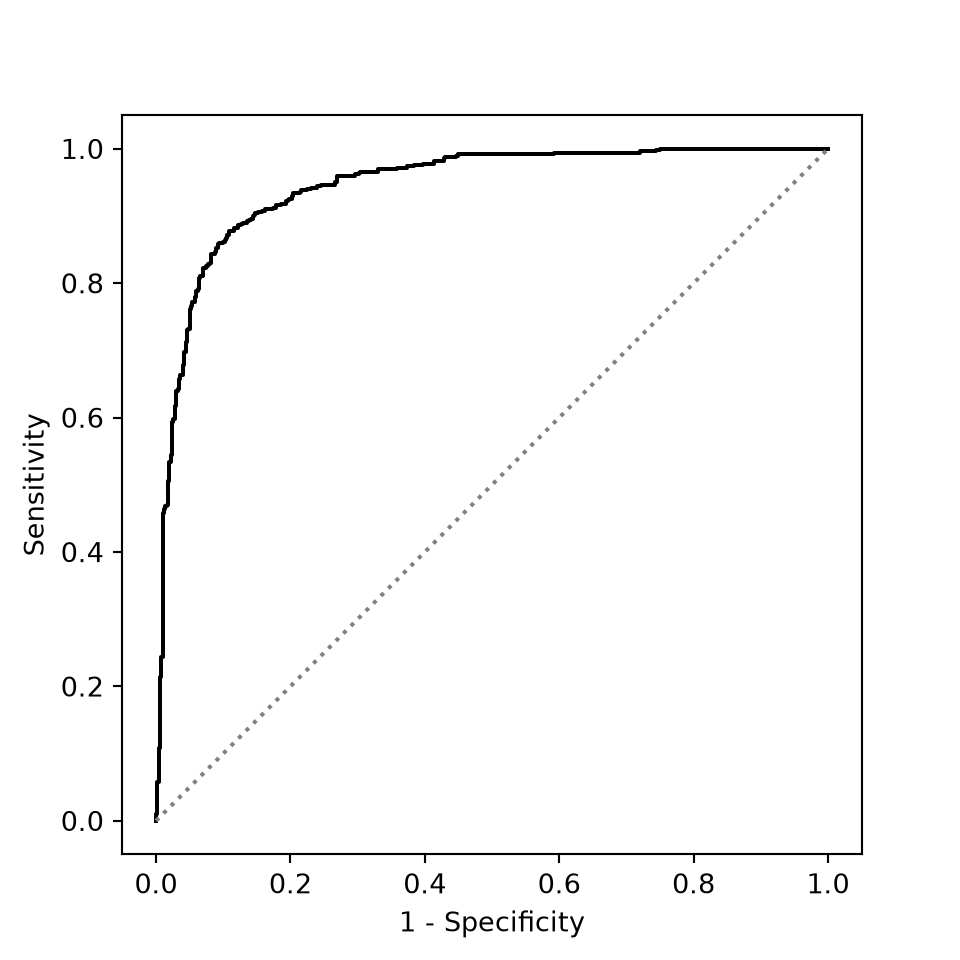
The AUCROC is calculated using the roc_auc_score() function. This function expects the reference labels as a binary variable, so we convert them to True for the positive case. Note that this measure is generally interpreted like a US university grading scale:
- .9 to 1 = A (excellent)
- .8 to .9 = B (good)
- .7 to .8 = C (acceptable)
- <.7 = D/F (unacceptable)
However, an acceptable AUCROC will depend on the specific use case. Also, an AUCROC of 0.5 is generally interpreted as a model that is performing no better than a random guess.
y_bin = bi_in["truth"] == "Class2"
print(round(roc_auc_score(y_bin, bi_in["Class2"]), 3))0.945The next two code blocks demonstrate the generation of a PR curve and the associated AUCPR metric. The syntax is very similar to that for the ROC curve and AUCROC metric, and AUCPR values are often interpreted similarly to AUCROC, like a college grading scale, other than the consideration that changes in relative class proportions will change the results. scikit-learn provides two ways to summarize the PR curve. The average_precision_score() function calculates the average precision as a weighted mean of the precision at each threshold, which is the generally recommended approach, while applying auc() to the curve integrates it using the trapezoidal rule. The two values are generally similar.
prec, rec, _ = precision_recall_curve(bi_in["truth"], bi_in["Class2"], pos_label="Class2")

fig, ax = plt.subplots(figsize=(5, 5))
ax.plot(rec, prec, color="black")
ax.set_xlabel("Recall")
ax.set_ylabel("Precision")
ax.set_xlim(0, 1)
ax.set_ylim(0, 1.02)
ax.set_aspect("equal")
plt.show()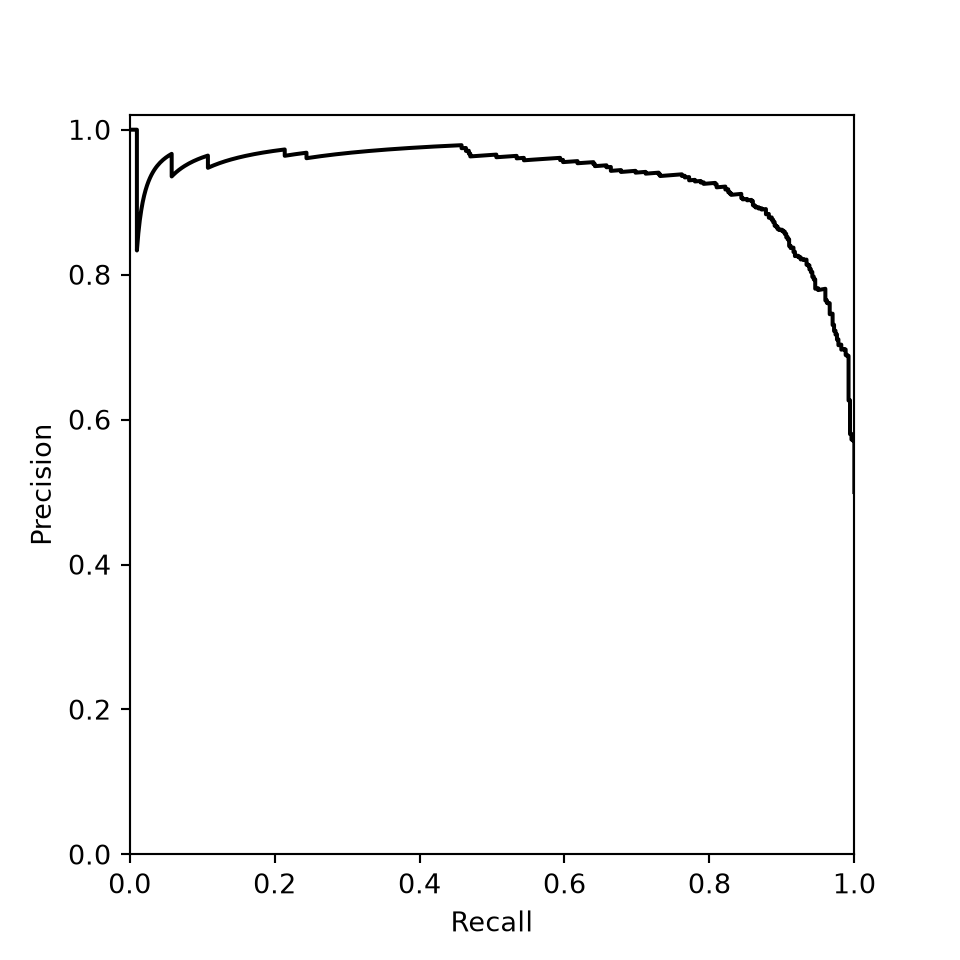
print(round(average_precision_score(y_bin, bi_in["Class2"]), 3))0.934print(round(auc(rec, prec), 3))0.93314.6 Concluding Remarks
In this chapter, we explored the metrics used to assess regression and classification models, which are needed to determine whether a model generalizes to new data and to compare models. Throughout the remaining chapters, we will implement the accuracy assessment methods and metrics introduced here as we explore different supervised learning algorithms, beginning with linear regression in the next chapter.
14.7 Questions
- Explain the difference between using
confusion_matrix()from scikit-learn andpd.crosstab()with the predictions as rows to create a confusion matrix. Why does the orientation of the table matter? - Explain the terms true positive, true negative, false positive, and false negative using an example.
- Explain the difference between omission and commission error using an example.
- If the relative proportion of classes in a multiclass classification changes, will class-level recall change? Explain your reasoning.
- If the relative proportion of classes in a multiclass classification changes, will class-level precision change? Explain your reasoning.
- Explain the difference between micro- and macro-averaging methods when calculating a single, aggregated metric from class-level metrics.
- Explain the difference between a receiver operating characteristic (ROC) curve and a precision-recall (PR) curve.
- Explain the concordance correlation coefficient (CCC) and how it is different from the Pearson correlation coefficient.
14.8 Exercises
Exercise 14.1: Assessing Classification Results
Introduction
In this exercise, you will assess a multiclass and a binary classification result using the methods demonstrated in Chapter 14. The data are provided in the datasets/gisData/accuracy/exercise folder.
Deliverables
- Jupyter Notebook or Quarto document with all code and results embedded. Answers to questions should be provided in Markdown cells or text.
Questions and Tasks
Multiclass Classification
You have been provided with accuracy assessment results for a land cover mapping project for the entire state of West Virginia as a point layer (accuracy_exercise.gpkg/multiClassWV). The “GrndTruth” column represents the reference labels while the “Pred” column represents the predictions. Complete the following tasks:
- Read in the point features.
- Recode the class indices for both the “GrndTruth” and “Pred” columns as follows:
- 1 = “Forest”
- 2 = “LowVeg”
- 3 = “Barren”
- 4 = “Water”
- 5 = “Impervious”
- 6 = “Mix Dev”
- Generate a confusion matrix in which the columns represent the reference labels and the rows represent the predictions.
- Calculate overall accuracy using scikit-learn.
- Calculate class-aggregated, macro-averaged recall, precision, and F1-score using scikit-learn.
- Write a paragraph describing the assessment results. Which classes were most confused? What classes were generally well differentiated?
Binary Classification
You have been provided with accuracy assessment results for the extraction of surface mine disturbance from historic topographic maps where two classes are differentiated: “Background” and “Mine”. “Mine” is considered the positive case while “Background” is the negative, background, or absence case. Three files have been provided:
- accuracy_exercise.gpkg/valPnts: point locations at which to perform validation
- topo_pred2.tif: raster of predictions (0 = “Background”; 255 = “Mine”)
- topo_ref.tif: raster of reference labels (0 = “Background”; 255 = “Mine”)
Perform the following tasks:
- Extract the prediction and reference values to the point locations using Rasterio (Chapter 10). Make sure that the points and rasters use the same coordinate reference system before extracting the values.
- In the resulting table, recode the numeric codes to class names.
- Generate a confusion matrix in which the columns represent the reference labels and the rows represent the predictions.
- Calculate overall accuracy, precision, recall, and F1-score using scikit-learn (make sure the correct class is treated as the positive case).
- Write a paragraph describing the sources of error in the results. Make sure to distinguish between commission and omission errors.
Exercise 14.2: Accuracy Assessment
75 Points scaled to 20 Points
Introduction
This exercise will explore metrics for assessing and comparing multiclass classification, binary classification, probabilistic, and regression models. These datasets were derived from some of our own research projects. However, they are meant to be generic here, so you don’t need to worry about the context or use case. The four CSV files used in this exercise are provided in the datasets folder of the book download.
Objectives
Calculate assessment metrics from predictions made to withheld test or validation data
Interpret metrics to assess model performance
Interpret metrics to compare models
Determine when specific metrics are appropriate measures for assessing certain models
Deliverables
- Quarto document or Jupyter Notebook with all code and results embedded. Files can be rendered to HTML webpages if your instructor requires this. Questions should be stated and answered within Markdown cells.
Background Questions
Question 1: Why is it important to use withheld validation data when assessing models as opposed to the data used to train the model? (5 Points)
Question 2. Explain the difference between Overall Accuracy and Kappa for assessing a multiclass classification. (5 Points)
Question 3. Explain the difference between Precision, Recall, F1-Score, Specificity, and Negative Predictive Value for assessing a binary classification. (5 Points)
Question 4. Explain the difference between the Receiver Operating Characteristic (ROC) curve and the Precision-Recall (PR) curve for assessing a probabilistic prediction. (5 Points)
Question 5. Explain the meaning and interpretation of the area under the curve (AUC) measure calculated from the Receiver Operating Characteristic Curve. (5 Points)
Question 6. Explain how R-squared is calculated. What is the unit of measurement of R-squared? (5 Points)
Question 7. Explain how Root Mean Square Error (RMSE) is calculated. What is the unit of measurement? (5 Points)
Tasks and Questions
This assignment can be conducted using either Python or R, whichever you prefer or whichever your instructor requires. Generate code to perform the following analyses and answer the stated questions.
Multiclass Classification
Task 1. The classification_data.csv dataset contains three columns and relates to a multiclass classification where five classes are differentiated. Each class has been assigned a numeric value (1 through 5), but these values represent categories or nominal data. The “truth” column represents the correct or reference class while the “m1” and “m2” columns represent separate predictions. Generate Confusion Matrices from the reference data and predictions obtained using the different models. Next, calculate the Overall Accuracy and Kappa statistic for both models. Based on these results, which model provided the best performance? What classes were most difficult to differentiate? (10 Points)
Task 2. The classification_data2.csv dataset represents classification results for differentiating six forest community types across the state of West Virginia using variables derived from satellite data and digital elevation data. The “Fall_T” models used only imagery collected in the fall along with digital terrain variables; the “Spr_T” models were produced using spring imagery and digital terrain variables; and the “Sum_T” models were produced using summer imagery and digital terrain variables. The “H_T” model used imagery from multiple seasons, which were summarized using a process called harmonic regression, alongside the digital terrain variables. The “set” column defined which dataset was used while the “OA” column provides the Overall Accuracy, and the “k” column provided the Kappa statistic. Each of the for sets of variables were used to train 50 different models using different training and testing data partitions in order to capture the variability in model performance when given different input samples. Create two grouped boxplots. The first plot should show the distribution of Overall Accuracy for each of the replicate sets as four separate boxplots. The second should show Kappa as opposed to Overall Accuracy. Based on these results, discuss the relative performance of the different sets of feature and also the variability in performance when different data partitions were used. (10 Points)
Binary Classification and Probabilistic Prediction
Task 3. The binary_data.csv dataset represents results for predicting the likelihood of landslide occurrence as predicted using a random forest model. The “truth” column represents the correct classification (“not” = not a landslide; “slopeD” = a landslide). The “predicted” column represents the predicted class. The “prob_not” column represents the predicted probability of the location not being a landslide while the “prob_fail” column represented the predicted probability of the site being a landslide. There are an equal number of “not landslide” and “landslide” examples based on the reference classification. The “slopeD” class should be treated as the positive outcome. From these data and using the classification results and reference classification calculate the following metrics: Precision, Recall, F1-Score, Specificity, and Negative Predictive Value. From these data and using the reference classification and predicted class probabilities, calculate the Area Under the ROC and PR Curves. Discuss the results in regards to the model performance. What was the dominant source of error in the model: false positives or false negatives? (10 Points)
Regression
Task 4. The regression_data.csv dataset contains 156 values (“truth”) and associated predictions using three different models (“m1”, “m2”, and “m3”). Calculate the R-Squared and RMSE metrics for each of the three models. How do these models compare in regards to accuracy and the amount of variability in the value of interest explained? (10 Points)