| Feature Class | Code | Transformation | Allows the Model to Represent |
|---|---|---|---|
| Linear | l | The original predictor variable | A response that increases or decreases steadily |
| Quadratic | q | The squared predictor variable | A response that peaks (or dips) at intermediate values, such as an optimum |
| Product | p | The product of two predictor variables | Pairwise interactions between predictor variables |
| Hinge | h | A piecewise linear function that is zero below (or above) a knot and linear beyond it | Flexible non-linear responses built from many line segments; similar to splines in a GAM |
| Threshold | t | A step function that is zero below a knot and one above it | Abrupt changes in the response; similar to splits in a decision tree |
12 Presence-Only Modeling (MaxEnt)
12.1 Topics Covered
- Presence-only data and presence-background modeling
- Strengths and weaknesses of presence-only modeling
- Key concepts of maximum entropy (MaxEnt) modeling: features, regularization, and output scales
- How MaxEnt relates to other algorithms
- Preparing presence and background data
- Tuning, training, and evaluating MaxEnt models with maxnet
- Response curves and variable importance (permutation and jackknife)
- Predicting to raster data and thresholding
12.2 Introduction
All of the models explored so far in this text are trained using samples of both the class of interest and the background or other classes. For our wetland mapping problem, we had examples of both wetlands and uplands. In many applications, however, reliable examples of where a phenomenon does not occur are unavailable. Species occurrence records from museum collections, herbaria, citizen science platforms, and online databases, such as the Global Biodiversity Information Facility (GBIF), typically only record where a species was observed. Failing to observe a species at a location does not mean that it is absent, since it may have been missed or simply not searched for. Similar situations arise in geospatial science, for example, when mapping landslides, sinkholes, archaeological sites, or mineral deposits from inventories that only record known occurrences.
Presence-only modeling addresses this problem. Since true absences are unavailable, the presence locations are contrasted with background locations sampled from the entire study area. Background points are not assumed to be absences. Instead, they characterize the environmental conditions that are available in the study area. The model then estimates how the conditions at presence locations differ from the available conditions. This is known as a presence-background approach.
12.2.1 Strengths and Weaknesses
Presence-only modeling has several strengths:
- It makes use of widely available occurrence data, which greatly expands the problems that can be addressed.
- It avoids the use of unreliable absence data, which can be worse than no absence data if many “absences” are actually undetected occurrences.
- Methods such as MaxEnt have performed well in comparisons with other presence-only methods and have become standard tools, especially in ecology and biogeography.
It also has important weaknesses:
- Sampling bias: Presence records are often concentrated in accessible locations, such as near roads or population centers. Since the background represents the entire study area, the model may learn the sampling bias as opposed to the true distribution.
- Unknown prevalence: Without absences, the overall prevalence, or how common the phenomenon is, cannot be estimated from the data. As a result, the output is best interpreted as relative suitability as opposed to a true probability of occurrence.
- Sensitivity to the background: The results depend on the extent from which background points are sampled. A large extent that includes many clearly unsuitable areas will make the model appear more accurate while providing less useful information about suitability within the relevant area.
- Evaluation challenges: Without true absences, standard accuracy assessment metrics cannot be calculated. Metrics such as the AUC ROC can be calculated by treating background points as pseudo-absences, but the maximum achievable value is less than 1 since the background can contain presences.
12.2.2 Key Concepts of MaxEnt
Maximum entropy (MaxEnt) modeling is the most widely used presence-only method. MaxEnt estimates a probability distribution across the cells of the study area. Of all the distributions that satisfy a set of constraints, it selects the one that is closest to uniform, or that has the maximum entropy. The constraints require that the expected value of each feature under the estimated distribution be close to its average value at the presence locations. In other words, MaxEnt assumes as little as possible beyond what the presence data tell us.
The features are transformations of the predictor variables that determine the shapes of the response curves the model can represent. MaxEnt uses the feature classes listed in Table 12.1. Simpler feature classes, such as linear and quadratic, produce smooth and easily interpretable responses, while hinge, product, and threshold features allow for more complex responses but increase the risk of overfitting.
Since a large number of features can be generated, MaxEnt uses regularization to prevent overfitting. Specifically, it applies an L1, or LASSO, penalty, which shrinks many feature coefficients to exactly zero, so that only a subset of features is retained. The strength of the penalty is controlled by the regularization multiplier. Values greater than 1 produce simpler, smoother models, while values less than 1 produce more complex models. Along with the feature classes, the regularization multiplier is the main setting that should be tuned.
The raw MaxEnt output is a relative occurrence rate that sums to one across the study area, which is difficult to interpret. So, it is generally transformed. The complementary log-log (cloglog) transformation is currently recommended. It produces values between 0 and 1 that can be interpreted as an index of relative suitability. Under certain assumptions, it approximates the probability of occurrence, but, since prevalence cannot be estimated from presence-only data, these values should not be interpreted as true probabilities.
12.2.3 Relation to Other Algorithms
Although MaxEnt was originally presented using the language of information theory, it has been shown to be closely related to familiar statistical models:
- MaxEnt is equivalent to an inhomogeneous Poisson point process model, which models the intensity of occurrences across the study area as a function of the predictor variables.
- MaxEnt is also equivalent to a regularized logistic regression model that contrasts presences with a very large number of background points that are given a large weight. The maxnet package that we use in this chapter implements MaxEnt in exactly this way, using glmnet to fit a LASSO logistic regression model.
- With linear and quadratic features, MaxEnt is similar to a logistic regression model with polynomial terms. With hinge features, it resembles a GAM, since the response curves are built from many piecewise linear segments, which act like splines. With threshold features, it resembles a decision tree-based model.
Other algorithms can also be used in a presence-background framework by treating the background points as a second class, as is commonly done with random forest and boosted regression trees. MaxEnt remains popular because its features and regularization were designed specifically for presence-background data, it generally produces smooth and interpretable response curves, and it has been extensively tested.
12.2.4 This Chapter
In this chapter, we revisit the wetland mapping problem from Chapter 10 but treat it as a presence-only problem. We use only the wetland locations from the training data, which simulates a common situation in which an inventory of wetland occurrences is available but locations that have been confirmed to not be wetlands are not. We use the maxnet package, which implements MaxEnt in R without requiring Java or the original MaxEnt software. Since the validation data from Chapter 10 include both wetlands and uplands, we can also assess how well the presence-only model differentiates the two classes, which is rarely possible in real presence-only applications.
12.3 Data Preparation
12.3.1 Presence Data
This chapter uses the same data as Chapter 10, and a copy of the data is provided in this chapter’s data folder. We read in the training table and keep only the 1,000 wetland samples, which serve as our presence data. We use the same eight predictor variables used in Chapter 10. We also read in the validation data, which include both wetlands and uplands, for use in the final assessment.
The provided tables contain the predictor variable values at each sample location but not the coordinates of the samples. This is sufficient for MaxEnt, which only requires the predictor variable values at the presence and background locations. In many presence-only applications, you would start with point locations and extract the predictor variable values from the raster stack using extract() from terra.
fldPth <- "gslrData/chpt12/data/"

predsToUse <- c("cost",
                "ctmi",
                "crv_plane",
                "crv_pro",
                "diss_a",
                "rough_a",
                "slp_d",
                "sp_a")

pres <- read_csv(str_glue("{fldPth}training.csv")) |>
  filter(class == "wet") |>
  select(all_of(predsToUse))

test <- read_csv(str_glue("{fldPth}validation.csv")) |>
  select(class, all_of(predsToUse)) |>
  mutate(class = factor(class,
                        levels = c("wet", "not"),
                        labels = c("Wetland", "Upland")))

nrow(pres)
[1] 100012.3.2 Background Data
Next, we generate background data. The background should represent the area in which the phenomenon could potentially occur. Since PFO/PSS wetlands only occur in forested or woody extents, we sample background points only from the forested areas defined by the forest mask. We read in the predictor variable stack, rename the bands, subset the eight predictor variables, and apply the mask.
predStk <- rast(str_glue("{fldPth}predictors.tif"))

names(predStk) <- c("cost", "crv_arc", "crv_plane", "crv_pro", "ctmi",
                    "diss_5", "diss_10", "diss_20", "diss_25", "diss_a",
                    "rough_5", "rough_10", "rough_20", "rough_25", "rough_a",
                    "slp_d", "sp_5", "sp_10", "sp_20", "sp_25", "sp_a")

predStk <- predStk[[predsToUse]]

forMsk <- rast(str_glue("{fldPth}for_mask.tif"))
predStkM <- mask(predStk, forMsk)
We then randomly sample 10,000 background cells from the masked raster stack using spatSample() from terra, which is the default number of background points used by the original MaxEnt software. Setting na.rm = TRUE ensures that only cells within the forest mask are sampled. The result is a data frame of predictor variable values.
set.seed(42)
bg <- spatSample(predStkM, size = 10000, method = "random", na.rm = TRUE) |>
  as_tibble()

nrow(bg)
[1] 10000Comparing the distributions of the predictor variables at the presence and background locations shows the information that MaxEnt will use. Below, we stack the two datasets, convert to a long format, and plot density curves. Large differences, such as for cost (plotted on a log scale), dissection, roughness, and slope, suggest that these variables will be important in the model. Variables with similar distributions, such as plan and profile curvature, provide less information.
bind_rows(pres |> mutate(type = "Presence"),
          bg |> mutate(type = "Background")) |>
  mutate(cost = log1p(cost)) |>
  pivot_longer(all_of(predsToUse), names_to = "variable", values_to = "value") |>
  ggplot(aes(x = value, fill = type)) +
  geom_density(alpha = 0.5) +
  facet_wrap(~variable, scales = "free", ncol = 4) +
  scale_fill_manual(values = c("Background" = "gray60", "Presence" = "#B03A2E")) +
  labs(x = "Value (cost is log-transformed)", y = "Density", fill = "") +
  theme_bw()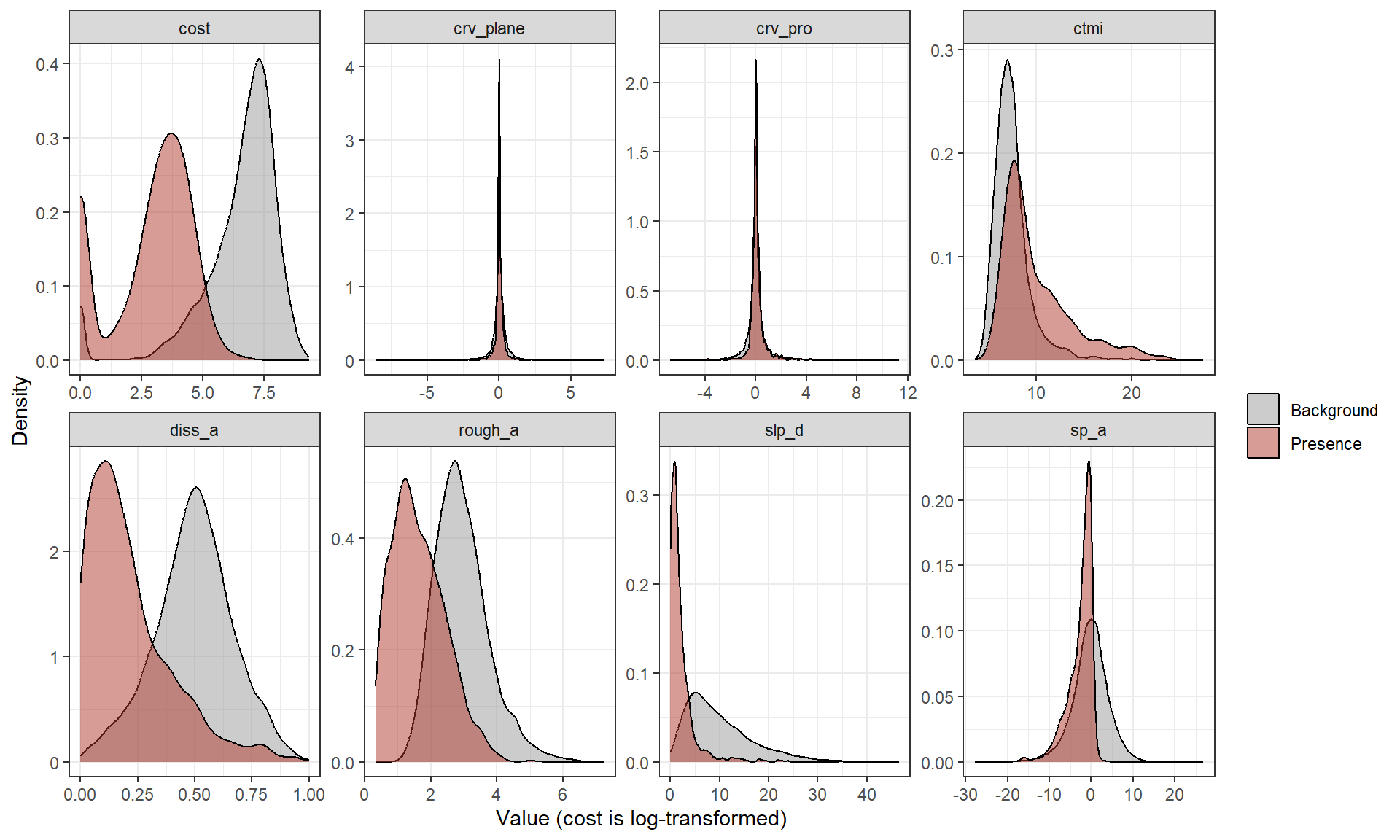
Lastly, we combine the presence and background data into a single data frame and create a vector, pa, that codes presences as 1 and background points as 0. Remember that the background points are not absences: some of them may fall within wetlands. We use these combined data for evaluation and variable importance below.
12.4 Training a MaxEnt Model with maxnet
The maxnet() function trains a MaxEnt model. It requires a vector of presence/background codes (p) and a data frame of predictor variables (data). The feature classes are defined by a formula created with maxnet.formula(), where the classes argument is a string containing the codes of the feature classes to use (e.g., "lqh" for linear, quadratic, and hinge features). The regmult argument sets the regularization multiplier. By default, maxnet selects the feature classes based on the number of presences and uses a regularization multiplier of 1.
Following the original MaxEnt software, the presence locations should also be included in the background, since the background represents all available locations, including those where the phenomenon occurs. By default, maxnet() does this internally (addsamplestobackground = TRUE). However, the internal implementation compares every presence to every background point, which is slow with many points, and it fails when the data contain only a single predictor variable, which we need for the jackknife test below. So, we write a short wrapper function, fitMx(), that adds the presences to the background ourselves and sets addsamplestobackground = FALSE. In our testing, this produced identical models about five times faster.
fitMx <- function(presD, bgD, fc, rm) {
  d <- bind_rows(presD, bgD, presD) |> as.data.frame()
  p <- c(rep(1, nrow(presD)), rep(0, nrow(bgD) + nrow(presD)))
  maxnet(p, d,
         f = maxnet.formula(p, d, classes = fc),
         regmult = rm,
         addsamplestobackground = FALSE)
}
12.5 Model Tuning
To select the feature classes and regularization multiplier, we use 5-fold cross-validation. The presence and background points are each randomly assigned to five folds. For each combination of settings, a model is trained using four folds and assessed on the withheld fold by calculating the AUC ROC for differentiating the withheld presences from the withheld background points. We test four combinations of feature classes and three regularization multipliers.
This tuning process requires training 60 models and takes a few minutes. Packages such as ENMeval provide more comprehensive tuning and evaluation tools for MaxEnt models, including spatial cross-validation and additional evaluation metrics.
set.seed(42)
foldP <- sample(rep(1:5, length.out = nrow(pres)))
foldB <- sample(rep(1:5, length.out = nrow(bg)))

tuneGrid <- expand_grid(fc = c("l", "lq", "lqh", "lqph"),
                        rm = c(1, 2, 4))

tuneRes <- pmap(tuneGrid, \(fc, rm) {
  foldAUC <- map_dbl(1:5, \(k) {
    mK <- fitMx(pres[foldP != k, ], bg[foldB != k, ], fc, rm)
    evalD <- bind_rows(pres[foldP == k, ], bg[foldB == k, ]) |> as.data.frame()
    evalP <- factor(c(rep(1, sum(foldP == k)), rep(0, sum(foldB == k))), levels = c(1, 0))
    roc_auc_vec(evalP, predict(mK, evalD, type = "cloglog")[, 1])
  })
  tibble(features = fc, regmult = rm, auc = mean(foldAUC))
}) |>
  bind_rows()

tuneRes |>
  arrange(desc(auc)) |>
  gt() |>
fmt_number(columns = auc, decimals = 4)| features | regmult | auc |
|---|---|---|
| lqph | 1 | 0.9858 |
| lqph | 2 | 0.9844 |
| lqph | 4 | 0.9836 |
| lqh | 1 | 0.9812 |
| lqh | 2 | 0.9806 |
| lq | 1 | 0.9792 |
| lqh | 4 | 0.9791 |
| lq | 2 | 0.9771 |
| l | 1 | 0.9765 |
| l | 2 | 0.9758 |
| lq | 4 | 0.9740 |
| l | 4 | 0.9740 |
The most complex feature set, which includes linear, quadratic, product, and hinge features, with the least regularization (a multiplier of 1) provided the highest cross-validated AUC ROC. However, the differences between the settings are small: all 12 combinations have mean AUC ROC values between roughly 0.974 and 0.986. When differences are this small, it is reasonable to prefer a simpler model, which produces smoother and more interpretable response curves. Here, we use the best performing settings, but we explore simpler settings in the exercises.
12.6 Train the Final Model
We now train the final model using all presence and background points and the selected settings. The betas element of the model contains the coefficients of the retained features. Feature names indicate the feature class: squared terms are wrapped in I(...^2), product features are separated with a colon, and hinge features begin with hinge() followed by the knot locations.
[1] 30# A tibble: 10 × 2
feature coefficient
<chr> <dbl>
1 diss_a:rough_a -4.26
2 hinge(sp_a):-12.2272600446429:26.7843246459961 4.14
3 hinge(cost):0:931.309072066327 -2.64
4 diss_a 2.12
5 hinge(cost):0:1164.13634008291 -2.07
6 hinge(crv_plane):-8.60206985473633:0.150773320879255 1.69
7 hinge(crv_pro):-6.73389911651611:1.36245394726189 -1.61
8 hinge(rough_a):2.15894107900316:7.23818683624268 1.44
9 hinge(crv_plane):-8.60206985473633:-0.173406055995397 1.21
10 hinge(slp_d):9.48507270034479:46.4768562316895 1.01The LASSO penalty retained 30 features out of the many candidate features. Most of the retained features are hinge features, which allow for flexible response curves. The feature with the largest coefficient is the product of terrain dissection and roughness, which indicates that the model uses an interaction between these two related variables. Note that coefficients for different feature types are on different scales and should not be interpreted directly as measures of importance.
12.7 Response Curves
Response curves show how the predicted suitability changes with each predictor variable while the other predictor variables are held at their mean values. Calling plot() on a maxnet model generates a response curve for each predictor variable. Setting type = "cloglog" plots the curves on the cloglog scale.
plot(mxM, type = "cloglog")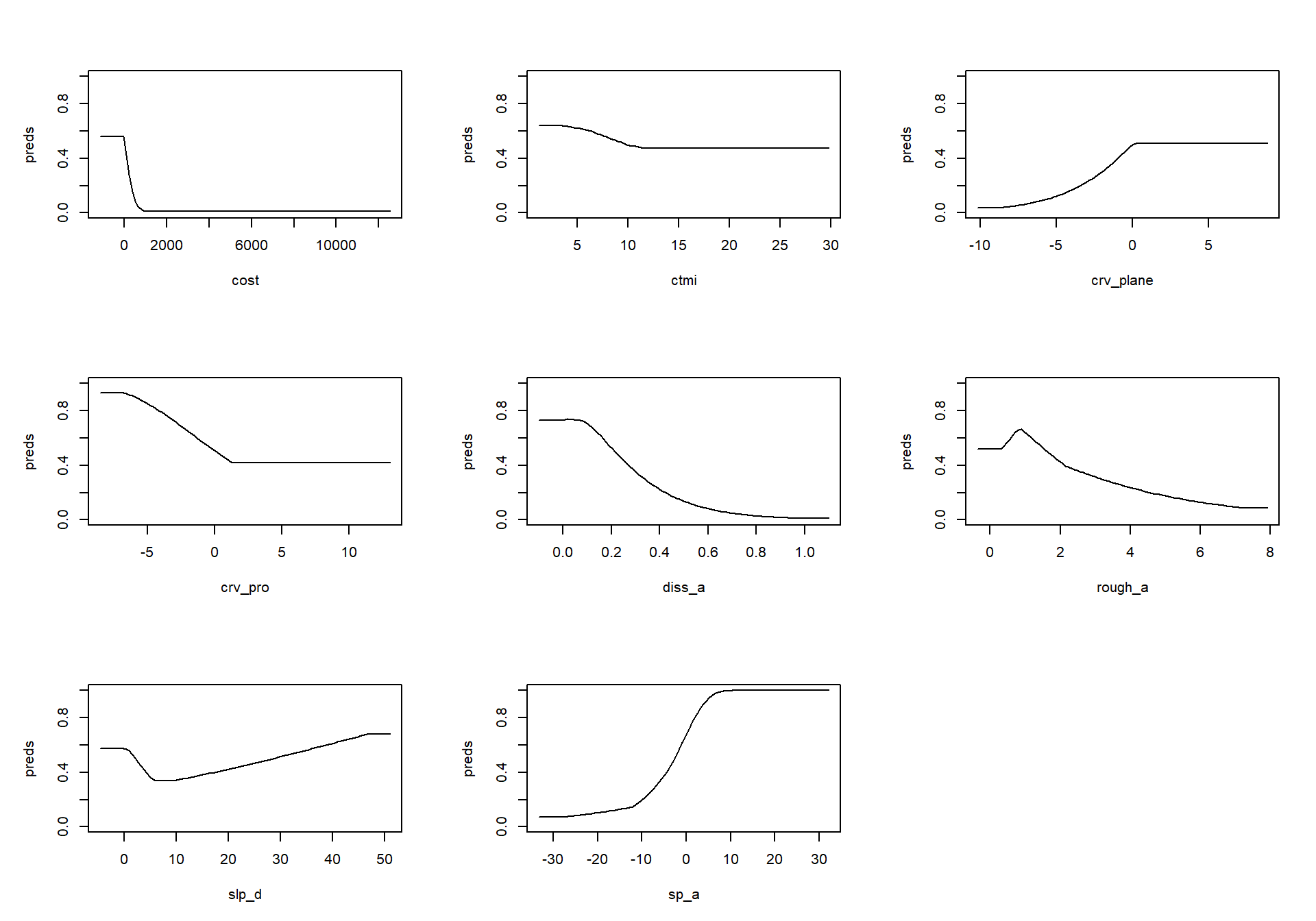
The response curves are generally consistent with the patterns observed in prior chapters. Suitability is highest close to water and drops to near 0 at a cost of about 1,000. Suitability decreases with increasing terrain dissection and, beyond low values, with increasing roughness. It is lowest in strongly convergent locations (negative plan curvature) and increases with slope position. The slope response curve decreases from flat terrain to about 10 degrees and then increases, similar to the GAM in the prior chapter. This increase on steep slopes is likely not meaningful, since few presences occur on steep slopes.
These curves should be interpreted cautiously. Each curve is generated while holding the other predictor variables at their mean values, which may represent an unrealistic combination of conditions, especially since several of the predictor variables are correlated. Also, product features mean that the effect of one variable depends on the values of others, which a single curve cannot show. Simpler feature classes and stronger regularization generally produce response curves that are easier to interpret.
12.8 Model Evaluation
12.8.1 Presence-Background Evaluation
In a true presence-only application, the model can only be assessed using presences and background points. We first calculate the AUC ROC for differentiating the training presences from the background points. This measures how well the model separates presence locations from the available conditions in the study area. Remember that the maximum achievable value is less than 1 since some background points may fall within wetlands. Also, since these data were used to train the model, this provides an optimistic assessment.
trainPred <- predict(mxM, mxData, type = "cloglog")[, 1]
roc_auc_vec(paF, trainPred)
[1] 0.986355912.8.2 Assessment with Presence-Absence Data
In our case, the validation data include both wetlands and uplands, so we can assess how well the presence-only model differentiates the two classes. Note that the model never saw any upland samples during training.
testPred <- tibble(class = test$class,
                   suitability = predict(mxM, as.data.frame(test[, predsToUse]),
                                         type = "cloglog")[, 1])

roc_auc(testPred, truth = class, suitability)
# A tibble: 1 × 3
.metric .estimator .estimate
<chr> <chr> <dbl>
1 roc_auc binary 0.988ggplot(testPred, aes(x = class, y = suitability, fill = class)) +
geom_boxplot(show.legend = FALSE) +
scale_fill_manual(values = c("Wetland" = "#B03A2E", "Upland" = "gray60")) +
labs(x = "Validation Class", y = "Predicted Suitability (cloglog)") +
theme_bw()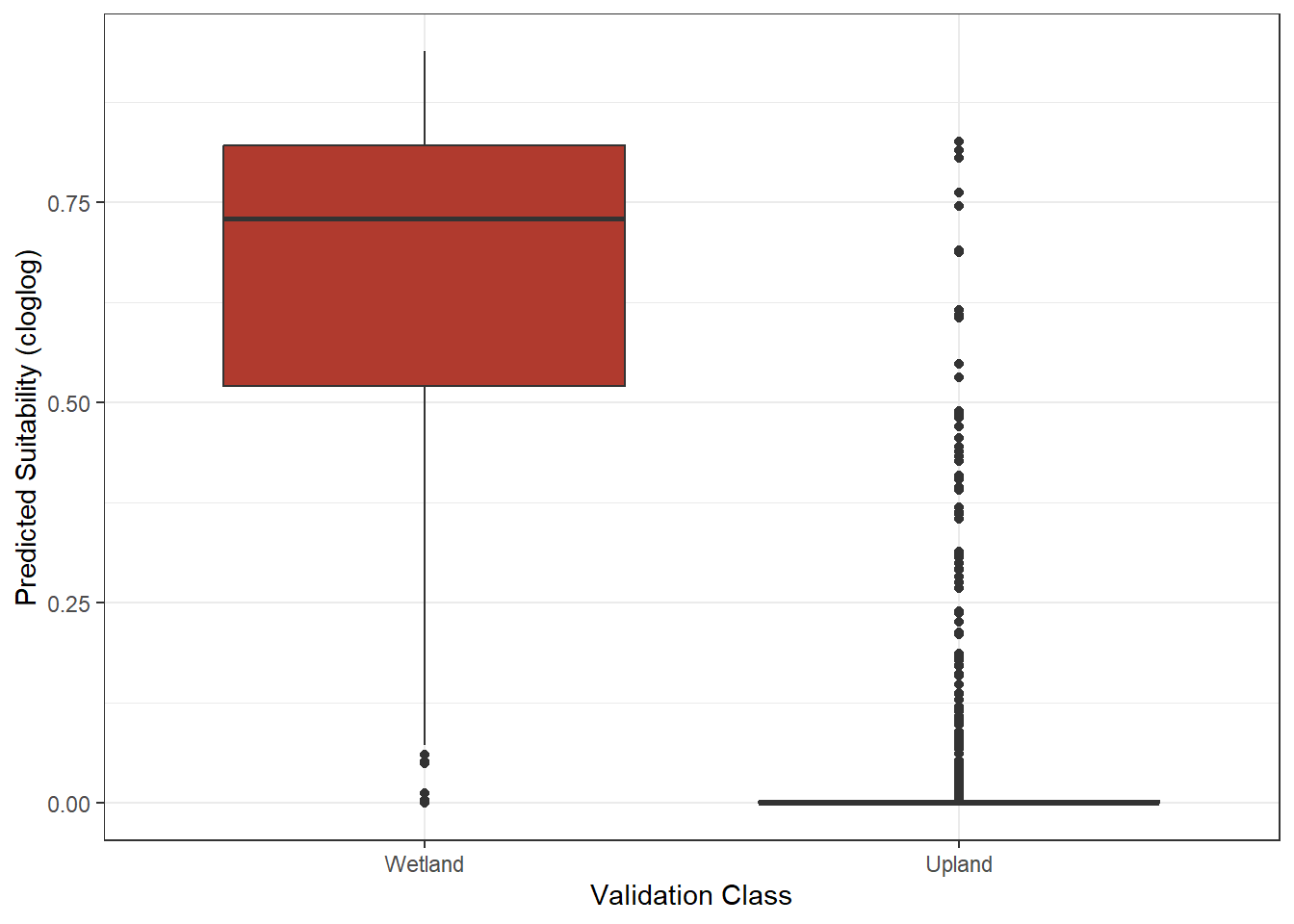
The presence-only model achieves an AUC ROC of approximately 0.988 for differentiating the validation wetlands and uplands, which is comparable to the presence-absence models trained in prior chapters. The boxplots show that most uplands have suitability values near 0, while most wetlands have high values. For this problem, the environmental conditions associated with wetlands are distinctive enough that contrasting the wetlands with the available conditions in the forested extent was sufficient. This will not always be the case, especially when presence data are biased or when the phenomenon occupies a large portion of the background.
12.8.3 Thresholding
It is often necessary to convert the continuous suitability values into a binary map. Since absences are not available in presence-only applications, thresholds are commonly based on the presence data alone. A common choice is the 10th percentile training presence threshold: the suitability value above which 90% of the training presences fall. This assumes that the 10% of presences with the lowest suitability may be errors or unusual locations. We calculate this threshold and assess the resulting classification using the validation data.
thresh <- quantile(trainPred[pa == 1], 0.10)
thresh
10%
0.3293821 Truth
Prediction Wetland Upland
Wetland 897 33
Upland 103 967threshMetrics <- metric_set(accuracy, sens, spec)
threshMetrics(testPred, truth = class, estimate = pred_class)# A tibble: 3 × 3
.metric .estimator .estimate
<chr> <chr> <dbl>
1 accuracy binary 0.932
2 sens binary 0.897
3 spec binary 0.967The threshold is approximately 0.33. By construction, about 90% of the training presences are above it, and the validation results are consistent: the sensitivity, or proportion of validation wetlands correctly predicted, is approximately 0.90. The specificity, or proportion of validation uplands correctly predicted, is approximately 0.97. Other threshold options include the minimum training presence, which predicts all training presences as suitable and generally results in a larger predicted area, and thresholds that maximize the sum of sensitivity and specificity, which require absence or background data.
12.9 Variable Importance
The original MaxEnt software reports two measures of variable importance: permutation importance and a jackknife test. Neither is built into maxnet, but both are straightforward to calculate.
12.9.1 Permutation Importance
Permutation importance measures how much model performance decreases when the values of a predictor variable are randomly shuffled, which breaks the relationship between that variable and the response while maintaining the values of the other variables. Larger decreases indicate more important variables. Below, we permute each predictor variable five times within the combined presence and background data, calculate the mean decrease in the presence-background AUC ROC, and normalize the decreases to percentages, as is done in the original MaxEnt software.
baseAUC <- roc_auc_vec(paF, trainPred)

set.seed(42)
permImp <- map(predsToUse, \(v) {
  aucDrop <- map_dbl(1:5, \(i) {
    permD <- mxData
    permD[[v]] <- sample(permD[[v]])
    baseAUC - roc_auc_vec(paF, predict(mxM, permD, type = "cloglog")[, 1])
  })
  tibble(variable = v, auc_decrease = mean(aucDrop))
}) |>
  bind_rows() |>
  mutate(percent = 100 * pmax(auc_decrease, 0) / sum(pmax(auc_decrease, 0)))

ggplot(permImp, aes(x = percent, y = reorder(variable, percent))) +
  geom_col(fill = "#B03A2E") +
  labs(x = "Permutation Importance (%)", y = "Predictor Variable") +
  theme_bw()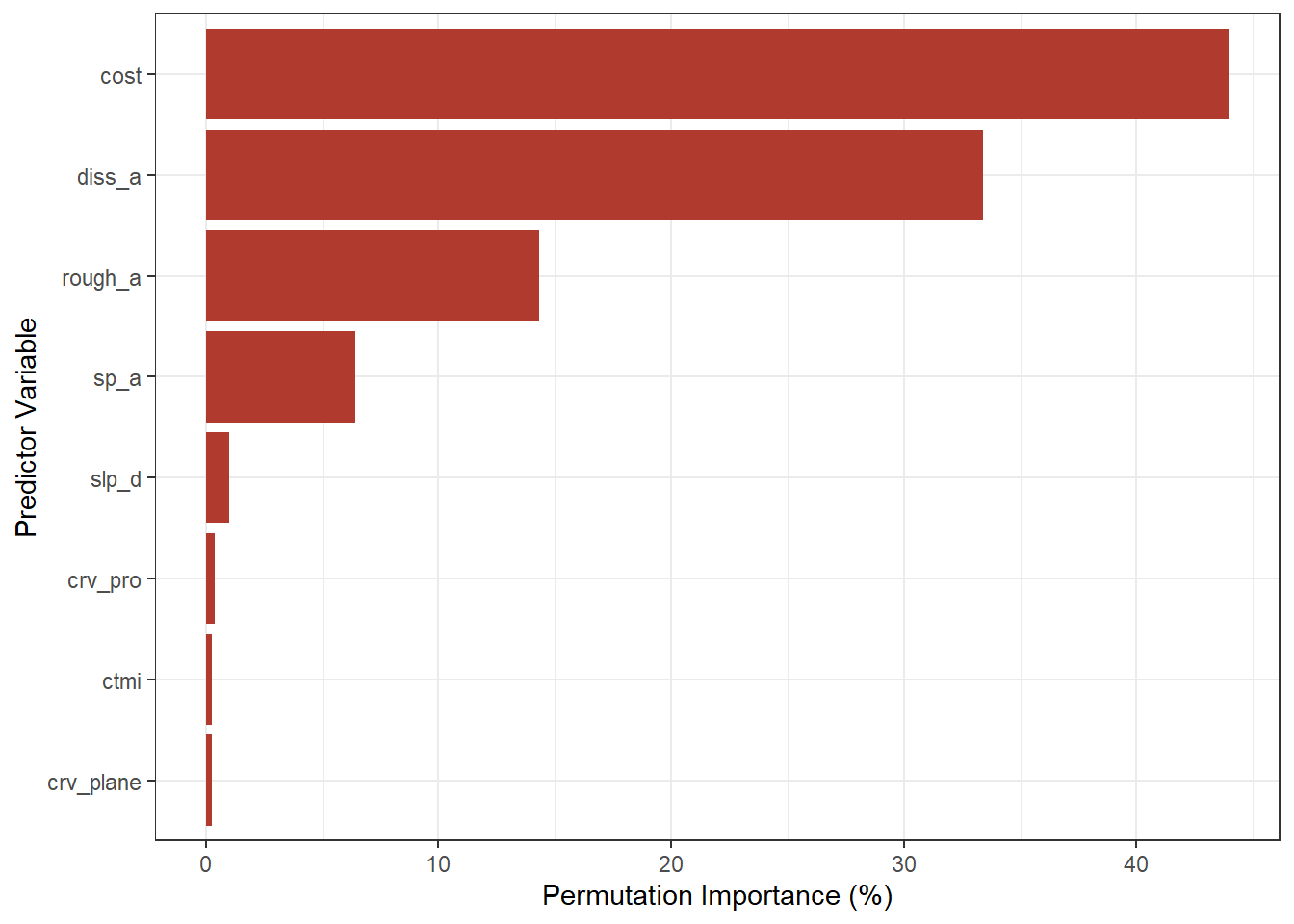
Cost is the most important predictor variable, accounting for over 40% of the total decrease in AUC ROC, followed by terrain dissection (approximately one third) and roughness. The remaining variables contribute little. Interestingly, slope has very low permutation importance even though it was important in prior chapters. This is because slope is strongly correlated with roughness, so when slope is permuted, the model can still obtain similar information from roughness. This is a well-known limitation of permutation importance with correlated predictor variables.
12.9.2 Jackknife Test
The jackknife test trains additional models to assess each predictor variable in two ways:
- With only the variable: A model is trained using only the predictor variable of interest. A high AUC ROC indicates that the variable contains a lot of useful information by itself.
- Without the variable: A model is trained using all predictor variables except the variable of interest. A large decrease relative to the full model indicates that the variable contains information that is not present in the other variables.
This requires training two models for each of the eight predictor variables. We use the same feature classes and regularization multiplier as the final model, except that product features are removed from the single-variable models since products require at least two variables.
fcOnly <- str_remove(bestSet$features, "p")

jackRes <- map(predsToUse, \(v) {
  others <- setdiff(predsToUse, v)
  mOnly <- fitMx(pres[, v], bg[, v], fcOnly, bestSet$regmult)
  mWithout <- fitMx(pres[, others], bg[, others], bestSet$features, bestSet$regmult)
  tibble(variable = v,
         `With Only` = roc_auc_vec(paF, predict(mOnly, mxData[, v, drop = FALSE],
                                                type = "cloglog")[, 1]),
         `Without` = roc_auc_vec(paF, predict(mWithout, mxData[, others],
                                              type = "cloglog")[, 1]))
}) |>
  bind_rows()

jackRes |>
  pivot_longer(-variable, names_to = "test", values_to = "auc") |>
  ggplot(aes(x = auc, y = variable, fill = test)) +
  geom_col(position = "dodge") +
  geom_vline(xintercept = baseAUC, linetype = "dashed") +
  scale_fill_manual(values = c("With Only" = "#B03A2E", "Without" = "#DBAF5A")) +
  coord_cartesian(xlim = c(0.5, 1)) +
  labs(x = "Presence-Background AUC ROC", y = "Predictor Variable", fill = "Model") +
  theme_bw()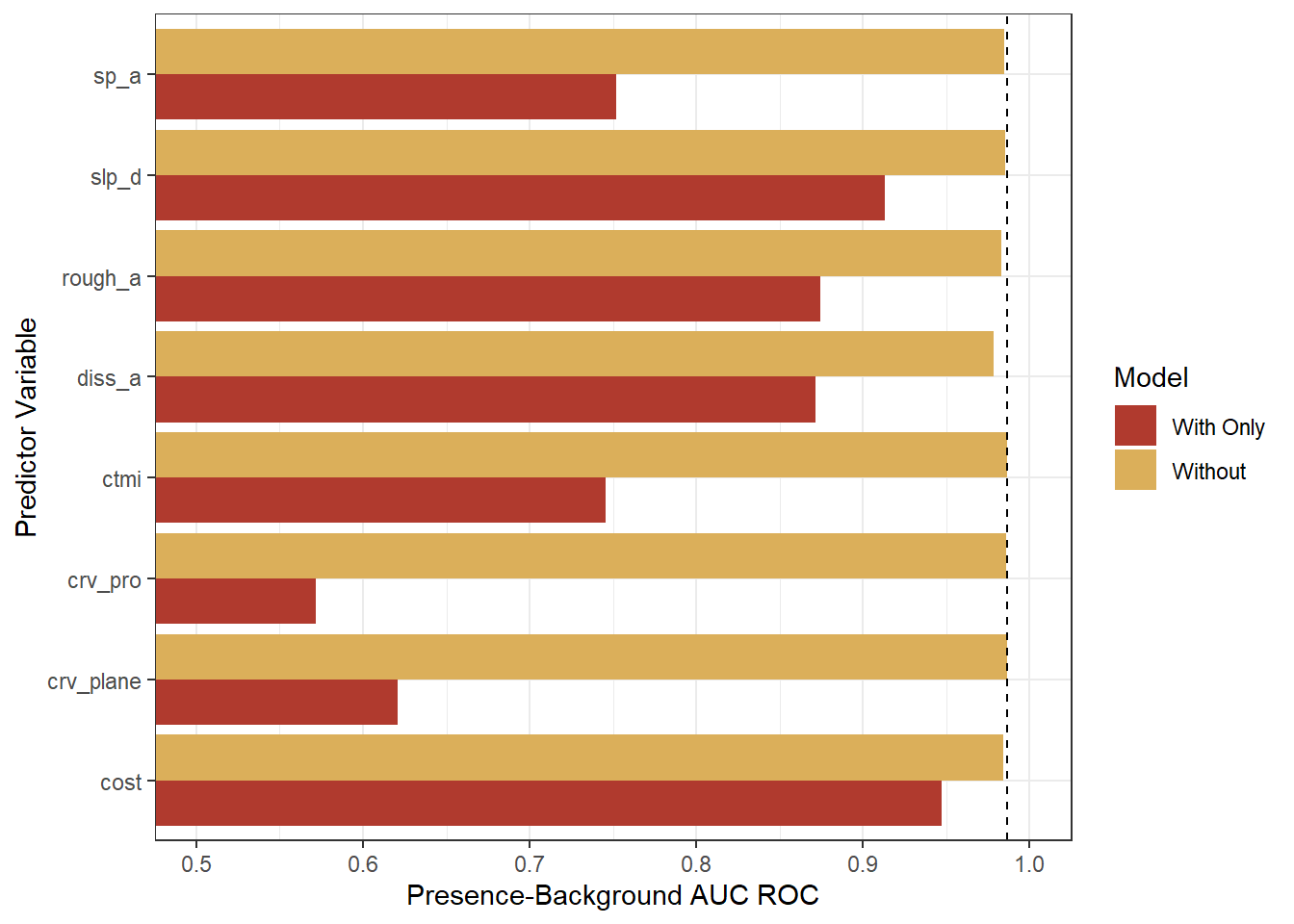
The dashed line shows the AUC ROC of the full model. The “With Only” results show that cost, by itself, provides the most information, with an AUC ROC of approximately 0.95. Slope, roughness, and dissection are also informative by themselves, while plan and profile curvature provide little information when used alone. Note that slope performs well by itself, which contrasts with its low permutation importance: it contains useful information, but that information is largely redundant with other variables. The “Without” results show that removing any single predictor variable barely decreases the AUC ROC. Removing dissection causes the largest decrease, but even this is small. This indicates that the predictor variables are largely redundant: the information contained in each can be obtained from the others. Considering the two jackknife components together with permutation importance provides a more complete picture of variable importance than any single measure.
12.10 Predict to Raster Data
Lastly, we predict the model to the full forested extent. Unlike some of the algorithms used in prior chapters, MaxEnt models are fast to apply since prediction only requires calculating the features and summing the weighted values. We provide a short function to predict() from terra that returns the cloglog output. We then apply the 10th percentile training presence threshold to create a binary map.
tm_shape(suitMap) +
  tm_raster(col.scale = tm_scale_continuous(values = "brewer.yl_gn_bu"),
            col.legend = tm_legend(title = "Suitability (cloglog)")) +
  tm_title("MaxEnt Wetland Suitability")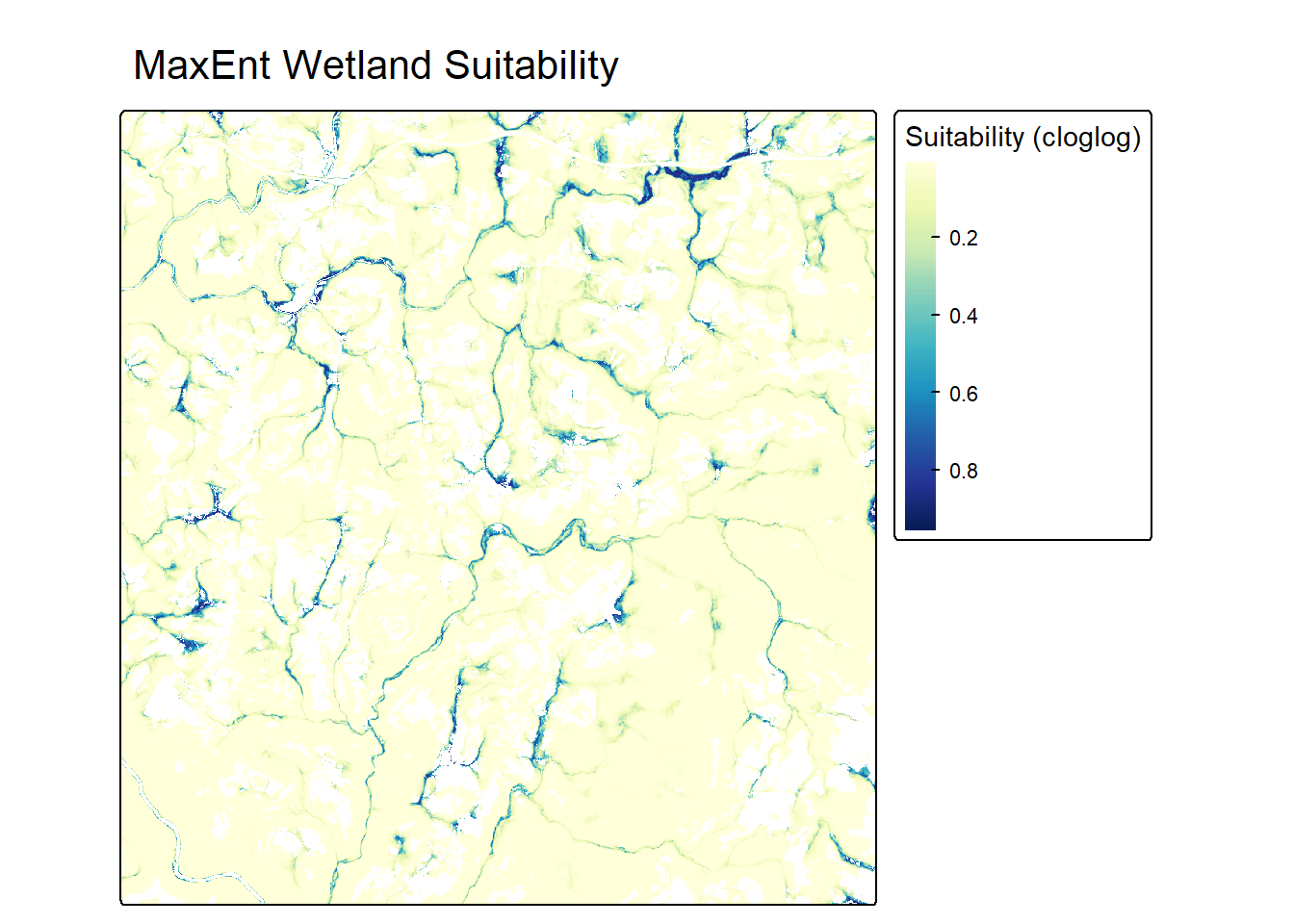
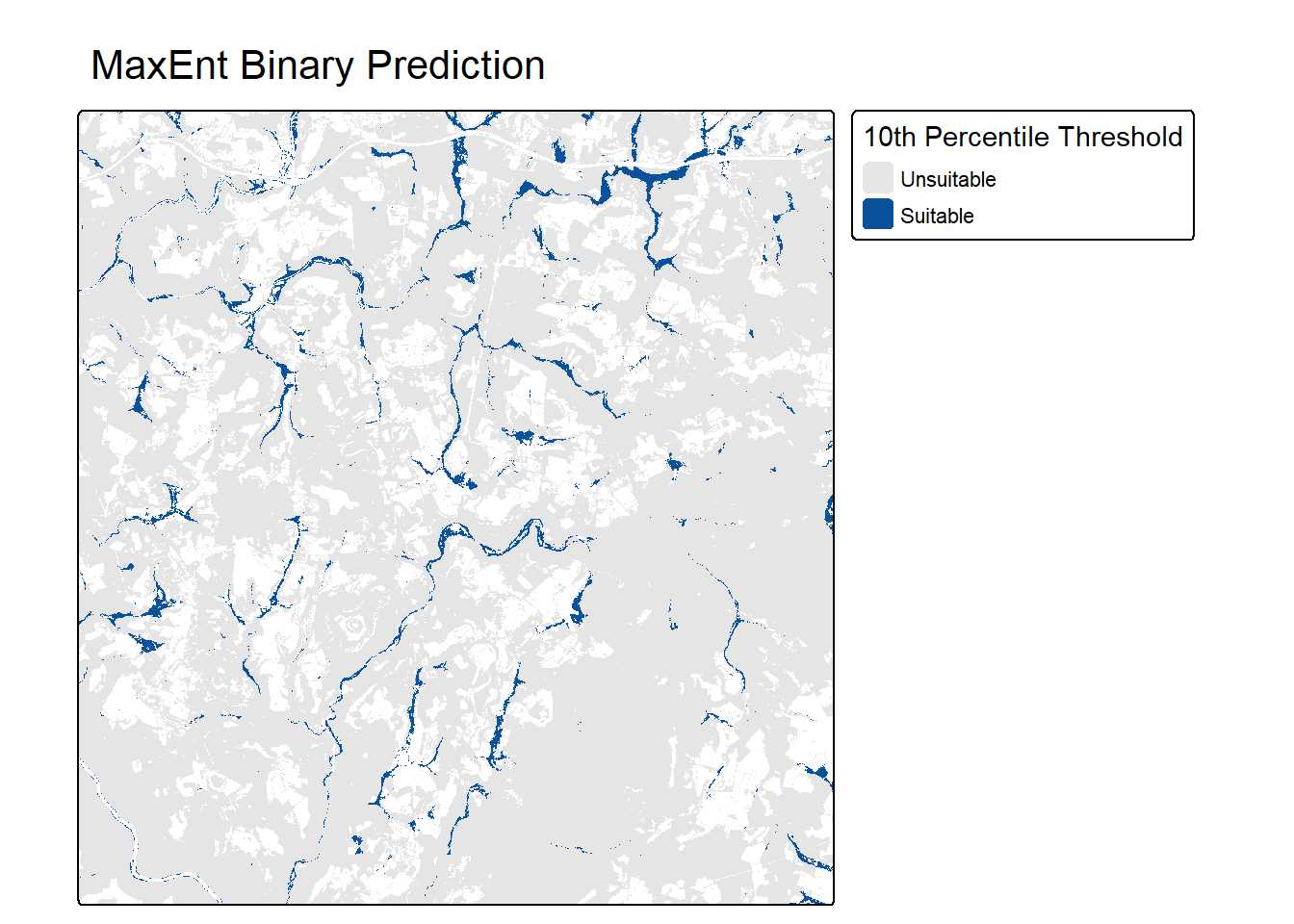
The suitability map shows high values along stream valleys and in flat, low-lying areas adjacent to streams, which is consistent with the maps produced in prior chapters. Most of the forested extent has low suitability, since PFO/PSS wetlands occupy only a small portion of the landscape.
12.11 Concluding Remarks
In this chapter, we treated the wetland mapping problem as a presence-only problem and used MaxEnt, as implemented in maxnet, to estimate wetland suitability from presence locations and background points sampled from the forested extent. We tuned the feature classes and regularization multiplier, interpreted the response curves, assessed the model with presence-background and presence-absence data, created a binary map using a presence-based threshold, and estimated variable importance using permutation and jackknife methods.
For this problem, the presence-only model performed nearly as well as the presence-absence models from prior chapters at differentiating wetlands from uplands. The variable importance results highlighted that distance from water weighted by slope is the most informative predictor variable, but also that many of the terrain variables contain redundant information, which complicates the interpretation of any single importance measure.
Keep in mind the key limitations of presence-only modeling: the output represents relative suitability as opposed to probability of occurrence, the results depend on how the background is defined, and sampling bias in the presence data can be learned by the model. When reliable absence data are available, or can be collected, presence-absence methods, such as those explored in the prior chapters, are generally preferred.
12.12 Questions
- Explain the difference between presence-absence and presence-background modeling.
- Why are background points not considered absences?
- Explain how sampling bias in presence records can affect a presence-only model.
- Why can the output of a presence-only model not be interpreted as a true probability of occurrence?
- Describe the maximum entropy principle as applied in MaxEnt.
- Explain the role of features and regularization in MaxEnt.
- Explain how MaxEnt is related to logistic regression and GAMs.
- Why is the maximum achievable presence-background AUC ROC less than 1?
- Explain the difference between the “with only” and “without” components of a jackknife test.
- What is the 10th percentile training presence threshold, and what assumption does it make?
12.13 Exercises
In these exercises, you will treat the landslide susceptibility problem introduced in the Chapter 10 exercises as a presence-only problem. The goal is to estimate relative landslide susceptibility within the Valley and Ridge physiographic province of West Virginia using only landslide locations and background data. You have been provided with the following files in the exercise folder for the chapter.
- chpt12.gpkg/lsPnts: point locations representing landslide locations and pseudo-absence locations where predictor variables have been extracted
- stk.tif: raster stack of predictor variables for a portion of the study area
The following digital terrain model (DTM) derived land surface parameter (LSP) predictor variables have been provided. Other than elevation, the LSPs were calculated at three different window sizes, indicated by the numbers 1 through 3.
- “elev”: elevation in meters
- “slp1”/“slp2”/“slp3”: topographic slope in degrees
- “sar1”/“sar2”/“sar3”: surface area ratio (SAR)
- “tri1”/“tri2”/“tri3”: topographic roughness index (TRI)
- “tpi1”/“tpi2”/“tpi3”: topographic position index (TPI)
- “diss1”/“diss2”/“diss3”: topographic dissection index
The “class” column differentiates landslides (“slpF”) from pseudo-absence samples (“not”). The pseudo-absence samples are random locations from across the study area.
Presence and Background Data
Task 1
- Read in the lsPnts layer, drop the geometry information, and drop the “elev” column.
- Create a presence data frame containing the predictor variables for the landslide samples only.
- In the chapter, background points were sampled from a raster stack covering the entire study area. Here, the provided raster stack only covers a small portion of the province, while the landslides were mapped across the entire province. Explain why sampling background points from the raster stack would be inappropriate for this problem.
- Instead, use the predictor variables for the pseudo-absence samples as the background data. Since these are random locations across the province, they characterize the conditions available in the study area. Remember that they are treated as background, not absences: some could fall in locations susceptible to landslides.
- Plot the distributions of the predictor variables for the presence and background data. Which variables appear to best separate landslides from the background?
Tune and Train
Task 2
- Using the
fitMx()function from this chapter, tune the feature classes ("l","lq","lqh", and"lqph") and regularization multiplier (1, 2, and 4) using 5-fold cross-validation. Use the presence-background AUC ROC of the withheld fold to compare settings. - Which settings performed best? Are the differences between settings large or small? Which settings would you choose, and why?
- Train the final model using all presence and background data and your selected settings. How many features were retained?
Response Curves and Variable Importance
Task 3
- Plot the response curves using
plot()withtype = "cloglog". Describe the relationships between landslide susceptibility and slope (“slp1”), topographic position (“tpi1”), and dissection (“diss1”). - Calculate permutation importance as demonstrated in this chapter. Which variables are the most important?
- Perform a jackknife test as demonstrated in this chapter. Which variable provides the most information by itself? Does removing any single variable substantially decrease performance?
- Many of the predictor variables in this dataset (slope, SAR, and TRI calculated at three window sizes) are strongly correlated. How does this redundancy affect the permutation importance and jackknife results? What would you change about the set of predictor variables to make the variable importance results easier to interpret?
Predict and Threshold
Task 4
- Read in the raster stack and rename the bands to match the predictor variable columns, including “elev”. The bands are in the same order as the columns.
- Use the final model to predict cloglog suitability to the full raster stack and map the result using tmap.
- Calculate the 10th percentile training presence threshold, apply it to create a binary map of susceptible areas, and map the result. What proportion of the mapped area is classified as susceptible?
Reflection
Task 5
- The presence-background AUC ROC from this exercise cannot be directly compared to the AUC ROC of the random forest model from the Chapter 10 exercises. Explain why.
- In the Chapter 10 exercises, the same pseudo-absence samples were treated as absences. Discuss the advantages and disadvantages of treating them as absences versus as background for landslide susceptibility mapping.
- Landslide inventories are often created by interpreting lidar data or aerial imagery, and mapping effort may differ across the study area. How could this type of sampling bias affect a presence-only model?