25 Geospatial Semantic Segmentation Workflows: Multiclass Classification
25.1 Topics Covered
- Prepare multiclass data for use in a geodl workflow
- Use a UNet architecture with a pre-trained encoder
- Use per-stage learning rates and freeze and unfreeze model stages during training
- Incorporate class boundary edge weighting into the loss calculation
- Reconfigure the loss during the training process
- Assess multiclass models and generate spatial predictions
25.2 Introduction
geodl is still actively being developed. We recommend installing it from GitHub as opposed to CRAN. This can be accomplished using devtools as follows:
devtools::install_github("maxwell-geospatial/geodl")
In Chapter 24, we implemented two workflows for a binary classification problem. In this chapter, we explore a multiclass classification problem focused on land cover mapping. We use version 1 of the landcover.ai dataset, which is available at this link. Five classes are differentiated: Background, Building, Woodland, Water, and Road. The data were introduced in the following paper:
Boguszewski, A., Batorski, D., Ziemba-Jankowska, N., Dziedzic, T. and Zambrzycka, A., 2021. LandCover. ai: Dataset for automatic mapping of buildings, woodlands, water and roads from aerial imagery. In Proceedings of the IEEE/CVF conference on computer vision and pattern recognition (pp. 1102-1110).
In the first workflow, we train a model using a pre-trained encoder. In the second workflow, we further customize the training loop and integrate class boundary edge weighting into the loss calculation. The luz and geodl training callbacks used in these workflows are summarized in Table 24.1 and Table 24.2 in Chapter 24.
25.3 Workflow 1: Landcover.ai (Multiclass)
For this example, we return to using pre-generated chips. However, we now explore a multiclass classification problem.
25.3.1 Preparation
We begin by reading in the required libraries and setting a random seed.
The originators of the landcover.ai dataset provide a Python script to generate image chips from RGB aerial images of larger spatial extents and associated raster masks. They also provide files listing out pre-defined training, validation, and test chips. To practice data preparation, we build our own chips and define our own data partitions. We begin by listing out all the images and masks into an data frame. We then randomly partition them into training, validation, and test sets with no overlap. We base the partitions on the original images to minimize autocorrelation between the partitions. Once the partitions are defined, we use the standard geodl workflow by generating chips using makeChipsMultiClass() followed by makeChipsDF(). We use a chip size of 512x512 with no overlap between chips. We also generate subsamples from the datasets to speed up the training and validation processes. Lastly, we view the chips as a check.
If training a model for later use, we recommend using all of the training chips. We are simply subsetting the data here to speed up the example.
#Seed R's base RNG (chip shuffling, augmentations, dataloader shuffling) and
#torch's RNG (model weight initialization, training loop) with one call.
#This must run before the chips are shuffled and the datasets, dataloaders,
#and model are created.
setSeed(42)
localPth <- "C:/geodlTests/lcai/landcover.ai.v1/"
fldPth <- "gslrData/chpt25/data/"
outPth <- "gslrData/chpt25/output/"
dir.create(str_glue("{localPth}chips"))
dir.create(str_glue("{localPth}chips/train"))
dir.create(str_glue("{localPth}chips/val"))
dir.create(str_glue("{localPth}chips/test"))
dir.create(str_glue("{outPth}e3"))
dir.create(str_glue("{outPth}e4"))allImgs <- data.frame(files=list.files(str_glue("{localPth}images/"),
pattern="\\.tif$", full.names=TRUE)) |>
mutate(mask = str_replace(files, "images", "masks"))
trainImgs <- allImgs |> sample_n(20, replace=FALSE)
notTrain <- setdiff(allImgs, trainImgs)
valImgs <- notTrain |> sample_n(10, replac=FALSE)
testImgs <- setdiff(notTrain, valImgs)
for(i in 1:nrow(trainImgs)){
makeChipsMultiClass(image=trainImgs[i,1],
mask=trainImgs[i,2],
n_channels = 3,
size = 512,
stride_x = 512,
stride_y = 512,
outDir = str_glue("{localPth}chips/train/"))
}
for(i in 1:nrow(testImgs)){
makeChipsMultiClass(image=testImgs[i,1],
mask=testImgs[i,2],
n_channels = 3,
size = 512,
stride_x = 512,
stride_y = 512,
outDir = str_glue("{localPth}chips/test/"))
}
for(i in 1:nrow(valImgs)){
makeChipsMultiClass(image=valImgs[i,1],
mask=valImgs[i,2],
n_channels = 3,
size = 512,
stride_x = 512,
stride_y = 512,
outDir = str_glue("{localPth}chips/val/"))
}trainDF <- makeChipsDF(
folder = str_glue("{localPth}chips/train/")) |>
sample_frac(1, replace = FALSE) |>
sample_n(3000)
testDF <- makeChipsDF(
folder = str_glue("{localPth}chips/test/")) |>
sample_frac(1, replace = FALSE) |>
sample_n(500)
valDF <- makeChipsDF(
folder = str_glue("{localPth}chips/val/")) |>
sample_frac(1, replace = FALSE) |>
sample_n(500)viewChips(chpDF=trainDF,
folder=str_glue("{localPth}chips/train/"),
nSamps = 25,
mode = "both",
justPositive = FALSE,
cCnt = 5,
rCnt = 5,
r = 1,
g = 2,
b = 3,
rescale = FALSE,
rescaleVal = 1,
cCodes= c(0,1,2,3,4),
cNames= c("Background",
"Buildings",
"Woodland",
"Water",
"Road"),
cColors= c("gray",
"red",
"green",
"blue",
"black"),
useSeed = TRUE,
seed = 42)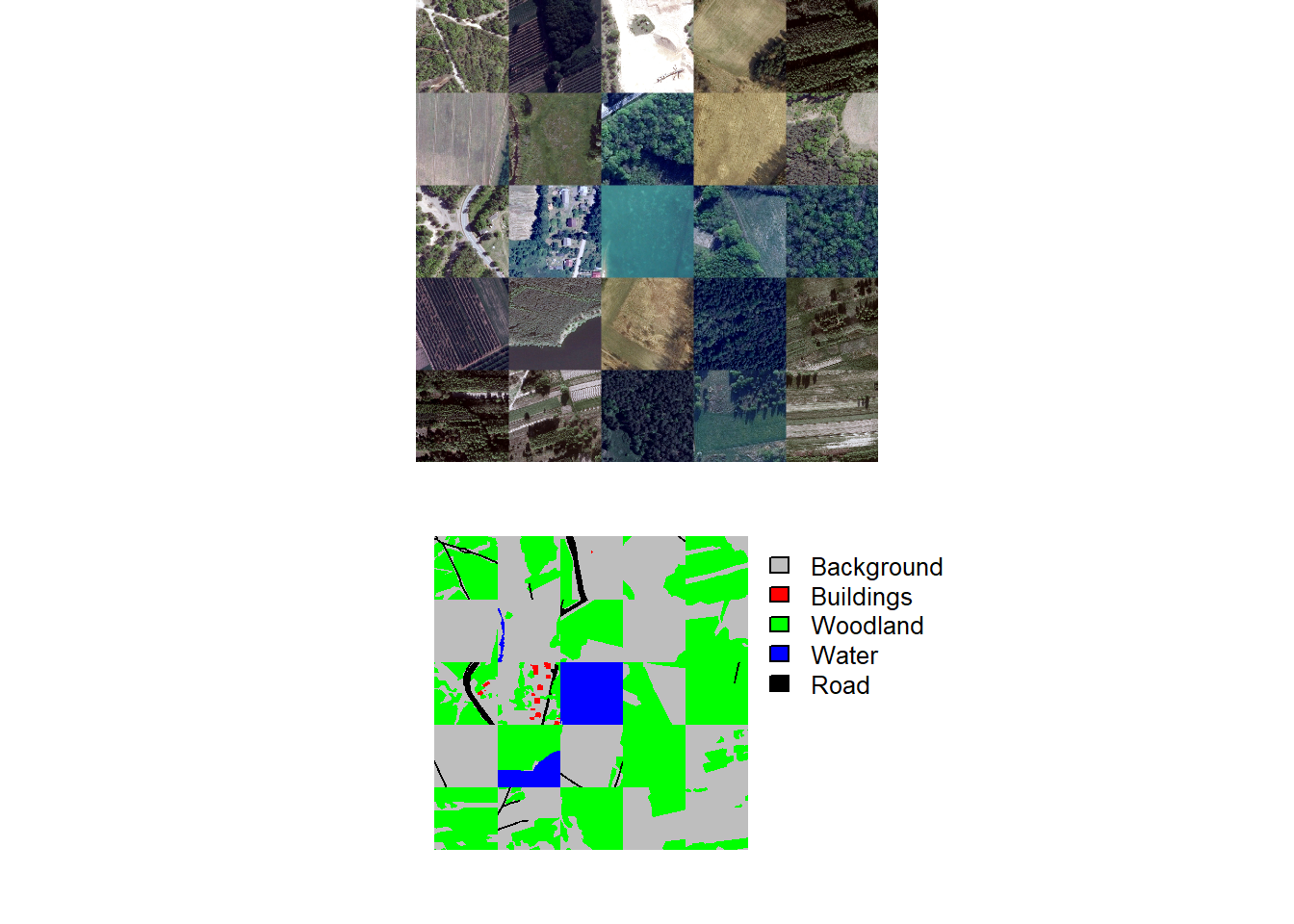
25.3.2 Datasets and Dataloaders
We next instantiate torch datasets for all three partitions. Since the input RGB imagery are unsigned 8-bit and scaled between 0 and 255, they are re-scaled from 0 to 1 using rescaleFactor=255. We also add 1 to the masks so that class codes are 1 to 5 as opposed to 0 to 4. Random vertical flips, horizontal flips, and rotations and random changes to brightness and saturation are applied to the training set. No augmentations are applied to the validation or test set.
trainDS <- defineSegDataSet(
  chpDF=trainDF,
  folder= str_glue("{localPth}chips/train/"),
  normalize = FALSE,
  rescaleFactor = 255,
  mskRescale= 1,
  bands = c(1,2,3),
  mskAdd=1,
  doAugs = TRUE,
  maxAugs = 1,
  probVFlip = .5,
  probHFlip = .5,
  probRotation=.3,
  probBrightness = .1,
  probContrast = 0,
  probGamma = 0,
  probHue = 0,
  probSaturation = .2,
  brightFactor = c(.9,1.1),
  contrastFactor = c(.9,1.1),
  gammaFactor = c(.9, 1.1, 1),
  hueFactor = c(-.1, .1),
  saturationFactor = c(.9, 1.1))

valDS <- defineSegDataSet(
  chpDF=valDF,
  folder=str_glue("{localPth}chips/val/"),
  normalize = FALSE,
  rescaleFactor = 255,
  mskRescale = 1,
  mskAdd=1)

testDS <- defineSegDataSet(
  chpDF=testDF,
  folder=str_glue("{localPth}chips/test/"),
  normalize = FALSE,
  rescaleFactor = 255,
  mskRescale = 1,
  mskAdd=1)
We next define torch dataloaders using a mini-batch size of 12. The last mini-batch is dropped, and only the training set is shuffled. Again, you may need to change the mini-batch size to run the example on your machine.
trainDL <- torch::dataloader(trainDS,
                             batch_size=8,
                             shuffle=TRUE,
                             drop_last = TRUE)

valDL <- torch::dataloader(valDS,
                           batch_size=8,
                           shuffle=FALSE,
                           drop_last = TRUE)

testDL <- torch::dataloader(testDS,
                            batch_size=8,
                            shuffle=FALSE,
                            drop_last = TRUE)
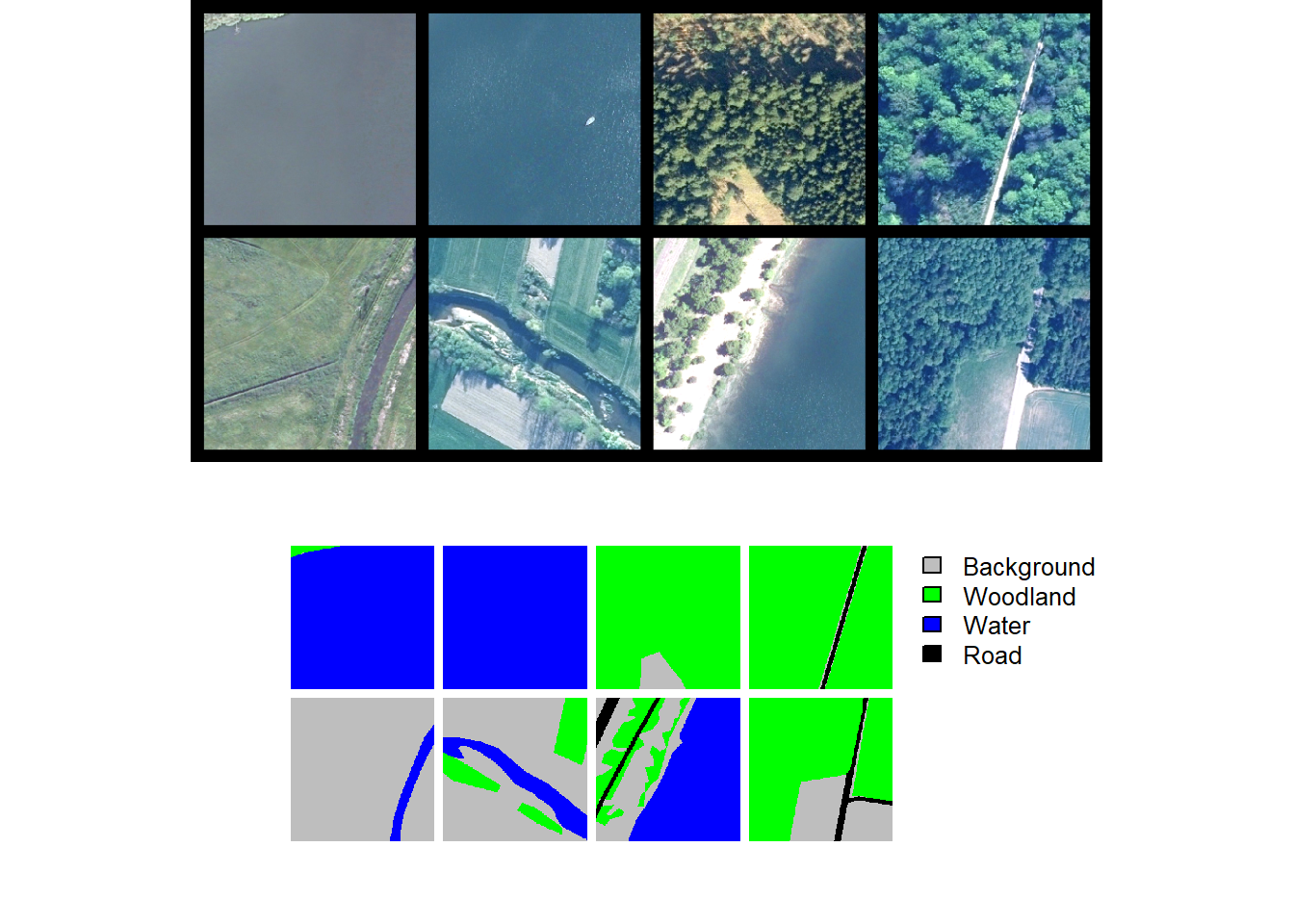
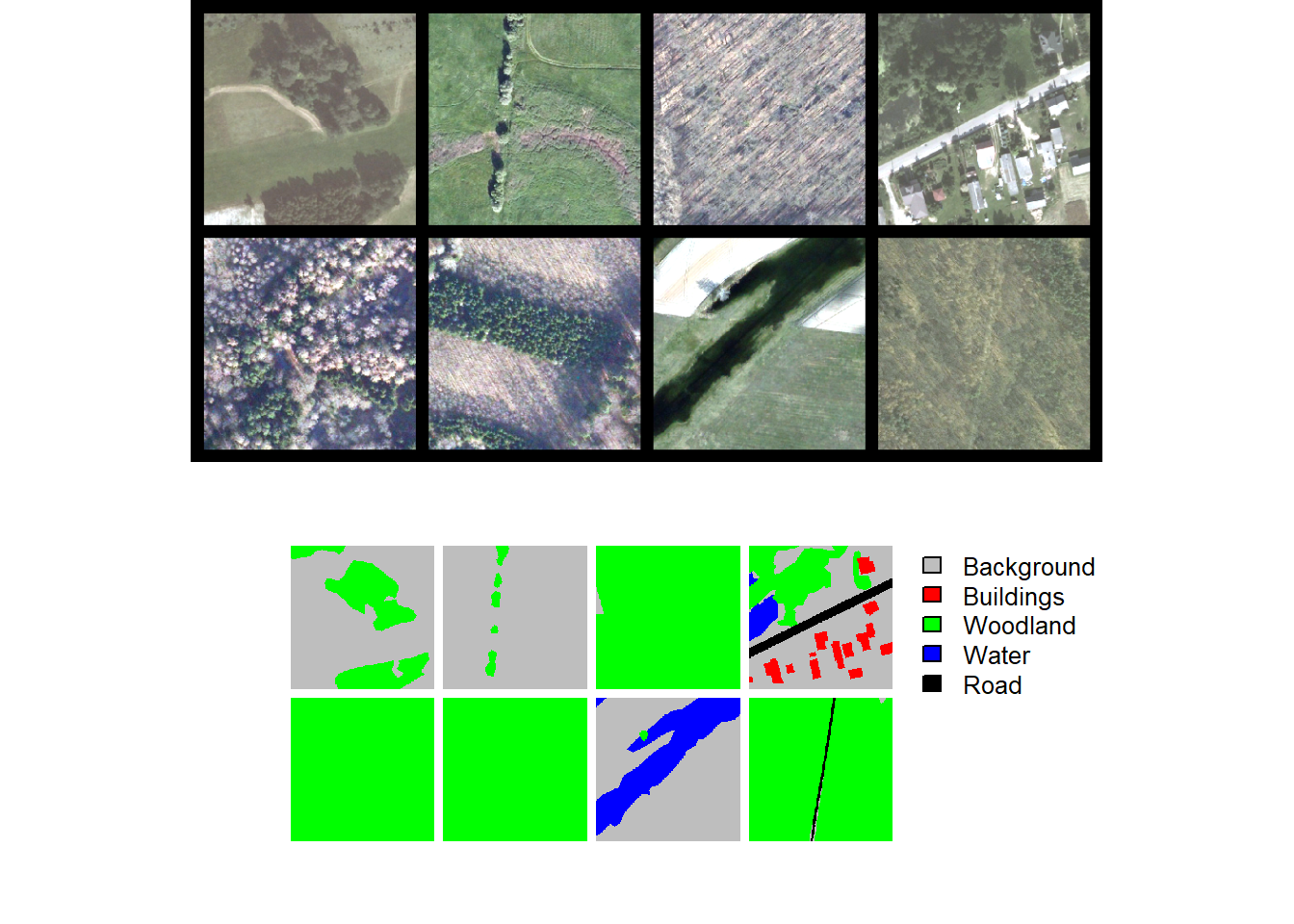
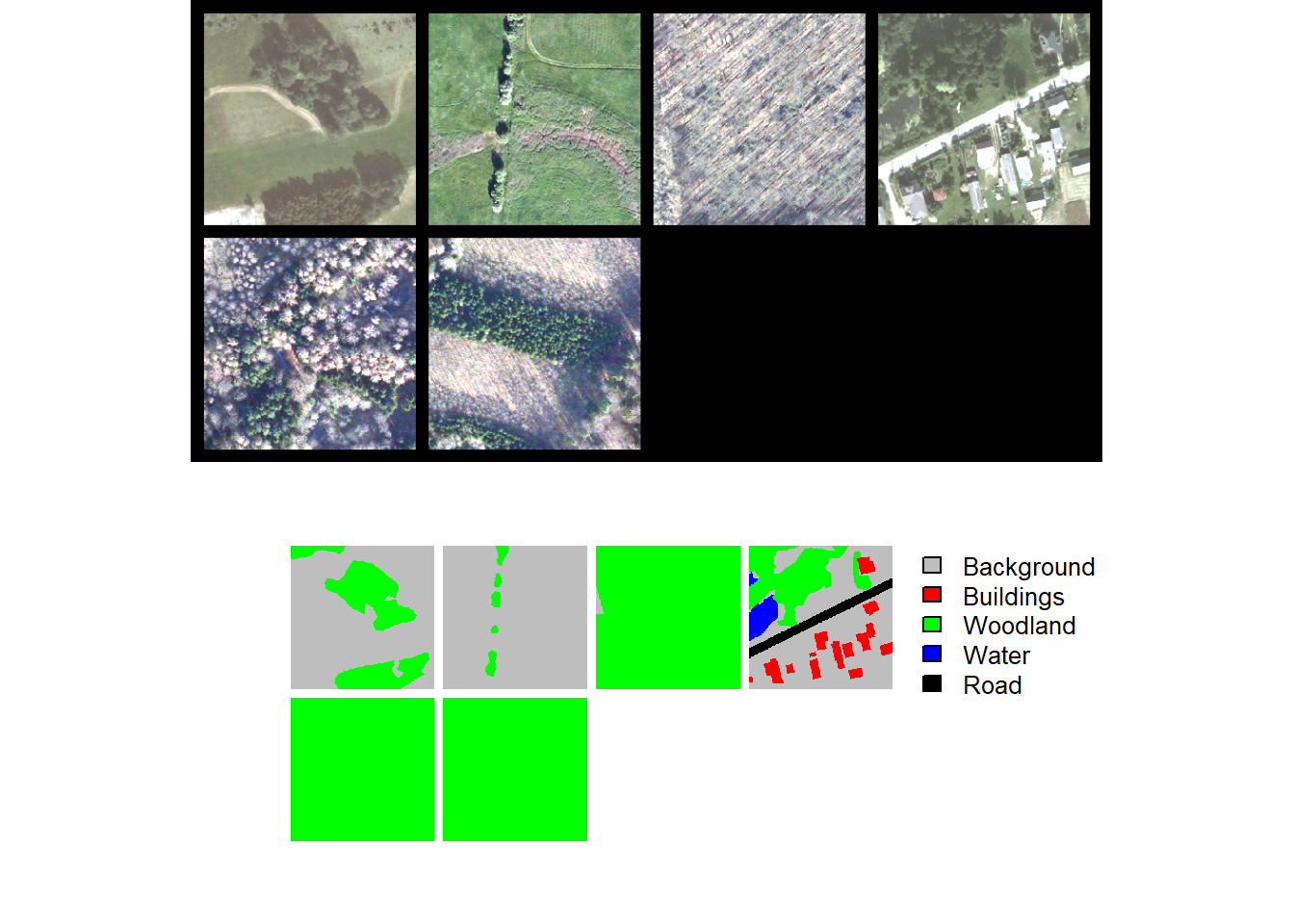
Lastly, we perform checks by plotting a mini-batch of the data using viewBatch() and obtain information about a mini-batch using describeBatch(). Since no issues are observed, we are now ready to train the model.
trainStats <- describeBatch(trainDL,
                            zeroStart=FALSE)
valStats <- describeBatch(valDL,
zeroStart=FALSE)print(trainStats)$batchSize
[1] 8
$imageDataType
[1] "Float"
$maskDataType
[1] "Long"
$imageShape
[1] "8" "3" "512" "512"
$maskShape
[1] "8" "1" "512" "512"
$bndMns
[1] 0.2579354 0.3180127 0.2919790
$bndSDs
[1] 0.11762630 0.09681492 0.07817193
$maskCount
[1] 636049 0 1461055 48
$minIndex
[1] 1
$maxIndex
[1] 4print(valStats)$batchSize
[1] 8
$imageDataType
[1] "Float"
$maskDataType
[1] "Long"
$imageShape
[1] "8" "3" "512" "512"
$maskShape
[1] "8" "1" "512" "512"
$bndMns
[1] 0.3642225 0.3684732 0.3244685
$bndSDs
[1] 0.10322702 0.09442510 0.08673908
$maskCount
[1] 788350 25065 1176599 84518 22620
$minIndex
[1] 1
$maxIndex
[1] 525.3.3 Training Loop
We use a UNet architecture with a MobileNetv2 encoder as implemented with the defineMobileUNet() function. The architecture will differentiate 5 classes and expects 3 input predictor variables. We also use the leaky ReLU activation function and define the desired number of output feature maps for each decoder block. We load pre-trained ImageNet parameters for the encoder and initially freeze the weights (freezeEncoder = TRUE). During the training process, we unfreeze encoder blocks 4 and 5 at epoch 10 and encoder blocks 1 through 3 at epoch 20 using callback_unfreeze_stages(). We use different learning rates for different stages of the architecture while also implementing a one-cycle learning rate policy with different max learning rates for different stages of the architecture.
The loss is configured as a focal Dice loss (lambda = 0, gamma = 0.7, and delta = 0.5) with variable weights per class. Specifically, we have weighted the more difficult classes higher. We also exclude outer rows and columns of cells for each chip when calculating the loss. Overall accuracy, F1-score, recall, and precision are calculated in multiclass mode using macro-averaging where each class has equal weight in the aggregated metric. As with the loss function, we do not consider outer rows and columns of cells in the assessment metric calculations.
We use the AdamW optimizer, train the model for 50 epochs, log losses and metrics to disk, and save the model state dictionary after each training epoch. luz implements GPU-based acceleration. We also save the exponentially weighted average of the parameters.
If you choose to run the training loop, it will take several hours to execute. We have provided a trained model in the data folder for the chapter if you would like to execute the post-training code without training a new model. The file is named “landcoveraiModel.pt.” We have also included the training logs: “lcaiLogs.csv”. If you want to load our saved state dictionary, your model must use the exact same configuration as we have specified below.
# --- Hyperparameters ----------------------------------------------------------
nEpochs   <- 50
maxLR     <- 1e-2

stage_lrs <- c(5e-5, 1e-4, 2e-4, 3e-4, 5e-4,
               5e-4,
               5e-4, 3e-4, 2e-4, 1e-4, 5e-5)

max_lrs <- stage_lrs / max(stage_lrs) * maxLR

# --- Training loop ------------------------------------------------------------
fitted <- defineMobileUNet |>
  luz::setup(
    loss = defineUnifiedFocalLoss(
      nCls           = 5,
      cropFactorPred = 32,
      cropFactorMsk  = 32,
      lambda         = 0,
      gamma          = 0.7,
      delta          = 0.5,
      smooth         = 1e-8,
      zeroStart      = FALSE,
      clsWghtsDist   = 1,
      clsWghtsReg    = c(0.1, 0.3, 0.15, 0.15, 0.3),
      useLogCosH     = FALSE,
      device         = "cuda"
    ),
    optimizer = torch::optim_adamw,
    metrics = list(
      luz_metric_overall_accuracy(nCls = 5, cropFactorPred = 32, cropFactorMsk = 32,
                                  smooth = 1, mode = "multiclass", zeroStart = FALSE),
      luz_metric_f1score(        nCls = 5, cropFactorPred = 32, cropFactorMsk = 32,
                                 smooth = 1, mode = "multiclass", zeroStart = FALSE),
      luz_metric_recall(         nCls = 5, cropFactorPred = 32, cropFactorMsk = 32,
                                 smooth = 1, mode = "multiclass", zeroStart = FALSE),
      luz_metric_precision(      nCls = 5, cropFactorPred = 32, cropFactorMsk = 32,
                                 smooth = 1, mode = "multiclass", zeroStart = FALSE)
    )
  ) |>
  set_hparams(
    inChn             = 3,
    nCls              = 5,
    pretrainedEncoder = TRUE,
    freezeEncoder     = TRUE,   # freeze entire encoder from initialisation
    avgImNetWeights   = FALSE,
    actFunc           = "lrelu",
    useAttn           = FALSE,
    useDS             = FALSE,
    dcChn             = c(256, 128, 64, 32, 16),
    negative_slope    = 0.01,
    stageLRs          = stage_lrs
  ) |>
  fit(
    data       = trainDL,
    epochs     = nEpochs,
    valid_data = valDL,
    callbacks  = list(
      # 1st: build per-stage optimizer before the scheduler reads param groups
      callback_per_stage_optimizer(),
      luz_callback_lr_scheduler(
        torch::lr_one_cycle,
        max_lr          = max_lrs,
        pct_start       = 0.3,
        epochs          = nEpochs,
        steps_per_epoch = length(trainDL),
        max_momentum    = rep(0.95, length(stage_lrs)),
        base_momentum   = rep(0.85, length(stage_lrs))
      ),
      # Epochs 1-10:  full encoder frozen (freezeEncoder = TRUE above)
      # Epoch 10 end: unfreeze top two encoder blocks (e4, e5)
      # Epoch 20 end: unfreeze remaining encoder blocks (e1, e2, e3)

      callback_unfreeze_stages(
        schedule = list(
          list(epoch = 10, components = c("e4", "e5")),
          list(epoch = 20, components = c("e1", "e2", "e3"))
        )
      ),
      callback_ema(
        warmup_steps = 50,
        save_dir     = str_glue("{outPth}e3/"),
        prefix       = "ema_epoch"
      ),
      luz_callback_csv_logger(str_glue("{outPth}e3/lcaiLogs.csv")),
      callback_save_model_state_dict(
        save_dir = str_glue("{outPth}e3/"),
        prefix   = "epoch"
      )
    ),
    accelerator = accelerator(
      device_placement = TRUE,
      cpu              = FALSE,
      cuda_index       = torch::cuda_current_device()
    ),
    verbose = TRUE
  )
25.3.4 Model Validation
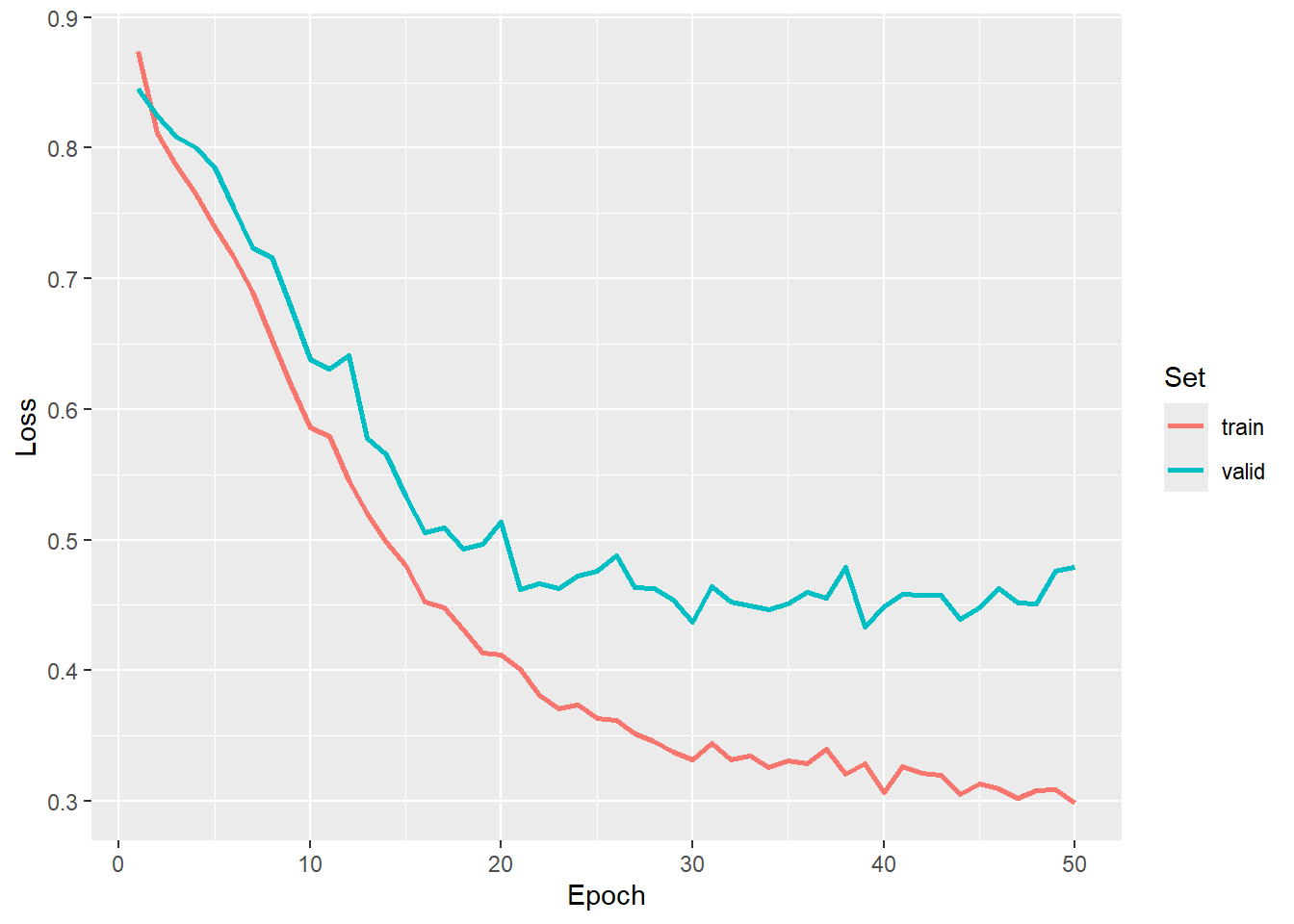
As with the prior two workflows, we first visualize the losses and metrics over the training epochs. We use the model state after epoch 39 as the final model.
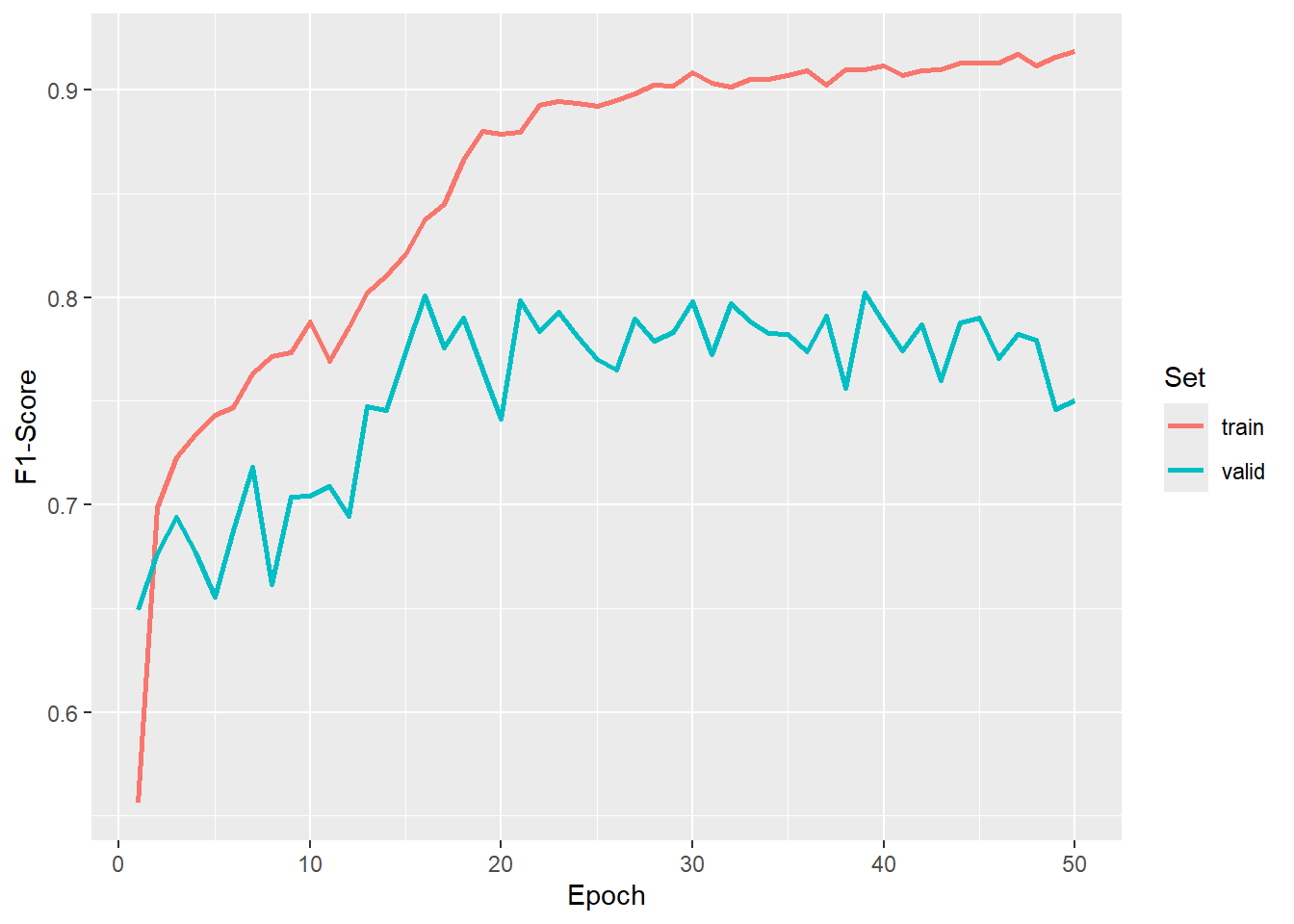
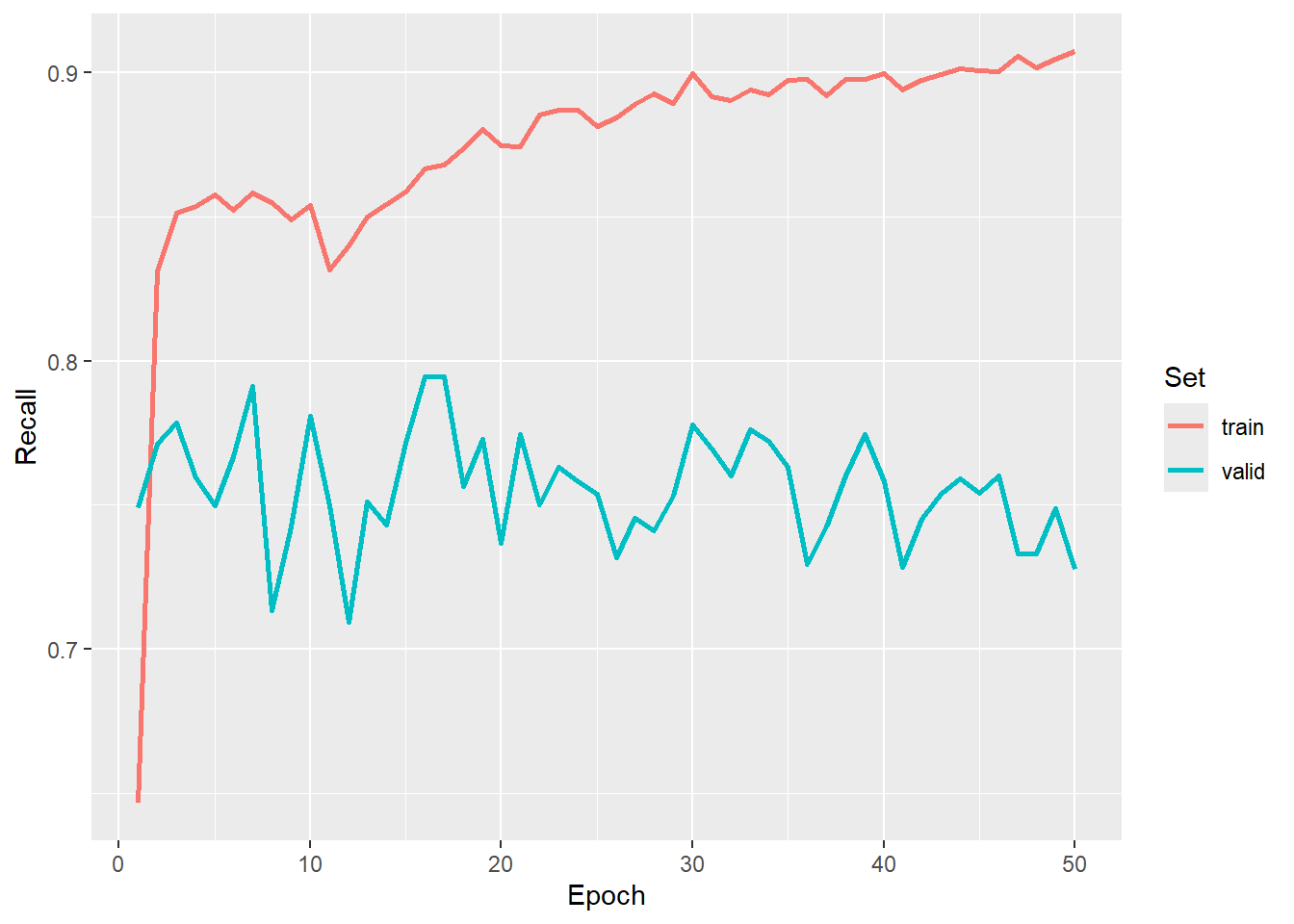
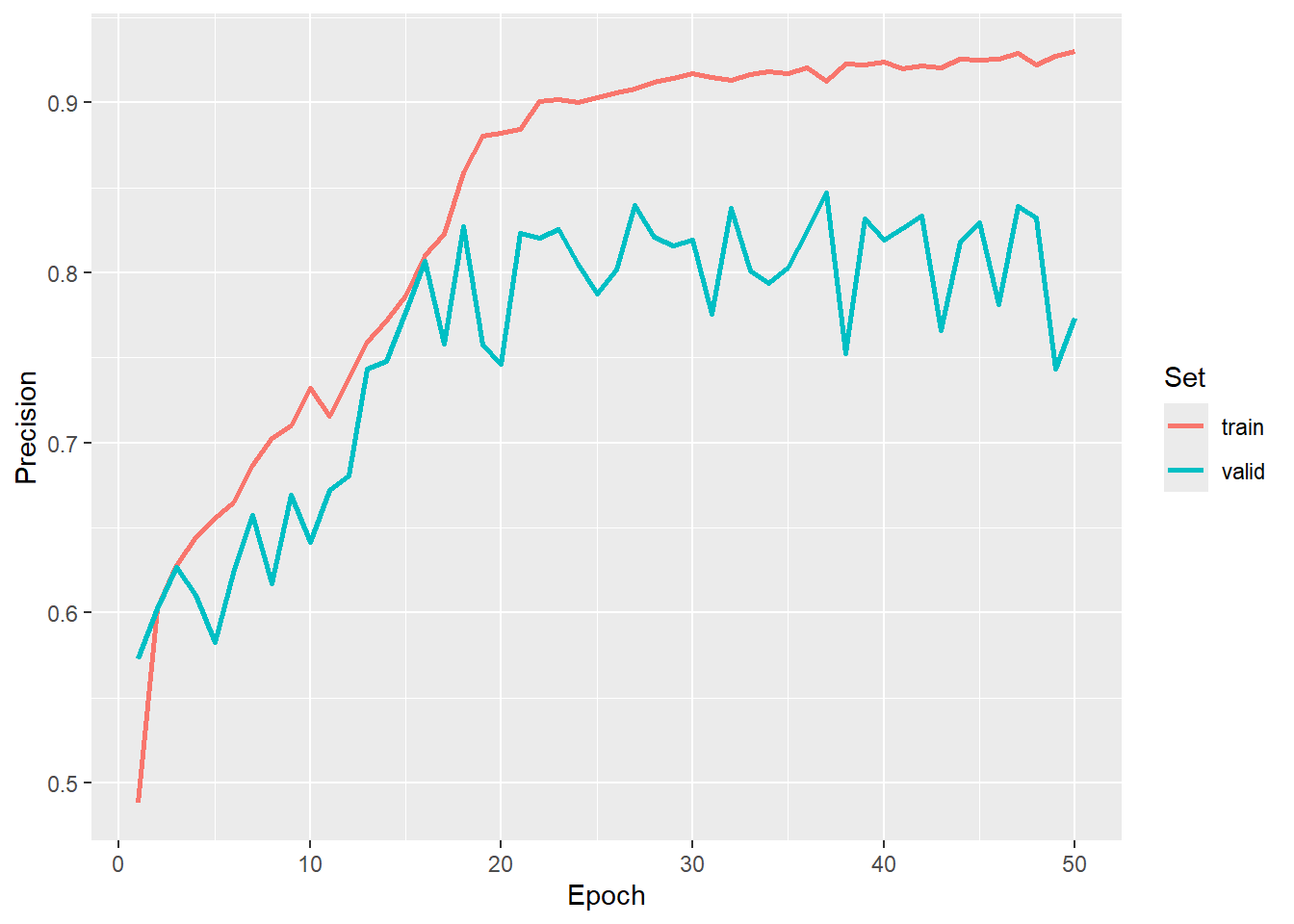
We re-instantiate the model, load the saved exponentially weighted average, and place the model in evaluation mode. Again, the new model must have the exact same configuration as the model that was trained above in order for the state dictionary to be loaded correctly.
newModel <-   defineMobileUNet(inChn=3,
                               nCls = 5,
                               pretrainedEncoder = TRUE,
                               freezeEncoder = FALSE,
                               avgImNetWeights = FALSE,
                               actFunc = "lrelu",
                               useAttn = FALSE,
                               useDS = FALSE,
                               dcChn = c(256,128,64,32,16),
                               negative_slope = 0.01)

newModel$load_state_dict(torch_load(str_glue("{fldPth}landcoveraiModel.pt")))$to(device="cuda")
newModel$eval()
Once the model is prepared, we visualize a mini-batch of predictions using viewBatchPreds(). We then obtain assessment metrics for all mini-batches using assessDL().
viewBatchPreds(dataLoader=testDL,
               model=newModel,
               mode="multiclass",
               padding=30,
               nCols = 4,
               r = 1,
               g = 2,
               b = 3,
               cCodes=c(1,2,3,4,5),
               cNames=c("Background",
                        "Buildings",
                        "Woodland",
                        "Water",
                        "Road"),
               cColors=c("gray",
                         "red",
                         "green",
                         "blue",
                         "black"),
               useCUDA=TRUE,
               probs=FALSE,
               usedDS=FALSE)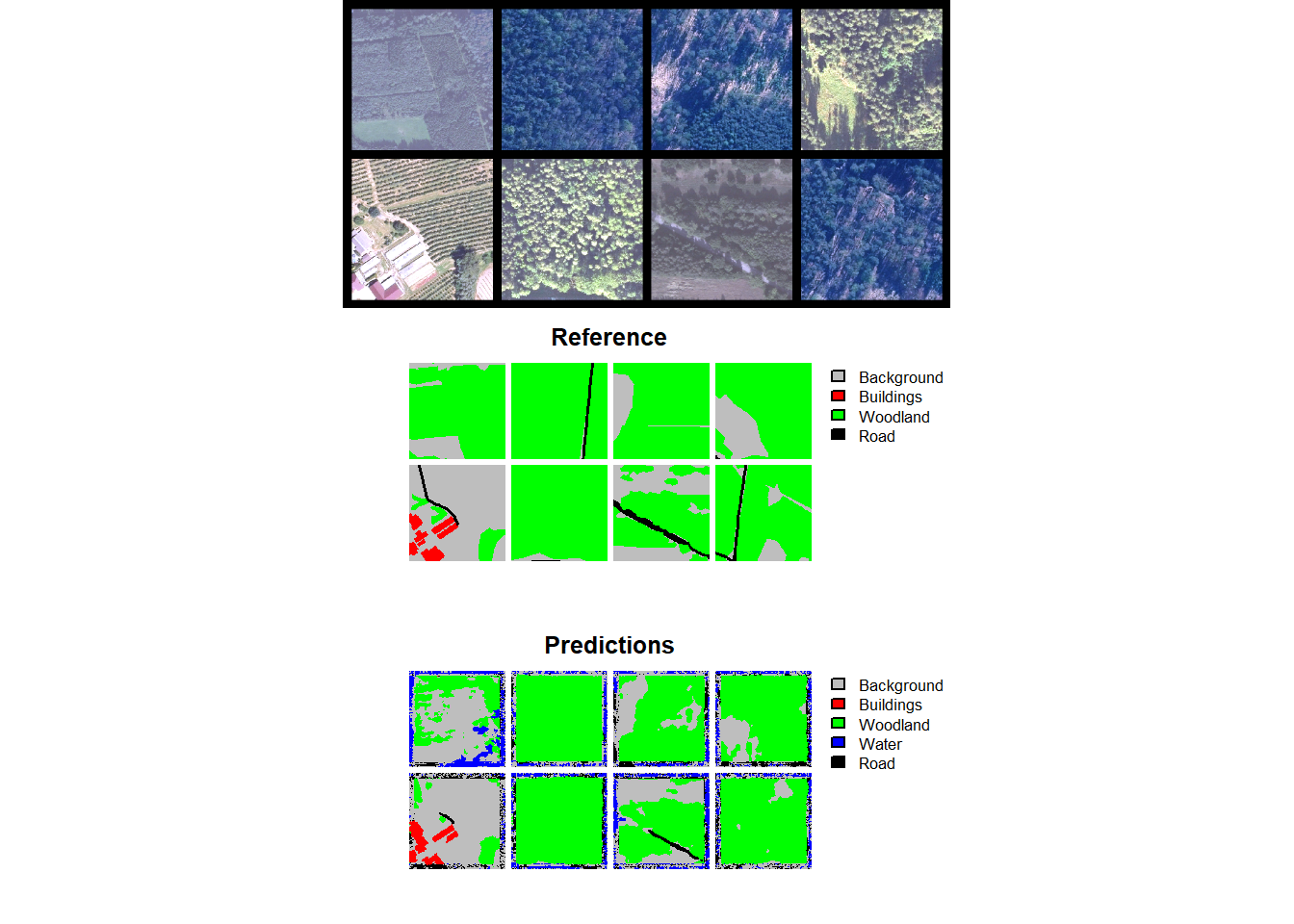
$Classes
[1] "Background" "Buildings"  "Woodland"   "Water"      "Road"

$referenceCounts
Background  Buildings   Woodland      Water       Road
  65211499    1981415    3425250    6915539   52489721

$predictionCounts
Background  Buildings   Woodland      Water       Road
  62523659    1558646    8506173   14257942   43177004

$confusionMatrix
            Reference
Predicted    Background Buildings Woodland    Water     Road
  Background   52708767    497746  1248527   618690  7449929
  Buildings      244197   1279858    32206      122     2263
  Woodland      3675465    177971  1921794    37581  2693362
  Water         4604446     13735    38841  6093868  3507052
  Road          3978624     12105   183882   165278 38837115

$aggMetrics
      OA macroF1 macroPA macroUA
1 0.7756  0.6828  0.7273  0.6434

$userAccuracies
Background  Buildings   Woodland      Water       Road
    0.8430     0.8211     0.2259     0.4274     0.8995

$producerAccuracies
Background  Buildings   Woodland      Water       Road
    0.8083     0.6459     0.5611     0.8812     0.7399

$f1Scores
Background  Buildings   Woodland      Water       Road
    0.8253     0.7231     0.3221     0.5756     0.8119
25.3.5 Spatial Predictions
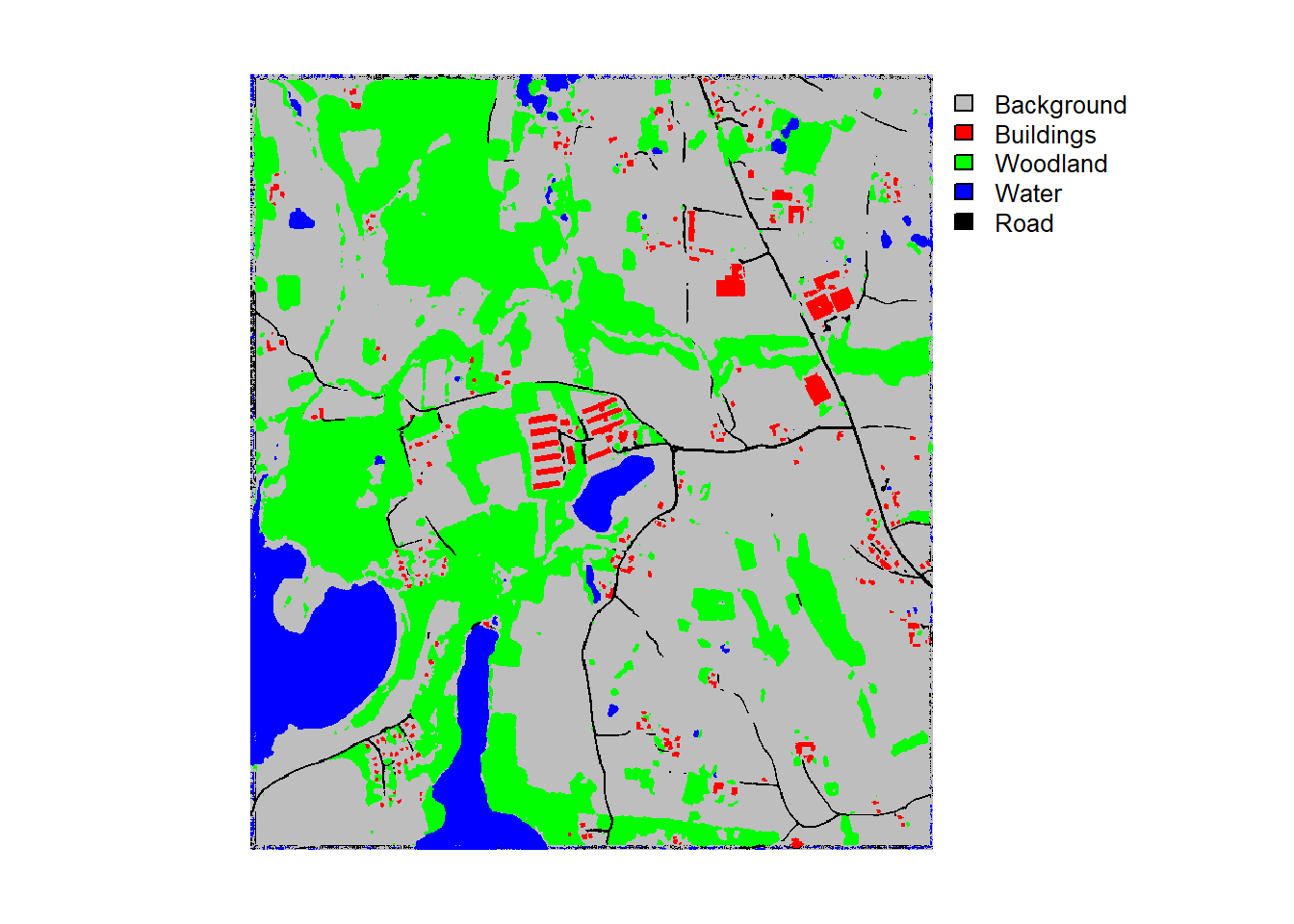
The final model can be used to predict to new data using the predictSpatial() function. The test image (“landcoveraiIMG.tif”) has been provided in the data folder for the chapter along with an example prediction (“landcoveraiPred.tif”). Note that the image is re-scaled using rescaleFactor=255. It is important that the new data are processed using the same configuration as the data used to train the model and generated using the dataset subclass.
predCls <- predictSpatial(imgIn= str_glue("{fldPth}landcoveraiIMG.tif"),
                          model=newModel,
                          predOut= str_glue("{outPth}e3/landcoveraiPred.tif"),
                          mode="multiclass",
                          predType="class",
                          useCUDA=TRUE,
                          nCls=5,
                          chpSize=512,
                          stride_x=256,
                          stride_y=256,
                          crop=50,
                          nChn=3,
                          normalize=FALSE,
                          rescaleFactor=255,
                          usedDS=FALSE)
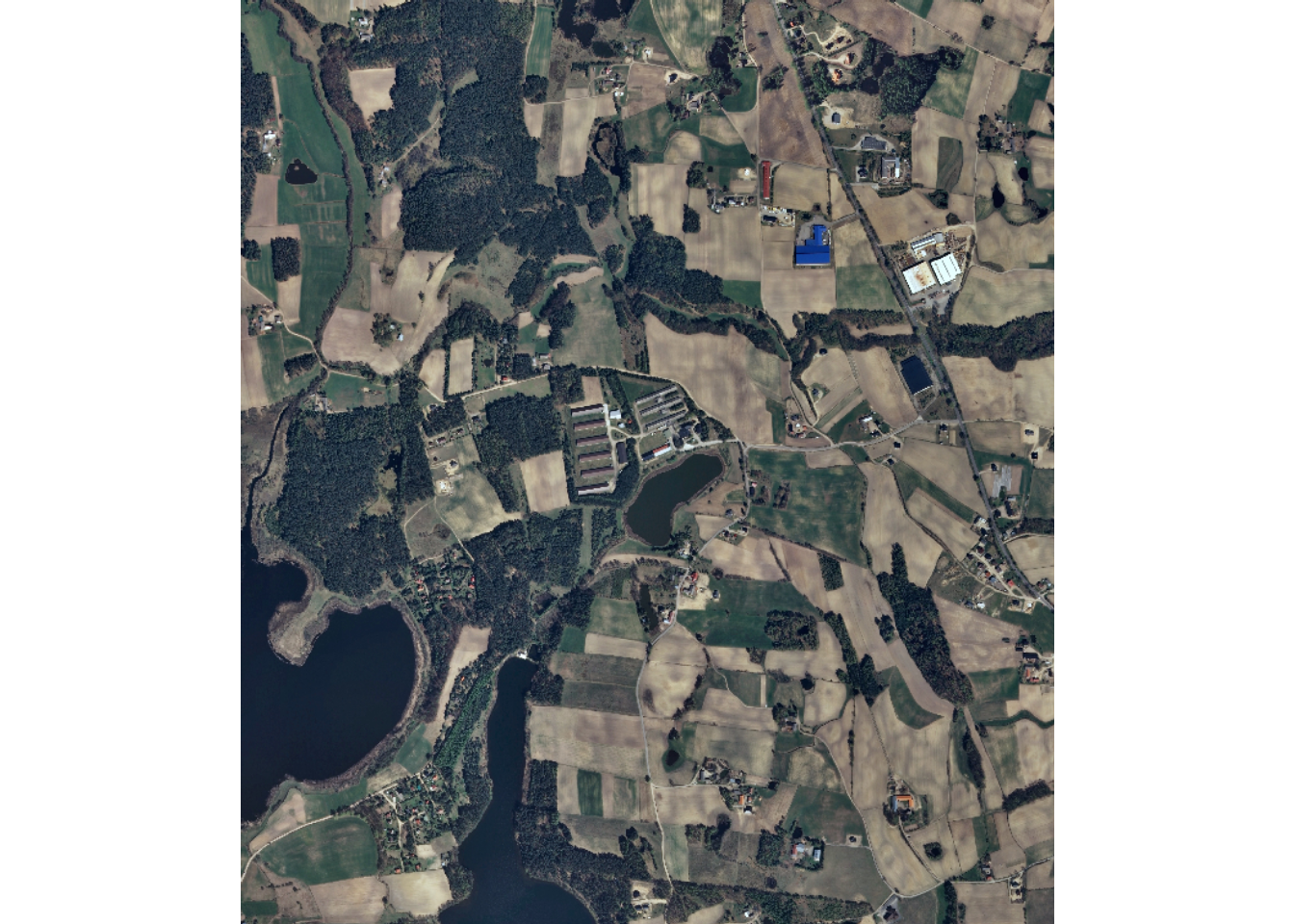
Lastly, we visualize the input image and its associated prediction.
25.4 Workflow 2: Landcover.ai (Edge Weighting)
The final workflow is very similar to Workflow 1. The primary difference is that we are now implementing class edge distance weighting into the loss function calculations in an attempt improve edge predictions.
25.4.1 Preparation
Since we have already created the chips above, we are not doing so here. However, it would be necessary to do this if this workflow is initiated from scratch. In order to use class edge weightings, we have to first create edge masks using makeBoundaryDistance(). For chips that do not have any edges, or are all one class, all cells are assigned a value of 1,000.
Once these new inputs are created, we set a random seed and recreate the chip data frames, now noting that we are using edge weightings (useEdgeDist=TRUE). As with the last example, we also generate subsamples of the data for the example workflow. Last, we view a mini-batch of chips as a check.
makeBoundaryDistance(chipsDir=str_glue("{localPth}chips/train/"), noDataValue = 1000)
makeBoundaryDistance(chipsDir=str_glue("{localPth}chips/val/"), noDataValue = 1000)
makeBoundaryDistance(chipsDir=str_glue("{localPth}chips/test/"), noDataValue = 1000)
#Seed R's base RNG (chip shuffling, augmentations, dataloader shuffling) and
#torch's RNG (model weight initialization, training loop) with one call.
#This must run before the chips are shuffled and the datasets, dataloaders,
#and model are created.
setSeed(42)trainDF <- makeChipsDF(
folder = str_glue("{localPth}chips/train/"), useEdgeDist=TRUE) |>
sample_frac(1, replace = FALSE) |>
sample_n(3000)
testDF <- makeChipsDF(
folder = str_glue("{localPth}chips/test/"), useEdgeDist=TRUE) |>
sample_frac(1, replace = FALSE) |>
sample_n(500)
valDF <- makeChipsDF(
folder = str_glue("{localPth}chips/val/"), useEdgeDist=TRUE) |>
sample_frac(1, replace = FALSE) |>
sample_n(500)viewChips(chpDF=trainDF,
folder=str_glue("{localPth}chips/train/"),
nSamps = 25,
mode = "both",
justPositive = FALSE,
cCnt = 5,
rCnt = 5,
r = 1,
g = 2,
b = 3,
rescale = FALSE,
rescaleVal = 1,
cCodes= c(0,1,2,3,4),
cNames= c("Background",
"Buildings",
"Woodland",
"Water",
"Road"),
cColors= c("gray",
"red",
"green",
"blue",
"black"),
useSeed = TRUE,
seed = 42)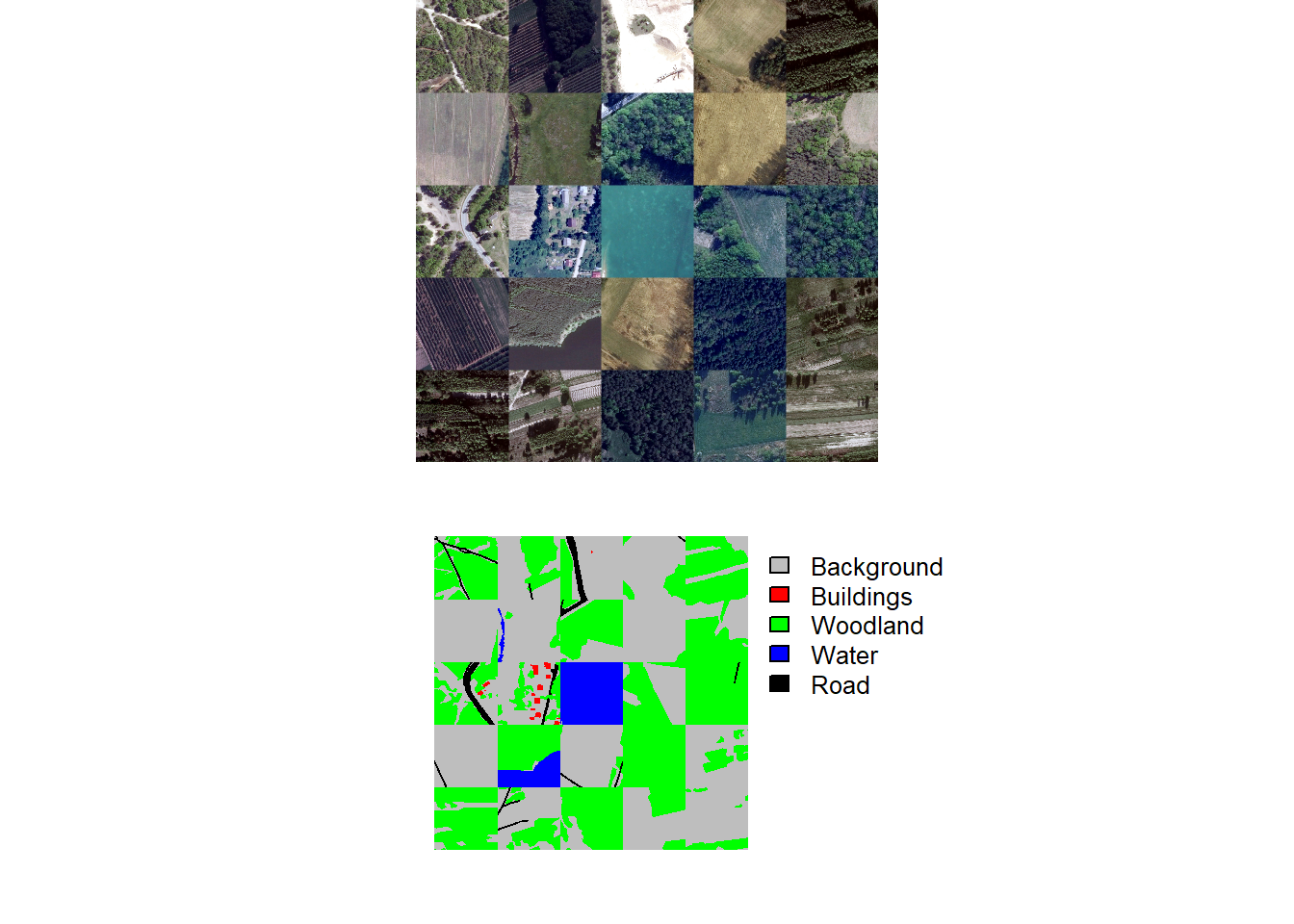
25.4.2 Datasets and Dataloaders
The dataset subclasses are the same as the last example other than setting useEdgeDist=TRUE. Setting this argument to TRUE will cause the edge distance grid to be processed alongside of the image and raster mask for each chip. We next instantiate the dataloaders with a mini-batch size of 6. We use a smaller mini-batch size since the edge distance masks are being incorporated, which increases the computational demand of the model. Mini-batches of images chips are then viewed as a check along with calculating summary information for the mini-batches.
trainDS <- defineSegDataSet(
  chpDF=trainDF,
  folder= str_glue("{localPth}chips/train/"),
  normalize = FALSE,
  rescaleFactor = 255,
  mskRescale= 1,
  bands = c(1,2,3),
  mskAdd=1,
  doAugs = TRUE,
  maxAugs = 1,
  probVFlip = .5,
  probHFlip = .5,
  probRotation=.3,
  probBrightness = .1,
  probContrast = 0,
  probGamma = 0,
  probHue = 0,
  probSaturation = .2,
  brightFactor = c(.9,1.1),
  contrastFactor = c(.9,1.1),
  gammaFactor = c(.9, 1.1, 1),
  hueFactor = c(-.1, .1),
  saturationFactor = c(.9, 1.1),
  useEdgeDist = TRUE)

valDS <- defineSegDataSet(
  chpDF=valDF,
  folder=str_glue("{localPth}chips/val/"),
  normalize = FALSE,
  rescaleFactor = 255,
  mskRescale = 1,
  mskAdd=1,
  useEdgeDist = TRUE)

testDS <- defineSegDataSet(
  chpDF=testDF,
  folder=str_glue("{localPth}chips/test/"),
  normalize = FALSE,
  rescaleFactor = 255,
  mskRescale = 1,
  mskAdd=1,
  useEdgeDist = TRUE)
trainDL <- torch::dataloader(trainDS,
batch_size=6,
shuffle=TRUE,
drop_last = TRUE)
valDL <- torch::dataloader(valDS,
batch_size=6,
shuffle=FALSE,
drop_last = TRUE)
testDL <- torch::dataloader(testDS,
batch_size=6,
shuffle=FALSE,
drop_last = TRUE)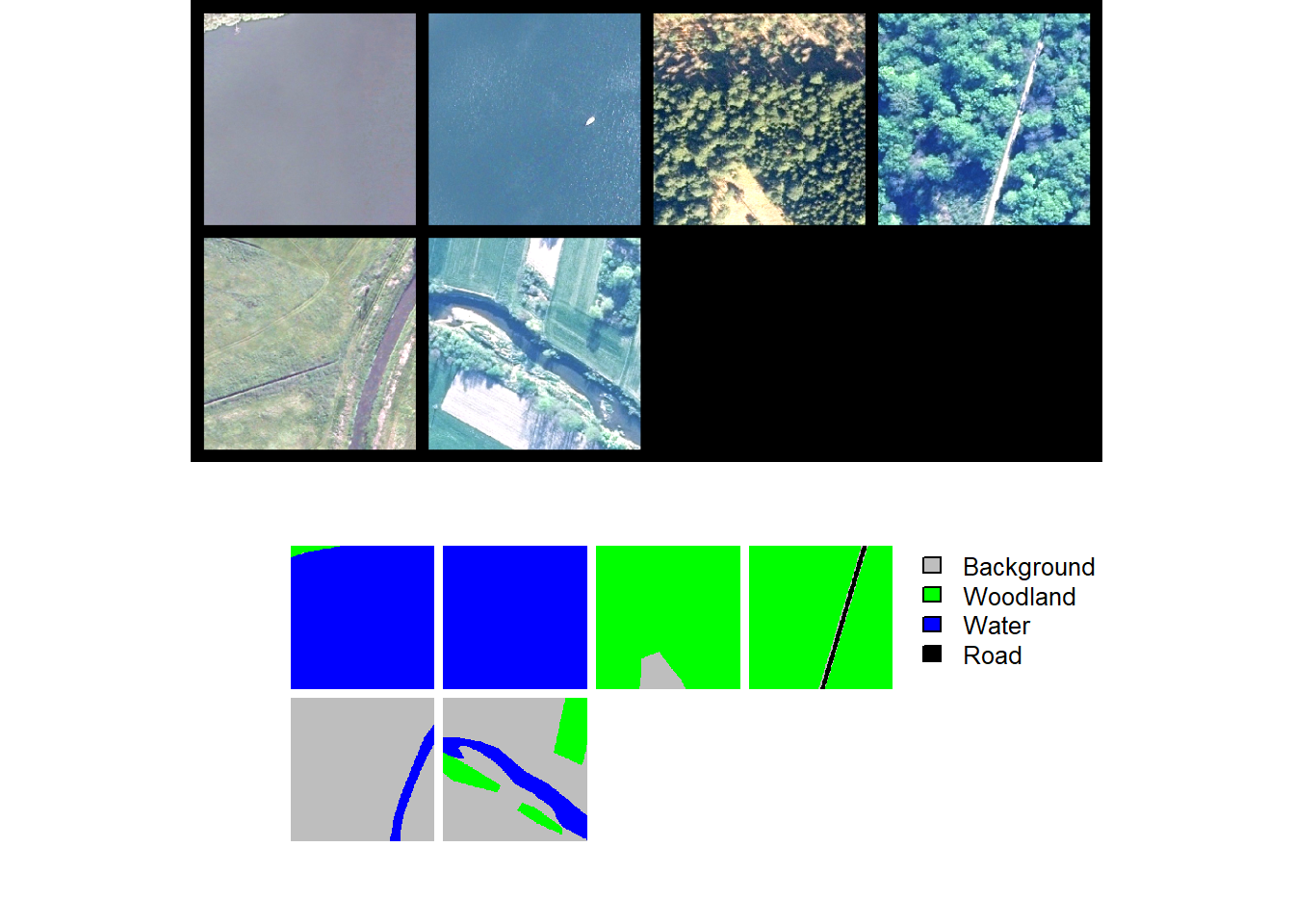
trainStats <- describeBatch(trainDL,
                            zeroStart=FALSE)
valStats <- describeBatch(valDL,
zeroStart=FALSE)print(trainStats)$batchSize
[1] 6
$imageDataType
[1] "Float"
$maskDataType
[1] "Long"
$imageShape
[1] "6" "3" "512" "512"
$maskShape
[1] "6" "1" "512" "512"
$bndMns
[1] 0.2806956 0.3203021 0.2848415
$bndSDs
[1] 0.11650714 0.09868575 0.08045257
$maskCount
[1] 578718 0 994098 48
$minIndex
[1] 1
$maxIndex
[1] 4print(valStats)$batchSize
[1] 6
$imageDataType
[1] "Float"
$maskDataType
[1] "Long"
$imageShape
[1] "6" "3" "512" "512"
$maskShape
[1] "6" "1" "512" "512"
$bndMns
[1] 0.3679390 0.3694616 0.3314153
$bndSDs
[1] 0.09760887 0.08789314 0.07937156
$maskCount
[1] 598955 25065 919696 11243 17905
$minIndex
[1] 1
$maxIndex
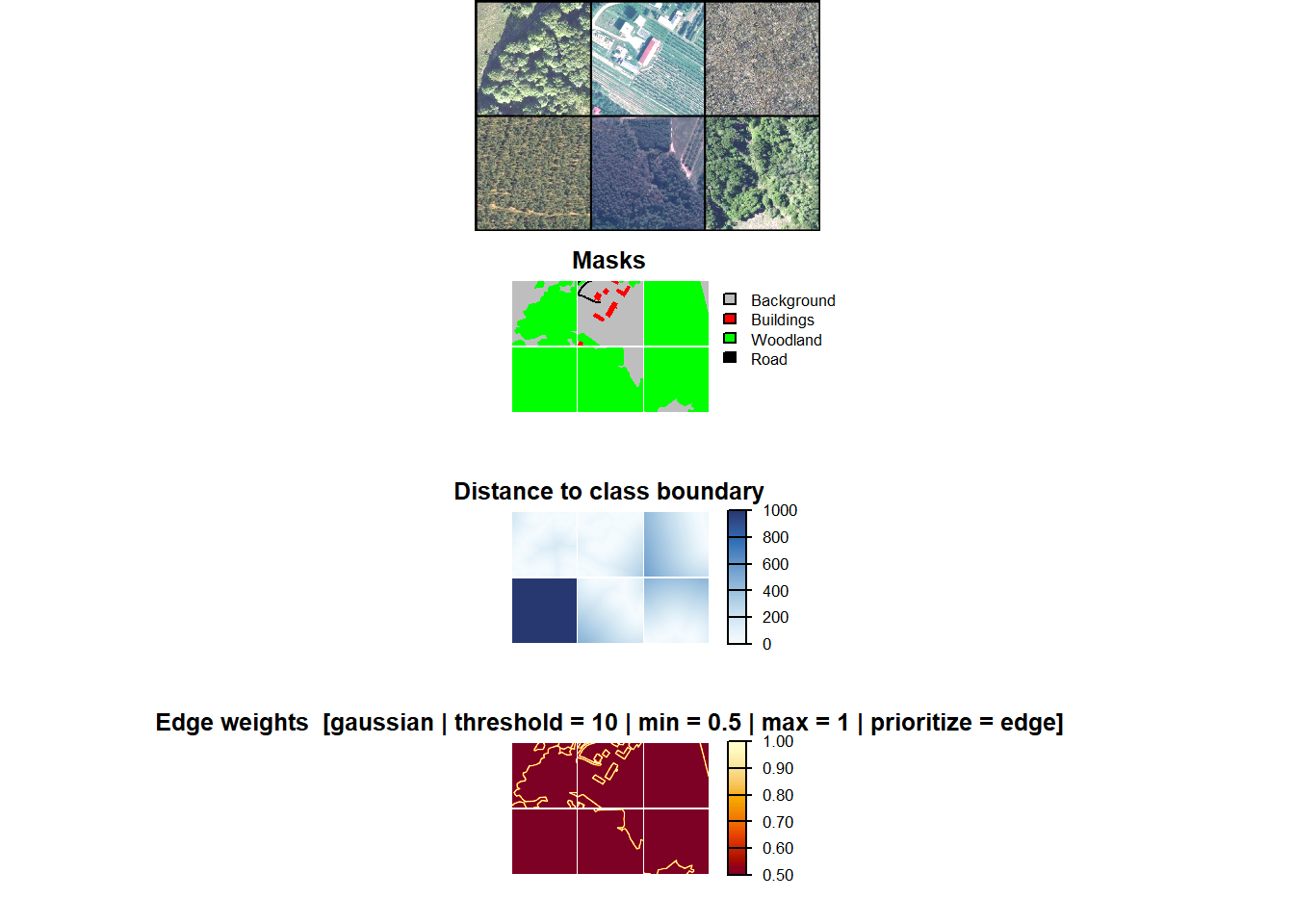
[1] 5Now that we have edge distance masks, we can also visualize these data using viewDist(). The function shows a mini-batch if input predictor variables (RGB images in this case), raster masks, class edge distance grids, and class distance weightings. The weightings are defined using a Gaussian weighting with a distance threshold of 10 meters. Using a Gaussian distribution, the weight declines from the maximum weight (1) to the minimum weight (0.5) out to the threshold distance. Past the threshold distance, the minimum weight is used (0.5).
If you want to decrease the relative weight of class edge pixels, which may be useful in situations where edges are gradational or fuzzy, you can use prioritizeEdge=FALSE.
viewDist(
  dataLoader=trainDL,
  nCols = 3,
  r = 1,
  g = 2,
  b = 3,
  cCodes = c(1,2,3,4,5),
  cNames=c("Background",
           "Buildings",
           "Woodland",
           "Water",
           "Road"),
  cColors=c("gray",
            "red",
            "green",
            "blue",
            "black"),
  edgeMode = "gaussian",
  distThreshold = 10,
  minWght = 0.5,
  maxWght = 1,
  prioritizeEdge = TRUE,
  padding = 10
)
25.4.3 Training Loop
The training loop is nearly identical to the loop used for Workflow 1. The key difference is that we are now not using a one-cycle learning rate policy and have incorporated callback_reconfigure_loss() to change the edge weighting at different points in the training process. Initially, no edge weighting is applied. At epoch 15, we initialize the edge weighting using a threshold distance of 10 m, a maximum weight of 1, and a minimum weight of 0.4. At epoch 20, we implement a more aggressive edge weighting with a threshold distance of 5 m and a minimum weight of 0.01. As with the other workflows, we have provided the training logs in the chapter data folder (“lcaiLogsW.csv”) and the final model (“landcoveraiModelW.pt”)
# --- Hyperparameters ----------------------------------------------------------
nEpochs   <- 30
maxLR     <- 1e-2

stage_lrs <- c(1e-4, 1e-4, 1e-4, 1e-4, 1e-4,
               1e-3,
               1e-3, 1e-3, 1e-3, 1e-3, 1e-3)

max_lrs <- stage_lrs / max(stage_lrs) * maxLR

# --- Training loop ------------------------------------------------------------

# Pre-build the loss object so callback_reconfigure_loss can hold a reference
# to the same instance that luz::setup() will use.
#
# Edge weighting is OFF for epochs 1-14 (useEdgeDist = FALSE).
# edgeMode / prioritizeEdge / applyDistWght are stored as scalars even when
# edge weighting is disabled, so they don't need to be set again in the callback.
loss_fn <- defineUnifiedFocalLoss(
  nCls           = 5,
  cropFactorPred = 32,
  cropFactorMsk  = 32,
  lambda         = 0,
  gamma          = 0.7,
  delta          = 0.5,
  smooth         = 1e-8,
  zeroStart      = FALSE,
  clsWghtsDist   = 1,
  clsWghtsReg    = c(0.1, 0.3, 0.15, 0.15, 0.3),
  useLogCosH     = FALSE,
  useEdgeDist    = FALSE,        # activated at epoch 15 via callback
  edgeMode       = "gaussian",   # sigma = distThreshold/3; ~minWght at threshold
  prioritizeEdge = TRUE,         # cells CLOSER to a boundary receive maxWght
  applyDistWght  = "both",
  device         = "cuda"
)

# --- Training loop -----------------------------------------------------------
fitted <- defineMobileUNet |>
  luz::setup(
    loss      = loss_fn,           # same object referenced by the callback below
    optimizer = torch::optim_adamw,
    metrics = list(
      luz_metric_overall_accuracy(nCls = 5, cropFactorPred = 32, cropFactorMsk = 32,
                                  smooth = 1, mode = "multiclass", zeroStart = FALSE),
      luz_metric_f1score(         nCls = 5, cropFactorPred = 32, cropFactorMsk = 32,
                                  smooth = 1, mode = "multiclass", zeroStart = FALSE),
      luz_metric_recall(          nCls = 5, cropFactorPred = 32, cropFactorMsk = 32,
                                  smooth = 1, mode = "multiclass", zeroStart = FALSE),
      luz_metric_precision(       nCls = 5, cropFactorPred = 32, cropFactorMsk = 32,
                                  smooth = 1, mode = "multiclass", zeroStart = FALSE)
    )
  ) |>
  set_hparams(
    inChn             = 3,
    nCls              = 5,
    pretrainedEncoder = TRUE,
    freezeEncoder     = TRUE,
    avgImNetWeights   = FALSE,
    actFunc           = "gelu",
    useAttn           = FALSE,
    useDS             = FALSE,
    dcChn             = c(512, 256, 128, 64, 32),
    negative_slope    = 0.01,
    stageLRs          = stage_lrs
  ) |>
  fit(
    data       = trainDL,
    epochs     = nEpochs,
    valid_data = valDL,
    callbacks  = list(

      # Build per-stage optimizer before the scheduler reads param groups
      callback_per_stage_optimizer(),
      callback_unfreeze_stages(
        schedule = list(
          list(epoch = 5, components = c("e4", "e5")),
          list(epoch = 10, components = c("e1", "e2", "e3"))
        )
      ),
      callback_reconfigure_loss(
        loss     = loss_fn,
        schedule = list(

          # End of epoch 14 → epoch 15 onward uses edge-weighted loss
          list(epoch = 15L, params = list(
            distThreshold = 10,    # Gaussian sigma = 10/3 ≈ 3.3 m
            maxWght       = 1.0,   # weight for pixels at/near the boundary
            minWght       = 0.4,   # weight for pixels beyond 10 m
            useEdgeDist   = TRUE   # flip last — all tensors above are created first
          )),

          # End of epoch 19 → epoch 20 onward uses tighter edge weighting
          list(epoch = 20L, params = list(
            distThreshold = 5,      # Gaussian sigma = 5/3 ≈ 1.7 m
            minWght       = 0.01  # near-zero weight beyond 5 m
          ))
        )
      ),
      callback_ema(
        warmup_steps = 50,
        save_dir     = str_glue("{outPth}e4/"),
        prefix       = "ema_epoch"
      ),
      luz_callback_csv_logger(str_glue("{outPth}e4/lcaiLogsW.csv")),
      callback_save_model_state_dict(
        save_dir = str_glue("{outPth}e4/"),
        prefix   = "epoch"
      )
    ),
    accelerator = accelerator(
      device_placement = TRUE,
      cpu              = FALSE,
      cuda_index       = torch::cuda_current_device()
    ),
    verbose = TRUE
  )
25.4.4 Model Validation and Spatial Prediction
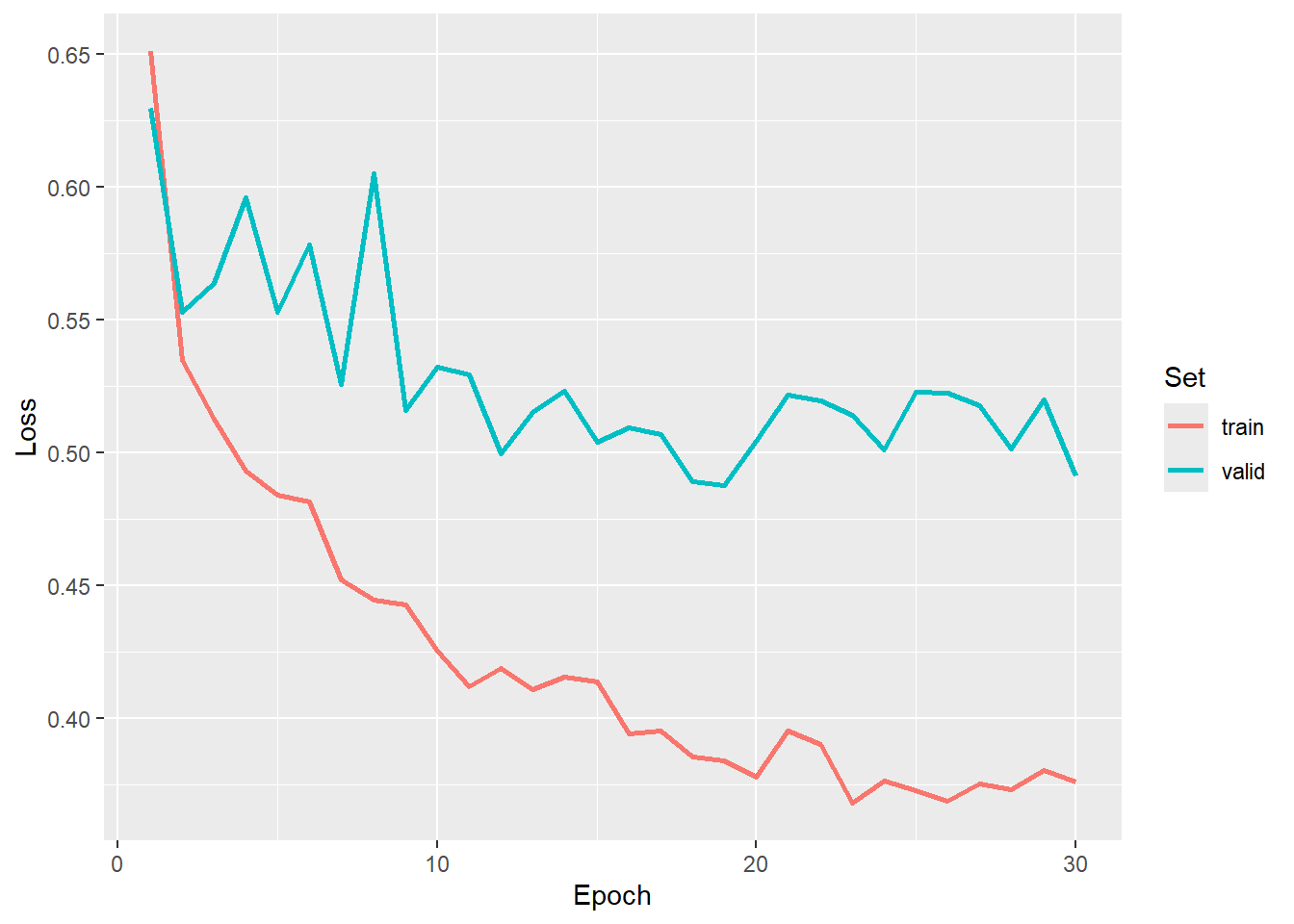
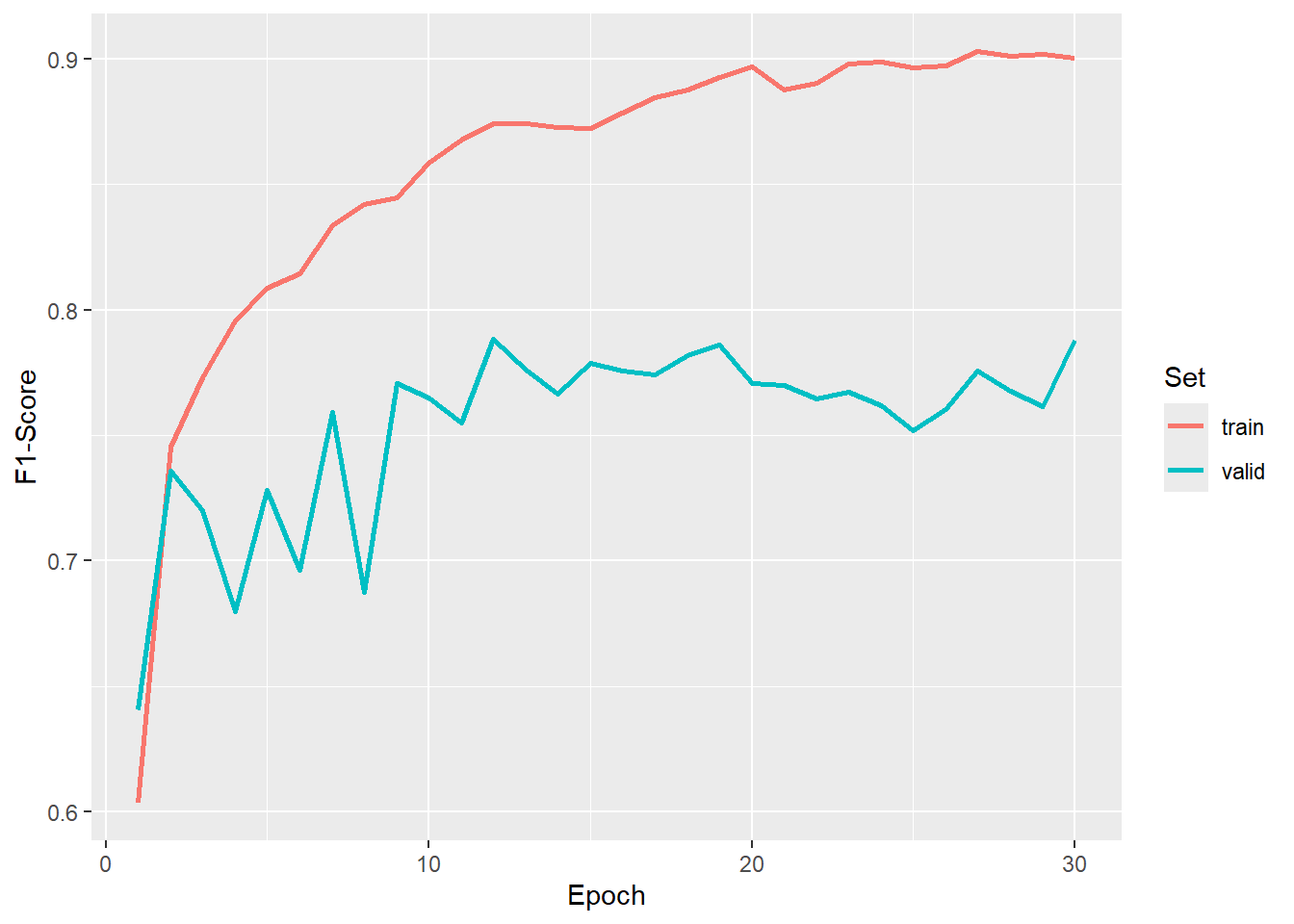
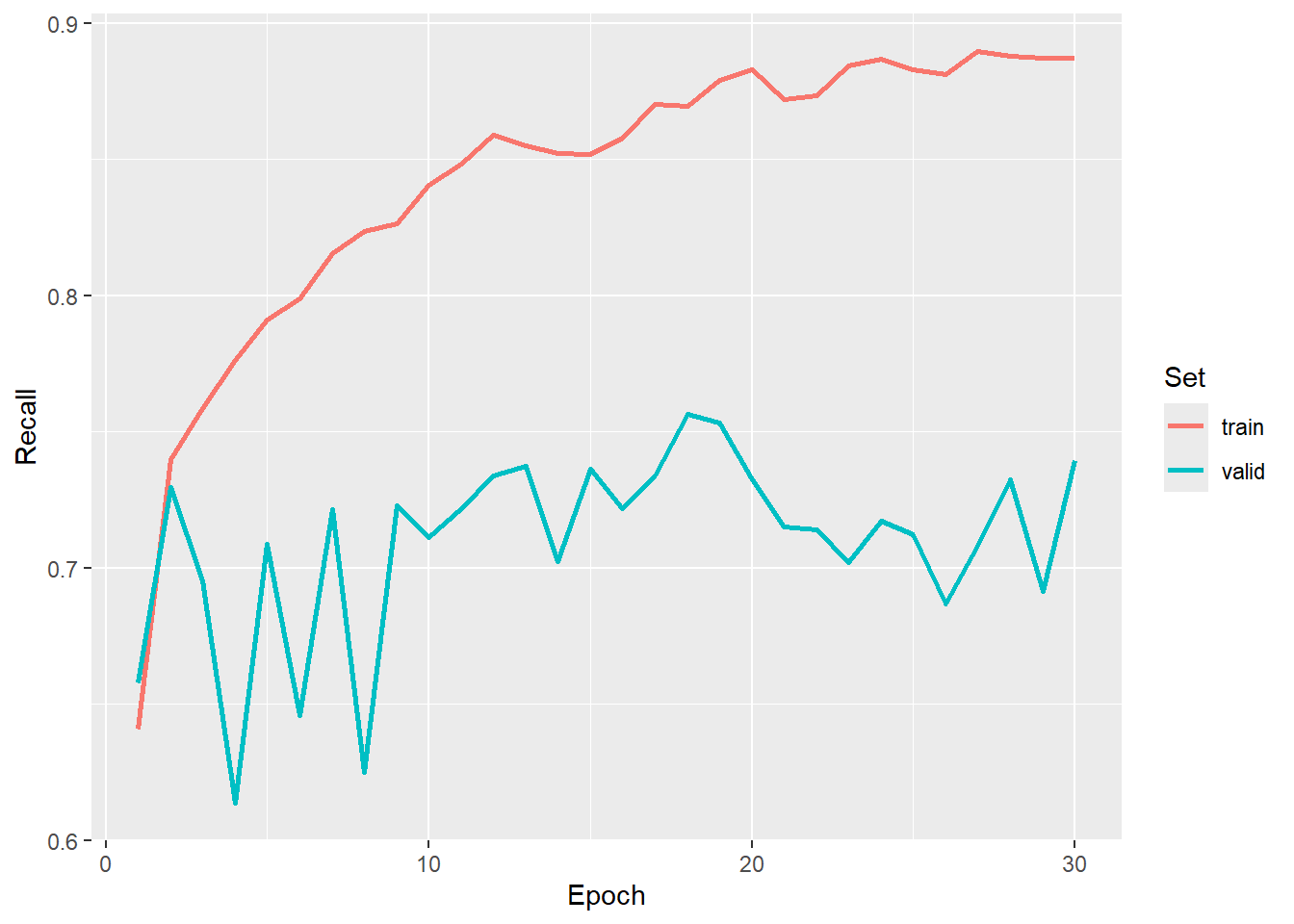
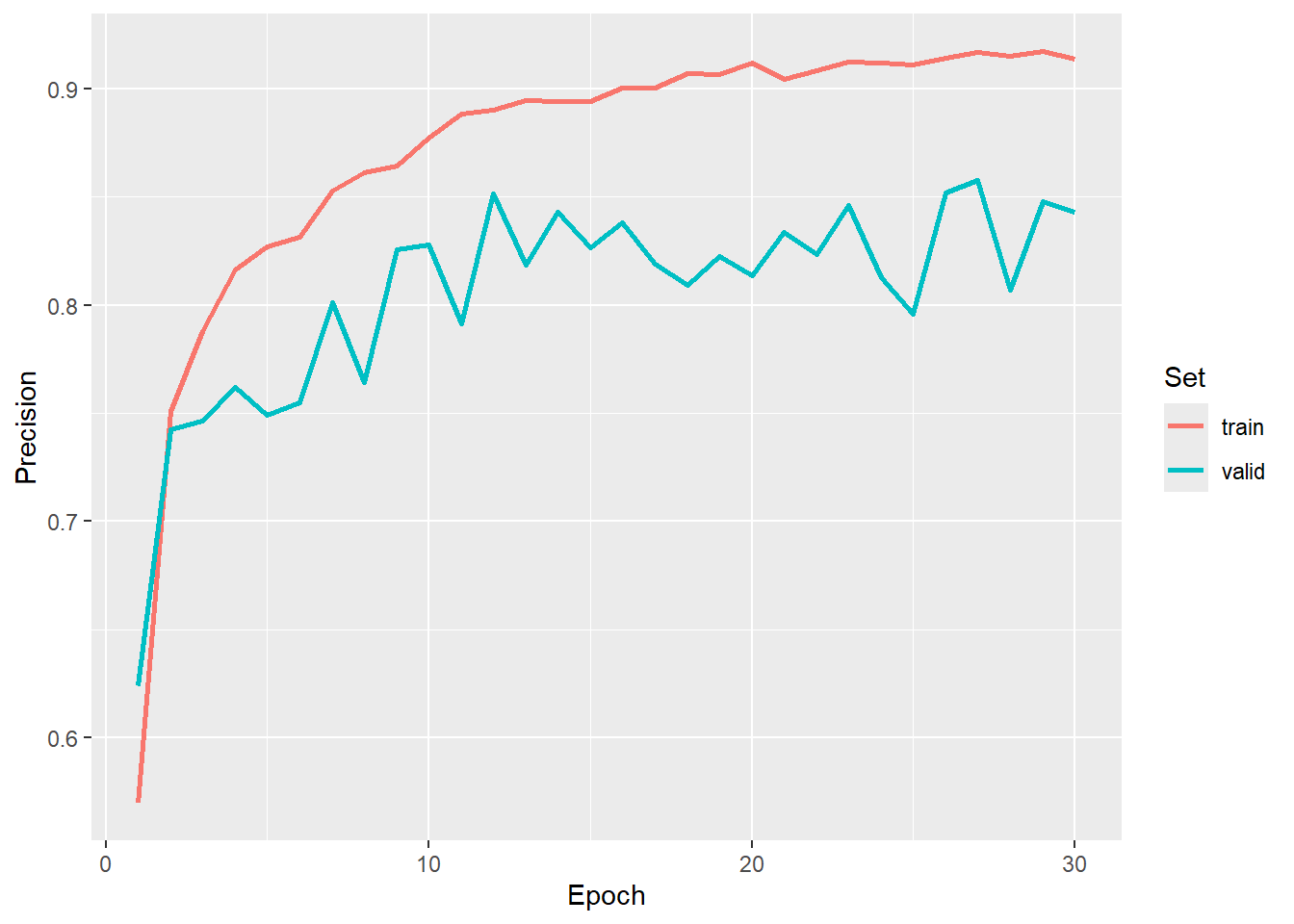
The results of the training loop are explored, a,nd we select the model state at epoch 30 as the final model. The model is re-instantiated and the saved exponentially weighted average of the weights is loaded.
newModel <-   defineMobileUNet(    inChn             = 3,
                                   nCls              = 5,
                                   pretrainedEncoder = FALSE,
                                   freezeEncoder     = FALSE,
                                   avgImNetWeights   = FALSE,
                                   actFunc           = "gelu",
                                   useAttn           = FALSE,
                                   useDS             = FALSE,
                                   dcChn             = c(512, 256, 128, 64, 32),
                                   negative_slope    = 0.01)

newModel$load_state_dict(torch_load(str_glue("{fldPth}landcoveraiModelW.pt")))$to(device="cuda")
newModel$eval()
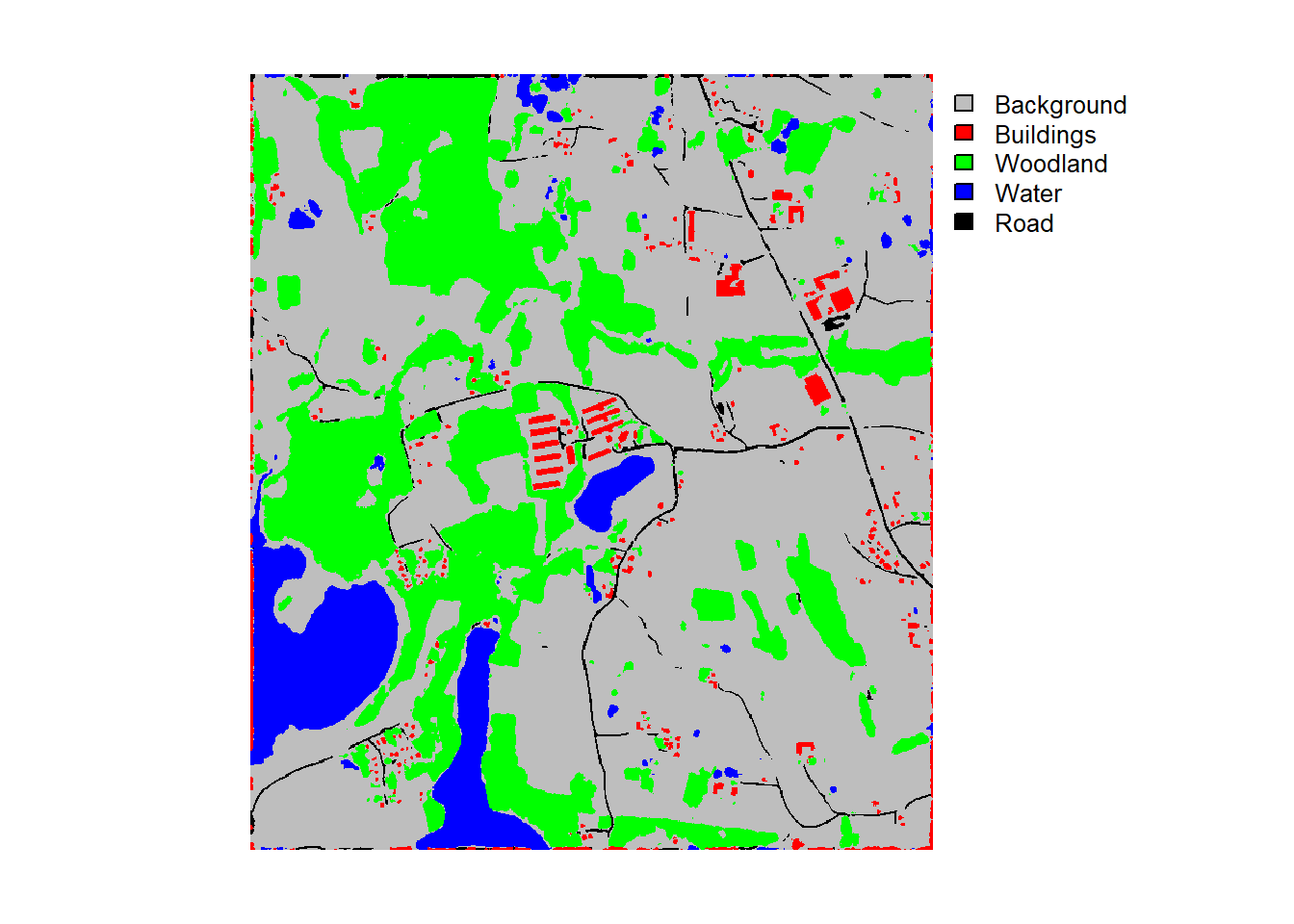
We next view a batch or predictions and assess the model using the entire test set. Lastly, we use the trained model to make predictions to an example image extent. The image and classification result are visualized.
viewBatchPreds(dataLoader=testDL,
               model=newModel,
               mode="multiclass",
               padding=30,
               nCols = 4,
               r = 1,
               g = 2,
               b = 3,
               cCodes=c(1,2,3,4,5),
               cNames=c("Background",
                        "Buildings",
                        "Woodland",
                        "Water",
                        "Road"),
               cColors=c("gray",
                         "red",
                         "green",
                         "blue",
                         "black"),
               useCUDA=TRUE,
               probs=FALSE,
               usedDS=FALSE)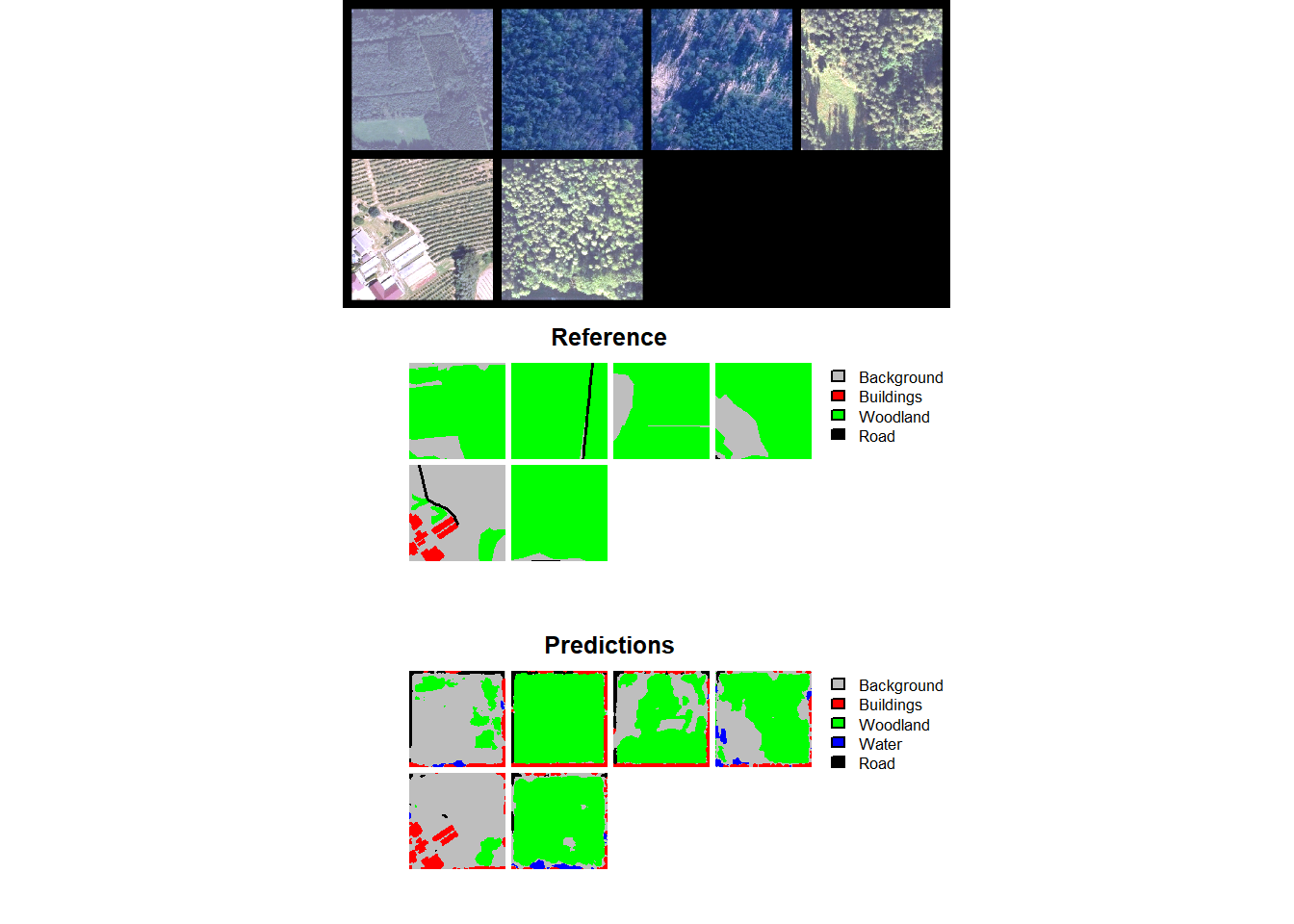
$Classes
[1] "Background" "Buildings"  "Woodland"   "Water"      "Road"

$referenceCounts
Background  Buildings   Woodland      Water       Road
  65672654    2026214    3429691    6915539   52503614

$predictionCounts
Background  Buildings   Woodland      Water       Road
  68181989    8189070    5810655    8904537   39461461

$confusionMatrix
            Reference
Predicted    Background Buildings Woodland    Water     Road
  Background   56195632    588241  1373156   923243  9101717
  Buildings     2950696   1407861   174106   335332  3321075
  Woodland      2317224     12358  1722970   274143  1483960
  Water         2527533     14720    44121  5361344   956819
  Road          1681569      3034   115338    21477 37640043

$aggMetrics
      OA macroF1 macroPA macroUA
1 0.7838  0.6318   0.709  0.5697

$userAccuracies
Background  Buildings   Woodland      Water       Road
    0.8242     0.1719     0.2965     0.6021     0.9538

$producerAccuracies
Background  Buildings   Woodland      Water       Road
    0.8557     0.6948     0.5024     0.7753     0.7169

$f1Scores
Background  Buildings   Woodland      Water       Road
    0.8397     0.2756     0.3729     0.6778     0.8186
predCls <- predictSpatial(imgIn=str_glue("{fldPth}landcoveraiIMG.tif"),
model=newModel,
predOut=str_glue("{outPth}e4/landcoveraiPredW.tif"),
mode="multiclass",
predType="class",
useCUDA=TRUE,
nCls=5,
chpSize=512,
stride_x=256,
stride_y=256,
crop=50,
nChn=3,
normalize=FALSE,
rescaleFactor=255,
usedDS=FALSE)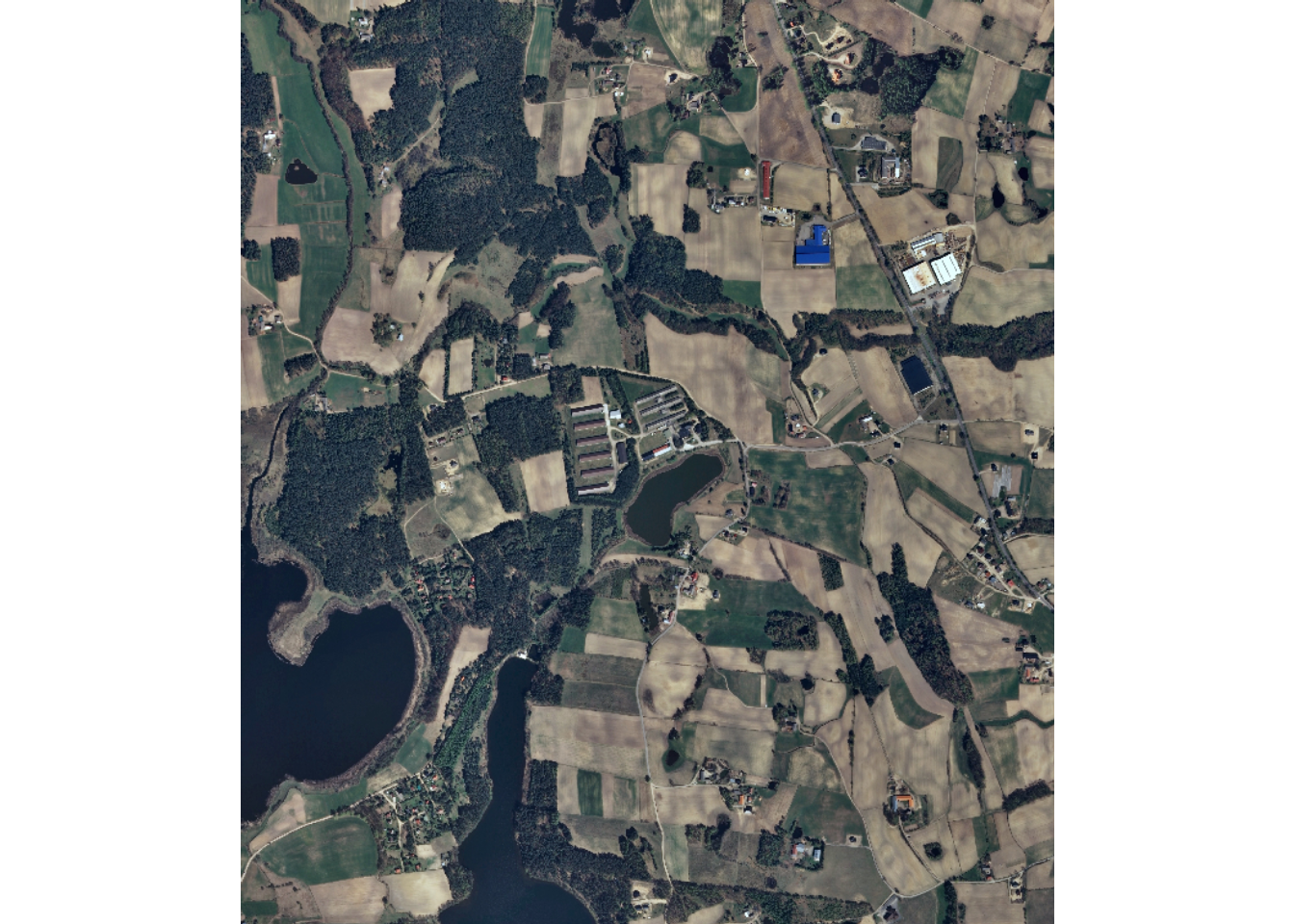
25.5 Concluding Remarks
We hope that the example workflows provided in this chapter and Chapter 24 will aid you in using the geodl package for your own geospatial semantic segmentation tasks. One benefit of this package is that it simplifies the use of torch for performing geospatial semantic segmentation. The process is implemented using functions and a declarative structure as opposed to generating custom subclasses of torch classes. This package is still in active development, so please remember to check for updates.
25.6 Questions
- Explain why it is generally best to start class indices at 1 as opposed to 0 for multiclass classification using torch in R.
- What are the potential benefits of using an encoder with pre-trained weights, such as weights learned from ImageNet?
- Why might it be useful to freeze the encoder stages early in the training process and unfreeze them later?
- Why might you want to use different learning rates for different stages of a model architecture?
- Explain the purpose of incorporating class boundary edge weighting into the loss calculation. What types of errors is it meant to reduce?
- Why might you want to reconfigure the loss function during the training process as opposed to using the same loss for all epochs?
- Explain the difference between macro-averaged and class-level assessment metrics. Why is it important to consider class-level metrics for a multiclass problem with imbalanced classes?
25.7 Exercises
In this exercise, you will use the landcover.ai dataset and the workflows in this chapter as a starting point. Note that a CUDA-enabled GPU is required to complete this exercise.
Task 1
Using the landcover.ai chips, train a UNet model with an EfficientNet-B2 encoder (defineEfficientUNetB2()) with pre-trained weights in place of the MobileNetv2 encoder used in Workflow 1. Use the same data partitions, augmentations, loss, and assessment metrics as Workflow 1. Train the model, log the loss and metrics to disk, and save the model state dictionary at the end of each epoch.
Task 2
Use the logs to select a final model. Re-instantiate the model, load the saved state dictionary, and place the model in evaluation mode.
Task 3
Validate the model on the test set using assessDL(). Compare the overall accuracy, macro-averaged F1-score, and class-level F1-scores to those obtained in Workflow 1. Which classes were the most difficult to differentiate? Did changing the encoder improve the results?
Task 4
Use your model to make a prediction to the provided landcover.ai image (landcoveraiIMG.tif) using predictSpatial() and map the result. Describe any systematic errors you observe, such as confusion between specific classes or errors along class boundaries.