15 Spatial Resampling
15.1 Topics Covered
- Spatial autocorrelation and why random resampling can be overly optimistic
- Spatial clustering cross-validation
- Spatial block cross-validation
- Leave-location-out cross-validation
- Using buffers and radii to separate analysis and assessment data
- Nearest neighbor distance matching (NNDM) cross-validation
- Visualizing spatial resamples
15.2 Introduction
In the prior chapter, we used v-fold cross-validation from the rsample package to tune model hyperparameters. When defining folds with vfold_cv(), samples are randomly assigned to folds without considering their location. For geospatial data, this can be problematic due to spatial autocorrelation: observations that are close to each other in space tend to be more similar than observations that are farther apart. If samples are randomly partitioned, many of the samples in the assessment, or validation, set will have nearby neighbors in the analysis, or training, set. As a result, the model is effectively being assessed using data that are very similar to the data used to train it, and the resulting performance estimates may be overly optimistic, especially if the model will be used to make predictions in new areas.
Spatial resampling methods attempt to address this issue by using the location of samples to define the partitions. Generally, these methods partition the data so that the analysis and assessment sets are spatially separated. The spatialsample package, which is part of tidymodels, provides several spatial resampling methods:
-
spatial_clustering_cv(): groups samples into spatial clusters, which are then used as folds -
spatial_block_cv(): overlays a grid of blocks over the data and assigns blocks to folds -
spatial_leave_location_out_cv(): assigns all samples from the same location or group to the same fold -
spatial_buffer_vfold_cv(): performs random v-fold cross-validation but removes samples within a buffer distance of the assessment samples from the analysis set -
spatial_nndm_cv(): performs a variant of leave-one-out cross-validation that matches the distances between the analysis and assessment data to the distances between the training data and the locations where predictions will be made
All of these functions return resampling objects that can be used in place of the output of vfold_cv() within a tidymodels workflow, for example when using tune_grid() or fit_resamples(). In this chapter, we do not train any models. Instead, we focus on demonstrating each method, explaining its settings, and visualizing the resulting resamples.
Below, we load all the required packages to execute the code in this chapter. The data used in this chapter are obtained from the pdxTrees package, so no data need to be downloaded. sf is used to convert the data to a spatial object.
15.3 Data Preparation
The pdxTrees package provides inventories of trees collected by the Portland Parks and Recreation Urban Forestry Division. The get_pdxTrees_parks() function returns the inventory of trees in Portland, Oregon parks while get_pdxTrees_streets() returns the inventory of street trees. Here, we use the park trees. The data include the longitude and latitude of each tree along with a variety of attributes including the park, species, diameter at breast height (DBH), height, and whether or not the species is native.
parkTrees <- get_pdxTrees_parks()
nrow(parkTrees)
[1] 25534The full dataset contains more than 25,000 trees. To make the examples run quickly and the maps easier to interpret, we randomly select 2,000 trees. We then perform the following steps:
- Select a subset of columns using
select() - Remove any trees with missing coordinates using
drop_na() - Randomly select 2,000 trees using
slice_sample() - Convert the table to an sf point object using
st_as_sf(). The coordinates are stored as longitude and latitude, so we define the coordinate reference system as WGS84 geographic coordinates (EPSG:4326) - Project the data to WGS84 UTM Zone 10N (EPSG:32610) using
st_transform()
It is important to use a projected coordinate reference system when working with spatialsample. Distances, such as the radius, buffer, and cellsize arguments discussed below, are defined in the map units of the coordinate reference system, in this case meters.
set.seed(42)
treesSF <- parkTrees |>
  select(Longitude, Latitude, Park, Common_Name, DBH, Tree_Height, Native) |>
  drop_na(Longitude, Latitude) |>
  slice_sample(n = 2000) |>
  st_as_sf(coords = c("Longitude", "Latitude"), crs = 4326) |>
  st_transform(crs = 32610)

treesSF
Simple feature collection with 2000 features and 5 fields
Geometry type: POINT
Dimension: XY
Bounding box: xmin: 517423.3 ymin: 5032641 xmax: 540207.8 ymax: 5055201
Projected CRS: WGS 84 / UTM zone 10N
# A tibble: 2,000 × 6
Park Common_Name DBH Tree_Height Native geometry
* <chr> <chr> <dbl> <dbl> <chr> <POINT [m]>
1 Mt Tabor Park Ponderosa … 25.1 84 Yes (531510 5039486)
2 Sellwood Park Douglas-Fir 32.9 161 Yes (526515.4 5034915)
3 Crystal Sprin… Douglas-Fir 33.7 113 Yes (528447.5 5036000)
4 Normandale Pa… American E… 29.5 65 No (530743.2 5041955)
5 Sacajawea Park Norway Map… 24.2 56 No (532338 5045109)
6 Kenilworth Pa… Douglas-Fir 32 121 Yes (528888.4 5037601)
7 Lincoln Park Douglas-Fir 20.1 107 Yes (536947.2 5039608)
8 South Park Bl… Northern R… 10.9 78 No (524741.5 5040275)
9 Gates Park English Ha… 13.5 31 No (537342.8 5037360)
10 Grant Park Douglas-Fir 43.7 109 Yes (528851 5043017)
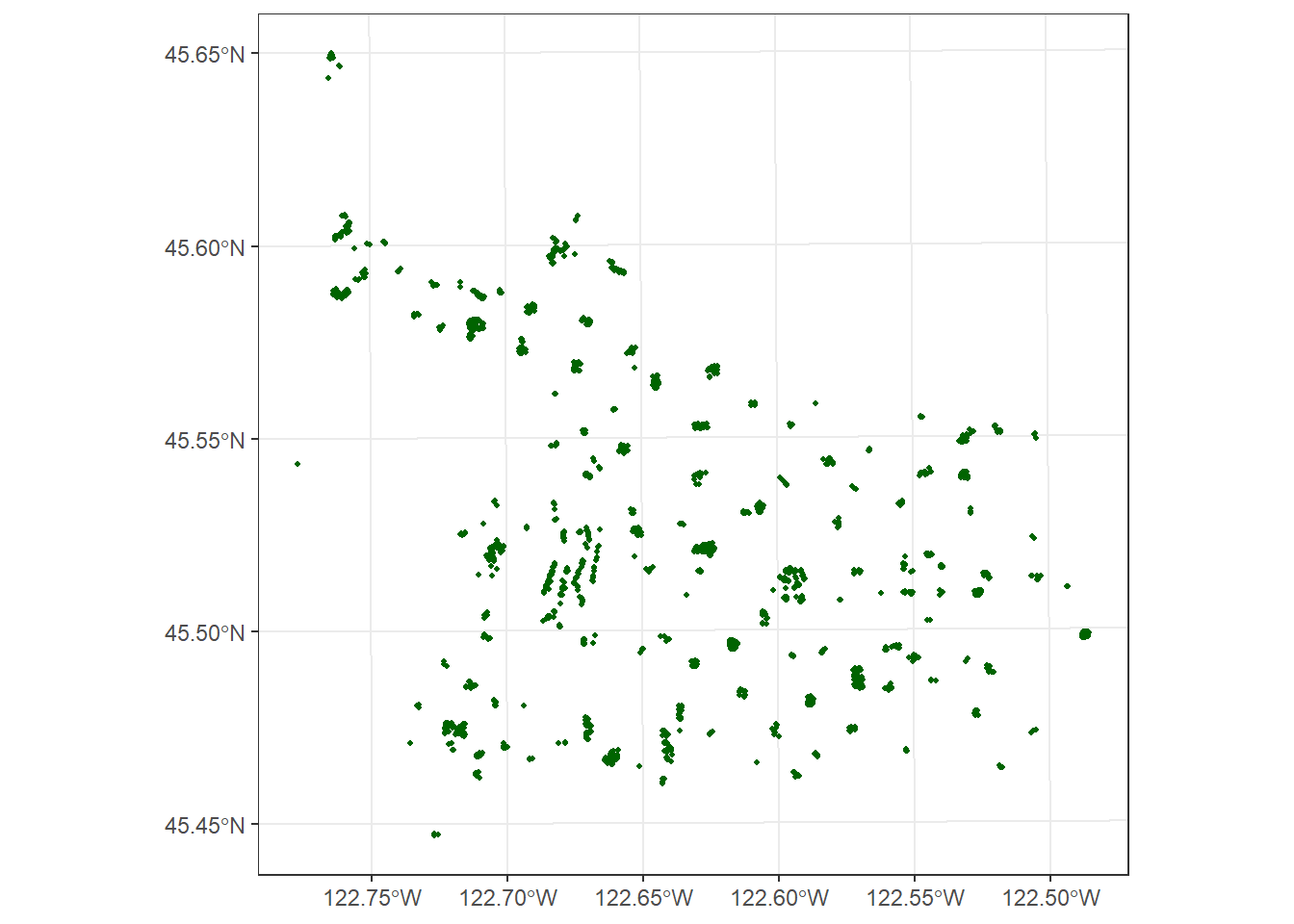
# ℹ 1,990 more rowsn_distinct(treesSF$Park)[1] 156Mapping the trees shows that they are not evenly distributed across the city. Instead, they are clustered within parks, with many parks represented in the sample. Trees within the same park are likely to be similar to each other, as they may have been planted at the same time, managed in the same way, and experience similar growing conditions. This is a good example of data where spatial autocorrelation should be considered.
15.4 Random v-Fold Cross-Validation
Before exploring spatial methods, we first generate folds using standard random 5-fold cross-validation with vfold_cv(). This will serve as a point of comparison. Unlike the spatialsample functions, rsample objects do not have an autoplot() method for maps. So, we use the complement() function to obtain the indices of the assessment samples for each fold, write the fold ID to a new column, and map the result using ggplot2.
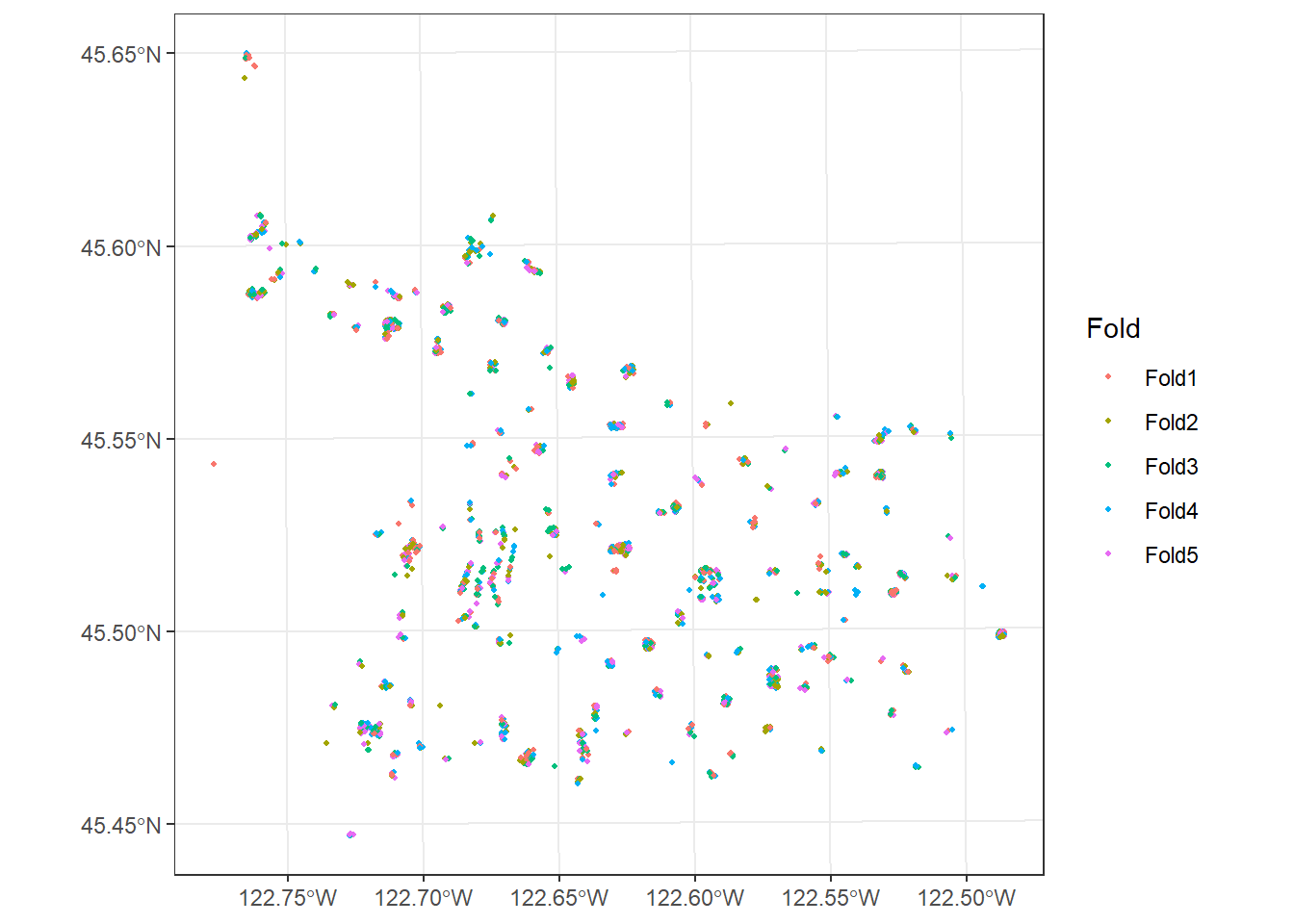
Note that all five folds are intermixed across the entire study area and within each park. When any one fold is withheld for assessment, nearly every withheld tree will have trees from the same park in the analysis set.
15.5 Spatial Clustering Cross-Validation
spatial_clustering_cv() uses the coordinates of the samples to group them into v spatial clusters, and each cluster then serves as a fold. By default, k-means clustering is used (cluster_function = "kmeans"). Since each fold is a spatially contiguous region, the assessment data for each iteration are spatially separated from much of the analysis data.
The result is a spatial_clustering_cv object, which is a type of rset and is printed similarly to the output of vfold_cv(). Each split lists the number of analysis and assessment samples. Note that the folds are not of equal size since the number of samples in each fold depends on the clustering result. The autoplot() function can be used to map the folds.
set.seed(42)
foldsCluster <- spatial_clustering_cv(treesSF, v = 5)
foldsCluster
# 5-fold spatial cross-validation
# A tibble: 5 × 2
splits id
<list> <chr>
1 <split [1599/401]> Fold1
2 <split [1566/434]> Fold2
3 <split [1571/429]> Fold3
4 <split [1619/381]> Fold4
5 <split [1645/355]> Fold5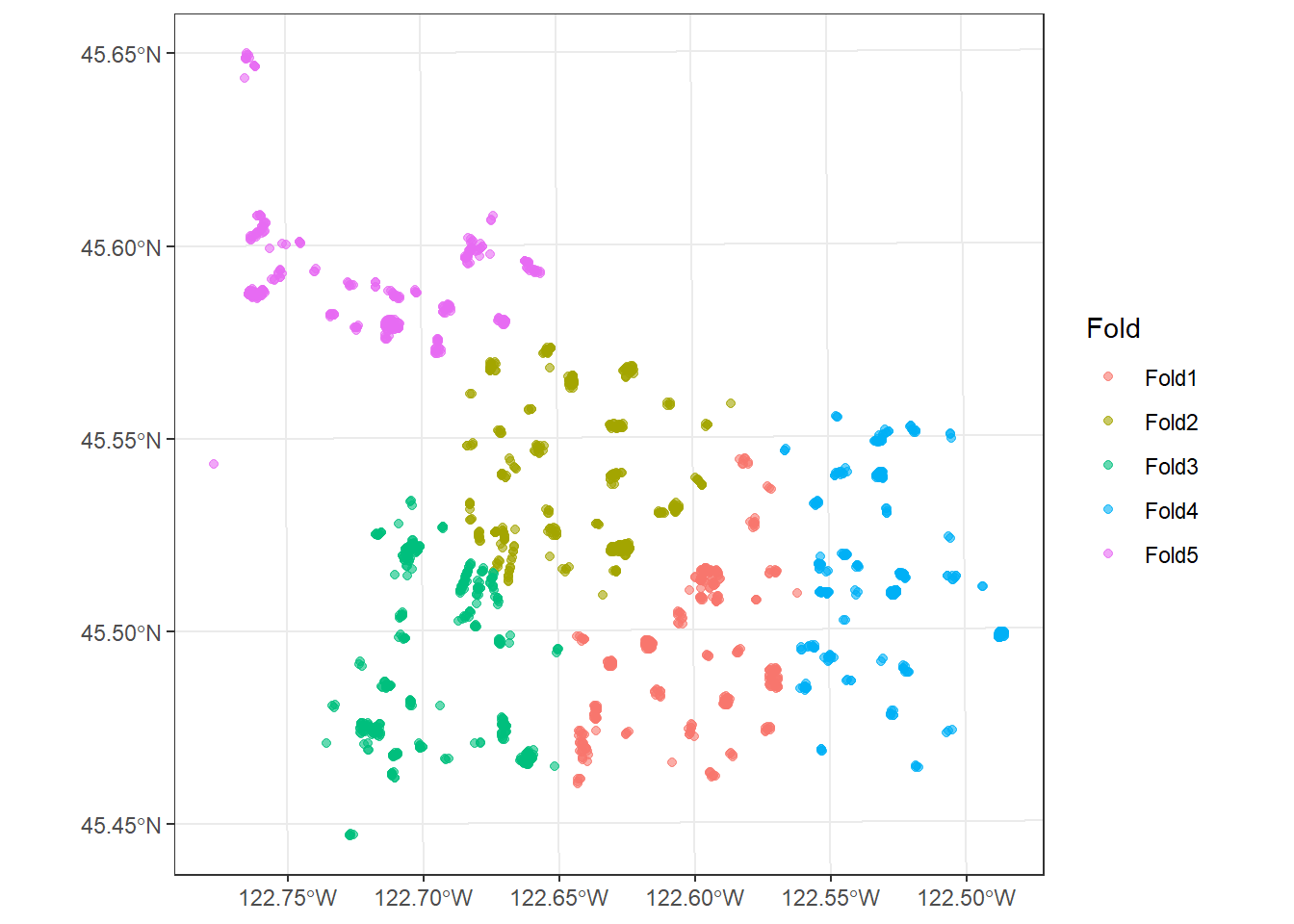
Hierarchical clustering can be used instead by setting cluster_function = "hclust". You can also provide your own clustering function.
set.seed(42)
foldsHclust <- spatial_clustering_cv(treesSF, v = 5, cluster_function = "hclust")

autoplot(foldsHclust) +
  theme_bw()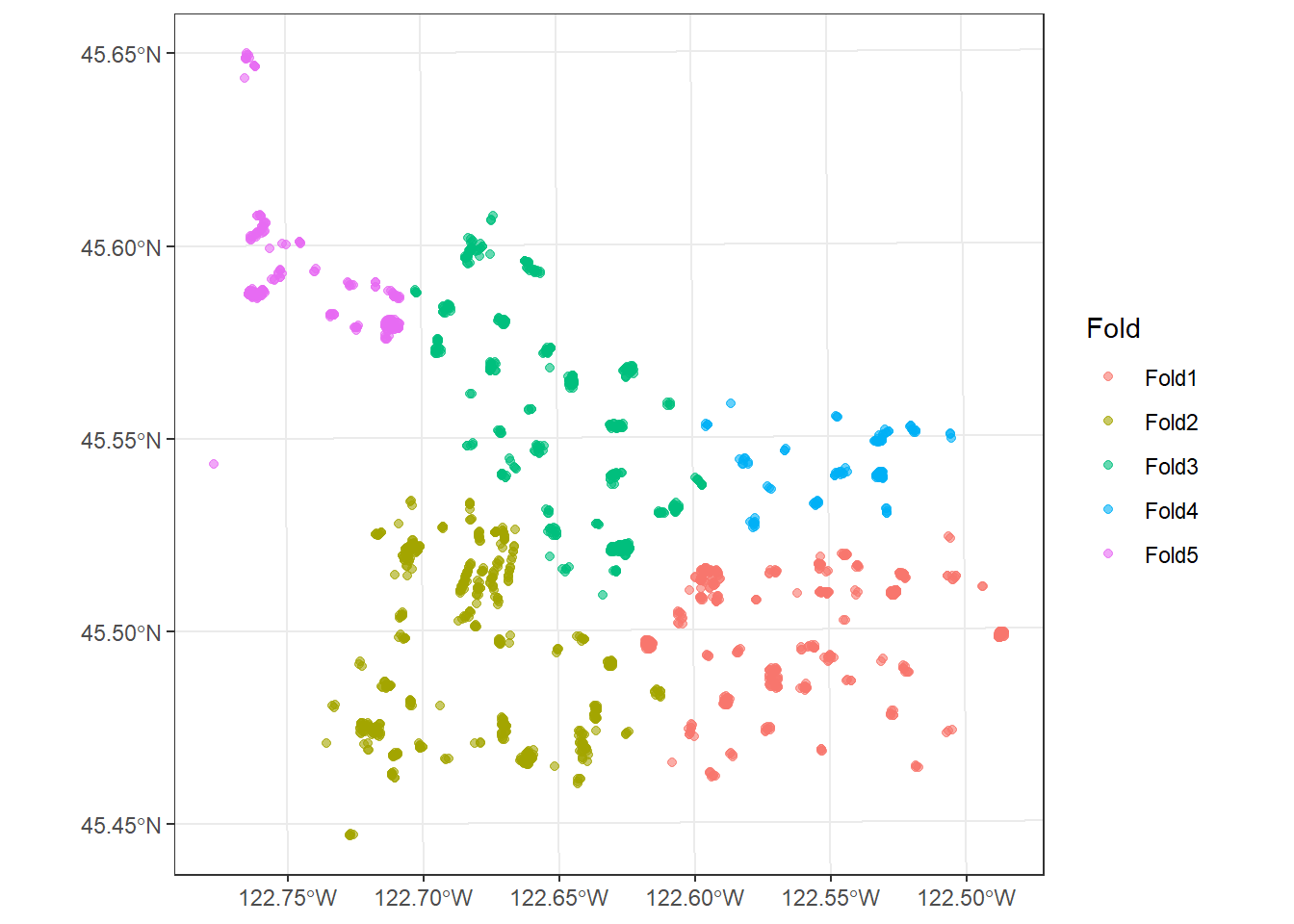
15.6 Spatial Block Cross-Validation
spatial_block_cv() overlays a regular grid of blocks over the study area. All samples that fall within the same block are assigned to the same fold. The size of the blocks can be defined using either the cellsize argument, which specifies the size of each block in map units, or the n argument, which specifies the number of blocks in the x and y directions. By default, square blocks are used. Setting square = FALSE will generate hexagonal blocks instead. By default, only blocks that contain samples are considered (relevant_only = TRUE).
The method argument determines how blocks are assigned to folds:
-
"random": blocks are randomly assigned to folds (the default) -
"snake": blocks are assigned to folds in order, moving left to right across the first row, right to left across the second row, and so on -
"continuous": blocks are assigned to folds in order, moving left to right across each row
In the first example, we use 2 km by 2 km blocks with random assignment to five folds. When applied to a spatial_block_cv object, autoplot() also displays the blocks.
set.seed(42)
foldsBlock <- spatial_block_cv(treesSF, v = 5, method = "random", cellsize = 2000)
foldsBlock
# 5-fold spatial block cross-validation
# A tibble: 5 × 2
splits id
<list> <chr>
1 <split [1735/265]> Fold1
2 <split [1629/371]> Fold2
3 <split [1507/493]> Fold3
4 <split [1509/491]> Fold4
5 <split [1620/380]> Fold5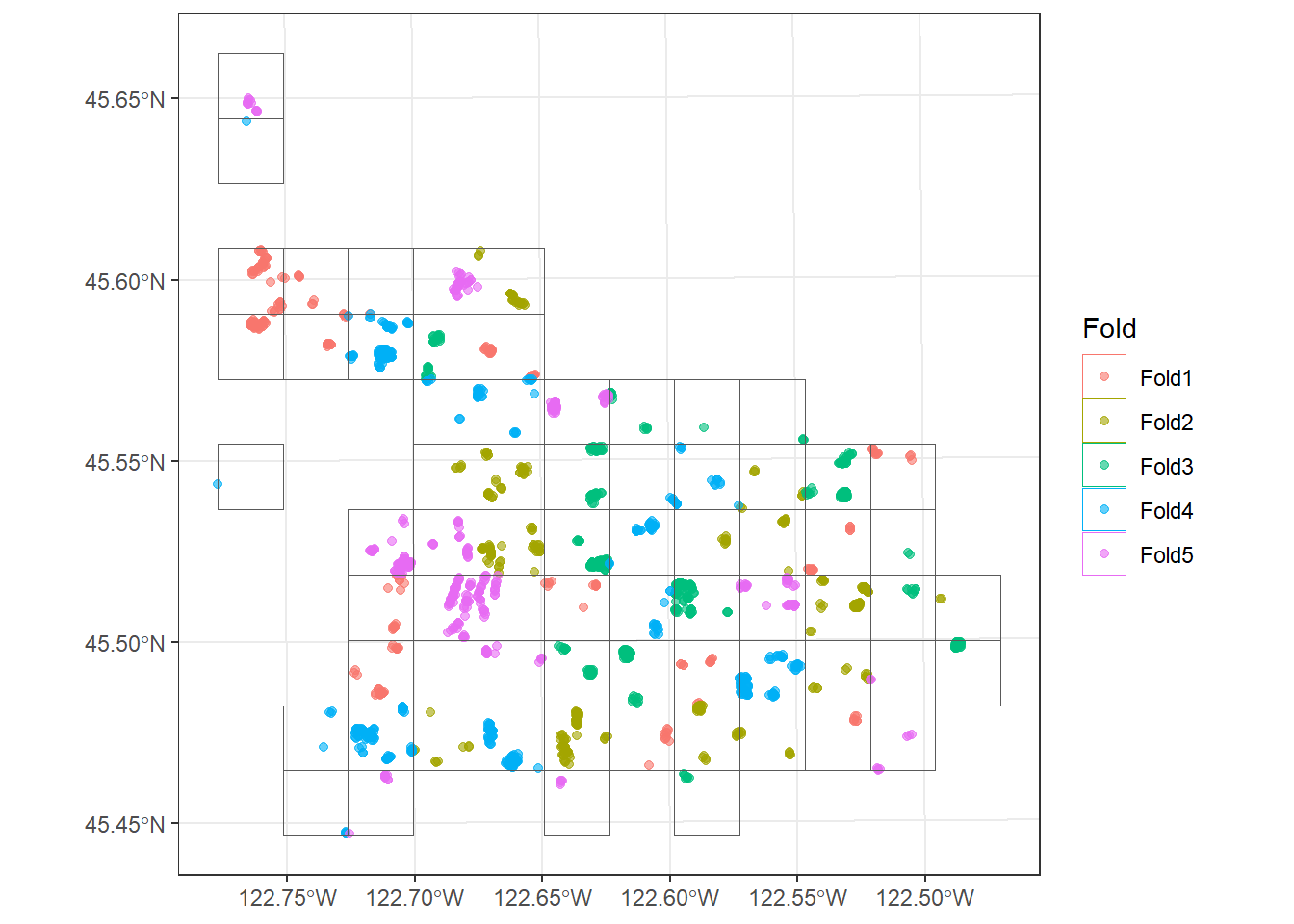
In this second example, the blocks are assigned to folds using the "snake" method. Since adjacent blocks are assigned to different folds, this method helps distribute each fold across the study area as opposed to having one fold dominate a specific region.
set.seed(42)
foldsSnake <- spatial_block_cv(treesSF, v = 5, method = "snake", cellsize = 2000)

autoplot(foldsSnake) +
  theme_bw()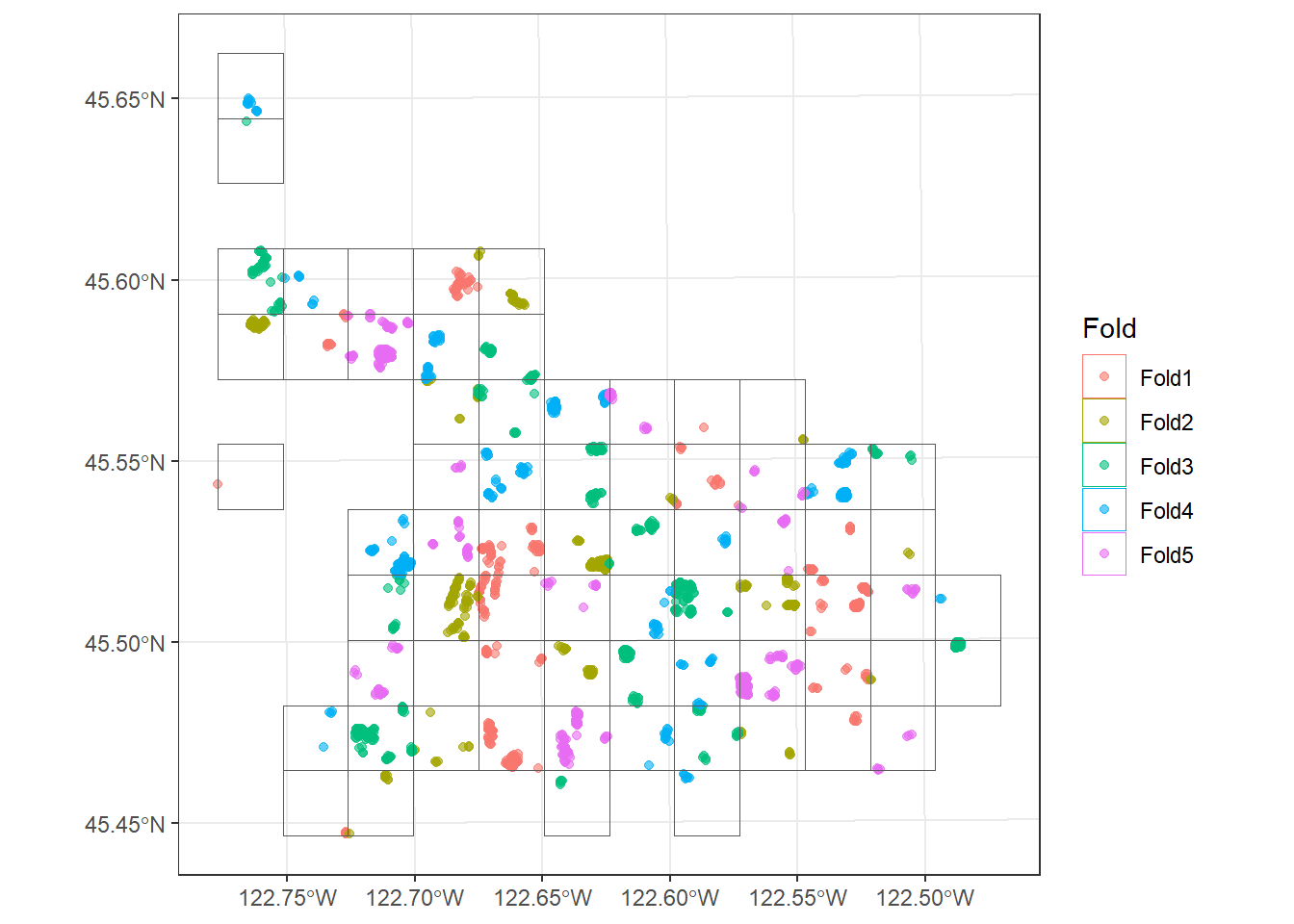
The size of the blocks or clusters should be large relative to the distance over which the data are spatially autocorrelated. If the blocks are too small, the analysis and assessment data will still be close together. If they are too large, the folds may differ substantially in their environmental conditions or in the number of samples they contain.
15.7 Leave-Location-Out Cross-Validation
In some cases, samples are already naturally grouped by location, such as multiple samples collected at the same field site or, in our example, multiple trees within the same park. spatial_leave_location_out_cv() assigns all samples from the same location to the same fold. The grouping variable is provided using the group argument.
If v is not specified, each location becomes its own fold, which would result in a separate fold for each of the parks in our sample. Here, we set v = 5 so that the parks are randomly grouped into five folds. As a result, each fold contains complete parks, and a park is never split between the analysis and assessment data.
set.seed(42)
foldsLLO <- spatial_leave_location_out_cv(treesSF, group = Park, v = 5)
foldsLLO
# 5-fold spatial leave-location-out cross-validation
# A tibble: 5 × 2
splits id
<list> <chr>
1 <split [1657/343]> Resample1
2 <split [1661/339]> Resample2
3 <split [1500/500]> Resample3
4 <split [1543/457]> Resample4
5 <split [1639/361]> Resample5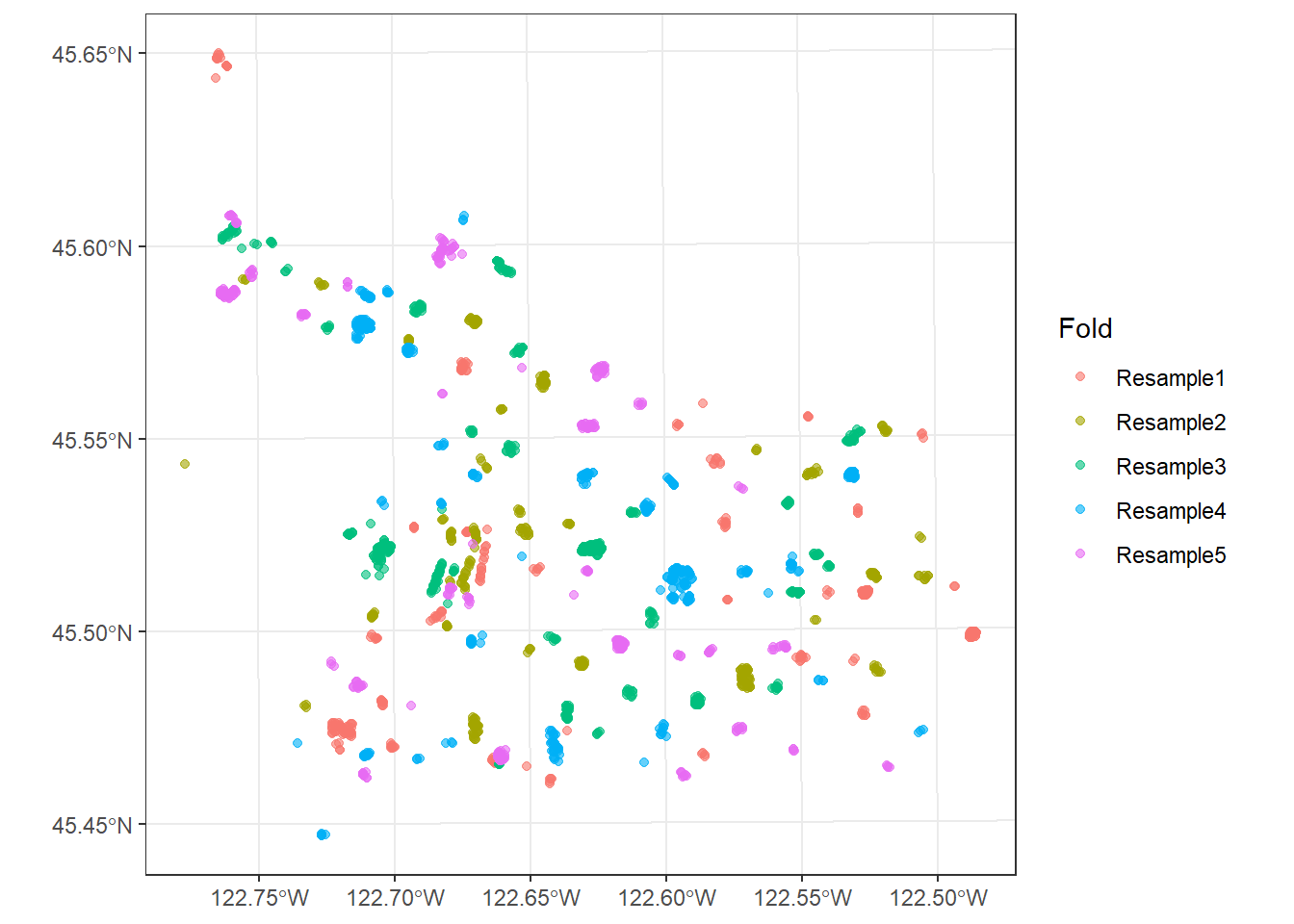
Note that this method does not guarantee that the folds are spatially separated: two neighboring parks could be assigned to different folds. However, it does guarantee that trees from the same park are not used for both training and assessment. This method is analogous to group_vfold_cv() from rsample.
15.8 Buffers and Radii
Even when using spatial folds, samples along the edge of an assessment fold may be very close to samples in neighboring analysis folds. To further separate the data, most of the spatialsample functions accept two additional arguments:
-
radius: samples within this distance of the assessment data are added to the assessment set -
buffer: samples within this distance of the assessment data (after applying the radius) are removed from the analysis set
Samples that fall within the buffer are not used in either the analysis or assessment set for that iteration. In this section, we visualize individual splits as opposed to all folds at once. The get_rsplit() function extracts a single split from a resampling object, and autoplot() maps the analysis, assessment, and buffer samples for that split.
15.8.1 Buffered v-Fold Cross-Validation
spatial_buffer_vfold_cv() randomly assigns samples to folds, similar to vfold_cv(), but then applies the radius and buffer. Both the radius and buffer arguments must be provided, though either can be set to NULL. In the example, we use no radius and a 100 m buffer.
set.seed(42)
foldsBuffer <- spatial_buffer_vfold_cv(treesSF, v = 5, radius = NULL, buffer = 100)
foldsBuffer
# 5-fold spatial cross-validation
# A tibble: 5 × 2
splits id
<list> <chr>
1 <split [491/400]> Fold1
2 <split [544/400]> Fold2
3 <split [490/400]> Fold3
4 <split [439/400]> Fold4
5 <split [504/400]> Fold5autoplot(get_rsplit(foldsBuffer, 1)) +
theme_bw()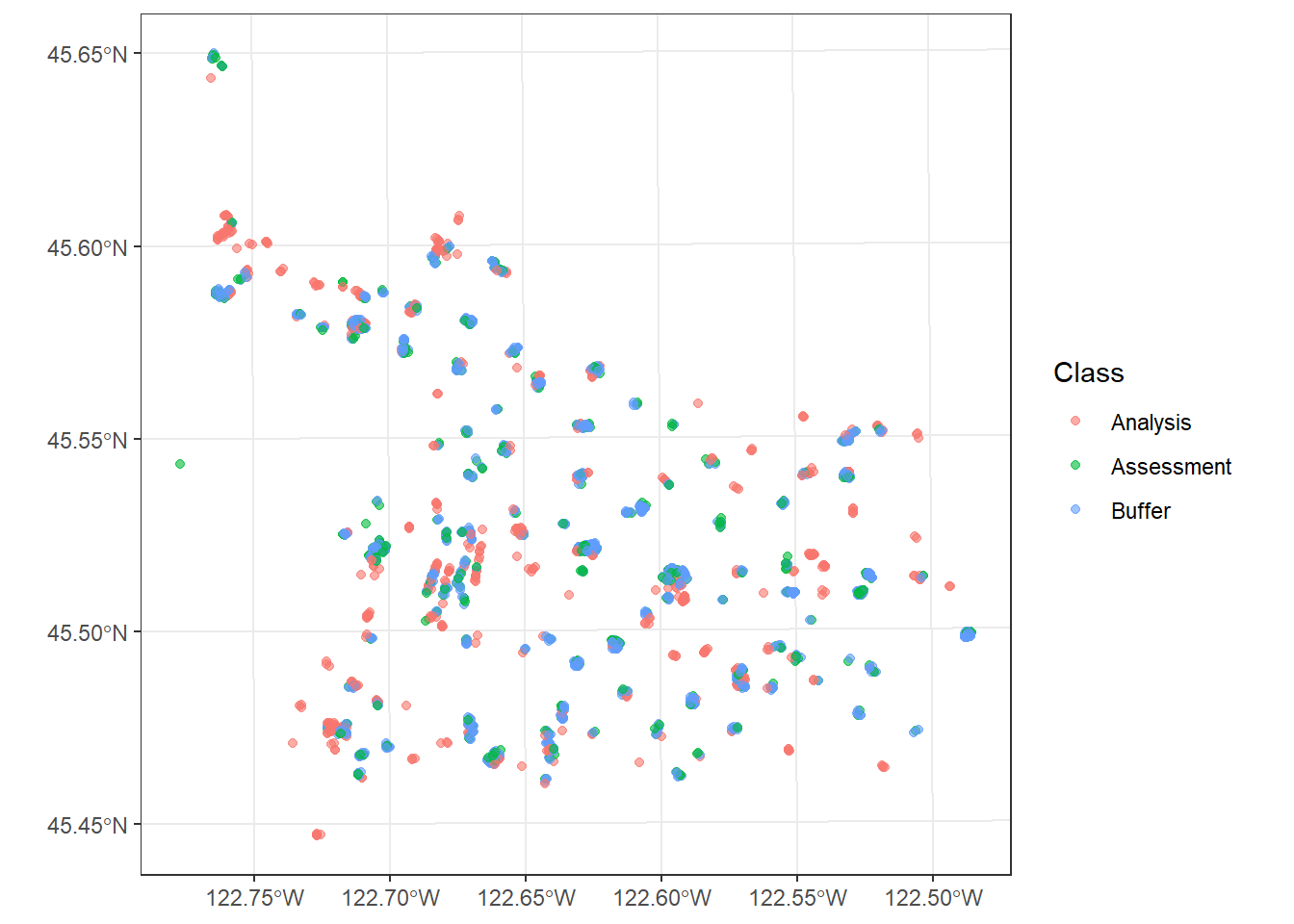
Note how much smaller the analysis sets are compared to the random v-fold cross-validation example. Even though only a 100 m buffer was used, roughly 70% of the samples not in the assessment set had to be removed from the analysis set because they were within 100 m of an assessment sample. This highlights how strongly clustered the trees are within parks and how close the analysis and assessment samples were to each other when using random v-fold cross-validation.
15.8.2 Adding a Buffer to Spatial Folds
Buffers can also be applied to the other spatial resampling methods. Below, we add a 500 m buffer to spatial clustering cross-validation and a 250 m buffer to leave-location-out cross-validation. Since these methods already generate spatially separated folds, fewer samples are removed from the analysis set than when using buffered random folds. In the leave-location-out example, the buffered samples are trees in other parks that are adjacent to parks in the assessment set.
set.seed(42)
foldsClusterBuf <- spatial_clustering_cv(treesSF, v = 5, buffer = 500)
foldsClusterBuf
# 5-fold spatial cross-validation
# A tibble: 5 × 2
splits id
<list> <chr>
1 <split [1599/401]> Fold1
2 <split [1548/434]> Fold2
3 <split [1557/429]> Fold3
4 <split [1619/381]> Fold4
5 <split [1645/355]> Fold5autoplot(get_rsplit(foldsClusterBuf, 2)) +
theme_bw()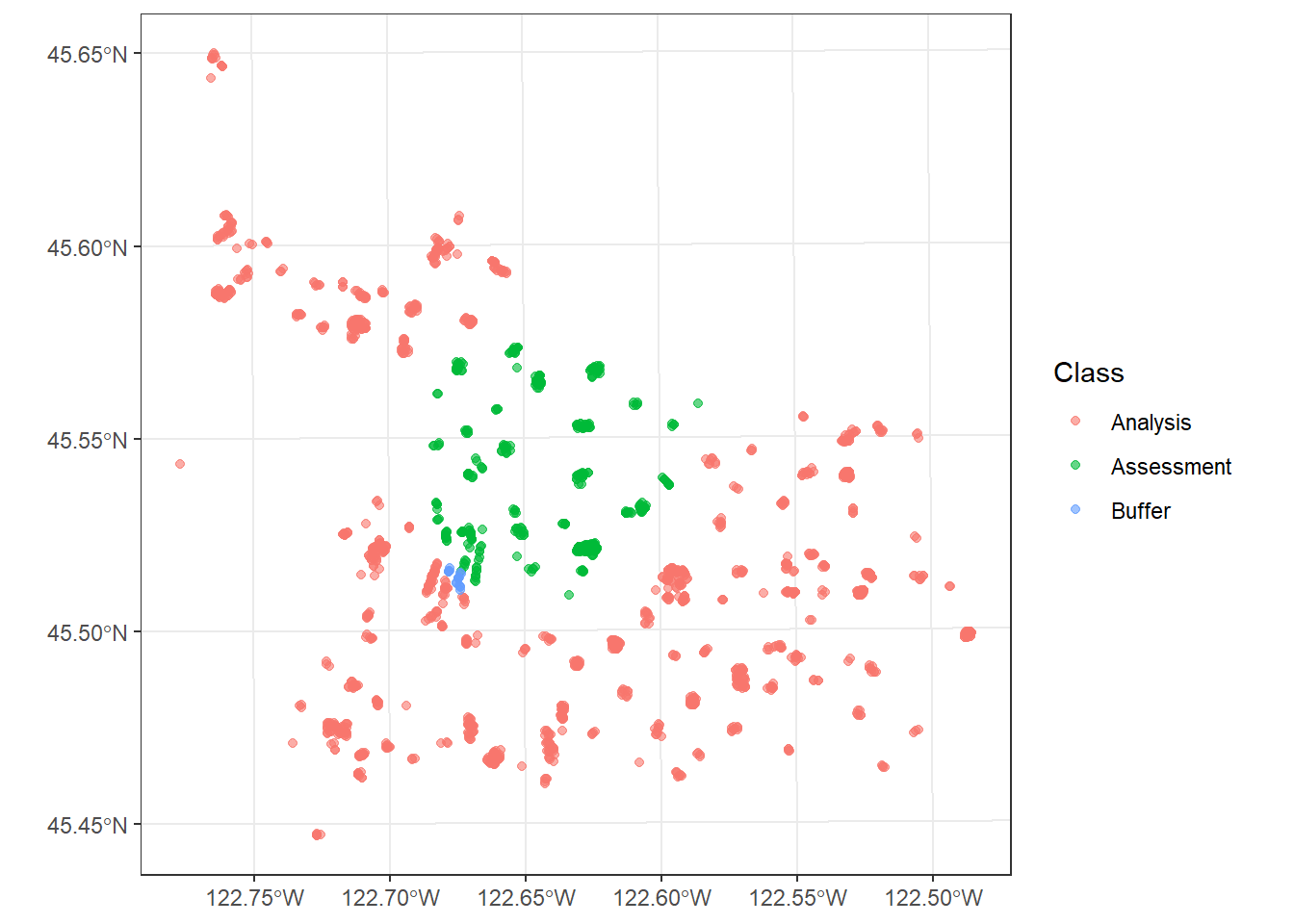
set.seed(42)
foldsLLOBuf <- spatial_leave_location_out_cv(treesSF, group = Park, v = 5, buffer = 250)

autoplot(get_rsplit(foldsLLOBuf, 1)) +
  theme_bw()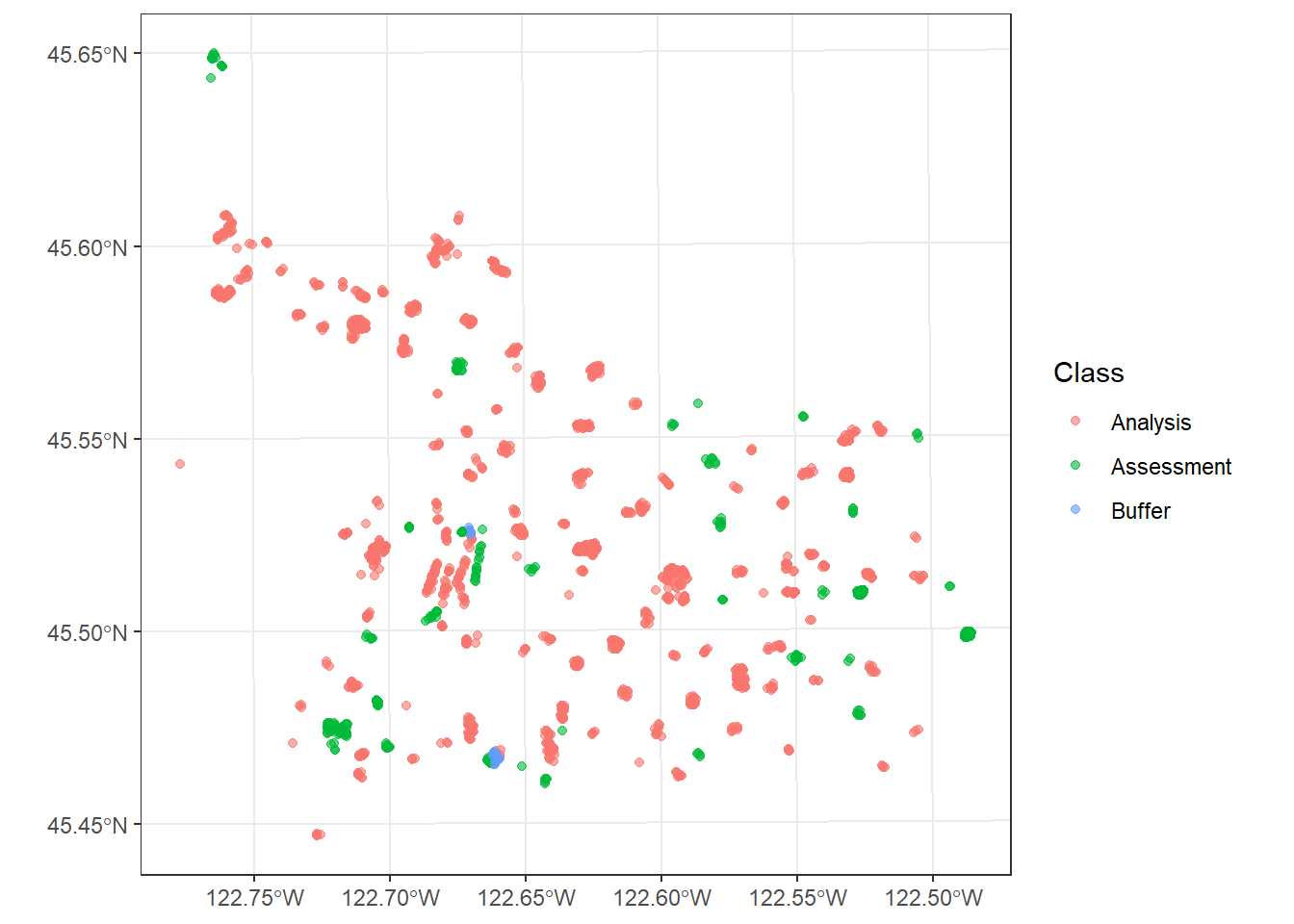
15.9 Nearest Neighbor Distance Matching
The methods above separate the analysis and assessment data, but they do not consider where the model will actually be used. If a model will only be used to make predictions near the training samples, strict spatial separation may result in overly pessimistic performance estimates. If the model will be used to make predictions far from the training samples, random resampling will be overly optimistic.
Nearest neighbor distance matching (NNDM) cross-validation, implemented with spatial_nndm_cv(), attempts to balance this. It is a variant of leave-one-out cross-validation: each sample is withheld for assessment one at a time. For each iteration, nearby samples are removed from the analysis set so that the distribution of distances between assessment samples and their nearest analysis samples matches the distribution of distances between the prediction sites, or the locations where the model will be applied, and their nearest training sample. The prediction_sites argument accepts either an sf point object or a polygon. If a polygon is provided, points are sampled from within it.
Since a separate split is generated for each sample and the distance calculations are computationally intensive, this method can be slow for large datasets. So, we randomly select 200 trees for this example. We define the prediction area as the convex hull of all the sampled trees using st_union() and st_convex_hull(). In other words, we are assuming that the model will be used to make predictions across the entire area covered by the park trees, including locations outside of parks.
predArea <- st_convex_hull(st_union(treesSF))

set.seed(42)
treesSub <- slice_sample(treesSF, n = 200)
foldsNNDM <- spatial_nndm_cv(treesSub, prediction_sites = predArea)
foldsNNDM
# A tibble: 200 × 2
splits id
<list> <chr>
1 <split [198/1]> Fold001
2 <split [195/1]> Fold002
3 <split [191/1]> Fold003
4 <split [194/1]> Fold004
5 <split [197/1]> Fold005
6 <split [192/1]> Fold006
7 <split [194/1]> Fold007
8 <split [198/1]> Fold008
9 <split [189/1]> Fold009
10 <split [193/1]> Fold010
# ℹ 190 more rowsThe result contains 200 splits, one per sample, each with a single assessment sample. We can map one split along with the prediction area. The assessment tree is shown along with any nearby trees that were removed from the analysis set.
autoplot(get_rsplit(foldsNNDM, 1)) +
  geom_sf(data = predArea, fill = NA) +
  theme_bw()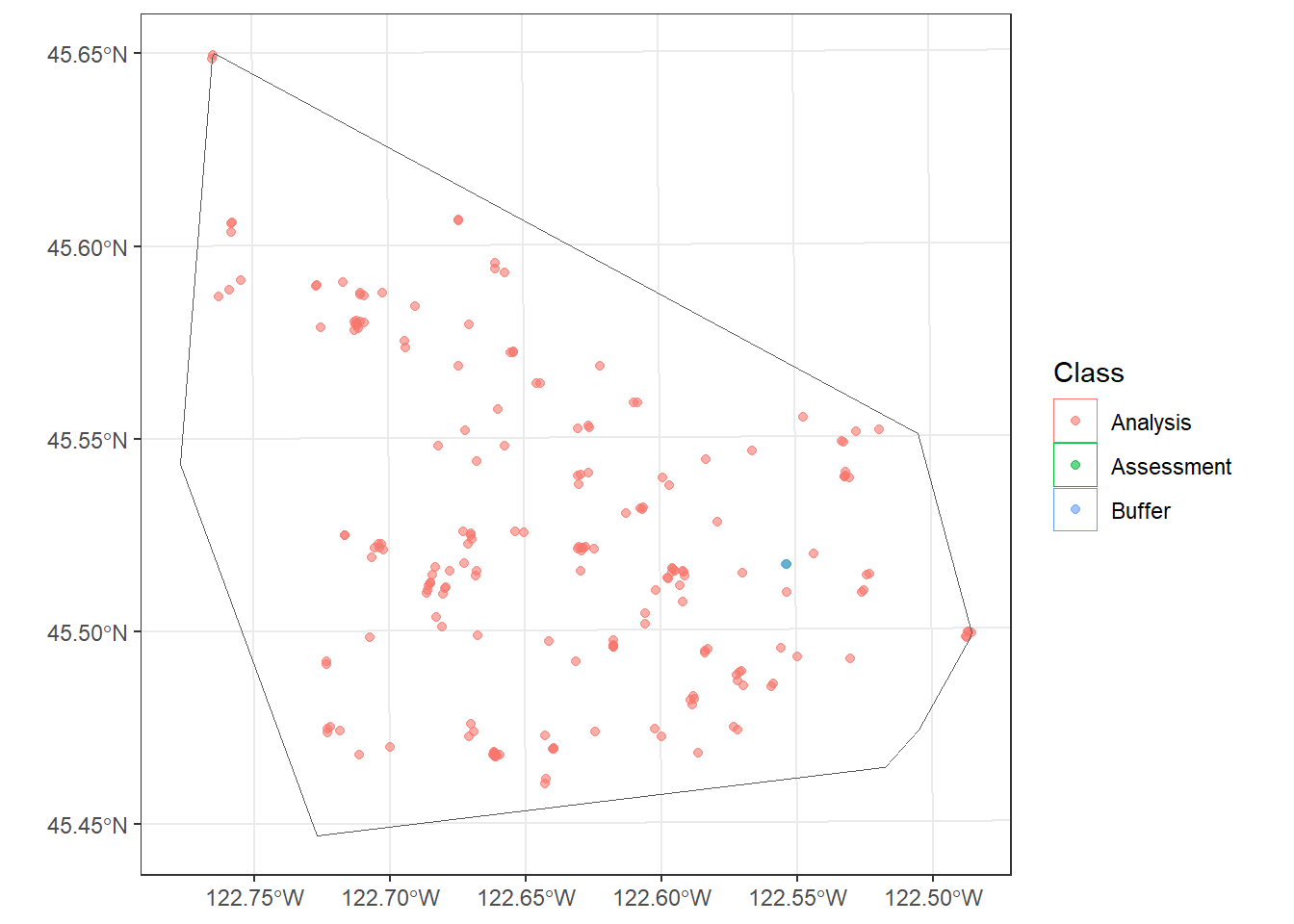
15.10 Using Spatial Resamples in a Workflow
Although we do not train any models in this chapter, it is worth noting how these resamples are used. Any of the resampling objects created above can be provided to the resamples argument of tune_grid() or fit_resamples() in place of the folds generated by vfold_cv(). For example, if we had defined a workflow (treeWF) and tuning grid (treeGrid) to predict tree height, as demonstrated in the prior chapter, we could tune the model using spatial clustering cross-validation as follows.
treeTune <- treeWF |>
  tune_grid(
    resamples = foldsCluster,
    grid = treeGrid,
    metrics = metric_set(rmse, rsq)
  )
15.11 Concluding Remarks
When samples are spatially autocorrelated, randomly partitioning them can result in overly optimistic estimates of model performance. The spatialsample package provides several methods for defining spatially aware resamples, including clustering, blocking, grouping by location, applying buffers, and matching distances to prediction locations. There is not a single best method. The appropriate choice depends on how the data were collected, the distance over which the data are autocorrelated, and, most importantly, where the model will be used to make predictions. Since these methods produce standard rsample objects, they can easily be integrated into the tidymodels workflows discussed in the prior chapters.
15.12 Questions
- Explain how spatial autocorrelation can cause random v-fold cross-validation to produce overly optimistic estimates of model performance.
- Explain the difference between spatial clustering cross-validation and spatial block cross-validation.
- Describe the
"random","snake", and"continuous"methods for assigning blocks to folds inspatial_block_cv(). - How should the size of the blocks or clusters relate to the distance over which the data are spatially autocorrelated? What problems arise if they are too small or too large?
- What is the purpose of leave-location-out cross-validation, and when is it appropriate? Why does it not guarantee that the analysis and assessment data are spatially separated?
- Explain the difference between the
radiusandbufferarguments used by the spatialsample functions. - Why can applying a buffer to randomly assigned folds remove a large proportion of the analysis data when samples are spatially clustered?
- Explain the goal of nearest neighbor distance matching (NNDM) cross-validation. What information about the intended use of the model does it require?
- Why is it important to use a projected coordinate reference system when working with spatialsample?
- How are the resampling objects created by spatialsample used within a tidymodels workflow?
15.13 Exercises
In this exercise, you will create and compare spatial resamples for the landslide data introduced in the Chapter 10 exercises. You have been provided with the following file in the exercise folder for the chapter.
- chpt15.gpkg/lsPnts: point locations representing landslide locations (“slpF”) and pseudo-absence locations (“not”) within the Valley and Ridge physiographic province of West Virginia. The points span roughly 300 km by 275 km.
The data are already in a projected coordinate reference system (NAD83 / UTM Zone 17N) with map units of meters, so distances can be specified in meters.
Data Preparation
Task 1
- Read in the lsPnts layer with
st_read()from sf. Keep the geometry, since it is required by spatialsample. - Use
st_crs()to confirm the coordinate reference system and its map units. - Map the points with tmap, coloring them by class. Describe the spatial distribution of the landslides and pseudo-absences. Do the landslides appear to be clustered?
Create Spatial Resamples
Task 2
Using a random seed for each so that your results are reproducible, create the following sets of 5 folds:
- Random v-fold cross-validation with
vfold_cv()from rsample, as a non-spatial point of comparison - Spatial clustering cross-validation with
spatial_clustering_cv(), using k-means clustering - Spatial block cross-validation with
spatial_block_cv(), using 25 km by 25 km blocks (cellsize = 25000) and random assignment of blocks to folds - Spatial block cross-validation using the same block size but the
"snake"assignment method - Buffered v-fold cross-validation with
spatial_buffer_vfold_cv(), using no radius and a 2 km buffer
Print each resampling object. How do the numbers of analysis and assessment samples differ between the folds for each method?
Visualize the Folds with tmap
Task 3
The autoplot() function used in this chapter produces ggplot2 graphics. Here, you will produce the maps with tmap instead.
- Write a function that accepts a resampling object and returns the points with a new column indicating the fold to which each point is assigned for assessment. Hint: as demonstrated in the random v-fold cross-validation section of this chapter,
complement()returns the indices of the assessment samples for a split. - Use your function and
tm_dots()to map the fold assignments for the random, clustering, and both block cross-validation methods. Color the points by fold, and add a title indicating the method. - Use
tmap_arrange()to display the four maps side by side. - Compare the maps. How does the spatial arrangement of the folds differ between the methods? How does the random block assignment differ from the snake assignment?
Task 4
- Extract the first split of the buffered v-fold cross-validation using
get_rsplit(). - Create a new column that labels each point as “Analysis”, “Assessment”, or “Buffer” for this split. Hint: the
in_idelement of a split contains the indices of the analysis samples,complement()returns the indices of the assessment samples, and all remaining points fall within the buffer. - Map the result with tmap, coloring the points by their role.
- What proportion of the non-assessment points were removed by the buffer? Explain why so many points were removed, even though the buffer is only 2 km. Hint: calculate the distances between each point and its nearest neighbor.
Reflection
Task 5
- Repeat the spatial block cross-validation using 10 km and 50 km blocks. How does the block size affect the spatial separation of the analysis and assessment data and the balance of samples between folds?
- If you were assessing a landslide susceptibility model that would be used to make predictions in a new region of the province, which resampling method would you choose, and why?
- If the model would only be used to fill in gaps between existing landslide inventories within the mapped area, would your choice change? Explain your reasoning.