23 Geospatial Semantic Segmentation: Models and Assessment (geodl)
23.1 Topics Covered
- Initialize and parameterize a customizable UNet semantic segmentation model
- Use UNet with ResNet, MobileNetv2, or EfficientNet-B2 encoders and pre-trained weights
- Use the UNet3+ and modified DeepLabv3+ architectures
- Configure losses using the unified focal loss framework
- Assess models using point or pixel locations, raster grids, or a torch dataloader
- Configure a model for extracting landforms or geomorphic features from LSP predictor variables (TerrainSeg)
23.2 Introduction
geodl is still actively being developed. We recommend installing it from GitHub as opposed to CRAN. This can be accomplished using devtools as follows:
devtools::install_github("maxwell-geospatial/geodl")
In Chapter 22, we introduced the geodl package and explored the data preparation workflow. In this chapter, we explore the remaining components of the package that are needed before a model can be trained: the semantic segmentation architectures, the unified focal loss framework, and the tools used to assess model predictions. We also introduce the TerrainSeg model, which calculates LSPs within the model architecture to support the extraction of landforms and geomorphic features from digital terrain data. In Chapter 24 and Chapter 25, we bring all of these components together into complete workflows.
Before beginning, we load the required packages and define the path to the data folder for this chapter and the folder where we wish to save output.
fldPth <- "gslrData/chpt23/data/"
outPth <- "gslrData/chpt23/output/"
23.3 Models
23.3.1 UNet
As discussed in Chapter 21, UNet was originally introduced in the following paper:
Ronneberger, O., Fischer, P. and Brox, T., 2015. U-net: Convolutional networks for biomedical image segmentation. In Medical image computing and computer-assisted intervention–MICCAI 2015: 18th international conference, Munich, Germany, October 5-9, 2015, proceedings, part III 18 (pp. 234-241). Springer international publishing.
Figure 23.1 conceptualizes the customizable UNet architecture implemented by geodl using the defineUNet() function. The user is able to define the number of input predictor variables (inChn), number of output classes (nCls), number of feature maps generated by each encoder block (enChn), number of feature maps generated by the bottleneck block (btnChn), and number of feature maps generated by each decoder block (dcChn). The user can choose between the following activation functions using the actFunc parameter: rectified linear unit (ReLU) ("relu"), leaky ReLU ("lrelu"), swish ("swish"), or Gaussian error linear unit (GELU) ("gelu"). If leaky ReLU is used, the negative_slope parameter defines the negative slope term, which is 0.01 by default.

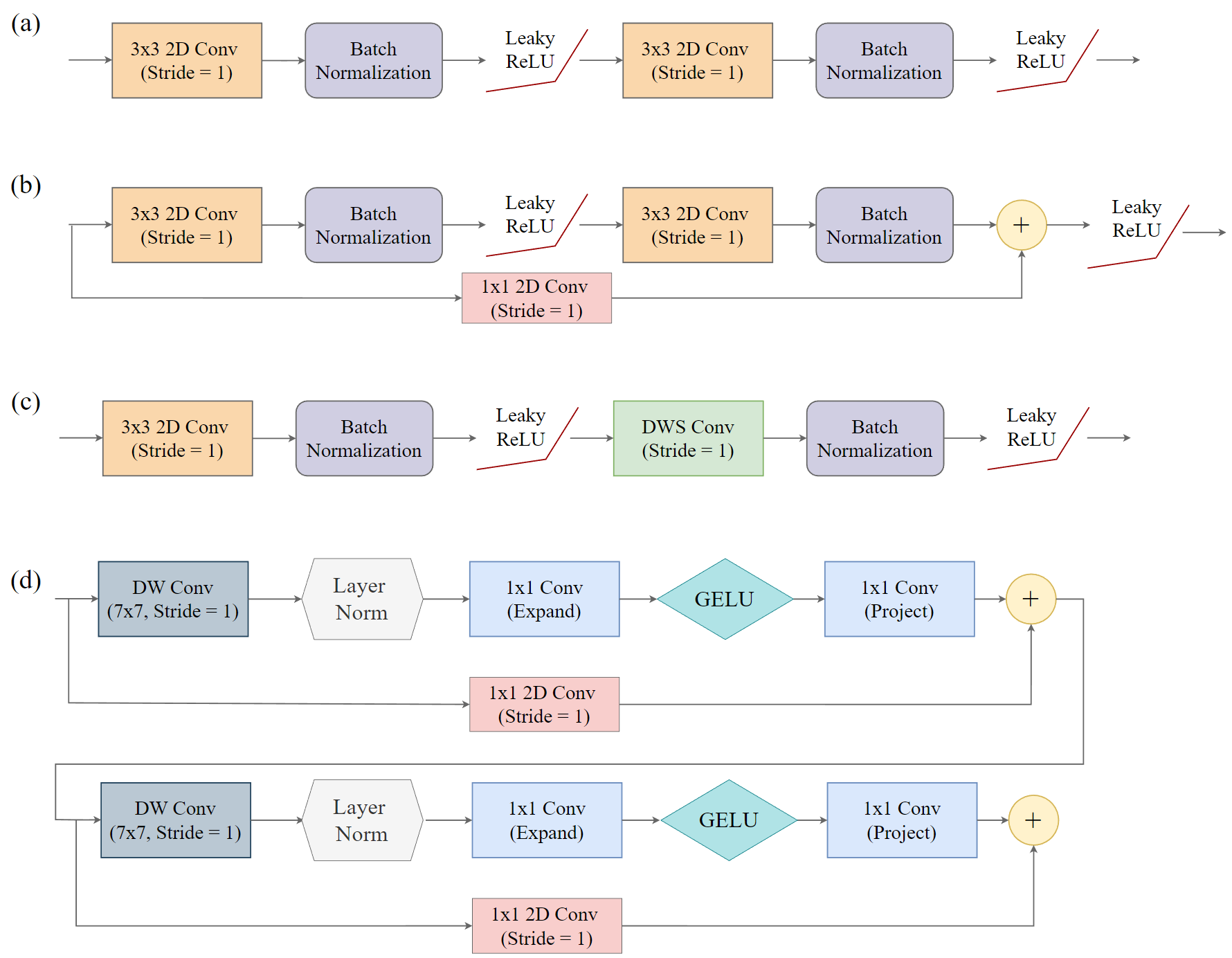
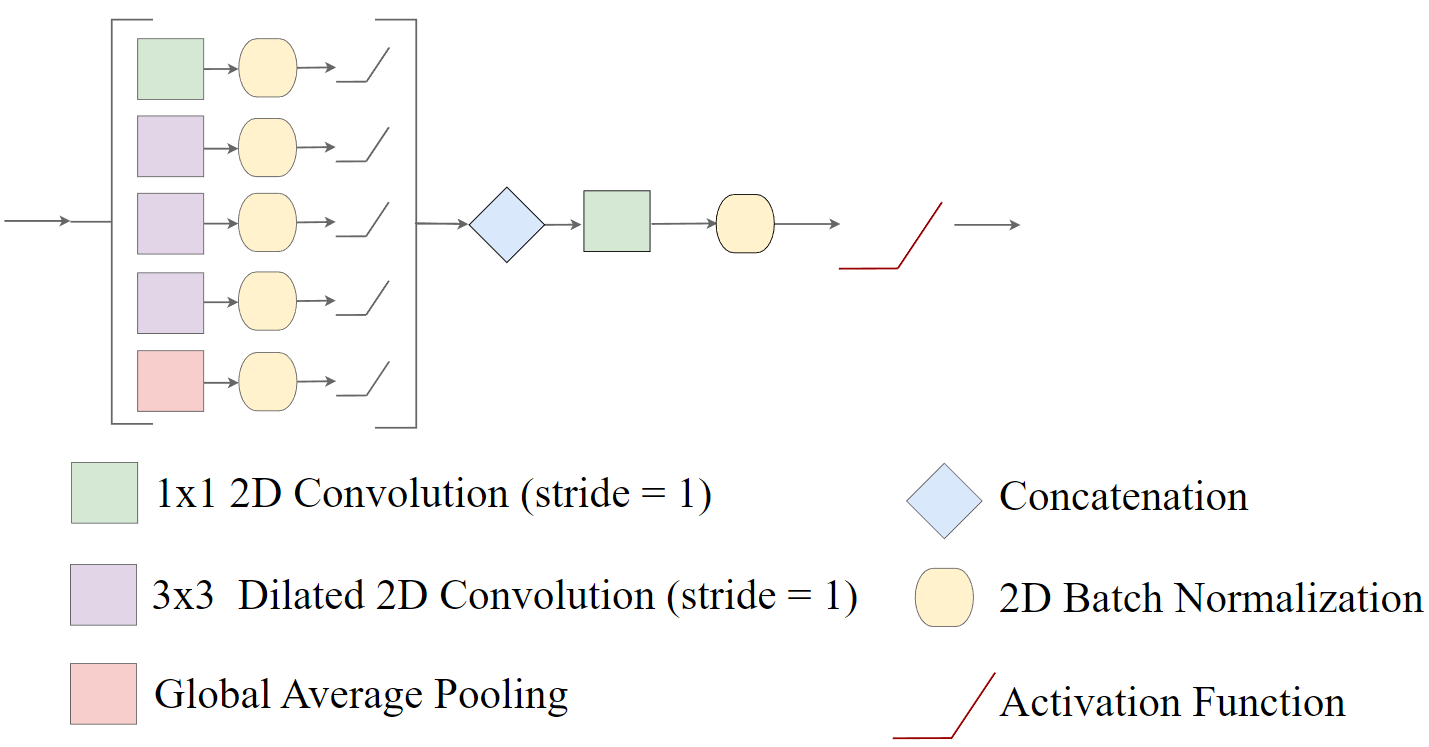
The encBlocks, btnBlocks, and decBlocks parameters allow the user to specify the types of blocks used by each block in the model. These different types of blocks are conceptualized in Figure 23.2. The default ("double") is the traditional double-convolution block (Figure 23.2(a)). If useRes=TRUE, a residual connection is included within each double-convolution block (Figure 23.2(b)). This can be helpful to combat the vanishing gradient problem. Since the number of output feature maps is different from the number of input feature maps, a 1x1 2D convolution is used to change the number of feature maps along the projection connection. "dws" implements a lighter block that uses traditional convolution followed by depthwise separable convolution (Figure 23.2(c)) (this block is referred to as DWS-style here). Lastly, "convnext" implements ConvNeXt-style blocks (Figure 23.2(d)). The expRatio parameter defines the inverted-bottleneck expansion ratio used in the ConvNeXt-style blocks. For the bottleneck, it is also possible to implement atrous spatial pyramid pooling (ASPP) using "aspp" (Figure 23.3). If the bottleneck uses an ASPP modification, the dilChn parameter defines the number of channels to generate in each component of the module while the dilRates parameter specifies the dilation rates to use. For the encoder and decoder, the user can specify the same type of operation for each block or provide a vector of length four to use different types of operations per block. Note also that the useRes parameter is only applicable to double-convolution and DWS-style blocks (not ConvNeXt-style blocks), and the ConvNeXt blocks always use a GELU activation function.
In terms of computational load, "dws" < "double" < "convnext". "convnext" may be most useful when used within later encoder blocks, the bottleneck, and earlier decoder blocks. Using these operations in earlier encoder or later decoder blocks can be computationally intensive. "dws" is useful for use in earlier encoder or later decoder blocks to reduce computational load.
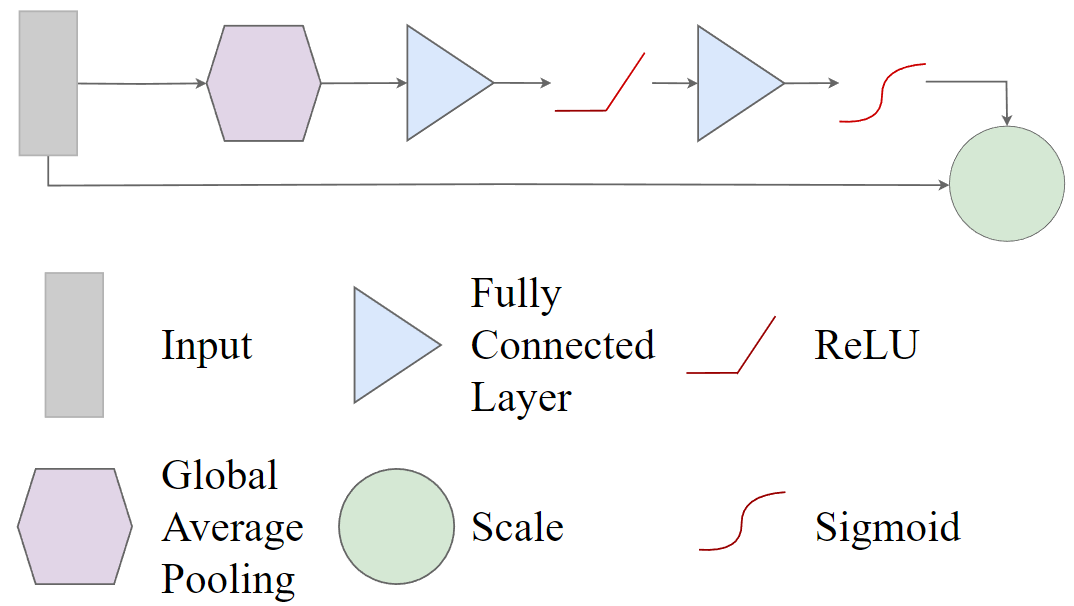
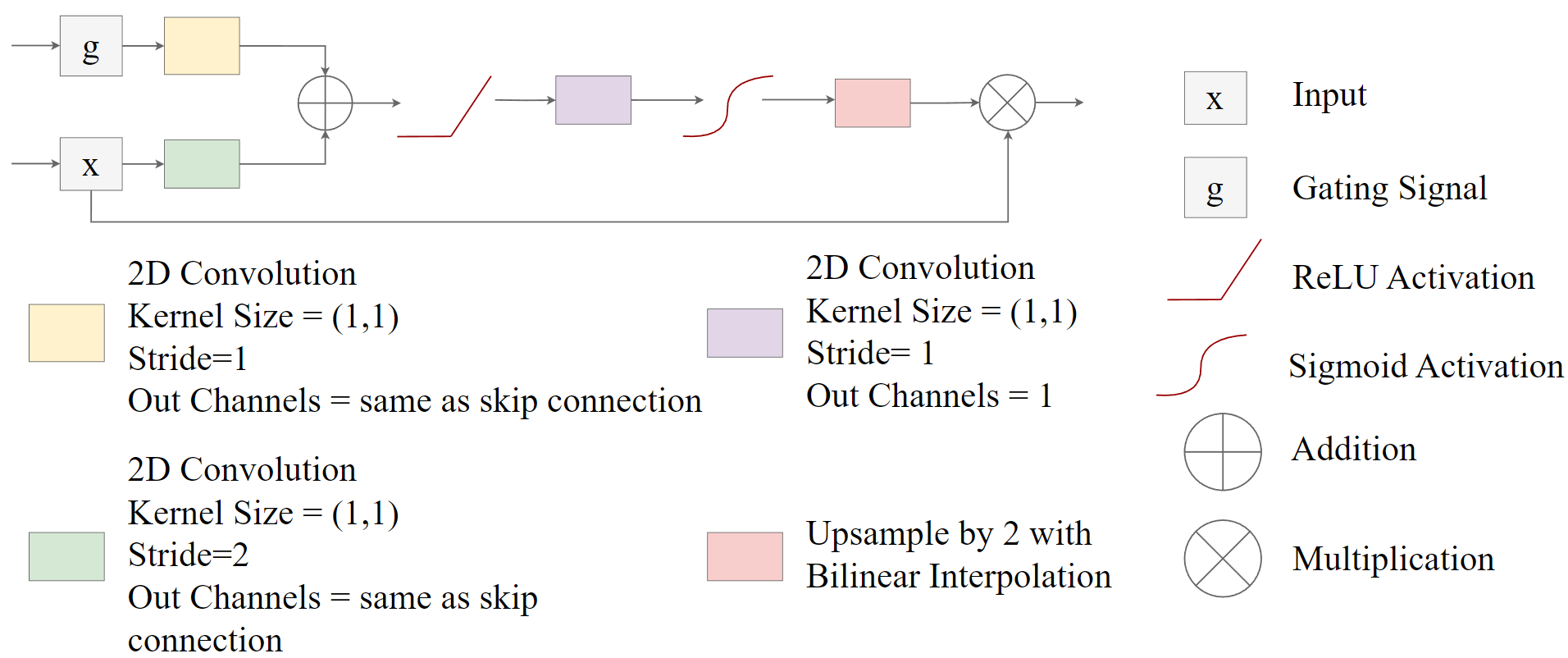
This implementation also supports some additional modifications. Squeeze and excitation modules (Figure 23.4) can be included between the encoder blocks using useSE=TRUE while attention gates (Figure 23.5) can be included along the skip connections using useAttn=TRUE. If squeeze and excitation is used, the seRatio parameter allows the user to define the reduction ratio. Convolutional block attention modules (CBAMs) (Figure 23.6) can be added along the skip connections using useCBAM. For CBAM, cbamRatio specifies the reduction ratio while cbamKernelSize specifies the kernel size in the spatial attention model component. If CBAMs are used, squeeze and excitation and attention gates are not used since they are somewhat redundant. Lastly, deep supervision can be implemented using doDS=TRUE. If deep supervision is implemented, the model will generate output logits using all stages of the decoder. For all stages other than the final, the output is up-scaled using bilinear interpolation to match the spatial resolution of the input data. The multiple results can be used with the unified focal loss framework.
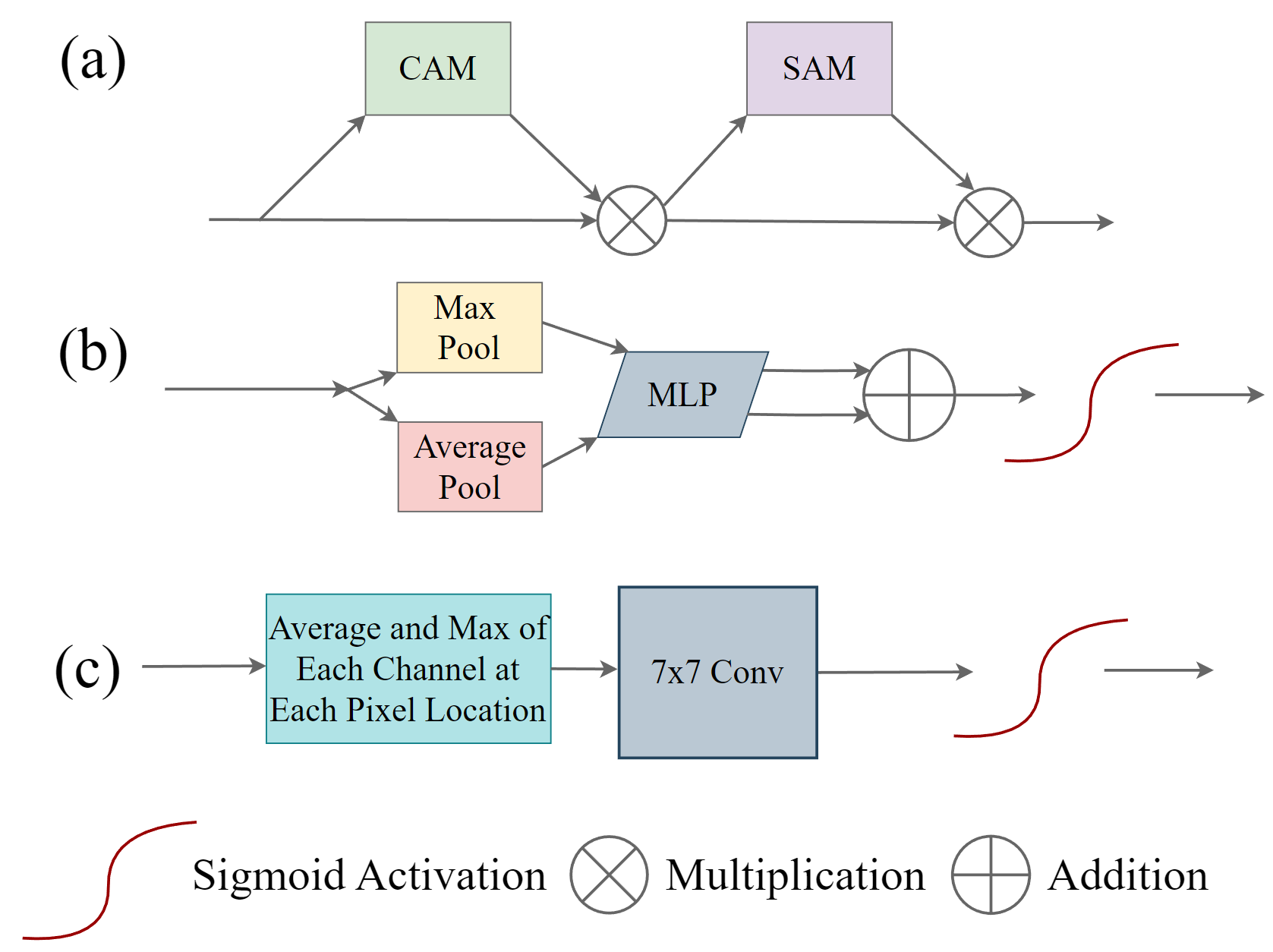
It is also possible to specify different learning rates for each model stage using the stageLRs parameter. This is demonstrated in the context of training loops in Chapter 25.
The following code shows how to instantiate a customized UNet model using defineUNet() with the following characteristics:
- Expects 4 input channels and differentiates 7 classes
- Uses double-convolution blocks (the default) throughout along with leaky ReLU activation functions with a 0.01 negative slope term
- Includes squeeze and excitation modules in the encoder and attention gate along the skip connections
- Uses residual connections in all double-convolution blocks
- Generates 16, 32, 64, and 128 feature maps for encoder blocks 1 through 4, respectively
- Generates 128, 64, 32, and 16 feature maps for decoder blocks 1 through 4, respectively
- Generates 256 feature maps for the bottleneck block
Once the model is instantiated, it is used to predict a tensor of random values with the expected input shape as a test. The countParams() function from geodl returns information about the number of trainable parameters overall (2,497,667), the expected input size, the generated output size, and the number of trainable parameters per block.
unetMod <- defineUNet(inChn = 4,
                      nCls = 7,
                      actFunc = "lrelu",
                      useAttn = TRUE,
                      useSE = TRUE,
                      useRes = TRUE,
                      useASPP = FALSE,
                      useDS = FALSE,
                      enChn = c(16, 32, 64, 128),
                      dcChn = c(128, 64, 32, 16),
                      btnChn = 256,
                      negative_slope = 0.01
)$to(device="cuda")
t1 <- torch::torch_rand(c(4,4,256,256))$to(device="cuda")
p1 <- unetMod(t1)p1$shape[1] 4 7 256 256countParams(unetMod, t1)$total_trainable
[1] 2497667
$total_non_trainable
[1] 0
$layer_params
layer trainable non_trainable
1 ag1 883 0
2 ag2 3299 0
3 ag3 12739 0
4 ag4 50051 0
5 btn 919296 0
6 c4 119 0
7 d1 639872 0
8 d2 160192 0
9 d3 40160 0
10 d4 10096 0
11 dUp1 262912 0
12 dUp2 65920 0
13 dUp3 16576 0
14 dUp4 4192 0
15 e1 3056 0
16 e2 14560 0
17 e3 57792 0
18 e4 230272 0
19 se1 80 0
20 se2 288 0
21 se3 1088 0
22 se4 4224 0
$input_size
[1] 4 4 256 256
$output_size
[1] 4 7 256 256Below, we replicate the above example but with a different UNet configuration:
- Expects 6 input channels and differentiates 4 classes
- Uses a DWS-style block for encoder block 1, double-convolution blocks for encoder blocks 2 and 3, and ConvNeXt-style blocks for encoder block 4 and the bottleneck
- Uses double-convolution blocks throughout the decoder
- Includes CBAMs along the skip connections
- Generates 16, 32, 64, and 128 feature maps for encoder blocks 1 through 4, respectively
- Generates 128, 64, 32, and 16 feature maps for decoder blocks 1 through 4, respectively
- Generates 256 feature maps for the bottleneck block
The resulting model has 2,433,012 trainable parameter since the heavier ConvNeXt blocks have been offset by using DWS-style blocks earlier in the encoder.
unetMod <- defineUNet(inChn = 6,
                      nCls = 4,
                      actFunc = "gelu",
                      encBlocks = c("dws","double","double","convnext"),
                      btnBlock = "convnext",
                      useRes = FALSE,
                      useCBAM = TRUE,
                      enChn = c(16, 32, 64, 128),
                      dcChn = c(128, 64, 32, 16),
                      btnChn = 256)$to(device="cuda")
t1 <- torch::torch_rand(c(4,6,256,256))$to(device="cuda")
p1 <- unetMod(t1)p1$shape[1] 4 4 256 256countParams(unetMod, t1)$total_trainable
[1] 2433012
$total_non_trainable
[1] 0
$layer_params
layer trainable non_trainable
1 btn 972800 0
2 c4 68 0
3 cbam1 164 0
4 cbam2 356 0
5 cbam3 1124 0
6 cbam4 4196 0
7 d1 590592 0
8 d2 147840 0
9 d3 37056 0
10 d4 9312 0
11 dUp1 262912 0
12 dUp2 65920 0
13 dUp3 16576 0
14 dUp4 4192 0
15 e1 1376 0
16 e2 14016 0
17 e3 55680 0
18 e4 248832 0
$input_size
[1] 4 6 256 256
$output_size
[1] 4 4 256 25623.3.2 UNet with Backbones
The package also implements UNet with different backbones:
-
defineResNetUNet(): uses a ResNet-18, -34, -50, -101, or -152 encoder (Figure 23.7) -
defineMobileUNet(): uses a MobileNetv2 encoder (Figure 23.8) -
defineEfficientUNetB2(): uses a EfficientNet-B2 encoder (Figure 23.9)
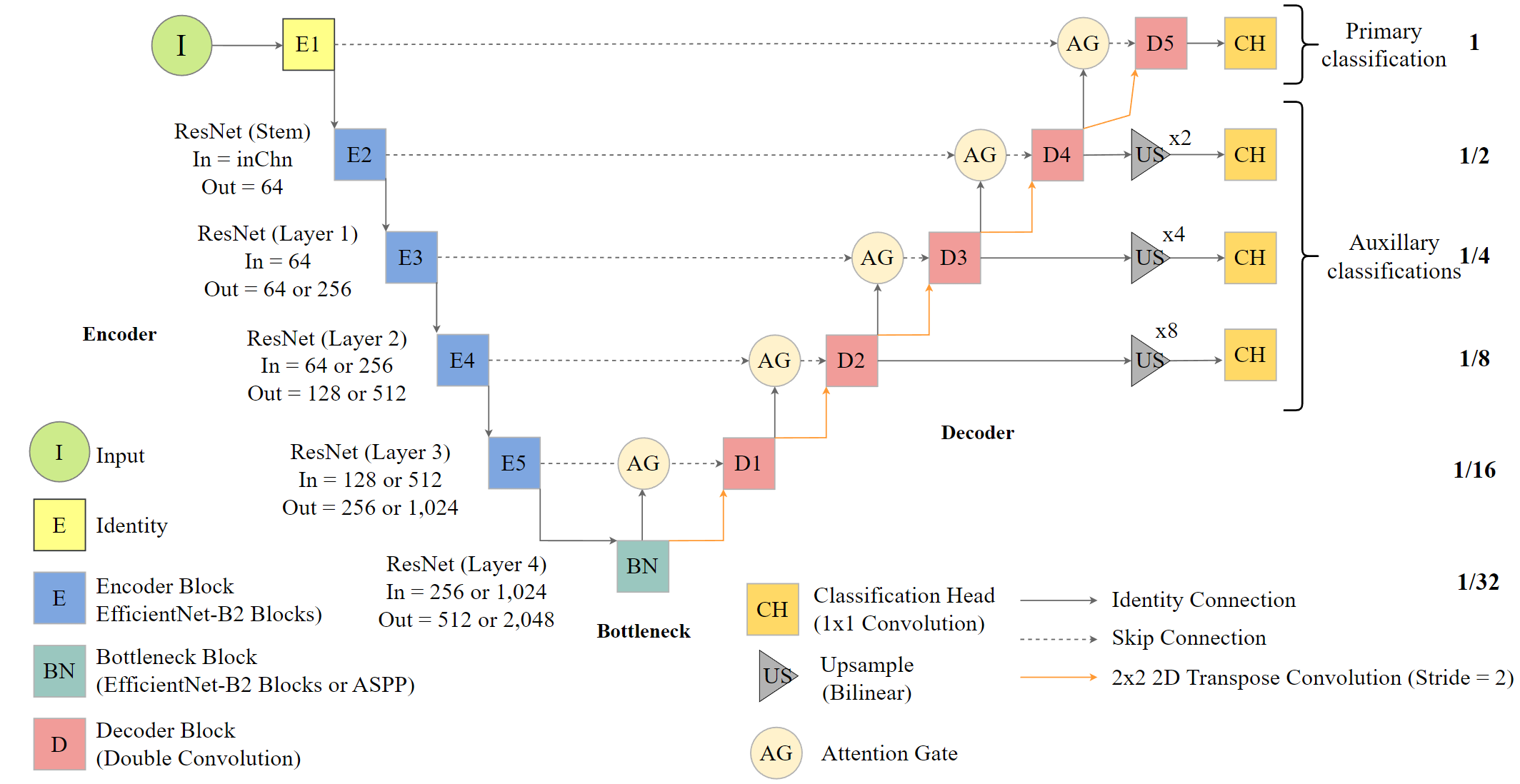
defineResNetUNet() (UNet with a ResNet-based encoder).
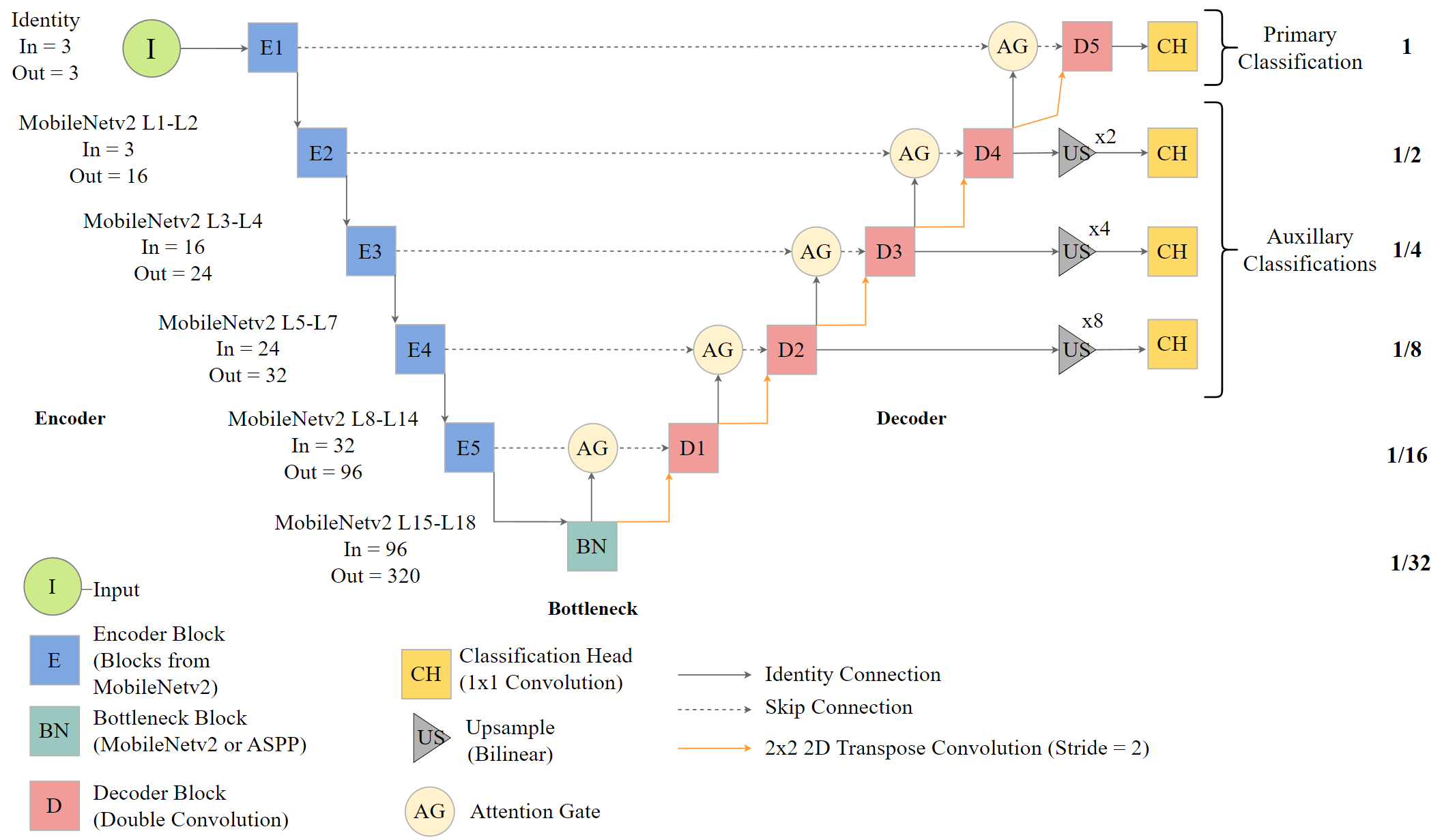
defineMobileUNet() (UNet with a MobileNetv2-based encoder).
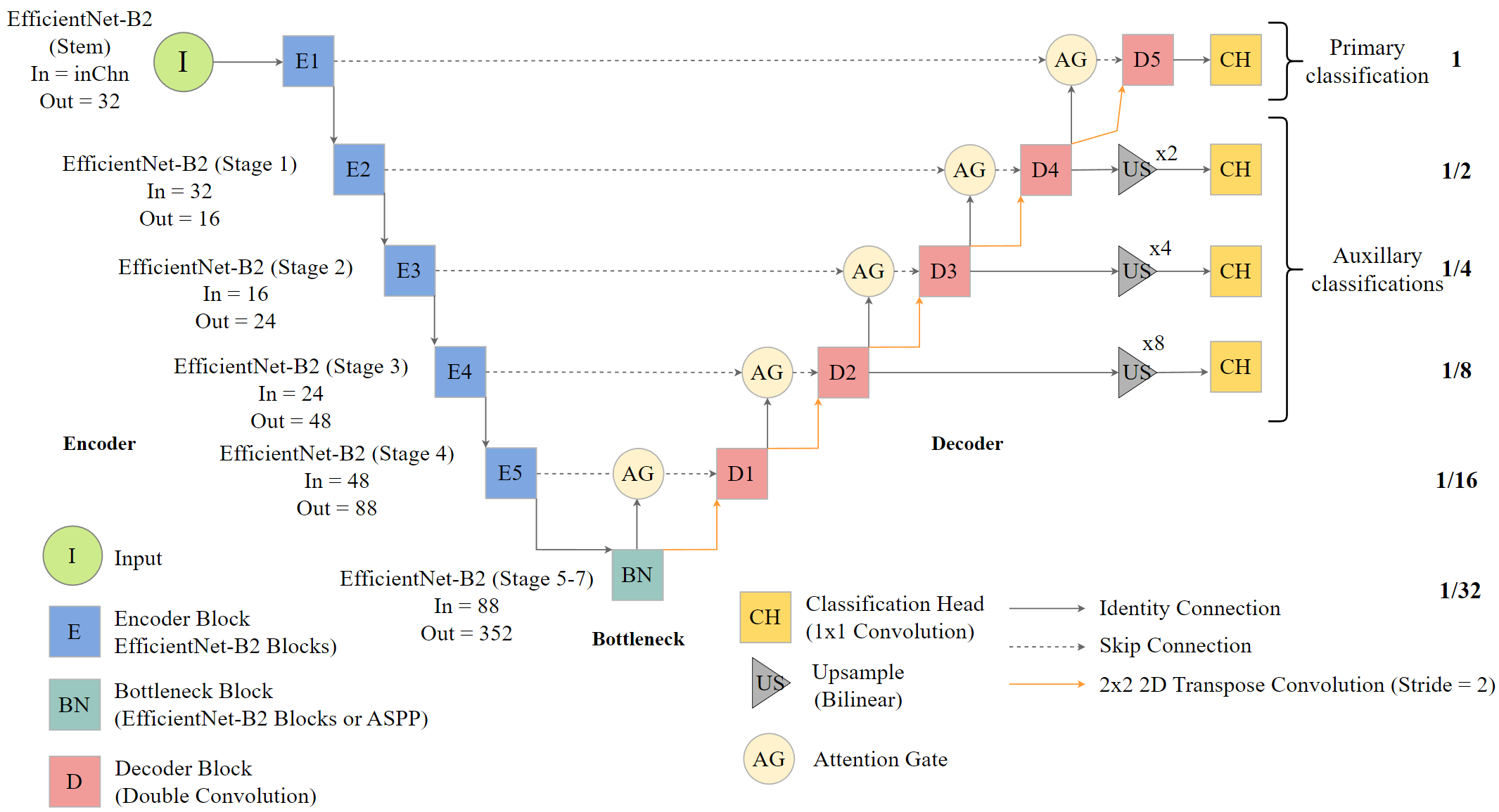
defineEfficientUNetB2() (UNet with an EfficientNet-B2-based encoder).
One of the primary reasons to use components of scene labeling architectures as the encoder component of UNet is the ability to use pre-trained weights, such as those generated using ImageNet. Pre-trained weights can be loaded using preTrained=TRUE. You can also choose to freeze the encoder, or not update its parameters during training, using freezeEncoder=TRUE. It is possible to freeze and unfreeze components of the model at different points during the training loop, as demonstrated in Chapter 25. When using three predictor variables, you can choose to average the ImageNet weights for the first layer using avgImNetWeights=TRUE, which may is most appropriate when using non-RGB data. If a channel count other than 3 is provided, the weights will always be averaged.
Here, we demonstrate the MobileNetv2-encoder. This implementation was inspired by a Posit blog post by Sigrid Keydana. The MobileNetv2 scene labeling architecture was introduced in the following manuscript and was built to support efficient model training on resource constrained devices. geodl makes use of the version of the architecture provided by the torchvision R package.
Sandler, M., Howard, A., Zhu, M., Zhmoginov, A. and Chen, L.C., 2018. Mobilenetv2: Inverted residuals and linear bottlenecks. In Proceedings of the IEEE conference on computer vision and pattern recognition (pp. 4510-4520).
The code below demonstrates how to instantiate an instance of this architecture, use it to predict random data, and obtain a count of trainable parameters. We are also loading a pre-trained encoder and freezing the weights. Since the encoder was frozen using freezeEncoder=TRUE, some of the parameters are not trainable.
munetMod <- defineMobileUNet(inChn = 4,
                             nCls = 7,
                             pretrainedEncoder = TRUE,
                             freezeEncoder = TRUE,
                             avgImNetWeights = TRUE,
                             actFunc = "lrelu",
                             useAttn = FALSE,
                             useDS = FALSE,
                             dcChn = c(256, 128, 64, 32, 16),
                             negative_slope = 0.01
)$to(device="cuda")
t1 <- torch::torch_rand(c(12,4,256,256))$to(device="cuda")
p1 <- munetMod(t1)p1$shape[1] 12 7 256 256countParams(munetMod, t1)$total_trainable
[1] 2954935
$total_non_trainable
[1] 3505160
$layer_params
layer trainable non_trainable
1 base_model 0 3505160
2 c4 119 0
3 d1 1549824 0
4 d2 480000 0
5 d3 124800 0
6 d4 32448 0
7 d5 7584 0
8 dUp1 410560 0
9 dUp2 262912 0
10 dUp3 65920 0
11 dUp4 16576 0
12 dUp5 4192 0
$input_size
[1] 12 4 256 256
$output_size
[1] 12 7 256 25623.3.3 UNet3+
UNet3+ (Figure 23.10) expands upon base UNet by incorporating additional connections and skip connections within the architecture. This requires downsampling with max pooling using varying strides or upsampling using bilinear interpolation using varying factors. This architecture was originally introduced by:
Huang, H., Lin, L., Tong, R., Hu, H., Zhang, Q., Iwamoto, Y., Han, X., Chen, Y.W. and Wu, J., 2020, May. Unet 3+: A full-scale connected unet for medical image segmentation. In ICASSP 2020-2020 IEEE international conference on acoustics, speech and signal processing (ICASSP) (pp. 1055-1059). IEEE.
A modified version of the UNet3+ architecture is implemented within geodl via the defineUNet3p() function. It allows for defining the number of input channels (inChn), number of output classes (nCls), number of feature maps generated by each encoder block (enChn), number of feature maps generated by the bottleneck block (btnChn), and the number of output feature maps generated by the skip connection projection (outChn) (UNet3+ is configured to have the same output length for all decoder blocks: outCHn*5). It also allows for selecting the activation function to use throughout the architecture (actFunc), including residual connections for double-convolution and DWS-style blocks (useRes=TRUE), and using deep supervision (doDS=TRUE). Similar to the UNet implementation, different types and combinations of blocks can be used (i.e., double-convolution, DWS-style, or ConvNeXt). The decoder blocks always use a single convolution operation, as was the case for the original UNet3+ implementation. For the projections along the skip connections (skipProj), either 1x1 or 3x3 convolution can be used (the original UNet3+ implementation used 3x3).
UNet3+ is generally a heavier model than UNet. It will likely take longer to train and may require the use of a smaller mini-batch size.
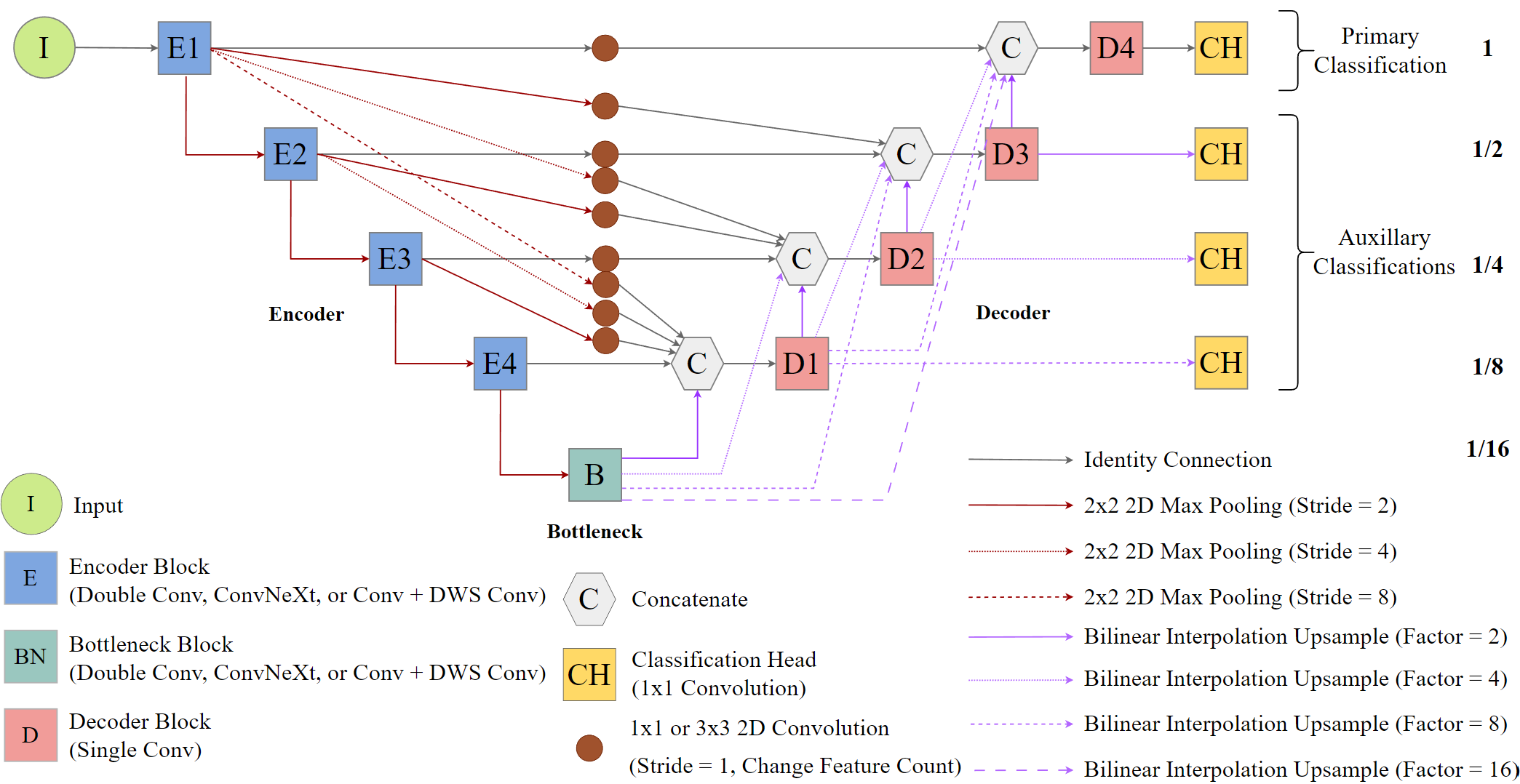
The code below demonstrates how to instantiate an instance of this architecture, use it to predict random data, and obtain a count of trainable parameters.
unet3pMod <- defineUNet3p(inChn = 4,
                          nCls = 7,
                          useDS = FALSE,
                          enChn = c(16, 32, 64, 128),
                          outChn = 64,
                          btnChn = 256,
                          negative_slope = 0.01
)$to(device="cuda")
t1 <- torch::torch_rand(c(12,4,256,256))$to(device="cuda")
p1 <- unet3pMod(t1)p1$shape[1] 12 7 256 256countParams(unet3pMod, t1)$total_trainable
[1] 6812583
$total_non_trainable
[1] 0
$layer_params
layer trainable non_trainable
1 bd1 147648 0
2 bd2 147648 0
3 bd3 147648 0
4 bd4 147648 0
5 btn 886272 0
6 ch 2247 0
7 d1Blk 922560 0
8 d1d2 184512 0
9 d1d3 184512 0
10 d1d4 184512 0
11 d2Blk 922560 0
12 d2d3 184512 0
13 d2d4 184512 0
14 d3Blk 922560 0
15 d3d4 184512 0
16 d4Blk 922560 0
17 e1d1 9408 0
18 e1d2 9408 0
19 e1d3 9408 0
20 e1d4 9408 0
21 e2d1 18624 0
22 e2d2 18624 0
23 e2d3 18624 0
24 e3d1 37056 0
25 e3d2 37056 0
26 e4d1 73920 0
27 encoder1 2976 0
28 encoder2 14016 0
29 encoder3 55680 0
30 encoder4 221952 0
$input_size
[1] 12 4 256 256
$output_size
[1] 12 7 256 25623.3.4 DeepLabv3+ (Modified)
Lastly, geodl also implements a modified version of the DeepLabv3+ architecture (Figure 23.11) after:
Chen, L.C., Zhu, Y., Papandreou, G., Schroff, F. and Adam, H., 2018, September. Encoder-decoder with atrous separable convolution for semantic image segmentation. In European conference on computer vision (pp. 833-851). Cham: Springer International Publishing.
The modified implementation includes four encoder blocks followed by a ASPP module. Each encoder block is followed by 2x2 max pooling with a stride of 2, so the ASPP module processes feature maps at 1/16 resolution, which are then upsampled to 1/4 resolution using bilinear interpolation. The feature maps generated by encoder block 3 are reprojected to a different channel count (defined using the lowLevelChn parameter) and are then concatenated with the upsampled output from the ASPP module. The stack is then processed by a single decoder block at 1/4 resolution and are then upsampled to full resolution using bilinear interpolation prior to being passed to the classification head. Similar to the UNet and UNet3+ implementations, the user can specify the types of blocks used in the encoder blocks and single decoder block, use residual connections in the double-convolution blocks and DWS-style blocks, and specify the activation function. The primary difference between this implementation and the original DeepLabv3+ architecture is that it does not use a backbone, such as a ResNet or Xception variant, with atrous convolution integration in the encoder. Instead, it uses a generic, configurable encoder.
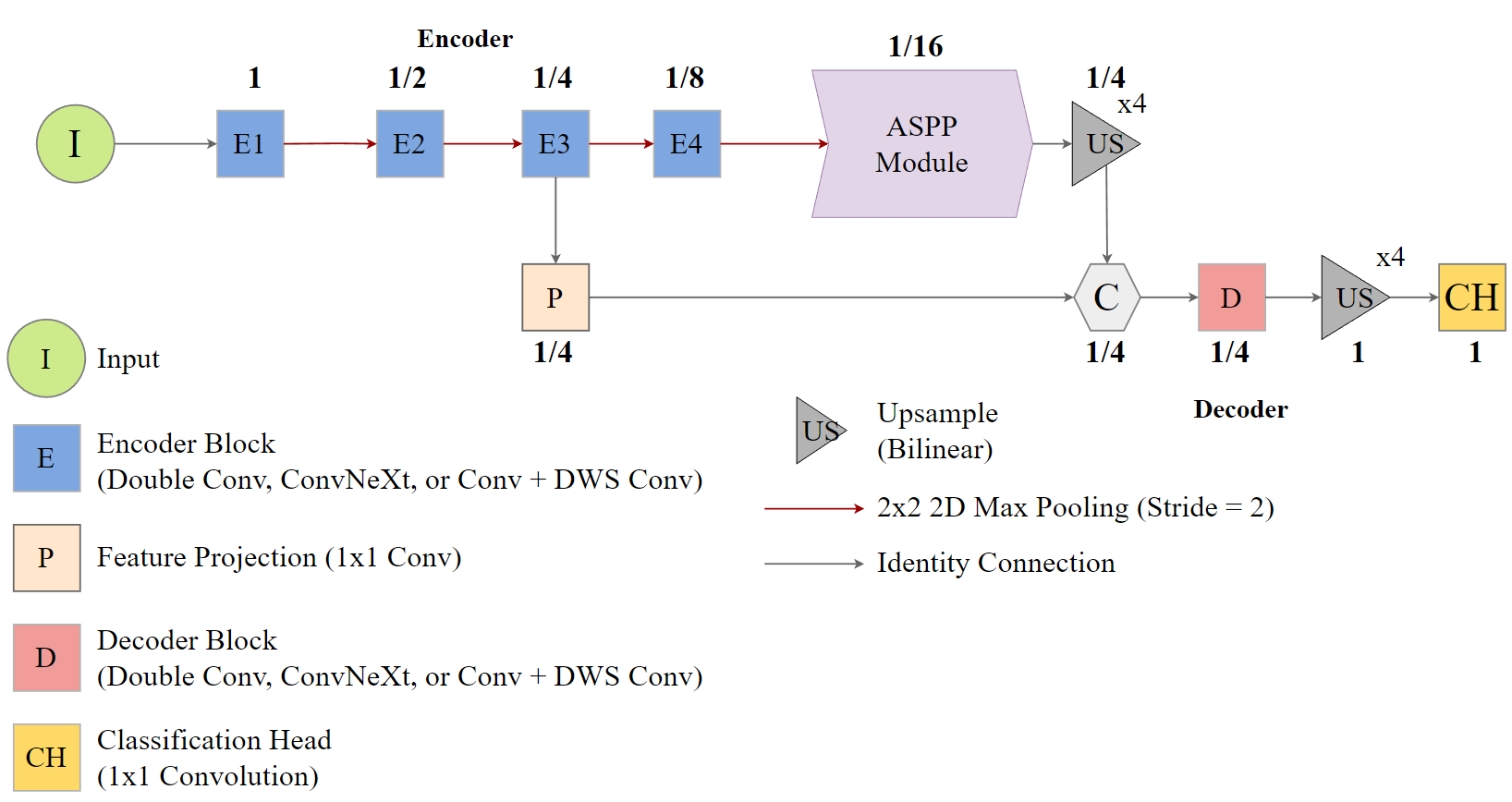
The code below demonstrates how to instantiate an instance of this architecture, use it to predict random data, and obtain a count of trainable parameters.
dlabMod <- defineDLab(
  inChn = 5,
  nCls = 2,
  actFunc = "swish",
  encBlocks = "double",
  decBlock = "convnext",
  useRes = FALSE,
  enChn = c(16, 32, 64, 128),
  btnChn = 256,
  lowLevelChn = 48,
  dcChn = 256,
  dilRates = c(6, 12, 18),
  dilChn = c(256, 256, 256, 256),
  negative_slope = 0.01,
  expRatio = 4
)$to(device="cuda")
t1 <- torch::torch_rand(c(2,5,512,512))$to(device="cuda")
p1 <- dlabMod(t1)p1$shape[1] 2 2 512 512countParams(dlabMod, t1)$total_trainable
[1] 2721986
$total_non_trainable
[1] 0
$layer_params
layer trainable non_trainable
1 aspp 1216256 0
2 cls 514 0
3 dec 1207232 0
4 e1 3120 0
5 e2 14016 0
6 e3 55680 0
7 e4 221952 0
8 lowLevelProj 3216 0
$input_size
[1] 2 5 512 512
$output_size
[1] 2 2 512 51223.4 Unified Focal Loss
geodl provides a modified version of the unified focal loss proposed in the following study:
Yeung, M., Sala, E., Schönlieb, C.B. and Rundo, L., 2022. Unified focal loss: Generalising dice and cross entropy-based losses to handle class imbalanced medical image segmentation. Computerized Medical Imaging and Graphics, 95, p.102026.
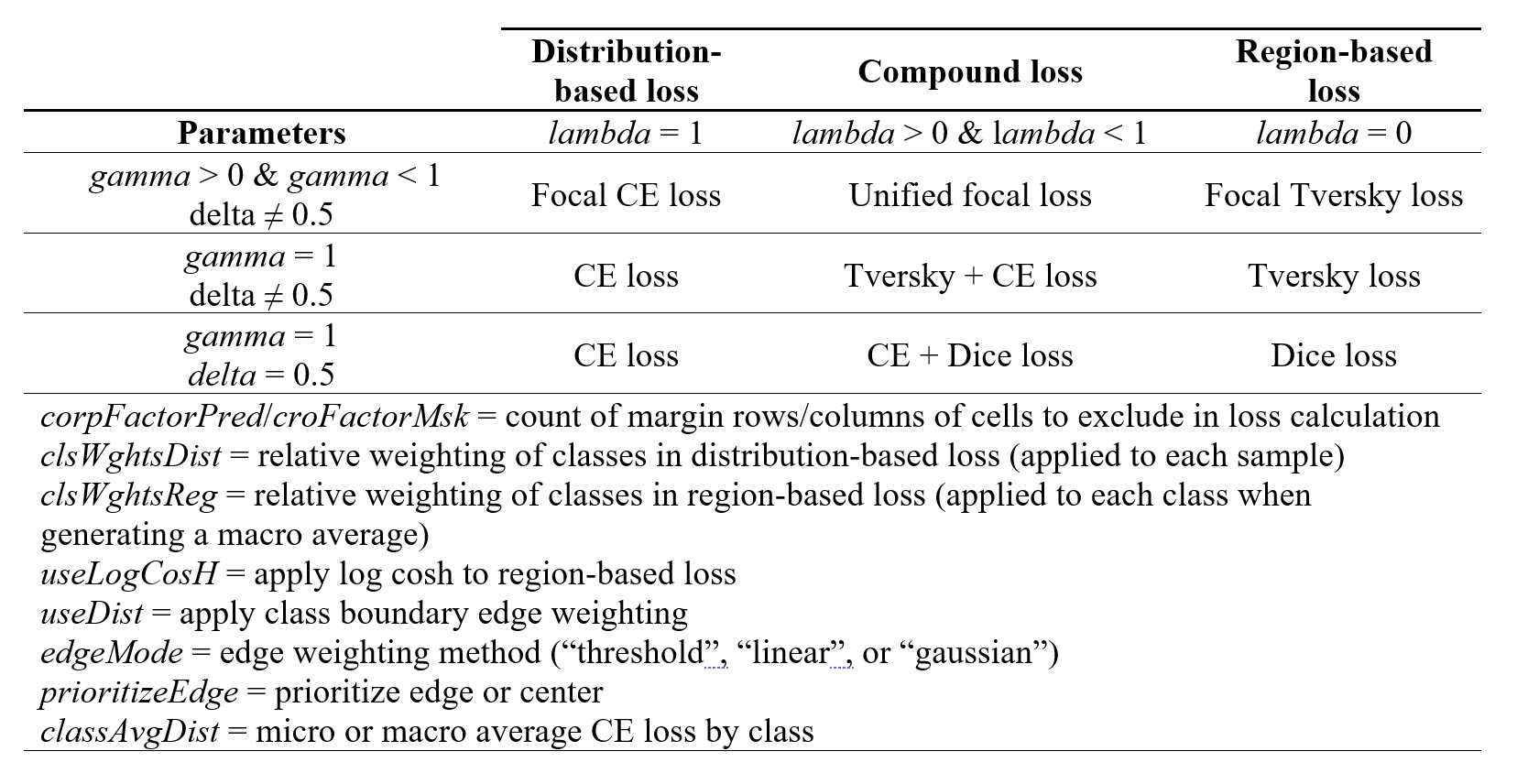
Table 23.1 describes the loss parameterization. The geodl implementation is different from the originally proposed implementation because it does not implement symmetric and asymmetric forms. Instead, it allows the user to define class weights for both the distribution- and region-based loss components.
Edge cells in the prediction can be ignored in the loss calculation by setting cropFactorMsk and cropFactorPred equal to the number of rows and columns that you want to ignore. These two values are generally the same; however, they may be different for the terrain segmentation process described below, so separate parameters have been provided. By default, edge rows and columns are included in the loss calculation.
The lambda parameter controls the relative weighting between the distribution- and region-based losses. When lambda=1, only the distribution-based loss is used. When lambda=0, only the region-based loss is used. Values between 0 and 1 yield a loss metric that incorporates both the distribution- and region-based loss components. A lambda of 0.5 yields equal weighting, values larger than 0.5 put more weight on the distribution-based loss, and values lower than 0.5 put more weighting on the region-based loss.
The gamma parameter controls the weight applied to difficult-to-predict samples, defined as samples or classes with low predicted re-scaled logits relative to their correct class. For the distribution-based loss, focal corrections are implemented sample-by-sample. For the region-based loss, corrections are implemented class-by-class during macro-averaging. gamma must be larger than 0 and less than or equal to 1. When gamma=1, no focal correction is applied. Lower values result in a larger focal correction.
The delta parameter controls the relative weights of false negative (FN) and false positive (FP) errors and should be between 0 and 1. A delta of 0.5 places equal weight on FN and FP errors. Values larger than 0.5 place more weight on FN in comparison to FP errors while values smaller than 0.5 place more weight on FP samples in comparison to FN samples.
The clsWghtDist parameter controls the relative weights of classes in the distribution-based loss and is applied sample-by-sample. The clsWghtReg parameter controls the relative weights of classes in the region-based loss and are applied to each class when calculating a macro average. By default, all classes are weighted equally. If you want to implement class weights, you must provide a vector of class weights equal in length to the number of classes being differentiated.
The useLogCosH parameter determines whether or not to apply a log cosh transformation to the region-based loss. If it is set to TRUE, this transformation is applied.
If class edge distance grids are calculated, as described above, it is possible to include these weightings in the loss calculation with useEdgeDist=TRUE. minWght sets the minimum weight applied while maxWght sets the maximum. We generally recommend using a max weight of 1. If a minimum weight of 0 is used, this will cause some of the cells to not be considered in the loss calculation. If prioritizeEdge=TRUE, cells nearer to class boundaries will be given higher weightings. In contrast, if this parameter is set to FALSE, cells further from edges will be given higher weight. This may be desirable if the features of interested have gradational or fuzzy boundaries. Three edge-weighting modes are available via edgeMode:
"threshold": pixels withindistThresholdreceive one weight; pixels beyond receive the other. WhenprioritizeEdge=TRUEthe inside weight ismaxWghtand the outside weight isminWght; the relationship is reversed whenprioritizeEdge=FALSE."linear": weight changes linearly frommaxWghtat distance 0 tominWghtatdistThreshold(whenprioritizeEdge=TRUE), or fromminWghttomaxWght(whenprioritizeEdge=FALSE). BeyonddistThresholdthe weight is clamped to the far-end value."gaussian": weight follows a Gaussian curve centered at distance 0. The curve uses sigma =distThreshold/ 3 so that the weight is approximatelyminWghtatdistThresholdand falls to exactlyminWghtbeyond it. Direction is controlled byprioritizeEdge.
The user can also specify whether the distance weighting is used for just the distribution-based ("distribution"), just the region-based ("region"), or both loss components ("both") using the applyDistWght parameter.
Using different parameterizations, users can define a variety of loss metrics including cross entropy (CE) loss, weighted CE loss, focal CE loss, focal weighted CE loss, Dice loss, focal Dice loss, Tversky loss, and focal Tversky loss.
Label smoothing (labelSmoothing=TRUE) is also implemented. When greater than 0, this amount of probability mass is spread uniformly across all classes when computing the cross-entropy, preventing the model from becoming overconfident. The focal modifier is always derived from the true-class softmax probability gathered directly from the network output, so focal weighting is not distorted by the smoothed targets. Default is 0 (no smoothing).
Lastly, different class averaging methods are available for the distribution-based loss using classAvgDist. When FALSE (default), the distribution loss is computed as a pixel-level weighted mean of the focal cross-entropy, with clsWghtsDist rescaling each pixel’s contribution by its true class weight. When TRUE, the focal cross-entropy is first averaged within each class and the resulting per-class means are then combined as a weighted average using clsWghtsDist. The per-class approach mirrors the macro-averaging philosophy already used by the region-based loss and can give better gradient signal to under-represented classes under severe class imbalance. Note that if a class has no pixels in a given batch its contribution is effectively zero for that step, consistent with the behavior of the region-based loss.
There is a definedUnifiedFocalLossDS variant of the function that must be used when deep supervision is implemented. It is able to process the multiple sets of predictions generated and combine the losses using different weightings via the dsWghts argument.
23.4.1 Loss Examples
We will now demonstrate how different loss metrics can be obtained using different parameterizations. Note that loss metric implementation within training loops is explored in Chapter 24 and Chapter 25. We first load in example data using the rast() function from terra representing class reference numeric codes (refC) and predicted class logits (predL).
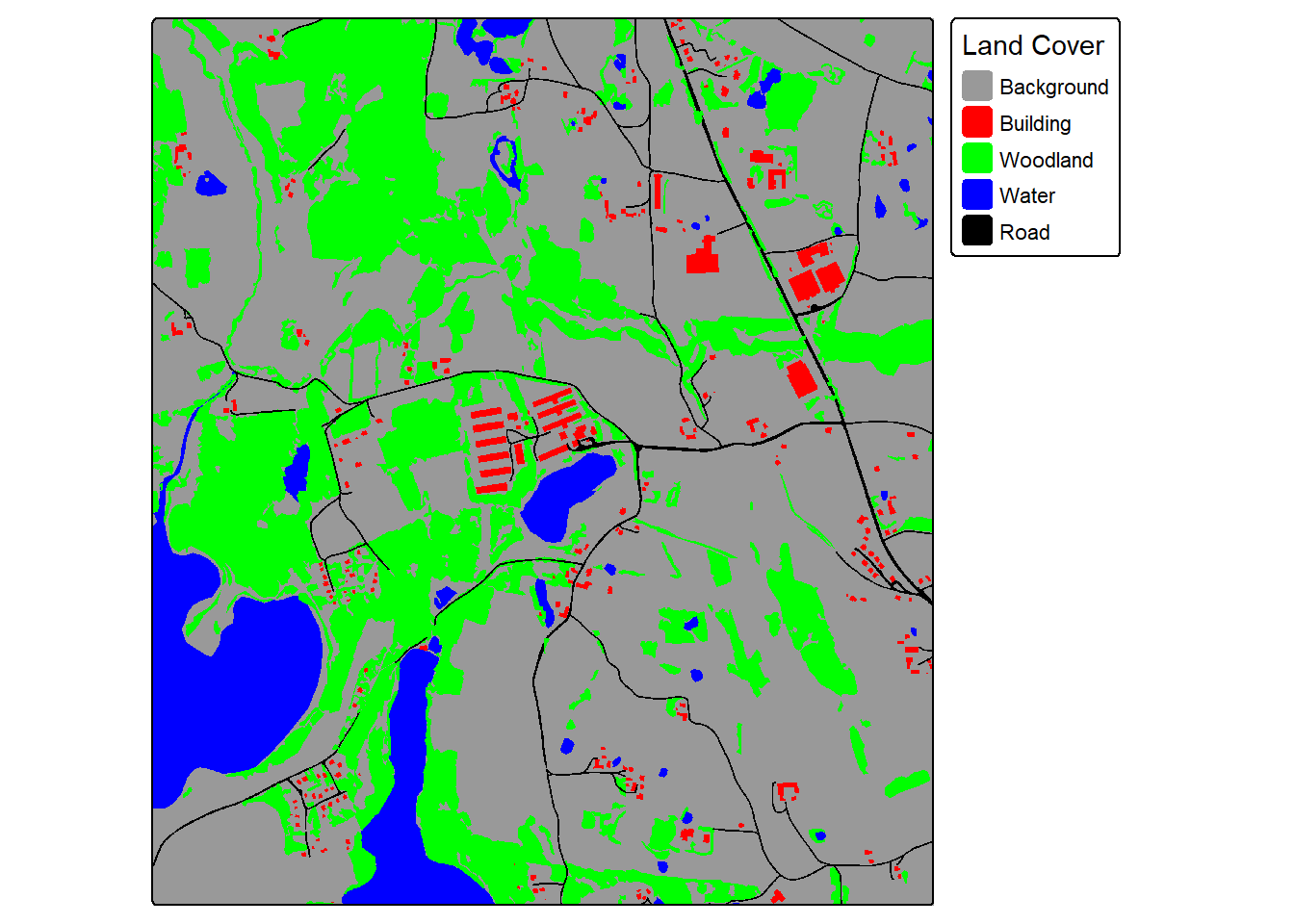
plot(predL)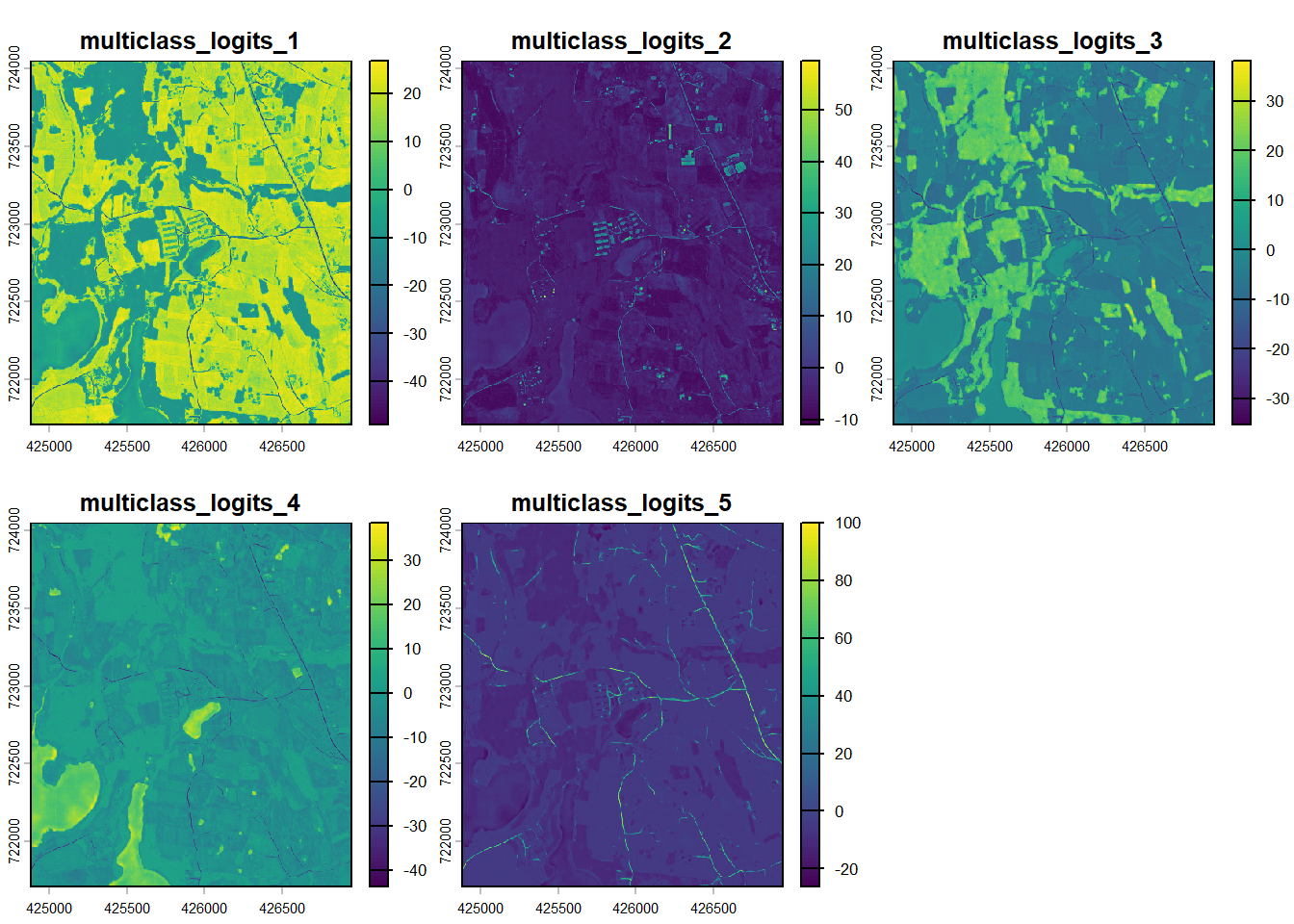
The spatRaster objects are then converted to torch tensors with the correct shape and data type. We simulate a mini-batch of two samples by concatenating two copies of the tensors.
predL <- terra::as.array(predL)
refC <- terra::as.array(refC)

target <- torch::torch_tensor(refC, dtype=torch::torch_long(), device="cuda")
pred <- torch::torch_tensor(predL, dtype=torch::torch_float32(), device="cuda")
target <- target$permute(c(3,1,2))
pred <- pred$permute(c(3,1,2))

target <- target$unsqueeze(1)
pred <- pred$unsqueeze(1)

target <- torch::torch_cat(list(target, target), dim=1)
pred <- torch::torch_cat(list(pred, pred), dim=1)
23.4.1.1 Example 1: Dice Loss
The Dice loss is obtained by setting the lambda parameter to 0, the gamma parameter to 1, and the delta parameter to 0.5. This results in only the region-based loss being considered, no focal correction being applied, and equal weighting between FN and FP errors.
myDiceLoss <- defineUnifiedFocalLoss(nCls=5,
                                 lambda=0, #Only use region-based loss
                                 gamma= 1,
                                 delta= 0.5, #Equal weights for FP and FN
                                 smooth = 1e-8,
                                 zeroStart=TRUE,
                                 clsWghtsDist=1,
                                 clsWghtsReg=1,
                                 useLogCosH =FALSE,
                                 device="cuda")
myDiceLoss(pred=pred,
           target=target)
torch_tensor
0.17861
[ CUDAFloatType{} ]23.4.1.2 Example 2: Tversky Loss
The Tversky Loss can be obtained using the same settings as those used for the Dice loss except that the delta parameter must be set to a value other than 0.5 so that different weights are applied to FN and FP errors. In the example, we use a weighting of 0.6, which places more weight on FN errors relative to FP errors. Setting gamma to a value lower than 1 results in a focal Tversky loss.
We must regenerate the tensors so that the computational graphs are re-initialized.
target <- torch::torch_tensor(refC, dtype=torch::torch_long(), device="cuda")
pred <- torch::torch_tensor(predL, dtype=torch::torch_float32(), device="cuda")
target <- target$permute(c(3,1,2))
pred <- pred$permute(c(3,1,2))

target <- target$unsqueeze(1)
pred <- pred$unsqueeze(1)
target <- torch::torch_cat(list(target, target), dim=1)
pred <- torch::torch_cat(list(pred, pred), dim=1)

myTverskyLoss <- defineUnifiedFocalLoss(nCls=5,
                                        lambda=0, #Only use region-based loss
                                        gamma= 1,
                                        delta= 0.6, #FN weighted higher than FP
                                        smooth = 1e-8,
                                        zeroStart=TRUE,
                                        clsWghtsDist=1,
                                        clsWghtsReg=1,
                                        useLogCosH =FALSE,
                                        device="cuda")

myTverskyLoss(pred=pred,
              target=target)
torch_tensor
0.177986
[ CUDAFloatType{} ]23.4.1.3 Example 3: Cross Entropy (CE) Loss
The cross entropy (CE) loss is obtained by setting lambda to 1, so that only the distribution-based loss is considered, and setting gamma to 1, so that no focal correction is applied. Setting gamma to a value lower than 1 results in a focal CE loss.
target <- torch::torch_tensor(refC, dtype=torch::torch_long(), device="cuda")
pred <- torch::torch_tensor(predL, dtype=torch::torch_float32(), device="cuda")
target <- target$permute(c(3,1,2))
pred <- pred$permute(c(3,1,2))

target <- target$unsqueeze(1)
pred <- pred$unsqueeze(1)
target <- torch::torch_cat(list(target, target), dim=1)
pred <- torch::torch_cat(list(pred, pred), dim=1)

myCELoss <- defineUnifiedFocalLoss(nCls=5,
                                   lambda=1, #Only use distribution-based loss
                                   gamma= 1,
                                   delta= 0.5,
                                   smooth = 1e-8,
                                   zeroStart=TRUE,
                                   clsWghtsDist=1,
                                   clsWghtsReg=1,
                                   useLogCosH =FALSE,
                                   device="cuda")

myCELoss(pred=pred,
         target=target)
torch_tensor
1.58689
[ CUDAFloatType{} ]23.4.1.4 Example 4: Combo-Loss
A combo-loss can be obtained by setting lambda to a value between 0 and 1. In the example, we have used 0.5, which results in equal weights being applied to the distribution- and region-based losses. We also apply a focal correction using a gamma of 0.8 and weight FN errors higher than FP errors by using a delta of 0.6. The result is a combination of the focal CE and focal Tversky losses.
target <- torch::torch_tensor(refC, dtype=torch::torch_long(), device="cuda")
pred <- torch::torch_tensor(predL, dtype=torch::torch_float32(), device="cuda")
target <- target$permute(c(3,1,2))
pred <- pred$permute(c(3,1,2))

target <- target$unsqueeze(1)
pred <- pred$unsqueeze(1)
target <- torch::torch_cat(list(target, target), dim=1)
pred <- torch::torch_cat(list(pred, pred), dim=1)

myComboLoss <- defineUnifiedFocalLoss(nCls=5,
                                      lambda=.5, #Use both distribution and region-based losses
                                      gamma= 0.8, #Apply a focal adjustment
                                      delta= 0.6, #Weight FN higher than FP
                                      smooth = 1e-8,
                                      zeroStart=TRUE,
                                      clsWghtsDist=1,
                                      clsWghtsReg=1,
                                      useLogCosH =FALSE,
                                  device="cuda")
myComboLoss(pred=pred,
            target=target)
torch_tensor
0.9143
[ CUDAFloatType{1} ]23.5 Model Assessment
The geodl package provides three functions for generating accuracy assessment metrics:
-
assessPnts(): performs assessment using point or cell locations stored in a table or data frame -
assessRaster(): performs assessment using raster grids of predicted and reference class codes -
assessDL(): calculates assessment metrics using a torch dataloader.
In this section, we provide examples for the assessPnt() and assessRaster() functions. We explore assessDL() in the example workflows in Chapter 24 and Chapter 25.
23.5.1 Example 1: Multiclass Classification
In this first example, geodl’s assessPnts() function is used to calculate assessment metrics for a multiclass classification from a table or at point/cell locations. The “ref” column represents the reference labels while the “pred” column represents the predictions. The aliases parameter allows for providing more meaningful class names and is especially useful when classes are represented using numeric codes. A mappings parameter, not used here, allows the user to change the order of the categories in the confusion matrix and printed metrics. If mappings is used along with aliases, the user must provide the desired alias names in the same order as the defined mappings.
For a multiclass assessment, the following are returned:
- class names (
$Classes) - count of samples per class in the reference data (
$referenceCounts) - count of samples per class in the predictions (
$predictionCounts) - confusion matrix (
$confusionMatrix) - aggregated assessment metrics (
$aggMetrics) (OA= overall accuracy,macroF1= macro-averaged class aggregated F1-score,macroPA= macro-averaged class aggregated producer’s accuracy or recall, andmacroUA= macro-averaged class aggregated user’s accuracy or precision) - class-level user’s accuracies or precisions (
$userAccuracies) - class-level producer’s accuracies or recalls (
$producerAccuracies) - class-level F1-scores (
$F1Scores).
myMetrics <- assessPnts(reference=mcIn$ref,
                        predicted=mcIn$pred,
                        multiclass=TRUE,
                        aliases=c("Barren",
                                   "Forest",
                                   "Impervious",
                                   "Low Vegetation",
                                   "Mixed Developed",
                                   "Water"))
print(myMetrics)
$Classes
[1] "Barren" "Forest" "Impervious" "Low Vegetation"
[5] "Mixed Developed" "Water"
$referenceCounts
Barren Forest Impervious Low Vegetation Mixed Developed
163 20807 426 3182 520
Water
200
$predictionCounts
Barren Forest Impervious Low Vegetation Mixed Developed
194 21440 281 2733 484
Water
166
$confusionMatrix
Reference
Predicted Barren Forest Impervious Low Vegetation Mixed Developed Water
Barren 75 7 59 46 1 6
Forest 13 20585 62 617 142 21
Impervious 10 8 196 33 22 12
Low Vegetation 63 138 34 2413 84 1
Mixed Developed 1 64 75 72 270 2
Water 1 5 0 1 1 158
$aggMetrics
OA macroF1 macroPA macroUA
1 0.9367 0.6991 0.6629 0.7395
$userAccuracies
Barren Forest Impervious Low Vegetation Mixed Developed
0.3866 0.9601 0.6975 0.8829 0.5579
Water
0.9518
$producerAccuracies
Barren Forest Impervious Low Vegetation Mixed Developed
0.4601 0.9893 0.4601 0.7583 0.5192
Water
0.7900
$f1Scores
Barren Forest Impervious Low Vegetation Mixed Developed
0.4202 0.9745 0.5545 0.8159 0.5378
Water
0.8634 23.5.2 Example 2: Binary Classification
A binary classification can also be assessed using the assessPnts() function and a table or point/cell locations. For a binary classification the multiclass parameter should be set to FALSE. For a binary case, the $Classes, $referenceCounts, $predictionCounts, and $confusionMatrix objects are also returned; however, the $aggMetrics object is replaced with $Mets, which stores the following metrics: overall accuracy (OA), recall, precision, specificity, negative predictive value (NPV), and F1-score. For binary cases, the second class is assumed to be the positive case.
myMetrics <- assessPnts(reference=bIn$ref,
                        predicted=bIn$pred,
                        multiclass=FALSE,
                        aliases  = c("Mine",
                                     "Not Mine"),
                        decimals=3)
print(myMetrics)
$Classes
[1] "Mine" "Not Mine"
$referenceCounts
Mine Not Mine
178 4822
$predictionCounts
Mine Not Mine
160 4840
$confusionMatrix
Reference
Predicted Mine Not Mine
Mine 158 2
Not Mine 20 4820
$Mets
OA Recall Precision Specificity NPV F1Score
Not Mine 0.996 1 0.996 0.888 0.988 0.99823.5.3 Example 3: Extract Raster Data at Points
Before using the assessPnts() function, you may need to extract predictions into a table. This example demonstrates how to extract reference and prediction numeric codes from raster grids at point locations. Note that it is important to make sure all data layers use the same projection or coordinate reference system. The extract() function from the terra packages can be used to extract raster cell values at point locations, as discussed and demonstrated in the first section of this text.
Once data are extracted, the assessPnts() tool can be used with the resulting table. It may be useful to re-code the class numeric codes to more meaningful names beforehand.
plotRGB(topo, stretch="lin")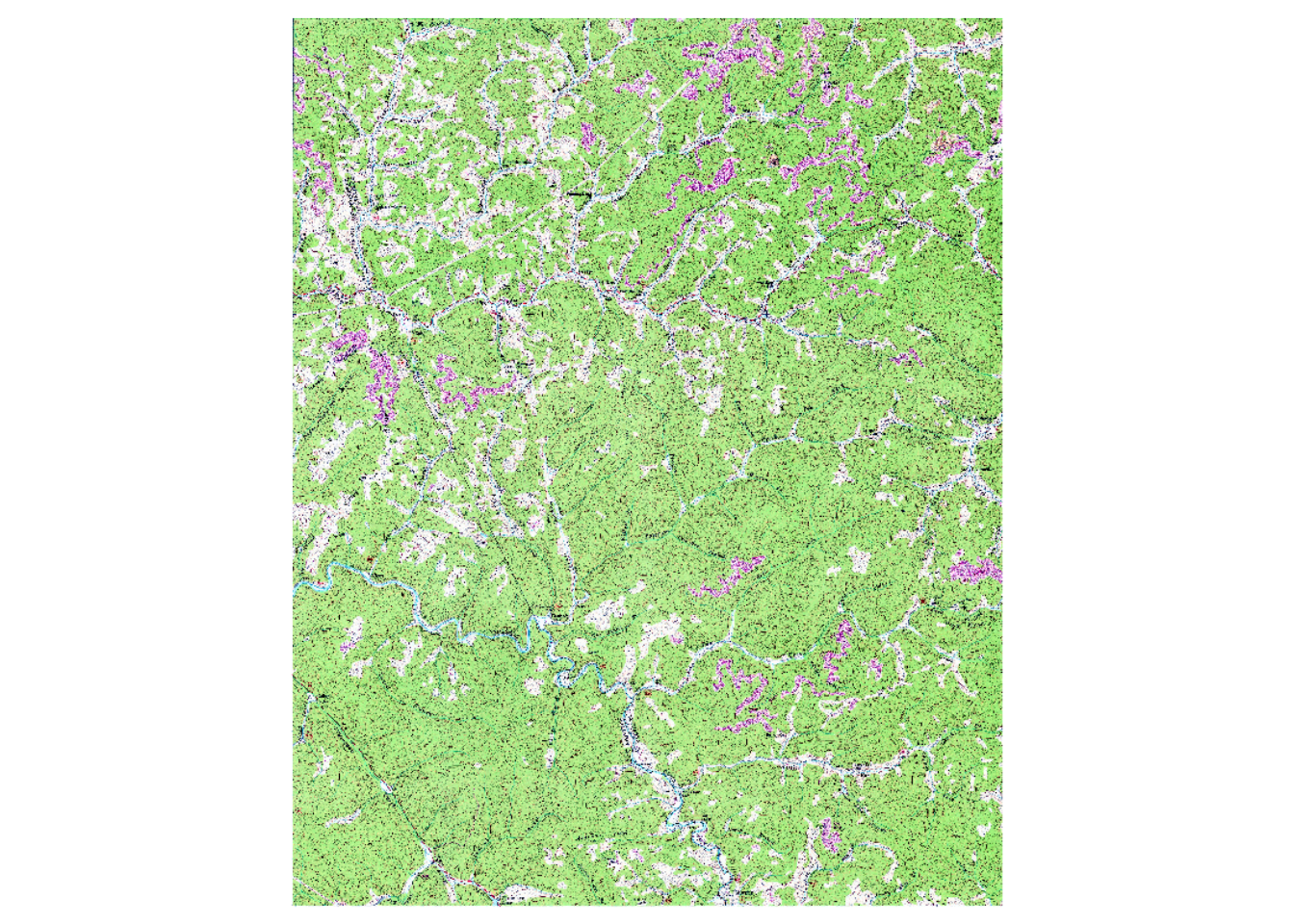
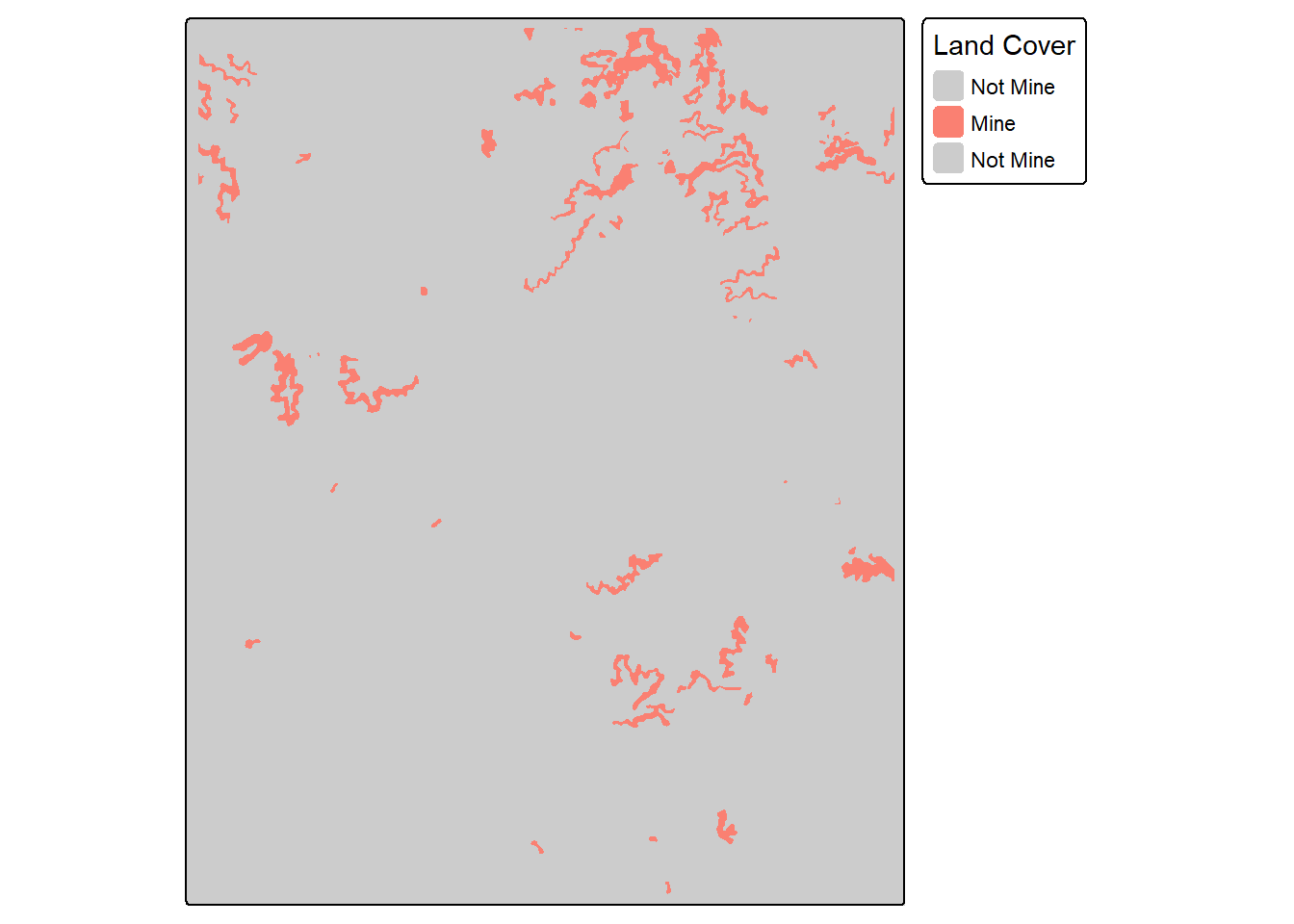
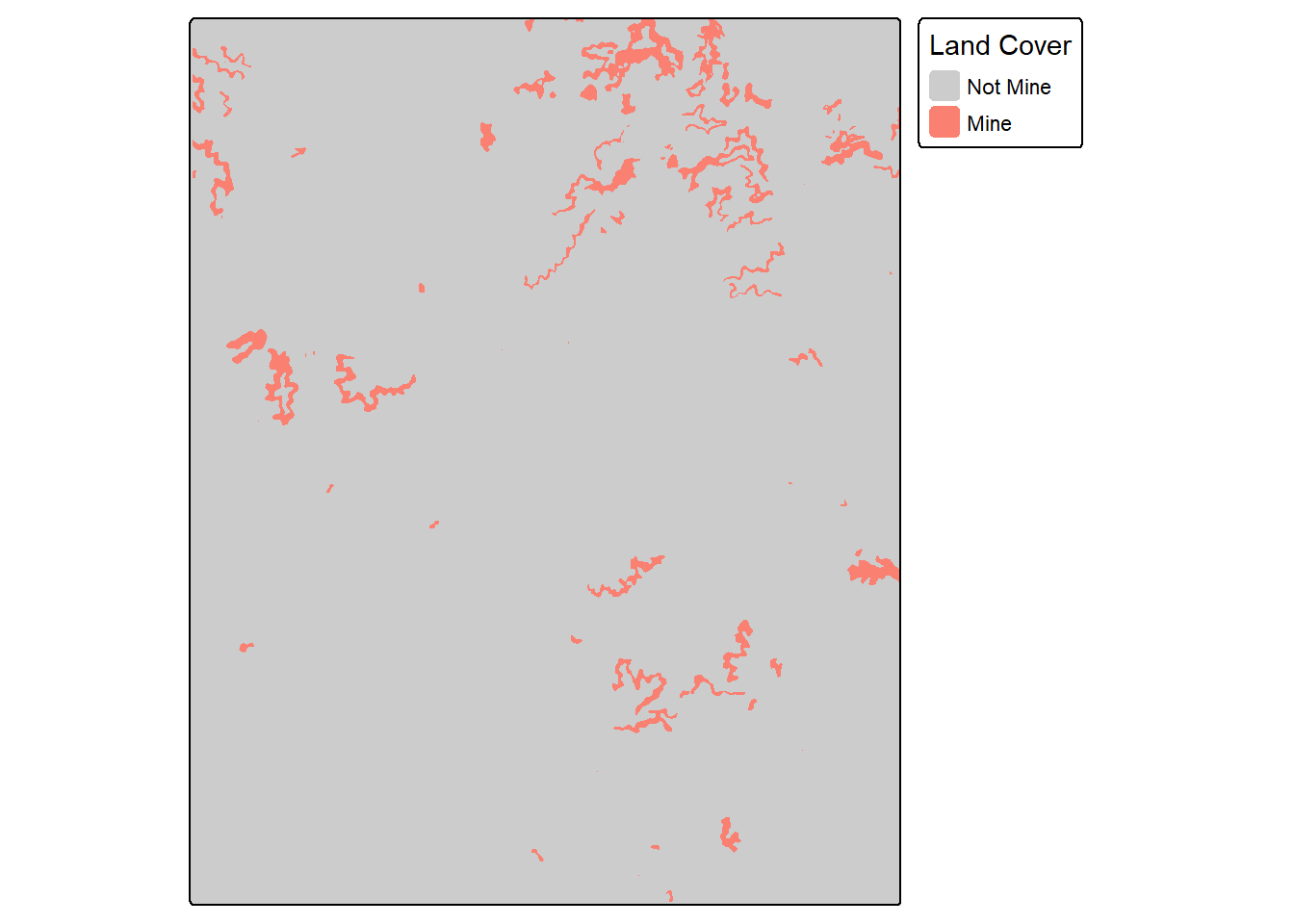
pntsIn2 <- terra::project(pntsTopo, terra::crs(refT))
refIsect <- terra::extract(refT, pntsIn2)
predIsect <- terra::extract(predT, pntsIn2)

resultsIn <- data.frame(ref=as.factor(refIsect$topoRef),
                        pred=as.factor(predIsect$topoPred))

resultsIn$ref <- forcats::fct_recode(resultsIn$ref,
                                   "Not Mine" = "0",
                                   "Mine" = "1")
resultsIn$pred <- forcats::fct_recode(resultsIn$pred,
                                   "Not Mine" = "0",
                                   "Mine" = "1")
myMetrics <- assessPnts(reference=bIn$ref,
predicted=bIn$pred,
multiclass=FALSE,
mappings=c("Not Mine", "Mine")
)
print(myMetrics)$Classes
[1] "Not Mine" "Mine"
$referenceCounts
Not Mine Mine
4822 178
$predictionCounts
Not Mine Mine
4840 160
$confusionMatrix
Reference
Predicted Not Mine Mine
Not Mine 4820 20
Mine 2 158
$Mets
OA Recall Precision Specificity NPV F1Score
Mine 0.9956 0.8876 0.9875 0.9996 0.9959 0.934923.5.4 Example 4: Use Raster Grids
The assessRaster() function allows for calculating assessment metrics from reference and prediction categorical raster grids as opposed to point locations or tables. Note that the grids being compared should have the same spatial extent, coordinate reference system, and number of rows and columns of cells.
predT <- terra::resample(predT, refT)myMetrics <- assessRaster(reference = refT,
predicted = predT,
multiclass = FALSE,
mappings = c("Not Mine", "Mine")
)
print(myMetrics)$Classes
[1] "Not Mine" "Mine"
$referenceCounts
Negative Positive
36022015 1301194
$predictionCounts
Negative Positive
36146932 1176277
$confusionMatrix
Reference
Predicted Negative Positive
Negative 35994704 152228
Positive 27311 1148966
$Mets
OA Recall Precision Specificity NPV F1Score
Mine 0.9952 0.883 0.9768 0.9992 0.9958 0.927523.6 Training Loop Utilities
geodl provides several functions to customize the training loop. These utilities are demonstrated in the context of training loops in Chapter 24 and Chapter 25.
23.7 Spatial Predictions
We will demonstrate using trained models to make predictions to full spatial extents in Chapter 24 and Chapter 25. This is accomplished using geodl’s predictSpatial() function.
23.8 TerrainSeg Model
geodl also implements a means to perform semantic segmentation or feature extraction of geomorphic, landform, or archeological features using LSP predictor variables. The defineTerrainSeg() function prepends the module conceptualized in Figure 23.12 to a pre-instantiated semantic segmentation model. This module calculates the following LSPs:
- Topographic slope
- Local topographic position index (TPI) using a small annulus moving window
- Multi-directional hillshade
- Planform curvature
- Profile Curvature
- Hillslope topographic position index (TPI) using a larger annulus moving window.
This method and workflow is described in the following publication:
Maxwell, A.E., Farhadpour, S. and Reed, M.M., 2026. A deep learning architecture and workflow for geomorphic feature extraction using digital terrain model‐derived land surface parameters. Earth Surface Processes and Landforms, 51(5), p.e70295.
The user is able to define moving window sizes to parameterize the TPI calculations. Smoothing can be applied prior to calculating surface curvatures to reduce the impact of local noise. The hillshade is calculated with illumination from the north, south, east, and west. This is so that applying random rotations, as implemented with defineSegDataSet() or defineDynamicSegDataSet() will not impact the illumination. All values are clipped and re-scaled to a range of 0 to 1.
Once LSPs are calculated, rows and columns of cells are cropped to remove edge effects, and the stack of LSPs is then provided as predictor variables to the trainable semantic segmentation architecture.
It also supports generating LSPs at varying resolutions by implementing Gaussian spatial pyramid pooling at five different levels of smoothing. The user can choose whether or not to calculate Gaussian pyramids. If Gaussian pyramids are not used, 6 LSPs are passed to the trainable component of the model. If it is used, 31 LSPs are provided. Note that the hillslope-scale TPI is only calculated at the original resolution since it already uses a large window and is, as a result, already generalized.

The code below shows how to instantiate, parameterize, and use the terrain segmentation model. In the example, we use a modified UNet architecture and differentiate two classes. The local TPI uses an inner radius of 2 cells and an outer radius of 10 cells while the hillslope-scale TPI uses a 50 m circular radius. The DTM is smoothed using a 11 cell radius moving window prior to calculating the surface curvatures. We also use Gaussian pyramids, which results in passing 31 LSPs to the trainable component of the model.
The model expects input chips with spatial dimensions of 640-by-640. After the LSPs are calculated, 64 rows and columns are cropped from each side of the tensor. This results in LSPs with spatial dimensions of 512-by-512 being passed to the UNet component.
unetMod <- defineUNet(inChn = 31,
                      nCls = 2,
                      actFunc = "lrelu",
                      useAttn = TRUE,
                      useSE = TRUE,
                      useRes = TRUE,
                      useASPP = FALSE,
                      useDS = FALSE,
                      enChn = c(16, 32, 64, 128),
                      dcChn = c(128, 64, 32, 16),
                      btnChn = 256,
                      negative_slope = 0.01
)$to(device="cuda")

terrainMod <- defineTerrainSeg(segMod= unetMod,
                               cellSize = 1,
                               spatDim=640,
                               tCrop = 64,
                               doGP = TRUE,
                               innerRadius = 2,
                               outerRadius =10,
                               hsRadius = 50,
                               smoothRadius = 11)$to(device="cuda")
t1 <- torch::torch_rand(c(4,1,640,640))$to(device="cuda")
p1 <- terrainMod(t1)p1$shape[1] 4 2 512 51223.9 Concluding Remarks
Now that we have explored the data preparation, modeling, loss, and assessment components of geodl, we are ready to implement complete training, validation, and prediction workflows. In Chapter 24, we explore two workflows for a binary classification problem, and in Chapter 25, we explore two workflows for a multiclass classification problem.
23.10 Questions
- Describe the structure and purpose of a squeeze and excitation module.
- Describe the structure and purpose of an attention gate module.
- Explain the purpose of the lambda, gamma, and delta terms in the unified focal loss framework.
- Describe the components and structure of an atrous spatial pyramid pooling (ASPP) module.
- Explain key differences and innovations of UNet3+ in comparison to base UNet.
- MobileNetv2 implements depthwise separable convolution. Explain how this is different from traditional convolution.
- Explain how the structure of the ConvNeXt-style blocks implemented in geodl are different from traditional double-convolution blocks.
- Why is it redundant to use squeeze and excitation and attention gates alongside of convolutional block attention modules (CBAMs)?
23.11 Exercises
Task 1
Using defineUNet(), instantiate an instance of a UNet-like architecture that meets the following criteria:
- Expects 7 input variables
- Differentiates 11 classes
- Uses the swish activation function throughout
- Uses attention gates along the skip connections
- Uses squeeze and excitation modules in the encoder with a reduction rate of 8.
- Produces the following number of feature maps for encoder blocks 1 through 4: 32, 64, 128, 128
- Produces 256 feature maps in the bottleneck block
- Produces the following number of feature maps for decoder blocks 1 through 4: 128, 64, 32, 16
Task 2
Test the architecture on randomly generated data with a mini-batch size of 8 and spatial dimensions of 256x256.
Task 3
Use the countParams() function to count the number of trainable parameters in the model. How many total trainable parameters are included in the architecture? Which layer has the most trainable parameters?
Task 4
Using defineUNet3p, instantiate an instance of a UNet3+ architecture that meets the following criteria:
- Expects 8 input variables
- Differentiates 3 classes
- Uses 1x1 convolution to reproject data along the skip connections as opposed to 3x3 convolution
- Uses a DWS-style block for encoder block 1, double-convolution blocks for encoder blocks 2 and 3, and ConvNeXt-style blocks for encoder block 4 and the bottleneck.
- Produces the following number of feature maps for encoder blocks 1 through 4: 32, 64, 128, 128
- Produces 256 feature maps in the bottleneck block
- Generates 32 feature maps for each input into each decoder block
Task 5
Test the architecture on randomly generated data with a mini-batch size of 8 and spatial dimensions of 256x256.
Task 6
Use the countParams() function to count the number of trainable parameters in the model. How many total trainable parameters are included in the architecture? How does this compare to the UNet architecture that you created for Task 1.
Task 7
Instantiate an instance of the unified focal loss using defineUnifiedFocalLoss() configured as a focal Tversky loss with a gamma of 0.6 and a delta of 0.7 for a 7 class problem.
Task 8
Instantiate an instance of the unified focal loss using defineUnifiedFocalLoss() configured as a focal cross entropy loss with a gamma of 0.8 and a delta of 0.5, and class weights of c(0.1, 0.3, 0.4, 0.2) for a 4 class problem.