16 Model Ensembles
16.1 Topics Covered
- Model ensembles and stacking
- Tuning multiple candidate models with tune for use in a stack
- Building a stacked ensemble with the stacks package
- Interpreting the stacking coefficients and selected members
- Comparing the ensemble to its individual members
- Predicting to raster data with a stacked ensemble
16.2 Introduction
Different algorithms learn different patterns from the same data. A random forest partitions the feature space using decision trees, a support vector machine (SVM) defines a separating boundary, k-nearest neighbor (kNN) relies on similarity to training samples, and an artificial neural network (ANN) learns a set of weighted, non-linear transformations. As a result, each algorithm likely makes different errors. A model ensemble combines the predictions of multiple models with the goal of producing a more accurate and stable result than any single model.
You have already used one type of ensemble: random forest is an ensemble of decision trees in which each tree is trained using a different bootstrap sample of the training data. This is known as bagging. Boosting is another ensemble approach in which models are trained sequentially, with each new model focusing on the errors of the prior models. In this chapter, we explore a third approach: stacking, or stacked generalization. Stacking combines different types of models by training a meta-learner, a model that learns how to best combine the predictions of a set of candidate models.
The stacking process is conceptualized in Figure 16.1 and consists of the following steps:
- A set of candidate models is trained and tuned using cross-validation. These can include different algorithms and different hyperparameter settings for the same algorithm.
- The out-of-fold predictions for each candidate model are saved. For each training sample, these are the predictions made by a model that was not trained using that sample.
- A meta-learner is trained using the out-of-fold predictions as predictor variables and the original dependent variable as the response. In the stacks package, the meta-learner is a regularized (LASSO) regression model with non-negative coefficients. As a result, many candidates receive a coefficient, or stacking coefficient, of zero and are removed. The candidates with non-zero coefficients become the members of the ensemble.
- The members are re-trained using the full training set, and new predictions are generated by combining the members’ predictions using the stacking coefficients.
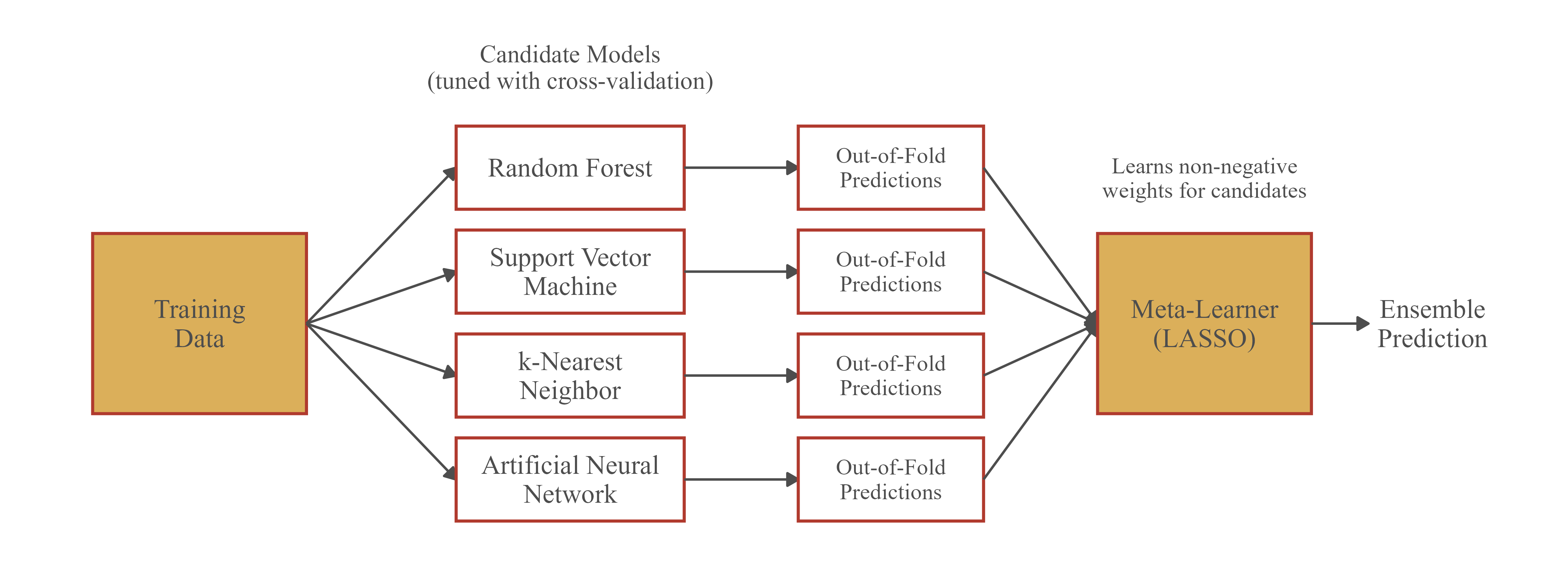
It is important that the meta-learner is trained using out-of-fold predictions. If it were trained using predictions made on the same data used to train the candidate models, it would favor models that overfit the training data.
In this chapter, we use the stacks package, which is part of tidymodels, to build a stacked ensemble from random forest, SVM, kNN, and ANN candidate models. We revisit the wetland mapping problem from Chapter 10, in which palustrine forested/palustrine scrub/shrub (PFO/PSS) wetlands are differentiated from uplands using land surface parameters (LSPs). The chapter builds on the tidymodels workflows discussed in Chapter 13 and Chapter 14, so we recommend reviewing those chapters first.
Below, we load the required packages. In addition to tidymodels and stacks, the algorithms are implemented using the ranger (random forest), kernlab (SVM), kknn (kNN), and nnet (ANN) packages, which must be installed but do not need to be loaded since they are called by parsnip. The meta-learner is fit using glmnet, which must also be installed. terra and tmap are used to predict to and visualize raster data.
16.3 Data Preparation
This chapter uses the same data as Chapter 10, and a copy of the data is provided in this chapter’s data folder. We read in the training and validation tables and select the same subset of eight LSPs used in Chapter 10. The dependent variable (“class”) is converted to a factor with descriptive labels. We set “Wetland” as the first factor level since yardstick treats the first level as the class of interest, or event, by default.
fldPth <- "gslrData/chpt16/data/"

predsToUse <- c("cost",
                "ctmi",
                "crv_plane",
                "crv_pro",
                "diss_a",
                "rough_a",
                "slp_d",
                "sp_a")

train <- read_csv(str_glue("{fldPth}training.csv")) |>
  select(class, all_of(predsToUse)) |>
  mutate(class = factor(class,
                        levels = c("wet", "not"),
                        labels = c("Wetland", "Upland")))

test <- read_csv(str_glue("{fldPth}validation.csv")) |>
  select(class, all_of(predsToUse)) |>
  mutate(class = factor(class,
                        levels = c("wet", "not"),
                        labels = c("Wetland", "Upland")))

table(train$class)
Wetland  Upland
1000 1000 table(test$class)
Wetland  Upland
   1000    1000
Next, we define the resampling strategy. All candidate models must be assessed using the same resamples so that their out-of-fold predictions align. We use 5-fold cross-validation with stratification by class.
set.seed(42)
folds <- vfold_cv(train, v = 5, strata = class)
We also define a single preprocessing recipe that is shared by all the candidate models. Unlike random forest, the SVM, kNN, and ANN algorithms are sensitive to the scale of the predictor variables. So, we center and scale all predictor variables using step_normalize(). Since this step is defined in the recipe, the means and standard deviations are calculated separately using the analysis data within each fold, which avoids a data leak.
wetRecipe <- recipe(class ~ ., data = train) |>
  step_normalize(all_numeric_predictors())
16.4 Define Candidate Models
Table 16.1 summarizes the four algorithms used as candidate models along with the parsnip functions, engines, and hyperparameters that we tune. For each algorithm, the hyperparameters to be tuned are set to tune().
| Algorithm | parsnip Function | Engine | Tuned Hyperparameters | Description |
|---|---|---|---|---|
| Random Forest | rand_forest() | ranger | mtry, min_n | Ensemble of decision trees trained on bootstrap samples with a random subset of predictor variables considered at each split |
| Support Vector Machine (SVM) | svm_rbf() | kernlab | cost, rbf_sigma | Finds the boundary that maximizes the margin between classes; the radial basis function kernel allows for non-linear boundaries |
| k-Nearest Neighbor (kNN) | nearest_neighbor() | kknn | neighbors, weight_func | Predicts based on the classes of the k most similar training samples in the feature space |
| Artificial Neural Network (ANN) | mlp() | nnet | hidden_units, penalty, epochs | Fully connected network with a single hidden layer; weights are learned iteratively |
The model specifications are defined below. For random forest, we use 500 trees and tune the number of predictor variables randomly selected at each split (mtry) and the minimum number of samples in a node required for a split (min_n). For the SVM, we use a radial basis function kernel and tune the cost of misclassification (cost) and the kernel width (rbf_sigma). For kNN, we tune the number of neighbors (neighbors) and the function used to weight neighbors by distance (weight_func). For the ANN, we tune the number of nodes in the single hidden layer (hidden_units), the weight decay penalty (penalty), and the number of training iterations (epochs). The MaxNWts argument of the nnet engine increases the maximum number of allowed weights.
rfSpec <- rand_forest(mtry = tune(),
                      min_n = tune(),
                      trees = 500) |>
  set_engine("ranger") |>
  set_mode("classification")

svmSpec <- svm_rbf(cost = tune(),
                   rbf_sigma = tune()) |>
  set_engine("kernlab") |>
  set_mode("classification")

knnSpec <- nearest_neighbor(neighbors = tune(),
                            weight_func = tune()) |>
  set_engine("kknn") |>
  set_mode("classification")

annSpec <- mlp(hidden_units = tune(),
               penalty = tune(),
               epochs = tune()) |>
  set_engine("nnet", MaxNWts = 5000) |>
  set_mode("classification")
Each model specification is combined with the shared recipe into a workflow.
rfWF <- workflow() |> add_recipe(wetRecipe) |> add_model(rfSpec)
svmWF <- workflow() |> add_recipe(wetRecipe) |> add_model(svmSpec)
knnWF <- workflow() |> add_recipe(wetRecipe) |> add_model(knnSpec)
annWF <- workflow() |> add_recipe(wetRecipe) |> add_model(annSpec)
16.5 Tune Candidate Models
Each workflow is tuned using tune_grid(). Setting grid = 10 generates 10 hyperparameter combinations for each algorithm using a space-filling design, so we obtain 40 candidate models in total. We calculate the area under the receiver operating characteristic curve (AUC ROC), overall accuracy, and log loss for each candidate.
The key addition for stacking is the control argument. control_stack_grid() is a convenience function that saves the out-of-fold predictions and the workflow for each candidate model, which are both required by stacks. Without these settings, the tuning results cannot be added to a stack.
Tuning 40 candidate models with 5-fold cross-validation requires training 200 models and may take a few minutes. Tuning can be parallelized, as discussed in the tune documentation.
ctrlStack <- control_stack_grid()
ensMetrics <- metric_set(roc_auc, accuracy, mn_log_loss)

set.seed(42)
rfRes <- tune_grid(rfWF,
                   resamples = folds,
                   grid = 10,
                   metrics = ensMetrics,
                   control = ctrlStack)

set.seed(42)
svmRes <- tune_grid(svmWF,
                    resamples = folds,
                    grid = 10,
                    metrics = ensMetrics,
                    control = ctrlStack)

set.seed(42)
knnRes <- tune_grid(knnWF,
                    resamples = folds,
                    grid = 10,
                    metrics = ensMetrics,
                    control = ctrlStack)

set.seed(42)
annRes <- tune_grid(annWF,
                    resamples = folds,
                    grid = 10,
                    metrics = ensMetrics,
                    control = ctrlStack)
Before building the ensemble, it is worth examining how well each algorithm performs on its own. show_best() returns the best performing hyperparameter combinations based on the cross-validation results. All four algorithms perform well, with mean AUC ROC values near 0.98 to 0.99. This is a fairly easy classification problem, so we should not expect large gains from the ensemble.
show_best(rfRes, metric = "roc_auc", n = 3)# A tibble: 3 × 8
mtry min_n .metric .estimator mean n std_err .config
<int> <int> <chr> <chr> <dbl> <int> <dbl> <chr>
1 4 6 roc_auc binary 0.990 5 0.00202 pre0_mod06_post0
2 2 2 roc_auc binary 0.990 5 0.00183 pre0_mod03_post0
3 3 35 roc_auc binary 0.989 5 0.00194 pre0_mod05_post0show_best(svmRes, metric = "roc_auc", n = 3)# A tibble: 3 × 8
cost rbf_sigma .metric .estimator mean n std_err .config
<dbl> <dbl> <chr> <chr> <dbl> <int> <dbl> <chr>
1 32 0.000464 roc_auc binary 0.986 5 0.00178 pre0_mod10_post0
2 0.0992 0.0774 roc_auc binary 0.985 5 0.00236 pre0_mod05_post0
3 3.17 1 roc_auc binary 0.980 5 0.00300 pre0_mod08_post0show_best(knnRes, metric = "roc_auc", n = 3)# A tibble: 3 × 8
neighbors weight_func .metric .estimator mean n std_err .config
<int> <chr> <chr> <chr> <dbl> <int> <dbl> <chr>
1 15 rectangular roc_auc binary 0.984 5 0.00286 pre0_mod10_post0
2 13 epanechnikov roc_auc binary 0.982 5 0.00265 pre0_mod09_post0
3 10 rank roc_auc binary 0.982 5 0.00298 pre0_mod07_post0show_best(annRes, metric = "roc_auc", n = 3)# A tibble: 3 × 9
hidden_units penalty epochs .metric .estimator mean n std_err .config
<int> <dbl> <int> <chr> <chr> <dbl> <int> <dbl> <chr>
1 2 0.0774 560 roc_auc binary 0.988 5 0.00233 pre0_m…
2 1 0.000000215 450 roc_auc binary 0.987 5 0.00162 pre0_m…
3 7 1 340 roc_auc binary 0.987 5 0.00211 pre0_m…16.6 Build the Stack
16.6.1 Add Candidates
A stack is initialized with stacks(), and the tuning results are added using add_candidates(). Printing the data stack shows that it contains 4 model definitions and 40 candidate members. At this point, the stack simply holds the out-of-fold predictions for all candidates.
wetStack <- stacks() |>
  add_candidates(rfRes) |>
  add_candidates(svmRes) |>
  add_candidates(knnRes) |>
  add_candidates(annRes)

wetStack
# A data stack with 4 model definitions and 40 candidate members:
# rfRes: 10 model configurations
# svmRes: 10 model configurations
# knnRes: 10 model configurations
# annRes: 10 model configurations
# Outcome: class (factor)The data stack can be converted to a tibble to view the out-of-fold predictions. Each column after the first is the predicted probability for one class from one candidate model, and each row is a training sample. These columns serve as the predictor variables for the meta-learner. Note that the predictions from different candidates are often highly correlated, which is one reason a regularized meta-learner is used.
# A tibble: 6 × 5
class .pred_Wetland_rfRespre…¹ .pred_Wetland_rfResp…² .pred_Wetland_rfResp…³
<fct> <dbl> <dbl> <dbl>
1 Wetland 0.891 0.893 0.891
2 Wetland 0.993 0.992 0.996
3 Wetland 0.994 0.989 0.996
4 Wetland 0.970 0.956 0.975
5 Wetland 0.994 0.997 0.994
6 Wetland 0.998 0.998 1
# ℹ abbreviated names: ¹.pred_Wetland_rfRespre0_mod01_post0,
# ².pred_Wetland_rfRespre0_mod02_post0, ³.pred_Wetland_rfRespre0_mod03_post0
# ℹ 1 more variable: .pred_Wetland_rfRespre0_mod04_post0 <dbl>16.6.2 Blend Predictions
blend_predictions() trains the meta-learner. By default, a LASSO model (mixture = 1) is fit with non-negative coefficients, and the regularization penalty is selected from a set of candidate values using bootstrap resampling of the out-of-fold predictions. Larger penalties remove more candidates from the ensemble. Printing the result shows how many candidates were retained and their stacking coefficients, or weights.
For a binary classification problem, the meta-learner only needs the predicted probabilities for one class since the probabilities for the two classes sum to one. As a result, the member names reference the “Upland” probabilities. This does not change how the ensemble is used or interpreted.
set.seed(42)
wetBlend <- blend_predictions(wetStack)

wetBlend
# A tibble: 9 × 3
member type weight
<chr> <chr> <dbl>
1 .pred_Upland_svmRespre0_mod02_post0 svm_rbf 3.55
2 .pred_Upland_rfRespre0_mod06_post0 rand_forest 3.52
3 .pred_Upland_annRespre0_mod09_post0 mlp 1.82
4 .pred_Upland_annRespre0_mod05_post0 mlp 1.71
5 .pred_Upland_annRespre0_mod08_post0 mlp 1.38
6 .pred_Upland_rfRespre0_mod03_post0 rand_forest 1.06
7 .pred_Upland_annRespre0_mod06_post0 mlp 0.707
8 .pred_Upland_annRespre0_mod10_post0 mlp 0.427
9 .pred_Upland_knnRespre0_mod10_post0 nearest_neighbor 0.248Of the 40 candidates, only a small number were retained. The random forest and SVM members received the largest stacking coefficients, followed by several ANN members, while a single kNN member received a small weight. Note that multiple members from the same algorithm, with different hyperparameter settings, can be retained. Also, the best candidate from cross-validation for a given algorithm is not necessarily selected, since the meta-learner favors combinations of candidates that complement each other as opposed to the best individual candidates.
The autoplot() function provides several visualizations of the blending process. The default plot shows how performance and the number of members change with the penalty value. The dashed line indicates the selected penalty. As the penalty increases, fewer members are retained; with too large of a penalty, performance degrades.
autoplot(wetBlend)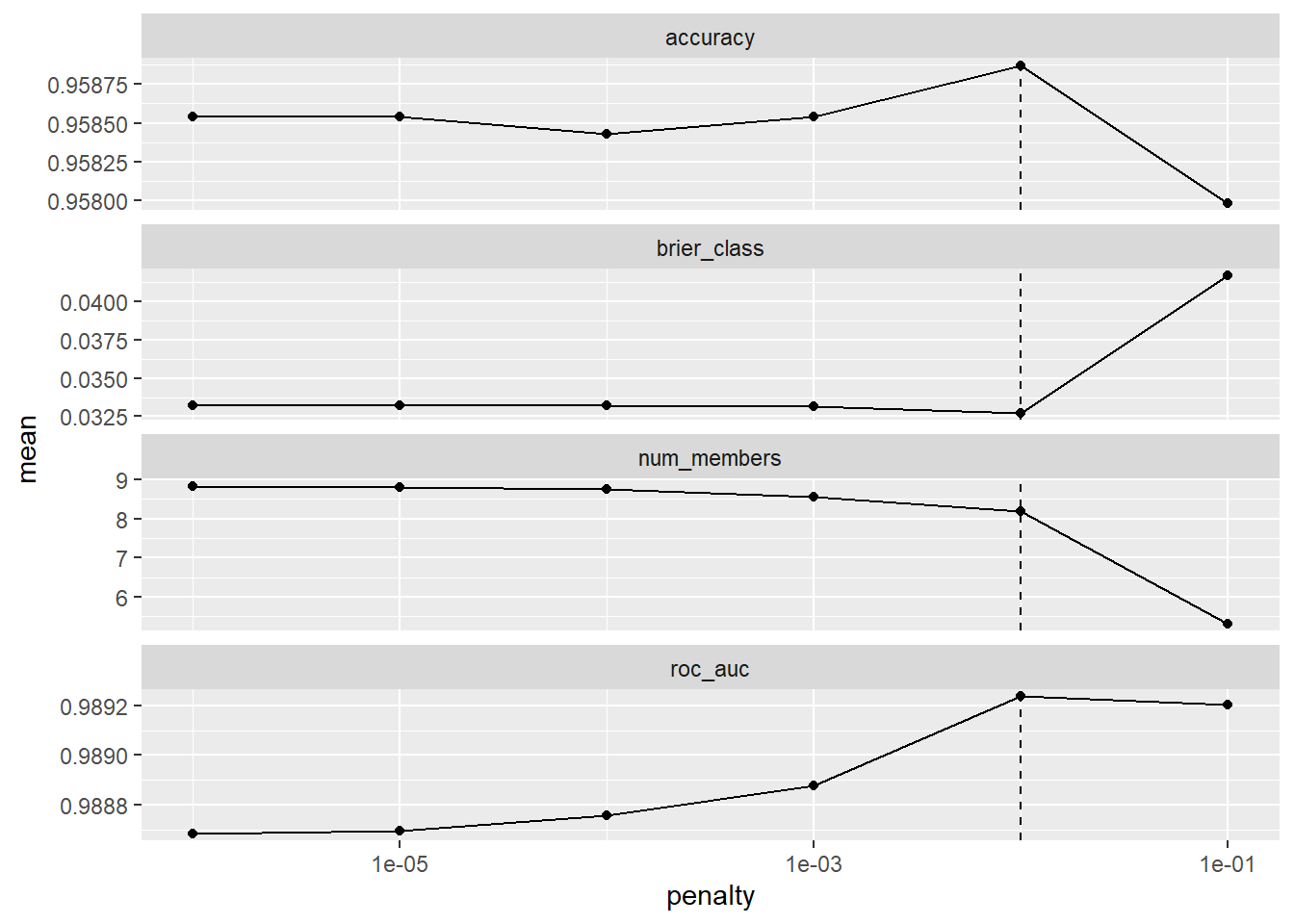
Setting type = "weights" displays the stacking coefficients of the members, colored by algorithm.
autoplot(wetBlend, type = "weights")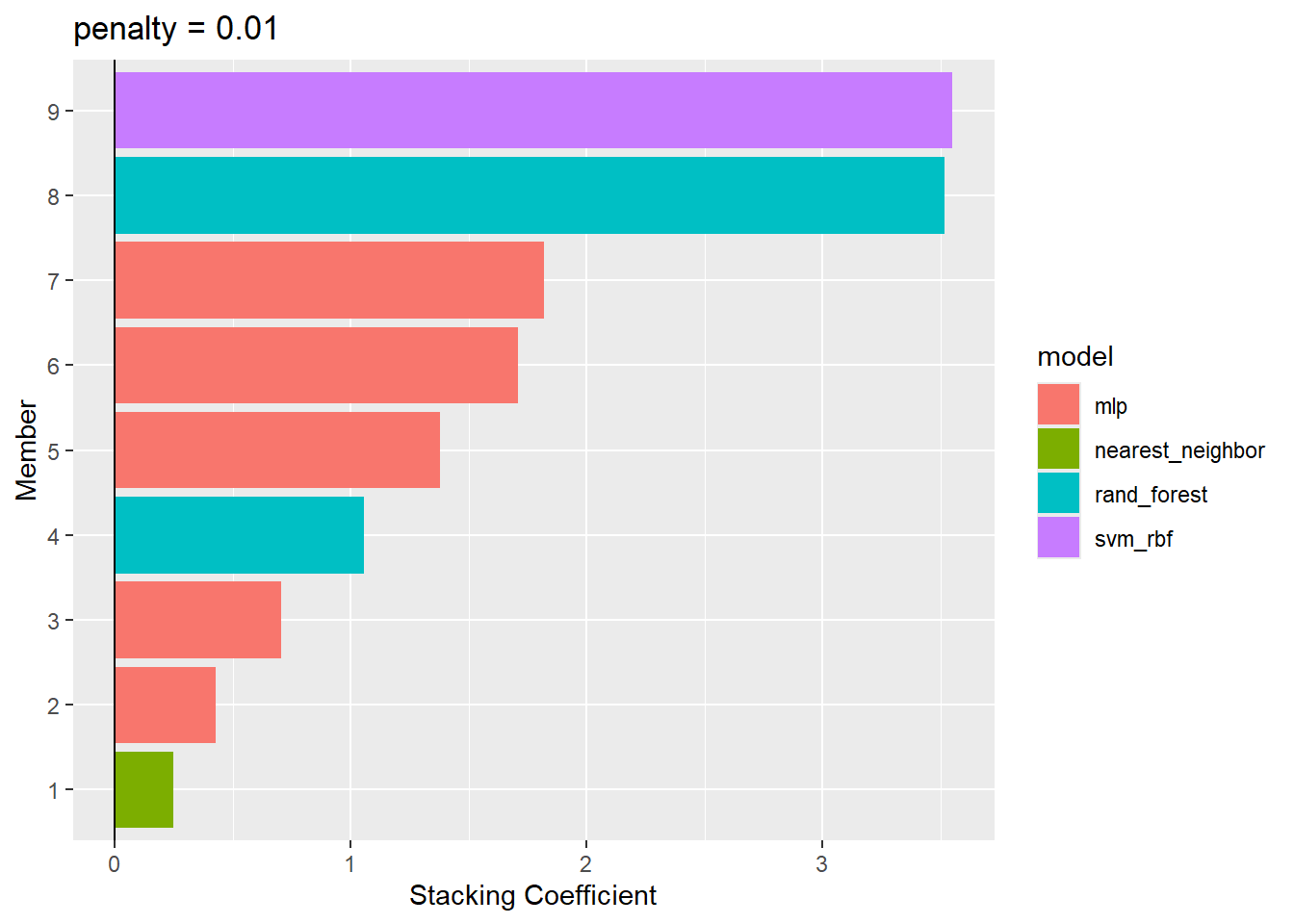
16.6.3 Fit Members
The members were only trained using the analysis data within each fold. Before the ensemble can be used to make predictions, each member must be re-trained using the full training set. This is accomplished with fit_members(). Only members with non-zero stacking coefficients are re-trained.
wetEns <- fit_members(wetBlend)collect_parameters() returns the hyperparameter settings and stacking coefficients for all candidates from a specific model definition. Below, we view the random forest candidates. Candidates with a coefficient of zero were not included in the ensemble.
collect_parameters(wetEns, "rfRes")# A tibble: 10 × 5
member mtry min_n terms coef
<chr> <int> <int> <chr> <dbl>
1 rfRespre0_mod01_post0 1 14 .pred_Upland_rfRespre0_mod01_post0 0
2 rfRespre0_mod02_post0 1 31 .pred_Upland_rfRespre0_mod02_post0 0
3 rfRespre0_mod03_post0 2 2 .pred_Upland_rfRespre0_mod03_post0 1.06
4 rfRespre0_mod04_post0 2 18 .pred_Upland_rfRespre0_mod04_post0 0
5 rfRespre0_mod05_post0 3 35 .pred_Upland_rfRespre0_mod05_post0 0
6 rfRespre0_mod06_post0 4 6 .pred_Upland_rfRespre0_mod06_post0 3.52
7 rfRespre0_mod07_post0 5 23 .pred_Upland_rfRespre0_mod07_post0 0
8 rfRespre0_mod08_post0 6 40 .pred_Upland_rfRespre0_mod08_post0 0
9 rfRespre0_mod09_post0 7 10 .pred_Upland_rfRespre0_mod09_post0 0
10 rfRespre0_mod10_post0 8 27 .pred_Upland_rfRespre0_mod10_post0 0 16.7 Assess the Ensemble
We now assess the ensemble using the withheld validation data. predict() works the same way as for other tidymodels workflows. Setting type = "prob" returns the predicted class probabilities while the default returns the predicted class. We combine the predictions with the reference labels and calculate a confusion matrix and a set of assessment metrics using yardstick.
          Truth
Prediction Wetland Upland
   Wetland     969     58
   Upland       31    942
classMetrics <- metric_set(accuracy, precision, recall, f_meas)
classMetrics(ensPreds, truth = class, estimate = .pred_class)# A tibble: 4 × 3
.metric .estimator .estimate
<chr> <chr> <dbl>
1 accuracy binary 0.956
2 precision binary 0.944
3 recall binary 0.969
4 f_meas binary 0.956roc_auc(ensPreds, truth = class, .pred_Wetland)# A tibble: 1 × 3
.metric .estimator .estimate
<chr> <chr> <dbl>
1 roc_auc binary 0.989The ensemble achieves high accuracy on the validation data. However, a more important question is whether the ensemble outperforms its individual members. Setting members = TRUE in predict() returns the predictions from each member in addition to the ensemble predictions. We then calculate the AUC ROC for the ensemble and each member. The map() function iterates over the columns containing the predicted probabilities for the “Wetland” class.
memberPreds <- predict(wetEns, test, type = "prob", members = TRUE)

aucCompare <- memberPreds |>
  select(starts_with(".pred_Wetland")) |>
  map(\(p) roc_auc_vec(test$class, p)) |>
  as_tibble() |>
  pivot_longer(everything(), names_to = "model", values_to = "roc_auc") |>
  mutate(model = str_remove(model, ".pred_Wetland_?"),
         model = if_else(model == "", "ENSEMBLE", model)) |>
  arrange(desc(roc_auc))

aucCompare |> gt() |>
fmt_number(columns = roc_auc, decimals = 4)| model | roc_auc |
|---|---|
| ENSEMBLE | 0.9891 |
| rfRespre0_mod06_post0 | 0.9877 |
| rfRespre0_mod03_post0 | 0.9875 |
| annRespre0_mod06_post0 | 0.9863 |
| knnRespre0_mod10_post0 | 0.9850 |
| annRespre0_mod08_post0 | 0.9785 |
| annRespre0_mod05_post0 | 0.9783 |
| annRespre0_mod09_post0 | 0.9741 |
| svmRespre0_mod02_post0 | 0.9738 |
| annRespre0_mod10_post0 | 0.9702 |
Interestingly, the SVM member, which received the largest stacking coefficient, has one of the lowest AUC ROC values of the members when used on its own. This highlights that the stacking coefficients do not simply reflect the performance of each member. Instead, they reflect how much each member contributes to the ensemble given the other members, which depends on how its errors differ from those of the other members.
The ensemble has the highest AUC ROC, but the improvement over the best individual member is small. This is typical when the individual models already perform very well and when they make similar errors. Ensembles tend to provide larger benefits when the candidate models are diverse, when the individual models are less accurate, or when the problem is more complex. Even when the gain in accuracy is small, ensembles can provide more stable predictions since they are less dependent on the idiosyncrasies of a single model. These benefits must be weighed against the increased computational cost and decreased interpretability of the ensemble.
16.8 Predict to Raster Data
Lastly, we use the ensemble to generate a spatial prediction of wetland likelihood. As in Chapter 10, we read in the raster stack of predictor variables, rename the bands, and subset the eight predictor variables used. Note that we do not need to manually rescale the raster data, since the normalization is part of the recipe within each member workflow and will be applied automatically.
Predicting with an ensemble requires generating predictions from every member, and some algorithms, such as kNN, are slow to predict to a large number of new samples. To reduce the processing time, we predict to a 600 by 600 cell subset of the full extent using bracket notation with row and column indices. The forest mask is cropped to the same extent and used to set non-forested cells to NA.
predStk <- rast(str_glue("{fldPth}predictors.tif"))

names(predStk) <- c("cost",
                    "crv_arc",
                    "crv_plane",
                    "crv_pro",
                    "ctmi",
                    "diss_5",
                    "diss_10",
                    "diss_20",
                    "diss_25",
                    "diss_a",
                    "rough_5",
                    "rough_10",
                    "rough_20",
                    "rough_25",
                    "rough_a",
                    "slp_d",
                    "sp_5",
                    "sp_10",
                    "sp_20",
                    "sp_25",
                    "sp_a")

predStk <- predStk[[predsToUse]]

predSub <- predStk[601:1200, 601:1200, drop = FALSE]

forMsk <- rast(str_glue("{fldPth}for_mask.tif"))
forMskSub <- crop(forMsk, predSub)

predSub <- mask(predSub, forMskSub)
predict() from terra applies a model to each cell. Since the ensemble returns a tibble of class probabilities, we define a short function that returns only the predicted probability for the “Wetland” class. Setting na.rm = TRUE skips cells with NA values, in this case those outside of the forest mask.
To predict to the full extent, replace predSub with the full predictor stack masked by the full forest mask. Predicting to the roughly 2.5 million forested cells takes substantially longer (an estimated 10 to 15 minutes on our machine), so we recommend writing the result to disk with writeRaster() as opposed to re-generating it.
tm_shape(wetProb) +
  tm_raster(col.scale = tm_scale_continuous(values = "brewer.yl_gn_bu"),
            col.legend = tm_legend(title = "Wetland Probability")) +
  tm_title("Stacked Ensemble Prediction")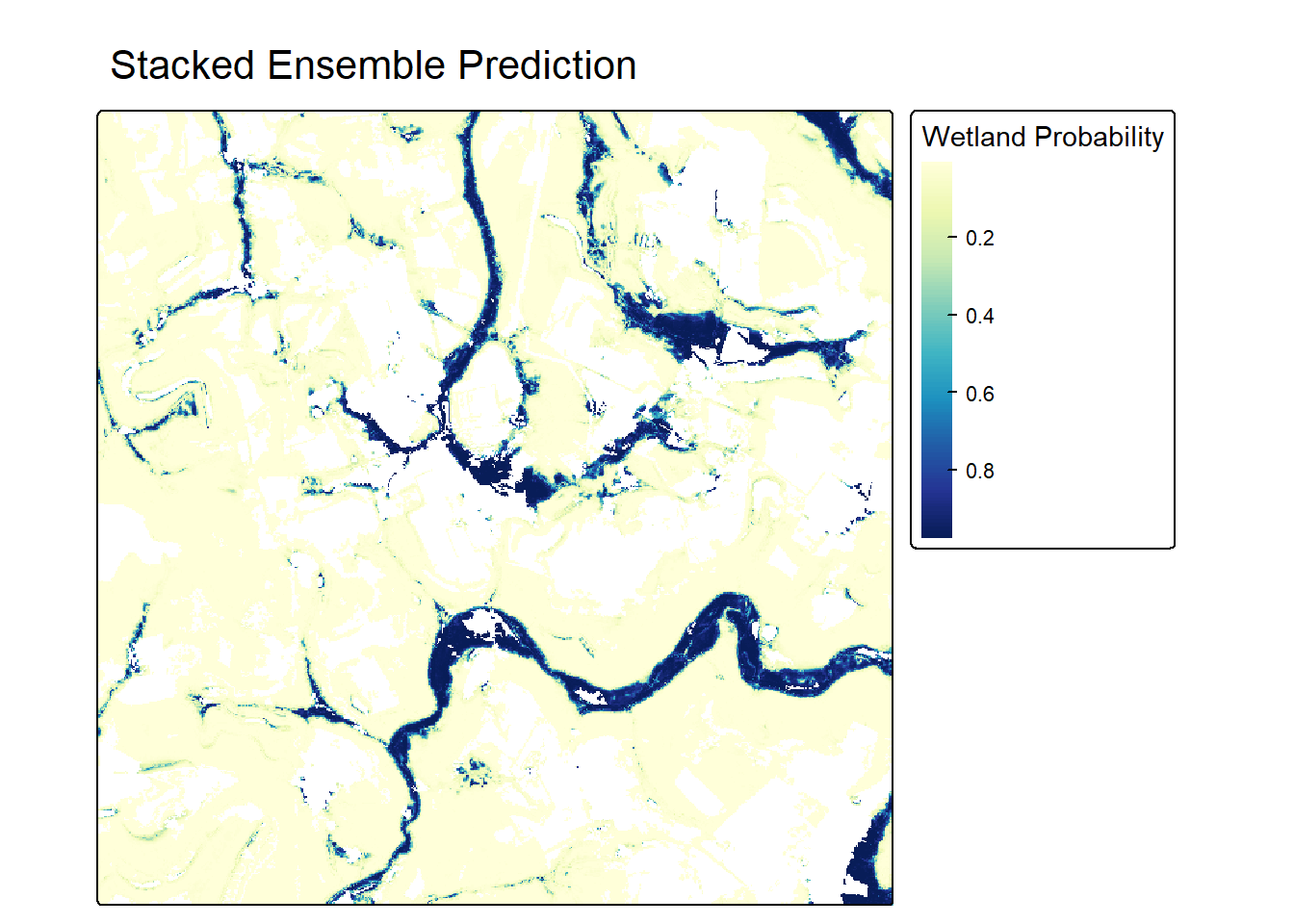
16.9 Concluding Remarks
In this chapter, we built a stacked ensemble from random forest, SVM, kNN, and ANN candidate models using the stacks package. The key steps were to (1) tune all candidates using the same resamples while saving their out-of-fold predictions, (2) combine the candidates with stacks() and add_candidates(), (3) train a regularized meta-learner with blend_predictions(), and (4) re-train the selected members with fit_members(). The resulting ensemble can be used like any other tidymodels model, including for predicting to raster data.
For this relatively easy problem, the ensemble only slightly outperformed its best member. In general, stacking is most beneficial when candidate models are diverse and make different errors. Since stacking requires tuning and training many models, it is also more computationally expensive than using a single model. In the next section of the text, we move on to deep learning using torch.
16.10 Questions
- Explain the difference between bagging, boosting, and stacking.
- What is the role of the meta-learner in a stacked ensemble?
- Why must the meta-learner be trained using out-of-fold predictions as opposed to predictions on the training data?
- Why must all candidate models be assessed using the same resamples?
- What is the purpose of
control_stack_grid()? - Why does the stacks package use a LASSO model with non-negative coefficients as the meta-learner?
- Why is it necessary to call
fit_members()before using the ensemble to make predictions? - Under what conditions is a stacked ensemble most likely to outperform its individual members?
16.11 Exercises
In these exercises, you will build a stacked ensemble for the landslide susceptibility problem introduced in the Chapter 10 exercises. The goal is to predict the likelihood of landslide occurrence within the Valley and Ridge physiographic province of West Virginia using topographic predictor variables. You have been provided with the following files in the exercise folder for the chapter.
- chpt16.gpkg/lsPnts: point locations representing landslide locations and pseudo-absence locations where predictor variables have been extracted
- stk.tif: raster stack of predictor variables for a portion of the study area
The following digital terrain model (DTM) derived land surface parameter (LSP) predictor variables have been provided. Other than elevation, the LSPs were calculated at three different window sizes, indicated by the numbers 1 through 3.
- “elev”: elevation in meters
- “slp1”/“slp2”/“slp3”: topographic slope in degrees
- “sar1”/“sar2”/“sar3”: surface area ratio (SAR)
- “tri1”/“tri2”/“tri3”: topographic roughness index (TRI)
- “tpi1”/“tpi2”/“tpi3”: topographic position index (TPI)
- “diss1”/“diss2”/“diss3”: topographic dissection index
The “class” column differentiates landslides (“slpF”) from pseudo-absence samples (“not”).
Data Preparation
Task 1
- Read in the lsPnts layer, drop the geometry information, and drop the “elev” column.
- Convert the “class” column to a factor with “slpF” as the first level so that yardstick treats landslides as the class of interest.
- Use
initial_split()from rsample to randomly split the data into equal-sized training and test sets, stratified by class. Set a random seed so that your results are reproducible. - Define 5-fold cross-validation folds from the training set, stratified by class.
- Define a recipe that uses all 15 predictor variables and centers and scales them with
step_normalize().
Tune Candidate Models
Task 2
- Define random forest (
rand_forest()with the “ranger” engine), SVM (svm_rbf()with the “kernlab” engine), kNN (nearest_neighbor()with the “kknn” engine), and ANN (mlp()with the “nnet” engine) model specifications, tuning the same hyperparameters used in this chapter. - Combine each specification with your recipe in a workflow and tune each workflow using
tune_grid()withgrid = 10, your cross-validation folds, andcontrol_stack_grid(). - Use
show_best()to report the best cross-validation AUC ROC for each algorithm. Which algorithm performed best on its own? Are the differences between the algorithms larger or smaller than those observed for the wetland data in this chapter?
Build the Stack
Task 3
- Add all four sets of candidates to a data stack, blend the predictions, and fit the members.
- How many of the 40 candidates were retained? Which algorithms are represented among the members?
- Use
autoplot()to plot the stacking coefficients. Which member received the largest weight? Is it also the best individual model? Explain why the stacking coefficients do not simply reflect the performance of each member.
Assess the Ensemble
Task 4
- Use the test set to calculate a confusion matrix, overall accuracy, precision, recall, F1-score, and AUC ROC for the ensemble.
- Use
predict()withmembers = TRUEto calculate the AUC ROC for each member. Did the ensemble outperform its best member? By how much? - Compare your results to the random forest model from the Chapter 10 exercises. Was the additional complexity of the ensemble worthwhile for this problem?
Expand the Ensemble
Task 5
- Add a regularized logistic regression model (
logistic_reg(penalty = tune(), mixture = tune())with the “glmnet” engine) as an additional set of candidates and build a new ensemble. Is the logistic regression model retained? Does the AUC ROC of the ensemble change? - Using
blend_predictions(), build an ensemble with a larger set of penalty values (e.g.,penalty = 10^seq(-4, 0, length.out = 20)). Useautoplot()to describe how the number of members and the AUC ROC change as the penalty increases.
Predict to Raster Data
Task 6
- Read in the raster stack and rename the bands to match the predictor variable columns, including “elev”. The bands are in the same order as the columns.
- Since predicting with an ensemble requires generating predictions from every member, use bracket notation to extract a 500 by 500 cell subset of the raster stack.
- Use your ensemble to predict the probability of landslide occurrence for the subset and map the result using tmap. Describe the spatial pattern of predicted landslide susceptibility.