| Callback | Use |
|---|---|
| luz_callback() | Allows for defining custom callbacks for use within a luz training loop |
| luz_callback_auto_resume() | Resume training a model |
| luz_callback_csv_logger() | Save losses and metrics to disk in a CSV file |
| luz_callback_early_stopping() | Stop training early if model is not improving based on a selected metric |
| luz_callback_gradient_clip() | Implement gradient clipping; re-scale gradients to stabilize learning; do not allow gradients to become too large |
| luz_callback_keep_best_model() | Save model parameters to file and load best parameters once training process finishes |
| luz_callback_lr_scheduler() | Implement a learning rate scheduler to change the learning rate |
| luz_callback_metrics() | For tracking assessment metrics during training |
| luz_callback_model_checkpoint() | Save model checkpoints to disk |
| luz_callback_profile() | Used to track the time needed for different components of the training loop |
| luz_callback_progress() | Prints progress information during the training process |
| luz_callback_resume_from_checkpoint() | Continue training model from a specified checkpoint |
| luz_callback_tfevents() | For use with TensorBoard |
| luz_callback_train_valid() | Switch between training and evaluation modes |
24 Geospatial Semantic Segmentation Workflows: Binary Classification
24.1 Topics Covered
- Prepare data for use in a geodl workflow
- Instantiate datasets and dataloaders
- Use luz and geodl callbacks to implement a training loop
- Train using pre-generated chips and associated masks with deep supervision
- Train using dynamically generated chips and the TerrainSeg model
- Assess generated models and visualize results
- Use trained models to generate spatial predictions for new data
24.2 Introduction
geodl is still actively being developed. We recommend installing it from GitHub as opposed to CRAN. This can be accomplished using devtools as follows:
devtools::install_github("maxwell-geospatial/geodl")
In Chapter 22 and Chapter 23, we described the functionality of the geodl package. In this chapter and the next, we use its components to implement complete deep learning (DL), semantic segmentation workflows. This chapter focuses on a binary classification problem, while Chapter 25 focuses on a multiclass problem.
In the first workflow, we use the vfillDLMini dataset, which includes a set of pre-built image chips and associated masks. The goal is to extract valley fill face anthropogenic geomorphic features using digital terrain model (DTM)-derived land surface parameter (LSP) predictor variables. Valley fill faces are remnants of surface coal mine reclamation resulting from placing displaced overburden rock material in mine-adjacent valleys. Three predictor variables are included. The first band is a topographic position index (TPI) calculated using a moving window with a 50 m circular radius. The second band is the square root of slope calculated in degrees. The third band is a TPI calculated using an annulus moving window with an inner radius of 2 meters and an outer radius of 5 meters. The TPI values are clamped to a range of -10 to 10 then linearly rescaled from 0 and 1. The square root of slope is clamped to a range of 0 to 10 then linearly rescaled from 0 to 1. Values are provided in floating point. This means of representing digital terrain data was proposed by Drs. Will Odom and Dan Doctor of the United States Geological Survey (USGS) and is discussed in the following publication, which is available in open-access:
Maxwell, A.E., W.E. Odom, C.M. Shobe, D.H. Doctor, M.S. Bester, and T. Ore, 2023. Exploring the influence of input feature space on CNN-based geomorphic feature extraction from digital terrain data, Earth and Space Science, 10: e2023EA002845. https://doi.org/10.1029/2023EA002845.
These data can be downloaded at this link. The dataset is ~5 GB compressed.
The second workflow explores the same task. However, we now use the raw input DTM data, generate chips dynamically, and use the TerrainSeg framework that incorporates both the generation of LSPs and semantic segmentation into the model architecture. These data are available at this link. Note that this is a large dataset (~12 GB compressed). The TerrainSeg workflow is described in the following publication:
Maxwell, A.E., Farhadpour, S. and Reed, M.M., 2026. A deep learning architecture and workflow for geomorphic feature extraction using digital terrain model‐derived land surface parameters. Earth Surface Processes and Landforms, 51(5), p.e70295.
24.3 Review of Training with luz
As with our examples in the prior chapters, we use luz to implement the training loop. Table 24.1, duplicated from Table 20.1, describes some of the training callbacks implemented by luz. geodl provides additional callbacks and training loop modification utility functions, which are described in Table 24.2. We introduce some of these utilities in the example workflows. geodl supports saving the model’s state dictionary after each training epoch (callback_save_model_state_dict()), using different learning rates for different components of the model architecture (callback_per_stage_optimizer()), freezing (callback_freeze_stages()) or unfreezing (callback_unfreeze_stages()) different components of the model during the training process, maintaining an exponential moving average (EMA) of the model weights that can be saved to disk (callback_ema()), and reconfiguring the unified focal loss during training (callback_reconfigure_loss()). When deep supervision is implemented, callback_ds_weight_decay() allows for augmenting the relative weighting of the component losses during the training process. It is generally recommended to reduce the weight of intermediate losses as training progresses and to train the model using only the main loss as the training process nears completion.
| Callback | Use |
|---|---|
| callback_save_model_state_dict() | Saves the model's state dictionary to disk as a .pt file at the end of every training epoch. |
| callback_per_stage_optimizer() | Seplaces the default flat-parameter optimizer with one built from per-stage parameter groups (via model$get_param_groups()) at the start of fit, enabling different learning rates per network stage. |
| callback_freeze_stages() | Progressively freezes (requires_grad = FALSE) named model components at specified training epochs according to a schedule. |
| callback_unfreeze_stages() | Progressively unfreezes (requires_grad = TRUE) previously frozen model components at specified training epochs according to a schedule. |
| callback_ema() | Maintains an exponential moving average (EMA) of model weights, swaps the EMA weights in during validation, and optionally saves merged EMA state dicts to disk each epoch. |
| callback_ds_weight_decay() | Decays ancillary deep supervision loss weights toward zero over training using a linear or cosine schedule, leaving the primary output weight unchanged. |
| callback_training_log() | Writes one CSV row per epoch logging the current optimizer learning rate(s) and, optionally, the deep supervision loss weights. |
| callback_reconfigure_loss() | Updates one or more hyperparameters of an instantiated defineUnifiedFocalLoss or defineUnifiedFocalLossDS object at specified training epochs. |
24.4 Workflow 1: Valley Fill Faces (With Chips)
24.4.1 Preparation
We begin by reading in the required libraries. Other than geodl, we read in the tidyverse, terra, sf, torch, luz, tmap, and tmaptools. We also set the path to our downloaded version of the vfillDLMini dataset. to make the workflow reproducible, we set a random seed sing the setSeed() function.
Remember to extract your downloaded copy of the vfillDLMini dataset.
Reproducibility in geodl is still experimental when using the GPU for computation. This arises from the use of cuDNN.
#Seed R's base RNG (chip shuffling, augmentations, dataloader shuffling) and
#torch's RNG (model weight initialization, training loop) with one call.
#This must run before the chips are shuffled and the datasets, dataloaders,
#and model are created.
setSeed(42)
You will need to update the path below to your copy of the vfillDLMini dataset. We are also having the code create subfolders in the output folder in which to store the results for each of the four experiments.
localPth <- "C:/geodlTests/vfillDLMini/vfillDLMini/"
fldPth <- "gslrData/chpt24/data/"
outPth <- "gslrData/chpt24/output/"

dir.create(str_glue("{outPth}e1"))
dir.create(str_glue("{outPth}e2"))
dir.create(str_glue("{outPth}e3"))
dir.create(str_glue("{outPth}e4"))
The vfillDLMini folder structure was formatted as expected by geodl, so we can use the makeChipsDF() function without issue. For the training set, we only use chips with at least one cell mapped to the positive case. We also shuffle the data to potentially reduce autocorrelation. For the validation and test datasets, we use all chips, including those that only include background features. We include the background-only chips to make sure we are evaluating a wide variety of landscape examples that could be potential false positives (FPs). Since valley fill faces make up a small percentage of the landscape, there is a large number of chances for FPs.
trainDF <- makeChipsDF(folder=str_glue("{localPth}train/"),
                                       extension=".tif",
                                       mode="Divided",
                                       shuffle=TRUE) |>
  filter(division=="Positive")

valDF <- makeChipsDF(folder=str_glue("{localPth}val/"),
                      extension=".tif",
                      mode="Divided",
                      shuffle=TRUE)

testDF <- makeChipsDF(folder=str_glue("{localPth}test/"),
                      extension=".tif",
                      mode="Divided",
                      shuffle=TRUE)
24.4.2 Datasets and Dataloaders
Next, we use the defineSegDataSet() function to generate torch datasets for the training, validation, and test partitions. The masks use a value of 0 for the background class and a value of 1 for the positive case; as a result, we set the mskAdd argument to 1 to generated class codes of 1 and 2. As noted in Chapter 22, this is needed when framing the problem as a multiclass classification due to the use of one-hot encoding and because R starts indexing at 1 as opposed to 0. For the training set, we apply random vertical flips, horizontal flips, and rotations. Up to three augmentations can be performed on a single chip, and each of the three selected augmentations have a 50% chance of being applied.
For all partitions, there is no need to normalize or re-scale the predictor variables since they are already scaled from 0 to 1.
trainDS <- defineSegDataSet(chpDF=trainDF,
                            folder=str_glue("{localPth}train/"),
                            mskAdd = 1,
                            doAugs = TRUE,
                            maxAugs = 3,
                            probVFlip = .5,
                            probHFlip = .5,
                            probRotation = .5)

valDS <- defineSegDataSet(chpDF=valDF,
                          folder=str_glue("{localPth}val/"),
                          mskAdd = 1)

testDS <- defineSegDataSet(chpDF=testDF,
                            folder=str_glue("{localPth}test/"),
                            mskAdd = 1)
The torch dataloaders use a mini-batch size of 10. Note that you may need to change this depending on your available hardware. We shuffle the training set but do not shuffle the validation or test sets. We do not need to drop the last mini-batch when using a mini-batch size of 10 since the number of available samples is evenly divisible by 10, so the final mini-batch will not be incomplete.
trainDL <- torch::dataloader(trainDS,
                             batch_size=10,
                             shuffle=TRUE,
                             drop_last = FALSE)

valDL <- torch::dataloader(valDS,
                           batch_size=10,
                           shuffle=FALSE,
                           drop_last = FALSE)

testDL <- torch::dataloader(testDS,
                           batch_size=10,
                           shuffle=FALSE,
                           drop_last = FALSE)
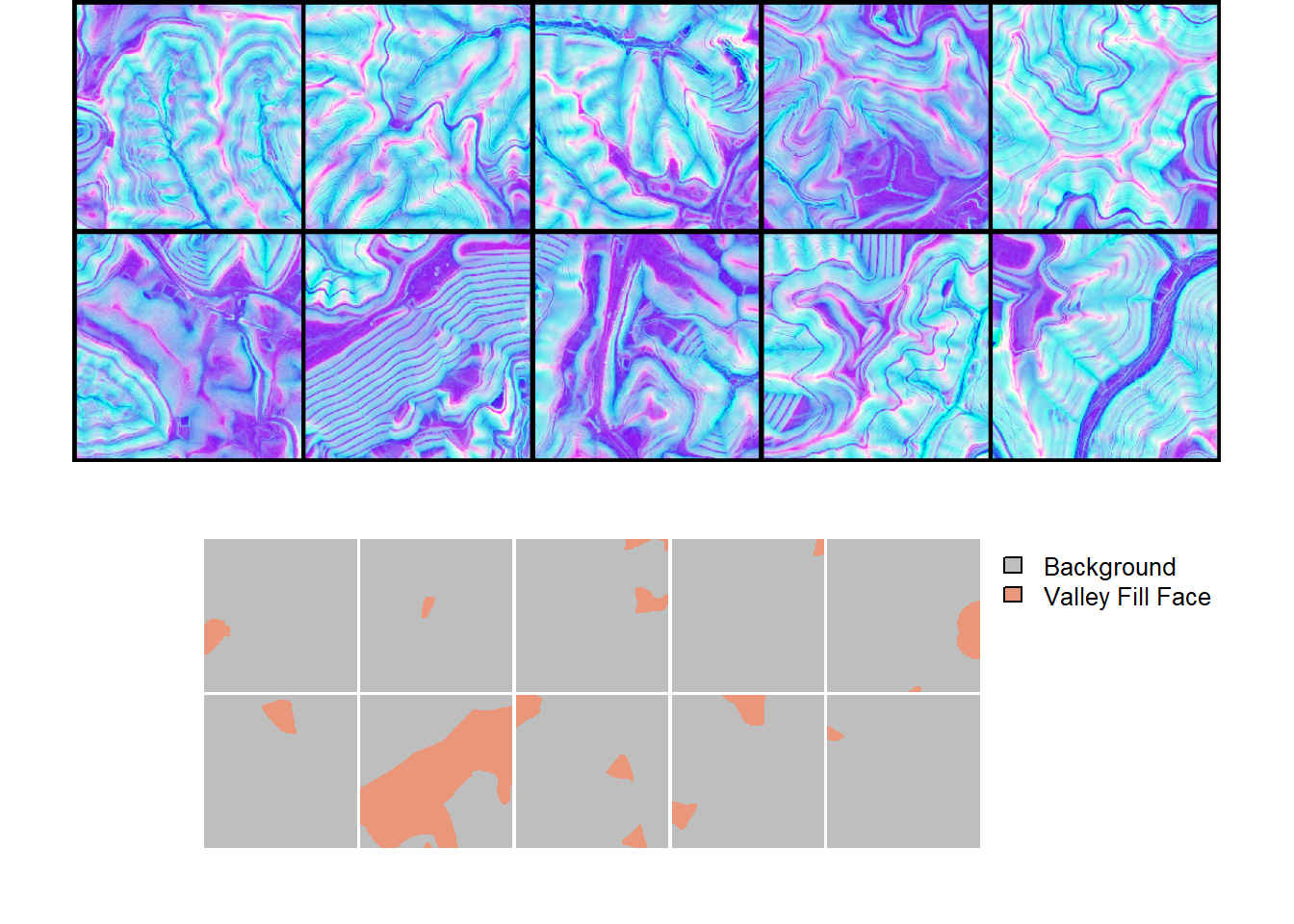
As noted in Chapter 22, we recommend checking your data with geodl’s utility functions prior to training a model. We view a mini-batch of chips and associated masks using viewBatch(). We also obtain summary information for all three data partitions using describeBatch(). The predictor variables and masks look correct. The mini-batch size (10), number of bands (3), and spatial dimension sizes (512x512) are as expected. The class codes are 1 and 2, also as expected. In short, everything looks good.
Within viewBatch(), we set cCodes to c(1,2) as opposed to c(0,1) since the dataset subclasses were configured to add 1 to each class code.
trainStats <- describeBatch(trainDL,
                            zeroStart=FALSE)
valStats <- describeBatch(valDL,
                          zeroStart=FALSE)
testStats <- describeBatch(testDL,
zeroStart=FALSE)trainStats$batchSize
[1] 10
$imageDataType
[1] "Float"
$maskDataType
[1] "Long"
$imageShape
[1] "10" "3" "512" "512"
$maskShape
[1] "10" "1" "512" "512"
$bndMns
[1] 0.4992042 0.4766266 0.4999925
$bndSDs
[1] 0.18269278 0.15065089 0.01590572
$maskCount
[1] 2412268 209172
$minIndex
[1] 1
$maxIndex
[1] 2valStats$batchSize
[1] 10
$imageDataType
[1] "Float"
$maskDataType
[1] "Long"
$imageShape
[1] "10" "3" "512" "512"
$maskShape
[1] "10" "1" "512" "512"
$bndMns
[1] 0.5008272 0.4276921 0.5000097
$bndSDs
[1] 0.14932206 0.13037789 0.01192871
$maskCount
[1] 2597293 24147
$minIndex
[1] 1
$maxIndex
[1] 2testStats$batchSize
[1] 10
$imageDataType
[1] "Float"
$maskDataType
[1] "Long"
$imageShape
[1] "10" "3" "512" "512"
$maskShape
[1] "10" "1" "512" "512"
$bndMns
[1] 0.5008587 0.4488016 0.5000161
$bndSDs
[1] 0.18368262 0.15434697 0.01401392
$maskCount
[1] 2587848 33592
$minIndex
[1] 1
$maxIndex
[1] 224.4.3 Training Loop
Now that our datasets and dataloaders have been configured and instantiated and we have performed checks, we are ready to train the model. We will implement a UNet architecture via defineUNet(). We configure the unified focal loss framework to use a focal Tversky loss. Two classes are being differentiated. lambda is set to 0 so that only the region-based loss is used. delta is set to 0.6, which results in more weight being applied to false negative (FN) errors. Since gamma is < 1, more weight will be placed on difficult samples. We also change the class weighting in the region-based loss so that the positive case has a higher weight (0.7) than the background case (0.3). zeroStart is set to FALSE since the class codes start at 1 as opposed to 0.
We use the AdamW optimizer with a learning rate of 0.001. We calculate four assessment metrics: overall accuracy, F1-score, recall, and precision. The last three metrics are calculated for only the positive case, as is common for a binary classification task, by setting clsWghts to c(0,1).
The UNet architecture is configured to accept 3 predictor variables and differentiate 2 classes. We also make use of the Gaussian error linear unit (GELU) activation function, residual connections, and convolutional block attention modules (CBAMs) along the skip connections. We define the number of output feature maps for each encoder block, the bottleneck, and each decoder block. Lastly, we implement deep supervision using useDS=TRUE.
We train the model for a total of 25 epochs, log the training and validation losses and assessment metrics to a CSV file, and save the state dictionary after each epoch. luz takes care of implementing GPU-based acceleration. The loss weights are 0.6, 0.2, 0.1, and 0.1 (60% for the primary loss from the full spatial resolution classification head and 20%, 10%, and 10% for the auxiliary losses from the auxiliary classification heads at increasingly earlier stages of the decoder. During training, we linearly decay the auxiliary weights so that they diminish to zero, and the last 10% of the epochs only use the primary loss.
If you choose to run the training loop, it will take several hours to execute. We have provided a trained model in the data folder for the chapter if you would like to execute the following code without training a new model. The file is named “vfillModel.pt.” We have also included the training logs: “vfillTrainLogs.csv”. If you want to load our model, the UNet must use the exact same configuration as we have specified below.
#Deep supervision loss weights: first value is the full-resolution output,
#the remaining three are the coarser decoder outputs. The weight environment
#is shared with the loss so the decay callback can reduce the auxiliary weights.
dsW <- make_ds_weights(c(0.6, 0.2, 0.1, 0.1))

fitted <- defineUNet |>
  luz::setup(
    loss = defineUnifiedFocalLossDS(nCls=2,
                                    weight_env=dsW,
                                    lambda=0,
                                    gamma=.7,
                                    delta=0.6,
                                    smooth = 1e-8,
                                    zeroStart=FALSE,
                                    clsWghtsDist=1,
                                    clsWghtsReg=c(0.3, 0.7),
                                    useLogCosH =FALSE,
                                    device="cuda"),
    optimizer = optim_adamw,
    metrics = list(
      luz_metric_overall_accuracy(nCls=2,
                                  smooth=1,
                                  mode = "multiclass",
                                  zeroStart= FALSE,
                                  usedDS=TRUE),
      luz_metric_f1score(nCls=2,
                         smooth=1,
                         mode = "multiclass",
                         zeroStart= FALSE,
                         clsWghts=c(0,1),
                         usedDS=TRUE),
      luz_metric_recall(nCls=2,
                        smooth=1,
                        mode = "multiclass",
                        zeroStart= FALSE,
                        clsWghts=c(0,1),
                        usedDS=TRUE),
      luz_metric_precision(nCls=2,
                           smooth=1,
                           mode = "multiclass",
                           zeroStart= FALSE,
                           clsWghts=c(0,1),
                           usedDS=TRUE)
    )
  ) |>
  set_hparams(inChn = 3,
              nCls = 2,
              actFunc = "gelu",
              useRes = TRUE,
              useCBAM = TRUE,
              useDS = TRUE,
              enChn = c(16,32,64,128),
              dcChn = c(128,64,32,16),
              btnChn = 256) |>
  set_opt_hparams(lr = 1e-3) |>
  fit(data = trainDL,
      epochs = 25,
      valid_data = valDL,
      callbacks = list(luz_callback_csv_logger(str_glue("{outPth}e1/vfillTrainLogs.csv")),
                       callback_ds_weight_decay(weight_env = dsW,
                                                decay = "linear",
                                                primary_only_frac = 0.1),
                       callback_save_model_state_dict(save_dir = str_glue("{outPth}/e1"), prefix = "epoch")),
      accelerator = accelerator(device_placement = TRUE,
                                cpu = FALSE,
                                cuda_index = torch::cuda_current_device()),
      verbose=TRUE)
24.4.4 Model Validation
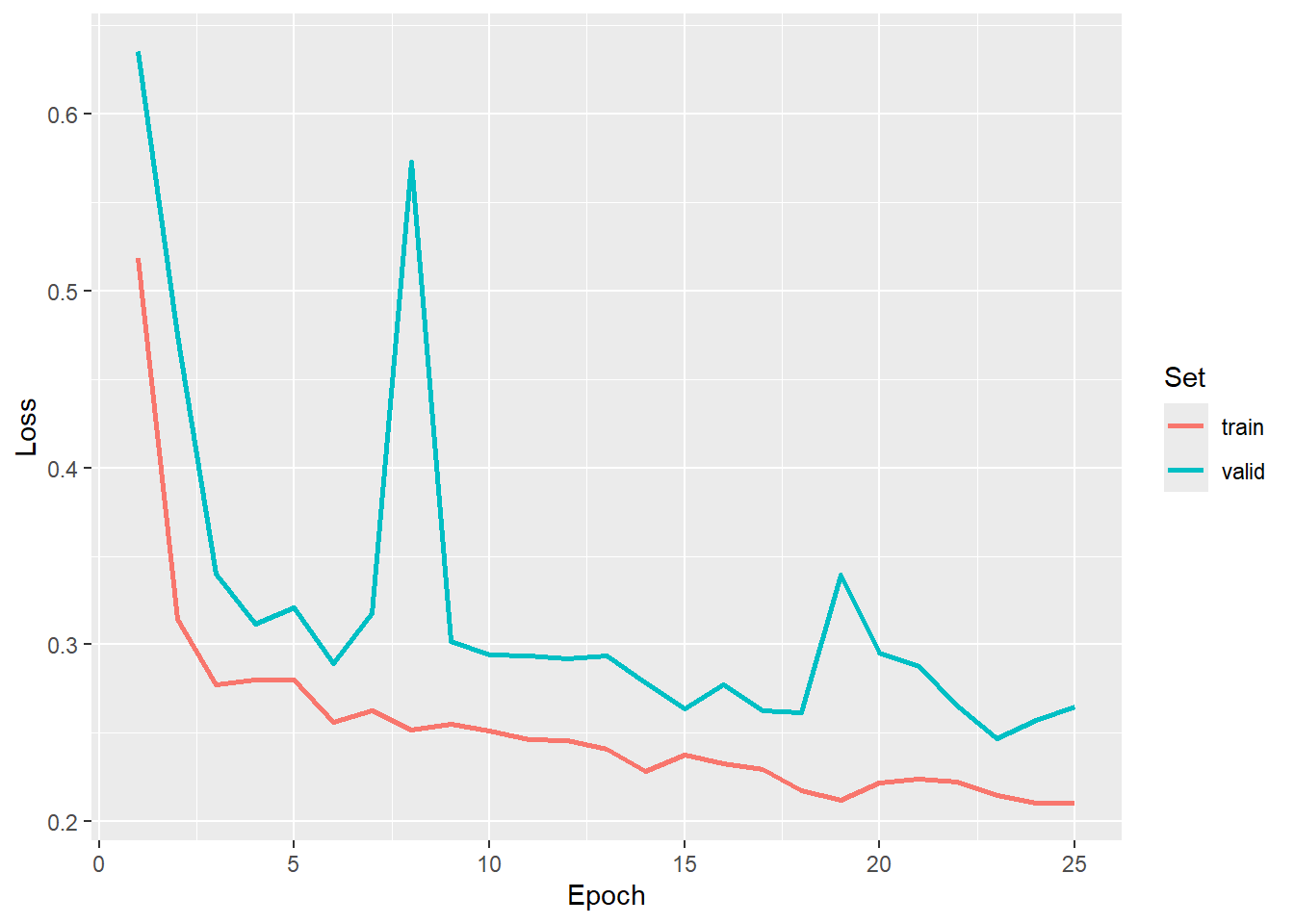
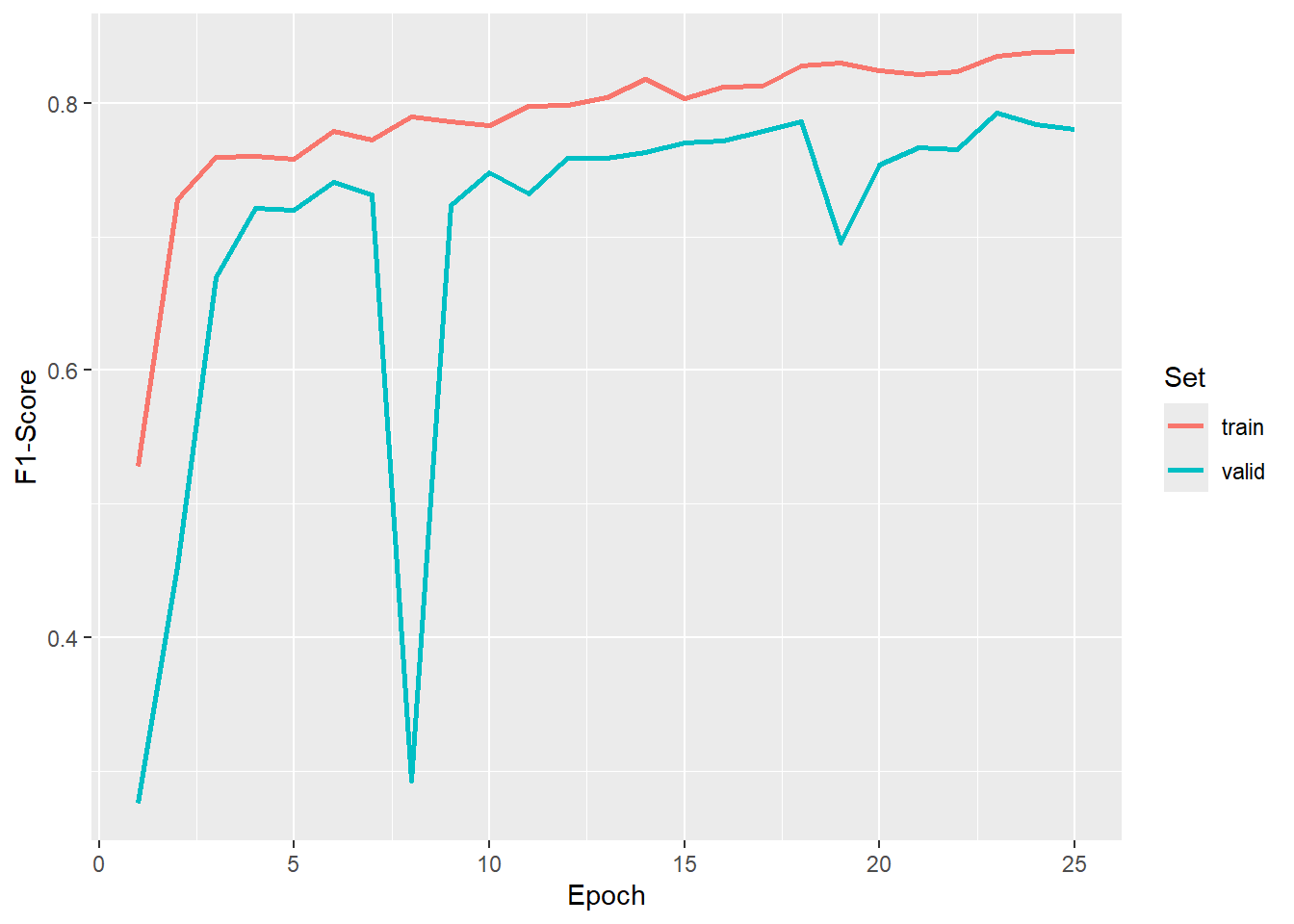
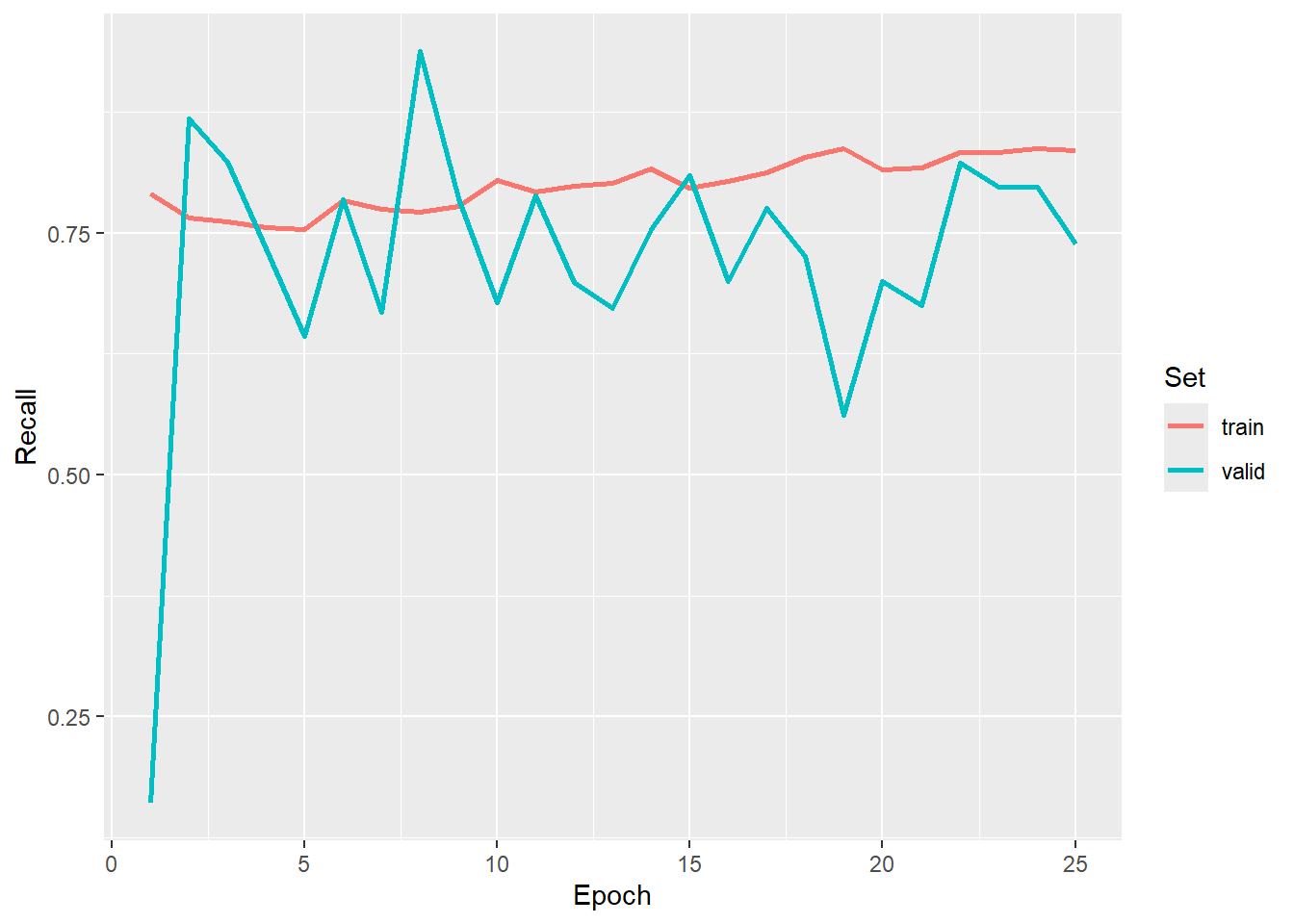
We now load in our saved logs and plot the trends in the training and validation assessment metrics over the training epochs. We have chosen to use the result after epoch 23 since it provided a good F1-score for the validation data.
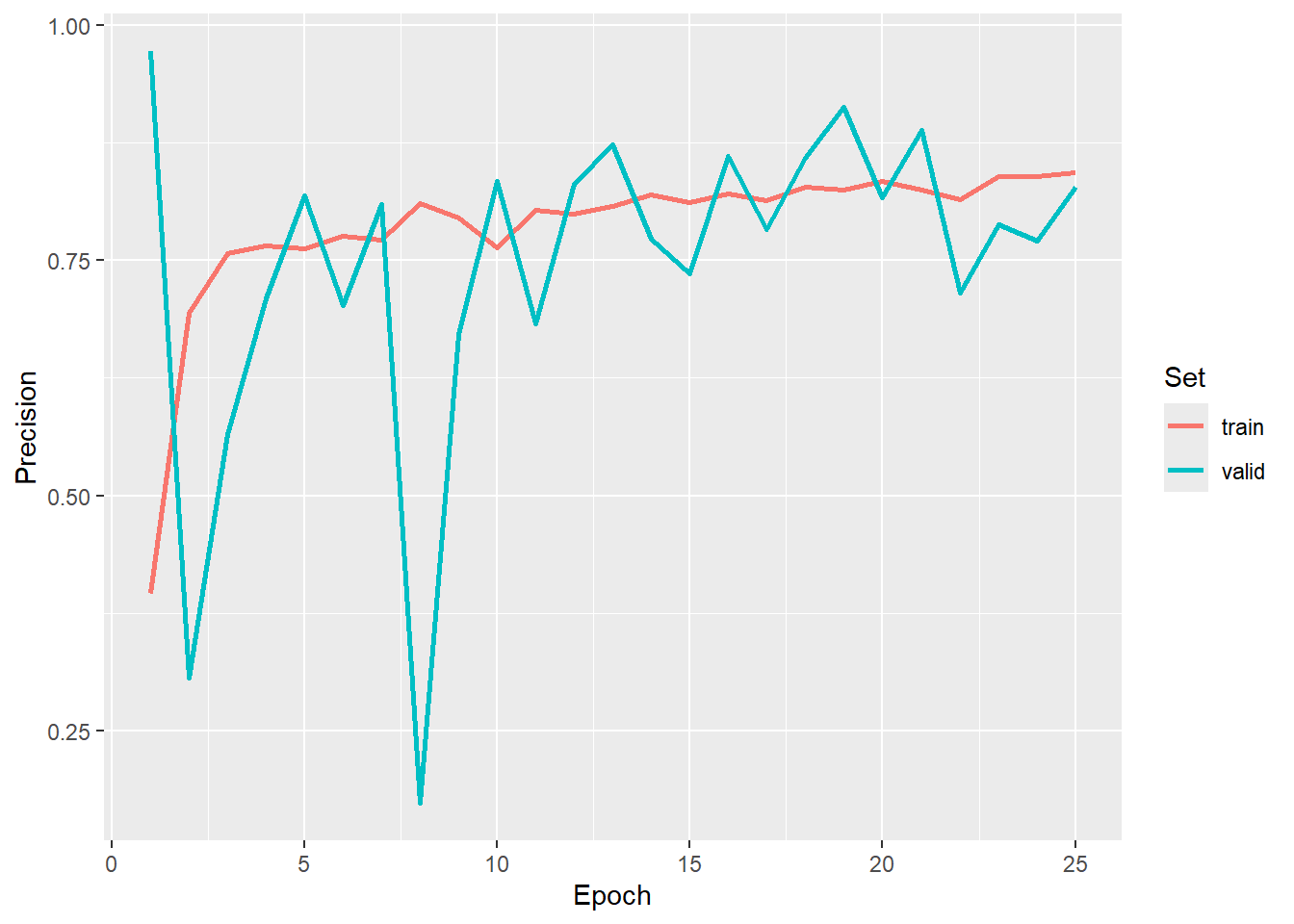
In order to use our saved model, we re-instantiate an instance of the model with the exact same configuration as the version that was trained. We next load the saved state dictionary into the the model and place it in evaluation mode.
We recommend moving the model to the GPU using $to(device="cuda") to speed up inference.
When loading a saved state dictionary, it is necessary to instantiate a model that has the exact same configuration as the model that was trained so that all of the parameters can be matched.
When the model is used for validation or to make predictions, it must be placed in evaluation mode so that it behaves correctly. Although geodl’s prediction and assessment functions do this internally, we recommend explicitly placing the model in evaluation mode using $eval() after loading a saved state from disk.
newModel <- defineUNet(inChn = 3,
              nCls = 2,
              actFunc = "gelu",
              useRes = TRUE,
              useCBAM = TRUE,
              useDS = TRUE,
              enChn = c(16,32,64,128),
              dcChn = c(128,64,32,16),
              btnChn = 256,
              negative_slope = 0.0)$to(device="cuda")

newModel$load_state_dict(torch_load(str_glue("{fldPth}vfillModel.pt")))
newModel$eval()
The viewBatchPreds() function plots a mini-batch of predictor variable chips, reference masks, and prediction masks and is meant to provide a visual assessment of the prediction results for a subset of image chips. The assessDL() function generates a variety of assessment metrics using all mini-batches generated by a dataloader. Note that this can be slow due to the large volume of computations being performed. In this example, we set multiclass to FALSE to obtain binary classification assessment metrics as opposed to multiclass metrics. Practically, this means that the F1-score, recall, and precision metrics only consider the positive case. Also, the negative predictive value (NPV) and specificity are calculate for the negative case.
viewBatchPreds(dataLoader=testDL,
               model=newModel,
               mode="multiclass",
               nCols =4,
               r = 1,
               g = 2,
               b = 3,
               cCodes=c(1,2),
               cNames=c("Background",
                        "Valley Fill Face"),
               cColors=c("gray",
                         "darksalmon"),
               useCUDA=TRUE,
               probs=FALSE,
               usedDS=TRUE)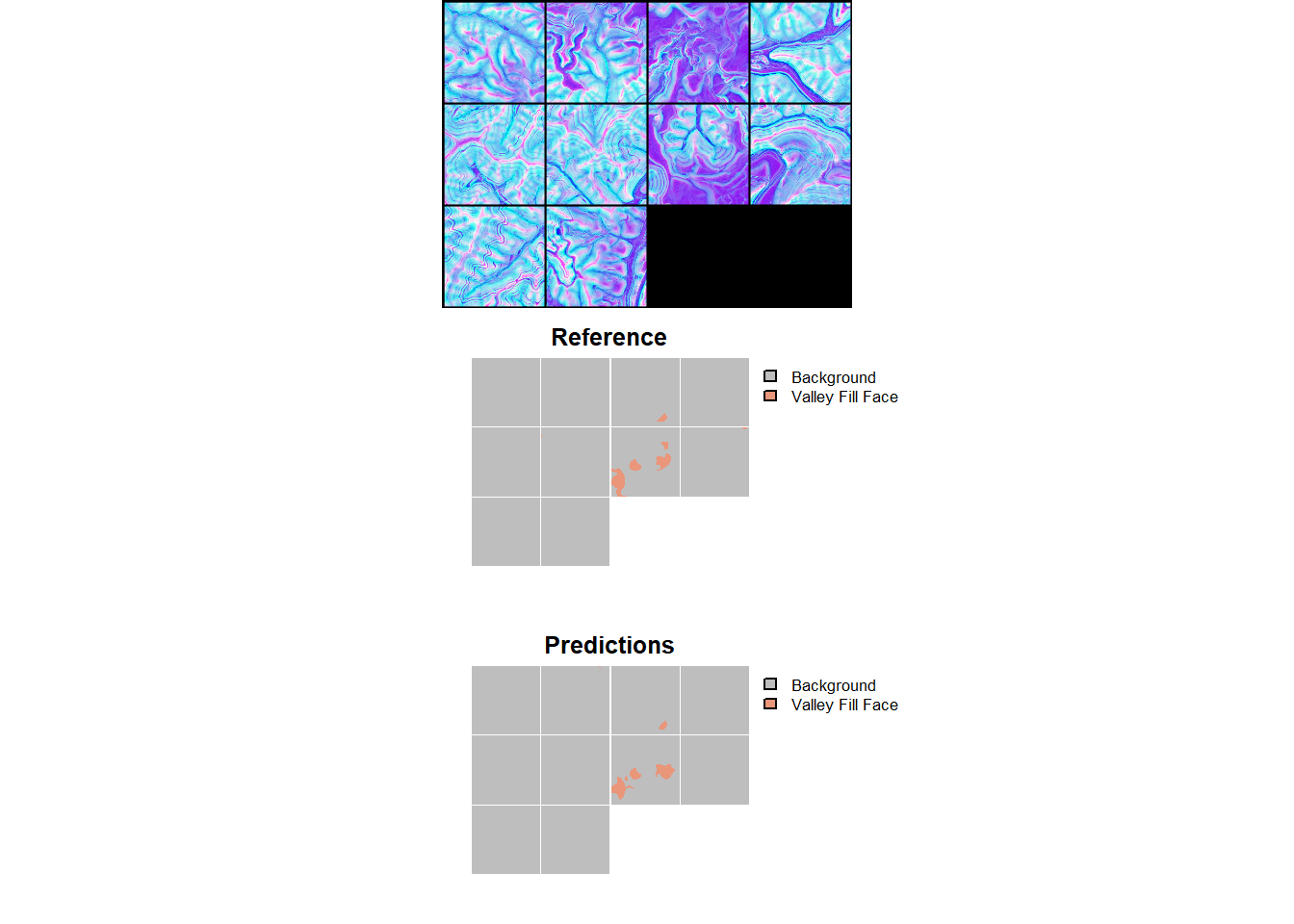
$Classes
[1] "Background"       "Valley Fill Face"

$referenceCounts
 Negative  Positive
128142376   2929624

$predictionCounts
 Negative  Positive
128546615   2525385

$confusionMatrix
          Reference
Predicted   Negative  Positive
  Negative 127511660   1034955
  Positive    630716   1894669

$Mets
                     OA Recall Precision Specificity    NPV F1Score
Valley Fill Face 0.9873 0.6467    0.7502      0.9951 0.9919  0.6947
24.4.5 Spatial Prediction
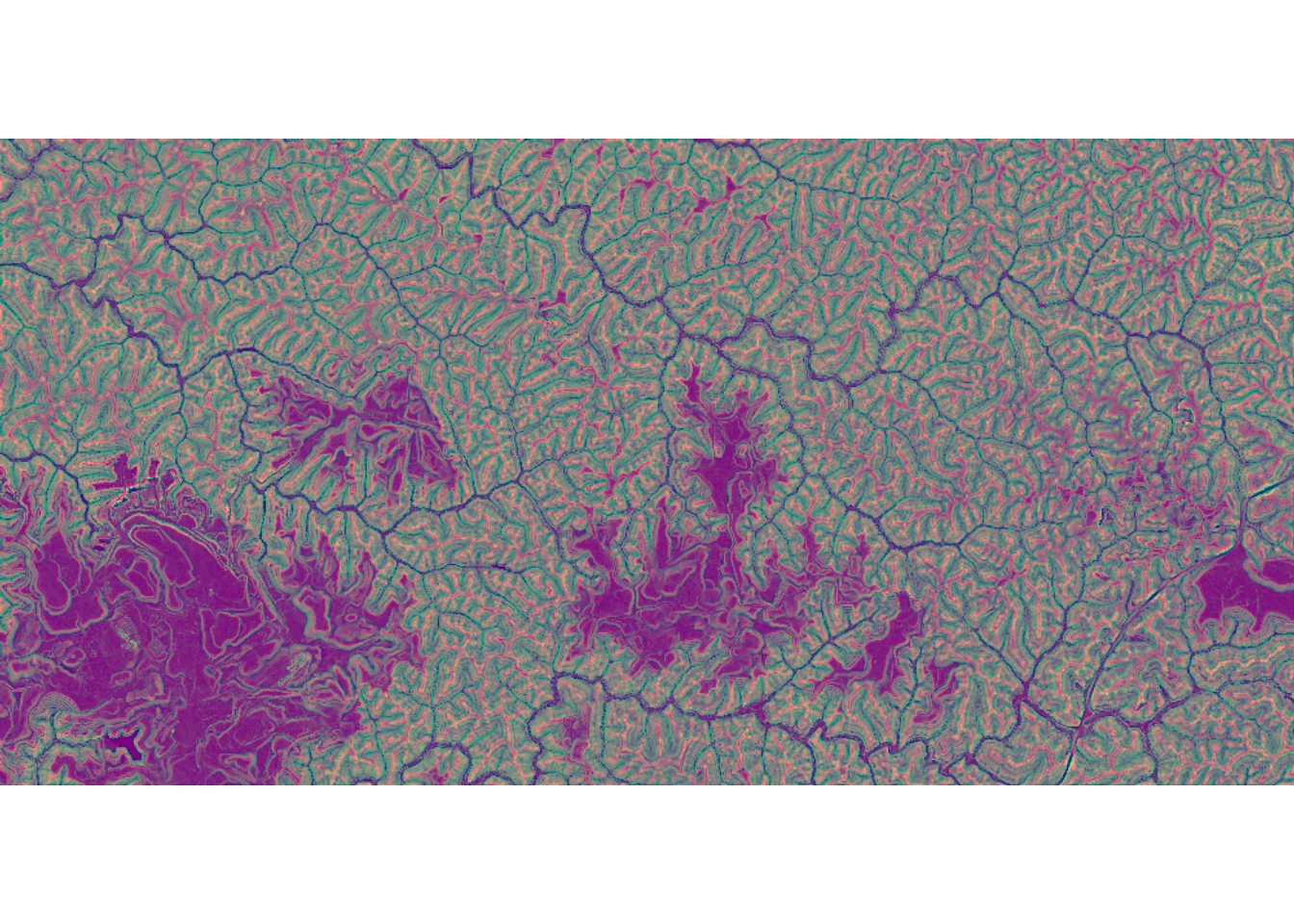
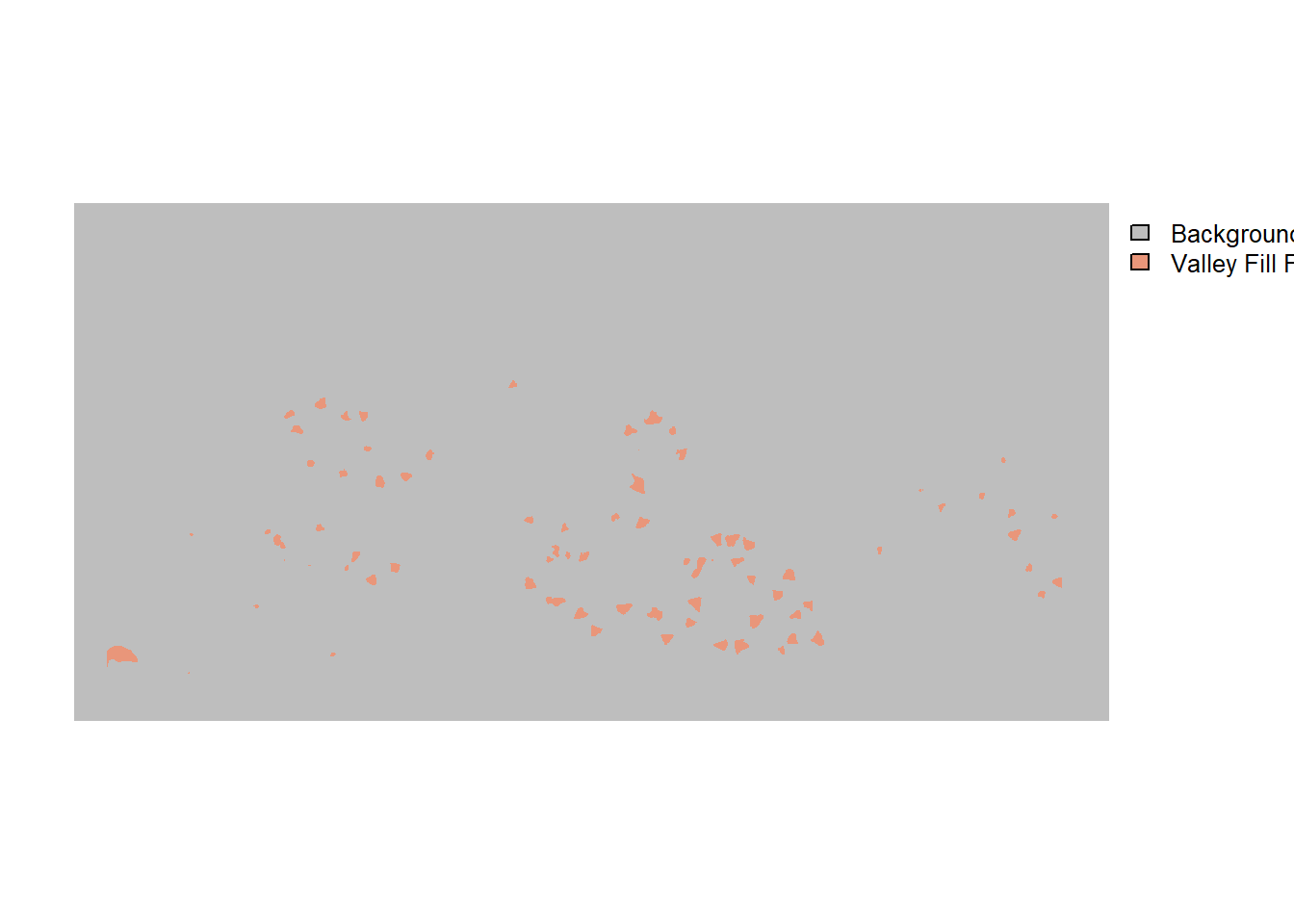
In the final step in the workflow, we use our trained and validated model to predict to a new spatial extent. This is accomplished using the predictSpatial() function. To obtain a “hard” classification, we set predType to "class". We use a stride in both the x and y directions that is smaller than the chip size to process the prediction using overlap. We also remove the outer 50 rows and columns of predictions from all non-edge chips so that only the center of chips are used in the final prediction when possible. The prediction is performed using a GPU to speed up the computation.
The new data and the resulting prediction have been provided in the data folder for the chapter. The input data are named “dtmStk.tif” while the example prediction is named “dtmStkPred.tif”
predCls <- predictSpatial(imgIn=str_glue("{fldPth}dtmStk.tif"),
                          model=newModel,
                          predOut=str_glue("{outPth}e1/vfillPred.tif"),
                          mode="multiclass",
                          predType="class",
                          useCUDA=TRUE,
                          nCls=2,
                          chpSize=512,
                          stride_x=256,
                          stride_y=256,
                          crop=50,
                          nChn=3,
                          normalize=FALSE,
                          rescaleFactor=1,
                          usedDS=TRUE)
Once the prediction is generated, it can be visualized using tmap.
24.5 Workflow 2: Valley Fills (Dynamic)
We will now explore the same task as that implemented in Workflow 1; however, we will now make use of dynamic chip generation and the TerrainSeg framework implemented by geodl. This requires working with the original input DTM data and vector-based valley fill face examples as opposed to image chips, raster-based masks, and derived LSPs.
As normal, we begin by loading the required libraries, setting a random seed, and defining our working directory.
It is not necessary for us to reload libraries here. We are simply doing so in order to make each workflow stand-alone.
#Seed R's base RNG (chip shuffling, augmentations, dataloader shuffling) and
#torch's RNG (model weight initialization, training loop) with one call.
#This must run before the chips are shuffled and the datasets, dataloaders,
#and model are created.
setSeed(42)
localPth <- "C:/22318522/vfillDL/vfillDL/"
fldPth <- "gslrData/chpt24/data/"
outPth <- "gslrData/chpt24/output/"24.5.1 Preparation
We begin by loading vector extents that define the geographic extent of the input data. To use the dynamic chips workflow, example vector data must have a “code” column that assigns a unique integer to each class being differentiated and also a “class” column that names the class. Our example data do contain a “code” column, but they lack a “class” column; as a result, we use dplyr to add this needed column. We then save the vector data back to disk with st_write(). We also need to generate point locations to define geographic centers of the chips that will be be dynamically generated. This is accomplished using st_centroid() from sf. So that all chips are not centered over the exact centroid of an example, we use the addCoordsNoise() function from geodl to add random Gaussian noise to the point coordinates. The generated point layers are then saved to disk.
You will need to update the folder path if you run the code below.
#Read in extents
trainE <- st_read(str_glue("{localPth}extents/training.shp"), quiet=TRUE)
val1E <- st_read(str_glue("{localPth}extents/validation1.shp"), quiet=TRUE)
val2E <- st_read(str_glue("{localPth}extents/validation2.shp"), quiet=TRUE)
ky1E <- st_read(str_glue("{localPth}extents/testingKY1.shp"), quiet=TRUE)
ky2E <- st_read(str_glue("{localPth}extents/testingKY2.shp"), quiet=TRUE)
va1E <- st_read(str_glue("{localPth}extents/testingVA1.shp"), quiet=TRUE)

#Read and prep vector features
trainF <- st_read(str_glue("{localPth}vectors/training.shp"), quiet=TRUE) |>
  mutate(class = "vfill") |>
  st_write(str_glue("{localPth}vectors/trainingb.shp"),
           append=FALSE)
Deleting layer `trainingb' using driver `ESRI Shapefile'
Writing layer `trainingb' to data source
`C:/22318522/vfillDL/vfillDL/vectors/trainingb.shp' using driver `ESRI Shapefile'
Writing 1105 features with 5 fields and geometry type Multi Polygon.Deleting layer `validationb' using driver `ESRI Shapefile'
Writing layer `validationb' to data source
`C:/22318522/vfillDL/vfillDL/vectors/validationb.shp' using driver `ESRI Shapefile'
Writing 186 features with 7 fields and geometry type Polygon.Deleting layer `validation2b' using driver `ESRI Shapefile'
Writing layer `validation2b' to data source
`C:/22318522/vfillDL/vfillDL/vectors/validation2b.shp' using driver `ESRI Shapefile'
Writing 118 features with 5 fields and geometry type Polygon.Deleting layer `testingKY1b' using driver `ESRI Shapefile'
Writing layer `testingKY1b' to data source
`C:/22318522/vfillDL/vfillDL/vectors/testingKY1b.shp' using driver `ESRI Shapefile'
Writing 553 features with 4 fields and geometry type Polygon.Deleting layer `testingKY2b' using driver `ESRI Shapefile'
Writing layer `testingKY2b' to data source
`C:/22318522/vfillDL/vfillDL/vectors/testingKY2b.shp' using driver `ESRI Shapefile'
Writing 165 features with 4 fields and geometry type Polygon.Deleting layer `testingVA1b' using driver `ESRI Shapefile'
Writing layer `testingVA1b' to data source
`C:/22318522/vfillDL/vfillDL/vectors/testingVA1b.shp' using driver `ESRI Shapefile'
Writing 156 features with 4 fields and geometry type Polygon.#Calculate chip centers
trainC <- st_read(str_glue("{localPth}vectors/trainingb.shp"), quiet=TRUE) |>
st_centroid() |>
addCoordNoise(20, "gaussian") |>
st_write(str_glue("{localPth}vectors/trainingbc.shp"),
append=FALSE)Deleting layer `trainingbc' using driver `ESRI Shapefile'
Writing layer `trainingbc' to data source
`C:/22318522/vfillDL/vfillDL/vectors/trainingbc.shp' using driver `ESRI Shapefile'
Writing 1105 features with 5 fields and geometry type Point.val1C <- st_read(str_glue("{localPth}vectors/validationb.shp"), quiet=TRUE) |>
st_centroid() |>
addCoordNoise(20, "gaussian") |>
st_write(str_glue("{localPth}vectors/validationbc.shp"),
append=FALSE)Deleting layer `validationbc' using driver `ESRI Shapefile'
Writing layer `validationbc' to data source
`C:/22318522/vfillDL/vfillDL/vectors/validationbc.shp' using driver `ESRI Shapefile'
Writing 186 features with 7 fields and geometry type Point.val2C <- st_read(str_glue("{localPth}vectors/validation2b.shp"), quiet=TRUE) |>
st_centroid() |>
addCoordNoise(20, "gaussian") |>
st_write(str_glue("{localPth}vectors/validation2bc.shp"),
append=FALSE)Deleting layer `validation2bc' using driver `ESRI Shapefile'
Writing layer `validation2bc' to data source
`C:/22318522/vfillDL/vfillDL/vectors/validation2bc.shp' using driver `ESRI Shapefile'
Writing 118 features with 5 fields and geometry type Point.ky1C <- st_read(str_glue("{localPth}vectors/testingKY1b.shp"), quiet=TRUE) |>
st_centroid() |>
addCoordNoise(20, "gaussian") |>
st_write(str_glue("{localPth}vectors/testingKY1bc.shp"),
append=FALSE)Deleting layer `testingKY1bc' using driver `ESRI Shapefile'
Writing layer `testingKY1bc' to data source
`C:/22318522/vfillDL/vfillDL/vectors/testingKY1bc.shp' using driver `ESRI Shapefile'
Writing 553 features with 4 fields and geometry type Point.ky2C <- st_read(str_glue("{localPth}vectors/testingKY2b.shp"), quiet=TRUE) |>
st_centroid() |>
addCoordNoise(20, "gaussian") |>
st_write(str_glue("{localPth}vectors/testingKY2bc.shp"),
append=FALSE)Deleting layer `testingKY2bc' using driver `ESRI Shapefile'
Writing layer `testingKY2bc' to data source
`C:/22318522/vfillDL/vfillDL/vectors/testingKY2bc.shp' using driver `ESRI Shapefile'
Writing 165 features with 4 fields and geometry type Point.va1C <- st_read(str_glue("{localPth}vectors/testingVA1b.shp"), quiet=TRUE) |>
st_centroid() |>
addCoordNoise(20, "gaussian") |>
st_write(str_glue("{localPth}vectors/testingVA1bc.shp"),
append=FALSE)Deleting layer `testingVA1bc' using driver `ESRI Shapefile'
Writing layer `testingVA1bc' to data source
`C:/22318522/vfillDL/vfillDL/vectors/testingVA1bc.shp' using driver `ESRI Shapefile'
Writing 156 features with 4 fields and geometry type Point.Before moving on, we visualize the extents and feature centroids. We bind all the extents into a single object then do the same for the centroids. This is just for display purposes. The data consist of six separate study areas: three in southern West Virginia, two in eastern Kentucky, and one in southwestern Virginia.
osm <- get_tiles(st_bbox(st_buffer(allExtents, 3000)),
                 provider = "OpenStreetMap", crop = TRUE)

tm_shape(osm)+
  tm_rgb()+
  tm_shape(allExtents)+
  tm_borders(col="black", lwd=2)+
  tm_shape(allCenters)+
  tm_bubbles(fill="red", size=.5)+
  tm_compass(position=c("left", "bottom"))+
  tm_scalebar(position=c("left", "bottom"))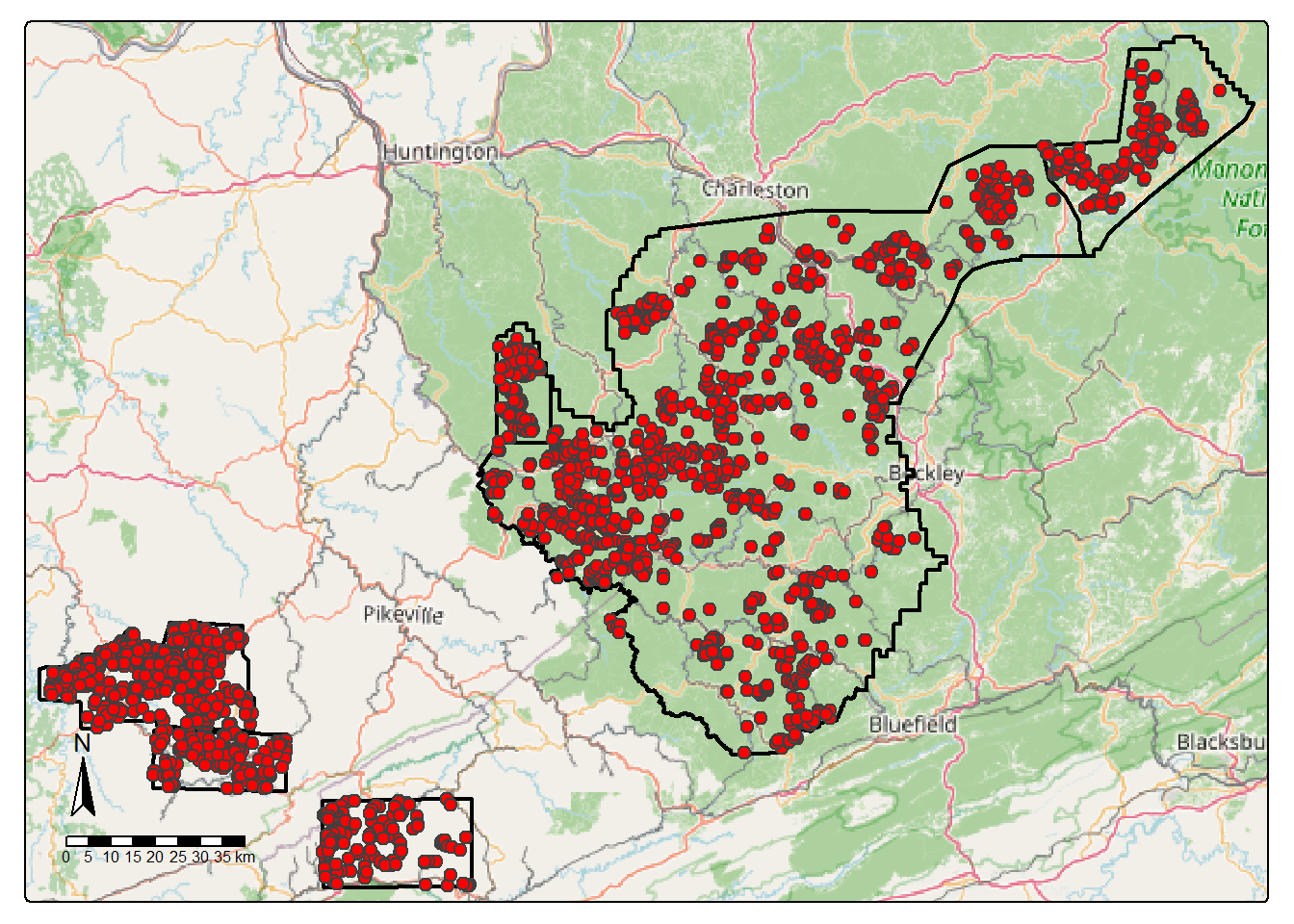
24.5.2 Datasets and Dataloaders
We now work through the the steps required to implement the dynamic chips workflow. We first use makeDynamicChipsSF() to generate sf objects for each extent. This requires defining the boundary, vector features, and associated DTM for each region. We have also chosen to generate random background point locations to generate additional background-only chips. The resulting data are also shuffled to potentially reduce spatial autocorrelation. We use a minimum distance of 100 m between the random background point locations and the presence point locations.
trainDC <- makeDynamicChipsSF(
  pntPth = str_glue("{localPth}vectors/"),
  pntName = "trainingbc.shp",
  featPth = str_glue("{localPth}vectors/"),
  featName = "trainingb.shp",
  extentPth = str_glue("{localPth}extents/"),
  extentName = "training.shp",
  extentCrop = 200,
  imgPth <- str_glue("{localPth}dems/"),
  imgName <- "train_dem.img",
  doBackground = TRUE,
  backgroundCnt = 500,
  backgroundDist = 100,
  useSeed = TRUE,
  seed = 42,
  doShuffle = TRUE
)

val1DC <- makeDynamicChipsSF(
  pntPth = str_glue("{localPth}vectors/"),
  pntName = "validationbc.shp",
  featPth = str_glue("{localPth}vectors/"),
  featName = "validationb.shp",
  extentPth = str_glue("{localPth}extents/"),
  extentName = "validation1.shp",
  extentCrop = 200,
  imgPth <- str_glue("{localPth}dems/"),
  imgName <- "val_dem.tif",
  doBackground = TRUE,
  backgroundCnt = 200,
  backgroundDist = 100,
  useSeed = TRUE,
  seed = 42,
  doShuffle = TRUE
)

val2DC <- makeDynamicChipsSF(
  pntPth = str_glue("{localPth}vectors/"),
  pntName = "validation2bc.shp",
  featPth = str_glue("{localPth}vectors/"),
  featName = "validation2b.shp",
  extentPth = str_glue("{localPth}extents/"),
  extentName = "validation2.shp",
  extentCrop = 200,
  imgPth <- str_glue("{localPth}dems/"),
  imgName <- "test_dem.tif",
  doBackground = TRUE,
  backgroundCnt = 200,
  backgroundDist = 100,
  useSeed = TRUE,
  seed = 42,
  doShuffle = TRUE
)

ky1DC <- makeDynamicChipsSF(
  pntPth = str_glue("{localPth}vectors/"),
  pntName = "testingKY1bc.shp",
  featPth = str_glue("{localPth}vectors/"),
  featName = "testingKY1b.shp",
  extentPth = str_glue("{localPth}extents/"),
  extentName = "testingKY1.shp",
  extentCrop = 200,
  imgPth <- str_glue("{localPth}dems/"),
  imgName <- "ky1_dem.tif",
  doBackground = TRUE,
  backgroundCnt = 100,
  backgroundDist = 100,
  useSeed = TRUE,
  seed = 42,
  doShuffle = TRUE
)

ky2DC <- makeDynamicChipsSF(
  pntPth = str_glue("{localPth}vectors/"),
  pntName = "testingKY2bc.shp",
  featPth = str_glue("{localPth}vectors/"),
  featName = "testingKY2b.shp",
  extentPth = str_glue("{localPth}extents/"),
  extentName = "testingKY2.shp",
  extentCrop = 200,
  imgPth <- str_glue("{localPth}dems/"),
  imgName <- "ky_2_dem.tif",
  doBackground = TRUE,
  backgroundCnt = 100,
  backgroundDist = 100,
  useSeed = TRUE,
  seed = 42,
  doShuffle = TRUE
)

va1DC <- makeDynamicChipsSF(
  pntPth = str_glue("{localPth}vectors/"),
  pntName = "testingVA1bc.shp",
  featPth = str_glue("{localPth}vectors/"),
  featName = "testingVA1b.shp",
  extentPth = str_glue("{localPth}extents/"),
  extentName = "testingVA1.shp",
  extentCrop = 200,
  imgPth <- str_glue("{localPth}dems/"),
  imgName <- "va1_dem.tif",
  doBackground = TRUE,
  backgroundCnt = 100,
  backgroundDist = 100,
  useSeed = TRUE,
  seed = 42,
  doShuffle = TRUE
)
Next, we bind the data frames to generate three partitions: training, validation, and test. The large extent in West Virginia is used for training while the other two extents in West Virginia are used for validation during the training process. The extents in Kentucky and Virginia are used to assess the final model as a test set. Since the result is an sf object, which behaves as a data frame with associated spatial information, this can be accomplished using bind_rows().
If desired, the results could be saved to disk as geospatial vector files.
We now check the chips using checkDynamicChips(). This is to make sure that the generated chips do not (1) contain NA cells and (2) do not have incorrect dimensions or shapes. Issues can arise due to chips occurring near the edge of extents. Note that such issues can be partially avoided by using an extent smaller than the area covered by the raster-based predictor variables. We specifically remove any samples that contain NA cells in either the chips or masks and/or that have a number of rows and/or columns not equal to that desired (i.e., 512x512).
cSize = 640

trainDC <- trainDC |>
  checkDynamicChips(chipSize=cSize,
                    cellSize=2) |>
  filter(cCntImg == cSize &
           rCntImg == cSize &
           cCntMsk == cSize &
           rCntMsk == cSize &
           naCntImg == 0 &
           naCntMsk == 0)


testDC <- testDC |>
  checkDynamicChips(chipSize=cSize,
                    cellSize=2) |>
  filter(cCntImg == cSize &
           rCntImg == cSize &
           cCntMsk == cSize &
           rCntMsk == cSize &
           naCntImg == 0 &
           naCntMsk == 0)


valDC <- valDC |>
  checkDynamicChips(chipSize=cSize,
                    cellSize=2) |>
  filter(cCntImg == cSize &
           rCntImg == cSize &
           cCntMsk == cSize &
           rCntMsk == cSize &
           naCntImg == 0 &
           naCntMsk == 0)
Now that the chips have been checked, we can instantiate DataSet instances using defineDynamicSegDataSet(). This works the same as defineSegDataSet() other than that the input must be generated by makeDynamicChipsSF() and the size of the chips must be specified. We can still incorporate random augmentations, normalization, and re-scaling as desired. For the training data, we apply some random augmentations and add 1 to the mask values to obtain codes of 1 and 2. For the other two partitions, random augmentations are not applied, but we still add 1 to the class codes.
trainDS <- defineDynamicSegDataSet(chipsSF=trainDC,
                                    chipSize=cSize,
                                    cellSize=2,
                                    normalize = FALSE,
                                    rescaleFactor = 1,
                                    mskRescale=1,
                                    mskAdd=1,
                                    doAugs = TRUE,
                                    maxAugs = 3,
                                    probVFlip = .3,
                                    probHFlip = .3,
                                    probRotate= .3)

valDS <- defineDynamicSegDataSet(chipsSF=valDC,
                                  chipSize=cSize,
                                  cellSize=2,
                                  normalize = FALSE,
                                  rescaleFactor = 1,
                                  mskRescale=1,
                                  mskAdd=1,
                                  doAugs = FALSE)

testDS <- defineDynamicSegDataSet(chipsSF=testDC,
                                   chipSize=cSize,
                                   cellSize=2,
                                   normalize = FALSE,
                                   rescaleFactor = 1,
                                   mskRescale=1,
                                   mskAdd=1,
                                   doAugs = FALSE)
We next instantiate the three torch dataloaders. We use a smaller mini-batch size in this workflow than in Workflow 1. Again, you may need to change the mini-batch size depending on your available hardware. We shuffle the training set but not the validation or test set. For all partitions, we drop the last mini-batch since it may be incomplete (i.e., the number of chips is not evenly divisible by the mini-batch size).
trainDL <- torch::dataloader(trainDS,
                             batch_size=8,
                             shuffle=TRUE,
                             drop_last = TRUE)

testDL <- torch::dataloader(testDS,
                            batch_size=8,
                            shuffle=FALSE,
                            drop_last = TRUE)

valDL <- torch::dataloader(valDS,
                           batch_size=8,
                           shuffle=FALSE,
                           drop_last = TRUE)
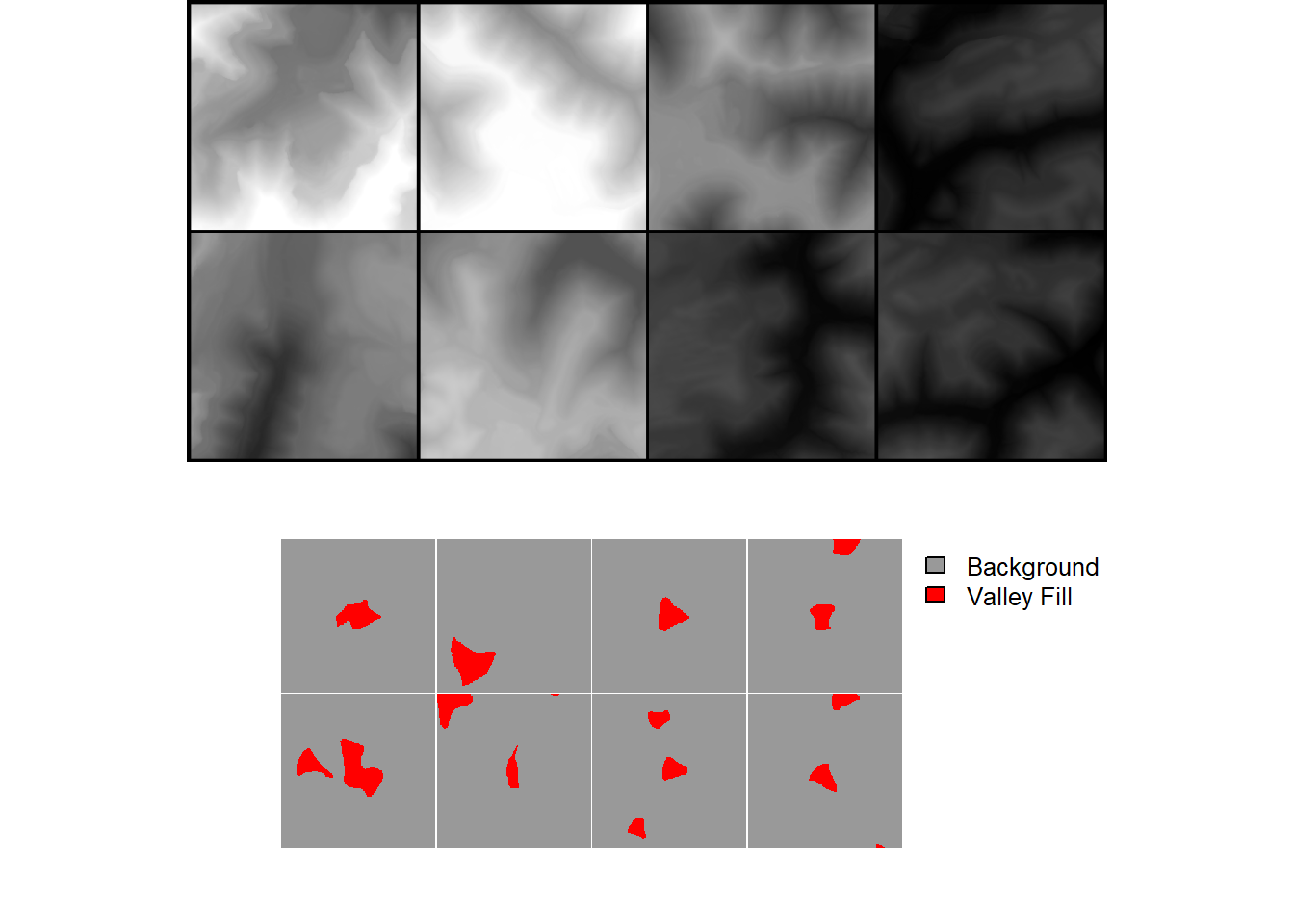
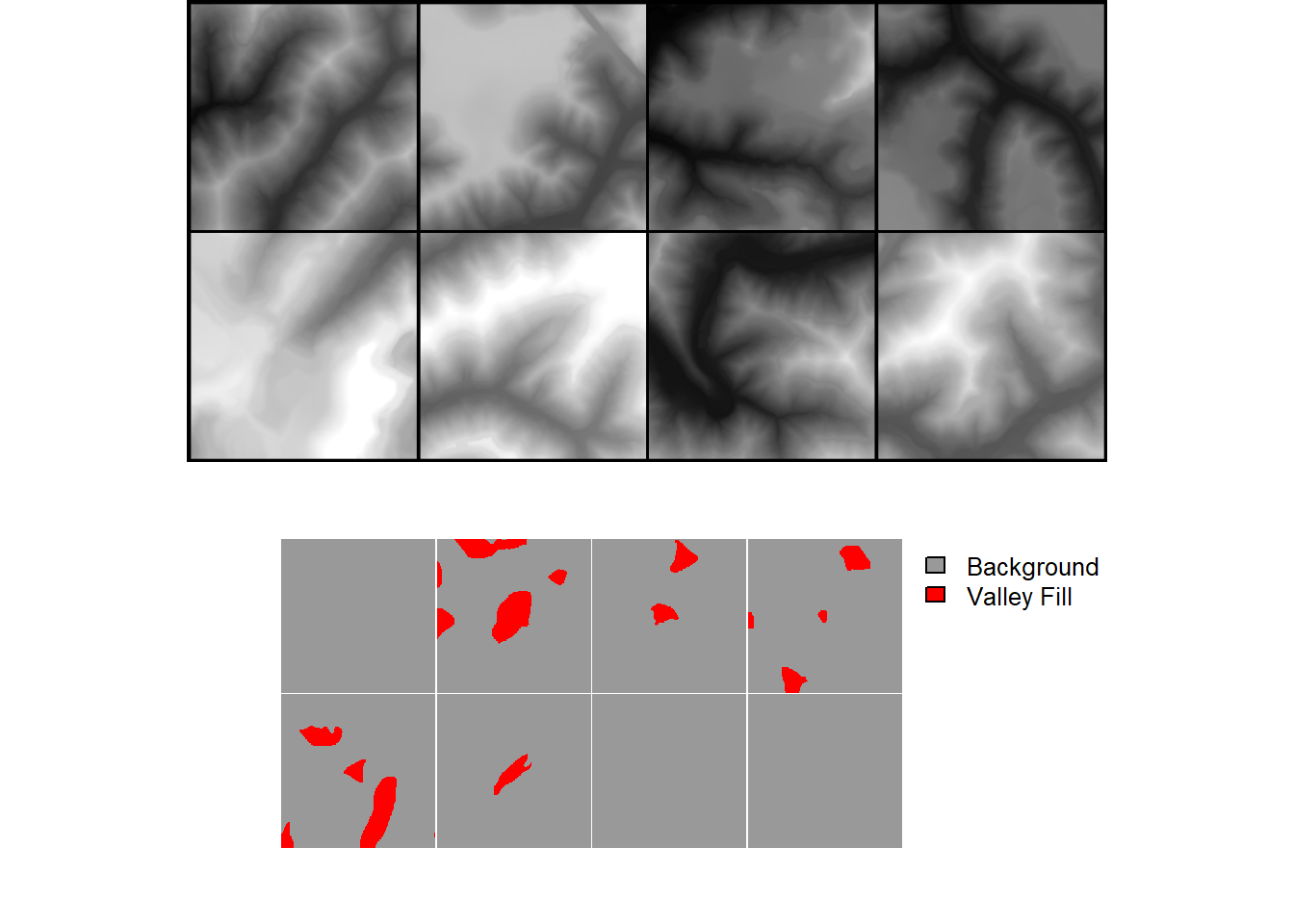
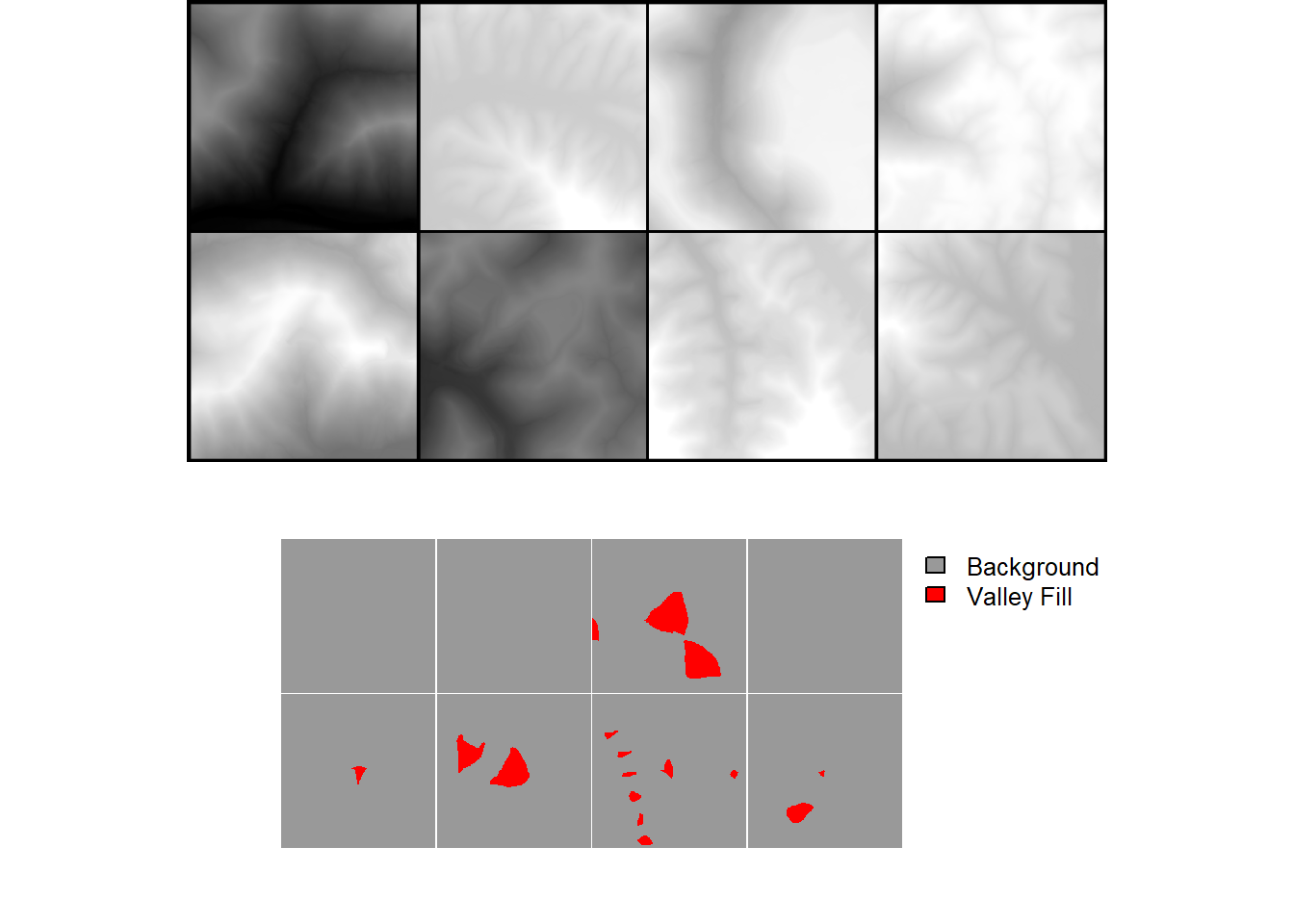
As checks, we print the length of each data loader and view a batch of chips from each partition.
24.5.3 Training Loop
The training loop set up is very similar to Workflow 1. We are using the same loss function (focal Tversky loss), assessment metrics (overall accuracy, F1-score, precision, and recall), and optimization algorithm (AdamW). For the loss and assessment metrics we have now implemented a crop factor so that edge rows and columns do not contribute to the loss or assessment metric calculations. The assessment metrics have been configured for a binary classification where only the positive case is considered using class weights of c(0,1).
For the model, we are using defineTerrainSeg(). For the LSP calculations, we use an inner radius of 2 cells and an outer radius of 10 cells for the local TPI calculation. For the hillslope-scale TPI calculation, we use a radius of 50 meters. We use a smoothing radius of 11 cells for the curvature calculations. Lastly, we do not use Gaussian Pyramids. As a result, a total of 6 LSPs are provided to the trainable model. For the trainable component of the model, we use the DeepLabv3+-like architecture implemented by dlabModel(). Between the LSP module and trainable model, we apply a crop of 64 rows and columns of cells. Since the input data have an input size of 640x640, this means that the input to the trainable model will have a spatial size of 512x512. We recommend using an input size and crop combination that results in an input size to the trainable component of the model of 1024x1024, 512x512, or 256x256. This will allow for appropriate tensor sizes throughout the down scaling processes in the semantic segmentation component of the model.
As with Workflow 1, we save the model logs and the state dictionary at the end of each epoch. We also calculate an exponentially weighted moving average of the weights and save them to disk at the end of each training epoch. luz handles GPU-based acceleration.
This took several hours to run on our machine. As with Workflow 1, we provide output files. The trained model is provided as “vfillDynamicModel.pt” while the log is provided as “vfillDynamicTrainLog.csv”.
dlabModel <- defineDLab(
    inChn = 6,
    nCls = 2,
    actFunc = "gelu",
    encBlocks = "double",
    decBlock = "double",
    useRes = FALSE,
    enChn = c(16, 32, 64, 128),
    btnChn = 256,
    lowLevelChn = 48,
    dcChn = 256,
    dilRates = c(6, 12, 18),
    dilChn = c(256, 256, 256, 256),
    negative_slope = 0.01,
    expRatio = 4
  )
fitted <- defineTerrainSeg |>
luz::setup(
loss = defineUnifiedFocalLoss(nCls=2,
cropFactorMsk = 64,
lambda=0,
gamma=.7,
delta=0.6,
smooth = 1e-8,
zeroStart=FALSE,
clsWghtsDist=1,
clsWghtsReg=c(0.3, 0.7),
useLogCosH =FALSE,
device="cuda"),
optimizer = optim_adamw,
metrics = list(
luz_metric_overall_accuracy(nCls=2,
cropFactorMsk=64,
smooth=1,
mode = "multiclass",
zeroStart= FALSE),
luz_metric_f1score(nCls=2,
cropFactorMsk=64,
smooth=1,
mode = "multiclass",
zeroStart= FALSE,
clsWghts=c(0,1)),
luz_metric_recall(nCls=2,
cropFactorMsk=64,
smooth=1,
mode = "multiclass",
zeroStart= FALSE,
clsWghts=c(0,1)),
luz_metric_precision(nCls=2,
cropFactorMsk=64,
smooth=1,
mode = "multiclass",
zeroStart= FALSE,
clsWghts=c(0,1))
)
) |>
set_hparams(segMod= dlabModel,
cellSize = 2,
spatDim=640,
tCrop = 64,
doGP = FALSE,
innerRadius = 2,
outerRadius = 10,
hsRadius = 50,
smoothRadius = 11) |>
set_opt_hparams(lr = 1e-3,
) |>
fit(
data = trainDL,
epochs = 25,
valid_data = valDL,
callbacks = list(
luz_callback_lr_scheduler(
torch::lr_one_cycle,
max_lr = .01,
pct_start = 0.3,
epochs = 25,
steps_per_epoch = length(trainDL)
),
callback_ema(
warmup_steps = 50,
save_dir = str_glue("{outFld}e2/"),
prefix = "ema_epoch"
),
luz_callback_csv_logger(str_glue("{outfld}e2/vfillDynamicTrainLogs.csv")),
callback_save_model_state_dict(
save_dir = str_glue("{outFld"),
prefix = "epoch"
)
),
accelerator = accelerator(
device_placement = TRUE,
cpu = FALSE,
cuda_index = torch::cuda_current_device()
),
verbose = TRUE
)24.5.4 Model Validation and Spatial Prediction
Once the workflow is trained, we explore the training logs. Based on the results, we selected the model state after epoch 22 as the final model. Instead of using the saved weights, we use the exponentially weighted average version. This is the model that has been provided in the data folder for the chapter.
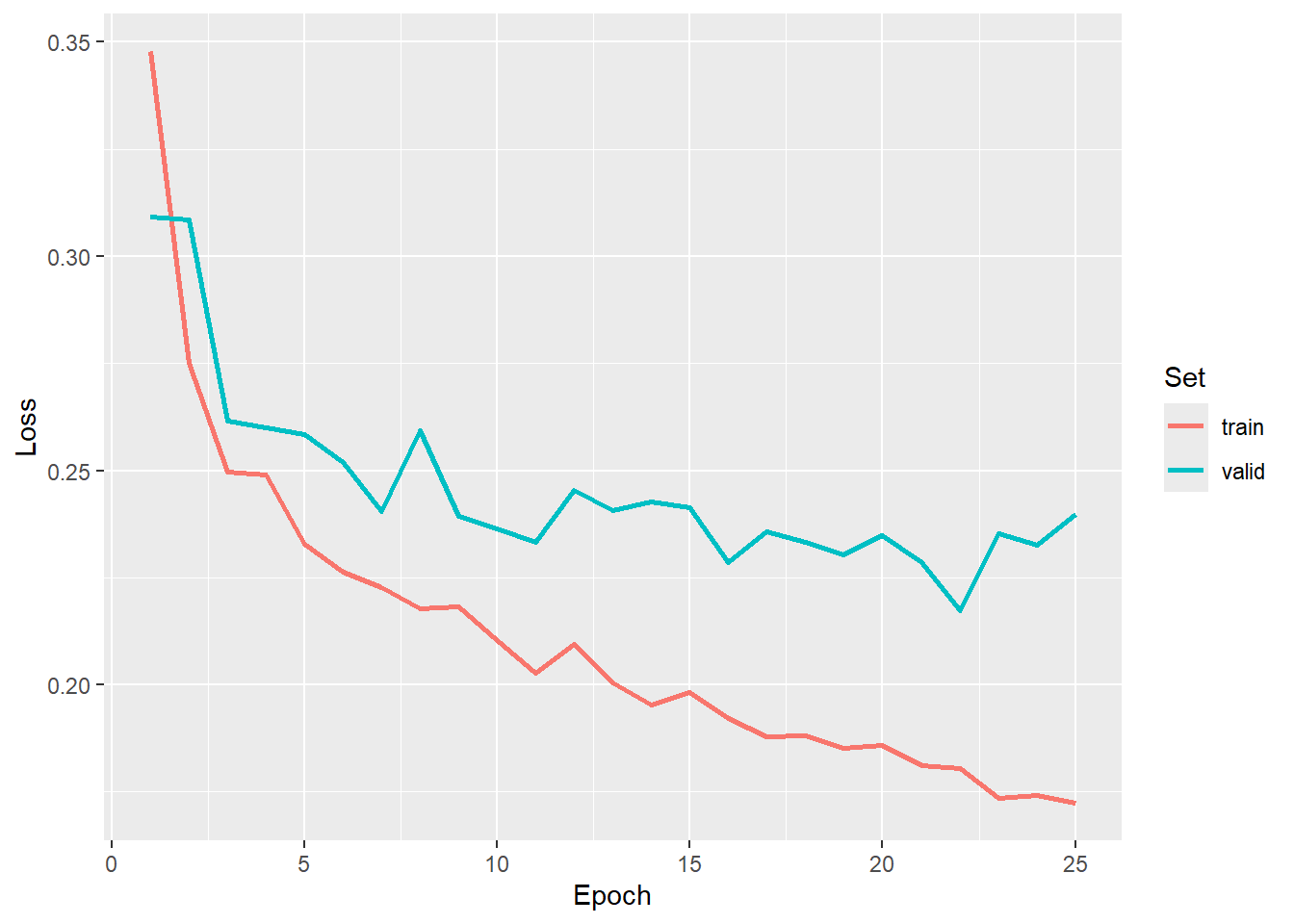
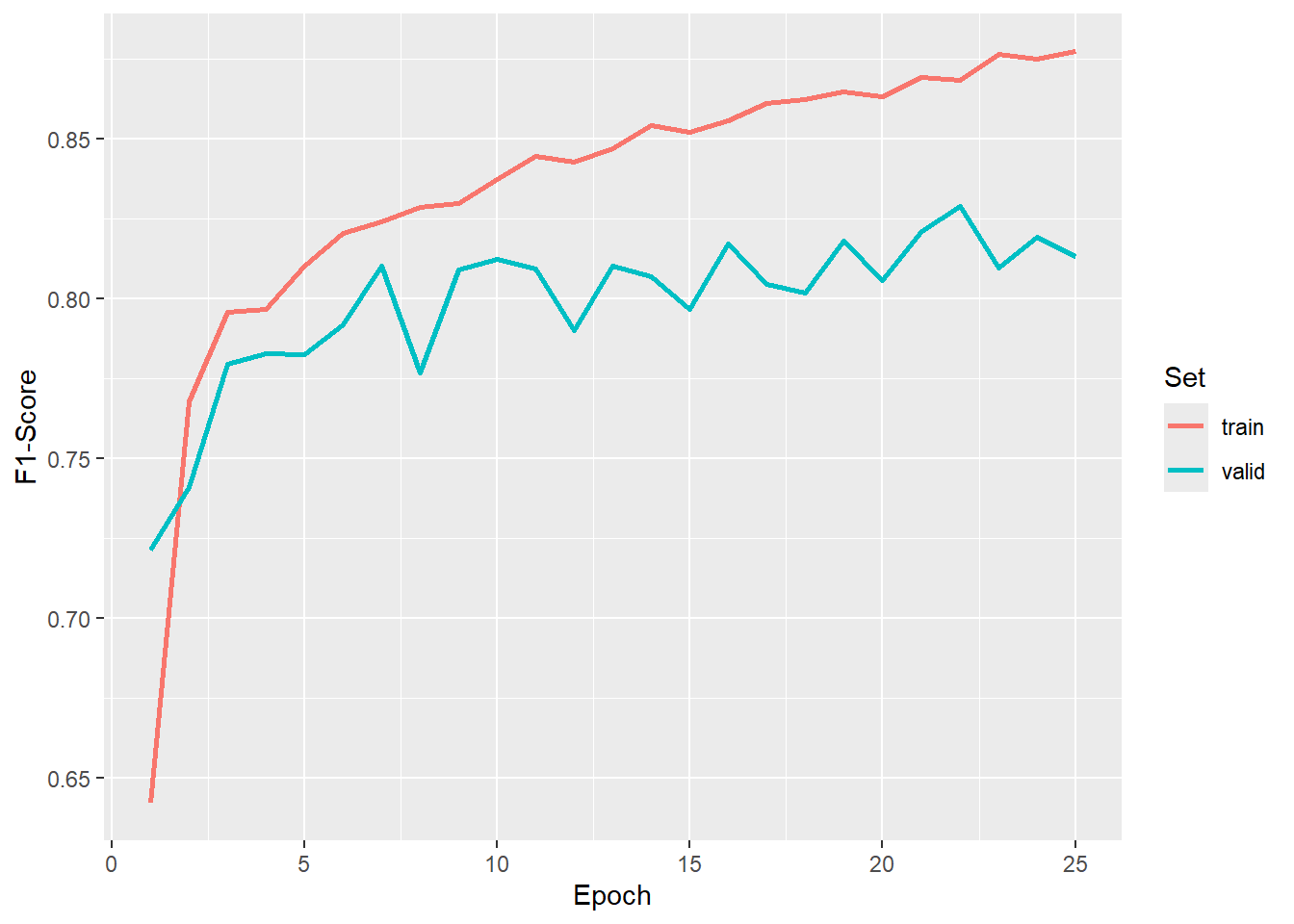
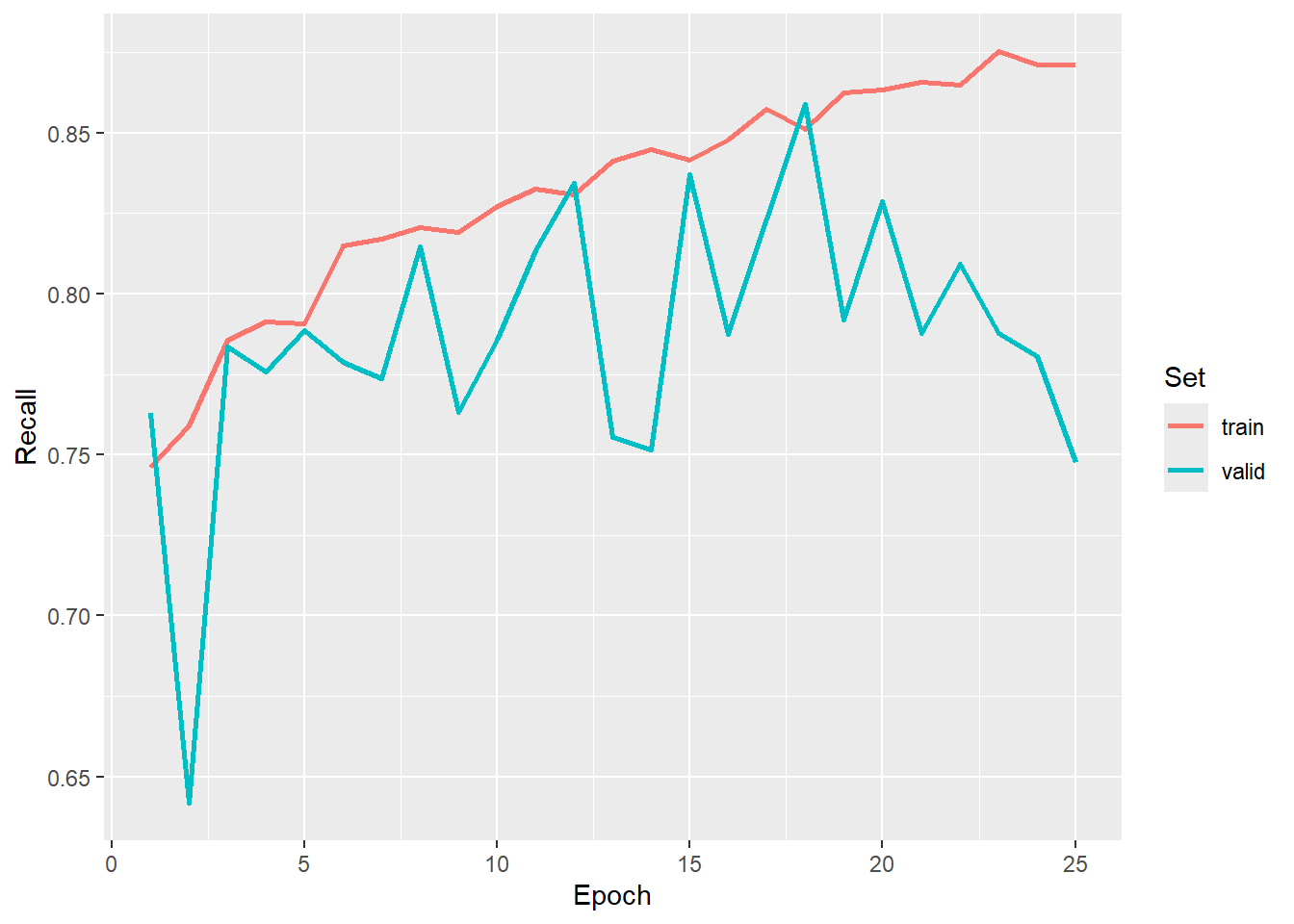
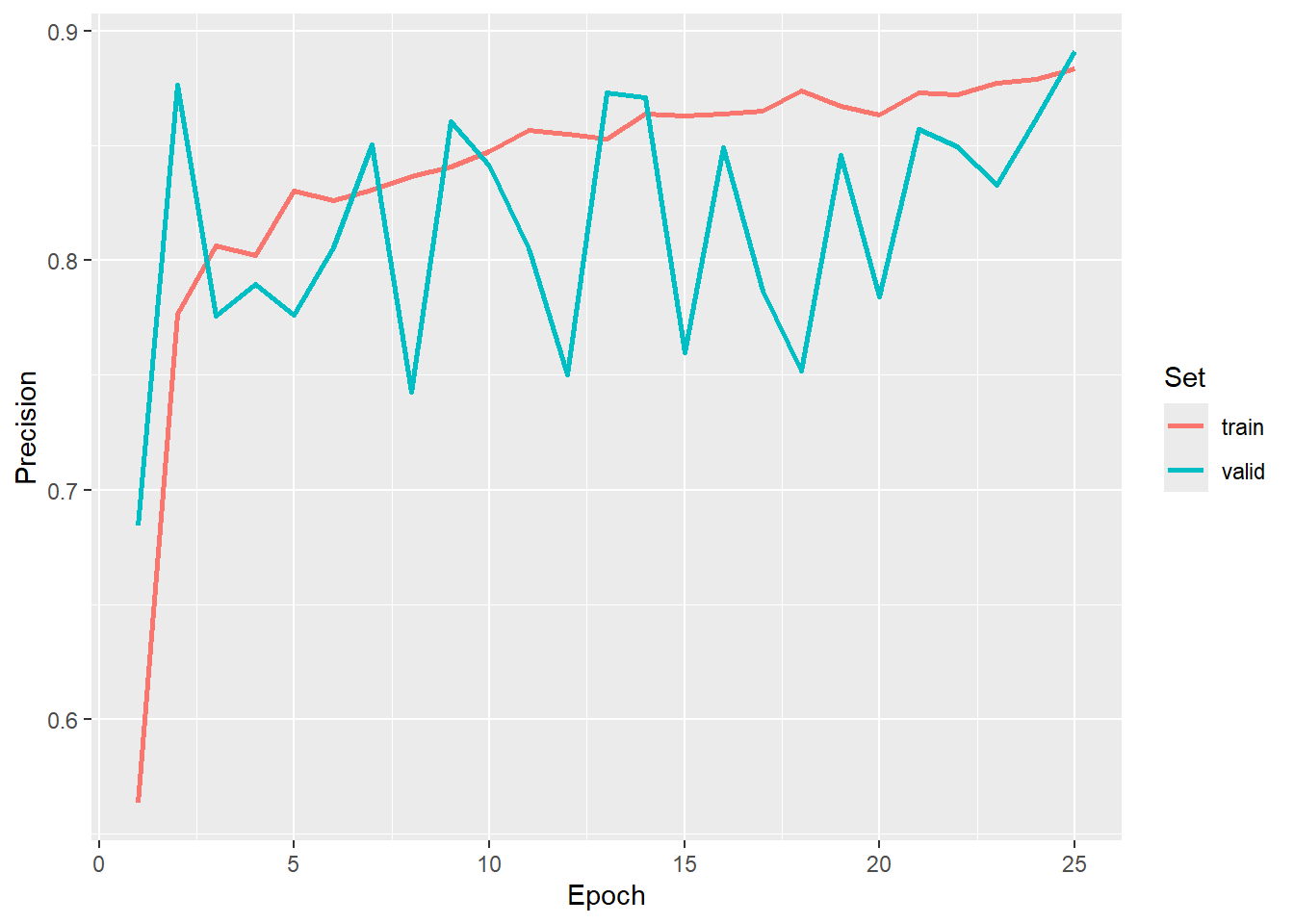
The model is re-instantiated, the state dictionary is loaded, and the model is placed in evaluation mode. Again, it is important that the instantiated model is identical to the model that was trained so that the trainable parameters can be correctly matched and loaded from the saved state dictionary.
dlabModel2 <- defineDLab(
  inChn = 6,
  nCls = 2,
  actFunc = "gelu",
  encBlocks = "double",
  decBlock = "double",
  useRes = FALSE,
  enChn = c(16, 32, 64, 128),
  btnChn = 256,
  lowLevelChn = 48,
  dcChn = 256,
  dilRates = c(6, 12, 18),
  dilChn = c(256, 256, 256, 256),
  negative_slope = 0.01,
  expRatio = 4
)

newModel <- defineTerrainSeg(segMod= dlabModel2,
                              cellSize = 2,
                              spatDim=640,
                              tCrop = 64,
                              doGP = FALSE,
                              innerRadius = 2,
                              outerRadius = 10,
                              hsRadius = 50,
                              smoothRadius = 11)$to(device="cuda")

newModel$load_state_dict(torch_load(str_glue("{fldPth}vfillDynamicModel.pt")))
newModel$eval()
The predictSpatial() function is used to predict to a new spatial extent. The key difference here in comparison to Workflow 1 is that doPad should be set to TRUE and the prePad argument should match the tCrop argument used in defineTerrainSeg(). This will allow the predictions to align correctly when chips are merged into a final product. Note also that the input is now the DTM as opposed to the stack of LSPs since the model generates the LSPs internally. This is one of the key benefits of this workflow: LSPs, raster masks, and image chips do not need to be generated prior to training the model. The user simply needs to provide the input DTM, example vector features, chip centroids, and processing extents. Although generating chips and LSPs during training slows the process, pre-processing requirements are reduced, and the user does not need to generate LSPs prior to making a prediction to a new location.
predCls <-geodl::predictSpatial(imgIn=str_glue("{fldPth}dtm.tif"),
                                model=newModel,
                                predOut=str_glue("{outPth}dtmPred.tif"),
                                mode="multiclass",
                                predType="class",
                                doPad = TRUE,
                                predPad = 64,
                                useCUDA= TRUE,
                                nCls=2,
                                chpSize=640,
                                stride_x=128,
                                stride_y=128,
                                crop=128,
                                nChn=1,
                                normalize=FALSE,
                                rescaleFactor=1,
                                usedDS=FALSE)
Lastly, we can visualize the predictions. We first generate a hillshade form the DTM then visualize the predictions over this surface. We convert codes of 0 and 1 to NA so that only the positive case cells are displayed.
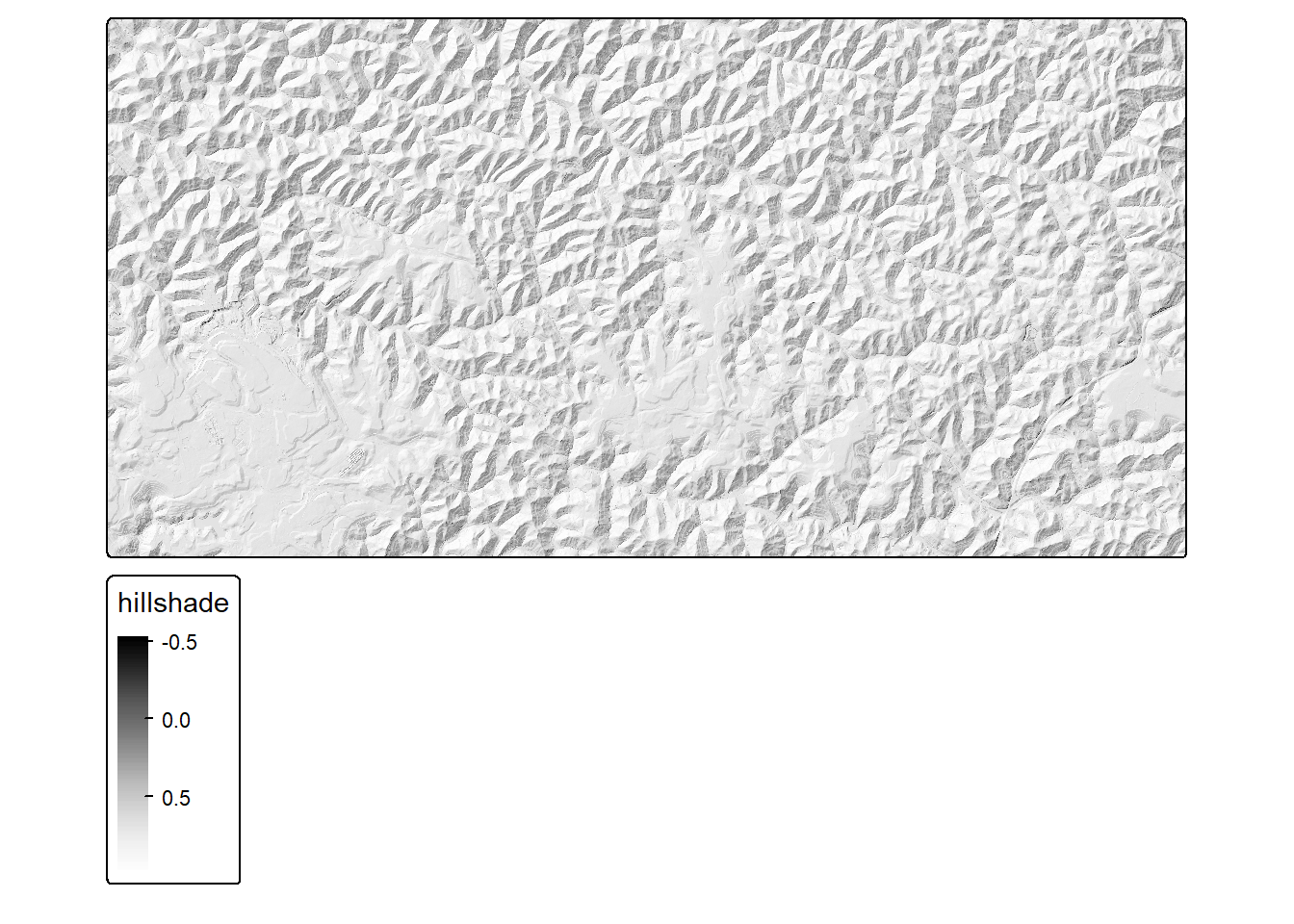
predCls <- rast(str_glue("{fldPth}vfillDynamicPred.tif"))

predCls2 <- predCls
predCls2[predCls2 == 0] <- NA
predCls2[predCls2 == 1] <- NA

tm_shape(hs)+
  tm_raster(col.scale = tm_scale_continuous(values="-brewer.greys"))+
  tm_shape(predCls2)+
  tm_raster(col.scale = tm_scale_categorical(labels = c("Valley Fill"),
                                             values = c("brown1")),
            col.legend = tm_legend("Features"))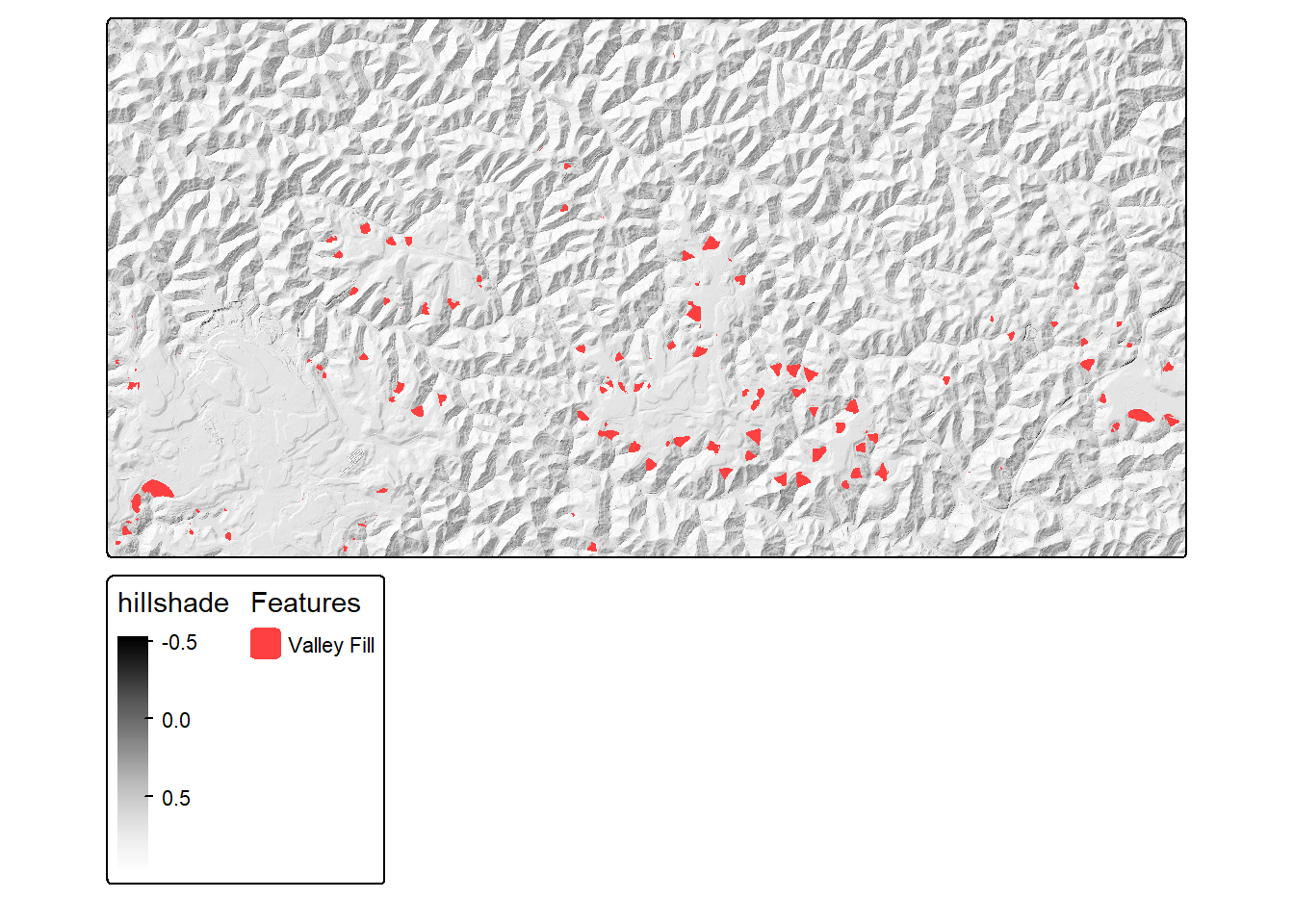
24.6 Concluding Remarks
The two workflows in this chapter demonstrated how to use geodl to extract a single feature class using pre-generated chips and dynamically generated chips, including the use of deep supervision, an exponential moving average of the model weights, and the TerrainSeg model. In the next chapter, we apply similar workflows to a multiclass land cover mapping problem and further customize the training process.
24.7 Questions
- Why should you monitor a validation set during the training process?
- Why is it common to implement data augmentations for the training set?
- Explain the purpose of the
drop_lastparameter in the torch dataloader. Why might you need to drop the last mini-batch? - Why is it necessary that a new instantiation of a model have the same architecture if we want to be able to load a state dictionary that was saved to disk?
- Explain the difference between a “hard” and “soft” prediction.
- geodl generally frames all problems as multiclass. How can the F1-score, recall, and precision assessment metrics be configured to provide a binary-style estimate as opposed to a macro-average of the background and presence classes?
- Why might we want to exclude margin rows and columns when calculating a loss or assessment metrics?
- Explain the purpose of deep supervision and why the weights of the intermediate losses are generally reduced as training progresses.
24.8 Exercises
Develop a pipeline to train and evaluate a geospatial semantic segmentation model using geodl, torch and luz. The goal of the model is to extract the extent of historic surface mines from topographic maps. You will make use of the topoDLMini dataset, which is available here. These data were introduced in the following publication, which is available here and is in open access:
Maxwell, A.E., Bester, M.S., Guillen, L.A., Ramezan, C.A., Carpinello, D.J., Fan, Y., Hartley, F.M., Maynard, S.M. and Pyron, J.L., 2020. Semantic segmentation deep learning for extracting surface mine extents from historic topographic maps. Remote Sensing, 12(24), p.4145.
Generate code to perform the following steps. Note that a CUDA-enabled GPU is required to complete this exercise.
- Use
makeChipsDF()to generate the chips data frames. The topoDLMini folder contains separate train, val, and test folders and were generated withmakeChips()in “Divided” mode. The file extension is “.png”. The generated training, validation, and test data frames should list 2,000, 500, and 500 chips, respectively. - Instantiate torch datasets for each partition using
defineSegDataSet(). Note that the image chips need to be re-scaled from 0 to 255 to 0 to 1. The masks also need to be re-scaled from 0 to 255 to 0 to 1. You should also add 1 to the class codes to obtain codes of 1 and 2 (1 = “background”; 2 = “mine”). For the training set, perform some augmentations of your choosing to help combat overfitting. - Generate torch dataloaders with a mini-batch size of 10 for all data partitions (note that you may need to lower the mini-batch size depending on your available hardware). Shuffle the training set. If using a mini-batch size of 10, you do not need to drop the last mini-batch. However, if you use an alternative mini-batch size and the number of chips is not evenly divisible by the mini-batch size, you should drop the last mini-batch.
- Check the data using
viewBatch()anddescribeBatch(). Note that the images should be scaled from 0 to 1, the the mask codes should be 1 and 2, there should be 3 input channels, and the spatial dimensions should be 256x256. If this is not the case, check your parameterization ofdefineSegDataSet(). - Train a model using luz. Use the training dataloader to train the model and the validation dataloader for validation. Use a UNet model via
defineUNet()that is parameterized to predict 2 classes and accept 3 predictor variables. You can use the default arguments for all other parameters. Use the adamw optimizer with a learning rate of 0.001. Use a focal Tversky loss via thedefineUnifiedFocalLoss()function withlambda=0,gamma=0.7, anddelta=0.6. Use class weights ofc(0.3, 0.7). Monitor overall accuracy, F1-score, recall, and precision. Make sure to parameterize F1-score, recall, and precision as expected for a binary classification usingclsWghts=c(0,1). Train the model for 25 epochs, log the loss and metrics to disk, and save the model state dictionary at the end of each epoch. - Use the logs to select a final model.
- Re-instantiate the model with the same configuration and load the saved state dictionary representing the epoch that you selected. Make sure to place the model in evaluation mode.
- Validate the model on the test set using
assessDL(). - View a mini-batch of predictions for the test set using
viewBatchPreds() - Generate a short write up of your results. Discuss issues of commission and omission errors.