22 Geospatial Semantic Segmentation: Data Preparation (geodl)
22.1 Topics Covered
- Understand semantic segmentation and the general geodl workflow
- Generate raster masks or labels from input vector data
- Generate image chips and associated masks and list them in a data frame
- Create class boundary distance grids
- Define a torch dataset with optional data augmentations and instantiate dataloaders
- Check and visualize data prior to training a model
- Generate chips dynamically during the training process
- Generate land surface parameters (LSPs) using GPU-based computation
22.2 Introduction
The geodl R package supports semantic segmentation, or pixel-level classification, in R. It builds on torch and luz, which support the deep learning (DL) component, and terra, which is used for reading and processing geospatial raster data. This package was created by the authors of this text and was introduced in the following paper:
Maxwell, A.E., Farhadpour, S., Das, S. and Yang, Y., 2024. geodl: An R package for geospatial deep learning semantic segmentation using torch and terra. PloS one, 19(12), p.e0315127.
Since the release of this paper, geodl has been expanded to include more semantic segmentation models, a wider range of training loop customization options, training routines that do not require generating image chips beforehand, and additional functionality for generating land surface parameters (LSPs) and performing DL using LSP predictor variables.
This is the first of four chapters focused on geodl. In this chapter, we provide an overview of semantic segmentation and the design of the package, and we then describe the data preparation workflow: generating raster masks, image chips, and boundary distance grids; defining datasets and dataloaders; checking data prior to training; generating chips dynamically; and calculating LSPs using GPU-based computation. In Chapter 23, we explore the semantic segmentation architectures, loss functions, and assessment tools provided by the package, including the TerrainSeg model for extracting landforms and geomorphic features from LSPs. Finally, Chapter 24 and Chapter 25 bring these components together into complete training, validation, and prediction workflows for binary and multiclass problems, respectively. Our goal is to provide background information and demonstrate workflows so that you have a working knowledge of the package and its underlying philosophy and can modify example workflows to meet your own needs.
geodl is still actively being developed. We recommend installing it from GitHub as opposed to CRAN. This can be accomplished using devtools as follows:
devtools::install_github("maxwell-geospatial/geodl")
22.2.1 Semantic Segmentation
In contrast to scene classification or scene labeling, which was explored in the first three chapters of this section, semantic segmentation entails pixel-level as opposed to scene-level labeling. This is generally a more difficult task due to increases in class heterogeneity and complex class signatures. However, it has a wide variety of use cases in remote sensing and the geospatial sciences. For example, semantic segmentation can be used to generate land cover maps and differentiate vegetation community types.
22.2.2 geodl Overview
The goal of geodl is to simplify the task of semantic segmentation using R and torch. It specifically provides tools for:
- Generating raster-based masks or reference labels from vector geospatial data
- Generating image chips from larger extents of input predictor variable raster grids and associated masks
- Training models using pre-generated image chips or chips created dynamically during the training process
- Defining a torch dataset subclass for geospatial data with the ability to apply data augmentations to combat overfitting
- Applying common assessment metrics: overall accuracy, precision, recall, and F1-score
- Implementing the unified focal loss framework after Yeung et al. (2022)
- Incorporating class boundary weightings when calculating loss metrics
- Defining and training convolutional neural network (CNN) semantic segmentation architectures including a customizable UNet; UNet3+; a DeepLabv3+-like architecture; and UNet with a ResNet, MobileNetv2, or EfficientNet-B2 encoder
- Making predictions to full spatial extents to generate both classification and probabilistic output
- Performing assessment using point or pixel locations, raster grids, or a torch dataloader
- Generating LSPs from a DTM using torch and GPU-based computation
- Implementing a semantic segmentation model designed specifically for geomorphic or landform feature extraction tasks
Simplified workflows are shown in Figure 22.1 and Figure 22.2. The first figure demonstrates the process when image chips are generated prior to the training process. The makeMasks() function allows for generating raster masks or labels from input vector geospatial data that align with input raster-based predictor variables. This results in a categorical raster grid where each class is assigned a numeric code. Using the input raster-based predictor variables and generated raster masks, the makeChips() or makeChipsMultiClass() function creates image chips and associated masks that are written to disk to a user-defined directory. The size of the generated chips is defined by the user. The chip and mask paths can then be written into a data frame using the makeChipsDF() function.
In torch, the dataset class defines how input data are processed to generate a single example tensor of predictor variables and an associated mask. The defineSegDataSet() subclass accepts a data frame generated with makeChipsDF() along with the path to the directory that stores the chips. The instantiated DataSet subclass is configured for geospatial semantic segmentation tasks. It can also implement a variety of data augmentations (e.g., flips, rotations, blur, contrast adjustment, and desaturation) in an attempt to reduce overfitting to the training examples. Once a dataset subclass is instantiated, it can be provided to the dataloader() function from torch to define how mini-batches of samples are generated during the training and validation processes. Several functions are provided to define model architectures, and training is implemented using the luz package, which greatly simplifies the error prone training process and is the standard workflow when using torch. Once a model is trained, it can be used to make predictions to new raster extents (predictSpatial()). It can also be validated using withheld samples at point or raster cell locations (assessPnts()), all raster grid cells in a prediction and reference dataset (assessRaster()), or using mini-batches of chips provided by a dataloader (assessDL()).

The package also implements an alternative workflow that does not require that predictor variables and associated raster masks be converted into image chips prior to the training or validation process. This workflow is conceptualized in Figure 22.2. The user can specify how to generate image chips and associated masks from processing extents, reference vector geospatial data, and raster-based predictor variables. This dataset subclass is implemented by the defineDynamicSegDataSet() function and requires first defining a data frame and validating it using the makeDynamicChipsSF() and checkDynamicChips() functions, respectively. This generated data frame contains all the information required to dynamically generate chips using defineDynamicSegDataSet().
Although using dynamic chips can slow down the training process, it alleviates the need to generate the chips and associated raster masks beforehand and save them to disk, which can help minimize the disk space required to build the model. The user generally has more control when generating the chips and saving them to disk, or when using the first workflow conceptualized above. However, this second workflow may be more practical in many circumstances.

22.3 Data Preparation
In this section, our goal is to describe the workflow used to prepare data to train and assess DL semantic segmentation models using geodl. Other than geodl, we load the tidyverse, terra, sf, tmap, tmaptools, and gt. We also define the path to our working directory and the folder where we wish to save output.
fldPth <- "gslrData/chpt22/data/"
outPth <- "gslrData/chpt22/output/"
22.3.1 Raster Masks
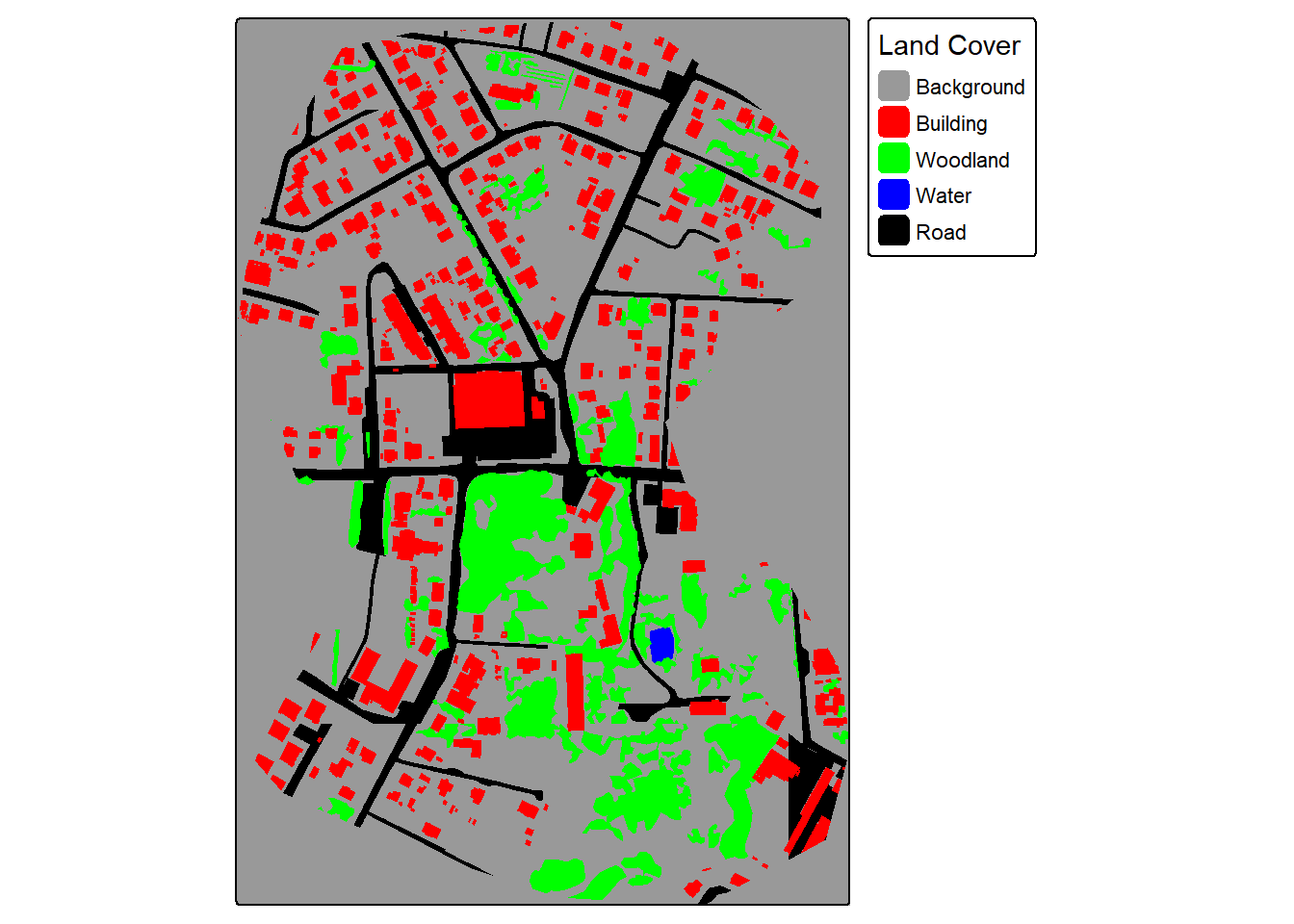
For our demonstration, we make use of a subset of an image from the landcover.ai dataset. We also need vector data representing the extent of interest, building footprints, and a wall-to-wall land cover classification. We first display the input image and vector data. The image extent is irregularly shaped; however, this is not an issue when using geodl. For the land cover data, all areas in the extent are labeled to one of the following classes: “Background”, “Building”, “Woodland”, “Water”, or “Road.”
plotRGB(img, stretch="lin")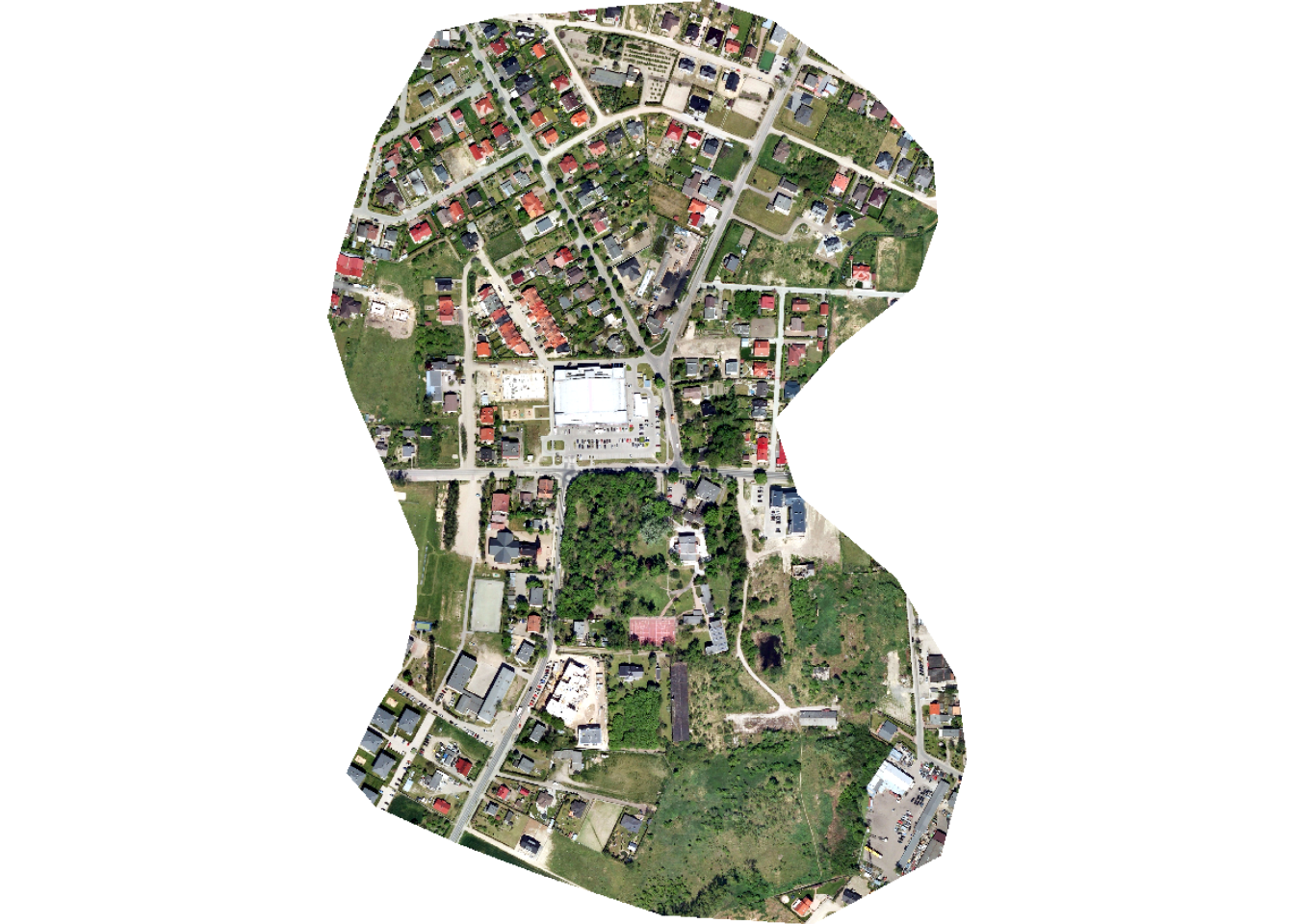
tm_shape(ext)+
  tm_borders(col="red", lwd=2)+
  tm_shape(buildings)+
  tm_polygons(fill="gray")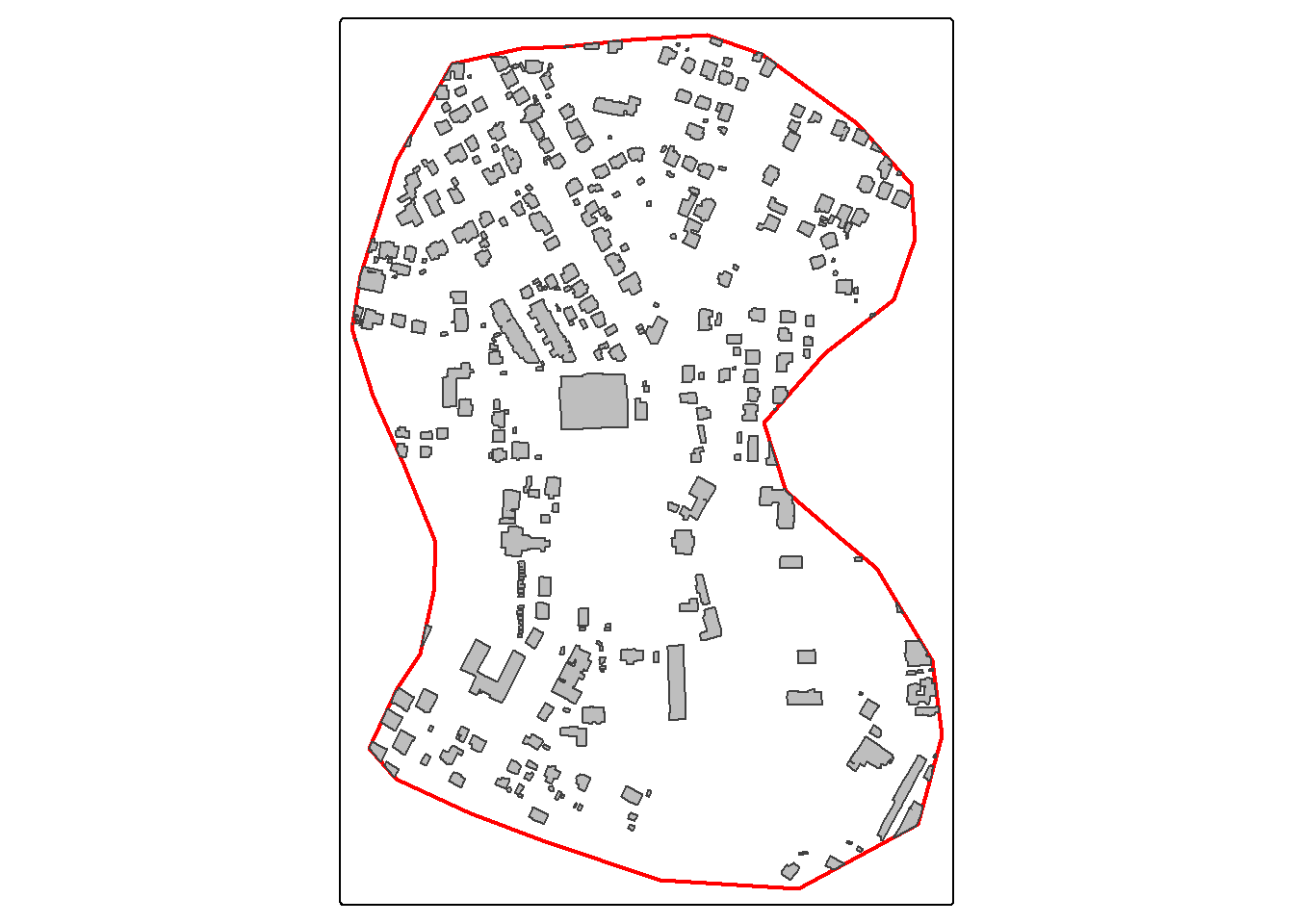
tm_shape(ext)+
  tm_borders(col="red", lwd=2)+
  tm_shape(lc)+
  tm_polygons(fill="gridcode",
              fill.scale = tm_scale_categorical(labels = c("Background",
                                                           "Building",
                                                           "Woodland",
                                                           "Water",
                                                           "Road"
                                                           ),
                                             values = c("gray60",
                                                         "red",
                                                         "green",
                                                         "blue",
                                                         "black")),
            fill.legend = tm_legend("Land Cover"))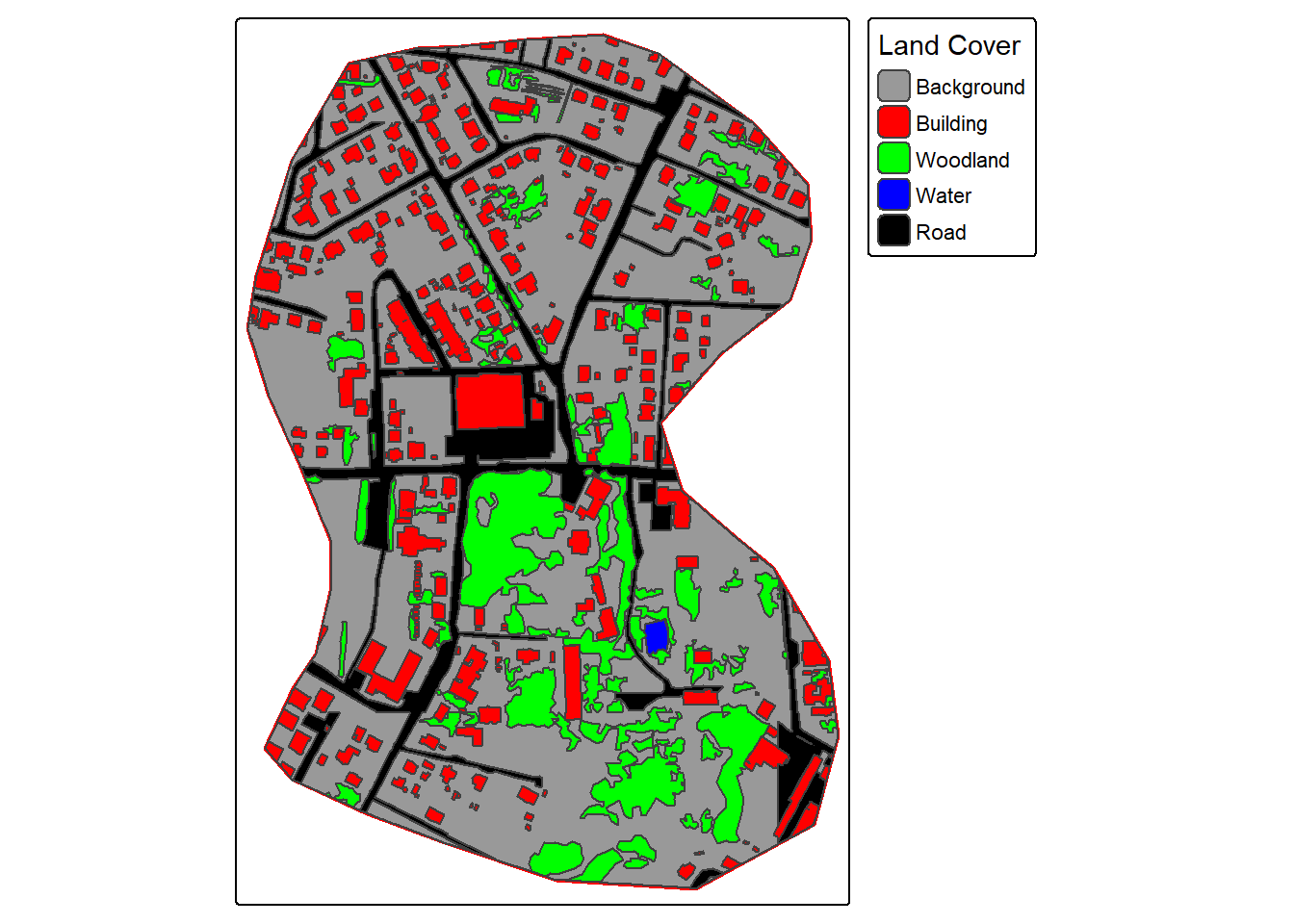
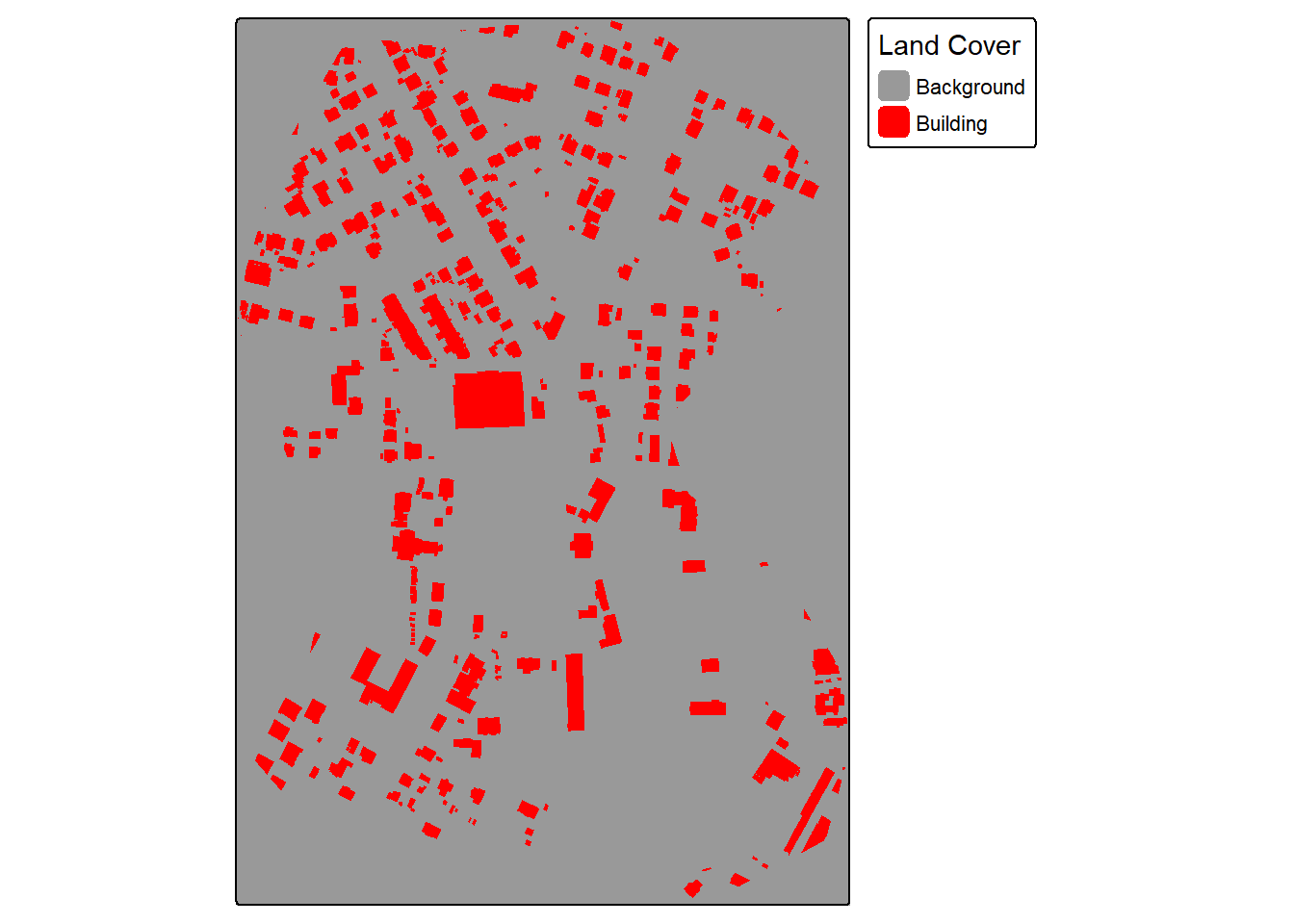
The makeMasks() function is used to convert polygon vector data to categorical raster data. The function requires providing an input image, input polygon vector features, and an attribute column of numeric codes that differentiate each class. A value can also be specified for the background class, or areas occurring outside the reference polygons. For the binary classification of buildings, the “gridcode” column holds a value of 1 for all building features. We are specifying to use a value of 0 for the background class. As a result, the resulting categorical raster will contain values of 0 and 1.
The crop option specifies whether or not the mask should be cropped to a defined extent. In this case, we are cropping the generated raster grid. The mode can be either "Both" or "Mask". When using "Both", a copy of the image is produced alongside of the mask. This is helpful if you want to crop the image relative to an extent and so that the image and mask align perfectly and have the same number of rows and columns of cells.
Once the mask and image are generated, they are read into R as spatRaster objects, and the binary mask is displayed with tmap.
In the second example, we generated masks for the multiclass land cover problem. The setup is the same except now we only create the mask as opposed to the mask and a copy of the image. The “gridcode” column holds values from 0 to 4 representing the five classes being differentiated. The background value of 0 is not used in this case since the polygons completely fill the mapped extent.
22.3.2 Make Chips
Once raster masks are generated that align with the raster-based predictor variables, they can be broken into chips of a defined size using the makeChips() or makeChipsMultiClass() function. makeChips() should be used when there are only two codes, 0 and 1, while makeChipsMultiClass() should be used when there are more than two classes differentiated.
For the building example, we use makeChips(). This function requires specifying the input predictor variables and mask raster grids. The generated chips are saved to a directory indicated by the outDir parameter. Inside this directory, the function will generate “images” and “masks” sub-directories. The size argument specifies the size of each chip, in this case 512x512 cells. The stride_x and stride_y parameters specify how far the moving window moves in the x and y directions as the chips are generated. Since 512 is used, there will be no overlap between adjacent chips. If strides smaller than the chip size are used, overlapping chips are generated.
For a binary classification, three options are available for mode. "All" indicates that all chips are produced including those that contain no cells mapped to the positive case. In contrast, "Positive" indicates that only chips that have at least one cell mapped to the positive case are generated. Lastly, "Divided" indicates that all chips are generated; however, chips that contain only background cells are saved to a separate “Background” directory while those that contain at least one cell mapped to the positive case are saved to the “Positive” directory. Here, we are only generating chips with positive-case cells included. You can also save chips to a folder that already exists and contains chips generated from other predictor variable/mask pairs using useExistingDir=TRUE.
If you want to generate chips from multiple datasets, after generating chips from the first datasets, subsequent data can be processed with results saved to the same directory using useExistingDir=FALSE.
For a multiclass problem and when using the makeChipsMultiClass() function, the key difference is that there is no mode argument since there are no background-only samples.
dir.create(str_glue("{outPth}lcChips/"))

makeChipsMultiClass(image = str_glue("{outPth}imgOut.tif"),
                    mask = str_glue("{outPth}lcMskOut.tif"),
                    n_channels = 3,
                    size = 512,
                    stride_x = 512,
                    stride_y = 512,
                    outDir = str_glue("{outPth}lcChips/"),
                    useExistingDir=FALSE)
22.3.3 Make Chips Data Frame
Once chips are created and saved in a specified directory using makeChips() or makeChipsMultiClass(), they can be listed into a data frame using makeChipsDF(). As with makeChips(), for a binary classification, the same three modes are available. For a multiclass classification, you should use mode = "All". For both the binary and multiclass problem types, the generated “chpN” column provides the name of the chip while the “chpPth” and “mskPth” columns list the paths to the images and masks, respectively. For a binary classification and when using mode="Divided", a “Division” column is added to indicate whether the chip is a background-only or positive case-containing sample.
bChipsDF <- makeChipsDF(folder = str_glue("{outPth}bChips/"),
                       extension=".tif",
                       mode="Positive",
                       saveCSV=FALSE)

head(bChipsDF) |>
gt()| chpN | chpPth | mskPth |
|---|---|---|
| imgOut_1025_1025.tif | images/imgOut_1025_1025.tif | masks/imgOut_1025_1025.tif |
| imgOut_1025_1537.tif | images/imgOut_1025_1537.tif | masks/imgOut_1025_1537.tif |
| imgOut_1025_2049.tif | images/imgOut_1025_2049.tif | masks/imgOut_1025_2049.tif |
| imgOut_1025_2561.tif | images/imgOut_1025_2561.tif | masks/imgOut_1025_2561.tif |
| imgOut_1025_513.tif | images/imgOut_1025_513.tif | masks/imgOut_1025_513.tif |
| imgOut_1537_2561.tif | images/imgOut_1537_2561.tif | masks/imgOut_1537_2561.tif |
lcChipsDF <- makeChipsDF(folder = str_glue("{outPth}lcChips/"),
                       extension=".tif",
                       mode="All",
                       saveCSV=FALSE)

head(bChipsDF) |>
gt()| chpN | chpPth | mskPth |
|---|---|---|
| imgOut_1025_1025.tif | images/imgOut_1025_1025.tif | masks/imgOut_1025_1025.tif |
| imgOut_1025_1537.tif | images/imgOut_1025_1537.tif | masks/imgOut_1025_1537.tif |
| imgOut_1025_2049.tif | images/imgOut_1025_2049.tif | masks/imgOut_1025_2049.tif |
| imgOut_1025_2561.tif | images/imgOut_1025_2561.tif | masks/imgOut_1025_2561.tif |
| imgOut_1025_513.tif | images/imgOut_1025_513.tif | masks/imgOut_1025_513.tif |
| imgOut_1537_2561.tif | images/imgOut_1537_2561.tif | masks/imgOut_1537_2561.tif |
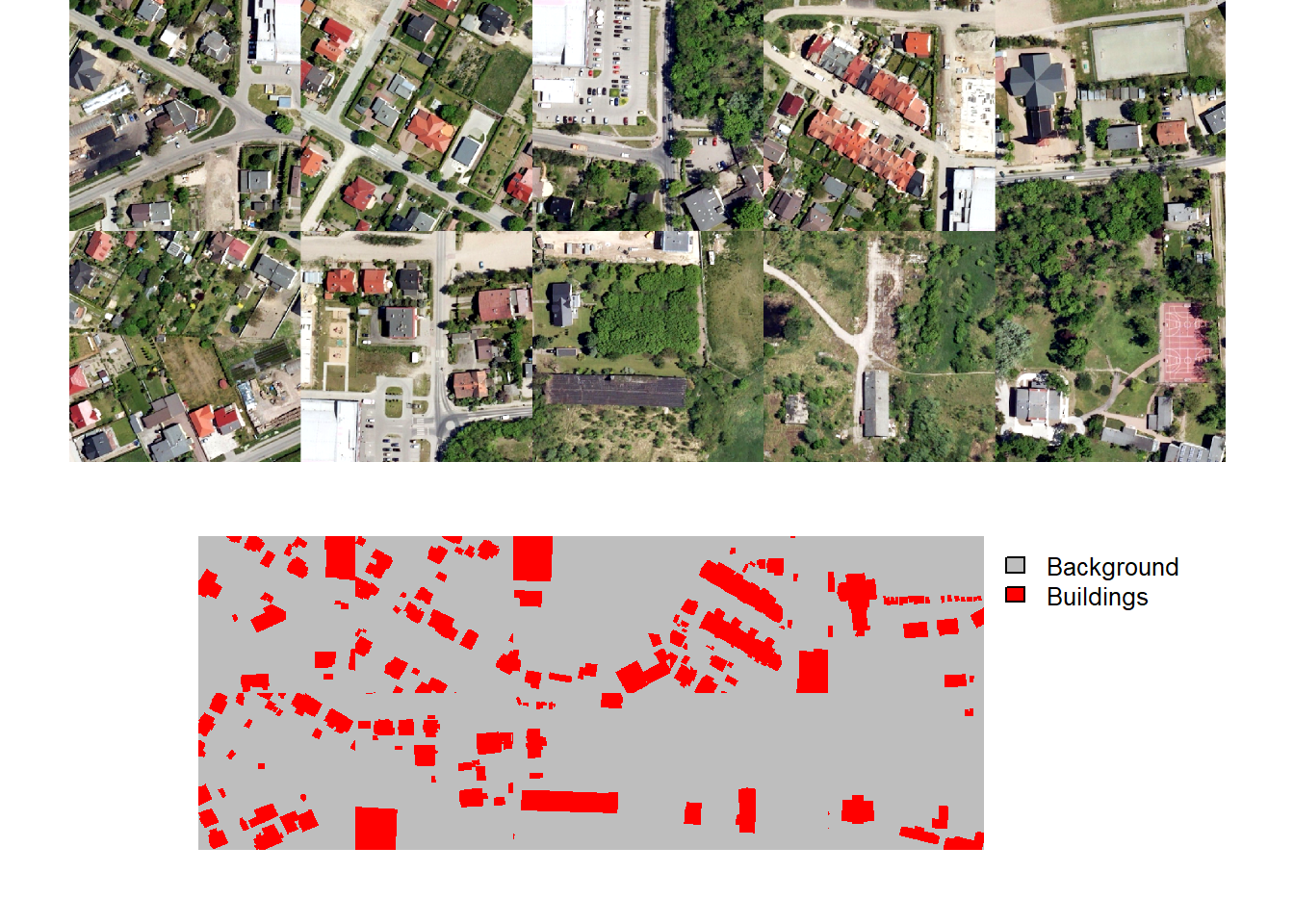
A random subset of chips can be visualized using the viewChips() function. The function requires providing a data frame created with makeChipsDF() and the path to the directory containing the chips. If mode is set to "image", only the images are shown. If mode is set to "mask", only the masks are displayed. Lastly, "both" indicates to show both the images and the masks. The user must also specify the integer or code assigned to each class (cCodes), name of each class (cNames), and color to use to display each class (cColors). If makeChips() is used with mode="Divided", the user can choose to only display chips containing positive case cells using justPositive=TRUE.
We generally recommend visualizing the chips to make sure that the data are being generated as expected. Below, we visualize chips for both the binary and multiclass problems.
viewChips(chpDF=lcChipsDF,
          folder=str_glue("{outPth}lcChips/"),
          nSamps = 10,
          mode = "both",
          justPositive = FALSE,
          cCnt = 5,
          rCnt = 2,
          r = 1,
          g = 2,
          b = 3,
          rescale = FALSE,
          rescaleVal = 1,
          cCodes = c(0,1,2,3,4),
          cNames= c("Background", "Buildings", "Woodland", "Water", "Road"),
          cColors= c("gray", "red", "green", "blue", "black"),
          useSeed = TRUE,
          seed = 42)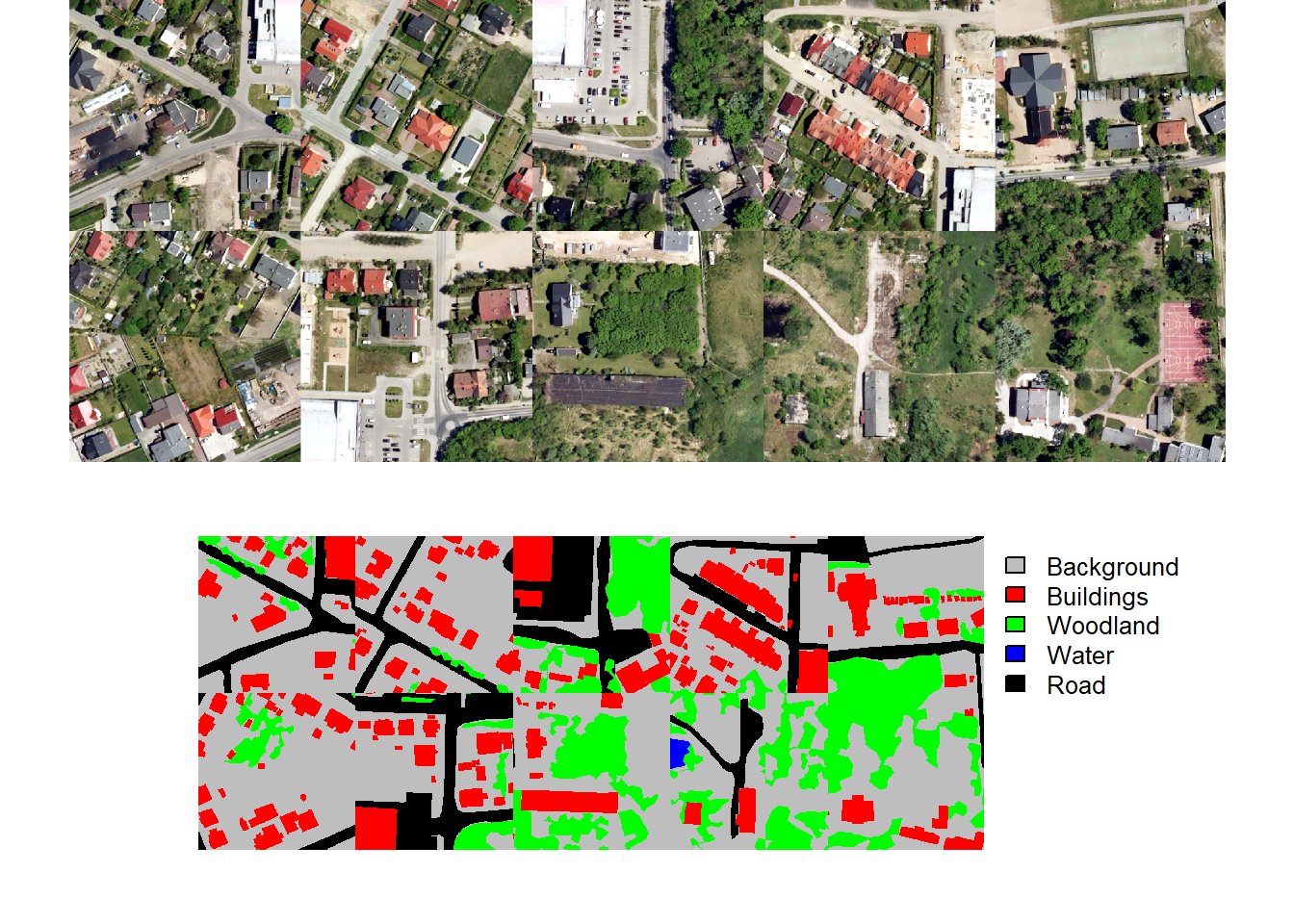
22.3.4 Distance Grids
As will be discussed later in this chapter, the implemented unified focal loss framework is able to incorporate class edge distance weightings into the loss calculations. In order to implement these weightings, the distance from class boundaries must be calculated, which can be accomplished using the makeBoundaryDistance() function. This function requires providing the path to a folder that contains chips and associated masks. Once distance grids are created and a dataset and subsequent dataloader subclass have been created, these distance masks can be visualized alongside of the associated chips and masks using the viewDist() function, which is demonstrated below.
makeBoundaryDistance(chipsDir=str_glue("{outPth}lcChips/"))22.3.5 Dataset Subclass
In order to train and validate DL models using torch, input data must be converted into tensors (i.e., multidimensional arrays) with the correct dimensionality and data types. These tensors need to then be provided to the algorithm as mini-batches, since algorithms are trained incrementally on subsets of the available training set. During the training loop, data within each training mini-batch are predicted. These predictions are then compared to the reference labels to calculate a loss (and, optionally, additional assessment metrics). Once the loss is calculated, backpropagation is performed and the model parameters are updated using an optimization algorithm, such as stochastic gradient descent (SGD), RMSProp, or Adam.
In the torch environment, how a single image chip is processed is defined by a dataset subclass. Specifically, the .getitem() method defines how a single input sample is processed to a tensor. The dataLoader is responsible for using the dataset subclass to generate mini-batches of samples to pass to the algorithm during the training or validation processes.
Datasets and dataloaders are used for preparing training, validation, and test datasets. As a result, they are an important component of the torch workflow. geodl provides the defineSegDataSet() function for processing input data. An instantiated dataset generated with this function can then be passed to torch’s default dataloader class.
The defineSegDataSet() function from geodl instantiates a subclass of torch::dataset() for geospatial semantic segmentation. This function is specifically designed to load data generated using the makeChips() or makeChipsMultiClass() function. It accepts a data frame created with the makeChipsDF() function.
It can also define random augmentations to combat overfitting. Note that horizontal and vertical flips and rotations will impact the alignment of the image chip and associated mask. As a result, the same augmentation will be applied to both the image and the mask to maintain alignment. Changes in brightness, contrast, gamma, hue, and saturation are not applied to the masks since alignment is not impacted by these transformations. Predictor variables are generated with three dimensions (channel/variable, width, height) regardless of the number of channels/variables. Masks are generated as three-dimensional tensors (class index, width, height).
Once the chips have been listed into a data frame and described, a dataset can be defined using defineSegDataSet(). This function has many parameters, many of which relate to data augmentations. Here is a description of the parameters:
chpDF: Data frame of image chip and mask paths created usingmakeChipsDF().folder: Full path or path relative to the working directory to the folder containing the image chips and associated masks. You must include the final forward slash in the path (e.g., “C:/data/chips/”).normalize:TRUEorFALSE. Whether to apply normalization. IfFALSE,bMnsandbSDsare ignored. Default isFALSE. IfTRUE, you must providebMnsandbSDs.rescaleFactor: A re-scaling factor to re-scale the bands to 0 to 1. For example, this could be set to 255 to re-scale 8-bit data. Default is 1 or no re-scaling.mskRescale: Can be used to re-scale binary masks that are not scaled from 0 to 1. For example, if masks are scaled from 0 and 255, you can divide by 255 to obtain a 0 to 1 scale. Default is 1 or no rescaling.mskAdd: Value to add to mask class numeric codes. For example, if class indices start are 0, 1 can be added so that indices start at 1. Default is 0 (return original class codes).
Several other functions in geodl have a zeroStart parameter. If class codes start at 0, this parameter should be provided an argument of TRUE. If they start at 1, this parameter should be provided an argument of FALSE. The importance of this arises from the use of one-hot encoding internally, which requires that class indices start at 1. The key need for this is that R begins indexing at 1 as opposed to 0, which is the case for Python.
bands: Vector of bands to include. The default is to only include the first three bands. If you want to use a different subset of bands, you must provide a vector of band indices here to override the default.bMns: Vector of band means. Length should be the same as the number of bands. Normalization is applied before any re-scaling within the function.bSDs: Vector of band standard deviations. Length should be the same as the number of bands. Normalization is applied before any re-scaling.doAugs:TRUEorFALSE. Whether or not to apply data augmentations to combat overfitting. IfFALSE, all augmentation parameters are ignored. Data augmentations are generally only applied to the training set. Default isFALSE.maxAugs: 0 to 7. Maximum number of random augmentations to apply. Default is 0 or no augmentations. Must be changed if augmentations are desired.probVFlip: 0 to 1. Probability of applying vertical flips. Default is 0 or no augmentations. Must be changed if augmentations are desired.probHFlip: 0 to 1. Probability of applying horizontal flips. Default is 0 or no augmentations. Must be changed if augmentations are desired.probRotation: 0 to 1. Probability of applying a rotation by 90-, 180-, or 270-degrees. Default is 0 or no augmentations. Must be changed if augmentations are desired.probBrightness: 0 to 1. Probability of applying brightness augmentation. Default is 0 or no augmentations. Must be changed if augmentations are desired.probContrast: 0 to 1. Probability of applying contrast augmentations. Default is 0 or no augmentations. Must be changed if augmentations are desired.probGamma: 0 to 1. Probability of applying gamma augmentations. Default is 0 or no augmentations. Must be changed if augmentations are desired.probHue: 0 to 1. Probability of applying hue augmentations. Default is 0 or no augmentations. Must be changed if augmentations are desired.probSaturation: 0 to 1. Probability of applying saturation augmentations. Default is 0 or no augmentations. Must be changed if augmentations are desired.brightFactor: Vector of smallest and largest brightness adjustment factors. Random value will be selected between these extremes. The default is 0.8 to 1.2. Can be any non-negative number. For example, 0 gives a black image, 1 gives the original image, and 2 increases the brightness by a factor of 2.contrastFactor: Vector of smallest and largest contrast adjustment factors. Random value will be selected between these extremes. The default is 0.8 to 1.2. Can be any non-negative number. For example, 0 gives a solid gray image, 1 gives the original image, and 2 increases the contrast by a factor of 2.gammaFactor: Vector of smallest and largest gamma values and gain value for a total of three values. Random value will be selected between these extremes. The default gamma value range is 0.8 to 1.2 and the default gain is 1. The gain is not randomly altered, only the gamma. Non-negative real number. A gamma larger than 1 makes the shadows darker while a gamma smaller than 1 makes dark regions lighter.hueFactor: Vector of smallest and largest hue adjustment factors. Random value will be selected between these extremes. The default is -0.2 to 0.2. Should be in range -0.5 to 0.5. 0.5 and -0.5 give complete reversal of hue channel in HSV space in the positive and negative direction, respectively. 0 means no shift. Therefore, both -0.5 and 0.5 will give an image with complementary colors while 0 gives the original image.saturationFactor: Vector of smallest and largest saturation adjustment factors. Random value will be selected between these extremes. The default is 0.8 to 1.2. For example, 0 will give a black-and-white image, 1 will give the original image, and 2 will enhance the saturation by a factor of 2.useEdgeDist:TRUEorFALSE. Whether to include a “distPth” column pointing to the distance-to-class-boundary grids produced bymakeBoundaryDistance(). Supported for all modes. Default is FALSE.
In our example, we are re-scaling the data by a factor of 255. This is because the data are currently represented as 8-bit integer values as opposed to 32-bit float values scaled from 0 to 1. We add 1 to the mask codes to obtain values from 1 to 5 as opposed to 0 to 4.
Augmentations are also being performed. A maximum of 3 augmentations will be applied per chip. Vertical flips, horizontal flips, rotation, brightness changes, and saturation changes will be considered. The flips and rotation have a 30% probability of being applied while the brightness and saturation changes have a 10% chance of being applied. We often struggle with determining the appropriate number of data augmentations to apply. We tend to conservatively apply augmentations; however, others may disagree.
Not all augmentations are appropriate for all data types. For example, saturation and hue adjustments are only applicable to RGB data.
bDS <- defineSegDataSet(chpDF= bChipsDF,
                        folder=str_glue("{outPth}bChips/"),
                        normalize = FALSE,
                        rescaleFactor = 255,
                        mskRescale = 1,
                        mskAdd = 1,
                        bands = c(1, 2, 3),
                        bMns = 1,
                        bSDs = 1,
                        doAugs = TRUE,
                        maxAugs = 3,
                        probVFlip = .3,
                        probHFlip = .3,
                        probRotation = .3,
                        probBrightness = .1,
                        probContrast = .1,
                        probGamma = 0,
                        probHue = 0,
                        probSaturation = .2,
                        brightFactor = c(0.8, 1.2),
                        contrastFactor = c(0.8, 1.2),
                        gammaFactor = c(0.8, 1.2, 1),
                        hueFactor = c(-0.2, 0.2),
                        saturationFactor = c(0.8, 1.2)
)
lcDS <- defineSegDataSet(chpDF= lcChipsDF,
folder=str_glue("{outPth}lcChips/"),
normalize = FALSE,
rescaleFactor = 255,
mskRescale = 1,
mskAdd = 1,
bands = c(1, 2, 3),
bMns = 1,
bSDs = 1,
doAugs = TRUE,
maxAugs = 3,
probVFlip = .3,
probHFlip = .3,
probBrightness = .1,
probContrast = .1,
probGamma = 0,
probHue = 0,
probRotation = .3,
probSaturation = .2,
brightFactor = c(0.8, 1.2),
contrastFactor = c(0.8, 1.2),
gammaFactor = c(0.8, 1.2, 1),
hueFactor = c(-0.2, 0.2),
saturationFactor = c(0.8, 1.2)
)22.3.6 Dataloaders
Once datasets are defined, the base-torch dataloader() function is used to instantiate a dataloader. We use a mini-batch size of 5, shuffle the chips, and drop the last mini-batch. The last mini-batch is dropped because it may be incomplete if the number of available chips is not divisible by the mini-batch size. Calling length() on the generated torch dataloader objects yields the number of mini-batches. Since our example data only include 12 chips and we are using a mini-batch size of 5, only two complete mini-batches can be generated.
bDL <- torch::dataloader(bDS,
                         batch_size=5,
                         shuffle=TRUE,
                         drop_last = TRUE)

lcDL <- torch::dataloader(lcDS,
                          batch_size=5,
                          shuffle=TRUE,
drop_last = TRUE)In this final example, we have modified the chips data frame, dataset, and dataloader to include the class edge distance grids created above. Other than calculating the distance grids beforehand using makeBoundaryDistance(), this requires setting the useEdgeDist argument to TRUE in both the makeChipsDF() and defineSegDataSet() functions.
lcChipsDF2 <- makeChipsDF(folder = str_glue("{outPth}lcChips/"),
                       extension=".tif",
                       mode="All",
                       saveCSV=FALSE,
                       useEdgeDist=TRUE)

lcDS2 <- defineSegDataSet(chpDF= lcChipsDF2,
                         folder=str_glue("{outPth}lcChips/"),
                         normalize = FALSE,
                         rescaleFactor = 255,
                         mskRescale = 1,
                         mskAdd = 1,
                         bands = c(1, 2, 3),
                         bMns = 1,
                         bSDs = 1,
                         doAugs = TRUE,
                         maxAugs = 3,
                         probVFlip = .3,
                         probHFlip = .3,
                         probBrightness = .1,
                         probContrast = .1,
                         probGamma = 0,
                         probHue = 0,
                         probRotation = .3,
                         probSaturation = .2,
                         brightFactor = c(0.8, 1.2),
                         contrastFactor = c(0.8, 1.2),
                         gammaFactor = c(0.8, 1.2, 1),
                         hueFactor = c(-0.2, 0.2),
                         saturationFactor = c(0.8, 1.2),
                         useEdgeDist=TRUE
)

lcDL2 <- torch::dataloader(lcDS2,
                          batch_size=5,
                          shuffle=TRUE,
                          drop_last = TRUE)
22.3.7 Checks
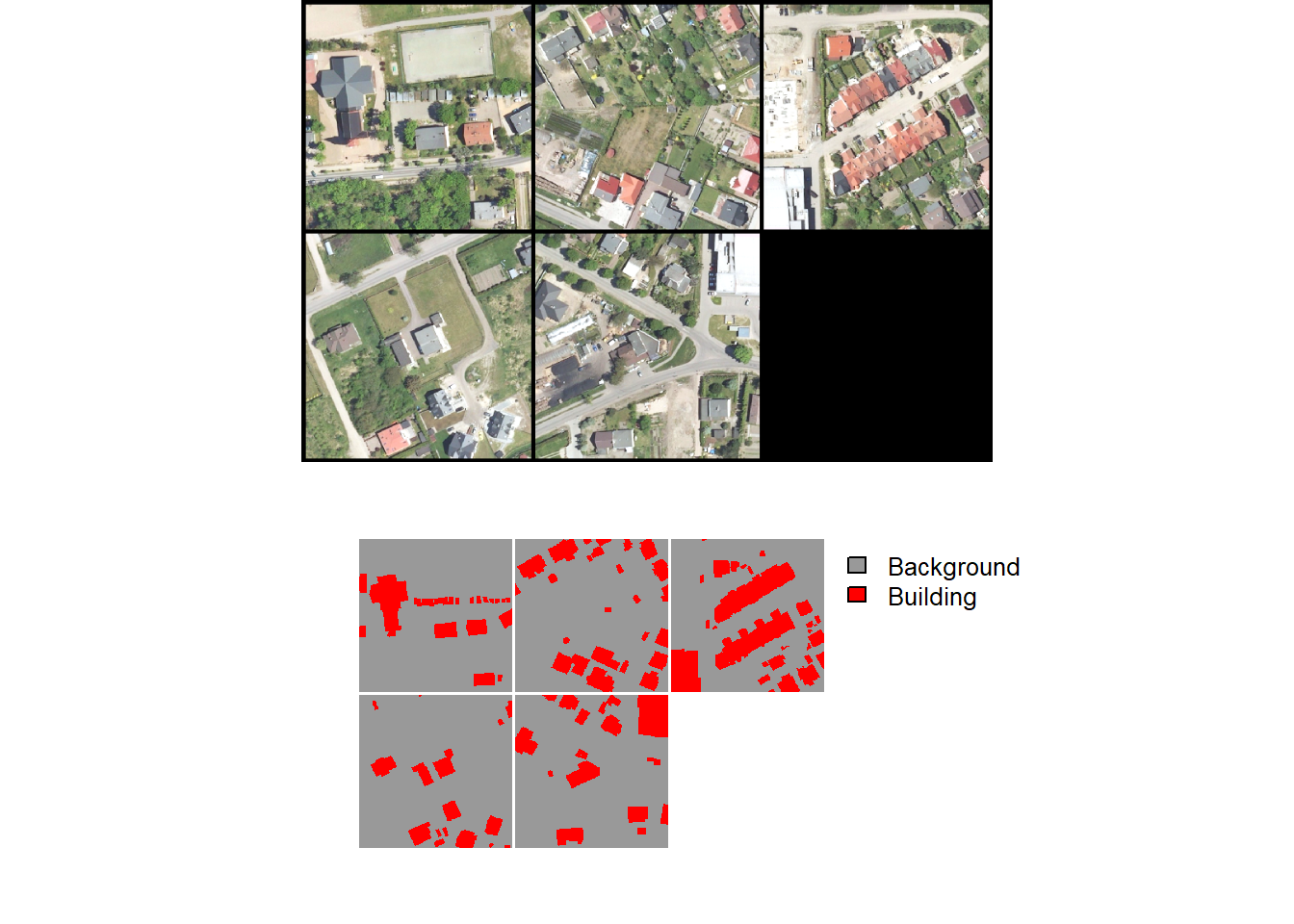
geodl provides several functions for checking mini-batches. The viewBatch() function plots a mini-batch of predictor variables and associated masks while the describeBatch() function provides summary information including the number of samples in the mini-batch, the data type of the predictor variables and mask tensors, the shape of the predictor variables and mask mini-batches, predictor variable means and standard deviations, count of cells mapped to each class in the mini-batch, and the minimum and maximum class codes.
Again, it is a good idea to inspect your data prior to training a model. Since the training process can be time consuming, it is best to catch issues prior to starting the training loop.
describeBatch(bDL,
              zeroStart=FALSE)
$batchSize
[1] 5
$imageDataType
[1] "Float"
$maskDataType
[1] "Long"
$imageShape
[1] "5" "3" "512" "512"
$maskShape
[1] "5" "1" "512" "512"
$bndMns
[1] 0.5346404 0.5278302 0.4456627
$bndSDs
[1] 0.1707050 0.1516064 0.1573129
$maskCount
[1] 1096336 214384
$minIndex
[1] 1
$maxIndex
[1] 2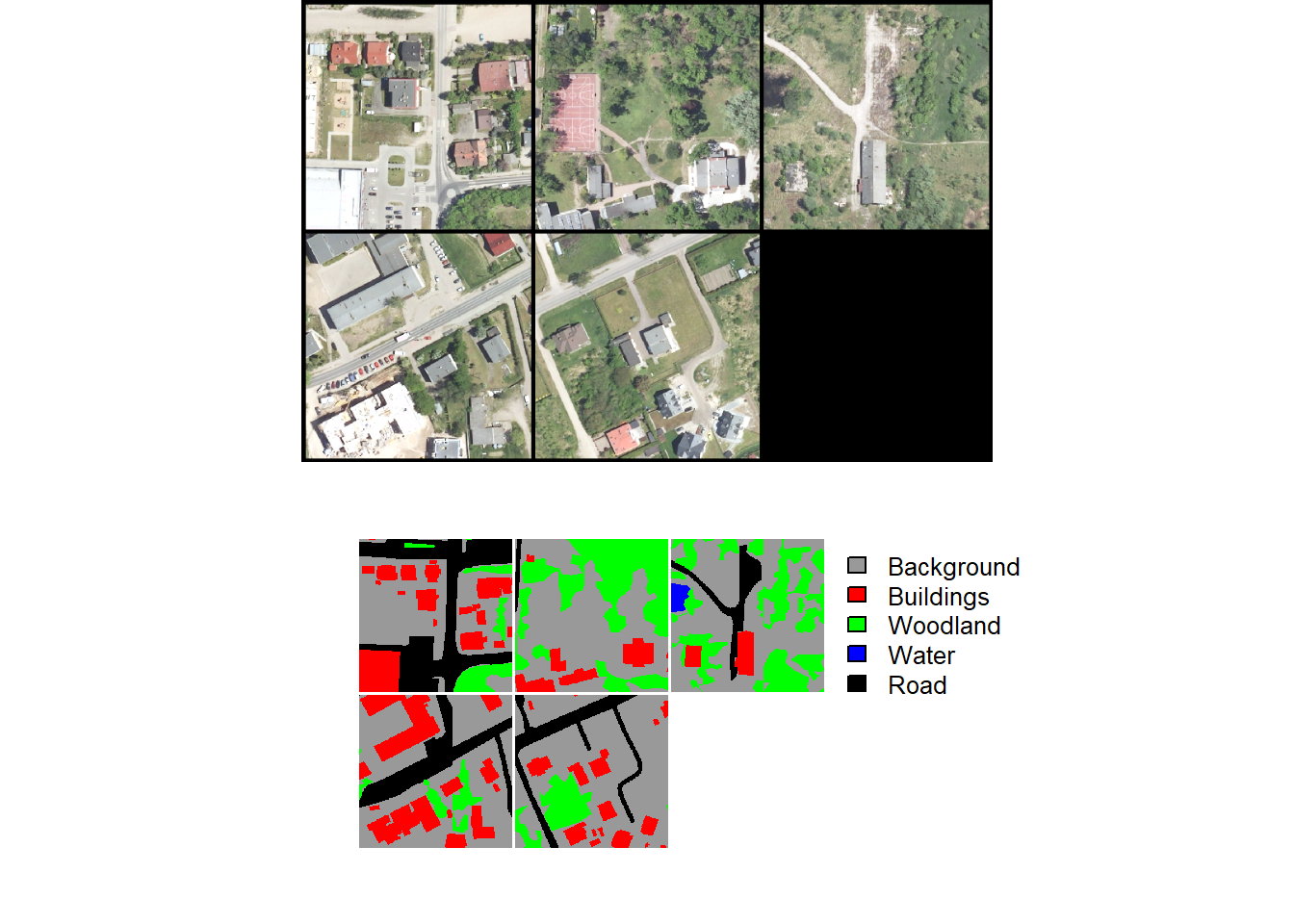
describeBatch(lcDL,
              zeroStart=FALSE)
$batchSize
[1] 5
$imageDataType
[1] "Float"
$maskDataType
[1] "Long"
$imageShape
[1] "5" "3" "512" "512"
$maskShape
[1] "5" "1" "512" "512"
$bndMns
[1] 0.4855518 0.4915026 0.4067154
$bndSDs
[1] 0.1594306 0.1397943 0.1443608
$maskCount
[1] 728118 146769 319968 4833 111032
$minIndex
[1] 1
$maxIndex
[1] 5When edge distance grids are included, they can be visualized using the viewDist() function, which plots a mini-batch of images, masks, distance grids, and distance weights. The distance grids and weights are visualized as a heatmap, with colors representing the distance or weight values. The weights must be parameterized using additional arguments. These same arguments are available in the loss function parameterization, as will be discussed below.
viewDist(dataLoader = lcDL2,
          nCols = 4,
          r = 1,
          g = 2,
          b = 3,
          cCodes = c(1, 2, 3, 4, 5),
          cNames=c("Background", "Buildings", "Woodland", "Water", "Road"),
          cColors=c("gray60", "red", "green", "blue", "black"),
          edgeMode = "gaussian",
          distThreshold = 10,
          minWght = 0.4,
          maxWght = 1.0,
          prioritizeEdge = TRUE)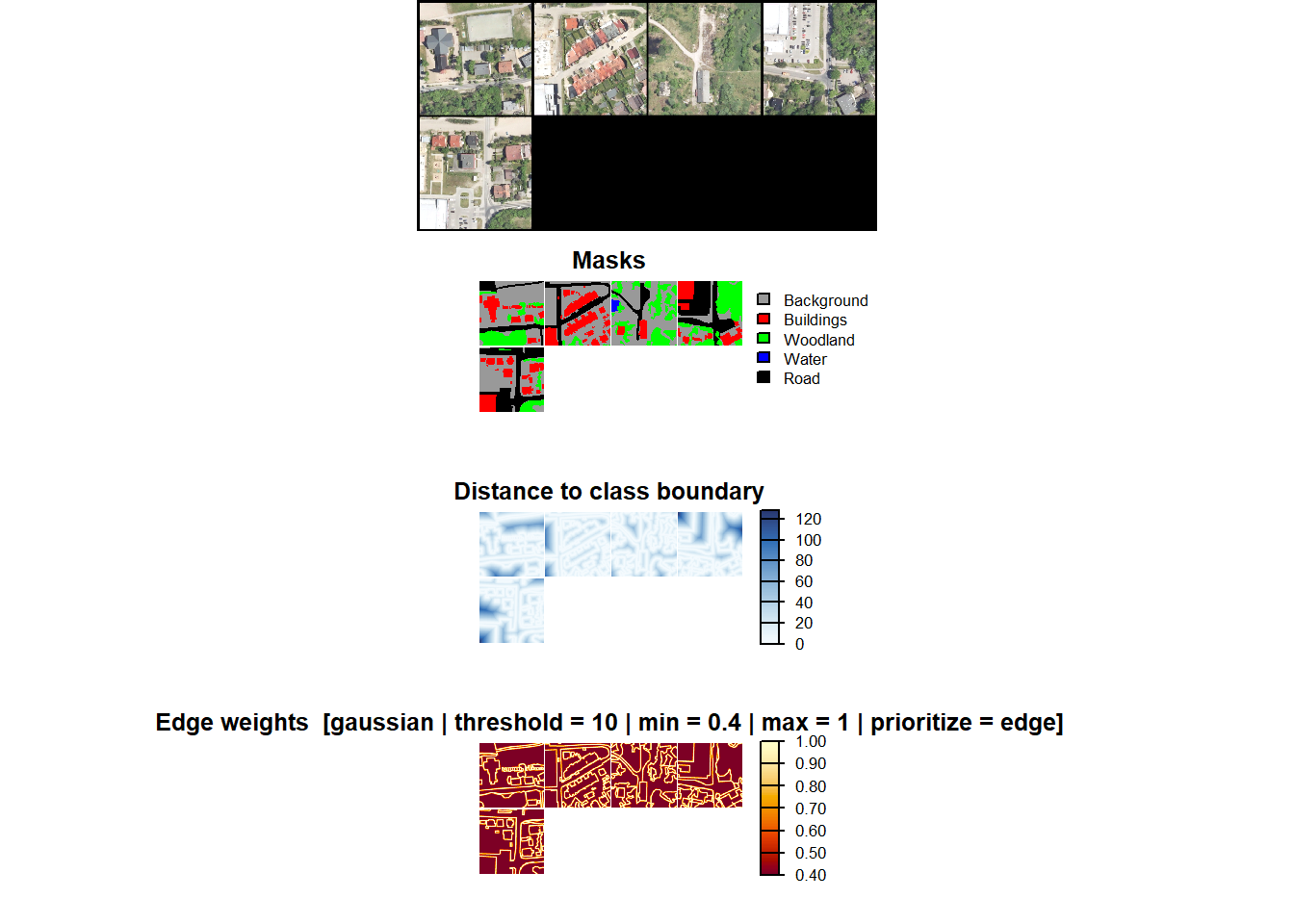
22.3.8 Dynamic Chips
As noted above, geodl provides an alternative workflow where chips do not need to be generated beforehand. Instead, they are generated dynamically during the training or validation process as needed. This process is conceptualized in Figure 22.2 above. Note that the example data used in this section were not provided since they are large. However, if you want to execute the code, these data can be downloaded from figshare.
The dynamic chips workflow does not support the use of class edge distance weighting.
The problem being explored is to extract valley fill faces resulting from surface coal mining reclamation using LSP predictor variables. All valley fill faces within three extents have been mapped. We read in the mapped valley fill faces and the extent of the three study areas. This workflow requires that the input polygon vector files contain both “code” and “class” attributes. The “code” field provides a unique numeric code for each class. In this case, we use a code of 1 since there is only one class being differentiated. Since the data do not include a “class” attribute, we generate this attribute, populate it with “vfill”, and save a copy of the file to disk with st_write().
fldPth2 <- "C:/22318522/vfillDL/vfillDL/"ky1Ext <- st_read(str_glue("{fldPth2}extents/testingKY1.shp"), quiet=TRUE)
ky2Ext <- st_read(str_glue("{fldPth2}extents/testingKY2.shp"), quiet=TRUE)
va1Ext <- st_read(str_glue("{fldPth2}extents/testingVA1.shp"), quiet=TRUE)
ky1V <- st_read(str_glue("{fldPth2}vectors/testingKY1.shp"), quiet=TRUE) |>
mutate(class = "vfill") |>
st_write(str_glue("{fldPth2}vectors/testingKY1b.shp"),
append=TRUE)
ky2V <- st_read(str_glue("{fldPth2}vectors/testingKY2.shp"), quiet=TRUE) |>
mutate(class = "vfill") |>
st_write(str_glue("{fldPth2}vectors/testingKY2b.shp"),
append=TRUE)
va1V <- st_read(str_glue("{fldPth2}vectors/testingVA1.shp"), quiet=TRUE) |>
mutate(class = "vfill") |>
st_write(str_glue("{fldPth2}vectors/testingVA1b.shp"),
append=TRUE)Next, we plot the three extents, which occur in eastern Kentucky and southwestern Virginia, USA.
allExtents <- bind_rows(ky1Ext, ky2Ext, va1Ext)
allFeatures <- bind_rows(ky1V, ky2V, va1V)
allFeaturesPnts <- st_centroid(allFeatures)

bounds <- allExtents |> st_buffer(3000) |> st_bbox() |> st_as_sfc()

tm_shape(bounds)+
  tm_borders(col="orange")+
  tm_shape(allExtents)+
  tm_borders(col="black", lwd=2)+
  tm_shape(allFeaturesPnts)+
  tm_bubbles(fill="red", size=.5)+
  tm_compass(position=c("left", "bottom"))+
  tm_scalebar(position=c("left", "bottom"))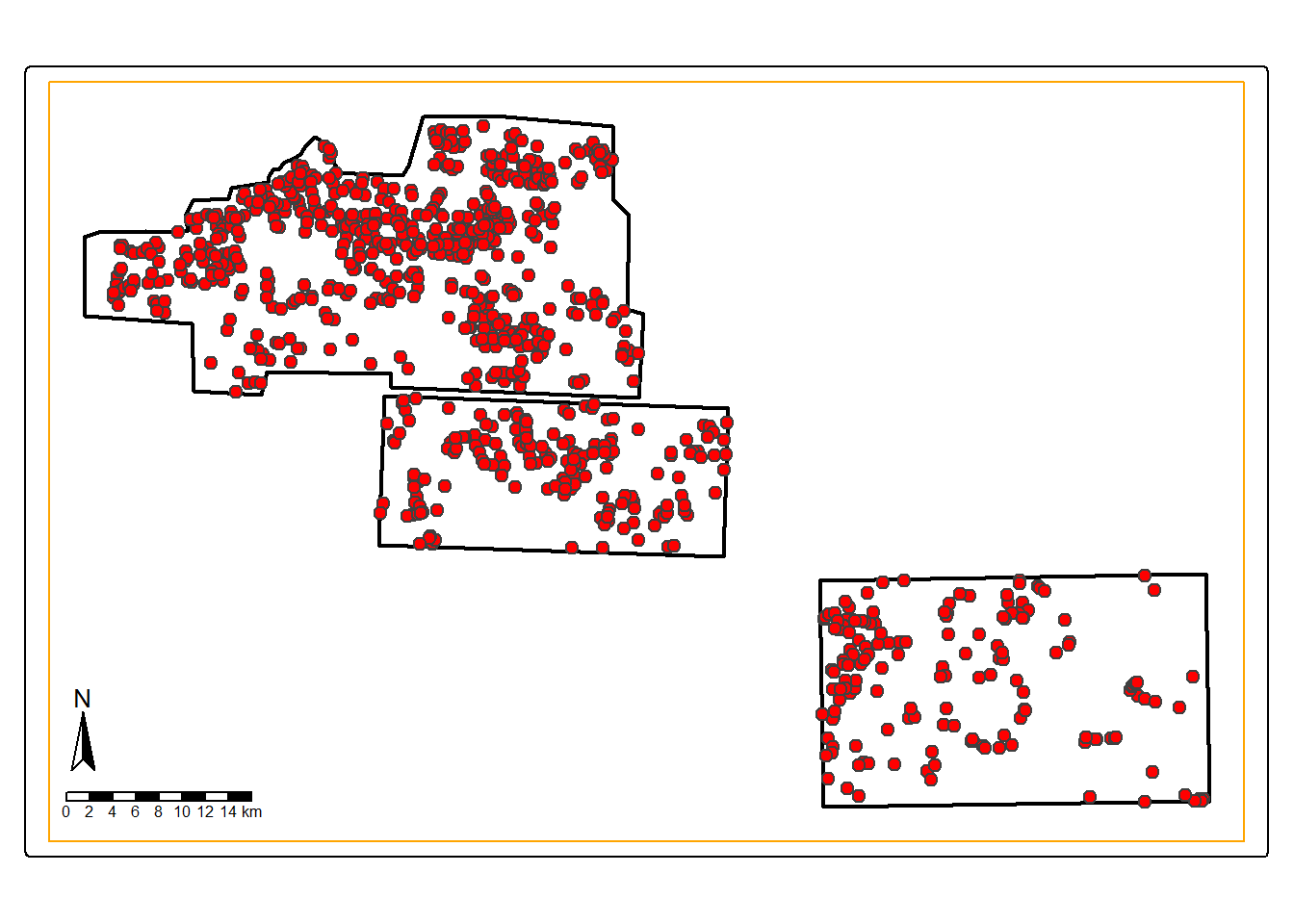
The makeDynamicChipsSF() function is used to create an sf vector object that specifies the center location of each chip to generate and the paths to the required data. The required inputs include the path to and name of the center point location, feature layer, extent vector boundary, and the path to and name of the raster predictor variable data. The center location of each chip must be specified using a point layer. We accomplish this below by creating new point layers containing the centroids of the example valley fill faces using the st_centroid() function from sf. Note that you may also choose to add random noise to the generated centroids so that the chips are not always centered on a feature using the addCoordNoise() function from geodl{.underline}. In order to minimize partial or incomplete chips, a crop can be applied to the extent using the extentCrop parameter. We use a crop of 200 m in our example. For binary classification tasks, it is also possible to generate random background chips. In this case, we generate 300 background chips where the center cannot be within 100 meters of a positive-case chip center. In order to make this reproducible, it is possible to set a random seed. Lastly, the order of the chips can be changed via shuffling to potentially reduce spatial autocorrelation.
In our example, we process all three extents separately then merge the result into a single sf object.
ky1VP <- ky1V %>% st_centroid() |>
  addCoordNoise(amount = 20, method = "gaussian") |>
  st_write(str_glue("{fldPth2}vectors/ky1P.shp"), delete_layer=TRUE)
Deleting layer `ky1P' using driver `ESRI Shapefile'
Writing layer `ky1P' to data source
`C:/22318522/vfillDL/vfillDL/vectors/ky1P.shp' using driver `ESRI Shapefile'
Writing 553 features with 4 fields and geometry type Point.ky2VP <- ky2V %>% st_centroid() |>
addCoordNoise(amount = 20, method = "gaussian") |>
st_write(str_glue("{fldPth2}vectors/ky2P.shp"), delete_layer=TRUE)Deleting layer `ky2P' using driver `ESRI Shapefile'
Writing layer `ky2P' to data source
`C:/22318522/vfillDL/vfillDL/vectors/ky2P.shp' using driver `ESRI Shapefile'
Writing 165 features with 4 fields and geometry type Point.va1VP <- va1V %>% st_centroid() |>
addCoordNoise(amount = 20, method = "gaussian") |>
st_write(str_glue("{fldPth2}vectors/va1P.shp"), delete_layer=TRUE)Deleting layer `va1P' using driver `ESRI Shapefile'
Writing layer `va1P' to data source
`C:/22318522/vfillDL/vfillDL/vectors/va1P.shp' using driver `ESRI Shapefile'
Writing 156 features with 4 fields and geometry type Point.ky1DC <- makeDynamicChipsSF(
pntPth = str_glue("{fldPth2}vectors/"),
pntName = "ky1P.shp",
featPth = str_glue("{fldPth2}vectors/"),
featName = "testingKY1b.shp",
extentPth = str_glue("{fldPth2}extents/"),
extentName = "testingKY1.shp",
extentCrop = 200,
imgPth <- str_glue("{fldPth2}dems/"),
imgName <- "ky1_dem.tif",
doBackground = TRUE,
backgroundCnt = 300,
backgroundDist = 100,
useSeed = TRUE,
seed = 42,
doShuffle = TRUE
)
ky2DC <- makeDynamicChipsSF(
pntPth = str_glue("{fldPth2}vectors/"),
pntName = "ky2P.shp",
featPth = str_glue("{fldPth2}vectors/"),
featName = "testingKY2b.shp",
extentPth = str_glue("{fldPth2}extents/"),
extentName = "testingKY2.shp",
extentCrop = 200,
imgPth <- str_glue("{fldPth2}dems/"),
imgName <- "ky_2_dem.tif",
doBackground = TRUE,
backgroundCnt = 300,
backgroundDist = 100,
useSeed = TRUE,
seed = 42,
doShuffle = TRUE
)
va1DC <- makeDynamicChipsSF(
pntPth = str_glue("{fldPth2}vectors/"),
pntName = "va1P.shp",
featPth = str_glue("{fldPth2}vectors/"),
featName = "testingVA1b.shp",
extentPth = str_glue("{fldPth2}extents/"),
extentName = "testingVA1.shp",
extentCrop = 200,
imgPth <- str_glue("{fldPth2}dems/"),
imgName <- "va1_dem.tif",
doBackground = TRUE,
backgroundCnt = 300,
backgroundDist = 100,
useSeed = TRUE,
seed = 42,
doShuffle = TRUE
)
allDC <- bind_rows(ky1DC, ky2DC, va1DC)Once the sf objects are generated, the dynamic chips should be checked using the checkDynamicChips() function. This requires generating each chip in memory and calculating summary information. We use the results to remove any chip that is smaller than the desired size, 512x512, and/or that contain NA cells. This results in chips that are of the correct size and do not have any missing data.
We saved a copy of the dynamic chips sf object to disk as a shapefile so that the checks do not need to be ran when the book is rendered. This was just to save time and is not required.
allDC <- checkDynamicChips(chipsSF = allDC,
                           chipSize=512,
cellSize=2)Reading layer `dynamicChipsDF' from data source
`C:\Users\amaxwel6\Dropbox\Teaching_WVU\wview_website\os_saBook\ossaBook\gslrData\chpt22\data\dynamicChipsDF.shp'
using driver `ESRI Shapefile'
Simple feature collection with 1774 features and 18 fields
Geometry type: POINT
Dimension: XY
Bounding box: xmin: 284269.7 ymin: 4087449 xmax: 381201.8 ymax: 4147449
Projected CRS: NAD83 / UTM zone 17NallDC <- allDC |> filter(cCntImg == 512 &
rCntImg == 512 &
cCntMsk == 512 &
rCntMsk == 512 &
naCntImg == 0 &
naCntMsk == 0)Similar to the prior workflow, we next instantiate an instance of the torch dataset subclass and a dataloader. The dataset is created using the defineDynamicSegDataSet() function and requires setting a desired chip size. Random noise can also be added to the chip center coordinates if desired. The same normalization, re-scaling, and data augmentation options provided by defineSegDataSet() are available.
allDCDS <- defineDynamicSegDataSet(chipsSF=allDC,
                        chipSize=512,
                        cellSize=2,
                        normalize = FALSE,
                        rescaleFactor = 1,
                        mskRescale=1,
                        mskAdd=1)
allDL <- torch::dataloader(allDCDS,
batch_size=10,
shuffle=TRUE,
drop_last = TRUE)length(allDL)[1] 160Once the dataloader is defined, results can be visualized with viewBatch(), just as when using the other workflow. If you desire to save the chips or a subset of the chips to disk, this can be accomplished with the saveDynamicChips() function. We demonstrate this in the final code block for a random subset of 20 chips.
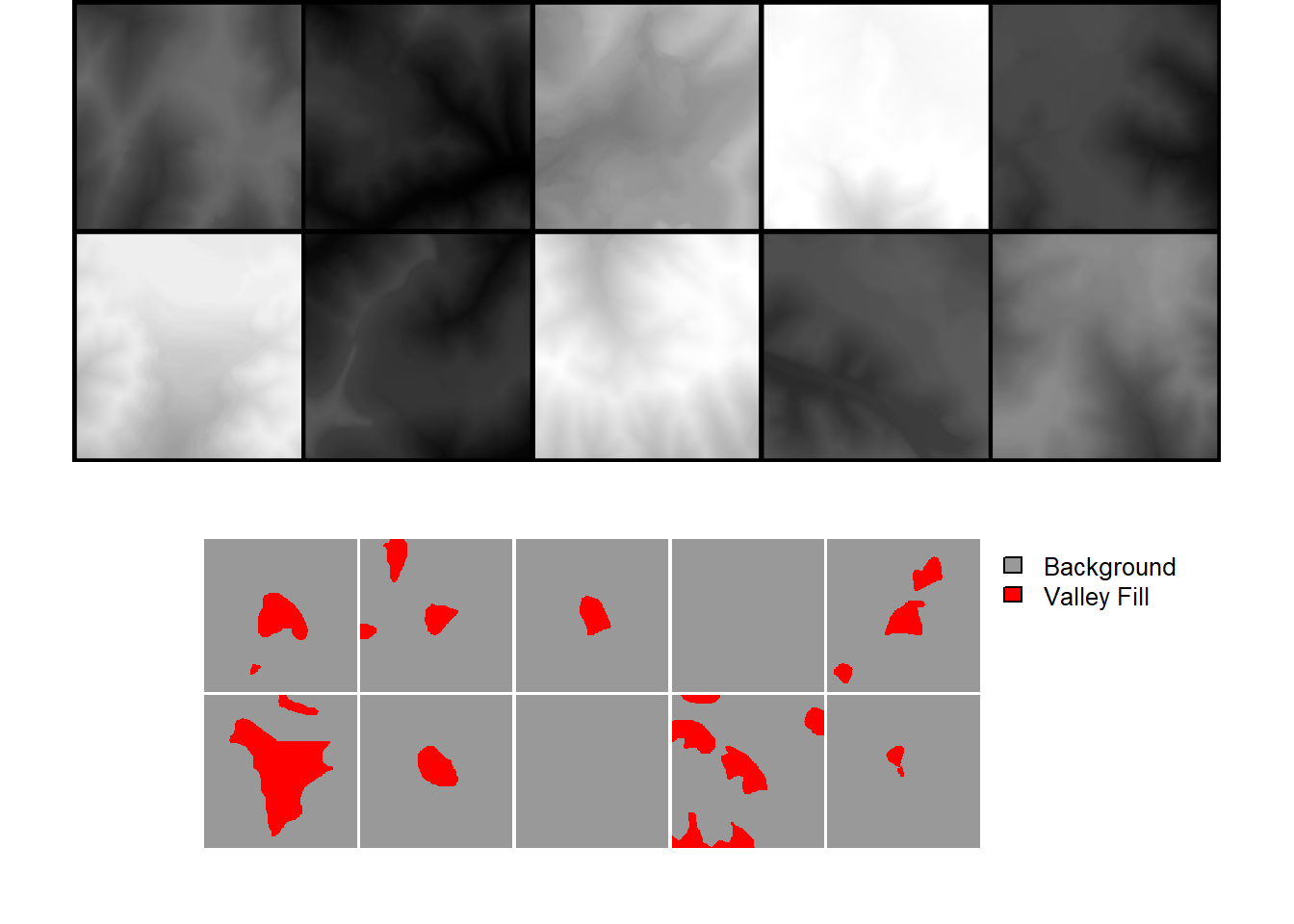
allDCSub <- allDC |> sample_n(20, replace=FALSE)

dir.create(str_glue("{outPth}dynamicChips/"))

saveDynamicChips(chipsSF = allDCSub,
                 chipSize=512,
                 cellSize=1,
                 outDir=str_glue("{outPth}dynamicChips/"),
                 mode = "All")
22.4 DTM Utilities
geodl provides some additional functionality for working with digital terrain models (DTMs). This section provides a brief introduction to this component of the package.
22.4.1 Land Surface Parameters (LSPs)
Many land surface parameters are calculated using local moving windows. Although packages such as terra and spatialEco already provide functionality for creating LSPs in R, as explored in Chapter 2, computation can be slow. Since torch implements moving windows in order to perform convolutional operations and because it supports GPU-based computation, opportunities arise to generate LSPs on the GPU using faster computation. geodl has made use of torch to implement several common LSPs as described in Table 22.1. Input data are converted to tensors, processing is performed on the GPU, and the resulting tensor is transferred back to the CPU and converted to a spatRaster() object, which can be saved to disk using writeRaster().
The examples below demonstrate creating the currently available LSPs, which include:
- topographic slope
- aspect or slope orientation measures (aspect, northwardness, eastwardness, the transformed solar radiation aspect index (TRASP), and the site exposure index (SEI))
- hillshades and multi-directional hillshades
- topographic position index (TPI)
- surface curvatures (mean, profile, and planform)
The user is able to specify the size and/or shape of the moving window for several LSPs. For example, TPI can be calculated with a circular window with a user-defined radius or an annulus window with a user defined inner and outer radius. For the curvature measures, the input DTM can be smoothed using a circular moving window in order to remove the impact of local noise on the calculation.
Moving window radii are specified as cell counts as opposed to distances.
| Function | LSP | Description |
|---|---|---|
| makeAspect() | Topographic Aspect, Northwardness, Eastwardness, Site Exposure Index (SEI), or Topographic Radiation Aspect Index (TRASP) | Slope orientation in degrees or transformations |
| makeSlope() | Topographic Slope | Slope steepness in degrees |
| makeHillshade() | Hillshade or Multi-directional Hillshade | Visualization based on illumination using one or multiple sun positions |
| makeTPI() | Topographic Position Index (TPI) | Center Cell Elevation - Mean Elevation in Moving Window |
| makeCrv() | Mean, Profile, or Planform Curvature | Surface curvatures |
| makeTerrainVisTorch() | 3-Band Terrain Visualization | Terrain visualization using hillslope TPI, slope, and local TPI (faster using torch) |
| makeTerrainVisTerra() | 3-Band Terrain Visualization | Terrain visualization using hillslope TPI, slope, and local TPI (faster using terra) |
dtm <- terra::rast(str_glue(fldPth, "dtm.tif"))

slpR <- makeSlope(dtm,
                  cellSize=1,
                  writeRaster=TRUE,
                  outName=str_glue("{outPth}slp.tif"),
                  device="cuda")

aspR <- makeAspect(dtm,
                   cellSize=1,
                   flatThreshold=1,
                   mode= "aspect",
                   writeRaster=TRUE,
                   outName=str_glue("{outPth}asp.tif"),
                   device="cuda")

northR <- makeAspect(dtm,
                     cellSize=1,
                     flatThreshold=1,
                     mode= "northness",
                     writeRaster=TRUE,
                     outName=str_glue("{outPth}aspN.tif"),
                     device="cuda")

eastnessR <- makeAspect(dtm,
                        cellSize=1,
                        flatThreshold=1,
                        mode= "eastness",
                        writeRaster=TRUE,
                        outName=str_glue("{outPth}aspE.tif"),
                        device="cuda")

traspR <- makeAspect(dtm,
                     cellSize=1,
                     flatThreshold=1,
                     mode= "trasp",
                     writeRaster=TRUE,
                     outName=str_glue("{outPth}trasp.tif"),
                     device="cuda")

seiR <- makeAspect(dtm,
                   cellSize=1,
                   flatThreshold=1,
                   mode= "sei",
                   writeRaster=TRUE,
                   outName=str_glue("{outPth}sei.tif"),
                   device="cuda")

hsR <- makeHillshade(dtm,
                     cellSize=1,
                     sunAzimuth=315,
                     sunAltitude=45,
                     doMD = FALSE,
                     writeRaster=TRUE,
                     outName=str_glue("{outPth}hs.tif"),
                     device="cuda")

hsMDR <- makeHillshade(dtm,
                       cellSize=1,
                       doMD = TRUE,
                       writeRaster=TRUE,
                       outName=str_glue("{outPth}hsMD.tif"),
                       device="cuda")

tpiC7 <- makeTPI(dtm,
                 cellSize=1,
                 innerRadius=2,
                 outerRadius=7,
                 mode="circle",
                 writeRaster=TRUE,
                 outName=str_glue("{outPth}tpiC7.tif"),
                 device="cuda")

tpiA3_11 <- makeTPI(dtm,
                    cellSize=1,
                    innerRadius=3,
                    outerRadius=11,
                    mode="circle",
                    writeRaster=TRUE,
                    outName=str_glue("{outPth}tpiA3_11.tif"),
                    device="cuda")

crvMn7 <- makeCrv(dtm,
                  cellSize=1,
                  mode="mean",
                  smoothRadius=7,
                  writeRaster=TRUE,
                  outName=str_glue("{outPth}crvMn7.tif"),
                  device="cuda")

crvPro7 <- makeCrv(dtm,
                   cellSize=1,
                   mode="profile",
                   smoothRadius=7,
                   writeRaster=TRUE,
                   outName=str_glue("{outPth}crvPro7.tif"),
                   device="cuda")

crvPln7 <- makeCrv(dtm,
                   cellSize=1,
                   mode="planform",
                   smoothRadius=7,
                   writeRaster=TRUE,
                   outName=str_glue("{outPth}crvPln7.tif"),
                   device="cuda")
dtm <- terra::rast(str_glue(fldPth, "dtm.tif"))
hsMDR <- terra::rast(str_glue(fldPth, "hsMD.tif"))
slpR <- terra::rast(str_glue(fldPth, "slp.tif"))
seiR <- terra::rast(str_glue(fldPth, "sei.tif"))
tm_shape(dtm)+
tm_raster(col.scale= tm_scale_continuous(values = "hcl.terrain2"),
col.legend = tm_legend("Elevation (meters)"))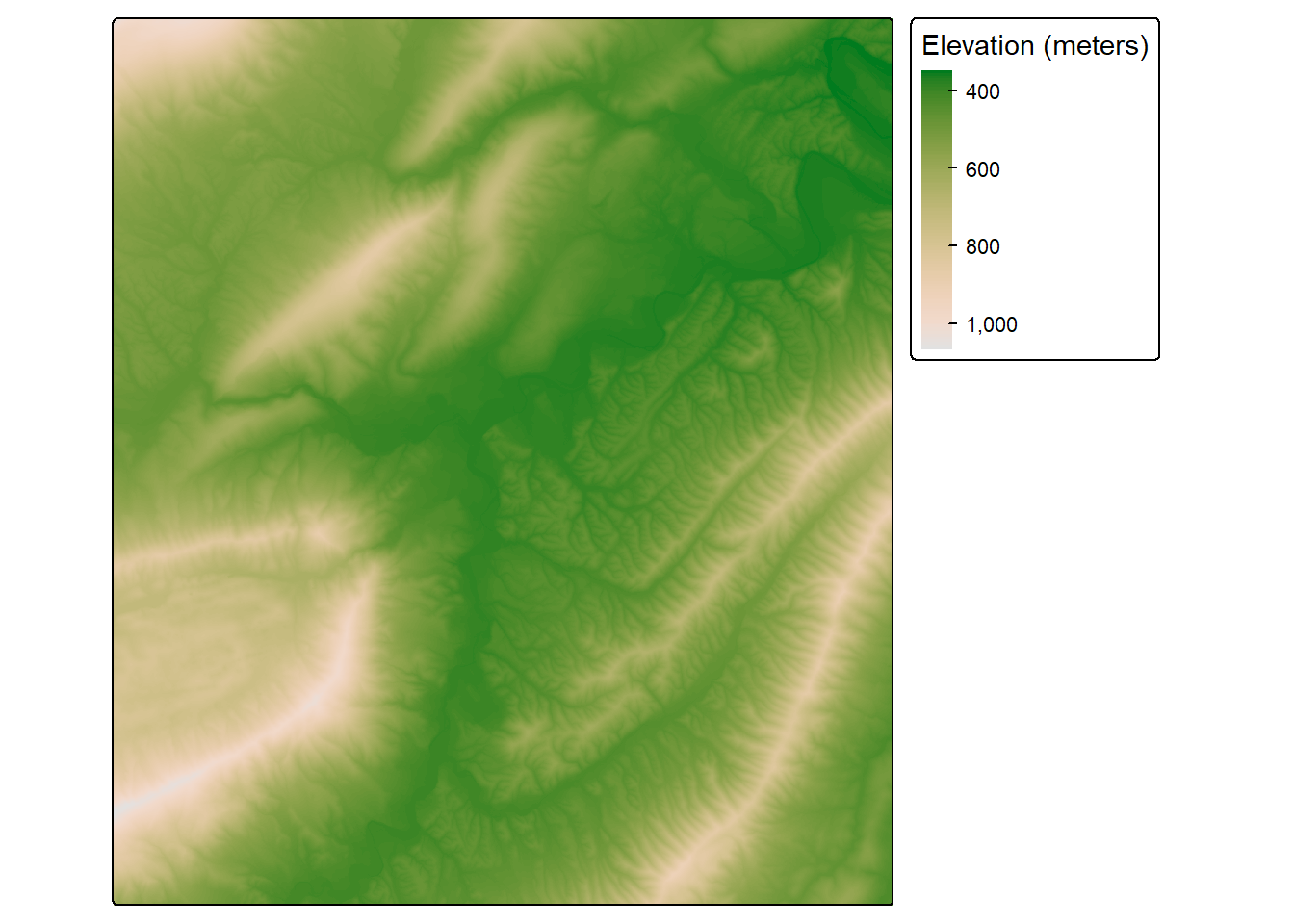
tm_shape(hsMDR)+
  tm_raster(col.scale= tm_scale_continuous(values = "-brewer.greys"),
            col.legend = tm_legend("Hillshade (Multi-Directional)"))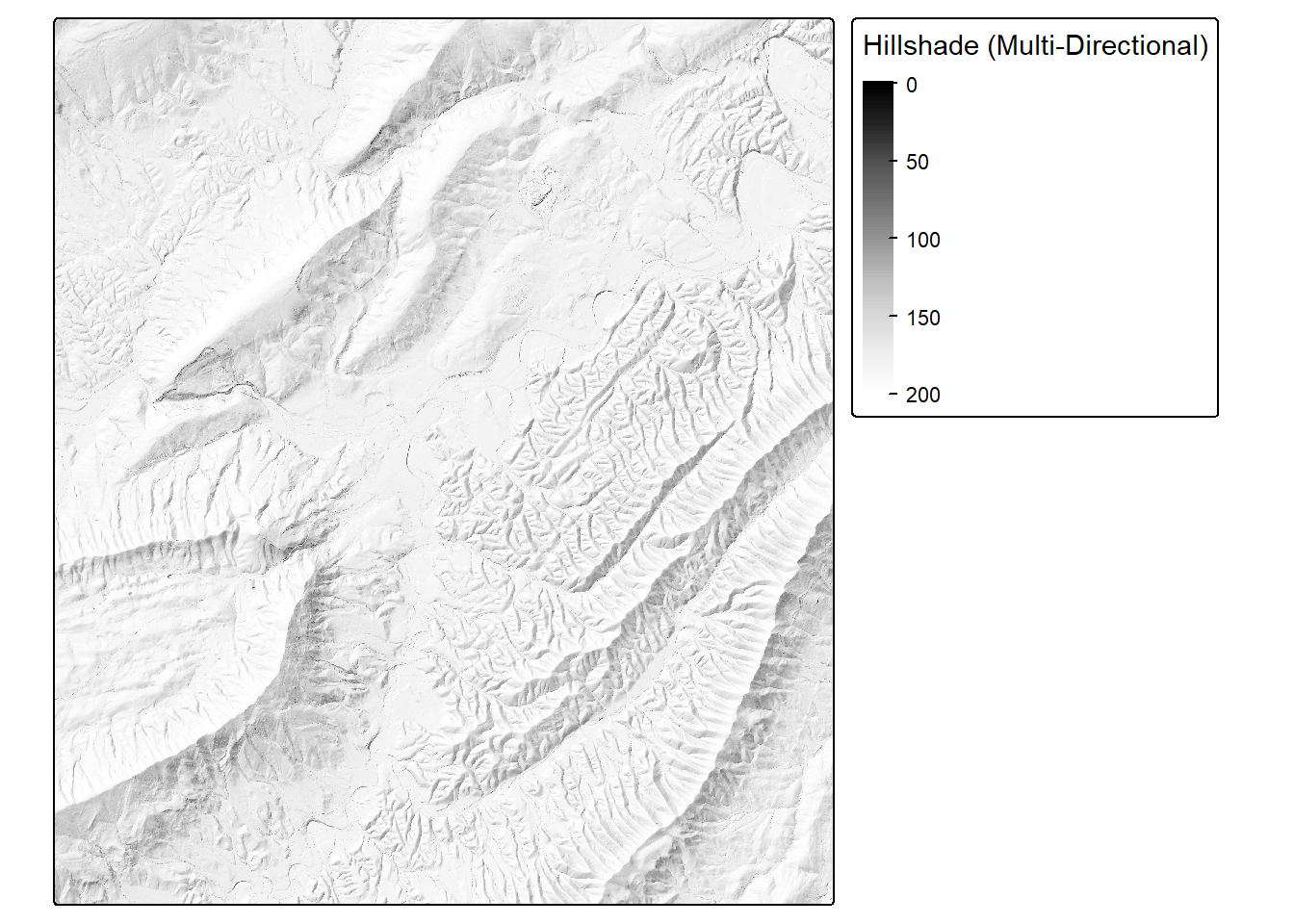
tm_shape(slpR)+
  tm_raster(col.scale= tm_scale_continuous(values = "brewer.yl_or_br"),
            col.legend = tm_legend("Slope (Degrees)"))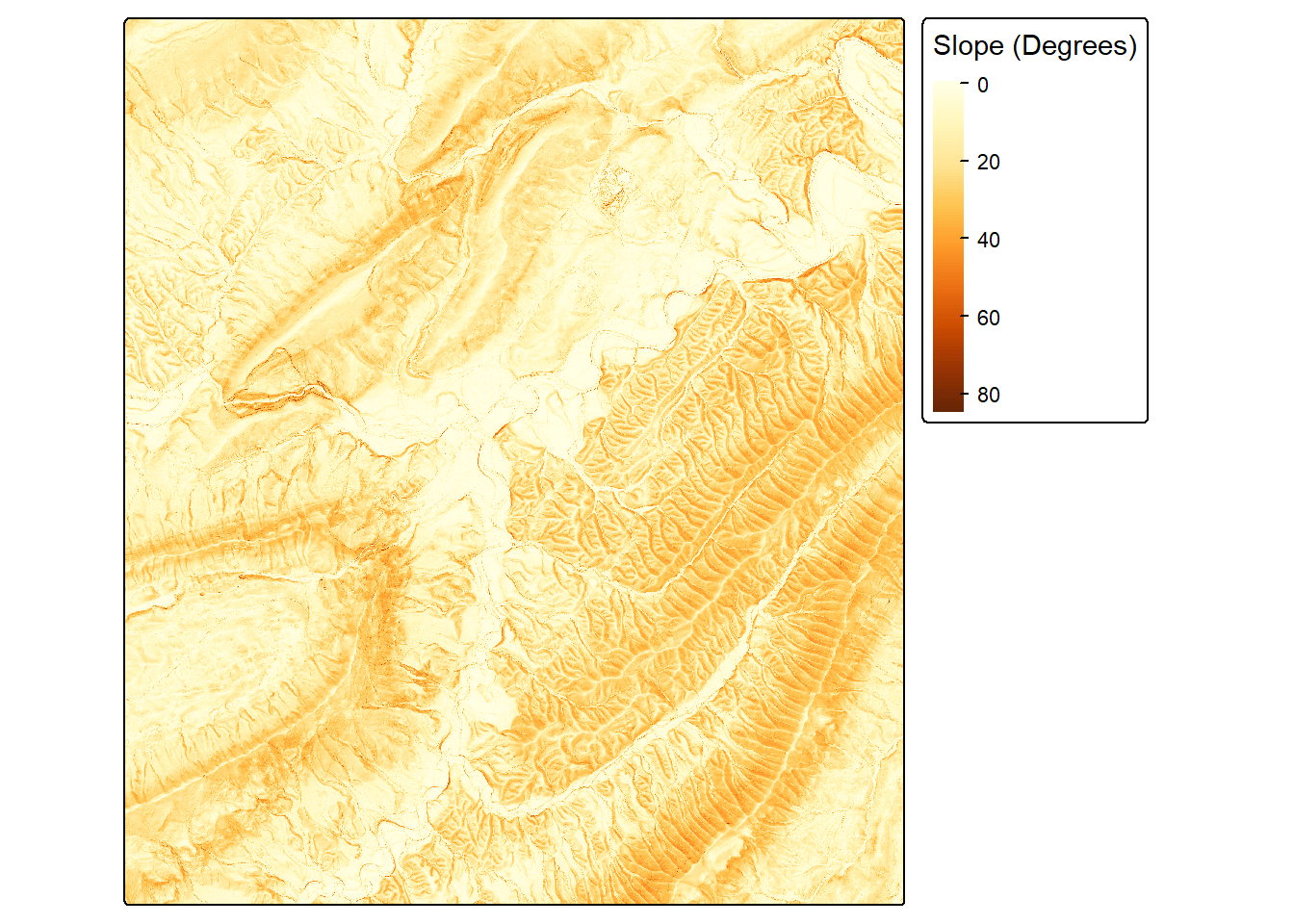
tm_shape(seiR)+
  tm_raster(col.scale= tm_scale_continuous(values = "-brewer.greys"),
            col.legend = tm_legend("Site Exposure Index (SEI)"))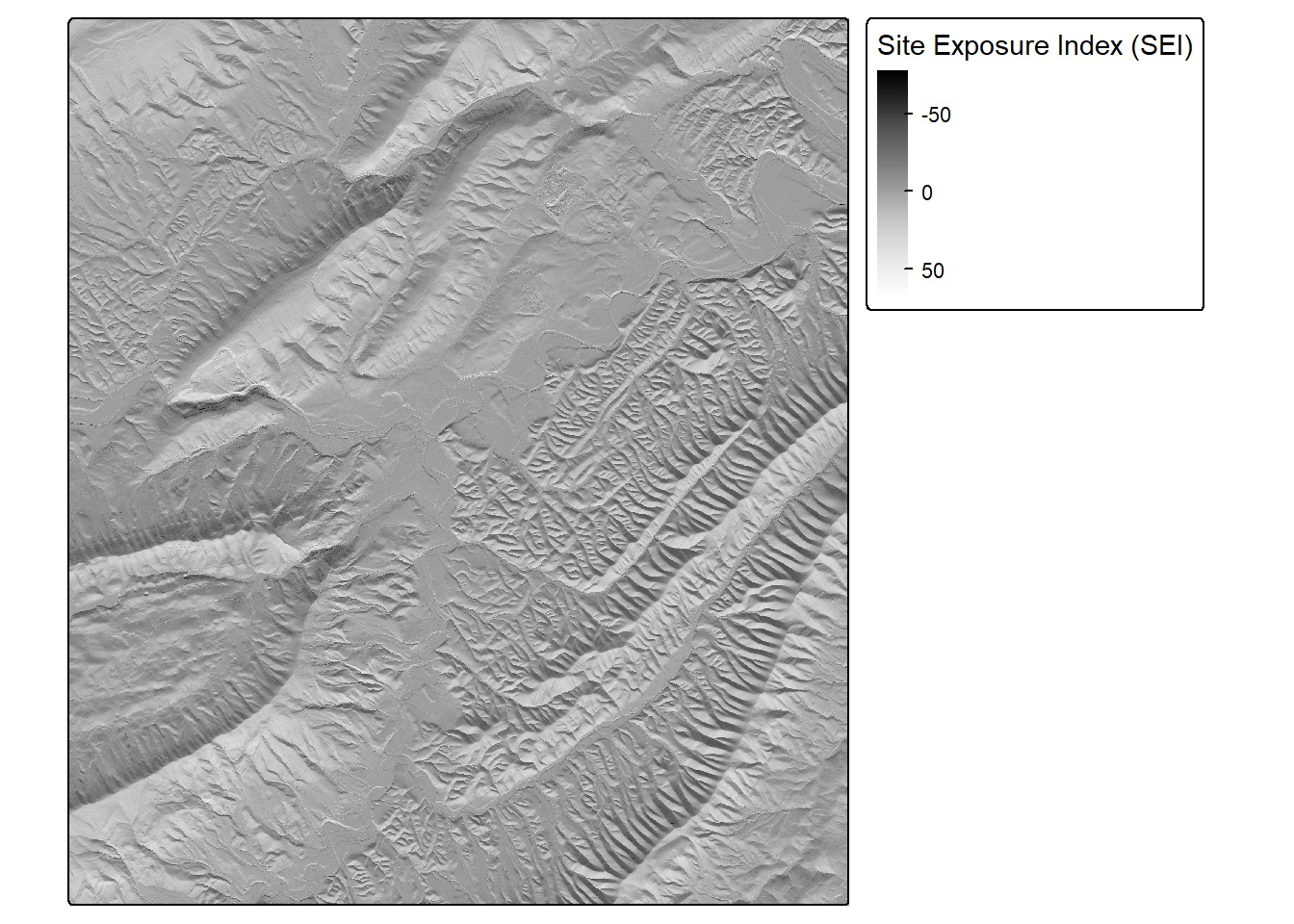
The makeTerrainDerivativesTerra() and makeTerrainDerivativesTorch() functions create a three-band raster stack from an input digital terrain model (DTM) of bare earth surface elevations. The first band is a topographic position index (TPI) calculated using a moving window with a circular radius. A larger radius is recommended to capture hillslope-scale topographic position. The second band is the square root of slope calculated in degrees. The third band is a TPI calculated using an annulus moving window. A smaller window is recommended to capture more local-scale topographic patterns. The TPI values are clamped to a range of -10 to 10 then linearly re-scaled from 0 and 1. The square root of slope is clamped to a range of 0 to 10 then linearly re-scaled from 0 to 1. Values are provided in floating point. This means of representing digital terrain data was proposed by Drs. Will Odom and Dan Doctor of the United States Geological Survey (USGS) and is discussed in the following publication, which is available in open-access:
Maxwell, A.E., W.E. Odom, C.M. Shobe, D.H. Doctor, M.S. Bester, and T. Ore, 2023. Exploring the influence of input feature space on CNN-based geomorphic feature extraction from digital terrain data, Earth and Space Science, 10: e2023EA002845. https://doi.org/10.1029/2023EA002845.
The code below provides an example of how to implement the makeTerrainDerivativesTorch() function. The dtm argument must be either a spatRaster object or a path and file name for a DTM on disk. Note that the vertical units should be the same as the horizontal units. The res parameter is used to specify the spatial resolution of the DTM data, which is required for calculations implemented internally. The DTM used in the example has a spatial resolution of 1-by-1 meters.
The output of this function is more meaningful for high spatial resolution digital terrain data (i.e., pixel sizes <= 5 m). The function returns the three-band raster as a spatRaster object and also writes the output to disk. We recommend saving the result as either a “.tif” or “.img” file.
The makeTerrainDerivativesTerra() produces the same result. However, computation does not make use of torch and GPU-based computation. As a result, it is generally slower than the torch-based implementation.
tVis <- makeTerrainVisTorch(dtm,
                            cellSize=1,
                            innerRadius=2,
                            outerRadius=5,
                            hsRadius=50,
                            writeRaster=TRUE,
                            outName=str_glue("{outPth}topoVisTorch.tif"),
                            device="cuda")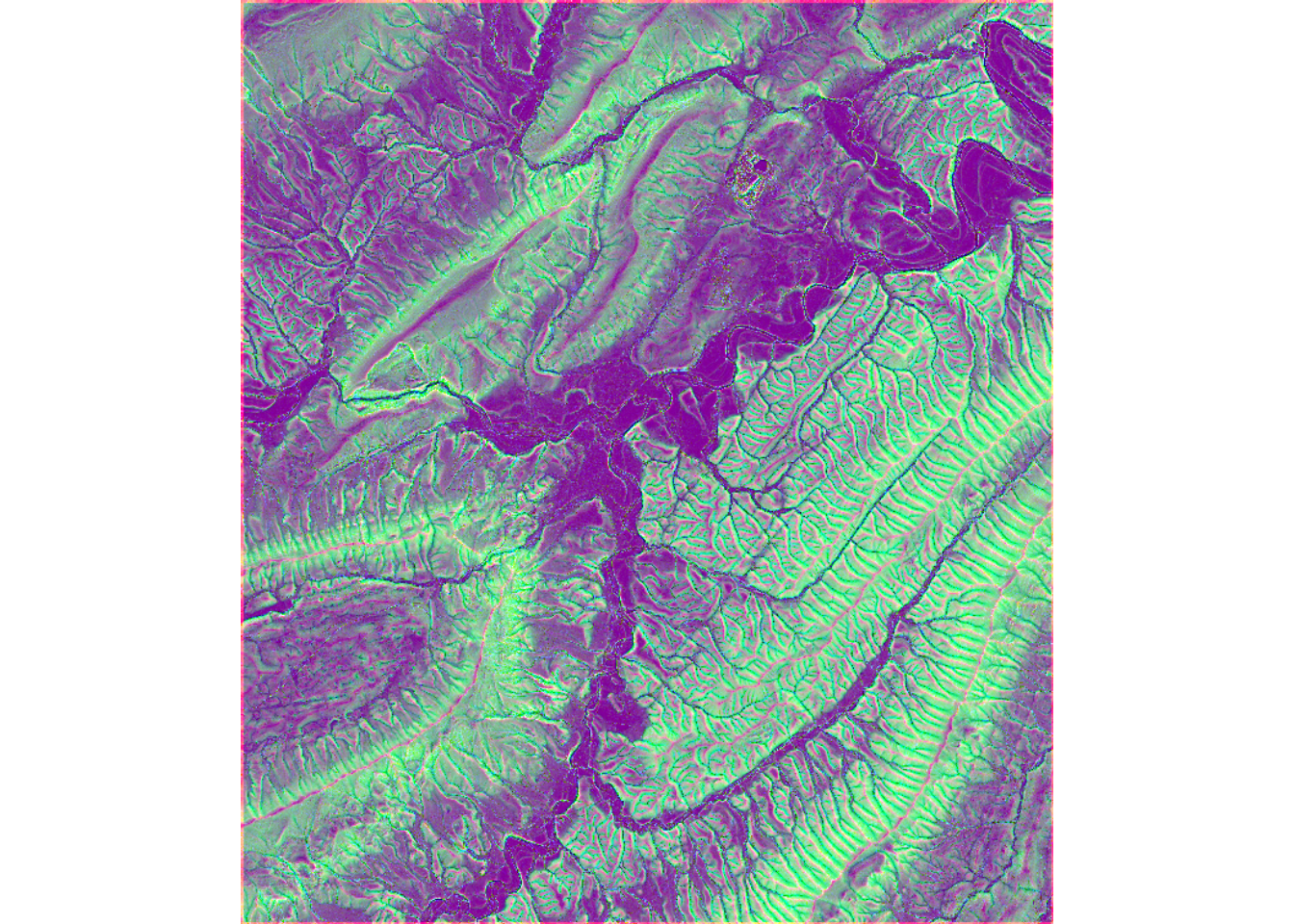
22.5 Concluding Remarks
In this chapter, we explored the data preparation components of geodl: creating raster masks from vector data, generating image chips and listing them in data frames, creating boundary distance grids, defining datasets and dataloaders, checking data prior to training, generating chips dynamically during training, and calculating LSPs on the GPU. In the next chapter, we explore the semantic segmentation architectures, loss functions, and assessment tools provided by the package.
22.6 Questions
- Explain the difference between scene classification and semantic segmentation.
- What is the purpose of the
makeMasks()function? Why must the generated masks align with the predictor variable raster grid? - Explain the difference between generating image chips prior to training using
makeChips()ormakeChipsMultiClass()and generating chips dynamically during training usingdefineDynamicSegDataSet(). What are the advantages and disadvantages of each approach? - What information is stored in the data frame created by
makeChipsDF(), and how is it used bydefineSegDataSet()? - Why are data augmentations generally applied to the training set but not to the validation or test sets?
- What is the purpose of a torch dataloader? What does the mini-batch size control?
- Why is it important to check data using functions such as
viewBatch()anddescribeBatch()prior to training a model? What problems can these checks reveal? - What is the purpose of class boundary distance grids?
- Why can torch be used to calculate LSPs more quickly than traditional raster processing packages? Why are moving window radii specified in cell counts as opposed to distances?
22.7 Exercises
In these exercises, you will use the data provided in the data folder for this chapter. Note that a CUDA-enabled GPU is required to complete Task 4.
Task 1
Use makeMasks() to generate a raster mask from the land cover polygons (mskPoly.shp) that aligns with the image (img.tif), cropping both to the study area extent (extent.shp). Plot the image and the mask using terra or tmap to confirm that they align.
Task 2
Use makeChipsMultiClass() to generate 256-by-256 cell image chips and associated masks from the image and mask created in Task 1. Use a stride of 128 cells in both the x and y directions so that the chips overlap. List the chips in a data frame using makeChipsDF(). How many chips were generated? How does this compare to the number of chips generated in the chapter, and why?
Task 3
Define a dataset from your chips using defineSegDataSet() that applies random horizontal and vertical flips. Instantiate a dataloader with a mini-batch size of 8 and shuffling enabled. Use describeBatch() and viewBatch() to check a mini-batch. Confirm that the data have the expected number of channels, spatial dimensions, value ranges, and class codes.
Task 4
Using the provided DTM (dtm.tif), calculate topographic slope, a topographic position index (TPI) using a circular moving window, and the profile and planform curvatures using the geodl LSP functions. Then, calculate a second TPI using an annulus moving window. Map the two TPI results and describe how they differ. How does changing the window size and shape change the scale of the landforms that are highlighted?